One-sentence summary: Even when it’s the same daily routine of searching the news, preparing topic ideas, and filling in the backend, some AI agents are better off taking the work directly, while others are better off helping you build an automation system first. The real dividing line is tools, permissions, and execution environment.
This article compares capabilities based on reference materials verified as of November 12, 2026. The standardized task is a hypothetical scenario and not a same-task hands-on test of nine products. The article won’t provide success rates, time estimates, or an overall ranking; plans, regions, and feature entry points still need to be confirmed against your actual account.
First, understand a few practical terms in AI agent comparisons
An AI agent isn’t just a model that generates answers. It’s a work system that can call tools around a goal, read the results, and keep executing. In content operations, it needs more than the ability to “write a content plan”—it also needs a search entry point, backend permissions, and an environment that can start again tomorrow.
| Term | What it means in this work | What it doesn’t mean |
|---|---|---|
| Local task | Organizing materials and operating software on your computer or a connected local environment | It can keep running after the computer is shut down |
| Cloud task | Searching, processing materials, and performing operations in a remote environment | It automatically reads files from a powered-off computer |
| Scheduled task | Triggering the news workflow at a specified time each day | It guarantees an execution environment that’s continuously online |
| Browser operation / Computer Use | The former clicks through web pages and fills out forms; the latter uses applications through a graphical interface | Searching the web is the same as controlling the desktop |
| API / MCP | An API lets programs call models or business systems; MCP connects external tools and data | Getting an interface automatically grants business permissions |
| Sub-agent | Assigning an independent or restricted unit to look up a news item or verify a piece of material | More parallelism means the results are necessarily more reliable |
These distinctions shape the selection decisions that follow. In particular, remember: a model API, an agent product subscription, and an execution environment are three different things—buying one doesn’t mean the other two are already in place.
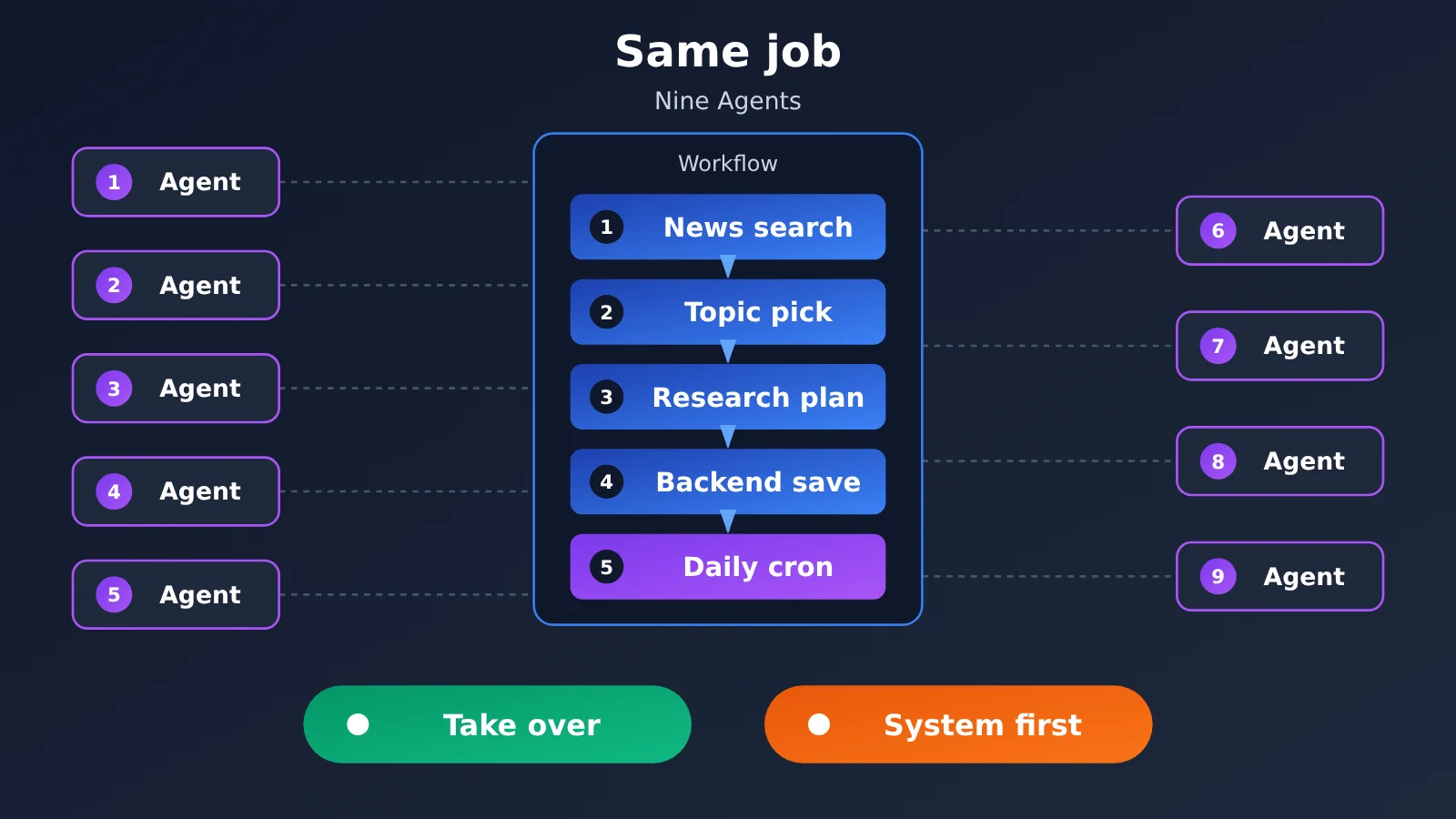
Giving 9 AI Agents the Same Job
Suppose you give every product the same request: “Every day at 9 a.m., search for the latest AI news, pick out 5 topics worth writing about, gather official materials and an article plan for each topic, then open the company’s content backend, fill in the fields, and save as a draft.”
An additional requirement: you shouldn’t have to reissue the task every day, and it should sensibly handle login, approval, or save failures. Here, “save as draft” is the endpoint rather than auto-publishing, so we avoid mixing content review permissions into the first round of validation.
| Work stage | What to deliver | Main acceptance criteria |
|---|---|---|
| Search news | News list and sources | Whether it distinguishes publication date, update date, and reprints |
| Filter topics | 5 topics with reasons for recommendation | Whether duplicates are removed, whether they suit the target reader |
| Prepare materials | Facts, official sources, and items to verify | Whether it presents inferences as facts |
| Generate plan | Title, summary, structure, and writing boundaries | Whether it matches the corporate template |
| Backend save and next-day execution | Draft records, result notifications, and scheduled configuration | Whether it actually saves, and whether there’s an environment running tomorrow |
This task spans at least four phases: research, content generation, business operations, and scheduling. A product that can complete the first three steps isn’t necessarily able to log into the company website; being able to save today doesn’t mean it can automatically re-run tomorrow.
Which AI Agents Are Better Suited to Take Over Content Work Directly?
If you want topic ideas and plans today, start by looking into ChatGPT Work, Claude Cowork, and Kimi Work. DeepSeek Harness and Kimi Claw can also play a role, but the former requires assembling a runtime system, while the latter’s strengths are mainly cloud hosting and channel delivery.
| AI Agent | Publicly documented capability fit for the unified task | What to confirm before starting |
|---|---|---|
| ChatGPT Work | Researching materials and generating office deliverables; handoff materials describe it as having a cloud browser and form operations | Account entry point, login support, key confirmations, and website access requirements |
| Claude Cowork | Cross-file research, report generation, connectors, browser, and scheduled tasks | Eligible plan, tool authorization, and whether local materials still depend on the desktop app |
| Kimi Work | Local file organization, document generation, browser and desktop work | Desktop environment, plugins, permissions; the computer must be running when local tasks execute |
| DeepSeek Harness | Research, file processing, and customizable workflows | Models, search tools, browser provider, approvals, and deployment environment |
| Kimi Claw | Cloud-hosted OpenClaw that searches, organizes, and delivers to connected channels | Channel authorization, plus the tools or APIs required by the enterprise backend |
ChatGPT Work is closer to the “hand off research and office tasks” way of working. However, the relevant link returned a 403 during this round of material verification. This article therefore relies on the capability descriptions in the handoff materials and does not treat it as independently verified in this round, let alone promise that the company backend is accessible or can save data.
Claude Cowork also leans toward directly delivering knowledge-work outputs. The materials state that, starting October 6, 2026, new tasks on the listed eligible Pro, Max, and Ultra plans run in the cloud; however, authorized local file access still depends on the desktop app and device state. Don’t take cloud execution to mean local dependencies are gone.
Kimi Work is better suited when materials are mostly stored on the computer and you need to operate local office software. It’s a local Agent in Beta, and desktop control requires the corresponding Computer Use configuration. The vendor’s descriptions of sub-agent counts and long-task duration are not concurrency or completion-rate test results from this article.
DeepSeek Harness can handle research and file tasks, but it isn’t an office-ready product with every tool preconfigured. Browser operation requires installing the relevant components and explicitly enabling an experimental provider; session recovery also won’t automatically restore browser login state, which directly affects enterprise backend data entry.
Kimi Claw is Kimi’s cloud-hosted OpenClaw service, not an execution framework independently built from scratch. It’s good for continuously collecting news and pushing topic ideas, but connecting to a chat platform doesn’t mean it can operate any enterprise website. Backend saving still requires the corresponding tools, browser capabilities, or business APIs.
Getting started tip: Validate source quality with one topic first, then validate backend saving. If you need to compare how different models generate plans, you can test the model invocation step through APIYI apiyi.com — but that won’t get you subscriptions or backend permissions for the products above.
Which AI Agents Are Better Suited for Building Automation Systems First?
When a task has to be repeated every day, the focus shifts from “click through the pages for me today” to “lock the process down and keep it maintainable.” That’s when Codex, Claude Code, Antigravity, Kimi Code, and DeepSeek Harness become worth a closer look.
| AI Agent | What it can help you build | Extension and usage boundaries |
|---|---|---|
| Codex | News collection, deduplication, material generation, backend submission, and test programs | Open code and model access in the CLI/Harness are separate from the hosted cloud service |
| Claude Code | Connecting business processes through code, MCP, Hooks, and Subagents | Extension interfaces of a commercial product aren’t the same as an open-source underlying engine |
| Antigravity | Parallel development, browser validation, remote tasks, and automation | Optional models, Remote Agents, and scheduling are constrained by account and environment conditions |
| Kimi Code | Developing and maintaining processes with the CLI, dev interface, search, MCP, and more | Not primarily positioned to directly take over any given enterprise backend |
| DeepSeek Harness | Custom model adapters, tools, sessions, execution loops, and backend mechanisms | MIT open source, still a Developer Preview, requires your own configuration and maintenance |
The value of Codex, Claude Code, and Antigravity isn’t just generating a snippet of scraping code — it’s being able to modify files, run commands, test, and fix problems around a project. Kimi Code is also well suited to building and maintaining this kind of program, though backend data entry requires hooking up additional APIs or browser tools.
DeepSeek Harness goes deeper on customizability: model adapters, tool registration, session records, and the Agent Loop can all be adjusted. But the official documentation explicitly states that it hasn’t completed a security audit and shouldn’t be treated as production-safe — start by validating it in an isolated environment with least privilege.
If your company offers a stable content API, prioritize validating interface-based submission rather than relying on mouse clicks every day. This isn’t a claim that APIs never change — it’s that interfaces generally make it easier to define fields explicitly, check return results, and record why something failed.
For the model layer, consider APIYI apiyi.com. According to the platform’s own public description, it provides a single API key for accessing mainstream models such as OpenAI, Claude, and Gemini, an OpenAI-compatible interface, pay-as-you-go billing, and trial credits for new users; specific model pricing and entitlements are subject to the platform’s pages, and this doesn’t mean all nine agents can switch directly to that interface.
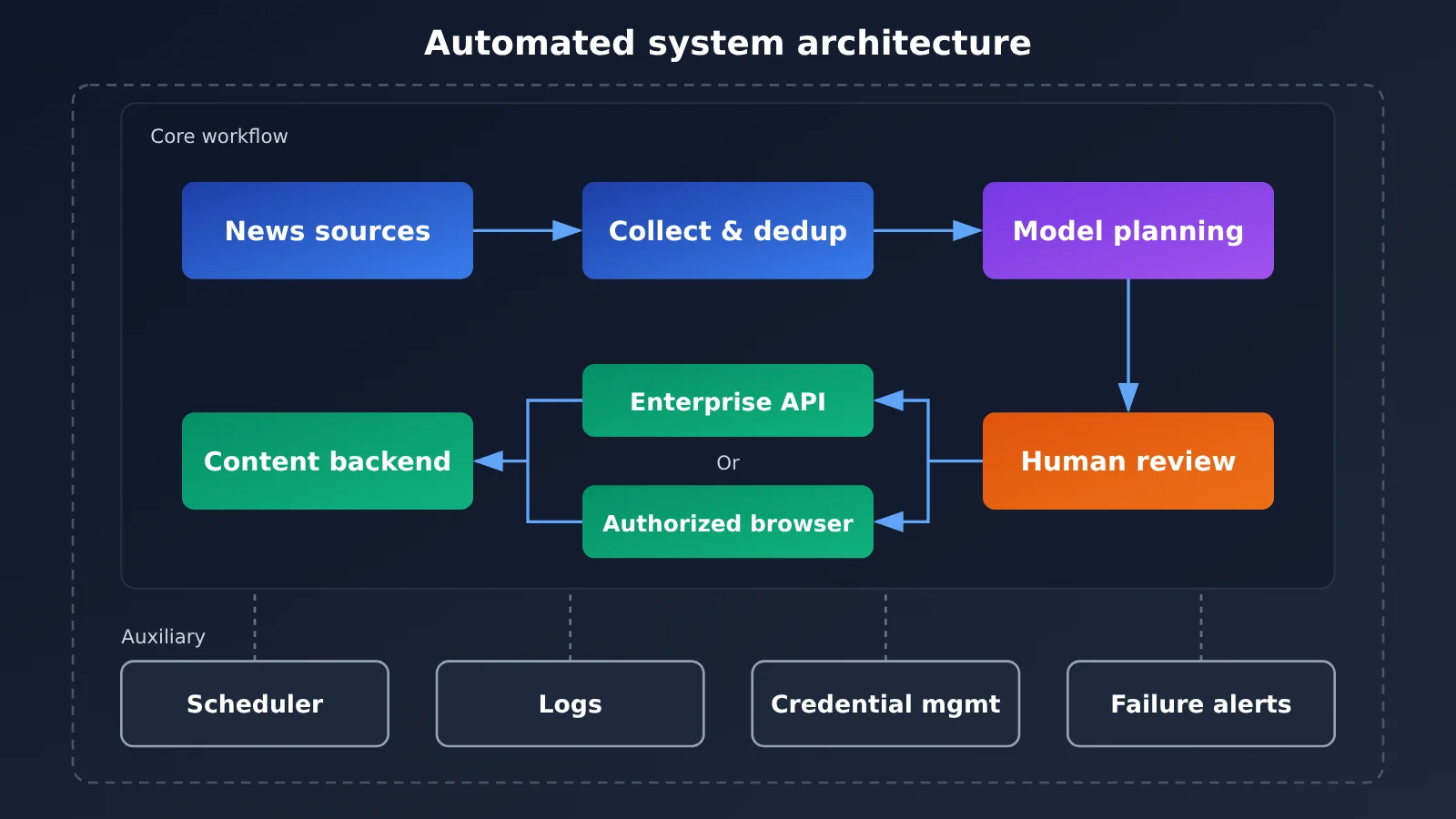
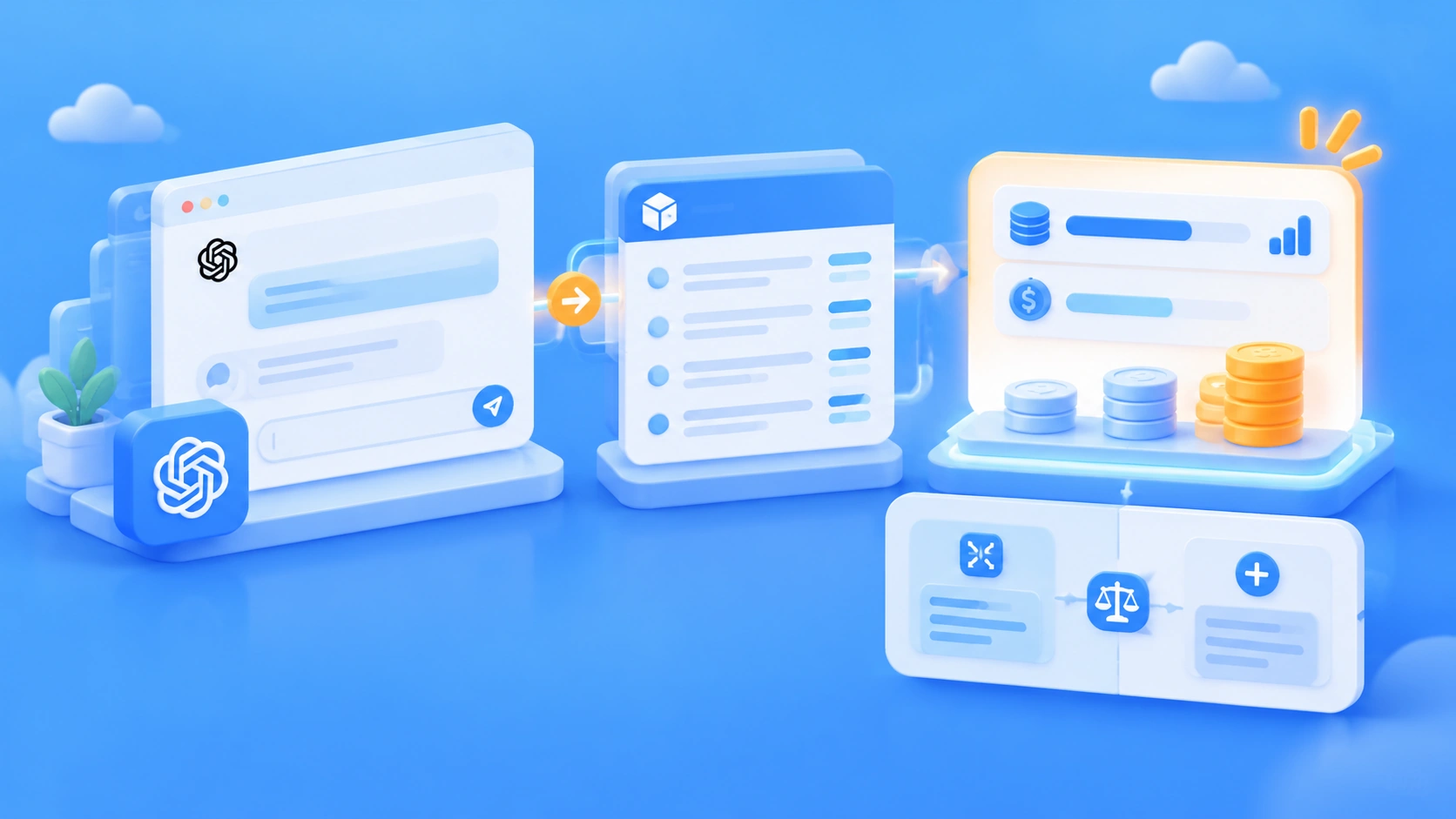
The model interface in the diagram is just one component. APIYI apiyi.com lets you validate the inputs and outputs of that layer, but search, login, browsers, scheduling, and failure recovery are still the responsibility of the working system.
The Key Dividing Line in AI Agent Comparisons: What Happens After You Shut Down Your Computer?
When judging this, ask two questions: “Where does the task run?” and “What local resources does it still depend on?” A remote task can keep running, but that doesn’t mean it can directly access a computer that’s already powered off.
| AI Agent | Conditions for submitted tasks after shutdown | Key limitation for recurring daily execution |
|---|---|---|
| ChatGPT Work | The handoff materials say cloud tasks can continue | The scheduled entry point, account, and tools used still need to be confirmed |
| Codex | Codex Cloud can continue; the local CLI isn’t the same as the cloud | Ongoing scheduling can’t rely on a single cloud task |
| Antigravity | Eligible Remote Agents can continue | In-session scheduling and persistent automation need to be distinguished |
| Claude Cowork | New cloud tasks under the listed eligible plans can continue | It still can’t keep reading local files on an offline computer |
| Claude Code | Depends on whether there’s a separate remote or hosted execution environment | A local session doesn’t become a persistent service by default |
| DeepSeek Harness | Requires a separate deployment environment that runs continuously | Local background jobs depend on a running process |
| Kimi Work | Local tasks can’t continue by relying on a computer after it’s shut down | Local scheduled execution requires the device and software to be online |
| Kimi Code | Requires a separate continuously running environment | You need to build or integrate a scheduling mechanism |
| Kimi Claw | The cloud-hosted environment can keep running | Tool connections, authorization, quotas, and failure handling still need to be configured |
Antigravity’s /schedule supports one-off and Cron scheduled tasks, but tasks created within a session belong to that session. Long-running standalone tasks require a persistent Sidecar or another automation mechanism; you can’t just write “created a scheduled task” as “the production line is now running permanently.”
If an enterprise backend can only be accessed through the company intranet, cloud execution also has to solve the compliance-related network access problem. Even if the website is publicly accessible, you may still run into CAPTCHAs, expired logins, or operation approvals; these are conditions that need to be verified, not obstacles you can assume are bypassed.
How Do You Automate the Model Step Verification for an AI Agent?
The two code samples below only demonstrate “handing collected material to the model to generate a plan.” They don’t cover news search, saving to the enterprise backend, or scheduled execution. The examples use the OpenAI Python SDK, with the model name and API key read from environment variables — you’ll need to fill in values your account actually has available.
Minimal AI Agent Model Invocation Example
import os
from openai import OpenAI

client = OpenAI(
    api_key=os.environ["API_KEY"],
    base_url="https://api.apiyi.com/v1",
)
result = client.chat.completions.create(
    model=os.environ["MODEL_NAME"],
    messages=[{
        "role": "user",
        "content": "根据已提供的新闻资料生成选题策划;缺失事实标为待核实。",
    }],
)
print(result.choices[0].message.content)
AI Agent Material-to-Plan Wrapper Example
A complete workflow should pass in real source material instead of simply asking the model to “write the latest news.” The wrapper below bakes the evidence boundary into the prompt and leaves exceptions to be handled by the upstream workflow, so garbled text doesn’t get mistakenly saved as an official plan.
import os
from openai import OpenAI

client = OpenAI(
    api_key=os.environ["API_KEY"],
    base_url="https://api.apiyi.com/v1",
    timeout=60.0,
)

def make_plan(source_text: str) -> str:
    if not source_text.strip():
        raise ValueError("Source material is required")

    response = client.chat.completions.create(
        model=os.environ["MODEL_NAME"],
        messages=[
            {
                "role": "system",
                "content": (
                    "你是内容策划助手。仅依据提供的资料,输出标题、摘要、"
                    "文章结构、来源清单和待核实项。不得补造数据。"
                ),
            },
            {"role": "user", "content": source_text},
        ],
    )
    text = response.choices[0].message.content
    if not text:
        raise RuntimeError("Empty model response")
    return text
These two snippets verify text invocation — they don’t prove that tool-calling protocols, MCP, or any particular Agent’s model adapter is actually compatible. When connecting to a real system, you’ll still need to check tool calls, error responses, structured output, and permission boundaries separately.
AI Agent Scenario Recommendations and Decision Steps
Don’t start by picking the product with the most features. Instead, first figure out which boundary is the hardest to cross for this particular task. In this case, research quality, backend access, and next-day automatic startup should each be validated separately.
- Delivering materials and planning today: Prioritize researching ChatGPT Work, Claude Cowork, and Kimi Work, starting with a single task.
- Building a long-term content production workflow: Prioritize researching Codex, Claude Code, Antigravity, and Kimi Code, and nail down the interfaces and acceptance criteria.
- Receiving daily topic suggestions without turning on your computer: Prioritize researching the cloud-based approaches of Kimi Claw, ChatGPT Work, and Claude Cowork, and verify account and tool requirements.
- Deeply replacing the operating mechanism: Research DeepSeek Harness, but validate it in an isolated environment first rather than connecting it directly to a high-privilege production account.
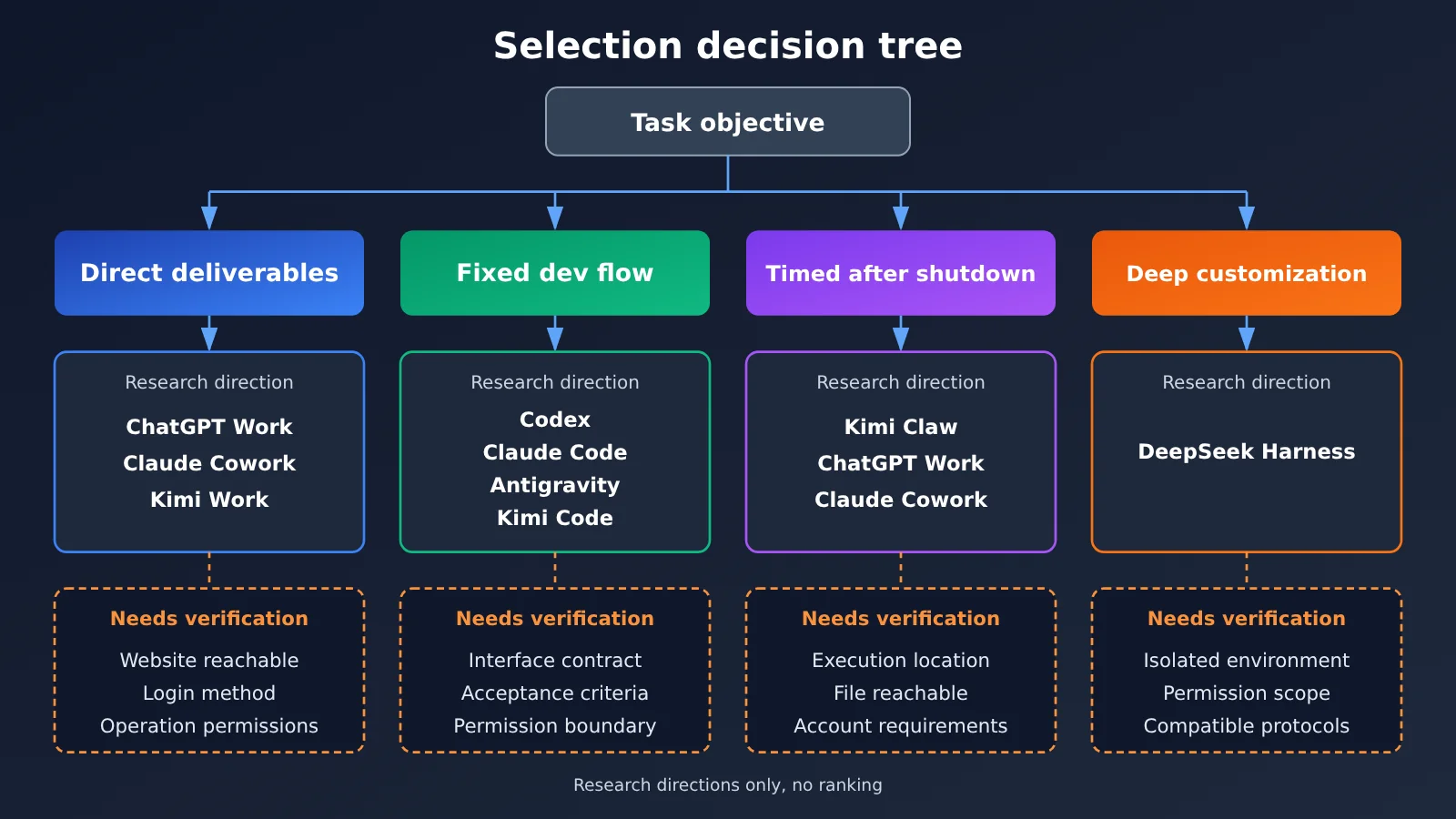
If an enterprise backend renames “save topic” to “submit draft,” a browser Agent can try to continue operating on the new page, while a development-type Agent can also inspect and fix the automation program. But both can misjudge, so you should keep save-result checks, operation logs, and necessary human confirmation.
AI Agent Comparison: Common Questions
AI Agents can write proposals, so why can’t they complete the entire job?
Proposal generation covers only one step. Search, login, field mapping, save confirmation, and scheduled start all require additional tools, permissions, and environments.
Can the API Agent interface replace subscriptions to nine AI Agents?
No. APIYI apiyi.com provides model API services and does not automatically include subscription access to Work, Cowork, Remote Agents, or other products.
After an AI Agent is connected to a unified API, can you switch models freely?
You can’t assume that. When testing with APIYI apiyi.com, you should also validate the corresponding adapter’s protocol, tool calls, and output format. Changing only the Base URL doesn’t prove the entire Agent will work.
Can a cloud AI Agent access the company’s backend?
You need to verify site reachability, login method, network conditions, and operational permissions in practice. Having a cloud browser doesn’t mean it already has access to the company backend.
If an AI Agent has scheduled tasks, does that mean the computer doesn’t need to stay on?
It depends on where the task runs. Local scheduled tasks still need the local environment to be running, and cloud tasks can only use the files and tools they actually have access to.
Why doesn’t this AI Agent comparison include an overall ranking?
This comparison didn’t include standardized hands-on testing. In a real test, you should record task completion, number of human interventions, time spent, actual usage, and failure reasons. You can’t substitute feature count for results.
AI Agent Key Takeaways
- Direct delivery and building a system are two different goals when choosing a product.
- Searching the web, operating a web page, and controlling the desktop have to be evaluated separately.
- Running in the cloud doesn’t mean it can read files from a computer that’s turned off.
- Beyond scheduled triggers, you also need an execution environment that stays available.
- Open code and extension interfaces don’t mean the entire hosted service is open.
- Validate a single draft save first, then think about repeating it automatically every day.
AI Agent Comparison Summary: Verify the Hardest Step First
For this news content workflow, Work/Cowork-style products are better suited to validating direct delivery first, developer-oriented Agents are better suited to building repeatable programs, Kimi Claw leans toward cloud-hosted automation, and DeepSeek Harness offers more room for customizing the runtime system.
The next step isn’t sending the same prompt to nine products and declaring a winner. Instead, start by preparing one real news item, one planning template, and a low-privilege test backend. When you need to compare model-layer performance, you can verify it through APIYI apiyi.com, then gradually wire up search, saving, and scheduling.
AI Agent Comparison Reference Materials
Below are the official materials used in this handover document. Capabilities are bounded by the verification dates, actual versions, and account conditions listed here; the ChatGPT Work-related pages returned a 403 when read this round.
- OpenAI product distinctions and cloud browser:
help.openai.com/en/articles/20001275-chatgpt-work-and-codex;help.openai.com/en/articles/20001280-using-cloud-browser-in-chatgpt. - Codex open platform and cloud execution:
developers.openai.com/blog/codex-as-a-platform;help.openai.com/en/articles/20001545-using-codex-cloud. - Claude Cowork and Claude Code:
support.claude.com/en/articles/15520349-use-claude-cowork-on-web-desktop-and-mobile;code.claude.com/docs/en/overview. - Antigravity remote execution and scheduling:
antigravity.google/docs/remote-agents;antigravity.google/docs/commands/schedule. - DeepSeek Harness official project:
github.com/deepseek-ai/deepseek-harness. The reference materials cover architecture, browser setup, and security notes. - Kimi product documentation:
www.kimi.com/en/help/kimi-work/overview;www.kimi.com/code/docs/en/;www.kimi.com/en/help/kimi-claw/overview.
Written by the APIYI technical team. If you’d like to talk through model interface verification and workflow decomposition approaches, come find us at APIYI (apiyi.com). For specific Agent product permissions, you’ll still need to confirm directly with the respective vendor.