Author’s note: Addressing a billing question here. While list prices for models have dropped sharply over the past few months, coding agents still seem stubbornly expensive in the same column. Prices were verified against official pricing pages accessible on 2026-10-26, as well as the APIYI model pricing page. The 96% figure is a third-party author’s estimate, not an empirical test from this article.
Between 2026-06-26 and 2026-09-29—about four months—OpenAI and Anthropic took turns slashing prices. Max Woolf mapped out this timeline on 2026-10-25 at minimaxir.com/2026/10/cheap-llms, highlighting cuts of up to 80% in his title. He noted that in coding agents, cache reads account for 96%–99% of total token costs because every round re-reads the prior conversation from the cache, with hit rates running around 90%–100% depending on the inference provider. The original post didn’t include reproducible request logs, so we’re treating that stat as a third-party claim—don’t let it substitute for your own actual usage metrics.
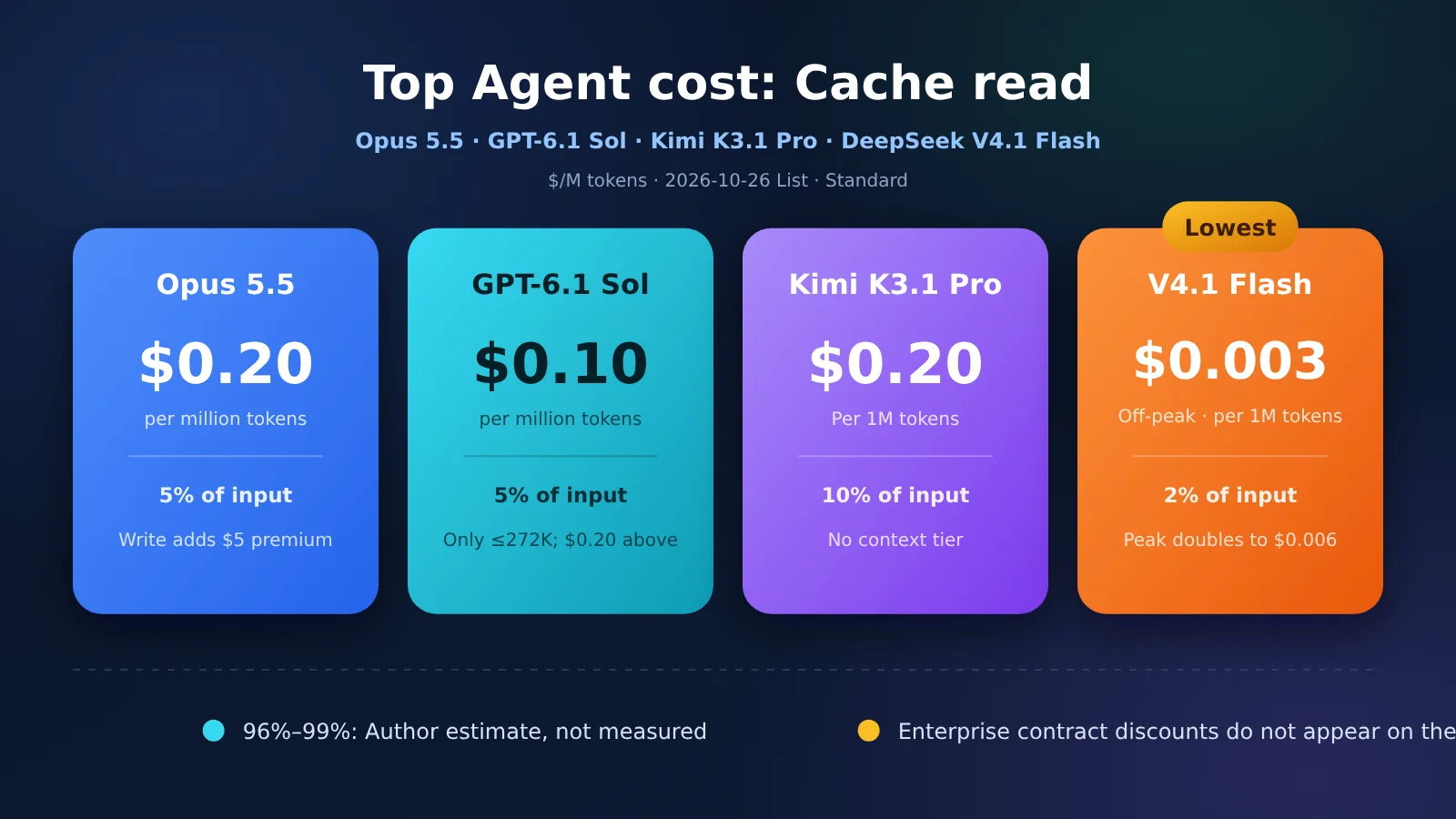
Within that same window, the cache read rates currently matching official pricing sheets are: Claude Opus 5.5 at $0.20, GPT-6.1 Sol at $0.10 for inputs up to 272K, Kimi K3.1 Pro at $0.20, and DeepSeek V4.1 Flash at $0.003 off-peak and $0.006 peak. All units are in USD per million tokens.
This isn’t a vague table where everyone looks like a winner. For coding loops with stable prefixes and inputs typically below 272K, start with GPT-6.1 Sol’s cache read pricing among the big three closed-source providers. If you need it another order of magnitude cheaper, look at DeepSeek’s off-peak cache read rate. Opus 5.5 and Kimi have identical cache read costs; the difference lies in cache-miss input, output, and cache write premiums.
Key takeaway: After reading this, you’ll be able to choose models based on cache hit rates rather than raw input pricing, and understand why reported enterprise discounts never seem to line up with a small team’s bill.
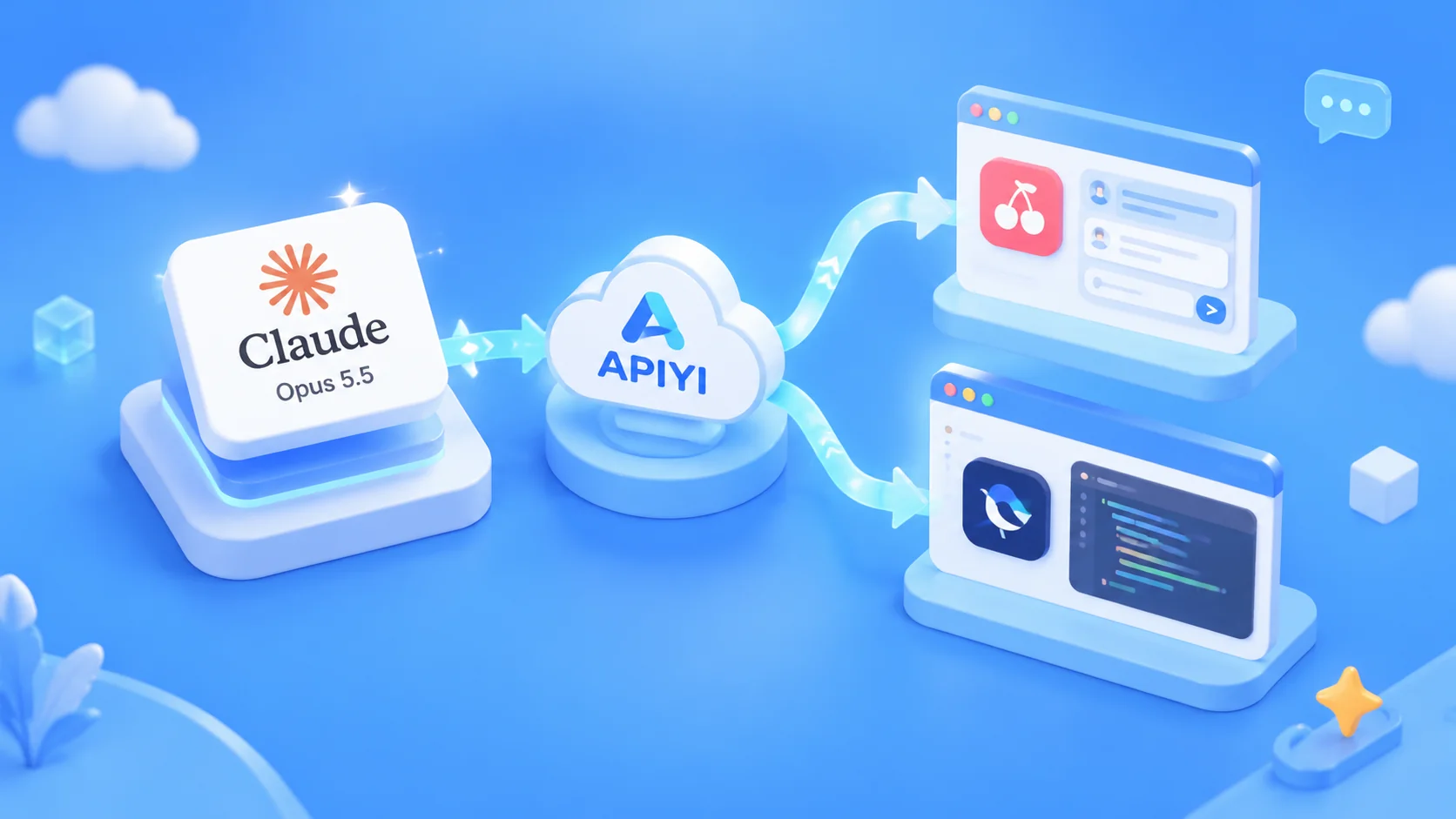
💡 Recommendation: You can test all four on APIYI apiyi.com by simply swapping the model name with a single API key. New accounts come with free test credits. Lock down your prefix first, then check the cache read stats in your usage logs—don’t jump to conclusions based on a single short conversation.
How Does Cache Read Pricing Compare Across the Four Providers?
Let’s first look at cache read prices, then at their ratio relative to uncached (cache-miss) inputs. This ratio determines just how “cheap” this column gets in long conversations. For Opus 5.5 and GPT-6.1 Sol (short context), cache reads cost 5% of the input price. Kimi K3.1 Pro sits at 10%, while DeepSeek V4.1 Flash is down at 2%. The absolute price differences are even starker than the percentages: Flash’s off-peak price of $0.003 is 1/33 of Sol’s short-context $0.10, and 1/67 of $0.20.
| Model | Cache Read | % of Cache-Miss Input | Cache-Miss Input | Output |
|---|---|---|---|---|
| Claude Opus 5.5 | $0.20 | 5% | $4 | $20 |
| GPT-6.1 Sol, input ≤272K | $0.10 | 5% | $2 | $10 |
| GPT-6.1 Sol, input >272K | $0.20 | 5% | $4 | $15 |
| Kimi K3.1 Pro | $0.20 | 10% | $2 | $10 |
| DeepSeek V4.1 Flash (Off-peak) | $0.003 | 2% | $0.15 | $0.60 |
| DeepSeek V4.1 Flash (Peak) | $0.006 | 2% | $0.30 | $1.20 |
All prices are in USD per million tokens. These reflect standard tiers only—excluding Batch, Fast tiers, or regional surcharges. Opus 5.5 figures come from Anthropic’s pricing sheet, where cache hits are billed at 0.05x the input rate. GPT-6.1 Sol uses OpenAI’s standard pricing; “short context” applies to inputs up to 272K tokens. Beyond that threshold, cache read, input, and output prices all jump up a tier (output rises to $15 rather than $20). Kimi comes from Moonshot’s public rate cards, which don’t tier pricing by context length. DeepSeek rates come from its official pricing page under the model name deepseek-flash (version DeepSeek-V4.1-Flash-1017). Peak hours run Monday through Friday, UTC 01:00–04:00 and 06:00–10:00 (excluding Chinese statutory holidays)—which translates to 09:00–12:00 and 14:00–18:00 Beijing Time. The 12:00–14:00 window between these two peaks remains off-peak. Weekends and statutory Chinese holidays are billed at off-peak rates all day.
On APIYI’s model pricing page (docs.apiyi.com/models as of the 2026-10-25 catalog), claude-opus-5-5 is listed at $4 / $20 / $0.20, gpt-6.1-sol at $2 / $10 / $0.10 (noting input increases to $4 beyond 272,000 tokens), and kimi-k3.1-pro at $2 / $10 / $0.20. DeepSeek is split into two separate rows: deepseek-v4.1-flash and deepseek-flash are listed at $0.30 / $1.20 / $0.006, matching official peak rates; deepseek-v4-1-flash-260910 is listed at $0.15 / $0.60 / $0.003, matching official off-peak rates. While the official API switches peak and off-peak pricing automatically based on request arrival time, the catalog separates them into different model IDs. Make sure to confirm the exact model name in your console before making any model invocation.
Cache reads are only half the billing story. The cache write price determines whether you’ll pay a premium again once a prefix expires. Note that you can’t compare the “short” and “long” tiers directly across providers by minutes in the table below: OpenAI’s short tier already lasts 30 minutes, whereas Anthropic and Kimi define their short tier at 5 minutes.
| Model | Short-tier Cache Write | Long-tier Cache Write | How Prefixes Get Cached |
|---|---|---|---|
| Opus 5.5 | 5 mins, $5 (1.25x input) | 1 hr, $8 (2x input) | Must include cache_control in request |
| GPT-6.1 Sol, ≤272K | 30 mins, $2.50 (1.25x input) | 12 hrs, $5 (2.5x input) | Separate write pricing; prefix must remain stable |
| Kimi K3.1 Pro | 5 mins, $2 (same as input) | 1 hr, $4 (projected at 2x) | Automatic by default (5 mins); specify 1 hr for longer intervals |
| V4.1 Flash | No separate write fee | N/A | First call billed as a cache miss, subsequent calls billed at cache read rate |
The card on Kimi’s official homepage lists cache writes at $2, which covers the default 5-minute tier. The $4 rate for the 1-hour tier comes from the configuration pricing in APIYI’s Kimi documentation, which notes that this tier hasn’t been verified in billing during this round of testing. In the official docs for the previous-gen Kimi K3, 1-hour writes cost 2x the 5-minute rate; applying that same multiplier to K3.1 Pro puts it at $4. If there’s any discrepancy in the console, always go by what the console shows. For the high-speed version (kimi-k3.1-pro-highspeed), input and output rates double, but cache reads stay at $0.20. When prefix hits are frequent, the cost gap between the two tiers narrows significantly.
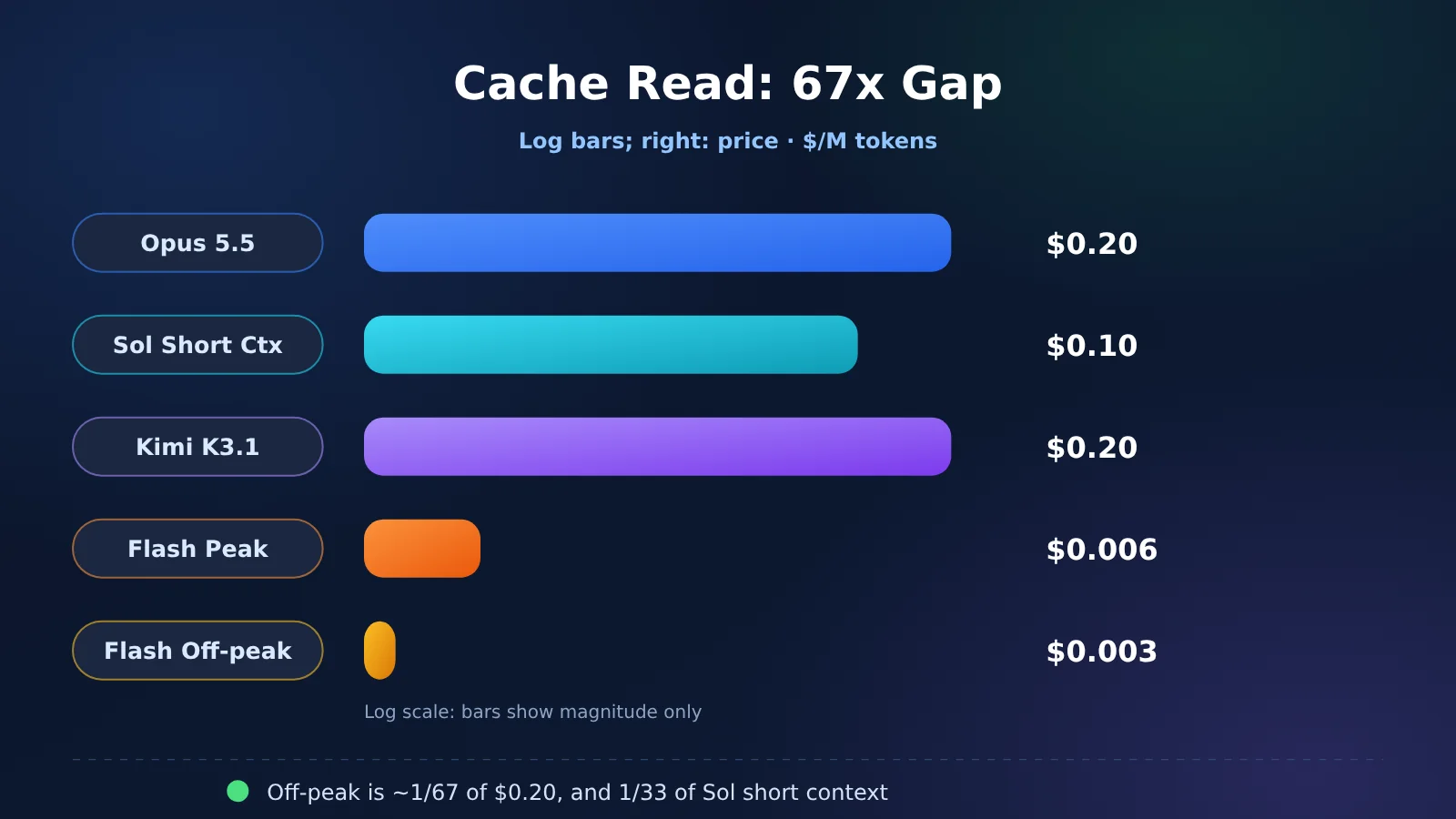
The bar lengths in the chart are just there to help you visualize orders of magnitude. Billing is still calculated by multiplying the base rate by your token count. If you switch models using the same API key, always check the cache read column in the APIYI console rather than relying on this chart to estimate your bill.
Why Cache Reads Deserve Their Own Line Item on a Coding Agent’s Bill
In every turn, a coding agent re-sends the system prompt, tool definitions, and prior conversation history. The parts where the prefix hasn’t changed qualify for cached input rates. Once that prefix changes, everything from the point of divergence onward is billed as a cache miss—and some providers charge an additional cache write fee on top of that. That’s why a 20% drop in standard input prices doesn’t translate to a 20% drop in your coding bill. If cache reads make up the vast majority of your token volume, that’s the specific pricing column you need to keep an eye on.
Max Woolf’s “96%–99%” figure referred to “total token expenditure.” In English, “expenditure” can mean either financial cost or token consumption, and the original article didn’t specify the denominator. Another third-party benchmark clarifies the methodology: WorkloadBench (updated on 2026-10-16) shows that across long-running coding tasks, 89%–96% of prompt tokens come from cache. The median for both GPT-6.1 Sol and Claude Opus 5.5 is 95%, with ranges spanning 91%–98% and 94%–99%, respectively (source: workloadbench.brenhq.com/cache). Keep in mind that this only measures the share of prompt tokens—the denominator excludes output tokens entirely, and it certainly doesn’t represent dollar spend. You can’t conflate the two sources into a sweeping claim that cache reads account for “96% of the bill.”
In dollar terms, the cache read share is usually much lower because output unit pricing is tens to hundreds of times higher than cache read pricing. Let’s run through a concrete scenario to inspect the cost breakdown. (To be clear: this isn’t Woolf’s original data, nor is it actual benchmark telemetry—just an illustrative model.) Assume a 40-turn session where each turn includes 120,000 cached tokens, 1,500 new cache-miss tokens, and 800 output tokens. At the start of the session, there’s an initial cache write of 40,000 tokens (which isn’t double-counted as a miss; for DeepSeek, which has no write fee, treat this 40,000 as a cache miss). Input sits around 120,000 tokens per turn, falling well within Sol’s short-context tier.
That brings total token consumption to 4,932,000, with cache reads accounting for 4,800,000—about 97%. This confirms that under an architecture with “long prefixes, many turns, and short per-turn outputs,” token counts can naturally reach the range Woolf described.
| Model | Cache Read | Cache Miss | Output | Cache Write / Initial Miss | Total | Cache Read % ($) |
|---|---|---|---|---|---|---|
| Opus 5.5, 5-min write | $0.96 | $0.24 | $0.64 | $0.20 | $2.04 | ~47% |
| GPT-6.1 Sol, ≤272K, 30-min write | $0.48 | $0.12 | $0.32 | $0.10 | $1.02 | ~47% |
| Kimi K3.1 Pro, 5-min write | $0.96 | $0.12 | $0.32 | $0.08 | $1.48 | ~65% |
| V4.1 Flash (Off-peak) | $0.0144 | $0.009 | $0.0192 | $0.006 | $0.0486 | ~30% |
| V4.1 Flash (Peak) | $0.0288 | $0.018 | $0.0384 | $0.012 | $0.0972 | ~30% |
All four short-context unit prices for Opus are exactly double those of Sol, giving them identical cost breakdowns and putting Sol’s total at exactly half. Kimi prices cache reads at 10% of standard input rather than 5%, meaning cache reads claim roughly 65% of the dollar total ($1.48, landing between Opus and Sol). Flash runs about $0.049 off-peak and doubles during peak hours. Because its cache read rate is only 2% of a miss, the dollar spend shifts primarily back to output tokens (around 40%), while cache reads sit around 30%. Among the three flagship models, cache reads still represent the single largest expense on this sample invoice. What Flash offers is an order-of-magnitude reduction across the entire bill, rather than fitting that same 96% dollar distribution.
If your prefix changes on every turn, the table above goes out the window. Timestamps, randomly ordered tool lists, or usernames injected right into the middle of system prompts will completely wipe out your cache hits. When that happens, what really matters is comparing cache-miss prices and cache-write prices.
Opus charges 1.25x the standard input rate for a 5-minute write; Sol also charges 1.25x for 30 minutes, jumping to 2.5x for 12 hours. Kimi’s 5-minute write matches its standard input price, with no short-tier markup. DeepSeek simply charges the regular miss price on the first run.
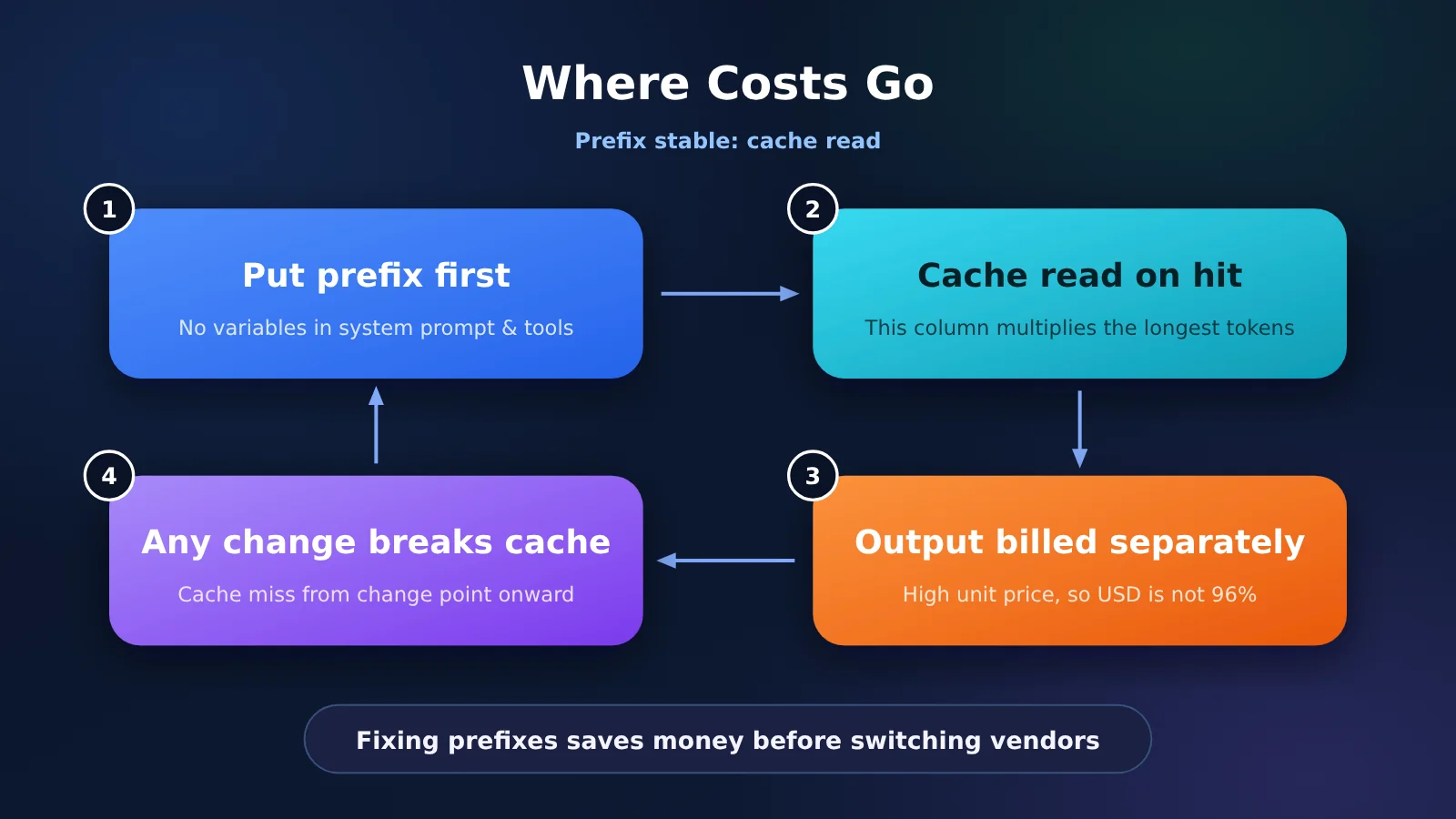
Fixing your prefix usually saves money much faster than switching providers. Keep your tool lists in a consistent order, push dynamic content to the very end of the message, and make sure the interval between calls in the same session doesn’t exceed the short-tier TTL. Once you’ve got those dialed in, you can start making choices based on cache-read unit pricing.
What Does This Four-Month Price Drop Timeline Tell Us?
Claims of “price drops up to 80%” only apply in two specific places, and neither should be understood as an across-the-board 80% discount for all models. The first instance, recorded by Max Woolf, happened on 2026-07-30 when OpenAI dropped GPT-5.6 Luna from $1 / $6 / $0.10 down to $0.20 / $1.20 / $0.02—both input and cached read costs plummeted by roughly 80%. The second instance is cached read pricing in the Sol lineup: dropping from $0.50 for GPT-5.6 Sol on 2026-06-26 to $0.10 for GPT-6.1 Sol on 2026-09-29, also an 80% reduction. But here, the model upgraded from 5.6 to 6.1—it wasn’t just slapping a clearance sticker on the exact same SKU.
| Date | Recorded Change | Input / Output / Cached Read |
|---|---|---|
| 2026-06-26 | OpenAI releases GPT-5.6 Sol and Luna | Sol $5 / $30 / $0.50 |
| 2026-06-30 | Anthropic releases Sonnet 5, noting launch pricing was temporary | $2 / $10 / $0.20 |
| 2026-07-24 | Anthropic releases Opus 5 | $5 / $25 / $0.50 |
| 2026-07-30 | GPT-5.6 Luna price cut | $0.20 / $1.20 / $0.02 |
| 2026-08-21 | GPT-5.6 Sol temporary ~20% discount for three months | $4 / $20 / $0.40 |
| 2026-09-01 | Fable 5.1 launches; cached reads lower than June’s Fable 5 | $10 / $50 / $0.25 |
| 2026-09-22 | Same-day release: GPT-6 Sol and Opus 5.5 | Sol $2 / $10 / $0.20; Opus 5.5 $4 / $20 / $0.20 |
| 2026-09-29 | GPT-6.1 Sol; cached reads halved again | $2 / $10 / $0.10 |
The table above reflects Max Woolf’s tracking, with prices formatted as input / output / cached reads. We’ve verified current pricing for the final two rows: Opus 5.5 at $4 / $20 / $0.20 matches Anthropic’s official pricing page, and GPT-6.1 Sol at $2 / $10 / $0.10 aligns with OpenAI’s standard tier for short context. We haven’t cross-checked every older announcement line by line, so please refer back to his original post if citing them.
He also noted that total costs for Opus 5.5 dropped by 40%–60%. Looking at the official pricing page, we can confirm the unit prices: compared to Opus 5, input and output rates dropped 20% ($5 to $4, and $25 to $20, respectively), while cached reads fell 60% from $0.50 to $0.20. That 40%–60% figure is his estimate based on typical usage patterns, not an official flat discount. Anthropic stated that Opus 5.5 requires less inference compute than Opus 5, and the pricing reflects that reduction—though keep in mind that’s the vendor’s own phrasing.
He also mentioned that DeepSeek V4.1 Flash runs around $0.15 / $0.60 / $0.003 on DeepSeek’s native API. Those numbers match their off-peak rates; peak pricing doubles that. For Kimi K3.1 Pro, he listed $2 / $10 / $0.20, which matches the pricing card on their official site. As for the Artificial Analysis scores mentioned—55 for Kimi, 58 for Opus 5.5, and 45 for Flash—these are third-party benchmark indices rather than our own coding evaluations. Don’t base your model selection purely on a three-point gap here.
How Should Small Teams Choose Models Without Enterprise Discounts?
Beyond list prices lies an invisible layer of discounts reserved exclusively for big enterprise clients. On October 24, 2026, AI Weekly cited a report from The Information: OpenAI landed a contract worth over $100 million annually by offering a 30%+ discount, prompting Replit to shift most of its AI spending from Anthropic to OpenAI. The report noted that Anthropic hadn’t extended Replit’s previous discount. None of the three companies publicly confirmed this. Replit CEO Amjad Masad mentioned at TechCrunch Disrupt that the decision came down to cost, partnerships, and performance. The same report noted that Claude models remain available, though OpenAI became the default for agents. It also mentioned that Rippling shifted its coding workloads from Anthropic to OpenAI, citing cost as the main factor. Keep in mind, these are news reports, not an officially published rate card agreed upon by all three.
Small teams simply can’t match these kinds of enterprise deals. Without a $100M annual commitment, you won’t get that reported 30% cut. Even if you mechanically applied a 30% discount to Opus’s cached read price—dropping $0.20 to $0.14—it’s still higher than the public list price of $0.10 for GPT-6.1 Sol’s short context window. The report didn’t specify whether the discount applied to cache hits, cache misses, or the total bill. This comparison just illustrates the order of magnitude: public cached read prices are already enough for small teams to make their initial choice.
| Session Characteristics | Where to Look First | Why |
|---|---|---|
| Stable prefixes, inputs typically under 272K, need a closed-source coding model | GPT-6.1 Sol | Cached reads at $0.10, lowest among the three |
| Single input exceeds 272K | Don’t assume $0.10 | Sol cached reads jump to $0.20, and output jumps to $15 |
| Same cached read budget as Opus, but want cheaper cache misses and output | Kimi K3.1 Pro | Cached reads are also $0.20, but input/output are $2 / $10 flat (no tier jumps) |
| High cache hit rate, tasks can avoid peak hours | DeepSeek V4.1 Flash (Off-peak) | Cached reads at $0.003—slashes the bill by an entire order of magnitude |
| Must run during work hours (Beijing Time 09:00–12:00, 14:00–18:00) | Recalculate Flash at peak rates | Cached reads rise to $0.006, and other unit prices double as well |
| Prefix changes on every turn | Fix your prefixes first | Cached read rates won’t help you here |
Model capabilities aren’t ranked in this table. Max Woolf considers Opus 5.5 stronger than the pricier Fable 5.1, but that’s his personal benchmark. DeepSeek’s official documentation notes that deepseek-flash is now powered by DeepSeek-V4.1-Flash-1017; the legacy deepseek-v4-flash identifier still works and bills at Flash rates, while deepseek-v4-pro is still sold separately. The official docs don’t offer an absolute performance ranking between Flash and Pro. Here’s a good rule of thumb: when the cost of failure exceeds the token price difference, reach for the premium model. When the cost of failure is lower than the price difference, let Flash churn through the loops.
💰 Cost Optimization: List prices are just baseline catalog rates. The APIYI (apiyi.com) console displays discounted rates tailored to your user group, with top-up promos calculated separately according to published pricing page rules. These are transparent, public rules—not custom enterprise master service agreements negotiated behind closed doors. Actual billing is determined by the console.
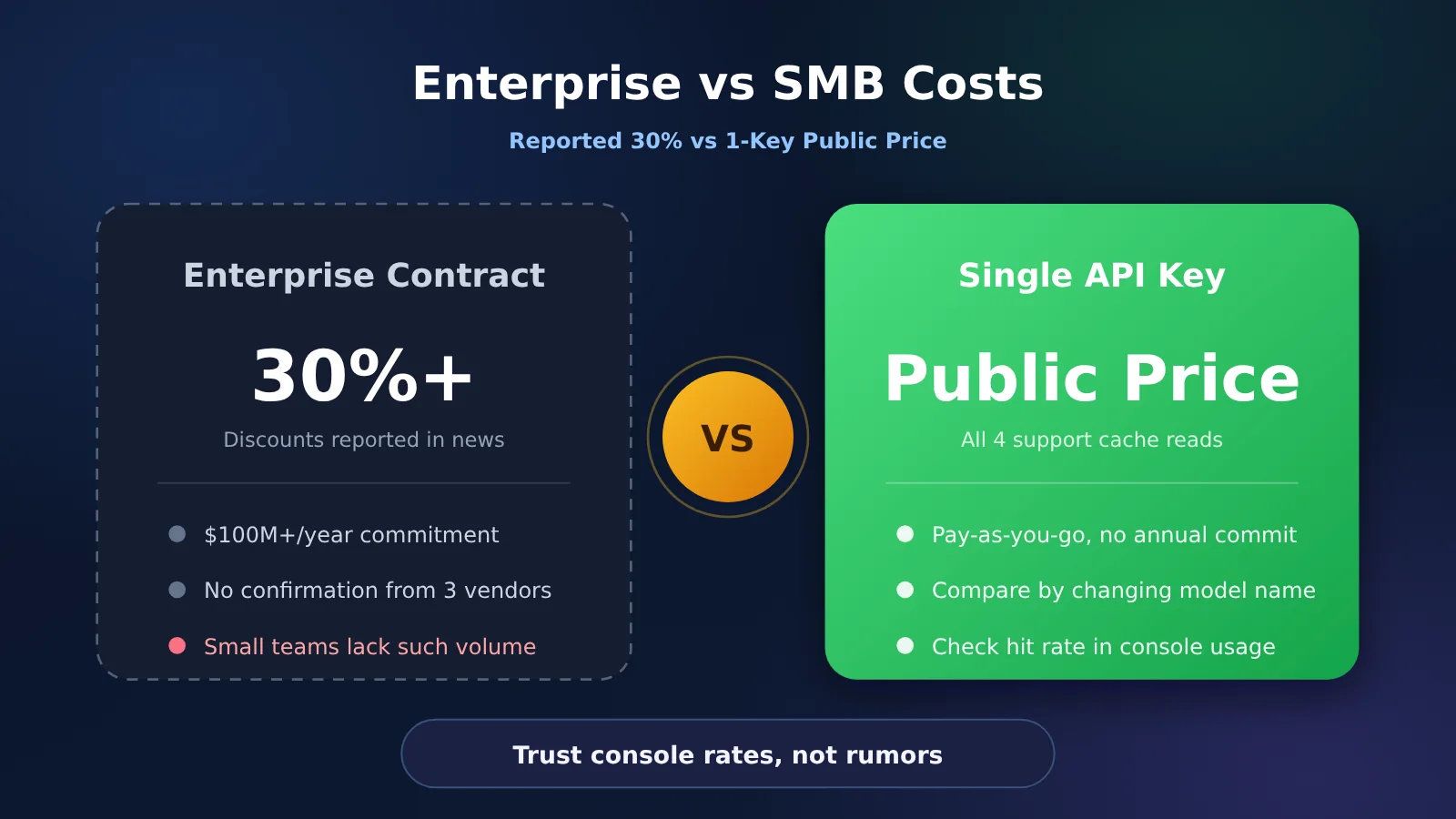
The 30% discount and $100 million figure on the left come from media reports—they aren’t prices you can actually purchase at checkout. The right side is the realistic path forward for small teams.
How to Check Cache Reads Across Four Providers with a Single Key
According to the pricing docs, for GPT-5 and newer models, it’s best to use /v1/responses since multi-turn prompt caching hits much more reliably. Chat Completions still works fine, though. In the example below, we stick with Chat Completions so you can switch between gpt-6.1-sol, kimi-k3.1-pro, and deepseek-flash simply by changing the model name. Note that caching for Opus 5.5 isn’t enabled by default on this path. Anthropic’s current setup requires putting a cache_control parameter at the request root or placing breakpoints directly on content blocks. APIYI supports both chat and messages endpoints for claude-opus-5-5. If you want cache pricing, route through messages and include cache_control. Don’t assume the $0.20 catalog price is active if you’re only using Chat Completions.
- Install the basics: If you haven’t installed the SDK yet, run
pip install openai. At the top of your script, addimport osandfrom openai import OpenAI. Store your API key in theAPIYI_API_KEYenvironment variable—never hardcode it into your repo. - Initialize the client: A single line gets it done:
client = OpenAI(api_key=os.environ["APIYI_API_KEY"], base_url="https://api.apiyi.com/v1"). This is the only place you need to change the base URL. - Lock down your prefix: Put your system prompt and tool definitions into
STABLE_PREFIXwithout altering a single character. Place the dynamic content for the current turn inuser_turn, and always keep it as the last message. - Send the request: Call
resp = client.chat.completions.create(model="gpt-6.1-sol", messages=[{"role": "system", "content": STABLE_PREFIX}, {"role": "user", "content": user_turn}]). Swapmodeltokimi-k3.1-proordeepseek-flashto query the other two providers. - Inspect token usage: Grab details with
details = resp.usage.prompt_tokens_details, thencached = getattr(details, "cached_tokens", 0) or 0. Finally, print them out:print(resp.usage.prompt_tokens, cached, resp.usage.completion_tokens). These three values correspond to prompt tokens, cached prompt tokens, and completion tokens.
Run several turns back-to-back, and divide cached tokens by total prompt tokens to get your actual cache hit rate. Then, multiply your cached volume by each provider’s cache read rate to find the real dollar cost. Kimi’s documentation notes that its cache tiers are configured prices, so billing is ultimately determined by their console. If you want DeepSeek’s off-peak discount, look for deepseek-v4-1-flash-260910 in the catalog rather than expecting deepseek-flash to automatically adjust pricing based on the clock.
Keep your API key in the APIYI_API_KEY environment variable instead of committing it to your repo. Free test credits are perfect for running a few turns with the same prefix across all four model names to compare their usage breakdown. Increase your turn count gradually as you verify performance, rather than running full-context workloads across all four providers right out of the gate.
Frequently Asked Questions About Cache Reads
Q1: Does “96%” mean cache reads make up 96% of the actual bill?
Not according to our findings here. Max Woolf noted that cache reads account for 96%–99% of total token usage, but didn’t disclose the denominator—making it a third-party estimate. WorkloadBench measured prompt tokens at 89%–96%, excluding output tokens. Based on the illustrative scenario in this article, tokens make up roughly 97% of the volume, while the actual dollar cost is around 47% on Opus and Sol, roughly 65% on Kimi, and about 30% on Flash.
Q2: Why is Sol’s cache read priced at $0.10 sometimes, and $0.20 at other times?
It depends on the input length of a single request. When it’s within 272K tokens, OpenAI’s standard cache read rate is $0.10. Once it exceeds that threshold, the rate jumps to $0.20, while cache-miss inputs rise to $4 and outputs to $15. The APIYI catalog lists the short-context rates ($2 / $10 / $0.10) and notes that inputs shift to $4 beyond 272,000 tokens. Output and cache read rates for long contexts follow OpenAI’s standard tiers; if the dashboard displays separate tiers, go by what’s shown on the dashboard.
Q3: Why does DeepSeek have two different cache read pricing tiers?
The official pricing uses peak and off-peak hours, with off-peak rates set at half the peak cost. Cache reads are $0.003 during off-peak and $0.006 during peak hours. Peak hours run on weekdays from 09:00–12:00 and 14:00–18:00 Beijing Time (converted from the official UTC window, excluding Chinese public holidays). Weekends and holidays are entirely off-peak. The APIYI catalog lists these two pricing tiers under separate model entries.
Q4: Can small teams qualify for the 30% enterprise discount?
The discounts mentioned in media reports are tied to contracts exceeding $100 million annually, and none of the three providers have publicly confirmed them. Small teams won’t have that kind of commit volume. Comparing public cache read rates is already enough to make an initial choice. For tiered discounts and top-up promotions, refer to the APIYI dashboard—don’t confuse them with those enterprise-level deals.
Q5: How can I connect to all four providers using a single API key?
Create an API key on APIYI (apiyi.com) and set your base URL to `https://api.apiyi.com/v1`. You can call `gpt-6.1-sol`, `kimi-k3.1-pro`, and `deepseek-flash` via standard Chat Completions simply by switching the model name. For `claude-opus-5-5`, route requests through `messages` and include `cache_control` to take advantage of cache pricing. For GPT-5 and later models, if you want higher multi-turn hit rates, the pricing page recommends switching to `/v1/responses`.
Q6: Since cache reads are so cheap, should we just make Flash our default model?
Only if the cost of failure is lower than the price difference. An illustrative off-peak bill for Flash is roughly one-twentieth the cost of Sol ($0.0486 vs. $1.02), and about one-tenth during peak hours. But if Flash takes multiple retries or extra turns to accomplish the same task, those extra rounds will quickly eat up the savings. Test both models using free credits on the same prefix to compare completion turns before locking in your default model.
Q7: Can cache write costs end up being more expensive than cache reads?
Yes—especially if your prefix expires frequently and hit rates are low. Cache writes for short tiers on Opus and Sol are 1.25x the regular input price, and Sol’s 12-hour tier jumps to 2.5x. Kimi’s 5-minute write is equal to the base input price. Only after two or three cache hits do cache reads become the dominant cost factor. For tasks with irregular invocation intervals, make sure you choose the right TTL before comparing cache read prices.
Key Takeaways: Cache Read Comparison
- The 96% figure is a third-party estimate: Max Woolf hasn’t released his raw logs. You’ll need to multiply by unit prices yourself to find the actual dollar share.
- Check cache reads first, then look for tier jumps: Once Sol exceeds 272K, cache read costs jump from $0.10 to $0.20.
- Opus and Kimi share the same $0.20 cache read price: Kimi offers cheaper cache misses and output tokens, with no markup on short-tier writes.
- Flash’s edge lies in its order of magnitude: At $0.003 off-peak and $0.006 peak, cache reads no longer dominate your total spend.
- The reported 30% enterprise discount doesn’t apply to small teams: That comes from reported annual commit deals. Public list prices are more than enough for your initial evaluation.
- One key connects all four providers: Just swap the model name on APIYI (apiyi.com), and track your real hit rate directly from console usage metrics.
Summary
Over the past four months, public price cuts have reached up to 80%—mostly driven by Luna’s list price and Sol’s cache read dropping from $0.50 down to $0.10. If you’re building coding agents, cache read costs still deserve their own line item. Based on official pricing as of 2026-10-26, GPT-6.1 Sol’s cache read in short contexts sits at $0.10, Opus 5.5 and Kimi K3.1 Pro are at $0.20, and DeepSeek V4.1 Flash comes in at $0.003 off-peak and $0.006 peak. Take the 96%–99% figures purely as Max Woolf’s estimate; in sample billing breakdowns, token volumes might get close to that range, but the actual dollar share will be noticeably lower.
Those reported enterprise discounts require annual commitments that small teams simply can’t get. Connecting all four providers with a single API key and multiplying your own hit rate by public cache read prices is far more practical than waiting on a 30% discount contract. We recommend running the same stable prefix on APIYI (apiyi.com) first before settling on your default model.
Author: APIYI Engineering Team
Tech Inquiries: Feel free to reach out via the APIYI homepage. For the latest model unit rates, please refer to the model pricing page in our documentation center at docs.apiyi.com.
References
- Max Woolf: Price Cut Timeline and 96%–99% Estimates
- Link:
minimaxir.com/2026/10/cheap-llms -
Note: 2026-10-25. The 96%–99% range is the author’s own estimate, not benchmarked in this article.
-
Anthropic Model Pricing
- Link:
platform.claude.com/docs/en/about-claude/pricing -
Note: Covers input, output, cache read, and the two-tier cache write pricing for Opus 5.5.
-
OpenAI Model Pricing
- Link:
developers.openai.com/api/docs/pricing -
Note: Covers short context, long context, cache read, and cache write pricing for GPT-6.1 Sol. The 272K token mark serves as OpenAI’s official cutoff between short and long context.
-
DeepSeek Model Pricing
- Link:
api-docs.deepseek.com/quick_start/pricing -
Note: Covers peak/off-peak cache hit rates, cache miss rates, and output pricing for
deepseek-flash. -
Kimi API
- Link:
platform.kimi.ai -
Note: Covers input, output, cache hit, and default cache write pricing for Kimi K3.1 Pro.
-
AI Weekly’s Coverage of the Replit Deal
- Link:
aiweekly.co/alerts/replit-shifts-100m-ai-spend-to-openai-after-30-price-cut -
Note: Details regarding the 30%+ discount and the $100M+ annual spend originate from reporting by The Information; these terms haven’t been publicly confirmed by the three companies involved.
-
WorkloadBench: Cached Token Share
- Link:
workloadbench.brenhq.com/cache - Note: 2026-10-16. Reflects the percentage of prompt tokens retrieved from cache, not the overall dollar share.