When choosing an API proxy, most people look at the price and model list first. But few ask: Will my requests be logged? What can I do to limit the damage if a key leaks? Can I get a refund after adding funds? Is the model I’m calling actually the one I selected? This article gives you an actionable API Proxy Data Security Checklist to work through these questions in five steps.
This isn’t a review that simply takes providers at their word, and it isn’t focused on any one service. The checklist applies to any API proxy. We use APIYI’s public documentation as an example to help you ask the right questions about the service you’re using.
What you’ll get: A practical verification process and a script you can run locally. With a small initial deposit, you can check whether logging, models, and charges match your expectations before adding more funds.
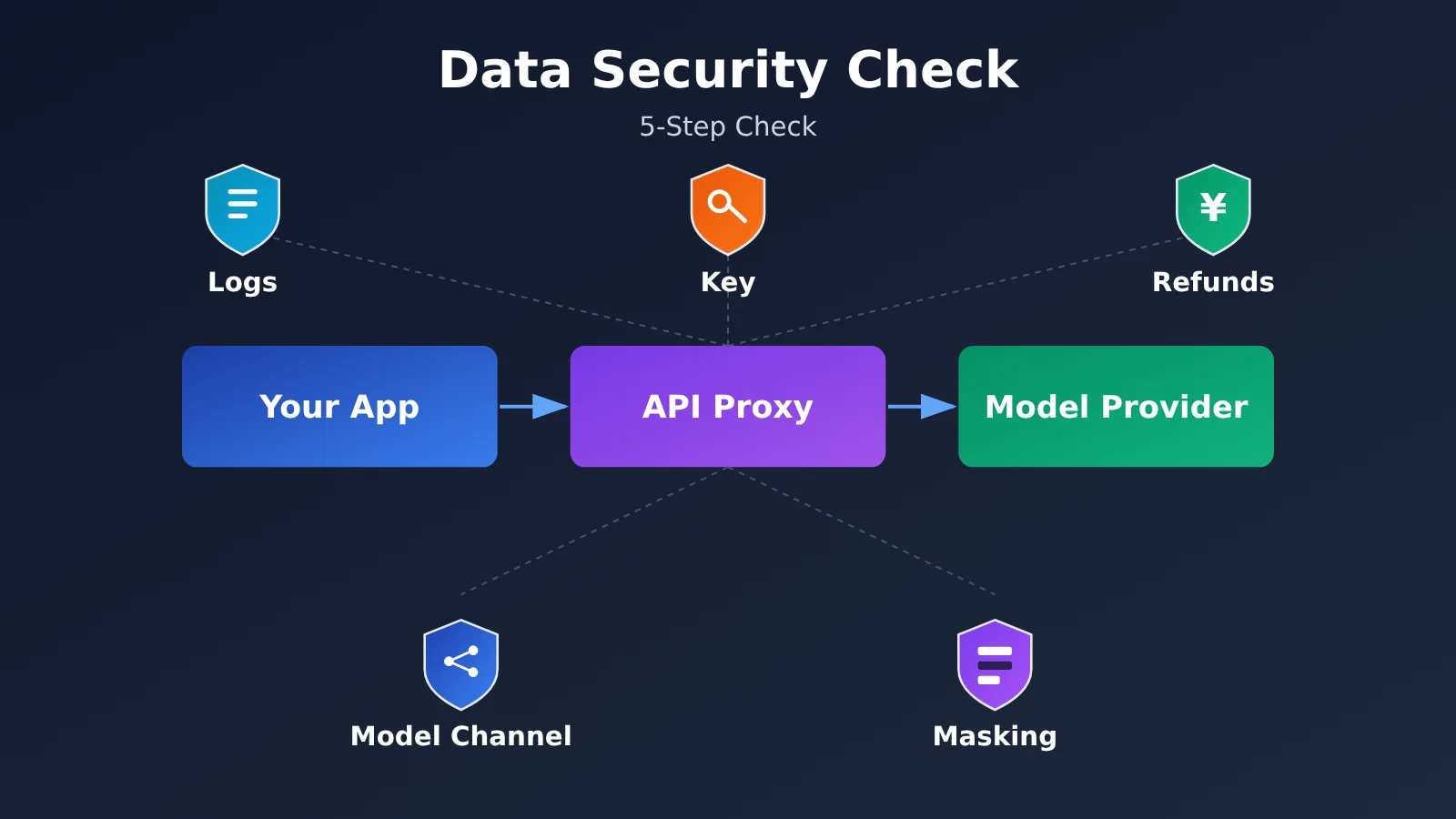
API Proxy Data Security Checklist: Key Points
An API proxy sits between you and the model provider: your request goes to the proxy first, which then forwards it to the provider. So you need to check more than whether “the model works.” You also need to know what gets recorded along the way, who can use your balance, and whether you can trace what happened if something goes wrong. The table below summarizes the five-step checklist.
| Step | What to check | What you’ll learn |
|---|---|---|
| Step 1: Logs | What’s logged by default, and whether request contents are logged for troubleshooting | Which information might be retained |
| Step 2: Keys | Available models, usage limits, IP restrictions, and project isolation | How to limit losses and revoke a key quickly if it leaks |
| Step 3: Refunds | Refund conditions, how the amount is calculated, processing time, and who operates the service | What to expect before adding funds, and whom to contact if something goes wrong |
| Step 4: Model routing | Which upstream model corresponds to each model name, backup routes, and the channel used for each call | Whether your request was downgraded or routed to a different model |
| Step 5: Data redaction | Whether sensitive information meets your organization’s requirements and has been redacted | How to minimize exposure in the worst-case scenario |
The Overall Approach to a Data Security Check
The checklist follows a simple sequence: “Ask first, verify with a small test, then scale up.” The first four steps establish what the provider says and what its rules specify. The fifth addresses what you can do yourself to avoid sharing information you shouldn’t—even when the rules look good.
The final step is the one that’s easiest to overlook: test the service with a real use case, then reconcile the call records. No matter how clearly a promotional page is written, an actual call with a Request ID is more convincing.
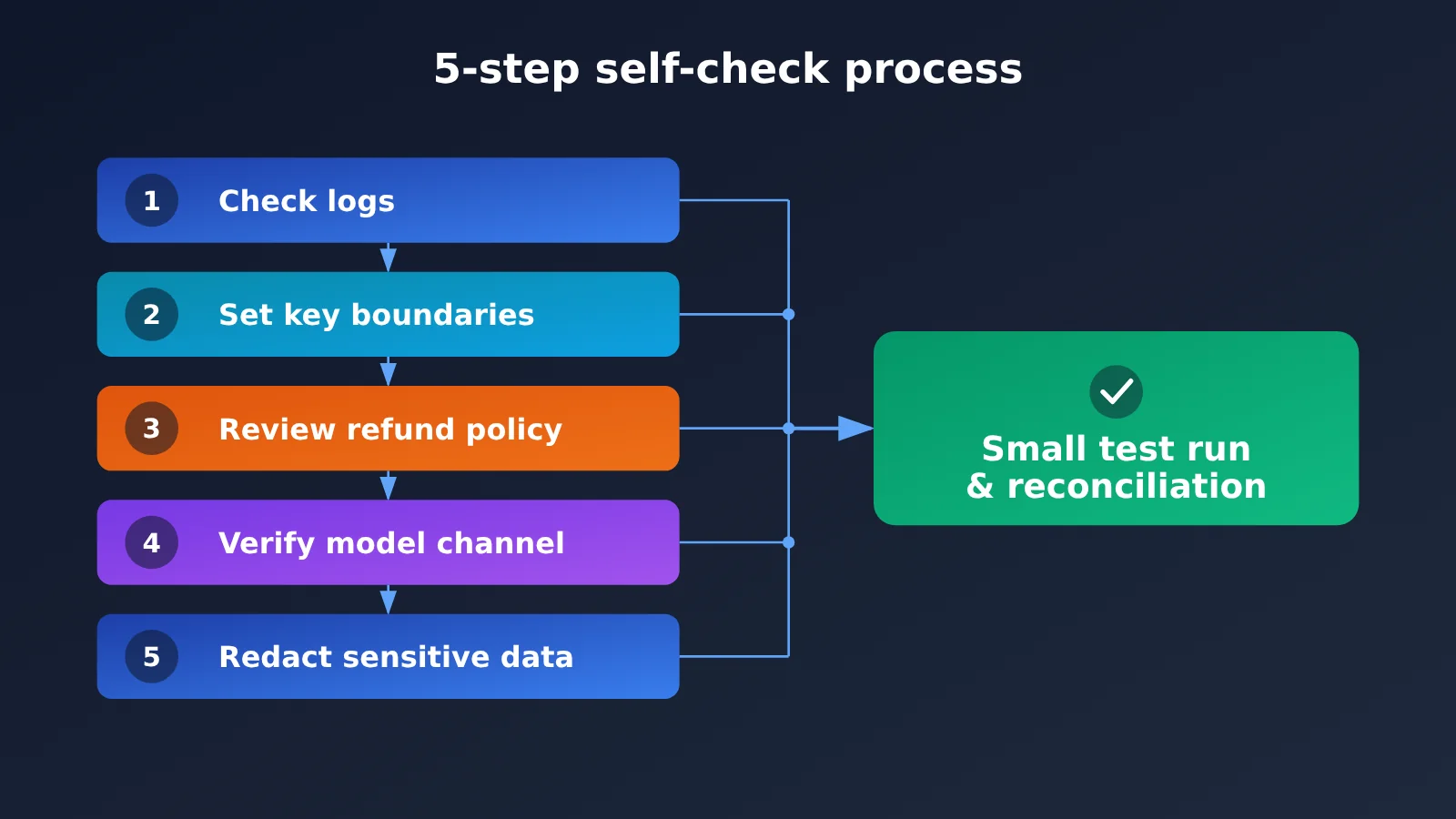
Step 1: Find Out What Your API Proxy Service Logs
The first step in a self-audit is to find out what the service provider logs by default, and whether request and response content might be logged during troubleshooting. Many people assume that “logging is enabled” means “content is being saved,” but those are very different things. What matters is exactly what information the logs contain.
For example, according to APIYI’s public documentation, standard call logs record details such as the call time, model, token usage, cost, and status—but not the input or output content. If you need help troubleshooting, an administrator can temporarily enable detailed logging, which may include the full prompt, system messages, conversation history, function call parameters, and model responses.
Log Types and Self-Audit Actions
| Log type | What it may contain | What you should do |
|---|---|---|
| Standard call logs | Call time, model, token usage, cost, status | Export them regularly for reconciliation and recordkeeping |
| Detailed logs (temporarily enabled for troubleshooting) | Full prompts, system messages, conversation history, function call parameters, model responses | Make sure the content is redacted before submitting a troubleshooting request |
| Uploaded files | Public documentation doesn’t specify whether they’re included in detailed logs | If files are involved, ask the service provider for written confirmation first |
Two points deserve special attention. First, detailed logging is intended to be “temporarily enabled to help with troubleshooting.” So before submitting a support ticket or asking customer service to investigate, decide what information must not appear in your reproduction sample. Second, the public documentation doesn’t specify whether file contents are included in detailed logs. Don’t assume anything when the documentation is silent—ask directly.
For information about standard log retention periods and deletion schedules, see APIYI’s log retention policy. If you need logs for reconciliation or recordkeeping, export your call records promptly. Don’t assume the platform will keep them indefinitely.
🎯 Technical tip: When evaluating a logging policy, it’s helpful to check the fields in an actual call log through the APIYI apiyi.com console and compare them with the public documentation. That gives you a clearer picture than reading the documentation alone.
Step 2: Set Limits on API Keys and Spending
An API key is the credential you use to call a model—and it’s effectively the “withdrawal password” for your account balance. A leaked key is one of the risks to watch out for when using an API proxy service. Common causes include posting it in a public repository or sharing it in screenshots or group chats.
Here are some best practices for managing your keys:
- Keep it private: Don’t put your key in a public code repository or include it in screenshots, screen recordings, or group chats. In your code, read it from an environment variable instead.
- Use separate keys for each project: Give each project its own key. If something goes wrong, you can quickly identify which project is responsible and revoke just one key.
- Limit permissions based on use: When creating a key, set options such as which models it can access, spending limits, or IP restrictions based on what you actually need. Apply every restriction available.
- Review regularly: Check your call history and balance on a regular schedule. Be alert for calls to unfamiliar models or at unusual times.
- Act immediately if something looks wrong: If you spot unfamiliar calls or unexpected charges, disable the affected key and create a new one, then contact the service provider to verify the records.
There’s another easy-to-miss rule when troubleshooting: never send your full API key to customer support. A Request ID, the call time, and a description of what happened are enough to investigate. Sending the full key creates another point of exposure.
API Key Self-Check
| Check | Passing standard | What to do if it doesn’t pass |
|---|---|---|
| Storage location | Environment variable or secrets management tool | Move it immediately and recreate any exposed keys |
| Project separation | One dedicated key per project | Create separate keys for each project and phase out the old key |
| Permission scope | Model, spending, or IP restrictions are in place | Set any available restrictions in the console |
| Review frequency | You have a regular review schedule | Set calendar reminders and check each time for changes in your balance |
Step 3: Check the Refund Policy and Service Operator Before Adding Funds
Before adding funds, check four things: the refund conditions, how refunds are calculated, how long they take to arrive, and who operates the service. This information should be on the policy page. Finding out you “can’t get a refund” after you’ve added funds puts you in the worst position.
For example, APIYI’s refund policy says, in broad terms, that you can request a refund within 30 days of adding funds. The refund amount is calculated based on rules such as your unused balance, and promotional credits are deducted. Users in mainland China who have already received an invoice aren’t eligible for a refund. Refund processing times vary by payment method, so check the policy details before submitting a request.
The service operator matters too. APIYI’s Terms of Service name MrrBase, LLC as the operator. You can check any API proxy service the same way: look for a clearly identified operator and confirm that it’s named in the terms.
When contacting customer support, use channels listed on the official website or in the documentation. APIYI lists WeCom customer support, [email protected], and Telegram @apiyi001. Don’t transfer money or share account information through “private contact details” that aren’t listed on an official page.
Refund and Operator Checklist
| Item to check | What to ask | APIYI’s public information |
|---|---|---|
| Refund period | How long after adding funds can you request a refund? | Within 30 days of adding funds |
| Refund calculation | How is the refund calculated, and how are promotional credits handled? | Based on rules such as the unused balance; promotional credits are deducted |
| Non-refundable cases | Which situations aren’t eligible for a refund? | Users in mainland China who have already received an invoice aren’t eligible |
| Processing time | How long does it take for the refund to arrive? | Varies by payment method; see the policy details |
| Service operator | Who operates the service? | MrrBase, LLC |
| Official support channels | Where can you get in touch? | WeCom customer support, [email protected], Telegram @apiyi001 |
Step 4: Verify the Model Name and Upstream Channel
“ The model was switched to a cheaper version” is one of the most common concerns among users of API proxy services. Rather than judging by output quality alone, ask the provider three direct questions: What upstream model does the model name shown on the page and in the logs correspond to? Are backup channels used? How can you check which channel handled a specific call?
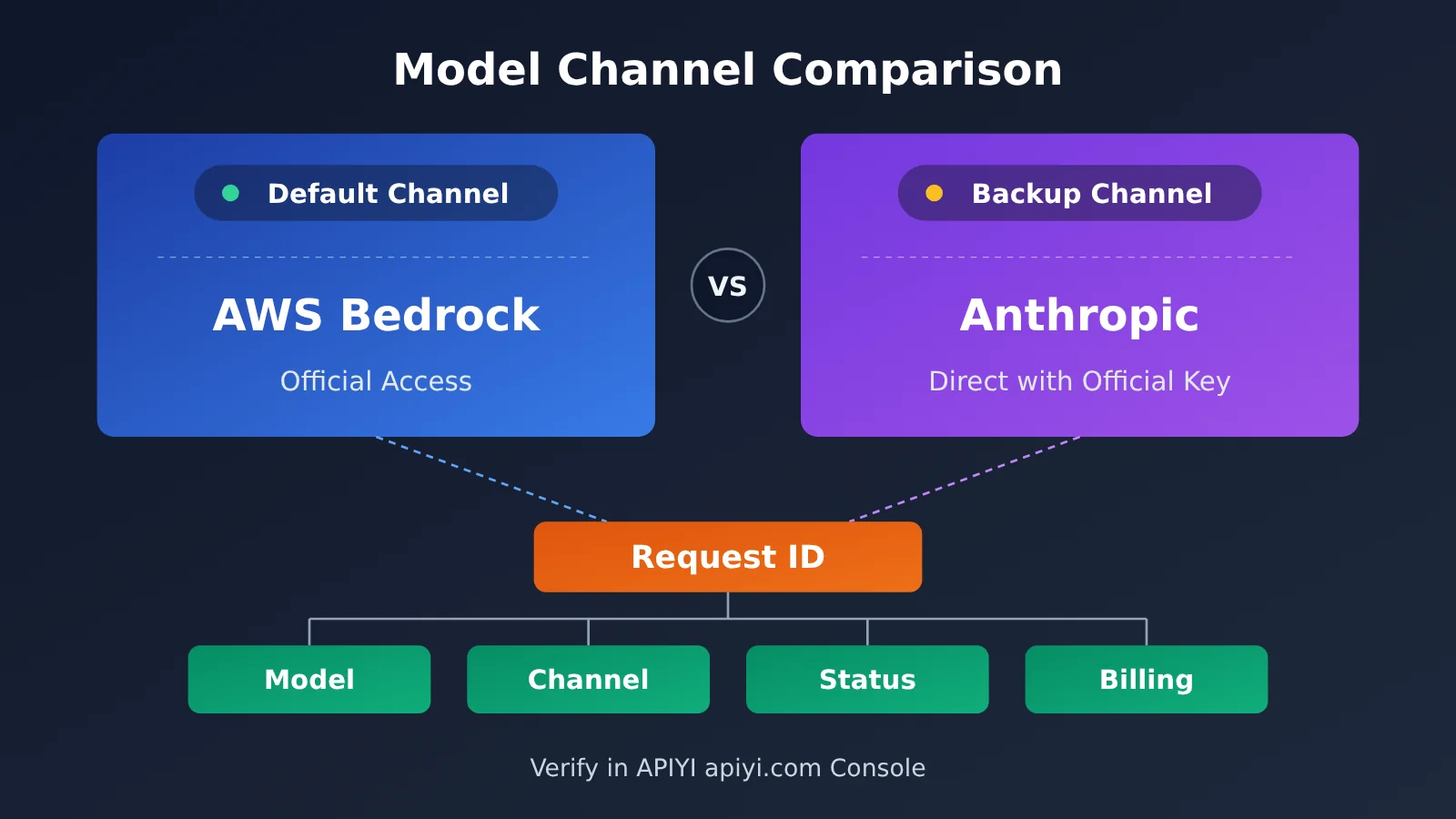
Take APIYI’s model fidelity statement as an example: the service doesn’t downgrade or replace models. For Claude, the default route is through the official AWS Bedrock integration, with a direct connection using an official Anthropic key as the backup channel. What matters to you is that the provider publicly documents both its “default channel” and “backup channel” instead of being vague.
How to Verify an Individual Call Using Its Request ID
To verify a specific call, save its Request ID. According to APIYI’s Request ID troubleshooting guide, logs can be used to check the model, channel, status, and billing record for that call. If you have questions, provide the Request ID to customer support so they can investigate.
This leads to a useful habit: keep a record of every important call in your own system, including at least the call time, requested model name, returned model name, and Token usage. If a dispute arises, your records and the platform’s logs can corroborate each other.
| Question | Answer to look for | Risk if missing |
|---|---|---|
| What upstream model does the model name correspond to? | A clear mapping | You can’t tell whether the model was replaced |
| Are backup channels used? | The backup channel and the conditions for switching to it | You won’t be able to explain inconsistent behavior after a channel switch |
| How can you check the channel for an individual call? | Look it up in the logs using the Request ID | You won’t have evidence if a dispute arises |
| Are models downgraded? | A public statement that models aren’t downgraded or replaced | There’s no clear commitment to verify against |
Step 5: Redact Sensitive Information Before Submitting
Before sharing company code, unpublished documents, customer information, or financial or medical data, make sure doing so complies with your organization’s security requirements. Redact sensitive information whenever possible. When troubleshooting, try to reproduce the issue with the smallest sample you can instead of uploading the complete data.
If your organization prohibits sending sensitive information through third-party proxy services, follow that requirement strictly. Convenience should never take precedence. Redaction isn’t a guarantee of complete security; it helps minimize the potential exposure if something goes wrong.
Here’s a small example of local redaction. It replaces common sensitive fields with placeholders before you submit a prompt. It only handles common formats, so it doesn’t replace manual review or your organization’s compliance requirements.
import re

PATTERNS = {
    "EMAIL": r"[\w.+-]+@[\w-]+\.[\w.-]+",
    "PHONE": r"\b1[3-9]\d{9}\b",
    "API_KEY": r"\bsk-[A-Za-z0-9]{16,}\b",
}

def redact(text: str) -> str:
    for label, pattern in PATTERNS.items():
        text = re.sub(pattern, f"<{label}>", text)
    return text

print(redact("联系 [email protected],手机 13800000000,Key sk-abcdefghijklmnop1234"))
API Proxy Service Data Security Self-Check: Quick Start
The first five steps are about asking questions; this section is about verifying the answers. If this is your first time using the service, start with a small top-up. Run one or two tasks based on your actual use case, without including sensitive information, then check the call logs, model, and charges. We recommend starting with a $5 top-up. Once you’ve confirmed everything works as expected, you can decide whether to add more funds.
Minimal example: Run a test call you can reconcile
The code below reads your key from an environment variable, makes a minimal call, and prints the returned model name and usage so you can compare them with the console logs:
import os
import openai

client = openai.OpenAI(
    api_key=os.environ["API_KEY_TEST"],
    base_url="https://api.apiyi.com/v1"  # Use the unified APIYI endpoint
)

resp = client.chat.completions.create(
    model="gpt-4o-mini",
    messages=[{"role": "user", "content": "Introduce yourself in one sentence"}],
    max_tokens=400,
)
print("id:", resp.id)
print("model:", resp.model)
print("usage:", resp.usage)
Keep in mind that resp.id returned by the SDK may not be the same as the Request ID in the platform logs. Check the official documentation. In the console’s call logs, find the entry for the corresponding time and verify that the model, status, and charges match your local output.
View the complete code: a test script with local audit logging
import json
import os
import re
import time
from typing import Optional

import openai

PATTERNS = {
    "EMAIL": r"[\w.+-]+@[\w-]+\.[\w.-]+",
    "PHONE": r"\b1[3-9]\d{9}\b",
    "API_KEY": r"\bsk-[A-Za-z0-9]{16,}\b",
}

AUDIT_FILE = "relay_audit.jsonl"


def redact(text: str) -> str:
    """Redact common sensitive fields before submission."""
    for label, pattern in PATTERNS.items():
        text = re.sub(pattern, f"<{label}>", text)
    return text


def call_and_audit(
    prompt: str,
    model: str = "gpt-4o-mini",
    system_prompt: Optional[str] = None,
    max_tokens: int = 400,
) -> str:
    """Call the model and write reconcilable details to a local audit file."""
    client = openai.OpenAI(
        api_key=os.environ["API_KEY_TEST"],
        base_url="https://api.apiyi.com/v1",  # Use the unified APIYI endpoint
    )

    messages = []
    if system_prompt:
        messages.append({"role": "system", "content": redact(system_prompt)})
    messages.append({"role": "user", "content": redact(prompt)})

    started = time.time()
    resp = client.chat.completions.create(
        model=model,
        messages=messages,
        max_tokens=max_tokens,
    )

    record = {
        "time": time.strftime("%Y-%m-%d %H:%M:%S", time.localtime(started)),
        "requested_model": model,
        "returned_model": resp.model,
        "response_id": resp.id,
        "prompt_tokens": resp.usage.prompt_tokens,
        "completion_tokens": resp.usage.completion_tokens,
        "latency_s": round(time.time() - started, 2),
    }
    with open(AUDIT_FILE, "a", encoding="utf-8") as f:
        f.write(json.dumps(record, ensure_ascii=False) + "\n")

    return resp.choices[0].message.content


if __name__ == "__main__":
    print(call_and_audit("Explain what an API proxy service is in two sentences"))
When the script finishes, open relay_audit.jsonl and compare the timestamps, model, and token usage with the console logs, entry by entry. If the requested model doesn’t match the returned model name, or the charges don’t line up with the usage, contact the official support channel and provide the records so they can investigate.
🚀 Quick start: We recommend using APIYI at apiyi.com for your first small test run. Run the script above, then compare the results with the console logs to complete your self-check. You won’t need to use any sensitive information.
Frequently Asked Questions
Q1: Does an API proxy service store my prompts and responses?
Check the service provider’s specific policy. For example, APIYI’s public statement says that standard call logs record only the time, model, token usage, cost, and status—not the input or output content. Administrators may temporarily enable detailed logging only when helping troubleshoot an issue. Before using any API proxy service, it’s a good idea to ask about its logging practices.
Q2: Why use a different API key for each project?
If one key is compromised, you can revoke the key for that project without affecting your other projects. Separate keys also make it easier to use call records to identify which project an unusual request came from. Limits on available models and usage quotas can help keep any potential damage contained.
Q3: If I change my mind after adding funds, am I guaranteed a full refund?
Not necessarily—it depends on the specific policy. For example, APIYI allows refund requests within 30 days of adding funds. The refund amount is calculated according to rules such as the unused balance, and promotional credits are deducted. Users in mainland China who have already received an invoice can’t request a refund. Read the full policy before applying. Processing times also vary by payment method.
Q4: How can I confirm that the model I call hasn’t been replaced?
Take two steps. First, ask the service provider which upstream model corresponds to the model name and whether it uses backup channels. Then save the Request ID for important calls and check the model, channel, status, and billing record for that request in the logs. APIYI’s public statement says it doesn’t downgrade or replace models. You can verify this yourself with a small test on apiyi.com.
Q5: Could uploaded files appear in detailed logs?
The public statement doesn’t specify whether file contents are included in detailed logs, so don’t assume they aren’t. Check with the service provider before sending requests that include files. If the files contain sensitive information, such as company code or customer data, redact it first or reproduce the issue with a minimal sample.
Q6: What if my company prohibits sending sensitive information through third parties?
Follow your organization’s rules—don’t bypass them for convenience. You can send tasks that contain no sensitive information through an API proxy service and keep sensitive tasks in an environment approved by your organization. A self-checklist for API proxy services can help reduce risk, but it can’t replace compliance requirements.
API Proxy Service Data Security Self-Check: Key Takeaways
- Check the different log levels: Standard and detailed logs aren’t the same. First, find out whether request content is recorded during troubleshooting.
- Set clear limits on API keys: Use separate keys for each project, and restrict models, quotas, or IP addresses. If a key is compromised, disable it first, then create a replacement.
- Read the full refund policy: Check the deadlines, how refunds are calculated, non-refundable cases, and processing times before adding funds.
- Verify the channels: Ask which upstream models are used and whether there are backup channels. Use the Request ID to verify an individual call.
- Redact sensitive data locally: Redact sensitive information before submitting it. If your organization’s policies prohibit submission, don’t submit it.
- Start small, then scale up: Add $5 first and test a real-world scenario. APIYI at apiyi.com is a recommended option for your initial verification.
Summary
The key to checking data security at an API proxy service is to replace marketing claims with facts you can verify:
- Logging and redaction: Find out what’s recorded by default, and redact sensitive information before submitting it.
- API keys and quotas: Isolate keys by project, limit permissions by use case, and disable a key immediately if anything seems wrong.
- Refunds and channels: Before adding funds, read the full refund policy and check who operates the service. Use the Request ID to verify the model and channel.
You don’t have to choose an API proxy service based on its marketing alone. Check its data logging, API key permissions, refund policy, and model channels one by one, then test it with your own calls to make a more informed decision. APIYI at apiyi.com is a recommended way to test the service quickly with a small balance. Once you’ve confirmed it meets your expectations, you can decide whether to add more funds.
📚 References
-
Log Retention Policy — Learn how long standard logs are retained and when they’re cleared. Check the retention period before archiving records for reconciliation.
-
Refund Policy — Review refund eligibility, how refund amounts are calculated, and when funds arrive. Check which charges are non-refundable before adding funds.
-
Terms of Service — Review the operating entity and service terms to confirm who operates the service.
-
Model Fidelity Statement — Learn about model channels and our no-downgrade commitment, including the default and backup channels.
-
Request ID Troubleshooting Guide — Check the model, channel, and billing details for an individual call. Share the Request ID with customer support if you need to resolve a dispute.
Author: APIYI Technical Team
Technical Support: Get in touch at APIYI’s official website, apiyi.com. For more resources, visit the documentation center at docs.apiyi.com.