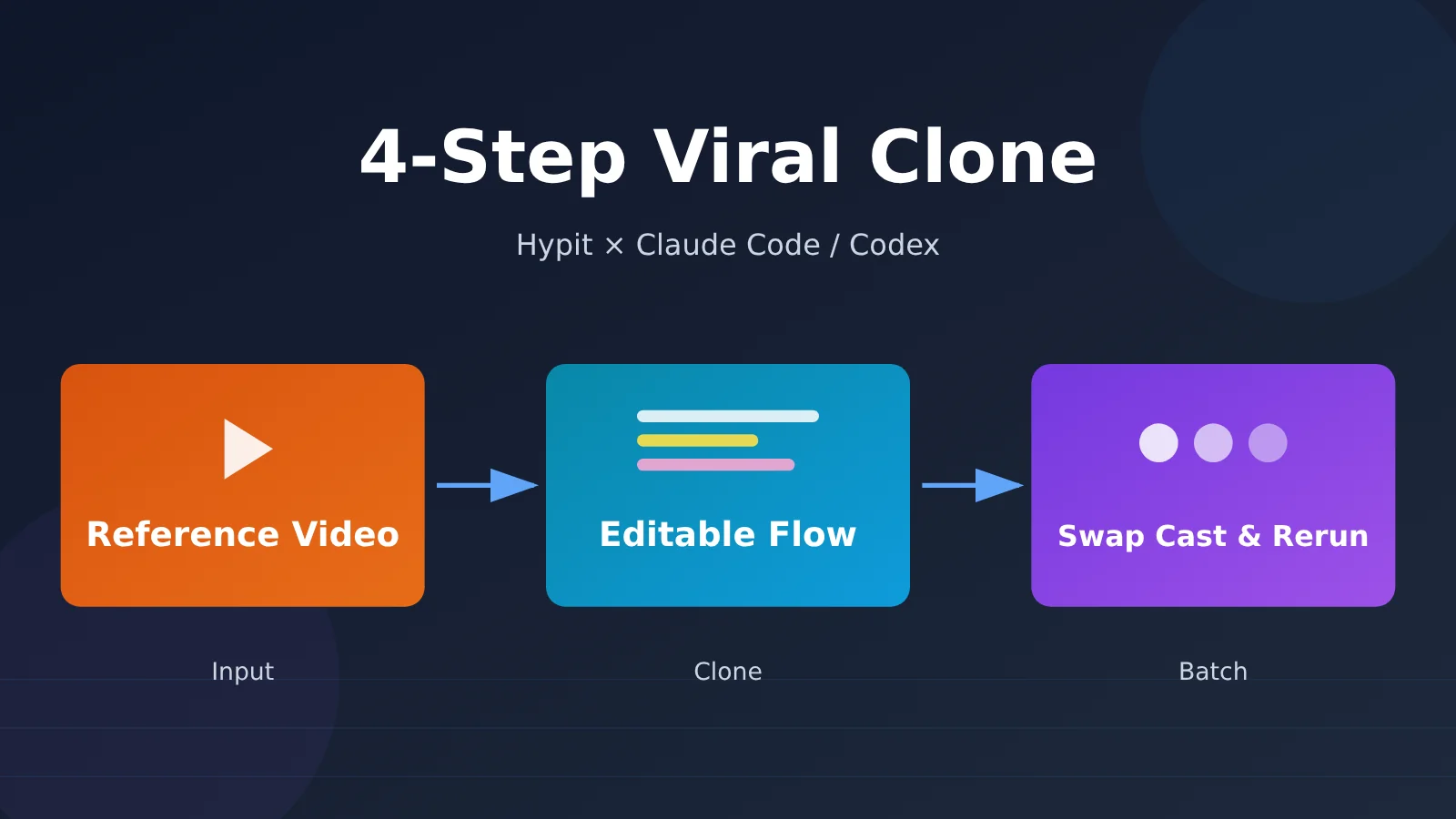
Author’s Note: Reverse-engineer viral videos using Hypit alongside Claude Code or Codex. In 4 simple steps, you can clone reference videos into editable production pipelines, swap talent or products while only re-running the modified parts, and see exactly where costs go with upfront estimates before you build.
The secret to reverse-engineering a viral hit isn’t just copying the script—it’s lifting and shifting the entire production pipeline. Hypit clones the full combination of storyboards, subtitles, B-roll, visual effects, and timelines, meaning when you tweak one element, you only have to re-render that specific part.
Anyone running paid video ads, e-commerce promos, or TikTok accounts has hit this exact bottleneck: once a video takes off, you want to swap the presenter, swap the product, change the language, or adjust the aspect ratio to create dozens of variations—and every single cut usually requires manual re-editing. This isn’t another generic AI video tool overview. It’s a hands-on playbook designed for creators and developers who already have Claude Code or Codex ready, even if they’ve never touched traditional video editing software. All details below are verified against Hypit’s GitHub repository README and official documentation as of October 26, 2026.
Key Takeaway: After reading this guide, you’ll be able to independently use an Agent to clone viral hits, understand what to expect and verify at every stage, and have full transparency into where your money actually goes.
Breaking Down Viral Videos: What Hypit Actually Does
Here are the four key takeaways at a glance before we dive into each one:
| Key Takeaway | TL;DR | What It Means for You |
|---|---|---|
| What it is | A “video creation language and system” built for agents like Claude Code and Codex | No need to master editing software—everything is driven by conversation |
| How it becomes editable | Footage, captions, B-roll, and effects are anchored to “words” instead of “seconds” | Swap out characters or products, and visuals automatically sync with the spoken script |
| How costs are managed | Hypit itself is free; any paid calls require an upfront quote and your confirmation | You call the shots on your budget—no surprise charges |
| Who it’s for | Ad and e-commerce teams that need to spin up dozens of variations from a single video | Limited value if you’re only editing one-off videos |
The Essence of Deconstructing Viral Videos: Hypit Is a “Video Language”
Officially, Hypit positions itself as a video creation language and system tailored for AI coding agents. When you hand a reference video to an agent, it reverse-engineers the video into a complete workflow—covering footage, captions, B-roll, and visual effects. The end result is an editable, re-runnable composition, not just a static, one-and-done rendered video file.
The team specifically highlights two key points. First, cloning a viral hit is just the quickest way to get started. You can also kick things off with official templates, or simply describe what you want and have the agent build the workflow from scratch. Second, generative models are completely optional. A workflow can compile a finished video purely using captions, motion graphics, and code-rendered visuals—without touching generative AI models at all, saving you from third-party generation fees.
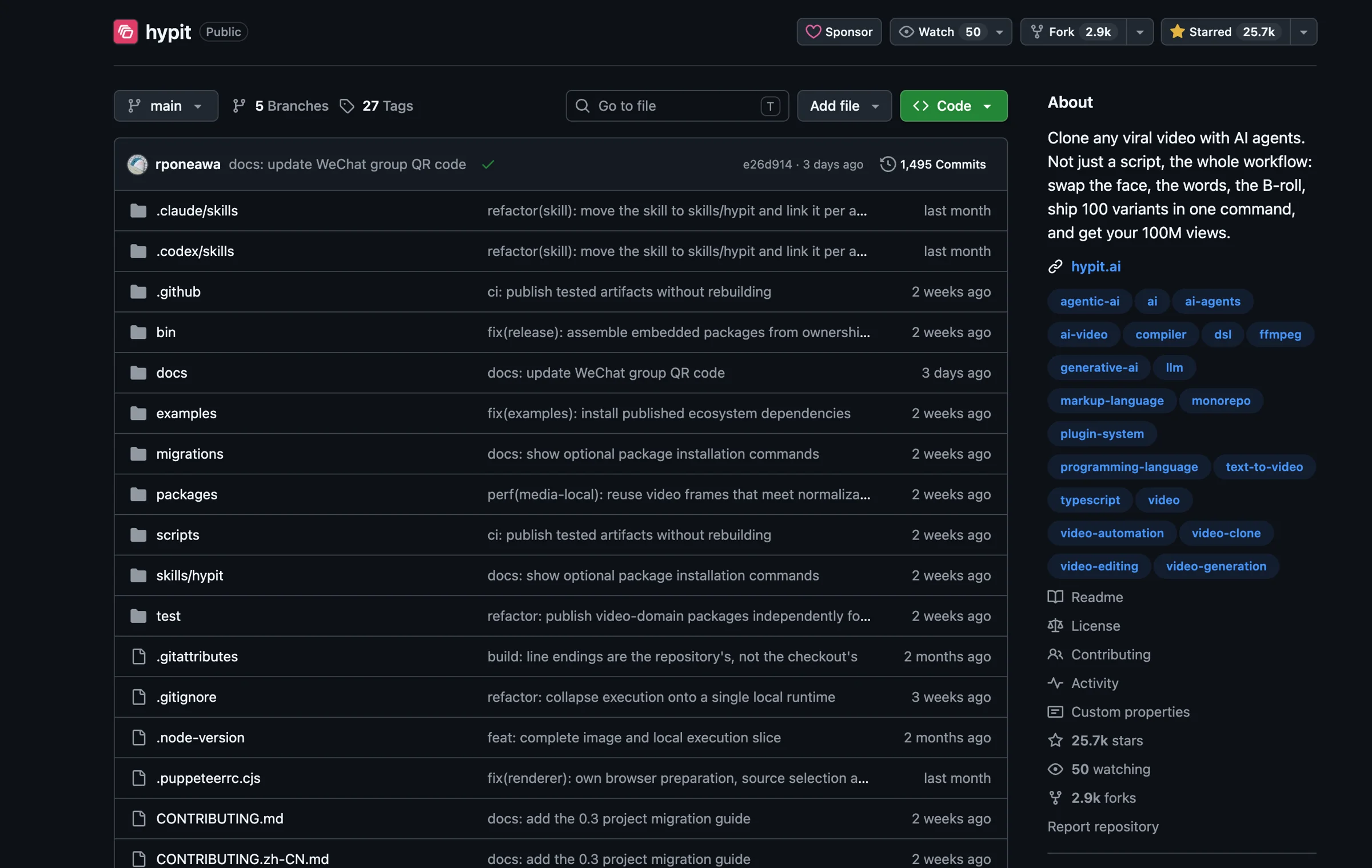
Head over to Hypit’s GitHub repository, and its positioning and project architecture are immediately obvious: the repo currently boasts 25.7k stars, 2.9k forks, and 1,495 commits, cleanly organized into directories like skills, examples, and packages (screenshot taken from the repo homepage on 2026-10-26).
Why Deconstructing Viral Videos Lets You “Only Rerun What Changed”
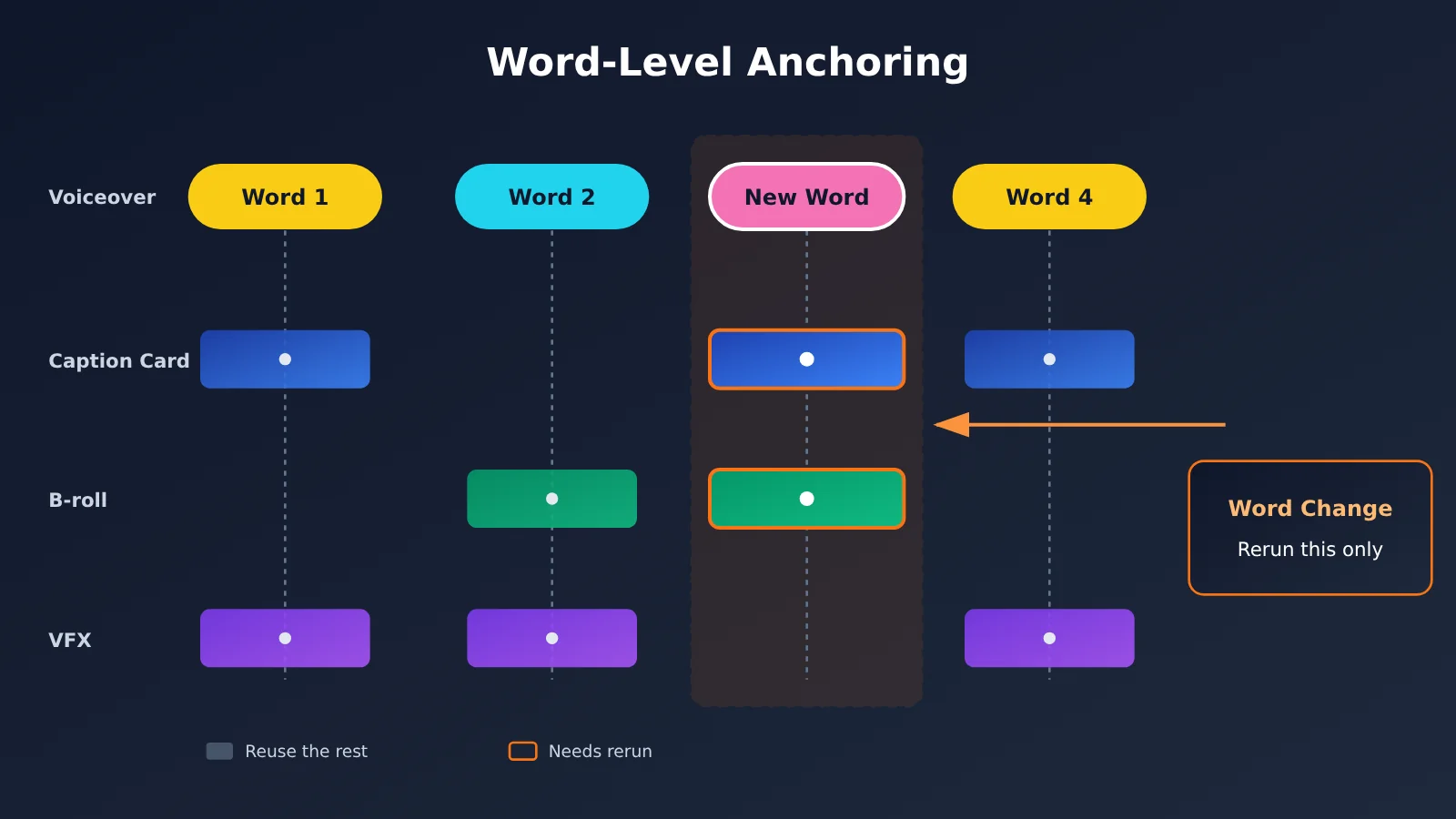
Traditional video editing arranges everything second-by-second on a timeline. If you swap out a host and the line delivery length shifts, every subsequent caption card and transition gets thrown completely out of sync. Hypit’s approach is to anchor visuals directly to “words”: when the reference video has spoken audio, WhisperX outputs each word along with its precise timestamp. The Agent then uses this data to figure out exactly which word a graphic should snap to. During cloning, the Agent also breaks down why the video worked—like which exact words triggered caption cards—and logs that analysis into reference notes right inside the project.
That’s why after switching hosts or products, the system knows exactly which assets need to be regenerated and which can be left untouched. Keep in mind, though, that Hypit has no implicit caching. Every build generates a brand-new build ID, even if you haven’t touched a single letter in the source files. If you want to reuse earlier outputs, you need to explicitly declare it in the new run file—we’ll cover this in detail in Step 4 of the Quickstart guide.
Breaking Down the Cost of Remaking Viral Videos: Hypit Is Free, Models Are Pay-As-You-Go
Hypit’s official documentation makes it clear: there are no seat fees, no per-render charges, and no watermarks. The only things you pay for are the external services you choose to connect. These mainly fall into three buckets: your coding agent subscription, API keys for various model providers, or an officially recommended HypiHub managed account.
For model services, you can bring your existing API keys and connect them via built-in providers or custom ones written specifically for your project. Just to clarify, APIYI apiyi.com is not on Hypit’s official Launch Partners list, and there is no formal partnership between them. It simply falls into the “bring-your-own-key model service” category, meaning you’ll need to set it up yourself following the provider mechanism outlined in Hypit’s documentation.
Who Should (and Shouldn’t) Use It for Remaking Viral Videos
The best-fit audience is pretty straightforward: ad teams needing to spin off dozens of variations from a single winning creative, cross-border TikTok operators, and indie hackers looking to streamline and automate video production. Hypit’s three official examples all showcase “one original clip plus three clone versions”—which maps directly to common workflows like swapping actors, changing products, or localizing languages.
On the flip side, it’s probably not right for you in three scenarios: you’re just making a single one-off clip with no plans to iterate; you don’t use a coding agent and don’t want to work in a command-line environment; or you’re producing high-end brand films that demand frame-by-frame manual touch-ups. Hypit excels at repeatable structures—it’s not meant to replace an editor’s creative intuition.
Quickstart: Breaking Down Viral Videos in 4 Steps — Clone, Swap Subjects, and Batch Rerun
The following four steps are organized according to the official Quickstart workflow. Each step covers three key things: what to do, what you’ll see, and how to verify it. Most of the process happens directly inside your Coding Agent (like Claude Code or Codex) through plain conversation—we’ll explicitly point out whenever you need to run commands manually in your terminal.
Step 1: Set Up Your Environment and the Hypit Skill
What to do:
- Check your Node version in your terminal. Run
node -v—it must be at least 22.15 (this is a hard requirement). - Install the Skill in your terminal. Run
npx skills add hypit-ai/hypit -g. The Skill equips your Agent with the domain knowledge needed to produce videos. - Ask your Agent to verify the executable. Just tell it, “Check if hypit is installed.” It’ll confirm whether the
hypitCLI is in place and help you install any missing tools. - Run a health check in your terminal. Execute
hypit doctor. It only performs read-only checks, so it won’t spin up any Workers or trigger paid API requests.
What you’ll see: The Skill and the hypit executable package are installed and updated separately. The Skill provides procedural knowledge, while the CLI package delivers the commands, components, Runtime, and Studio. Your video projects can live in any folder—there’s no need to clone a repo. If you’ve already installed it before, you can have your Agent run hypit version --check to see your current version.
How to verify: You’re all set once hypit doctor reports zero blocking issues and hypit version --check successfully outputs the version number. If you plan to run WhisperX locally, make sure you’ve also installed Python 3.10 to 3.13 along with uv, plus ffmpeg and ffprobe for media processing.
Step 2: Submit the Reference Video and Specify Your Changes
What to do:
- Submit your reference video in the Agent chat—this can be a local video file or a link from a supported platform.
- Attach your replacement assets in the same chat, such as headshots of the new presenter, product photos, or brand assets.
- Provide a quick, one-line summary of your requested changes. You can modify aspects like the presenter, product, language, aspect ratio, and call-to-action (CTA). For example: “Swap the host with the person in this photo, replace the product with skincare items, and change the ending CTA to claim a coupon.”
What you’ll see: The Agent will first break down why this video works—tracking where graphic overlays and subtitle cards sync with specific spoken words—and log its analysis and decisions in the project’s reference notes. You’ll then see source files like .svml pop up in the project directory (check the file breakdown in the next section for what each one does).
How to review: Give the reference notes a quick read to see if the Agent’s take on the video’s hooks and viral elements aligns with yours—like whether it caught the subtitle card in the first 3 seconds. If it’s off track, simply correct it in the chat; making adjustments at this stage doesn’t cost anything. You can also run hypit check reference.svml in your terminal to verify that the source code has no issues.
Step 3: Pick Your Services, Review the Plan and Pricing Before You Start
What to do:
- Decide on your transcription method in the Agent chat. If your reference video has a spoken voiceover, you’ll need WhisperX to output word-level timestamps. Running it locally comes with setup overhead, while using HypiHub managed hosting is much easier—and you can always mix and match both approaches.
- Choose your generation services in the Agent chat. Decide which models will handle your A-roll video and B-roll images. You can use HypiHub or bring your own API key via a Provider. If you plan to connect an OpenAI-compatible service like APIYI (apiyi.com), set the endpoint URL to
https://api.apiyi.com/v1. Refer to the Hypit documentation’s Provider guide for exact syntax. - Select your runtime in the terminal. Run
hypit runtime use hypit.runtime.json. - Review the execution plan in the terminal. Run
hypit plan build.svrun. This only lists the target deliverables, external requests to be sent, and available parameters—it won’t trigger any actual tasks. - Check the pricing in the terminal. Run
hypit pricing reference.svrun. It reads the rates from your selected providers and groups requests by volume and unit cost. Add--jsonfor structured output, or append--verboseto see full request details and raw pricing docs.
What you’ll see: Following the official rules, before initiating any paid model invocations, the Agent must clearly explain which account it’s using, what it plans to do, the known rates, and estimated costs—including any parts that are still tentative. Once you confirm the scope and budget, all invocations within that scope run together. Switching accounts, adjusting the scope, or increasing the budget will always require fresh confirmation.
How to verify: Make sure the number of requests in the quote matches your changelog. For instance, if you only swapped out the product but see that all A-roll clips are queued for regeneration, stop and ask the Agent why before continuing.
🚀 Official Best Practice: Keep your scope as narrow as possible on your first run—like generating just a single variation—to make sure the workflow runs smoothly before moving on to batch jobs. For model services, you can first test your connection using the new-user free trial credits on APIYI (apiyi.com). Check the platform’s model catalog for supported models and current pricing.
Step 4: Build the Final Video, Then Batch-Rerun with New Actors or Products
What to do:
- Submit the generation job in your terminal. Run
hypit build build.svrun --follow. Note that onlybuildactually submits the task—--followsimply lets you monitor progress, so closing your terminal won’t interrupt the background run. - Download the finished video in your terminal. Run
hypit get <build-id> --output final.video --to output/final.mp4. - Open the preview in your terminal. Run
hypit studio --run build.svrun. The default port is 5179, and the interface supports Simplified Chinese. - Head back to the Agent chat to create variants, such as: “Generate another version, but swap out the product for an app.”
What you’ll see: The Agent will first verify that layouts, subtitles, graphics, and B-roll appear at the exact right moments before delivering the final video. Inside Studio, you can inspect the timeline and editable properties. The #comments view supports timestamped notes, which are saved directly to your project’s FEEDBACK.json. When creating variants, the Agent reuses appropriate existing assets and only reruns what actually changed.
How to verify: First, review the final video to confirm subtitles and lip-sync match up, and that the product appears right on cue with the spoken words. Next, check whether asset reuse actually worked: the new .svrun should explicitly declare the previous results to reuse using build-record and satisfy. You can run hypit plan to confirm downstream requests have decreased before you spend any credits. To check your build history, run hypit builds, hypit history <output-name>, or hypit inspect <build-id>.
Deconstructing Viral Video Project Files and Costs: Where Does the Money Go?
What Do the Files in a Viral Video Project Actually Do?
Opening the project directory for the first time can be confusing with all those unfamiliar file extensions. Let’s break down what each file type actually does in plain English:
| File | Plain English Explanation | When You’d Touch It |
|---|---|---|
| .svml | The “script + asset checklist”—defines what the video says, which assets and components to use, and how to piece everything together. | When updating lines or swapping assets (usually handled by the Agent). |
| .svs | The “reusable recipe”—like a karaoke caption style or a split-screen interview layout. | When you want multiple videos to share the exact same style. |
| .svrun | The “work order”—specifies which script to run, which existing assets to reuse, and what final deliverables to generate. | Every time you run variations; reuse declarations go here. |
| Build Results | The “build log”—contains the generated output files and the factual execution log for that specific run. | When checking what went into a specific version and what it cost. |
You’ll also see reference notes, Briefs (target specifications), and Treatments (creative responses). These document the Agent’s understanding of the reference video and outline the creative direction for the current run.
Cost Reference from Official Examples (Self-Reported)
The three sets of figures below come from the author’s self-reported total costs in the Hypit example READMEs, based on single-run experiments. These aren’t official quotes and shouldn’t be taken as a hard project budget—they’re just meant to give you a rough idea of what resources are involved.
| Example | Duration | Key Resources | Self-Reported Cost |
|---|---|---|---|
| Soccer Ranking: GOAT DEBATE | 20s | 2x Seedance 2 Mini 720p A-roll clips, 1x 2K + 10x 1K GPT Image 2 images, WhisperX | $1.15 |
| Podcast Clip: DAILY CREATINE | 18s | 3x Seedance 2 Mini 720p A-roll clips, 2x 2K character images + 3x 1K collage tiles, WhisperX | $1.07 |
| Street Interview: NICE RIDE | 26s | 3x Seedance 2 Mini 720p A-roll clips, 1x 2K character image, WhisperX, face bounding boxes & YOLOv8 head tracking | $1.09 |
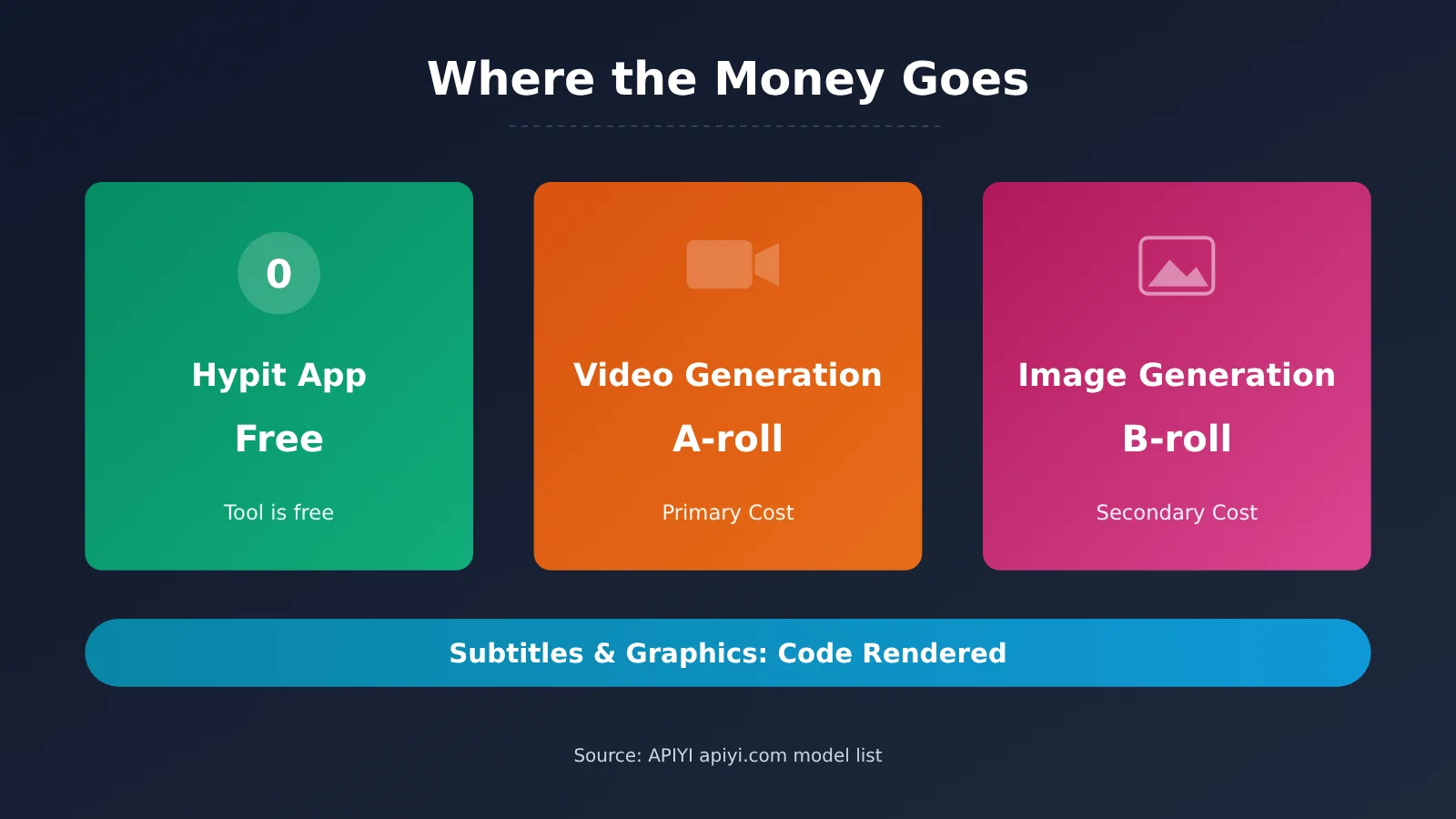
Looking at the breakdown, the cost mainly boils down to two things: A-roll video generation, plus image generation for B-roll and character reference images. Subtitles, motion graphics, and layouts are rendered programmatically via code, so they don’t rack up any extra generation costs.
APIYI Video and Image Model Pricing
If you’re integrating APIYI (apiyi.com) directly using the provider mechanism, the table below lists the relevant models pulled from the platform’s catalog. Listed prices reflect default rates and don’t necessarily match the exact services shown in official examples.
| Model | Billing Model | Price (USD) | Endpoint |
|---|---|---|---|
| doubao-seedance-2-0-mini-260615 | Token-based | Input $23 / Output $23 (per million tokens) | chat |
| doubao-seedance-2-0-fast-260128 | Token-based | Input $37 / Output $37 (per million tokens) | chat |
| veo-3.1-fast-generate-preview | Per request | $0.3 / call | chat |
| wan3.0-video | Per second | $0.0294 / sec | chat |
| MiniMax-H3 | Per second | $0.03 / sec | hailuo |
| oxygen-1.0 | Per second | $0.02 / sec | videos |
| gpt-image-2 | Token-based | Input $5 / Output $30 / Cached read $1.25 (per million tokens) | chat, images |
| gpt-image-2-all | Per request | $0.025 / call | chat, images |
Data updated on October 25, 2026 (in USD). Models use a mix of per-request, per-second, and token-based pricing. Actual model availability and pricing are subject to the platform’s official model list.
Here’s how the three billing methods work: Per request charges per API call; Per second bills based on generated video duration, deducted per requested second; Token-based charges per million tokens (input/output). As for endpoints, chat maps to /v1/chat/completions, images points to /v1/images/generations, videos routes to /v1/videos, and hailuo is MiniMax’s native video endpoint. Keep an eye on platform promotions too—top-up events and tier discounts can be stacked, so your actual billed cost will reflect what’s shown live in your console.
Three Habits to Keep Costs Down:
- Run
hypit planandhypit pricingbefore every build. - Explicitly declare reused assets when generating variations to avoid regenerating existing materials.
- Test a single run at minimum scope first; scale up to batch generation only after confirming the output looks good.
Common Errors & Troubleshooting When Breaking Down Viral Videos
| Issue | Common Cause | Solution |
|---|---|---|
| Node version error during installation or runtime | Node version is below 22.15 | Upgrade Node to 22.15 or higher, then run hypit doctor to check again |
Terminal says hypit command not found |
Only installed the Skill, not the executable package | Both need to be installed separately. Ask the Agent in chat to install hypit, then run hypit version --check |
| WhisperX fails to run | Missing Python 3.10–3.13, uv, or ffmpeg locally |
Install the missing dependencies, then run hypit programs up --runtime <profile> --endpoint <render-instance>. If you’d rather avoid the hassle, switch to HypiHub managed hosting instead |
| Trying to trigger paid calls before seeing a price quote | Skipped the planning and pricing steps | Run hypit plan build.svrun and hypit pricing reference.svrun first. If you change the scope or increase the budget, you’ll need to reconfirm |
| Disconnected mid-build and want to resume | Closed the terminal assuming the job stopped | --follow is just a watcher; the job keeps running in the background. Run hypit builds to find the build ID, then run hypit get. To stop it, use hypit cancel <build-id> |
| Subtitles and visuals are out of sync in the final cut | Missing word-level timestamps, or edited copy wasn’t regenerated for that section | Make sure WhisperX generated word-level timestamps. Pinpoint the spot on the Studio timeline, leave a note with #comments, and have the Agent re-run just that specific segment |
The golden rule of troubleshooting is to always start with read-only commands. hypit doctor, hypit plan, and hypit check don’t incur any costs—diagnose the issue first before submitting a build.
FAQs on Deconstructing Viral Videos
Q1: Do you have to invoke generative models to deconstruct viral videos?
Not necessarily. According to official docs, a workflow can compile a final video using only subtitles, motion graphics, and code-rendered visuals without invoking any generative models—meaning zero generation service fees. You only need to invoke video or image models when you need new character A-roll or B-roll footage.
Q2: What is the relationship between Hypit and APIYI?
There’s no official partnership between the two, and APIYI isn’t on Hypit’s Launch Partners list. APIYI apiyi.com is a bring-your-own-key model service that you can integrate yourself following the Provider mechanism in the Hypit documentation. It provides OpenAI-compatible interfaces for multiple models using a single API key, with model availability and pricing determined by the platform’s model list.
Q3: Who handles transcription and word-level alignment for the reference video?
In the Hypit workflow, WhisperX handles this. You can run it locally or host it through HypiHub. APIYI doesn’t provide this service—integrating it is strictly for the video and image generation stages.
Q4: About how much does a 20-second clip cost?
The three official examples report costs between $1.07 and $1.15, but that’s just benchmark data from single test runs, not a fixed quote. Your actual spending depends on the chosen models, the number of A-roll takes, and the image count. The most reliable approach is to run `hypit pricing` first for an estimate, and then verify it against the actual usage in the APIYI apiyi.com console.
Q5: If I generate 50 versions, will each one be created from scratch?
They won’t be reused automatically, but you can declare reuse manually. Hypit doesn’t use implicit caching. You need to declare which past artifacts to carry over using `build-record` plus `satisfy` in the new `.svrun` file, and then run `hypit plan` to confirm that requests are sent only for the modified parts. Once you nail this step, batch reruns will save you real money.
Viral Video Deconstruction Summary: When to Use Hypit
When you have a viral hit driving serious volume and need to churn out multiple variations—swapping actors, products, or languages—Hypit’s approach of “cloning the entire production pipeline and only re-running what changed” is by far the most cost-effective. However, if you’re only making a one-off video you’ll never touch again, or if you need frame-by-frame manual touch-ups, the overhead of setting up the environment and learning the workflow will likely cost you more than just editing it manually. Either way, reviewing the plan and cost estimate before every build is your single most effective move for keeping expenses under control.
During the model integration phase, you can leverage APIYI (apiyi.com) using its free tier to test-run a minimal variant first before deciding whether to scale up in bulk.
📚 References
- Hypit GitHub Repository: README and official examples
- Link:
github.com/hypit-ai/hypit -
Description: Product positioning, assets used, and self-reported costs across three examples
-
Hypit Official Documentation Quickstart: 5-step onboarding guide
- Link:
hypit.ai -
Description: Skill installation and the “quote before you build” workflow
-
Hypit Official Documentation Run & Develop: CLI and environment requirements
- Link:
hypit.ai/quickstart/run/ - Description: Commands like
plan,pricing,build, along with Node and Python version requirements
Author: APIYI Technical Team
Tech Support & Discussion: For supported model types and billing details, check out our documentation center at docs.apiyi.com