When you're using Sora 2 API for video generation, knowing the availability of different access methods is crucial. In this post, we'll dive deep into the status differences between Official Relay and Official Reverse access. This should help you pick the most stable calling solution for your needs.
Core Value: By the end of this article, you'll know how to check the real-time status of various Sora 2 API services, understand the stability gap between relay and reverse methods, and learn how to choose the right access path for your specific business requirements.
Sora 2 API Availability Status Overview
Looking at the real-time status from January 28, 2026, at 14:00, there's a clear difference in availability across service types:
| Service Type | Current Status | Stability | Description |
|---|---|---|---|
| Sora 2 Relay | 🟢 Operational | ★★★★★ | Via official API relay |
| Sora 2 Pro Relay | 🟢 Operational | ★★★★★ | Pro version official relay |
| Sora 2 Reverse | 🟡 Risk Control | ★★☆☆☆ | Reverse interface restricted |
| Sora 2 Pro Reverse | 🔴 Suspended | ★☆☆☆☆ | Service temporarily unavailable |
| Veo 3.1 Reverse | 🟢 Operational | ★★★☆☆ | Google video model |
| Sora Images | 🟢 Operational | ★★★★☆ | Image generation feature |
What are Official Relay and Official Reverse?
In the world of AI video generation APIs, there are two main ways to connect:
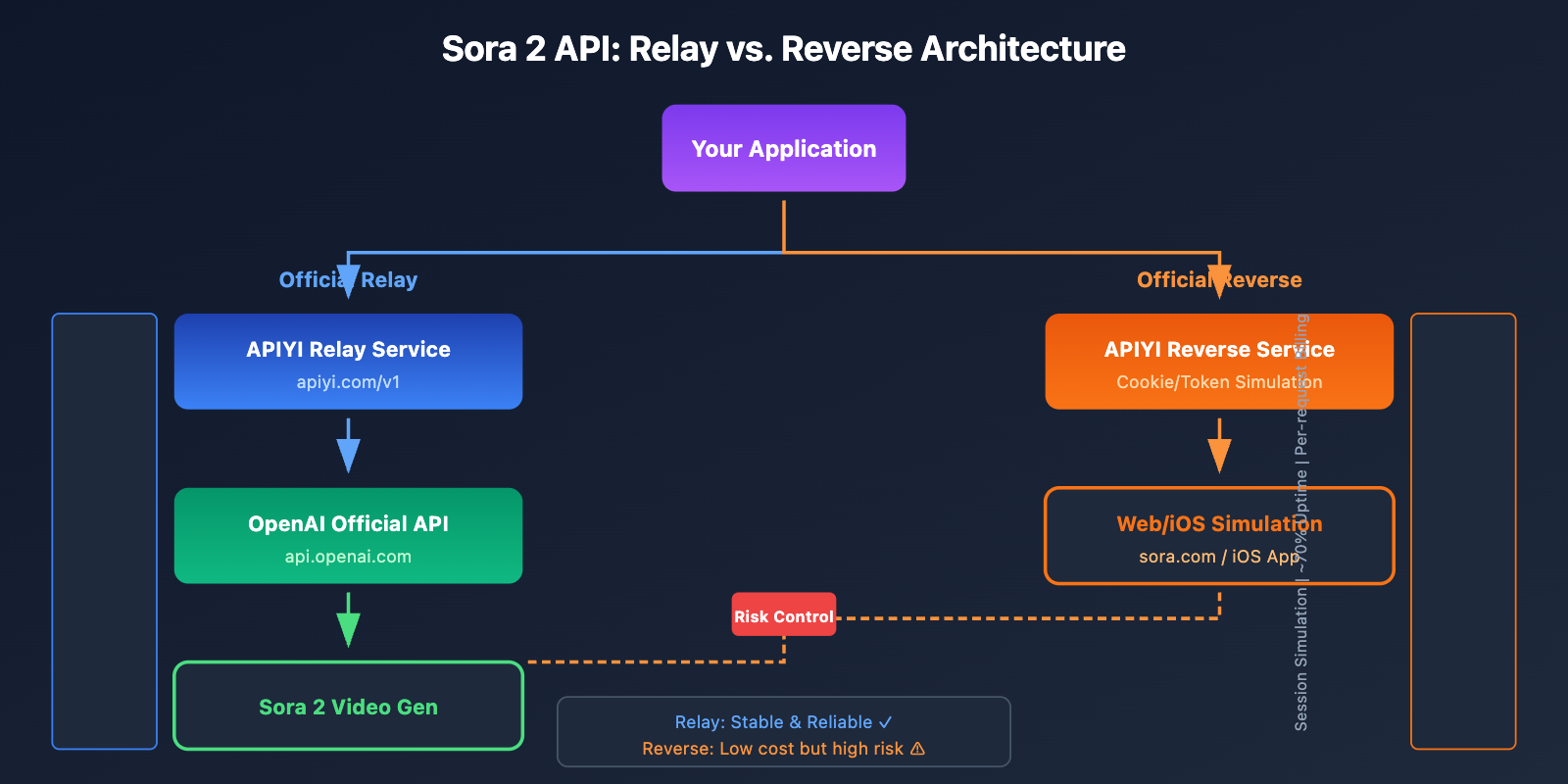
Official Relay:
- Calls are made through the official OpenAI API interface.
- Uses officially authenticated API Keys.
- Billed according to official pricing (per-second billing).
- Stability is backed by an SLA guarantee.
Official Reverse:
- Simulates Web/App calls via reverse engineering.
- Based on subscription account Cookies/Tokens.
- Billed per request, which makes it cheaper.
- Stability is often affected by the platform's risk control measures.
🎯 Pro Tip: For production environments and commercial projects, we recommend using the Official Relay API via the APIYI (apiyi.com) platform to ensure you get the most stable service.
Detailed Comparison: Sora 2 API Official Relay vs. Official Reverse
Differences in Technical Principles
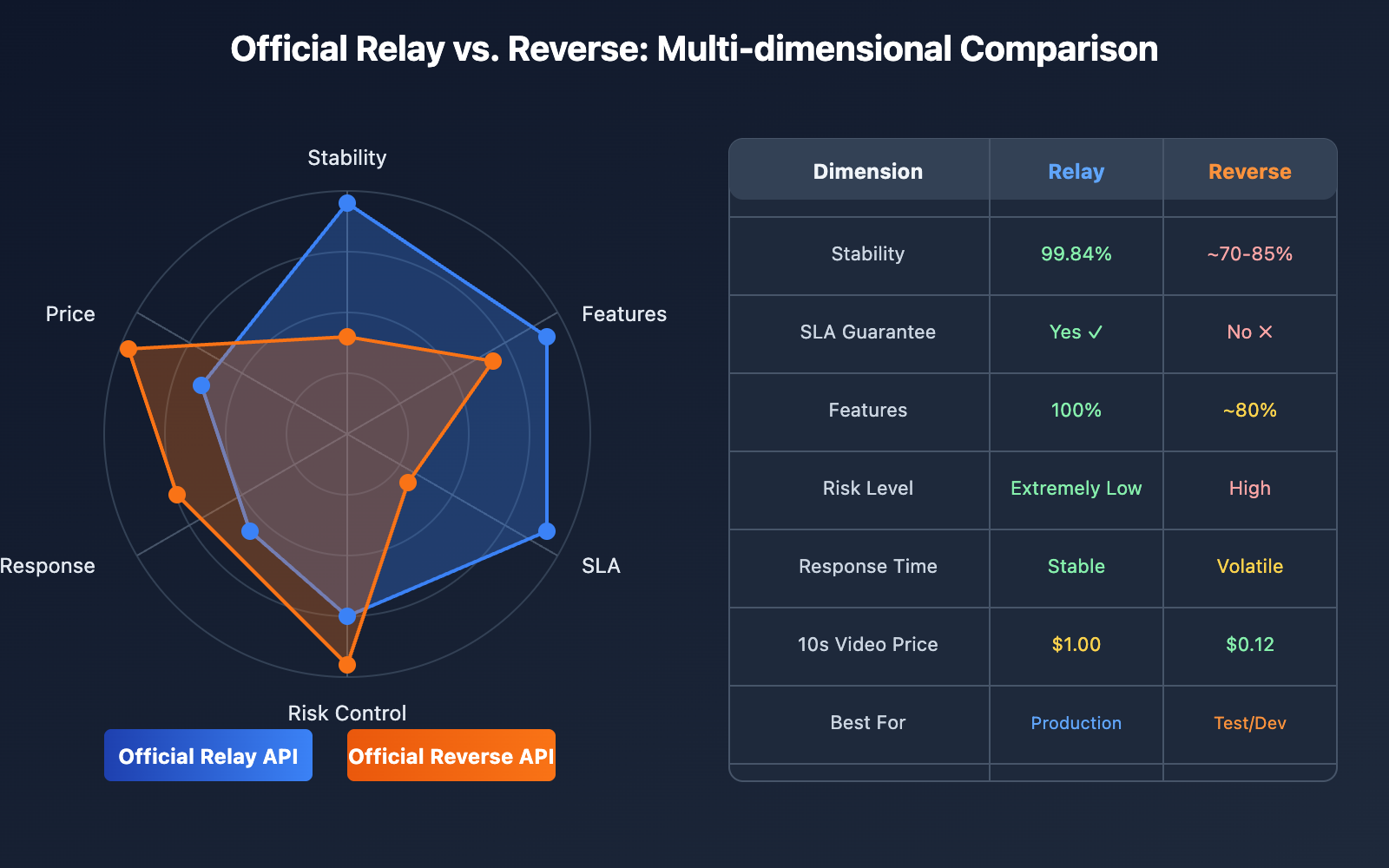
| Dimension | Official Relay | Official Reverse |
|---|---|---|
| Access Method | Official OpenAI API Interface | Simulates Web/iOS App requests |
| Authentication | API Key | Cookie/Session Token |
| Billing Model | Per-second ($0.10-0.50/sec) | Per-request ($0.12-0.80/request) |
| SLA Guarantee | 99.9% Availability Commitment | No guarantee |
| Risk Level | Extremely Low | High |
| Feature Completeness | Full API parameter support | May lack certain parameters |
Stability Comparison
Based on monitoring data from January 2026:
| Service | Monthly Availability | Avg. Response Time | Risk Frequency |
|---|---|---|---|
| Sora 2 Official Relay | 99.84% | Stable | Almost none |
| Sora 2 Official Reverse | ~85% | Highly Volatile | 1-3 times per week |
| Sora 2 Pro Official Relay | 99.84% | Stable | Almost none |
| Sora 2 Pro Official Reverse | ~70% | Highly Volatile | Frequent |
Price Comparison
Using a 10-second 720p video generation as an example:
| Plan | Single Price | Cost (100 runs/mo) | Value for Money |
|---|---|---|---|
| Official Relay Standard | $1.00 | $100 | Top choice for stability |
| Official Relay Pro | $5.00 | $500 | High-quality needs |
| Official Reverse Standard | $0.12 | $12 | Testing scenarios |
| Official Reverse Pro | $0.80 | $80 | Limited budget |
💡 Cost Tip: You can get better rates for official relay APIs through the APIYI (apiyi.com) platform, allowing you to lower costs while maintaining stability.
How to Check Sora 2 API Status
Method 1: Official OpenAI Status Page
You can check the real-time status of official relay APIs through the OpenAI status page:
Check at: status.openai.com
This page provides:
- Overall API service status
- Sora-specific service status (monitoring 5 components)
- Historical uptime data (99.84% over the last 90 days)
- Scheduled maintenance notifications
- Incident logs
import requests

def check_openai_status():
    """Check official OpenAI service status"""
    # Note: This is demo code; actual parsing of the status page is required
    status_url = "https://status.openai.com/api/v2/status.json"

    try:
        response = requests.get(status_url, timeout=10)
        data = response.json()

        status = data.get("status", {})
        indicator = status.get("indicator", "unknown")
        description = status.get("description", "")

        return {
            "status": indicator,  # none/minor/major/critical
            "description": description,
            "operational": indicator == "none"
        }
    except Exception as e:
        return {"status": "error", "description": str(e)}

# Example usage
result = check_openai_status()
print(f"OpenAI Status: {result['description']}")
Method 2: Third-Party Status Monitoring
For the status of relay and reverse services, you can refer to third-party provider status pages:
APIYI Status Monitoring: Provides real-time status for both official relay and reverse services.
import openai

def check_sora_availability(api_key, base_url="https://api.apiyi.com/v1"):
    """
    Check Sora 2 API availability
    Tests service status via the unified APIYI interface
    """
    client = openai.OpenAI(
        api_key=api_key,
        base_url=base_url
    )

    services = {
        "sora-2": "Sora 2 Standard",
        "sora-2-pro": "Sora 2 Pro",
    }

    results = {}

    for model, name in services.items():
        try:
            # Test availability with minimum parameters
            response = client.videos.create(
                model=model,
                prompt="Test availability",
                seconds=4,
                size="1280x720"
            )
            results[model] = {
                "name": name,
                "status": "operational",
                "task_id": response.id
            }
        except Exception as e:
            error_msg = str(e)
            if "rate_limit" in error_msg.lower():
                status = "rate_limited"
            elif "unavailable" in error_msg.lower():
                status = "unavailable"
            else:
                status = "error"

            results[model] = {
                "name": name,
                "status": status,
                "error": error_msg
            }

    return results

# Example usage
status = check_sora_availability("YOUR_API_KEY")
for model, info in status.items():
    print(f"{info['name']}: {info['status']}")
🚀 Quick Start: We recommend using the apiyi.com platform for API availability testing. It offers unified status monitoring and alerting services.
Method 3: Implementing Automated Status Monitoring
Here's a production-grade status monitoring tool you can use:
import openai
import time
from datetime import datetime
from typing import Dict, List, Optional
from dataclasses import dataclass
from enum import Enum

class ServiceStatus(Enum):
    OPERATIONAL = "operational"      # Running normally
    DEGRADED = "degraded"           # Performance issues
    RISK_CONTROL = "risk_control"   # Under risk control
    SUSPENDED = "suspended"         # Service suspended
    UNKNOWN = "unknown"             # Status unknown

@dataclass
class ServiceInfo:
    name: str
    model: str
    type: str  # "official" or "reverse"
    status: ServiceStatus
    last_check: datetime
    response_time: Optional[float] = None
    error_message: Optional[str] = None

class SoraStatusMonitor:
    """Sora 2 API Status Monitor"""

    SERVICES = {
        "sora-2-official": {
            "name": "Sora 2 Official Relay",
            "model": "sora-2",
            "type": "official"
        },
        "sora-2-pro-official": {
            "name": "Sora 2 Pro Official Relay",
            "model": "sora-2-pro",
            "type": "official"
        },
    }

    def __init__(self, api_key: str, base_url: str = "https://api.apiyi.com/v1"):
        self.client = openai.OpenAI(api_key=api_key, base_url=base_url)
        self.status_history: Dict[str, List[ServiceInfo]] = {}

    def check_service(self, service_id: str) -> ServiceInfo:
        """Check status of a single service"""
        config = self.SERVICES.get(service_id)
        if not config:
            raise ValueError(f"Unknown service: {service_id}")

        start_time = time.time()

        try:
            # Send test request
            response = self.client.videos.create(
                model=config["model"],
                prompt="Status check test",
                seconds=4,
                size="1280x720"
            )

            response_time = time.time() - start_time

            return ServiceInfo(
                name=config["name"],
                model=config["model"],
                type=config["type"],
                status=ServiceStatus.OPERATIONAL,
                last_check=datetime.now(),
                response_time=response_time
            )

        except Exception as e:
            error_msg = str(e).lower()
            response_time = time.time() - start_time

            # Determine status based on error type
            if "rate_limit" in error_msg or "risk control" in error_msg:
                status = ServiceStatus.RISK_CONTROL
            elif "suspended" in error_msg or "unavailable" in error_msg:
                status = ServiceStatus.SUSPENDED
            elif "timeout" in error_msg:
                status = ServiceStatus.DEGRADED
            else:
                status = ServiceStatus.UNKNOWN

            return ServiceInfo(
                name=config["name"],
                model=config["model"],
                type=config["type"],
                status=status,
                last_check=datetime.now(),
                response_time=response_time,
                error_message=str(e)
            )

    def check_all_services(self) -> Dict[str, ServiceInfo]:
        """Check status of all services"""
        results = {}
        for service_id in self.SERVICES:
            results[service_id] = self.check_service(service_id)
            time.sleep(1)  # Avoid rate limits
        return results

    def get_status_summary(self) -> str:
        """Get status summary report"""
        results = self.check_all_services()

        lines = [
            f"Sora 2 API Status Report - {datetime.now().strftime('%Y-%m-%d %H:%M')}",
            "=" * 50
        ]

        status_icons = {
            ServiceStatus.OPERATIONAL: "🟢",
            ServiceStatus.DEGRADED: "🟡",
            ServiceStatus.RISK_CONTROL: "🟡",
            ServiceStatus.SUSPENDED: "🔴",
            ServiceStatus.UNKNOWN: "⚪"
        }

        for service_id, info in results.items():
            icon = status_icons.get(info.status, "⚪")
            line = f"{icon} {info.name}: {info.status.value}"
            if info.response_time:
                line += f" ({info.response_time:.2f}s)"
            lines.append(line)

        return "\n".join(lines)

# Example usage
monitor = SoraStatusMonitor(api_key="YOUR_API_KEY")
print(monitor.get_status_summary())
View full code (including alerts and scheduled tasks)
import openai
import time
import json
import smtplib
from datetime import datetime, timedelta
from typing import Dict, List, Optional, Callable
from dataclasses import dataclass, asdict
from enum import Enum
from email.mime.text import MIMEText
import threading

class ServiceStatus(Enum):
    OPERATIONAL = "operational"
    DEGRADED = "degraded"
    RISK_CONTROL = "risk_control"
    SUSPENDED = "suspended"
    UNKNOWN = "unknown"

@dataclass
class ServiceInfo:
    name: str
    model: str
    type: str
    status: ServiceStatus
    last_check: datetime
    response_time: Optional[float] = None
    error_message: Optional[str] = None

    def to_dict(self):
        d = asdict(self)
        d['status'] = self.status.value
        d['last_check'] = self.last_check.isoformat()
        return d

class SoraStatusMonitor:
    """Sora 2 API Status Monitor - Full Version"""

    SERVICES = {
        "sora-2-official": {
            "name": "Sora 2 Official Relay",
            "model": "sora-2",
            "type": "official"
        },
        "sora-2-pro-official": {
            "name": "Sora 2 Pro Official Relay",
            "model": "sora-2-pro",
            "type": "official"
        },
    }

    def __init__(
        self,
        api_key: str,
        base_url: str = "https://api.apiyi.com/v1",
        alert_callback: Optional[Callable] = None
    ):
        self.client = openai.OpenAI(api_key=api_key, base_url=base_url)
        self.alert_callback = alert_callback
        self.status_history: Dict[str, List[ServiceInfo]] = {
            sid: [] for sid in self.SERVICES
        }
        self._running = False
        self._monitor_thread = None

    def check_service(self, service_id: str) -> ServiceInfo:
        """Check status of a single service"""
        config = self.SERVICES.get(service_id)
        if not config:
            raise ValueError(f"Unknown service: {service_id}")

        start_time = time.time()

        try:
            response = self.client.videos.create(
                model=config["model"],
                prompt="Status check",
                seconds=4,
                size="1280x720"
            )

            return ServiceInfo(
                name=config["name"],
                model=config["model"],
                type=config["type"],
                status=ServiceStatus.OPERATIONAL,
                last_check=datetime.now(),
                response_time=time.time() - start_time
            )

        except Exception as e:
            error_msg = str(e).lower()

            if "rate_limit" in error_msg:
                status = ServiceStatus.RISK_CONTROL
            elif "suspended" in error_msg or "unavailable" in error_msg:
                status = ServiceStatus.SUSPENDED
            elif "timeout" in error_msg:
                status = ServiceStatus.DEGRADED
            else:
                status = ServiceStatus.UNKNOWN

            return ServiceInfo(
                name=config["name"],
                model=config["model"],
                type=config["type"],
                status=status,
                last_check=datetime.now(),
                response_time=time.time() - start_time,
                error_message=str(e)
            )

    def check_all_services(self) -> Dict[str, ServiceInfo]:
        """Check all services"""
        results = {}
        for service_id in self.SERVICES:
            info = self.check_service(service_id)
            results[service_id] = info

            # Record history
            self.status_history[service_id].append(info)
            # Keep only the last 100 entries
            if len(self.status_history[service_id]) > 100:
                self.status_history[service_id] = \
                    self.status_history[service_id][-100:]

            # Check if alert is needed
            self._check_alert(service_id, info)

            time.sleep(1)

        return results

    def _check_alert(self, service_id: str, current: ServiceInfo):
        """Check if an alert should be sent"""
        history = self.status_history[service_id]

        if len(history) < 2:
            return

        previous = history[-2]

        # Trigger alert when status changes
        if previous.status != current.status:
            if self.alert_callback:
                self.alert_callback(
                    service_id=service_id,
                    previous_status=previous.status,
                    current_status=current.status,
                    service_info=current
                )

    def get_uptime(self, service_id: str, hours: int = 24) -> float:
        """Calculate uptime percentage for a specified period"""
        history = self.status_history.get(service_id, [])
        cutoff = datetime.now() - timedelta(hours=hours)

        recent = [h for h in history if h.last_check > cutoff]

        if not recent:
            return 0.0

        operational = sum(
            1 for h in recent
            if h.status == ServiceStatus.OPERATIONAL
        )

        return (operational / len(recent)) * 100

    def start_monitoring(self, interval_seconds: int = 300):
        """Start scheduled monitoring"""
        self._running = True

        def monitor_loop():
            while self._running:
                try:
                    self.check_all_services()
                except Exception as e:
                    print(f"Monitoring error: {e}")
                time.sleep(interval_seconds)

        self._monitor_thread = threading.Thread(
            target=monitor_loop,
            daemon=True
        )
        self._monitor_thread.start()

    def stop_monitoring(self):
        """Stop monitoring"""
        self._running = False

    def export_status(self, filepath: str):
        """Export status data to JSON"""
        data = {
            service_id: [info.to_dict() for info in history]
            for service_id, history in self.status_history.items()
        }
        with open(filepath, 'w') as f:
            json.dump(data, f, indent=2, ensure_ascii=False)


def email_alert(service_id, previous_status, current_status, service_info):
    """Email alert example"""
    subject = f"[Sora API Alert] {service_info.name} Status Change"
    body = f"""
    Service: {service_info.name}
    Status Change: {previous_status.value} → {current_status.value}
    Check Time: {service_info.last_check}
    Error Message: {service_info.error_message or 'None'}
    """
    print(f"Alert: {subject}")
    print(body)
    # Actual email sending code omitted for brevity


# Example usage
if __name__ == "__main__":
    monitor = SoraStatusMonitor(
        api_key="YOUR_API_KEY",
        alert_callback=email_alert
    )

    # Start scheduled monitoring (check every 5 minutes)
    monitor.start_monitoring(interval_seconds=300)

    # Main program loop
    try:
        while True:
            time.sleep(60)
            # Print status every minute
            for sid in monitor.SERVICES:
                uptime = monitor.get_uptime(sid, hours=1)
                print(f"{sid}: {uptime:.1f}% Uptime (Last 1 hour)")
    except KeyboardInterrupt:
        monitor.stop_monitoring()
        monitor.export_status("sora_status_history.json")
Detailed Breakdown of Sora 2 API Service Status
Sora 2 Official Relay Status
Current Status: 🟢 Running Smoothly
The Official Relay API calls through OpenAI's official interfaces, offering the highest level of stability:
| Metric | Value | Description |
|---|---|---|
| Monthly Uptime | 99.84% | Based on official OpenAI data |
| Avg. Response | 30-120 seconds | Total video generation time |
| Risk Control Freq. | Extremely Low | Only triggered by content moderation |
| SLA Guarantee | Yes | Enterprise-grade service commitment |
Best for:
- Production environment deployments
- Commercial project integrations
- Applications requiring guaranteed stability
- Enterprise-level clients
Sora 2 Official Reverse Status
Current Status: 🟡 Risk Control Active
Official Reverse APIs simulate Web or App client calls. Their stability is heavily influenced by the platform's risk control measures:
| Status Type | Meaning | Duration |
|---|---|---|
| Normal | Service is available | – |
| Risk Control | Limited requests, partial failures | A few hours to several days |
| Suspended | Service completely unavailable | A few days to several weeks |
| Maintenance | Technical upgrades and adaptations | A few hours |
Common triggers for risk control:
- OpenAI updates Web-side verification mechanisms.
- High request frequency triggering rate limits.
- Batch banning of account pools.
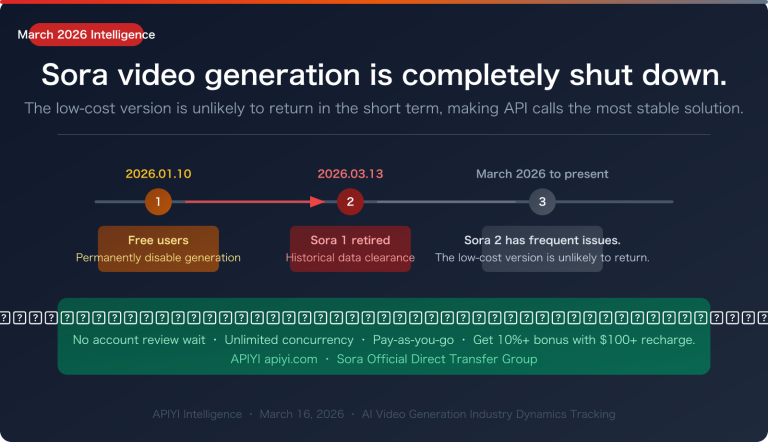
- Policy shifts (e.g., the January 10, 2026, restrictions on free users).
Sora 2 Pro Official Reverse Status
Current Status: 🔴 Suspended
The Pro version of the reverse service is currently suspended for a few key reasons:
- High Account Costs: Pro subscriptions cost $200/month, making account pool maintenance expensive.
- Stricter Risk Control: OpenAI protects Pro features much more aggressively.
- Technical Complexity: The reverse engineering required for Pro endpoints is significantly more difficult.
⚠️ Note: Official Reverse services can be quite volatile and aren't recommended for production environments. We suggest using the Official Relay API via APIYI (apiyi.com) to ensure stable service.
Veo 3.1 Status
Current Status: 🟢 Running Smoothly
Google Veo 3.1, a major competitor to Sora, currently offers:
| Feature | Veo 3.1 | Sora 2 Pro |
|---|---|---|
| Max Duration | 8 seconds (API) | 25 seconds |
| Max Resolution | 4K | 1080p |
| Audio Support | Native sync | Native sync |
| API Status | Paid Preview | Officially Released |
Sora 2 API: Stability & Selection Guide
Choosing Based on Your Use Case
| Use Case | Recommended Solution | Reason |
|---|---|---|
| Production | Official Relay API | Guaranteed stability |
| Commercial Projects | Official Relay API | SLA support |
| Dev & Testing | Official Reverse API | Lower cost |
| Personal Learning | Official Reverse API | Wallet-friendly pricing |
| High-Freq Calls | Official Relay API | No risk control limits |
| Limited Budget | Official Reverse API | Cheaper pay-per-use |
Hybrid Usage Strategy
For projects looking to balance cost and performance, a hybrid strategy works best:
class SoraAPIClient:
    """Sora API client with automatic fallback support"""

    def __init__(self, official_key, reverse_key, base_url="https://api.apiyi.com/v1"):
        self.official_client = openai.OpenAI(
            api_key=official_key,
            base_url=base_url
        )
        self.reverse_client = openai.OpenAI(
            api_key=reverse_key,
            base_url=base_url
        )

    def create_video(self, prompt, seconds=8, prefer_official=True, **kwargs):
        """
        Create a video with automatic fallback

        Args:
            prompt: Video description (prompt)
            seconds: Video duration
            prefer_official: Whether to prioritize Official Relay
        """
        clients = [
            (self.official_client, "official"),
            (self.reverse_client, "reverse")
        ] if prefer_official else [
            (self.reverse_client, "reverse"),
            (self.official_client, "official")
        ]

        last_error = None

        for client, api_type in clients:
            try:
                response = client.videos.create(
                    model="sora-2",
                    prompt=prompt,
                    seconds=seconds,
                    **kwargs
                )
                return {
                    "success": True,
                    "api_type": api_type,
                    "task_id": response.id
                }
            except Exception as e:
                last_error = e
                print(f"{api_type} API failed: {e}")
                continue

        return {
            "success": False,
            "error": str(last_error)
        }

# Example Usage
client = SoraAPIClient(
    official_key="YOUR_OFFICIAL_KEY",
    reverse_key="YOUR_REVERSE_KEY"
)

# Prioritize Official Relay, auto-fallback to Reverse on failure
result = client.create_video(
    prompt="A beautiful sunset over the ocean",
    seconds=8,
    prefer_official=True
)
Sora 2 API Status Monitoring FAQ
Q1: What’s the main difference between official relay and official reverse?
Official Relay:
- Uses the official OpenAI API interface
- Billed per second, higher pricing
- 99.84% stability with SLA guarantees
- Perfect for production environments
Official Reverse:
- Simulates Web/App requests
- Billed per request, lower pricing
- Stability around 70-85%, no guarantees
- Best for testing and personal projects
You can use both solutions through the APIYI (apiyi.com) platform and switch flexibly based on your needs.
Q2: What does it mean when official reverse shows “Risk Control in Progress”?
"Risk Control in Progress" means OpenAI has detected unusual request patterns and restricted the reverse interface. In this state:
- Request success rates drop (to about 30-50%)
- Response times get longer
- You might trigger CAPTCHAs
- Certain features may be restricted
We recommend waiting for the risk control to be lifted or switching to the official relay API.
Q3: How can I check the real-time status?
Checking Official Relay status:
- OpenAI Official:
status.openai.com - APIYI Platform: Provides a unified status dashboard
Checking Official Reverse status:
- Follow provider announcements
- Use the status detection code provided in this article
Through the APIYI (apiyi.com) platform, you can access unified status monitoring that covers both relay and reverse services.
Q4: Why does the Pro version of official reverse frequently pause?
There are a few reasons why the Pro version of official reverse is unstable:
- High Costs: Pro subscriptions cost $200/month
- Strict Risk Control: OpenAI prioritizes protecting Pro features
- Account Scarcity: The pool of available Pro accounts is limited
- Policy Changes: Restrictions became even tighter after January 10, 2026
For users who need Pro features, we strongly suggest using the official relay API.
Q5: Which solution should I choose for a production environment?
We strongly recommend using the official relay API for the following reasons:
- 99.84% availability guarantee
- Official SLA support
- No risk of being flagged by risk control
- Full feature access
- Enterprise-grade support
By using the official relay services via APIYI (apiyi.com), you can ensure stability while getting more competitive pricing.
Sora 2 API Status Cheat Sheet
| Service Type | Status Page | Stability | Recommendation |
|---|---|---|---|
| Sora 2 Relay | status.openai.com | ★★★★★ | Best for Production |
| Sora 2 Pro Relay | status.openai.com | ★★★★★ | High-quality Needs |
| Sora 2 Reverse | Provider Announcements | ★★☆☆☆ | Testing Only |
| Sora 2 Pro Reverse | Provider Announcements | ★☆☆☆☆ | Not Recommended |
| Veo 3.1 | status.cloud.google.com | ★★★★☆ | Alternative Option |
📌 Tip: Available platforms include APIYI (apiyi.com). We recommend choosing a platform that provides unified status monitoring for your API integration.
Summary
Monitoring Sora 2 API availability is crucial for maintaining business stability. Here are the key takeaways:
- Distinguish the types: The stability of Official APIs is significantly higher than that of Inverse (unofficial) versions.
- Real-time monitoring: Keep an eye on status.openai.com to track the status of official channels.
- Choose wisely: You must use Official APIs for any production environment.
- Fallback strategies: You can implement an automatic fallback from Official to Inverse APIs to ensure service continuity.
We recommend using APIYI (apiyi.com) to access stable Official API services while benefiting from unified status monitoring and alerting features.
Author: APIYI Team | For more AI development tips, visit apiyi.com
References:
- OpenAI Status Page: Official service status monitoring
- Link:
status.openai.com
- Link:
- Sora 2 API Documentation: Official interface specifications
- Link:
platform.openai.com/docs/models/sora-2
- Link:
- Google Veo Documentation: Veo 3.1 API specifications
- Link:
ai.google.dev/gemini-api/docs/video
- Link: