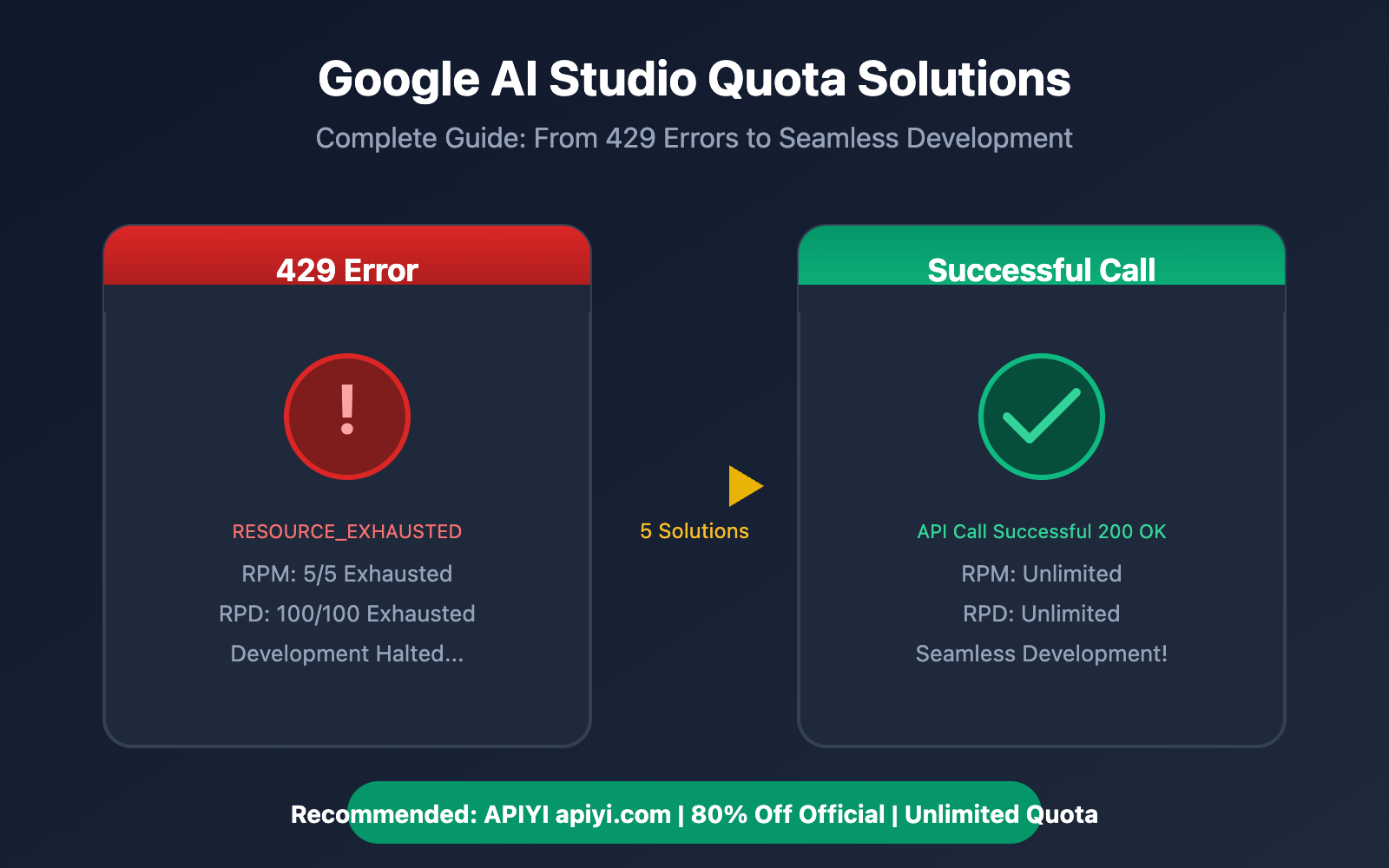
Working on a project with Google AI Studio and suddenly hit with a 429 RESOURCE_EXHAUSTED error? You're not alone—after Google significantly slashed free quotas in December 2025, tens of thousands of developer projects worldwide ground to a halt overnight.
In this post, we'll break down the Google AI Studio quota mechanism and provide 5 proven solutions to help you get your development back on track quickly.
Deep Dive into Google AI Studio Quota Mechanisms
What are Google AI Studio Quotas?
Google AI Studio implements multi-dimensional limits on Gemini API calls, primarily including:
| Limit Dimension | Meaning | Reset Time |
|---|---|---|
| RPM (Requests Per Minute) | Number of requests per minute | Rolling reset every minute |
| RPD (Requests Per Day) | Number of requests per day | Resets at midnight Pacific Time |
| TPM (Tokens Per Minute) | Number of tokens processed per minute | Rolling reset every minute |
| IPM (Images Per Minute) | Number of images processed per minute | Rolling reset every minute |
🔑 Key Insight: Quotas are calculated per Project, not per API Key. Creating multiple API Keys won't increase your total quota.
Latest 2026 Google AI Studio Free Tier Limits
On December 7, 2025, Google implemented massive cuts (50%-92%) to the Gemini API free tier. Here are the current limits for each model:
| Model | RPM Limit | RPD Limit | TPM Limit |
|---|---|---|---|
| Gemini 2.5 Pro | 5 | 100 | 250,000 |
| Gemini 2.5 Flash | 10 | 250 | 250,000 |
| Gemini 2.5 Flash-Lite | 15 | 1,000 | 250,000 |
| Gemini 3 Pro Preview | 10-50* | 100+* | 250,000 |
*Limits for Gemini 3 Pro Preview are dynamically adjusted based on account age and region.
Why You're Seeing the Google AI Studio 429 Error
A 429 error is triggered whenever any single dimension exceeds its limit. Common scenarios include:
- RPM Exceeded: Sending too many requests in a very short period.
- RPD Exhaustion: Reaching the total daily request limit.
- TPM Exceeded: A single request has a very long token count or there are too many concurrent requests.
- Account Status Issues: Even after upgrading to Tier 1, some users report still being stuck with free tier limits due to account flags.
# Typical 429 error response
{
    "error": {
        "code": 429,
        "message": "You exceeded your current quota, please check your plan and billing details.",
        "status": "RESOURCE_EXHAUSTED"
    }
}
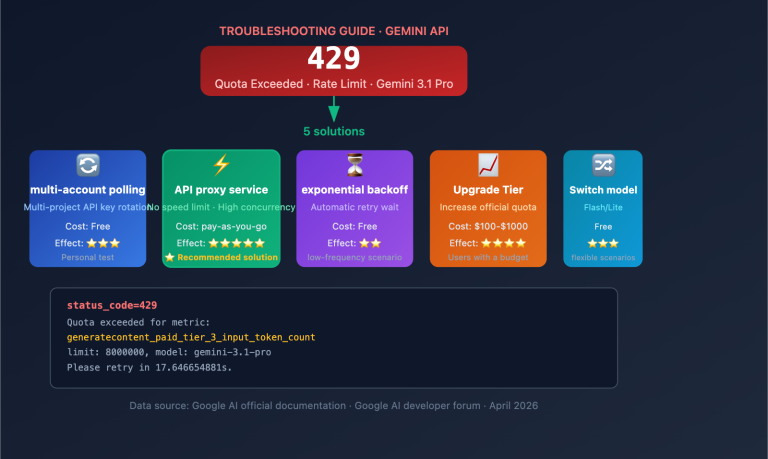
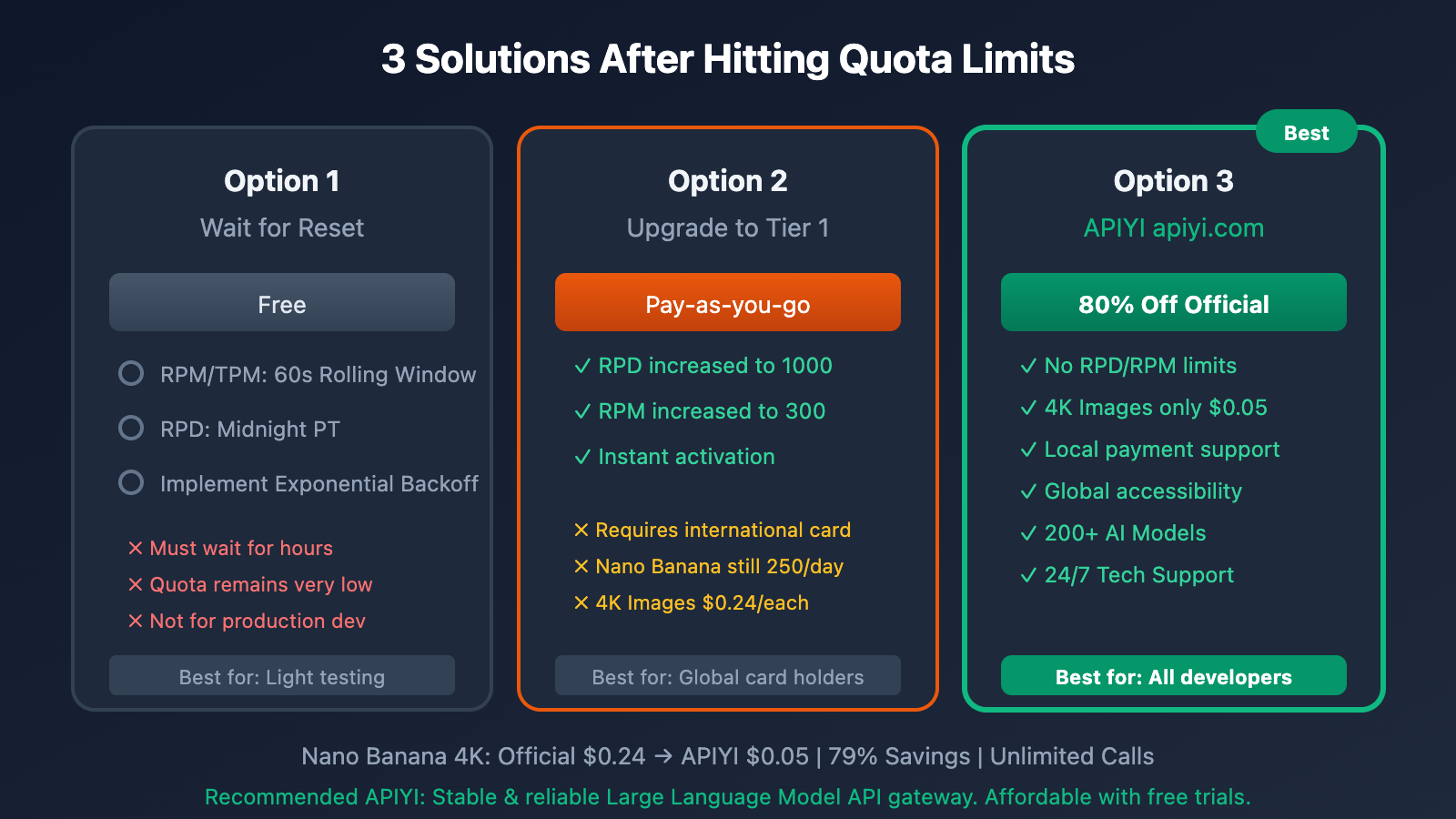
5 Ways to Solve Google AI Studio Quota Limits
Option 1: Wait for Quota Reset (Free but Time-Consuming)
Best for: Light testing, non-urgent projects
Google AI Studio's quota reset rules:
- RPM/TPM: Automatically resets within a 60-second rolling window.
- RPD: Resets at midnight Pacific Time (4 PM Beijing Time).
Implementing Exponential Backoff Retry:
import time
import random

def call_with_retry(func, max_retries=5):
    """Retry mechanism with exponential backoff"""
    for attempt in range(max_retries):
        try:
            return func()
        except Exception as e:
            if "429" in str(e):
                wait_time = (2 ** attempt) + random.uniform(0, 1)
                print(f"Quota exceeded, retrying in {wait_time:.1f} seconds...")
                time.sleep(wait_time)
            else:
                raise
    raise Exception("Retries exhausted")
| Pros | Cons |
|---|---|
| ✅ Completely free | ❌ Requires waiting for hours |
| ✅ No configuration needed | ❌ Quota remains very low |
| ✅ Great for learning/testing | ❌ Not suitable for production |
Option 2: Upgrade to Tier 1 Paid Layer
Best for: Developers with international credit cards
Quota increases after upgrading to Tier 1:
| Metric | Free Tier | Tier 1 |
|---|---|---|
| RPM | 5-15 | 150-300 |
| RPD | 100-1000 | Virtually unlimited |
| Effective Time | – | Instant |
Upgrade Steps:
- Visit the Google AI Studio console.
- Go to the API Keys page.
- Click the "Set up Billing" button.
- Link a Google Cloud billing account.
- Select the Tier 1 plan.
Tier 1 Pricing Reference:
- Gemini 2.5 Flash: $0.075 / million input tokens
- Gemini 2.5 Pro: $1.25 / million input tokens
- 4K Image Generation: $0.24 / image
| Pros | Cons |
|---|---|
| ✅ RPM increased to 150-300 | ❌ Requires an international credit card |
| ✅ RPD limits virtually removed | ❌ Some models still have restrictions |
| ✅ Takes effect immediately | ❌ Difficult to bind cards from mainland China |
Option 3: Use APIYI Relay Service (Recommended)
Best for: All developers, especially those in mainland China
🎯 Recommended Solution: Call the Gemini API through the APIYI (apiyi.com) platform. You won't have to worry about quota limits, and it supports Alipay/WeChat payments.
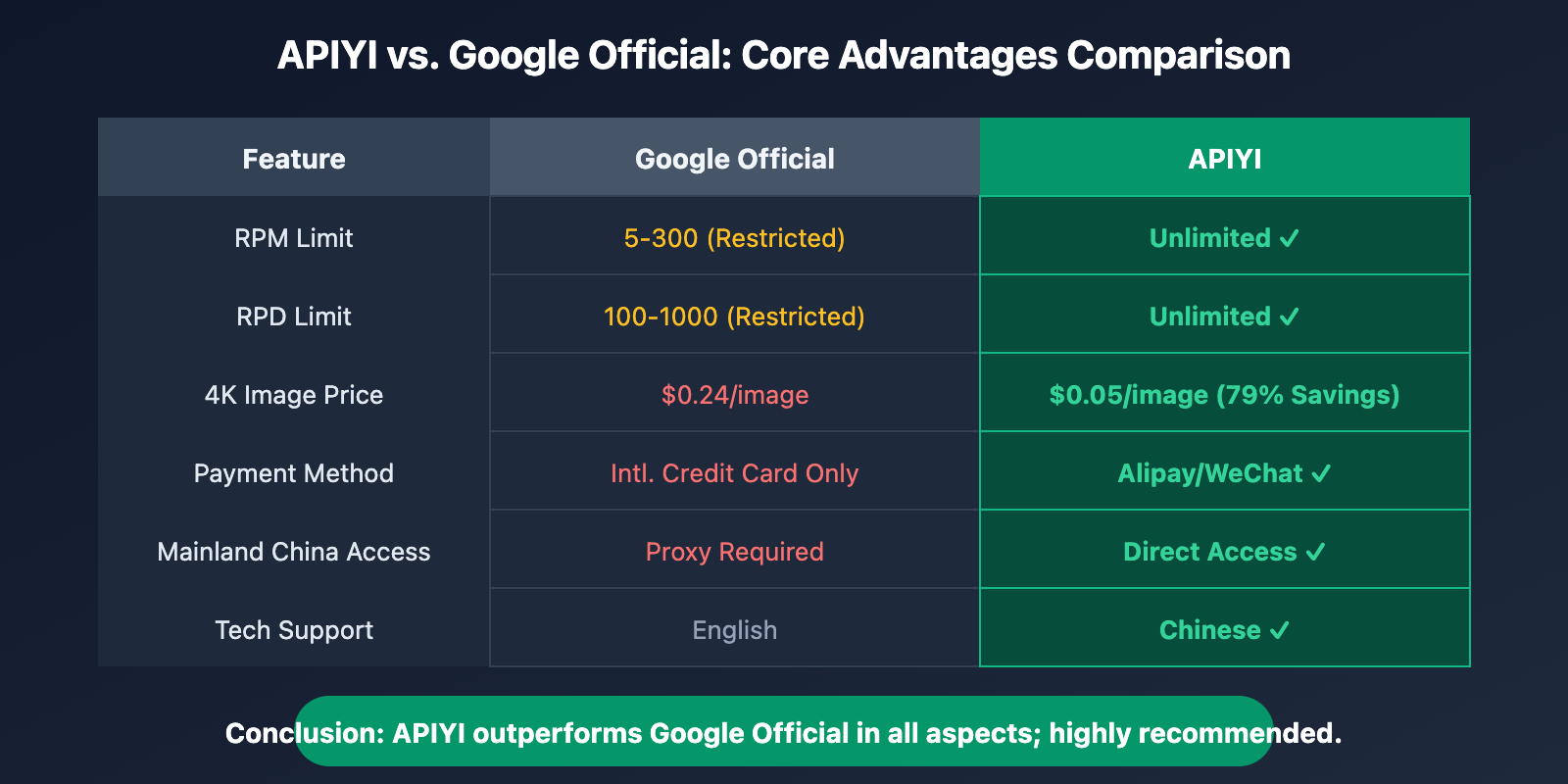
APIYI vs. Official Comparison:
| Feature | Google Official | APIYI |
|---|---|---|
| RPM Limit | 5-300 | Unlimited |
| RPD Limit | 100-Unlimited | Unlimited |
| 4K Image Price | $0.24/image | $0.05/image |
| Payment Method | Intl. Credit Card Only | Alipay/WeChat |
| Mainland China Access | Proxy Required | Direct Access |
| Tech Support | English | Chinese |
Quick Integration Code:
import openai

# APIYI configuration
client = openai.OpenAI(
    api_key="your-apiyi-key",  # Get yours at api.apiyi.com
    base_url="https://api.apiyi.com/v1"
)

# Call the Gemini model
response = client.chat.completions.create(
    model="gemini-2.5-pro",
    messages=[
        {"role": "user", "content": "Hello, please introduce yourself."}
    ]
)

print(response.choices[0].message.content)
💡 Pro Tip: We recommend using the APIYI (apiyi.com) platform for development and testing. It provides a unified interface for over 200 mainstream Large Language Models at about 20% of the official price.
Option 4: Create Multiple Google Cloud Projects
Best for: Tech-savvy developers
Since quotas are calculated per project, you can theoretically increase your total quota by creating multiple projects:
import random

class MultiProjectClient:
    """Round-robin client for multiple projects"""

    def __init__(self, api_keys: list):
        self.api_keys = api_keys
        self.current_index = 0

    def get_next_key(self):
        """Get the next API Key in rotation"""
        key = self.api_keys[self.current_index]
        self.current_index = (self.current_index + 1) % len(self.api_keys)
        return key

    def call_api(self, prompt):
        """Call the API using a rotated key"""
        api_key = self.get_next_key()
        # Use this key to call the Gemini API
        pass

# Usage example
client = MultiProjectClient([
    "key_from_project_1",
    "key_from_project_2",
    "key_from_project_3"
])
| Pros | Cons |
|---|---|
| ✅ Increase quota for free | ❌ Complex to manage |
| ✅ No payment required | ❌ Risk of violating ToS |
| – | ❌ Potential for Google detection and bans |
⚠️ Risk Warning: This method carries the risk of violating Google's Terms of Service and isn't recommended for production environments.
Option 5: Optimize Request Strategies
Best for: All developers
Even with limited quota, you can maximize efficiency by optimizing your strategy:
1. Implement a Request Queue:
import asyncio
from collections import deque

class RateLimitedQueue:
    """Rate-limited request queue"""

    def __init__(self, rpm_limit=5):
        self.rpm_limit = rpm_limit
        self.queue = deque()
        self.request_times = deque()

    async def add_request(self, request_func):
        """Add a request to the queue"""
        self.queue.append(request_func)
        await self._process_queue()

    async def _process_queue(self):
        """Process requests in the queue"""
        now = asyncio.get_event_loop().time()

        # Clear records older than 60 seconds
        while self.request_times and now - self.request_times[0] > 60:
            self.request_times.popleft()

        # Check if a request can be sent
        if len(self.request_times) < self.rpm_limit and self.queue:
            request_func = self.queue.popleft()
            self.request_times.append(now)
            await request_func()
2. Batch Your Requests:
def batch_prompts(prompts: list, batch_size: int = 5):
    """Combine multiple prompts into a single batch request"""
    combined_prompt = "\n\n---\n\n".join([
        f"Question {i+1}: {p}" for i, p in enumerate(prompts)
    ])
    return combined_prompt

# Combine 5 independent requests into 1
prompts = ["Question 1", "Question 2", "Question 3", "Question 4", "Question 5"]
batch_prompt = batch_prompts(prompts)
# Only consumes 1 RPM quota unit
3. Cache Repetitive Requests:
import hashlib
import json

class ResponseCache:
    """Response cache"""

    def __init__(self):
        self.cache = {}

    def get_cache_key(self, prompt, model):
        """Generate a cache key"""
        content = f"{model}:{prompt}"
        return hashlib.md5(content.encode()).hexdigest()

    def get(self, prompt, model):
        """Retrieve from cache"""
        key = self.get_cache_key(prompt, model)
        return self.cache.get(key)

    def set(self, prompt, model, response):
        """Save to cache"""
        key = self.get_cache_key(prompt, model)
        self.cache[key] = response
Google AI Studio Quota Solution Comparison
After evaluating the five solutions above, here's a detailed comparison:
| Solution | Cost | Quota Increase | Implementation Difficulty | Recommendation |
|---|---|---|---|---|
| Wait for Reset | Free | None | ⭐ | ⭐⭐ |
| Upgrade to Tier 1 | Pay-as-you-go | 10-60x | ⭐⭐ | ⭐⭐⭐ |
| APIYI Proxy | 80% off official | Unlimited | ⭐ | ⭐⭐⭐⭐⭐ |
| Multi-project Polling | Free | Multiples of projects | ⭐⭐⭐⭐ | ⭐⭐ |
| Optimization Strategy | Free | Indirect increase | ⭐⭐⭐ | ⭐⭐⭐ |
🎯 Selection Advice: For most developers, we recommend using APIYI (apiyi.com) as your primary solution. This platform doesn't just solve quota limit issues; it also offers an 80% discount compared to official prices and provides technical support in Chinese.
FAQ
Q1: Why am I still getting 429 errors after upgrading to Tier 1?
This is a known issue with Google AI Studio. Some users have reported that even after binding a payment account, the system continues to apply free-tier limits.
How to fix it:
- Go to AI Studio and confirm that all projects have been upgraded.
- Regenerate your API Key.
- Wait 24 hours for the system to synchronize.
If the problem persists, we suggest switching to a third-party platform like APIYI (apiyi.com) to bypass these quota headaches.
Q2: When does the RPD quota reset?
Google AI Studio's RPD (Requests Per Day) resets at midnight Pacific Time. This corresponds to 4:00 PM (Daylight Saving) or 3:00 PM (Standard Time) Beijing Time.
Q3: Why is the Gemini 3 Pro Preview limit inconsistent?
As a preview model, the limits for Gemini 3 Pro Preview are adjusted dynamically based on several factors:
- Account age
- Usage region
- Historical usage patterns
- Current Google server load
Q4: How can I check my current quota usage?
- Log in to Google AI Studio.
- Navigate to the API Keys page.
- Look at the usage statistics in the "Quota" section.
Q5: Which Gemini models does APIYI support?
APIYI supports all major Gemini models released by Google, including:
- Gemini 2.5 Pro / Flash / Flash-Lite
- Gemini 3 Pro Preview
- Plus over 200 other Large Language Models (Claude, GPT, Llama, etc.)
Visit apiyi.com to see the full model list and real-time pricing.
Q6: Will multi-project polling get me banned by Google?
There is a risk. Google's Terms of Service prohibit creating multiple accounts to circumvent usage limits. While there haven't been widespread reports of bans yet, we don't recommend using this method for production environments.
Summary
After Google AI Studio slashed its free quotas in late 2025, developers are facing much stricter RPM/RPD limits. Here are the 5 solutions we've covered, each with its own pros and cons:
- Waiting for quota resets: Good for learning or testing, but way too inefficient.
- Upgrading to Tier 1: Offers a significant quota boost, but requires an international credit card.
- APIYI Proxy: No quota limits, lower prices, and supports Alipay/WeChat. Highly recommended.
- Multi-project polling: Carries a risk of getting banned, so we don't recommend it.
- Optimizing request strategies: Worth learning and can be used alongside other solutions.
For developers in China, we recommend using the APIYI (apiyi.com) platform directly. It's a one-stop shop to solve quota limits, payment hurdles, and network access issues all at once.
📝 Author: APIYI Team
🔗 APIYI Official Website: apiyi.com – A stable and reliable Large Language Model API proxy platform supporting 200+ models, with prices as low as 20% of the official rates.