
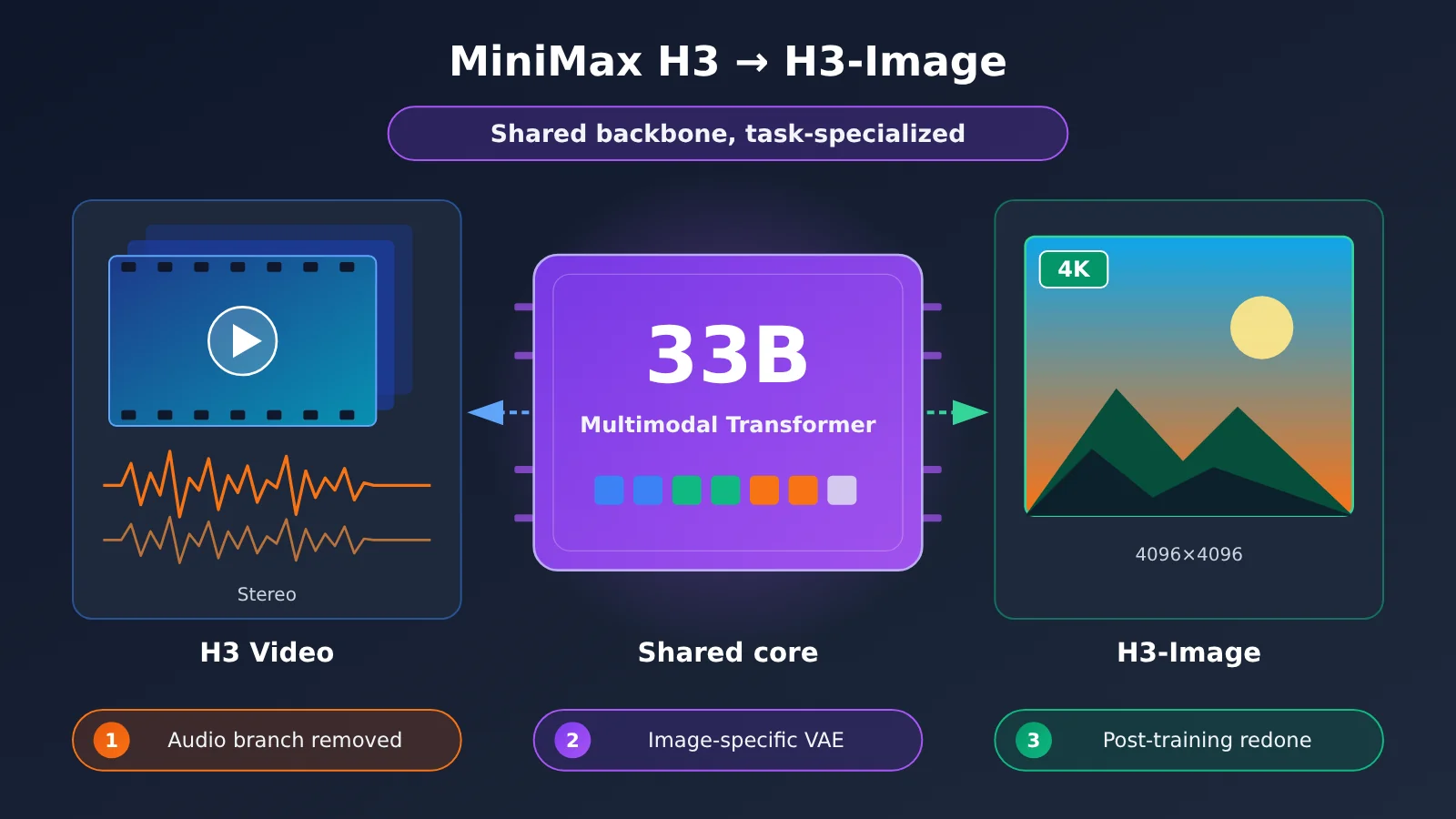
Author’s note: H3-Image reuses H3’s multimodal foundation, adds image-specific components, and re-optimizes the training and inference pipeline, ending up as a standalone image generation model. This article breaks down what it inherited, what it dropped, and what it added.
6 Terms to Know Before Reading About the MiniMax H3 Architecture
These concepts come up repeatedly below, so here’s a one-sentence explanation of each.
| Term | Plain-English Explanation | Role in MiniMax H3 |
|---|---|---|
| Transformer | A neural network for sequence data that’s good at capturing relationships between elements in a sequence | H3-Omni-Transformer is the core of the entire model family |
| DiT | A diffusion model built on a Transformer that generates content by denoising step by step | H3-Image’s main body is a 33.1B-parameter single-stream DiT |
| VAE | A model that encodes and decodes between pixels and a compressed representation, like a “compressor + decompressor” | H3 uses a visual VAE and an audio VAE; H3-Image swaps in an image-specific VAE |
| Latent variables | A compact representation of the original data after compression; computing in this space is far cheaper than working on pixels directly | The Transformer predicts latents, not pixels |
| RoPE | Rotary position embedding, which tells the model where each token sits in the sequence | H3 uses 3D Multimodal RoPE to express temporal and spatial positions |
| Distillation | Training a complex multi-step process to finish in just a few steps | H3-Image is distilled down to just 6 sampling steps |
In November 2026, MiniMax released the weights for H3-Image, its image generation model. H3, open-sourced three months earlier, generates video with stereo audio. The new model is in the same 33B parameter range, and its core architecture comes from H3.
This isn’t as simple as “changing the video model’s output to a single frame.” The official H3-Image model card and launch blog make it clear: it keeps H3’s core multimodal Transformer and text encoder, removes the audio generation branch, swaps in an image-specific VAE, and reworks post-training and inference for image tasks.
Key takeaway: By the end of this article, you’ll know exactly what changed when the same 33B architecture moved from video to images, why each change was made, and which points are officially confirmed versus industry-level inference.
MiniMax H3: From Video to Images, What MiniMax Actually Released
Let’s get the timeline straight first. When people see the “MiniMax H3 open source” news, they often blur two separate releases together. H3 and H3-Image are two different things, released about three months apart.
| Date | Event | Notes |
|---|---|---|
| 2026-07-31 | MiniMax publishes the H3 model introduction | The official tech blog first reveals the H3 architecture |
| 2026-08-03 | MiniMax H3 weights officially released | An omni-modal video generation model; what’s open-sourced is H3-Base |
| 2026-11-10 | Date on the H3-Image Community License | Image generation model weights become available |
| 2026-11-11 | MiniMax publishes the H3-Image introduction on its English official blog | Details on post-training and inference optimization are shared |
What H3 and H3-Image Are Built For
The two models handle very different tasks. H3 is an omni-modal video generation system. It can take text, images, video, and audio as input, and it outputs 4–15 second videos at 24 FPS with native 32kHz stereo sound. The default output has a 768px short side, and the full workflow goes up to 2K. H3-Image, on the other hand, focuses on high-resolution image generation and editing. The official spec lists a maximum of about 16MP (for example, 4096×4096), and MiniMax says it can generate a 4K image in under 10 seconds.
That raises the core question of this article: one model makes “video with sound” and the other makes “high-resolution still images,” so why do they belong to the same technical family? The answer lies in H3’s underlying design.
MiniMax H3’s Underlying Architecture: A Unified Multimodal Transformer
The core of H3 is called the H3-Omni-Transformer. According to the official technical overview, it’s a roughly 33B-parameter, single-stream, dense Transformer. “Single-stream” means information from different modalities doesn’t run through separate networks. Instead, it’s stitched into one sequence and processed by a single set of parameters. “Dense” means every token goes through all the parameters, rather than activating only a subset of experts as in MoE.
How MiniMax H3 Encodes Different Modalities
Here’s the processing path as officially described:
- Text: Encoded into a semantic representation by H3-Encoder, which tells the model “what you want to happen in the frame.”
- Images and video: These go through both the text encoder and the Visual VAE. The former handles understanding the semantics of what’s in the frame, while the latter compresses pixels into latents.
- Audio: Compressed into audio latents by the Audio VAE.
- Unified sequence: The representations from all these modalities are combined into a single sequence and fed into the Transformer.
- Joint prediction: The Transformer predicts video latents and audio latents at the same time, then hands them off to the corresponding VAEs to decode into visuals and sound.
You can think of it as “everyone speaks the same language.” Whether the raw input is a sentence, an image, or a piece of music, it gets translated into a token sequence before entering the Transformer. The model doesn’t care which modality a token came from. Its job is to figure out the relationships between those tokens and generate the target tokens.
What 3D Multimodal RoPE Does
Video has both a time axis and two spatial dimensions, so H3 uses 3D Multimodal RoPE to encode position. A token needs to know not only its horizontal and vertical coordinates within the frame, but also which frame it belongs to. The official team has explicitly confirmed this design. It matters a lot for understanding H3-Image later on, because an image can be treated as a special case where the time dimension has just one frame.
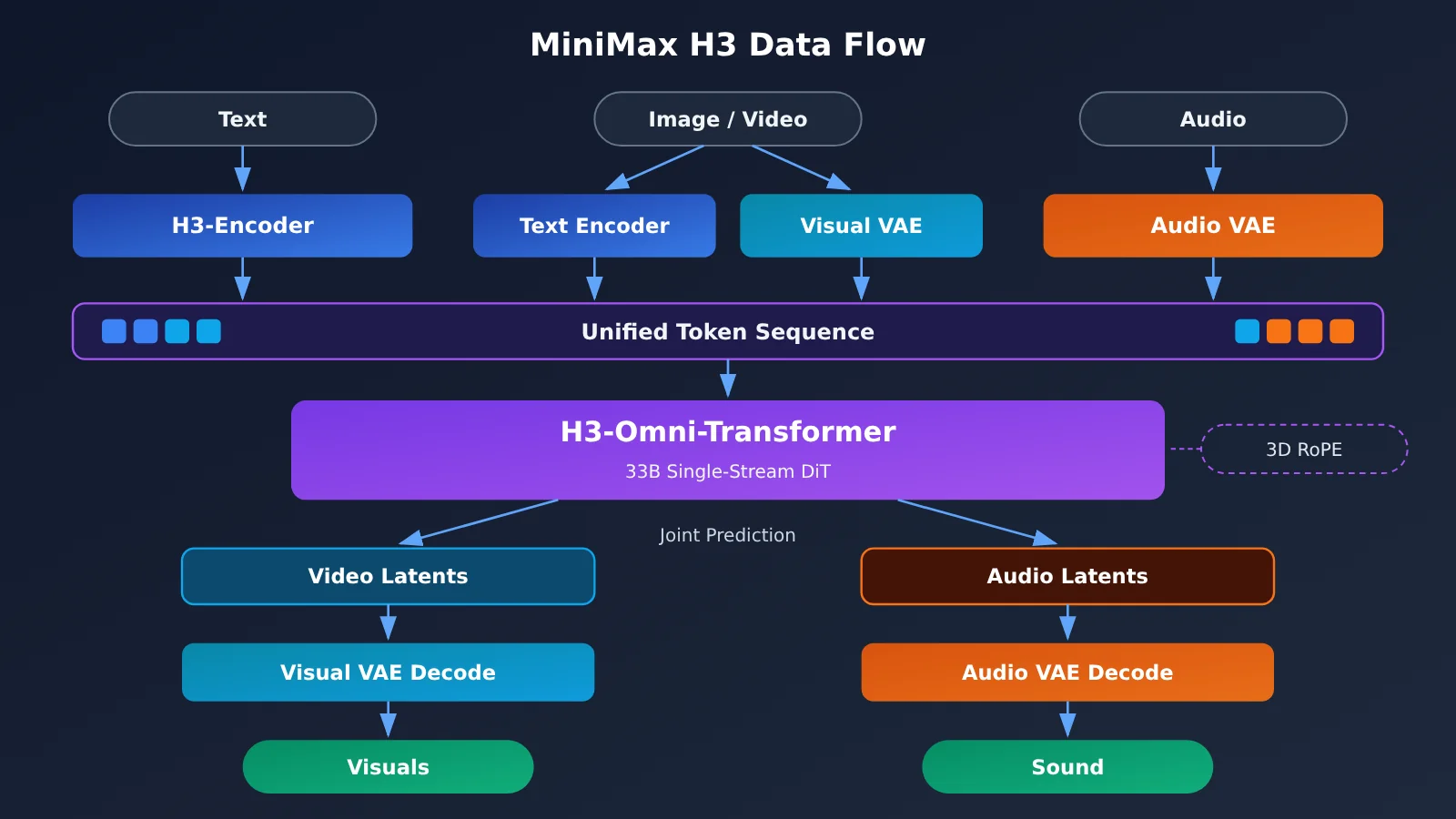
【Our Inference】 Precisely because H3 was designed from the start around a “unified sequence + unified Transformer” rather than a single-task “text in, video out” pipeline, its backbone has the foundation to be transferred to other generation tasks. The official team hasn’t put it this way directly; this is our own judgment drawn from the architecture design.
What MiniMax H3-Image Inherited, Removed, and Added
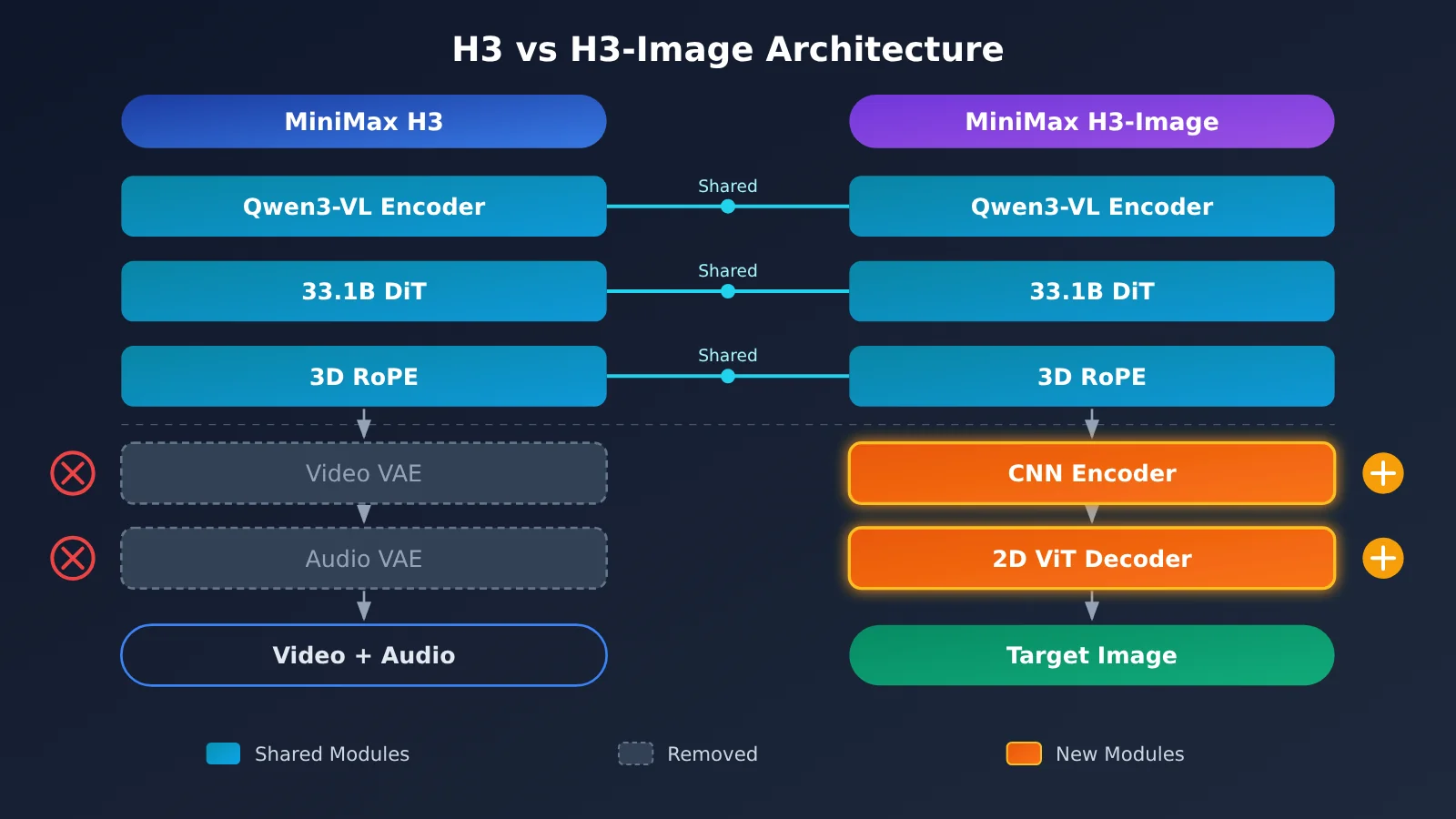
This is the part of the technical evolution that’s worth a close look. The table below is based on the official H3-Image model card:
| Category | Component | What They Did |
|---|---|---|
| Inherited | Qwen3-VL text encoder | Reuses H3’s full text encoder, taking the hidden states from layer 50 |
| Inherited | 33.1B single-stream DiT | Keeps the core H3-Omni-Transformer architecture |
| Inherited | 3D Multimodal RoPE | Still used to encode positional relationships |
| Removed | Audio branch | No more joint video and audio generation |
| Replaced | Image-specific VAE | CNN encoder + 24-layer 2D ViT decoder |
| Changed | Generation target | Text and reference images are encoded into one unified sequence, and the model predicts the target image’s latents |
Inheritance #1: The Qwen3-VL Text Encoder and Layer-50 Hidden States
The H3-Image model card says it reuses the Qwen3-VL-based text encoder from H3, and uses the hidden states from its layer 50 as the conditioning input. Qwen3-VL is a vision-language model, so it can read text and also understand the content of a reference image. That’s exactly the capability multi-reference editing needs.
【Common Industry Practice】 As for why they take an intermediate layer instead of the last one, the official docs don’t go into detail. The general view in the industry is that the last few layers of a language model lean toward “predicting the next token,” while intermediate layers keep richer, more general semantic features. Plenty of diffusion models take a similar approach.
Inheritance #2: A 33.1B DiT with 3D RoPE
Here are the specs for H3-Image’s DiT backbone:
| Parameter | Value | In plain terms |
|---|---|---|
| Parameter count | 33.1B | Same order of magnitude as H3’s ~33B backbone |
| Layers | 50 | Information goes through 50 transformations |
| Hidden Size | 5376 | The representation dimension of each token |
| Attention Heads | 56 | Looks at token relationships from 56 angles at once |
| FFN Size | 14336 | The intermediate width of each layer’s feed-forward network |
| VAE spatial downsampling | 16x | A 4096-pixel side gets compressed to 256 |
| Latent channels | 24 | Each latent position carries 24 values |
| Coverage per token | ~32×32 pixels | Determines sequence length and compute cost |
If we assume each token covers roughly 32×32 pixels, a 4096×4096 image comes out to about 128×128 = 16,384 tokens (this is our own estimate based on the official parameters). Add several reference images and the sequence gets even longer, which is why inference speed optimization matters so much for this model.
[Our inference] 3D RoPE is still useful for image tasks. The target image is just a single frame, but when you have multiple reference images alongside the target, the model needs a way to tell them apart in the sequence, and the extra dimension can handle that. The official team hasn’t published the exact position allocation scheme, so this is just a reasonable interpretation.
Removed: The Audio Branch
Images have no duration and no sound, so keeping the audio branch would only waste training and inference resources. Once it’s removed, the model’s learning objective narrows from a joint “video + audio” distribution to a plain image distribution, which makes the training signal more focused.
Replaced: An Image-Specific VAE
H3’s Visual VAE has to handle temporal continuity in video. H3-Image swaps it for a VAE designed specifically for static images. The encoder is a CNN, which is good at efficiently extracting local textures. The decoder is a 24-layer 2D ViT, so it can account for global structure when reconstructing pixels. Combining 16x downsampling with 24 channels means the model stores information in fewer spatial positions but more channels, and that matters a lot for high-resolution output at the 16MP level. The team also stresses that H3-Image’s high-resolution results are generated directly, rather than relying on a traditional super-resolution upscaler.
What Changed: From Predicting Video + Audio to Predicting a Target Image
Here’s the final generation flow: the text prompt and the reference images are encoded together into a single unified sequence. The DiT then denoises step by step in latent space to predict the target image’s latent, and the image VAE decodes that into the final picture. As for the number of reference images, the model card sets the cap at 16, while the vLLM deployment recipe says 9 at most. The two figures are counted differently, so the number you can actually use depends on the inference framework you run.
How MiniMax Optimized H3-Image to Be Faster and Easier to Use
Changing the architecture wasn’t enough. In the H3-Image launch blog, MiniMax says it built on H3’s pretrained capabilities and improved the post-training pipeline in five areas: training data, reinforcement learning, sampling-step compression, prompt enhancement (Prompt Enhancement), and deployment optimization. The official post doesn’t share details on the data or the reinforcement learning, so we’ll focus on the parts where more information is public.
6-Step Sampling Distillation and Dropping CFG
Diffusion models generate images by starting from noise and denoising step by step, which normally takes dozens of steps. Traditional diffusion models also commonly use CFG (Classifier-Free Guidance): at every step, they run the model twice, once with the prompt and once without, then blend the two results by a set ratio to make the output follow the prompt more closely.
H3-Image uses distillation to compress sampling down to 6 steps, and it no longer needs CFG. The first change cuts the step count dramatically, and the second means each step needs only one forward pass. For a model with 33.1B parameters and tens of thousands of tokens per image, the combination is the technical basis for the official “4K in 10 seconds” claim. Keep in mind that the 10 seconds is a vendor claim. Real-world speed depends on your hardware and deployment setup.
Prompt Enhancement: Expanding Short Descriptions into Actionable Instructions
H3-Image offers an optional PE (Prompt Enhancement) model, with weights of about 17.9GB. It expands a user’s short description into a more detailed prompt that the model can understand better. If you’d rather not deploy this extra model for now, you can get a similar preprocessing effect with a general-purpose Large Language Model. Here’s a minimal example:
import openai

client = openai.OpenAI(
    api_key="YOUR_API_KEY",
    base_url="https://api.apiyi.com/v1"  # Use the APIYI unified interface
)

resp = client.chat.completions.create(
    model="gpt-4o-mini",
    messages=[{"role": "user", "content": "把这句扩写成详细的图像生成提示词:雨夜的赛博朋克街头"}]
)
print(resp.choices[0].message.content)
View the full prompt enhancement implementation
import openai
from typing import List, Optional

SYSTEM_PROMPT = (
    "你是图像生成提示词工程师。请把用户的简短描述扩写为结构化提示词,"
    "依次包含:主体、构图、光线、材质细节、色彩、镜头与画幅。"
    "如果用户提供了参考图说明,请明确每张参考图在画面中的作用。"
    "只输出提示词正文,不要解释。"
)

def enhance_prompt(
    user_prompt: str,
    reference_notes: Optional[List[str]] = None,
    model: str = "gpt-4o-mini",
) -> str:
    client = openai.OpenAI(
        api_key="YOUR_API_KEY",
        base_url="https://api.apiyi.com/v1"
    )
    content = user_prompt
    if reference_notes:
        refs = "\n".join(f"参考图{i+1}:{n}" for i, n in enumerate(reference_notes))
        content = f"{user_prompt}\n\n{refs}"

    try:
        resp = client.chat.completions.create(
            model=model,
            messages=[
                {"role": "system", "content": SYSTEM_PROMPT},
                {"role": "user", "content": content},
            ],
            max_tokens=600,
        )
        return resp.choices[0].message.content
    except Exception as e:
        return f"Error: {e}"

# Example: compositing a living room from an empty room + furniture reference images
print(enhance_prompt(
    "把这些家具摆进空客厅,北欧风,午后自然光",
    ["空房间照片", "灰色布艺沙发", "橡木茶几", "落地灯"],
))
Tip: When building an image generation workflow, you can start the prompt preprocessing step by connecting to several mainstream Large Language Models through APIYI (apiyi.com). Compare how well each one expands prompts, then decide whether a dedicated PE model is worth deploying. Model names follow the platform’s model list.
Deployment Optimization and High-Resolution Support
The officially recommended deployment frameworks include SGLang, vLLM-Omni, Diffusers, and ComfyUI. Supported hardware includes the NVIDIA H200, RTX PRO 6000 Blackwell, and AMD Instinct MI350X, and there’s a multi-GPU parallelism option too. Three things work together to make direct output possible at high-resolution aspect ratios like 16:9 (5472×3072), 9:16 (3072×5472), and 21:9 (6272×2688): the image VAE’s high compression ratio, 6-step sampling without CFG, and framework-level inference optimizations.
What MiniMax H3’s Architecture Reuse Means
Impact on Developers
- Shared foundation, but not interchangeable: H3 and H3-Image share a text encoder, which the model card labels the “shared H3 text encoder” (about 66.7GB). The DiT weights and VAE are separate for each model, though, so you can’t use the H3 video weights to generate images.
- The deployment bar is still high: The main image model is about 68.65GB. Add the text encoder and the full download comes to about 135.35GB. That’s only the storage footprint, which isn’t the same as the VRAM you’ll need.
- Read the licenses separately: H3 and H3-Image come with two different Community Licenses, and their trigger conditions differ noticeably. See the table below.
| Item | MiniMax H3 | MiniMax H3-Image |
|---|---|---|
| Open-source scope | H3-Base only; Context-IR and Regenerate-2K require the official API | Image model weights, shared text encoder, optional PE model |
| What you can get locally | 768p audio-video generation; the full 2K workflow depends on the official API | Officially stated to output up to about 16MP directly |
| Commercial license trigger | Annual revenue from commercial products and services exceeds $20 million | You and/or your affiliates have annualized revenue above $1 million, or you offer hosted services to any third party |
| Other obligations | Regional restrictions and others; check the full license text | Regional restrictions, output usage, product attribution, and others; check the full license text |
A note on this comparison: The table is compiled from the two license texts and the official model cards. It’s for technical selection reference only and isn’t legal advice. If self-deployment or licensing isn’t an option for you right now, you can call other mainstream image and multimodal models through APIYI (apiyi.com) to prototype your workflow.
Impact on the Industry
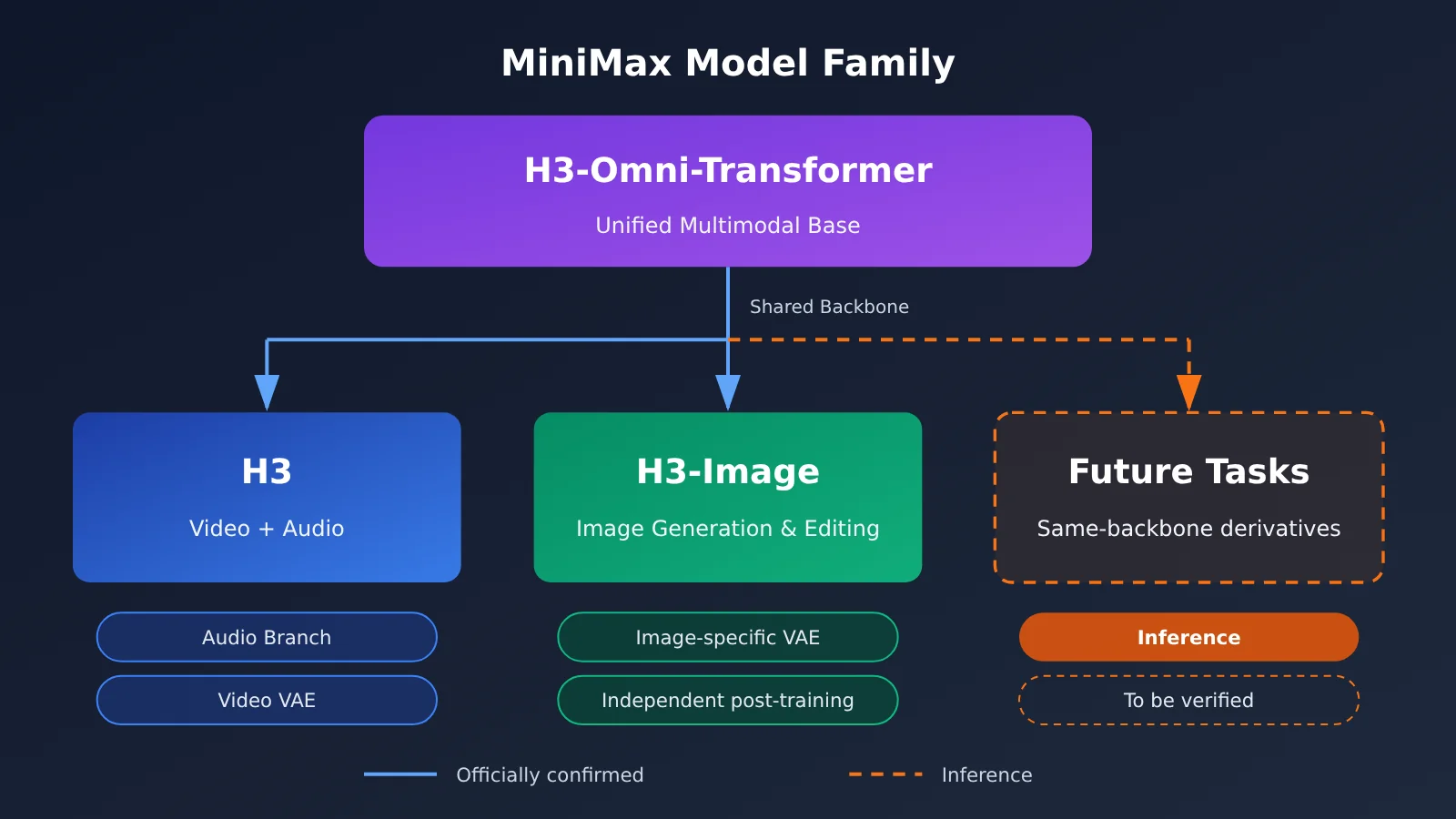
[Officially confirmed] H3-Image reuses H3’s core Transformer and text encoder, while using a dedicated VAE and a separate post-training pipeline.
[Our inference] This suggests that video and image generation can share a lot of foundational capability, such as semantic understanding, multimodal alignment, and spatial position modeling, but each task still needs its own encoder/decoder components and targeted training. MiniMax’s approach looks more like “build a unified multimodal foundation first, then specialize it per task” than training a model from scratch for every generation task. If this approach works out, we’ll likely see more derivative models built on the same backbone, but for now that’s just industry speculation.
Frequently Asked Questions (FAQ)
Q1: Is H3-Image just the H3 video model switched over to image output?
No. H3-Image inherits H3’s Qwen3-VL text encoder, 33.1B single-stream DiT architecture, and 3D RoPE. But it drops the audio branch, swaps in an image-specific VAE (a CNN encoder paired with a 2D ViT decoder), and gets its own post-training pipeline, including separate data, reinforcement learning, and distillation.
Q2: Why are MiniMax H3 and H3-Image almost the same size in parameters?
Both share the same core Transformer architecture. H3 has about 33B parameters, and H3-Image’s DiT has 33.1B. The similar parameter counts suggest the backbone was kept intact. The differences are mostly in the encoder/decoder components and the training objectives.
Q3: How many reference images does H3-Image actually support?
The official model card says up to 16, while the vLLM deployment recipe says up to 9. The first is the vendor’s stated limit, and the second is a test configuration for a specific framework. In practice, go with whatever your chosen inference framework supports.
Q4: Will 6-step sampling and dropping CFG hurt image quality?
The official position is that the distilled model still delivers high-quality output, but most of the public evidence so far comes from the vendor’s own showcases. I’d recommend running comparison tests on your own use cases, paying close attention to complex instruction following and multi-reference-image combinations.
Q5: I don’t have an H200-class GPU. How can I validate my image generation workflow first?
You can start by getting the workflow running through a cloud API:
1. Sign up at APIYI (apiyi.com) to get an API key and some free test credits
2. Use the prompt enhancement code from this article (set base_url to `https://api.apiyi.com/v1`) to build the preprocessing step
3. Plug in the mainstream image models already available on the platform, and once the whole pipeline checks out, decide whether self-hosting is worth it
Q6: Can I deploy H3-Image and offer it as an API service to others?
Be very careful here. Under the H3-Image license, offering a hosted service to any third party requires prior written authorization from MiniMax, regardless of your revenue size. Check the original license text for the exact terms, and get legal advice if you need it.
MiniMax H3 Architecture Evolution: Key Takeaways
- Same foundation, different job: H3-Image reuses H3’s core Transformer and text encoder. It’s not just a matter of flipping the output mode.
- Three key changes: The audio branch is removed, an image-specific VAE is swapped in, and the generation target becomes predicting image latents.
- Semantic understanding comes from Qwen3-VL: It takes the hidden states from layer 50, so it can understand both text and reference images.
- Speed comes from distillation: 6-step sampling with no CFG is the technical basis for the official “4K in 10 seconds” claim.
- Look at the licenses separately: H3-Image’s hosted service and the $1 million revenue threshold can both trigger licensing requirements.
- Validate before you deploy: You can build a prototype with multiple models through APIYI (apiyi.com) first, then evaluate the cost of self-hosting.
Summary
The evolution of MiniMax H3 from video to image comes down to three things:
- Shared foundation: The 33B-class single-stream multimodal Transformer, the Qwen3-VL text encoder, and 3D RoPE are all kept intact.
- Task specialization: The audio branch is dropped and a CNN + 2D ViT image VAE takes its place. The generation target changes from video + audio latents to image latents.
- Training and inference rebuilt: Data, reinforcement learning, 6-step CFG-free distillation, prompt enhancement, and deployment optimizations together make 16MP-class output possible.
For developers, the questions really worth studying are which capabilities can be shared, which ones have to be trained specifically for the task, and what hardware costs and license obligations come with the weights. Before you decide whether to self-host, we recommend using APIYI (apiyi.com) to compare several models through a single unified interface, so you can get your image workflow running quickly.
📚 References
- MiniMax H3 Official Technical Overview: H3-Omni-Transformer architecture
- Link:
minimax.io/blog/minimax-h3 -
Notes: The official description of the multimodal encoding path and 3D Multimodal RoPE
-
MiniMax H3-Image Official Release Blog: Post-training and inference optimization
- Link:
minimax.io/blog/minimax-h3-image -
Notes: Improvements in data, reinforcement learning, 6-step distillation, prompt enhancement, and more
-
H3-Image Hugging Face Model Card: Full architecture parameters
- Link:
huggingface.co/MiniMaxAI/MiniMax-H3-Image -
Notes: Detailed specs for the DiT, VAE, and text encoder
-
H3 Original Model Card and License: Video model specs and licensing terms
- Link:
huggingface.co/MiniMaxAI/MiniMax-H3 -
Notes: H3 specs, plus the full license text at
blob/main/LICENSE -
H3-Image License Text: Commercial licensing conditions
- Link:
huggingface.co/MiniMaxAI/MiniMax-H3-Image/blob/main/LICENSE -
Notes: Terms covering hosted services, revenue thresholds, and more
-
vLLM Deployment Recipe: Framework test configuration
- Link:
recipes.vllm.ai/MiniMaxAI/MiniMax-H3-Image - Notes: Framework-side figures such as the number of reference images
Author: APIYI Technical Team
Get in touch: Reach out to us on the APIYI apiyi.com homepage. For more resources, visit the docs.apiyi.com documentation center.