Author’s note: This article evaluates Seedream 5.5’s three core upgrades, distinguishes between official self-reported results, media reports, and third-party platform specifications, and provides acceptance criteria and integration recommendations for each capability.
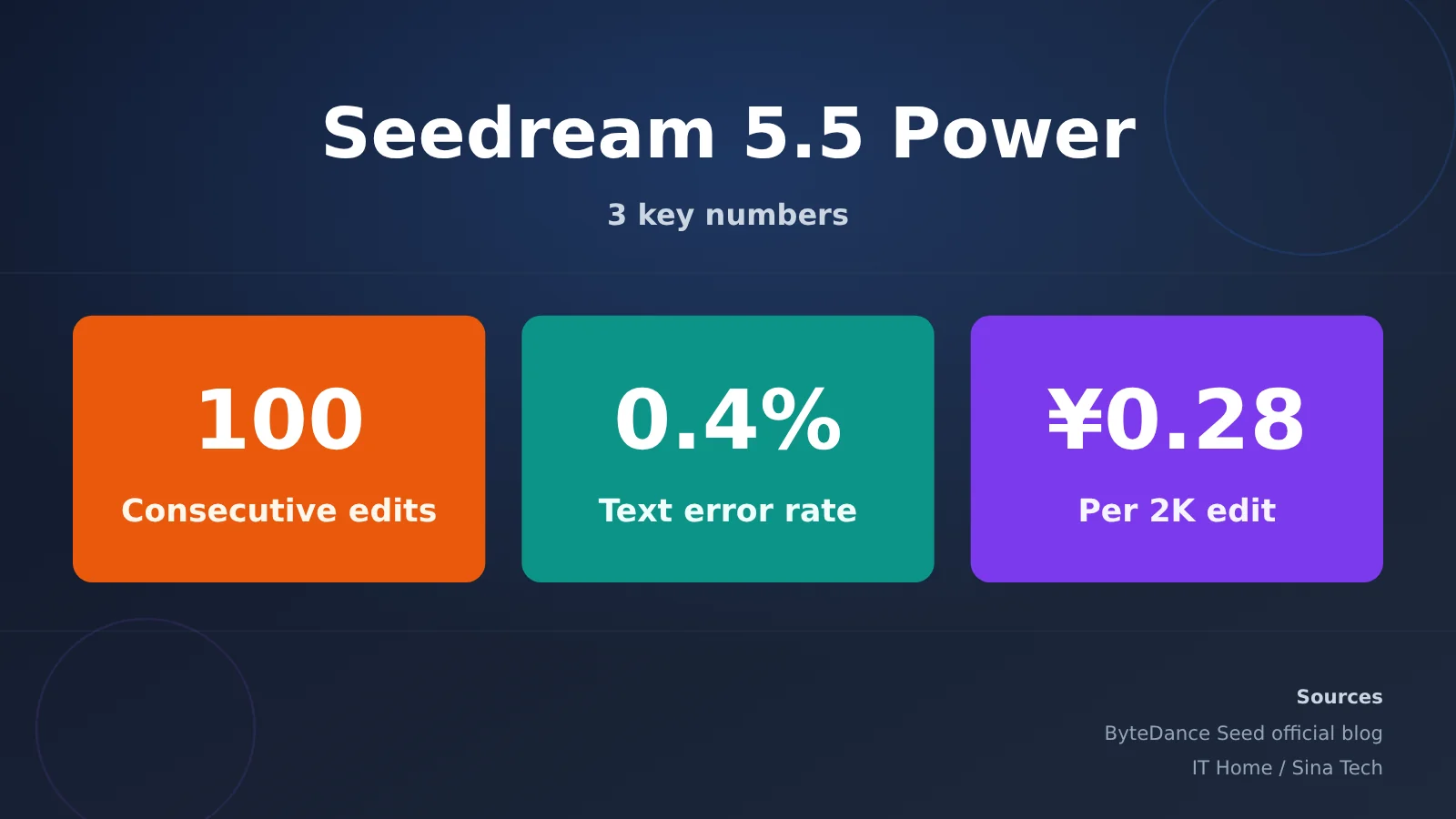
How capable is Seedream 5.5? In short, its strengths are reliable editing across repeated revisions, direct generation of transparent assets, clear dense small text in both Chinese and English, and lower costs and faster speeds—not artistic style. The three key figures are: up to 100 rounds of continuous editing on the same work and a 0.4% rate of severe text corruption, according to official testing; and a reported cost of about 0.28 yuan per 2K square image edit, according to media coverage.
This isn’t a recap of the launch announcement. On November 9, 2026, the day of release, neither Artificial Analysis nor Design Arena had a Seedream 5.5 score, and the company hadn’t published an API model ID or a complete price list. So we’ll identify the source of each figure: official self-reported results, media reports, or third-party platform specifications.
What you’ll get: By the end of this article, you’ll be able to decide whether to move your e-commerce images, storyboards, game assets, and UI assets to 5.5; how to get started on Jimeng, Doubao, and Volcano Ark; and which parameters to check when integrating via API, including which pricing figures shouldn’t be compared directly.
How Powerful Is Seedream 5.5? Key Takeaways
| Feature | Details | Source | What It Means for You |
|---|---|---|---|
| 100 rounds of editing | Preserves pixels in unedited areas and supports up to 100 rounds of edits on the same image | Official | Refine e-commerce product images and storyboards without starting over |
| Native RGBA | Directly outputs transparent or semi-transparent images with an Alpha channel | Official | Skip background removal and edge cleanup; use assets directly in your design workflow |
| Small Chinese and English text | Severe text corruption rate of 0.4%; minor text corruption rate of 1.7% | Official testing | Less rework on posters, infographics, and UI copy |
| Cost | Editing a 2K square image costs about 0.28 yuan, less than half the cost of 5.0 Pro | Media reports | Significantly lower per-image costs for batch image generation |
| Speed | Nearly 40% faster than the previous generation | AIbase report | Faster iterations |
The official positioning for this generation is clear: help image models consistently deliver usable results within production standards, time, and budget constraints. The focus is on reliability for professional production, not the wow factor of a single image. With that in mind, the numbers are easier to interpret: the comparison is about usability, not just aesthetics.
Seedream 5.5 Core Features: Three Upgrades and Acceptance Criteria
Seedream 5.5 100-Round Editing: Does It Hold Up Over Time?
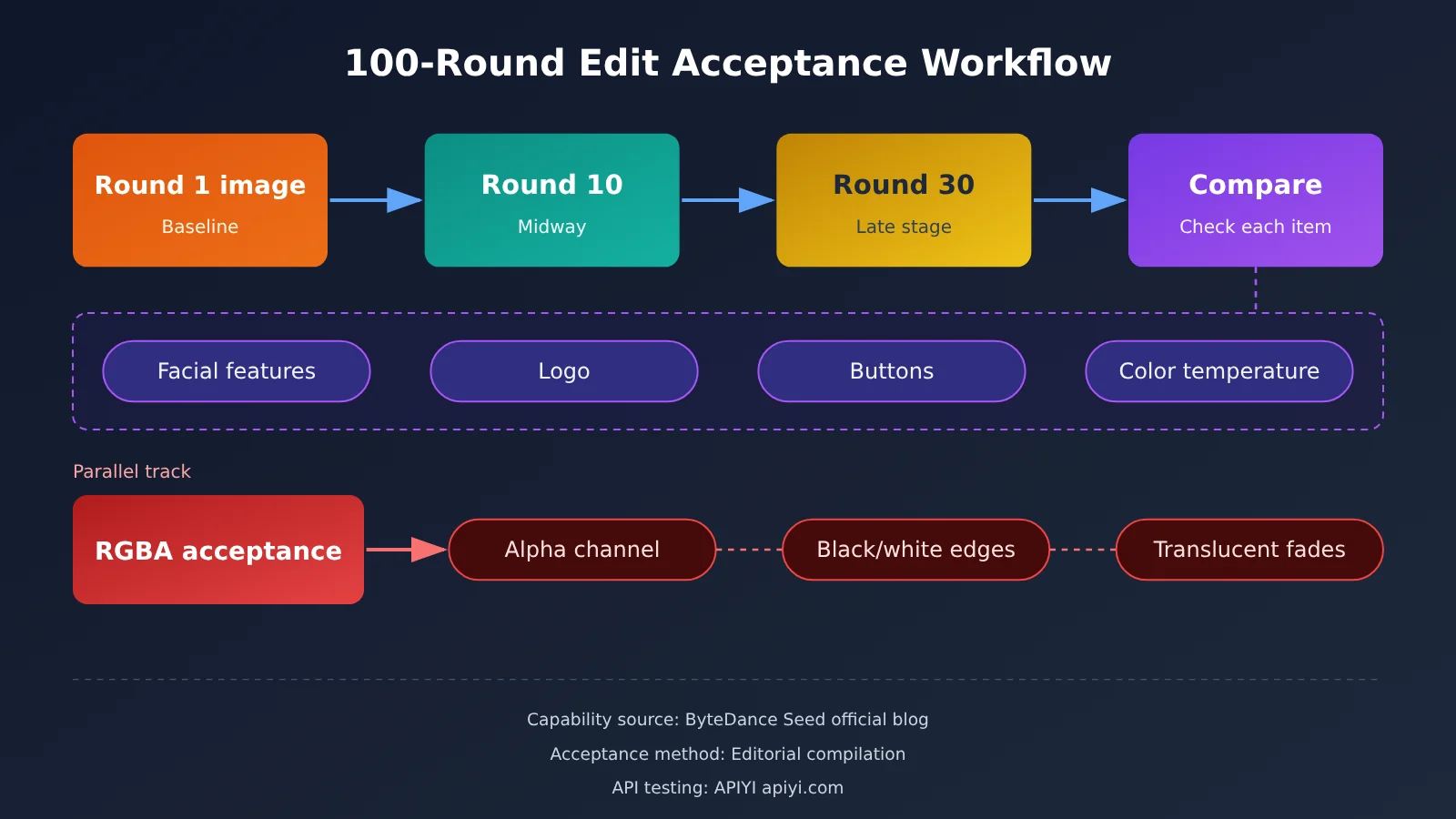
The longstanding problem with multi-round editing is that images get blurrier with each edit. The first few rounds look fine, but after a dozen or so, faces start to drift, the overall color shifts, and untouched areas get quietly redrawn. ByteDance says Seedream 5.5 preserves unedited areas at the pixel level, eliminates color shifts, and reduces detail loss and image degradation during consecutive edits.
One official demo shows the same person edited over 100 rounds, with each round using the previous result as input. The edits change clothes, glasses, rings, and objects on a desk. Even in later rounds, the contact between accessories and skin, occlusion, and transitions in light and shadow remain convincing. Another demo shows a series of edits to an old study: boxes are repeatedly moved, and the perspective, occlusion, and shadows stay consistent at every step.
Acceptance criteria: Use your own real-world material for at least 30 consecutive edits, then compare the results from rounds 1 and 30 side by side. Check the following:
- Whether the subject’s facial proportions, hairline, or skin tone have drifted
- Whether logos and brand text retain their original letterforms and colors
- Whether UI buttons or price labels have shifted; record any movement of more than a few pixels
- Whether the overall color temperature of unedited areas has become warmer or grayer
Seedream 5.5 Native RGBA: Transparent Assets Straight from the Model
The second upgrade is native RGBA generation for transparent assets. The model outputs transparent or semi-transparent images directly with an Alpha channel, handling contours, edges, and transparent areas in fine detail. Official demos showed feather edges, gaps between feathers, and claw outlines on a snowy owl spreading its wings, as well as transparent decorative lettering and the same set of transparent character assets reused across different scenes.
For layers, AIbase, as cited by Chinaz, reports support for up to 100 transparent asset layers in a single output. Third-party platform Atlas Cloud describes this as “1 opaque base image + up to 99 transparent PNG layers”—the two descriptions are consistent. Note that the APIMart model page says transparent backgrounds and layer separation support only 1 reference image.
Acceptance criteria:
- After exporting the PNG, use image software to confirm that the file actually has an Alpha channel, rather than a white background or checkerboard pattern baked into the pixels
- Place the asset on both solid black and solid white backgrounds, and check the edges for white or gray fringes
- Semi-transparent areas, such as glass, smoke, and feather tips, should have gradual transparency rather than abrupt, hard edges
Seedream 5.5 Realism and Text: Dense Small Print in Chinese and English
The third upgrade covers both visual texture and text. According to the official announcement, lighting, materials, and skin texture have improved, with less excessive shine, overexposure, and blotchiness. Text rendering is also more accurate, including complex character shapes and dense small print in Chinese and English.
Acceptance criteria: Generate a poster or infographic with several lines of small text and inspect it at 1:1 scale. For Chinese, check whether strokes are fused or character components are missing. For English, check whether letter spacing is even and whether any invented, letter-like symbols appear. For images of people, also check the forehead and tip of the nose for plastic-looking highlights.
Seedream 5.5 Test Results: How to Read the Official Tests and Third-Party Rankings
First, a note: none of the figures in this section come from APIYI’s own testing. The data falls into two categories: the vendor’s tests on the MagicArena platform and positions on third-party rankings as of that day.
Official Test Results (MagicArena)
MagicArena’s scores are assigned by experienced image generation evaluators, who assess output quality and usability. They aren’t based on blind votes from regular users. The evaluation covers six scenarios: e-commerce, marketing, film and television, gaming, office work, and fashion design. The metrics are usability rate and mean opinion score (MOS).
| Metric | Official test result | How to read it |
|---|---|---|
| Preference over the previous generation (GSB) | Positive across all four combinations of text structure and realism with text-to-image and image-to-image | Shows only that it performed better than its own 5.0 Pro |
| Realism · image-to-image | GSB reached +55.62% | The largest improvement among the four |
| Severe / minor text corruption rate | 0.4% / 1.7% | Covers Chinese and English, including dense, small text |
| Usability rate in film and television and office scenarios | More than twice that of 5.0 Pro | “Usable” was determined by experts |
| Comparison with other models | Led in both text structure tests; clear advantage in text-to-image realism | Compared against GPT Image 2.5 Sunburst, Nano Banana 2.1, and others |
Two points are worth noting. First, the comparison uses GPT Image 2.5 Sunburst, not the GPT Image 2.6 you might be using. Second, the vendor chose the platform, evaluators, and comparison models. These figures are useful for reference, but they shouldn’t be treated as independent third-party conclusions.
Third-Party Leaderboard Rankings (as of 2026-11-09)
| Leaderboard | 1st Place | Nano Banana 2.1 | Seedream 5.0 Pro | Seedream 5.5 |
|---|---|---|---|---|
| AA-Image-T2I v2.1 | GPT Image 2.6 Sunburst (max) 1259 | 6th, 1176 | 18th, 1101 (11,895 samples) | Not yet listed |
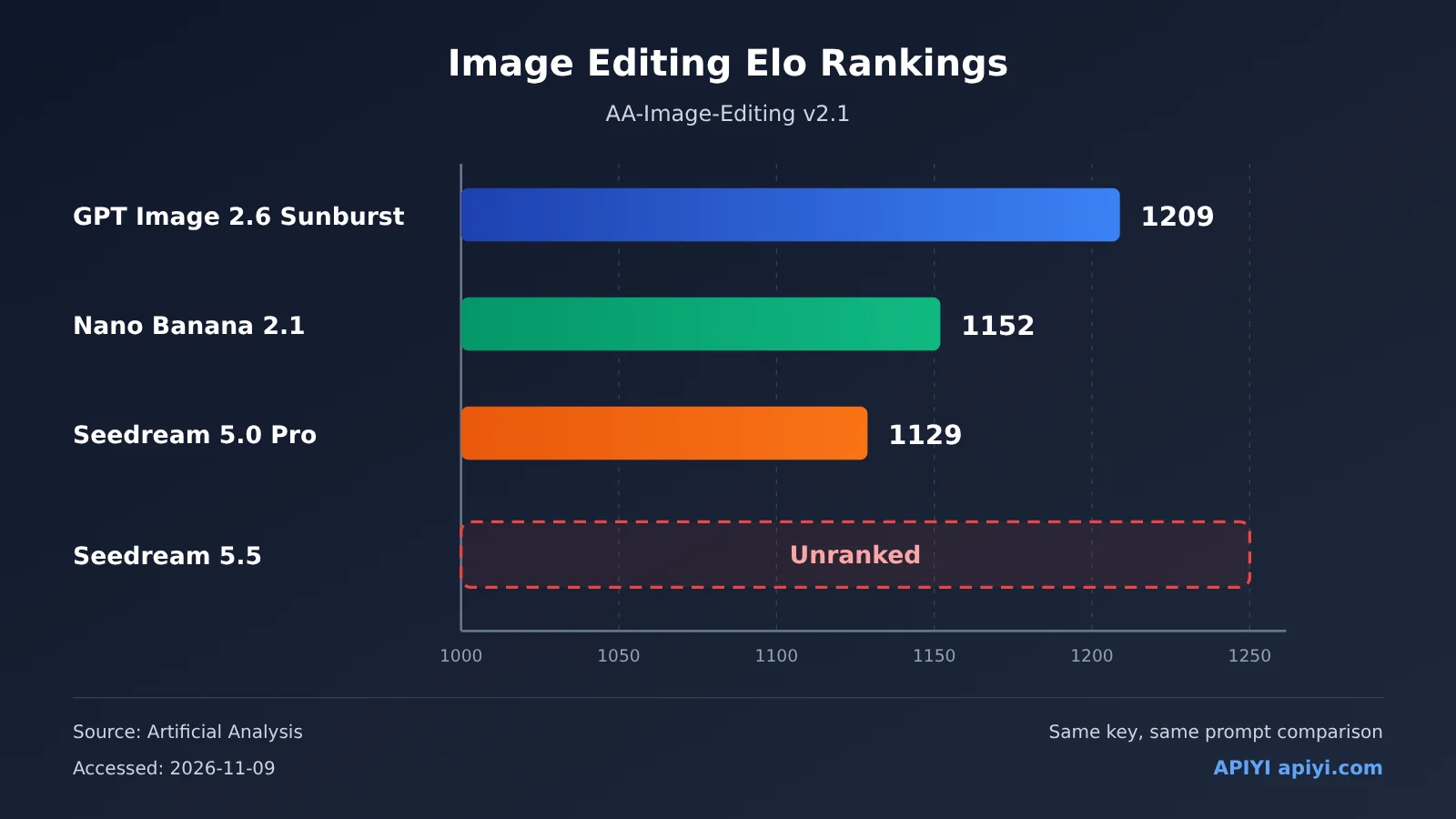
| AA-Image-Editing v2.1 | GPT Image 2.6 Sunburst (max) 1209 | 7th, 1152 | 11th, 1129 (13,721 samples) | Not yet listed |
| Design Arena Overall Image Leaderboard | GPT Image 2.6 Sunburst 1384 | 1275 | 1248 | Not yet listed |
The leaderboards show where the previous generation stands: Seedream 5.0 Pro ranks noticeably higher in editing than in text-to-image, suggesting that editing has long been the series’ strength. There’s no independent data yet to answer whether 5.5 can catch up to GPT Image 2.6. Also, Artificial Analysis and Design Arena use separate Elo systems, so their scores can’t be directly compared by subtracting one from the other.
Seedream 5.5 Speed and Cost
Billing still has two components: input images and output images. Text tokens are free. According to IT Home and Sina Tech, editing one square 2K image costs about RMB 0.28—less than half the cost of Seedream 5.0 Pro. AIbase reports a 60% reduction compared with 5.0 Pro, which is in the same ballpark. On speed, AIbase reports that it’s nearly 40% faster than the previous generation, though we couldn’t find that figure in the official announcement. Note that RMB 0.28 is a media-reported figure, not official pricing.
APIYI currently offers the following per-call prices for Seedream models (see the model list at docs.apiyi.com for the latest details):
| Model | APIYI Price per Call | Positioning |
|---|---|---|
seedream-5-0-pro-260628 |
$0.12/call | Previous-generation flagship |
seedream-5-0-260128 |
$0.035/call | Standard |
seedream-5-0-flash-260915 |
$0.018/call | Fast and affordable |
seedream-4-5-251128 |
$0.04/call | Older version |
seedream-4-0-250828 |
$0.035/call | Older version |
Seedream 5.5 will be available on APIYI as soon as possible. Check the platform’s model list for the model name and pricing.
💡 Tip for a side-by-side comparison: On apiyi.com, the same API key can also call
gpt-image-2.6-flareandgpt-image-2.6-sunburst(billed by token, with image output at $30 per million tokens), as well asgemini-nano-banana-2.1($0.045/call). Once 5.5 is available, you can compare the three providers using the same prompts and reference images, then decide which types of tasks to migrate.
Seedream 5.5: Pros and Cons
Strengths
- Holds up through multiple revisions: Unedited areas stay stable, making it useful for e-commerce product images and storyboards that need several rounds of client feedback.
- Direct transparent output: Generate stickers, character assets, and UI icons without having to remove the background.
- Small Chinese and English text: Official internal tests report a low error rate, which means less rework on infographics and poster copy.
- Cost and speed: According to media reports, the cost per image is less than half that of 5.0 Pro.
Limitations
- No independent scores yet: Neither of the two third-party leaderboards has listed 5.5. Teams that rely on independent scores for purchasing decisions will have to wait.
- Pro version not yet available: The official roadmap says a Pro version will follow.
- Incomplete API information: The official model ID and full pricing haven’t been published. As of publication, the Volcengine Ark pricing page still lists only the 5.0 series.
- Inconsistent resolution claims: WaveSpeed lists tiers from 1K to 3K, APIMart goes up to 2K, and OpenArt lists a maximum of 4K (3840×2160). Morphic also mentions 4K but notes that the API documentation is still pending. There’s no consistent official guidance, so check your platform’s actual offerings.
- Transparent asset limitations: APIMart notes that transparent backgrounds and layer separation support only one reference image.
When to Hold Off on Switching
If you’re creating a single, highly stylized illustration, you may not get much benefit from 5.5’s strengths. If you need to deliver a finished 4K image the same day and your platform doesn’t yet offer a 4K tier, it’s also worth waiting. And for teams already using GPT Image 2.6 reliably for text-to-image work, the official comparison didn’t include 2.6, so it’s best to test both models on the same prompts before migrating.
Getting Started with Seedream 5.5
Here are the official access points:
- Jimeng web app: Create → Generate / Canvas → Select Seedream 5.5
- Doubao app / web app: Image Generation → Select the Seedream 5.5 model
- Doubao Work: Skills → Seedream 5.5
- Volcengine Ark Experience Center: Visual Models → Image Generation → Doubao-Seedream-5.5
- Outside China: The official X account says it’s coming to Dreamina, CapCut, and BytePlus
For API access, APIYI provides one key and two OpenAI-compatible endpoints, /v1/images/generations and /v1/images/edits. Set base_url to https://api.apiyi.com/v1. To switch models, you only need to change the model field; the invocation method stays the same. Results are returned synchronously, with no asynchronous task ID. For multi-round editing, use the previous round’s output as the input image for the next /v1/images/edits request. For specific size tiers and transparent output fields, check the documentation once 5.5 becomes available.
🚀 Integration tip: Before 5.5 becomes available, you can use
seedream-5-0-260128on apiyi.com to get your editing workflow up and running. Once 5.5 is available, you’ll only need to change themodelfield and keepbase_urlset tohttps://api.apiyi.com/v1.
Frequently Asked Questions (FAQ)
Q1: Can I use images generated by Seedream 5.5 commercially?
The official release materials don’t specify separate terms for commercial use. Whether you can use the images commercially depends on the user agreement of the platform you use, such as Jimeng, Doubao, Volcano Ark, or an API provider. Check the relevant platform’s terms before delivery. For images containing people’s likenesses or brand logos, you’ll also need to confirm that you have the necessary permissions.
Q2: Should I choose Seedream 5.5 or 5.0 Pro?
If your work involves repeated revisions, transparent assets, or small Chinese text, the official internal tests show positive preference results for 5.5 across all four metrics. Media reports also put its cost at less than half that of 5.0 Pro. On the other hand, 5.0 Pro already has third-party benchmark scores you can use to inform purchasing decisions. A practical approach is to run the same set of test cases on apiyi.com using the same API key and compare the results across all relevant metrics.
Q3: How do I export a transparent background in Seedream 5.5?
After generating a transparent asset in the web interface, download it as a PNG. JPEG doesn’t preserve the alpha channel. When using the API, you’ll also need to select PNG output. APIMart notes that transparent backgrounds support only one reference image, so tasks involving multiple reference images need to be handled separately.
Q4: Why isn’t there an API price for Seedream 5.5 yet?
The official announcement says it’s “rolling out across platforms.” As of November 9, the Volcano Ark pricing page didn’t have a price entry for 5.5, and quotes from third-party platforms varied. The ¥0.28 figure comes from media reports; for models and pricing on APIYI, check the model list at docs.apiyi.com.
Q5: Does Seedream 5.5 actually support 4K?
There’s no consistent official answer. OpenArt and Morphic list 4K (about 8.29 megapixels), while WaveSpeed tops out at 3K and APIMart at 2K. If 4K is a hard requirement, first confirm that it’s available on the platform you plan to use.
Seedream 5.5 Key Takeaways
- Positioning: Focuses on usable results for professional delivery, rather than the wow factor of a single image
- Three numbers: 100 editing rounds, a 0.4% severe text corruption rate, and approximately ¥0.28 per 2K edit
- Sources: The corruption rate and GSB figures come from the provider’s own tests; the ¥0.28 cost and 40% speed improvement are media-reported figures
- Leaderboards: As of November 9, neither AA nor Design Arena listed 5.5
- Acceptance checks: Check for drift at round 30, inspect the PNG Alpha channel, and view small text at 1:1 to see whether characters run together
- Integration: Once APIYI adds 5.5, you’ll only need to change the
modelfield using the same key on apiyi.com
Summary
Seedream 5.5’s strengths come down to three things:
- Consistency: Unedited areas stay unchanged over 100 rounds of editing, making it suitable for commercial work that needs repeated revisions
- Convenience: Native RGBA output produces transparent assets directly, saving you the work of cutting out backgrounds and refining edges
- Cost savings: According to media reports, the cost per image is less than half that of 5.0 Pro, and it’s faster
The decision is straightforward: if your workflow involves repeated edits, transparent assets, and small Chinese text, 5.5 is worth trying right away. If you’re generating a one-off stylized image or need to deliver a finished 4K image the same day, consider waiting for the Pro version or first checking which tiers your platform offers. Once 5.5 is available on APIYI, you can switch to it and test it using the same API at apiyi.com.
📚 References
- ByteDance Seed Official Blog: “More Realistic Generation, More Stable Editing Over 100 Rounds | Introducing Seedream 5.5”
- Link:
seed.bytedance.com -
Notes: The original source for the three upgrades, official MagicArena test results, and access points
-
Artificial Analysis Image Leaderboards: AA-Image-T2I v2.1 and AA-Image-Editing v2.1
- Link:
artificialanalysis.ai -
Notes: Third-party Elo rankings, accessed 2026-11-09
-
IT Home / Sina Technology / Chinaz (AIbase): Launch-day coverage
-
Notes: Media sources for the 0.28 yuan cost, 40% speed improvement, and 100-layer output
-
APIYI Model List: Available Seedream models and per-call pricing
- Link:
docs.apiyi.com/models - Notes: Check the platform’s live list for the latest information
Author: APIYI Technical Team
Technical discussions: Contact us through the APIYI homepage at apiyi.com. For more resources, visit the documentation center at docs.apiyi.com.