Author’s note: This article doesn’t presume any conclusions about MiniMax H3’s specs or licensing. Instead, it lays out an executable pre-launch verification method to help teams judge—based on evidence—whether the model can go into a commercial video product.
When you integrate a hot model into a commercial video product, the real risk usually isn’t in the invocation step. It’s discovering after launch that capabilities fall short, licensing doesn’t cover your use case, or data can’t leave the country. This article introduces the three-layer boundary verification method for MiniMax H3 before commercialization, so product, engineering, and legal teams can all judge from the same checklist.
This isn’t a spec roundup. On November 4, 2026, 36Kr published a report titled “Silicon Valley giants are using it as a foundation—what makes this Chinese open-source model so special?”, but at the time of writing we hadn’t obtained the full text, so we can’t confirm its specific connection to MiniMax H3. That’s why this article won’t hand you unverified conclusions about resolution, duration, pricing, or licensing—those all need to be confirmed item by item against official first-party sources.
Core value: After reading this, you’ll have a verification checklist covering “capabilities, licensing, deployment” and a 5-step validation process, so you can decide whether to launch, run a limited pilot, or hold off.
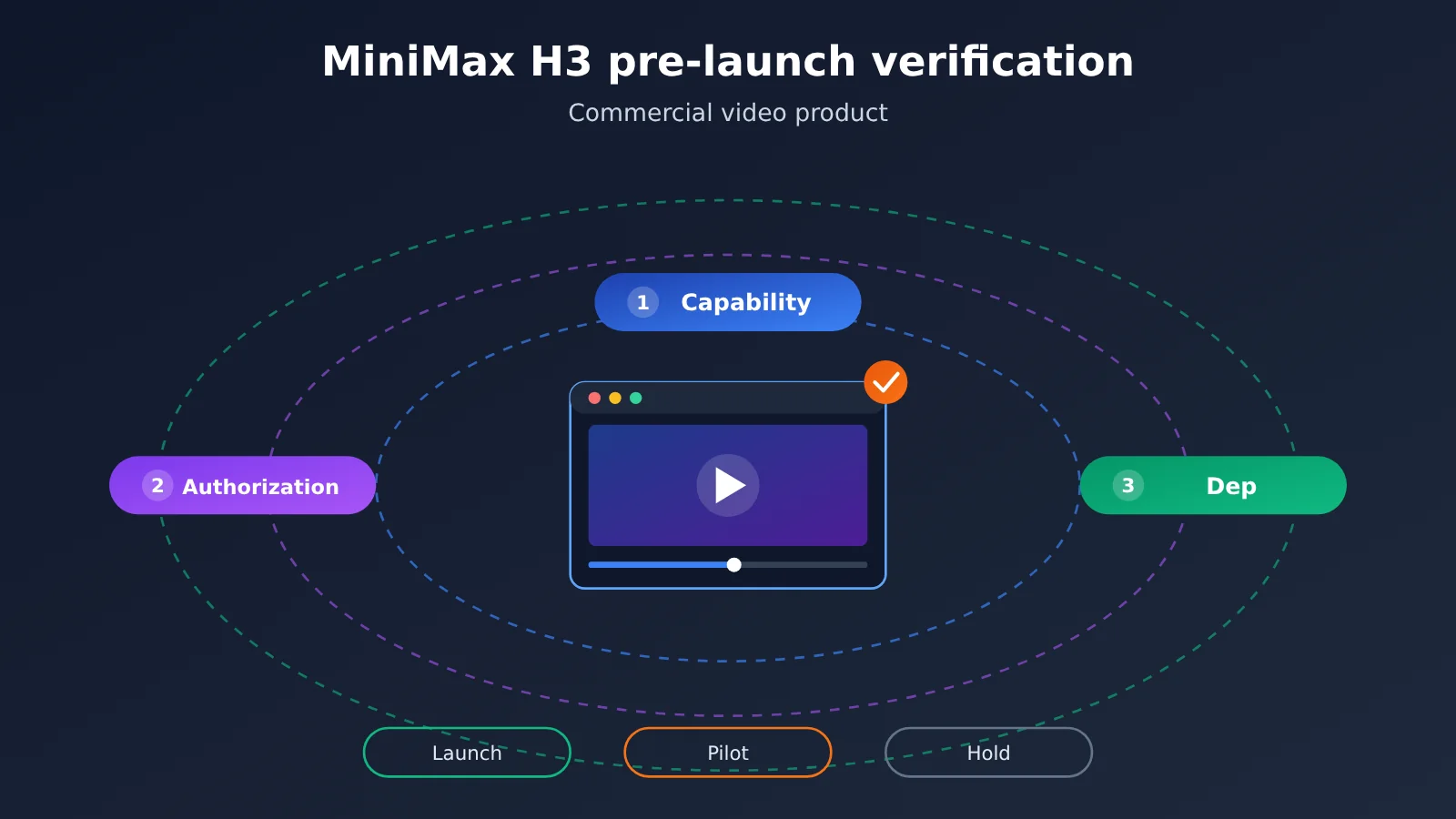
MiniMax H3 Commercial Verification: The Essentials
Commercial video products don’t care whether a model is “good” — they care whether it can deliver consistently under clearly defined conditions. The table below groups the questions you must answer before launch into three buckets, and lists the evidence you should keep for each.
| Verification layer | Questions you must answer | Evidence to keep | What happens if you don’t confirm it |
|---|---|---|---|
| Capability limits | Can it reliably produce video that meets the product spec? | Official spec pages, test footage, evaluation records | Feature promises you can’t keep; failure rates and costs blow past projections |
| Licensing limits | Does your current usage allow commercial use and redistribution? | Snapshots of the license or terms of service, legal opinion | The product could get pulled, forced into remediation, or dragged into a contract dispute |
| Deployment limits | Who owns data, compute, and operations? | Architecture diagrams, data-flow diagrams, capacity test reports | Compliance review stalls out, and the service goes down at peak |
MiniMax H3 Capability Limits: Check the Product Spec First, Then the Demo
Demo videos usually show the model at its best. Your product, on the other hand, has to handle ordinary prompts from a lot of ordinary users. So work backwards from the product requirements: nail down clip length, aspect ratio, resolution, whether you need audio, and whether you need face consistency — then decide whether MiniMax H3 can hit those marks. Record the model version, parameters, and test date alongside every metric; otherwise the results are hard to reproduce.
MiniMax H3 Licensing Limits: Don’t Treat “Open Source” as “Commercially Usable”
“Open source,” “open weights,” and “you can call an API” are three different states, and the rights they grant can be completely different. Model weights, inference code, and cloud services often fall under separate files, and some licenses come with scale thresholds, attribution requirements, or use restrictions. Judge based on the version and channel you’re actually using — not on a headline or a paraphrase from a community thread.
MiniMax H3 Deployment Limits: Where the Data Goes and Who Owns the Responsibility
Whether you use a hosted API, self-hosted weights, or a third-party platform directly determines where your data passes through, who’s responsible for scaling, and who responds when something breaks. Video jobs tend to run long and eat a lot of compute, and those differences get amplified once you’re live. If your team is still in the selection phase, you can run a small-scale validation through a unified interface platform like APIYI, then decide whether to invest in building your own.
How to confirm MiniMax H3’s capability boundaries
The goal of capability validation isn’t to prove the model is powerful—it’s to find the conditions under which it fails. I recommend preparing a fixed test set drawn from real business scenarios, covering common prompts, difficult cases, and edge inputs, then reusing it for future version updates. That’s how you get comparable results.
| Capability | What to confirm | Suggested test method | Pass criteria |
|---|---|---|---|
| Output specs | Resolution, duration, frame rate, aspect ratio, file format | Request each item and inspect the actual output files | Does it cover every spec promised by the product? |
| Input modes | Text-to-video, image-to-video, first/last frame, reference assets | Run the same creative idea through each pipeline | Do all required modes work? |
| Visual stability | Character consistency, limbs, text, camera movement | Generate the same prompt repeatedly and score manually | Does the usable rate meet the team’s threshold? |
| Audio capabilities | Native audio, voiceover, or lip sync | Check official docs and spot-check the final video’s audio track | If unsupported, is there a post-production workaround? |
| Service performance | Queue time, generation time, failure reason distribution | Run concurrent tests at different times and calculate P50 and P95 | Does it meet the product’s wait-time requirements? |
When scoring, don’t look only at average scores. In commercial products, user experience is often determined by the worst results, so track the “undeliverable” rate separately—for example, character distortion, garbled subtitles, or content that clearly doesn’t match the prompt. That rate affects both user satisfaction and real costs, since every failed retry can add charges.
Content safety is also part of the capability boundary. You need to test the model’s blocking behavior—whether normal business content gets falsely blocked, whether violating content is effectively stopped, whether blocked requests are billed, and whether error messages give the frontend enough guidance. Also confirm whether final videos carry watermarks or metadata markers, since that affects final delivery and compliance handling.
How to Confirm the Scope of MiniMax H3’s Commercial License
A licensing review should start with “how exactly are we going to use this,” not with “is this model open source.” A consumer-facing app, a private deployment for enterprise customers, and reselling model capabilities as an API are all different usage scenarios—and the same set of terms might give different answers to each.
| Review item | Key question | Risk reminder | Suggested owner |
|---|---|---|---|
| License type | Which document applies to the weights, the code, and the API respectively? | Open-source code doesn’t mean the weights are equally open | Legal + tech lead |
| Commercial terms | Are there scale, revenue, regional, or industry restrictions? | Business growth may trigger new obligations | Legal + product lead |
| Redistribution and hosting | Can you offer a hosted service externally or deliver the weights? | SaaS, private deployment, and resale aren’t the same thing | Legal + business |
| Fine-tuning and derivatives | What are the distribution and attribution requirements for fine-tuned weights? | Derivative models may inherit the original constraints | Algorithm lead |
| Rights in outputs | Who owns the generated content, what are the usage limits, and how is liability divided? | Model terms can’t substitute for a copyright assessment | Legal |
Once the review is done, lock in the version. I’d recommend saving the full text of the license or terms of service in effect at the time, along with the date, model version number, and source URL; if you’re self-hosting, also record the hash of the weight files. Terms can change between versions, and this snapshot helps the team explain the basis for its judgment during later audits or disputes.
If the product provides services to the general public in mainland China, you should also assess the applicable requirements of the Interim Measures for the Administration of Generative Artificial Intelligence Services, the Provisions on the Administration of Deep Synthesis of Internet Information Services, and the Measures for Labeling AI-Generated Synthetic Content; for EU users, you should also assess the transparency obligations under the EU AI Act. These requirements run on a separate track from the model license—the model being commercially usable doesn’t automatically mean the product is compliant, and the final conclusion should come from qualified legal professionals.
Training data and asset rights also need to be handled separately. Faces, voices, and brand materials uploaded by users, as well as datasets used for fine-tuning, should all have a clear, authorized source and scope of use. I’d recommend building this into the user agreement and internal backend workflows at the same time—don’t leave all of these issues to the model vendor.
How to Choose a MiniMax H3 Deployment Method
There’s no one-size-fits-all deployment method—what matters is what your team is willing to take responsibility for. Once you’ve confirmed which access methods MiniMax H3 actually offers, use the table below to compare them. The self-hosted row applies only if the official weights are actually released and the license permits it.
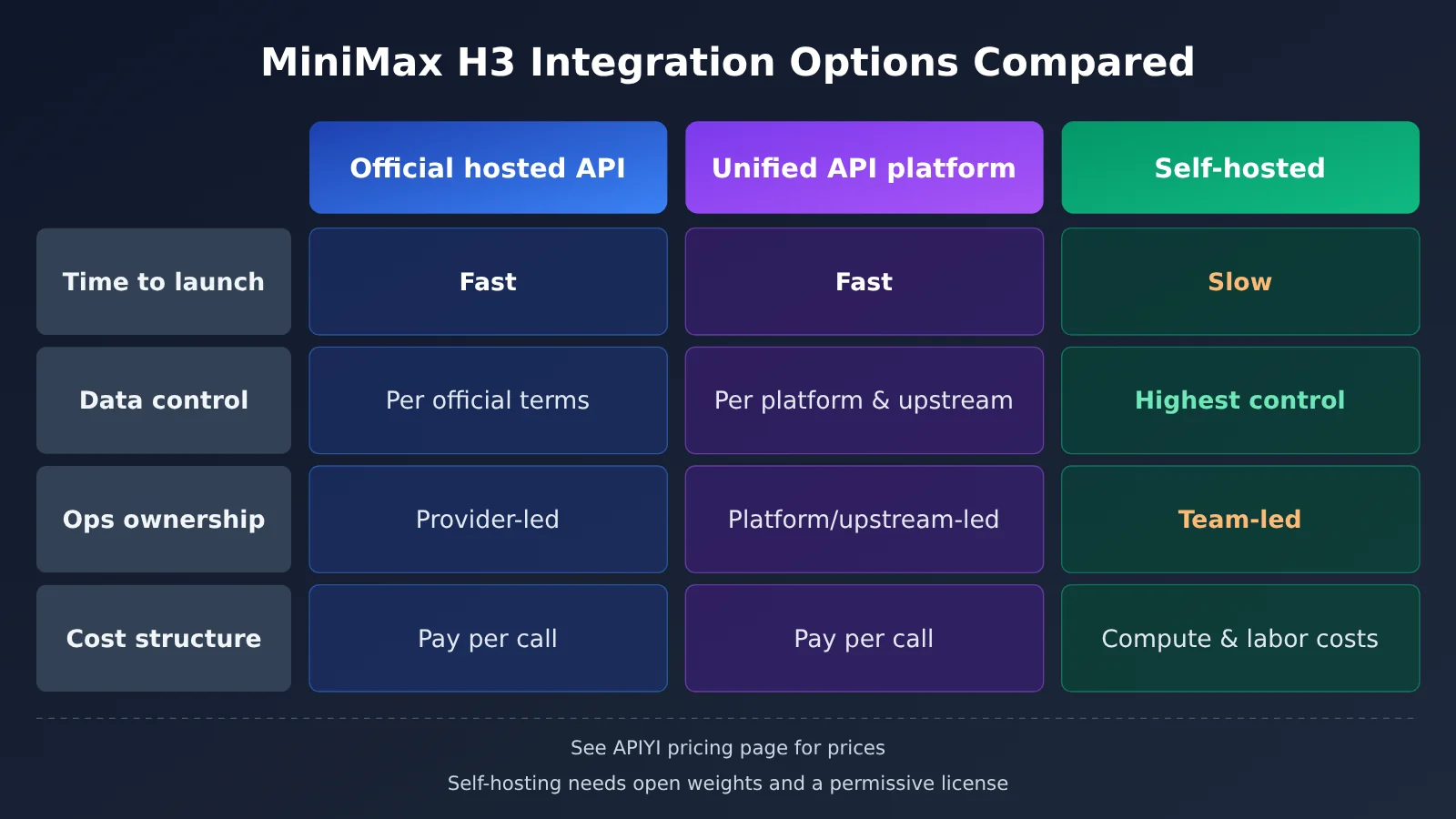
| Access method | Time to launch | Data control | Operational responsibility | Best for | What to verify |
|---|---|---|---|---|---|
| Official hosted API | Relatively fast | Depends on official terms | Mostly handled by the provider | Deep integration with a single model | Region, quotas, data retention policy |
| APIYI unified interface | Relatively fast | Depends on platform and upstream terms | Mostly handled by the platform and upstream provider | Multi-model comparison, quick validation | Model availability, billing basis, upstream terms |
| Self-hosted weights | Relatively slow | Highest degree of control | Mostly handled by your team | Strong data isolation needs and an in-house compute team | Whether weights are available, license, GPU capacity |
Official hosted API comparison: The official API usually keeps features in sync more directly and offers a more straightforward path for reporting issues, but your business gets tied to a single vendor’s quotas and available regions. If your team also needs to compare multiple video models at the same time, a unified interface makes switching easier.
Unified API platform comparison: APIYI provides API access to the models covered in this article and is compatible with OpenAI and Anthropic interface formats, which reduces duplicate integration work when connecting multiple models. That said, the specific fields for video tasks and how to query task status should still follow the APIYI documentation at https://docs.apiyi.com, and you should also confirm whether the upstream terms cover your commercial use case.
Self-hosting comparison: Self-hosting offers the biggest advantages in data isolation and version control, but your team is responsible for model loading, inference queuing, VRAM scheduling, and failure recovery. It’s only the safer choice when your invocation volume and isolation requirements are enough to justify that investment—and only if the license clearly allows it.
Whichever method you choose, map out the full data flow: where user assets are uploaded, which systems the prompt passes through, how long the final video is stored, and whether logs contain personal information. Final video links may expire, so it’s a good idea to copy them to your own object storage as soon as generation is complete, and set deletion policies based on your business requirements.
MiniMax H3 Quick Start: 5 Steps to Pre-Launch Validation
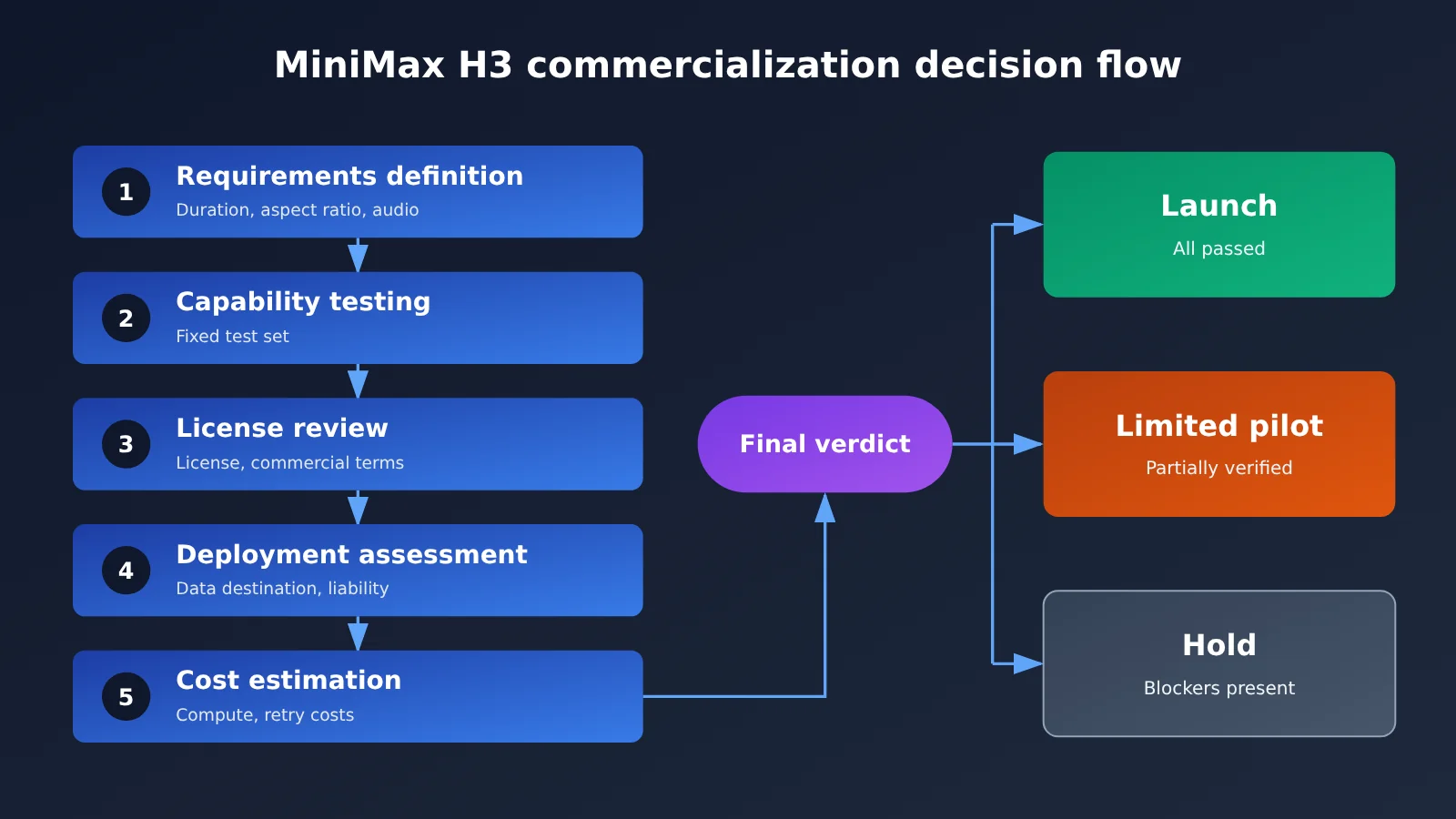
The process below doesn’t depend on a specific SDK, so product, engineering, and legal can move forward in parallel. Each step should leave a record that can be reviewed—that’s more valuable than a demo that merely “looks good.”
- Freeze requirements: Write down the target users, output specs, per-video wait time, estimated call volume, and delivery regions. Mark which items are must-haves and which can be downgraded.
- Collect first-hand information: Confirm the version, capabilities, and terms from official documentation and the model release page. Label community information as “to be verified”—don’t put it straight into the plan.
- Get the minimal workflow working end to end: Work through task submission, status checks, output download, and error handling in order. Confirm that async tasks don’t produce duplicate submissions on timeout and retry.
- Run a fixed test set: Use real business assets to run repeated generation and concurrency tests. Record availability, latency, failure reasons, and actual costs.
- Hold a release review: Product, engineering, legal, and finance jointly confirm the results and put the decision in writing, choosing one of three options: launch, limited pilot, or hold.
When getting the workflow running, it’s best to turn the following parameters into configuration items instead of hard-coding them in business logic. The fields in the table below describe general concepts; the actual field names and value ranges depend on the API documentation for the platform you’re using.
| Config item | Purpose | Pre-launch check | Common issues |
|---|---|---|---|
| Model identifier | Specify the model and version | Does the name match the docs? Can the version be pinned? | Default alias upgrades change behavior |
| Prompt and assets | Describe the content or provide a reference image | Length, format, file size, and access method | Asset URL can’t be accessed by the server |
| Output specs | Control duration, aspect ratio, and resolution | Is the parameter combination supported? Does it affect billing? | Invalid spec combination causes task failure |
| Task ID | Used to query async task results | Is it persisted? Can it support resuming after interruption? | Task results lost after service restart |
| Callback or polling strategy | Get task completion status | Timeout, retry interval, and idempotent handling | Polling too frequently triggers rate limiting |
Validation tip: If you want to compare MiniMax H3 with other video models within the same workflow, you can run a small-scale test through APIYI at apiyi.com. Before integrating, check the documentation at
https://docs.apiyi.comand rely on the model names and API details listed there.
Cost estimation should come after step 4, because only test data reflects real consumption. You can estimate the model cost per deliverable video as “price per generation ÷ availability rate,” then add storage, distribution, moderation, and human review costs. The unit price and billing basis must be based on actual data from APIYI’s pricing page at https://docs.apiyi.com/models; this article doesn’t provide unverified price figures.
For release decisions, you can use this simple set of rules:
- Ready to launch: All must-haves pass, licensing has a written conclusion, capacity and cost are within budget, and there’s a fallback plan.
- Limited pilot: Licensing and compliance are clear, but there are controllable gaps in quality or performance; you can reduce risk with an allowlist or restricted specs.
- Hold launch: Commercial licensing is unclear, the data path can’t pass review, or there are must-have gaps that can’t be worked around.
FAQ
Q1: What is MiniMax H3, and which specs does this article actually confirm?
This article couldn’t verify enough first-hand material, so it doesn’t draw conclusions about its specs. What it offers is a way to verify things yourself — for actual capabilities, refer to the model documentation published by MiniMax.
Q2: I’ve seen claims that MiniMax H3 is “open source” — can I use it commercially right away?
No, you can’t jump to that conclusion. You need to check the terms that apply to the weights, the code, and the API service separately, and confirm that your product type, business scale, and region all fall within the permitted scope.
Q3: When is MiniMax H3 being released, and can I call it now?
As of November 5, 2026, the information available to this article isn’t enough to confirm its release date or which channels are open. Check official announcements and verify current availability in the model list of the platform you’re using.
Q4: Which commercial video scenarios is MiniMax H3 a good fit for?
Whether it fits depends on your test results. Start by building test sets around these scenarios:
– **E-commerce short videos:** Focus on whether product appearance gets distorted and whether brand text renders accurately.
– **Ad creative drafts:** Focus on style control and batch generation cost.
– **Narrative or character-driven content:** Focus on cross-shot character consistency and the portrait licensing workflow.
Q5: How can I quickly validate MiniMax H3 through the API?
Follow these steps:
1. Go to APIYI apiyi.com, sign up, and get an API key.
2. Confirm the model name and request format in the docs at `https://docs.apiyi.com`.
3. Use a small set of fixed samples to run through task submission, polling, and download.
APIYI is compatible with the OpenAI and Anthropic API formats, so existing projects can reuse their call layer — but video-specific parameters still need to be checked separately.
Q6: How is MiniMax H3 pricing calculated?
Refer to the actual data on the APIYI pricing page at `https://docs.apiyi.com/models` for pricing and billing rules. When estimating costs, also confirm whether failed tasks are billed, and how duration and resolution affect the unit price.
Q7: If I call it through a third-party platform, do I still need to do a licensing review?
Yes, you do. The platform solves connectivity — it doesn’t replace your own compliance judgment about your product. Before launch, you should still confirm the platform terms, upstream terms, and local regulatory requirements, and keep a record of your review.
Q8: Do I need to run through validation again after a model version update?
At minimum, re-run your fixed test set and check whether the terms have changed. If the version update affects output specs, API fields, or data handling, you should also redo your deployment and compliance assessment.
MiniMax H3 Commercialization Verification: Key Takeaways
- Verify before integrating: Base MiniMax H3’s specs and terms on official first-party sources.
- Judge capability by worst-case results: Use real test sets to measure the proportion of undeliverable outputs, not just demo clips.
- Licensing depends on usage: Review SaaS, private deployment, and resale separately.
- Deployment determines responsibility: The integration approach affects data paths, capacity planning, and incident response.
- Calculate cost by deliverable: Factor in failed retries and use APIYI’s pricing page for unit prices.
- Keep verification switchable: Use APIYI’s unified interface to reduce adaptation costs when comparing multiple models.
- Decisions must be documented: Save model versions, terms snapshots, test results, and review conclusions.
Summary
Before using MiniMax H3 in a commercial video product, the core work comes down to three things:
- Confirm capability boundaries: Validate specs, stability, performance, and content safety with real business samples.
- Confirm licensing boundaries: Review terms and regulatory requirements based on your actual product form, and save version snapshots.
- Confirm deployment boundaries: Clarify data paths, capacity plans, operational responsibilities, and fallback options.
If the current information isn’t enough to reach a conclusion, “hold off” or “limited pilot” are equally valid decisions. Compared with being forced to fix things after launch, buying evidence with a small-scale test costs far less.
Next, you can prepare a fixed test set, then verify invocations through APIYI at apiyi.com; see https://docs.apiyi.com for API documentation, and refer to the actual data at https://docs.apiyi.com/models for pricing.
📚 References
- 36Kr report: “Silicon Valley Giants Are Using It as a Foundation — What Makes This Chinese Open-Source Model So Special?”
- Link:
36kr.com/p/4055377799271297 -
Note: Published November 4, 2026. This article uses it only as background for the topic and does not rely on its body content as a factual source.
-
MiniMax Open Platform: Official entry point for API and service information
- Link:
platform.minimaxi.com -
Note: Used to verify model availability, API specifications, and terms of service.
-
MiniMax Hugging Face page: One of the official model release channels
- Link:
huggingface.co/MiniMaxAI -
Note: If relevant weights are released, you can check version and license files here.
-
APIYI Documentation Center: API invocation instructions
- Link:
https://docs.apiyi.com -
Note: Used to confirm model names, request formats, and integration methods.
-
APIYI Pricing page: Model pricing and billing information
- Link:
https://docs.apiyi.com/models - Note: The prices and billing standards mentioned in this article are based on the actual data on this page.
Author: APIYI Technical Team
Technical Discussion: For more integration resources, visit the APIYI Documentation Center at docs.apiyi.com