Author’s note: MiniMax-H3-Image’s strengths are roughly 16MP direct output and up to 16 reference images. Seedream 5.5’s strengths are its officially self-reported ~100 rounds of continuous editing and native transparent backgrounds. This article gives a “which model for which job” verdict, and explains which generation of Seedream you can call on APIYI today.
Two image models that both pitch themselves on editing landed within two days of each other. ByteDance Seed released Seedream 5.5 on 2026-11-09, and MiniMax released the open-weight MiniMax-H3-Image on 2026-11-10. Both claim stable editing, but they don’t mean the same thing by “stable.”
The short version: If you need large ~16MP images in one shot, want to feed in lots of reference images, or plan to self-host, look at H3-Image. If you need to edit the same image dozens of times in a row, or need transparent-background assets, look at Seedream 5.5’s official self-reported numbers. Keep in mind that its official blog doesn’t list API pricing or a model ID. As of 2026-11-11, neither new model is available on APIYI yet.
This isn’t a same-prompt head-to-head benchmark. Neither side has published an official demo comparison using the same prompt, and this article won’t stitch their marketing images together into a fake “side-by-side.” Every number below is labeled by source: figures from official evals, blogs, and accounts are marked “official self-reported,” and specs from API documentation pages are marked “per the docs.”
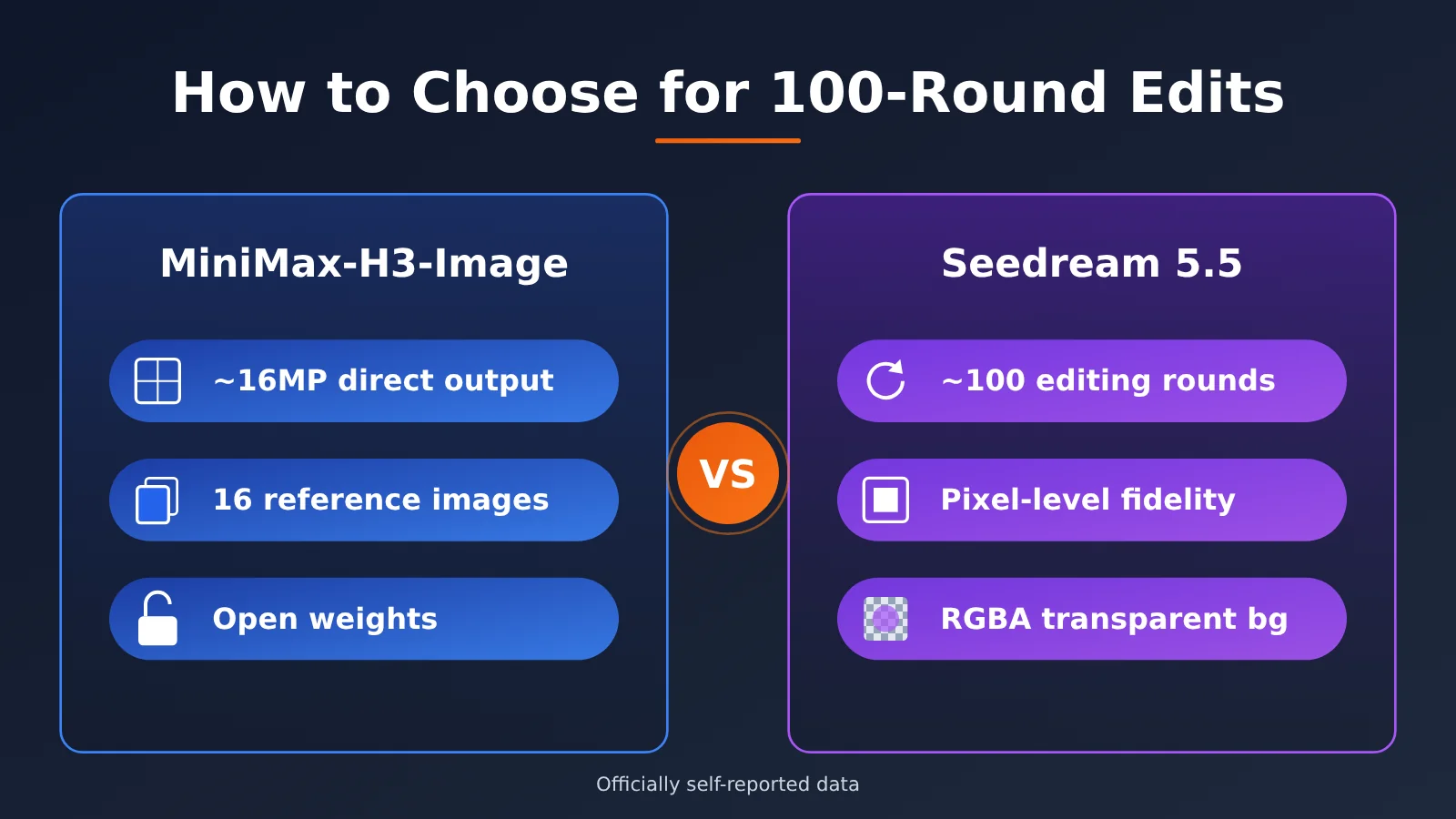
H3-Image vs. Seedream 5.5: Core Differences
Let’s start with the specs. The rule for the table below: only include what’s in official announcements or documentation. If one side publishes a figure and the other doesn’t, we mark the empty cell “Not officially disclosed” rather than filling it in with numbers from third-party pages.
| Dimension | MiniMax-H3-Image | Seedream 5.5 |
|---|---|---|
| Release date | 2026-11-10 | 2026-11-09 |
| Single-pass output resolution | ~16MP native output (official claim) | Not officially disclosed |
| Area limit | 20 megapixels, default area is 4K (per documentation) | Not officially disclosed |
| Reference image limit | Up to 16 images (official claim) | Not officially disclosed |
| Consecutive editing rounds | Not officially disclosed | Up to ~100 rounds, with pixel-level preservation of unedited regions and no color shift (official claim) |
| Transparency channel | Not officially disclosed | Native RGBA, including partial transparency (official claim) |
| Inference settings | 6 steps, no CFG, no negative prompt (official claim) | Not officially disclosed |
| Generation and editing | Same checkpoint (official claim) | Not officially disclosed |
| Weights and license | Open weights, community license, with Applicable Territory terms and an additional authorization request process | Not officially disclosed |
| API model ID and pricing | Official API documentation available | Not provided in the official blog |
📌 Data note: The table reflects data as of 2026-11-11. Neither model is available on APIYI (apiyi.com) yet. We’ll add this model as soon as we can; model names and pricing are subject to the platform’s model list.
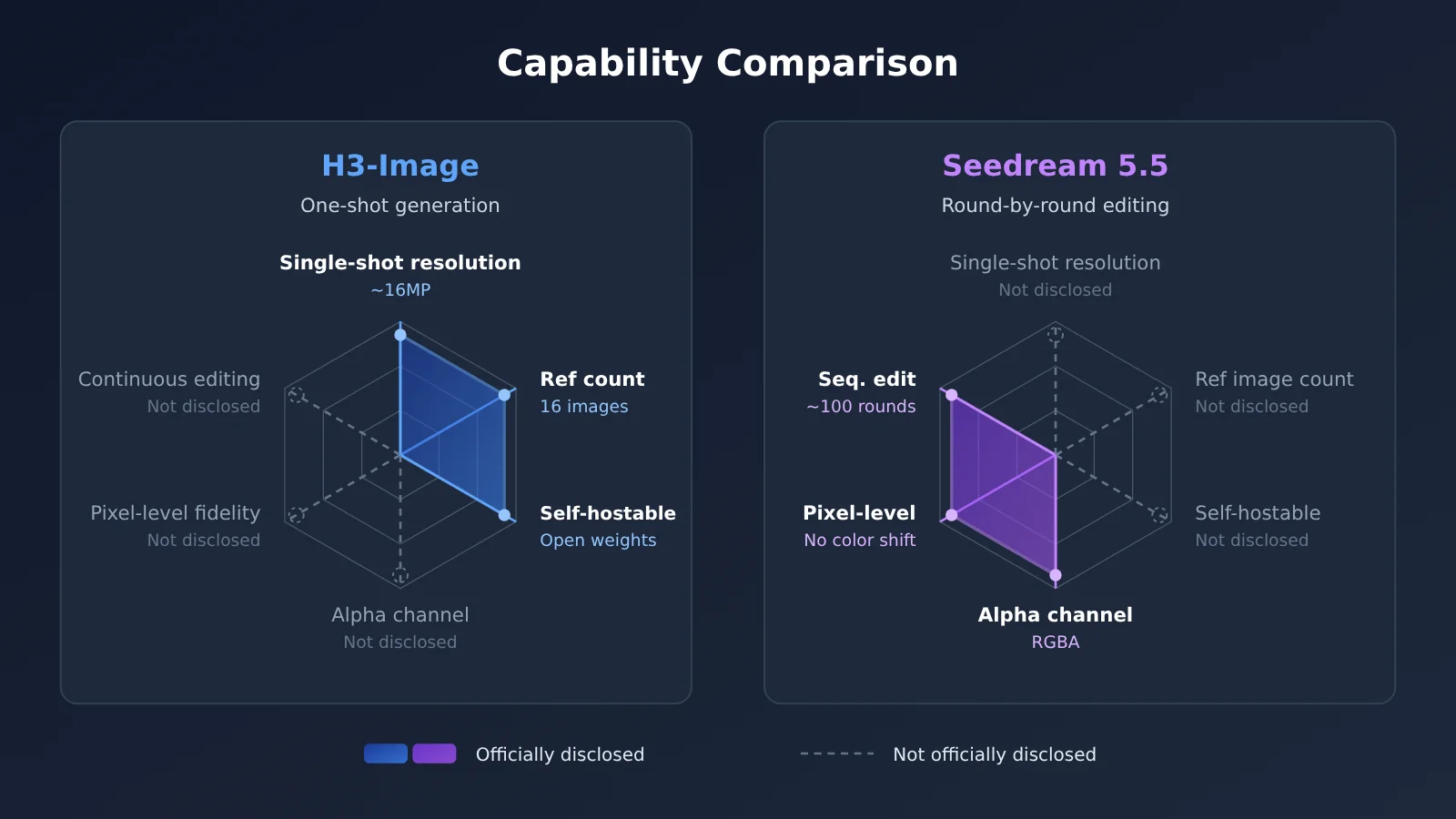
H3-Image’s One-Shot Output
H3-Image’s philosophy is “get it big enough and accurate enough in one go.” Native output of roughly 16MP means large-format needs like posters and print materials don’t have to start with a small image and then go through super-resolution. One less upscaling step means one less place where detail can get distorted. The API docs set the area cap at 20 million pixels, with the default area set at 4K, so there’s headroom.
Another thing worth noting is the limit of up to 16 reference images. When you’re building brand materials, characters, products, color palettes, and layouts often each need several references. The higher the reference image limit, the easier it is to spell out all your constraints in a single request. Generation and editing share the same checkpoint, and it produces images in 6 steps, uses no CFG, and doesn’t support negative prompts. So when you write your prompt, you’ll need to rephrase “what you don’t want” as “what you do want.”
Seedream 5.5: Hundred-Round Editing and Transparent Backgrounds
Seedream 5.5’s selling point is all about editing. It officially claims support for up to roughly 100 consecutive rounds of editing, with unchanged areas staying pixel-level consistent and no color shifts. Anyone who’s done multi-round editing knows that with traditional models, by around the dozenth round the whole image often turns gray or yellow, or the background gets quietly redrawn. That’s exactly the problem it’s trying to solve.
Native RGBA output is the second highlight, and it supports partial transparency, such as the semi-transparent transitions in glass, smoke, and the edges of hair strands. For e-commerce graphics, stickers, and UI assets, you don’t need a separate cutout step anymore. The official materials also mention more natural lighting, materials, and skin texture, plus better rendering of dense small text.
Who Is the Official GSB Comparison Actually Against?
This is easy to misread. In the Seedream 5.5 blog post, the GSB comparison is against GPT Image 2.5 Sunburst and Nano Banana 2.1. It isn’t against H3-Image or GPT Image 2.6. So you can’t carry those results over and conclude that “Seedream 5.5 beats H3-Image.”
| Official Self-Reported Metric | Compared Against | Result |
|---|---|---|
| Usability rate in film/TV and office scenarios | Seedream 5.0 Pro | More than 2x (self-reported by the vendor) |
| Text and structure (two dimensions) | GPT Image 2.5 Sunburst, Nano Banana 2.1 | Ahead (self-reported by the vendor) |
| Text-to-image realism | GPT Image 2.5 Sunburst, Nano Banana 2.1 | Clear advantage (self-reported by the vendor) |
| Severe text corruption rate | No comparison, absolute value | 0.4% (self-reported by the vendor) |
| Minor text corruption rate | No comparison, absolute value | 1.7% (self-reported by the vendor) |
All of this comes from ByteDance Seed’s official announcement, not from a third-party leaderboard. Also, the blog says Seedream 5.5 Pro is still on the way. The version released now is simply called Seedream 5.5, so don’t refer to it as 5.5 Pro.
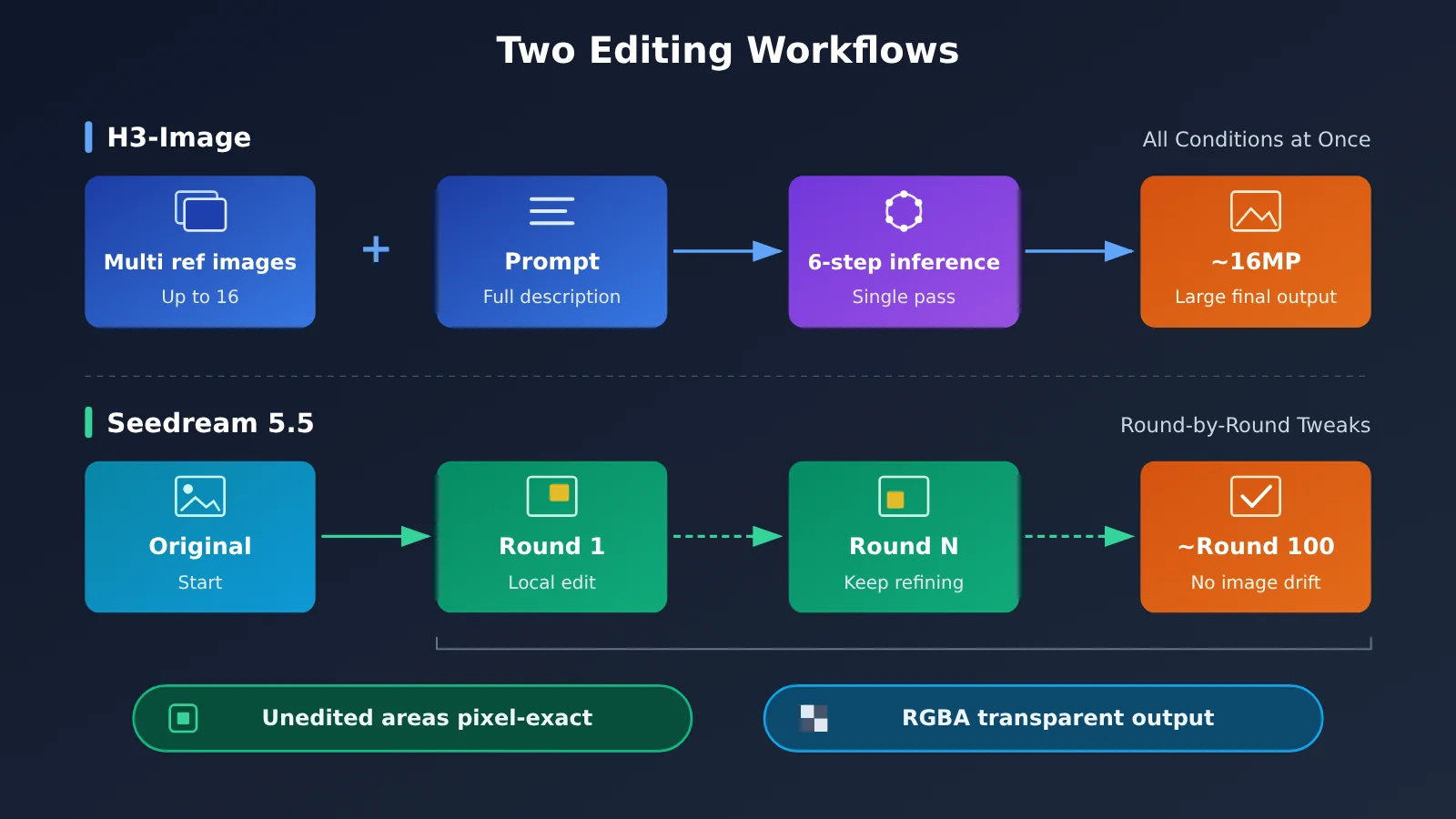
How H3-Image and Seedream 5.5 Work: Two Editing Pipelines
The difference between them comes down to two distinct workflows. H3-Image is built around “give it everything up front”: you feed in multiple reference images plus a full description and get a large finished image directly. Seedream 5.5 is built around “refine it round by round”: you tweak the same image bit by bit, and it relies on preserving unedited regions pixel for pixel to keep the picture from drifting.
When choosing, ask yourself whether your need is “lots of conditions but few changes” or “simple conditions but lots of back-and-forth.” The former maps to reference image count and single-pass resolution, while the latter maps to stability across consecutive edits. That question will tell you more than any promo image.
H3-Image vs. Seedream 5.5: Recommended Scenarios
The table below suggests a leaning for each common task. The reasoning is based on the capabilities each side officially states, not on head-to-head tests with the same prompts.
| Task Type | Leaning | Reason |
|---|---|---|
| Large-format posters, print materials | H3-Image | ~16MP direct output, area cap of 20 million pixels |
| Multi-character or multi-product compositing | H3-Image | Up to 16 reference images |
| Private deployment, self-hosted inference | H3-Image | Open weights; check the community license and territory terms first |
| Repeatedly editing the same image | Seedream 5.5 | Officially self-reported ~100 rounds of consecutive editing |
| Transparent-background stickers, e-commerce assets | Seedream 5.5 | Native RGBA, including partial transparency |
| Dense small text, office charts | Seedream 5.5 | Officially self-reported low text-corruption rate and better dense small text |
When to Choose H3-Image
- Large images finalized in one pass: Ad key visuals, display boards, and packaging flats that need high resolution without going through upscaling.
- Reference-heavy tasks: Multi-angle brand IP sheets or bundled product shots, where you need to feed many reference images to the model at once.
- Teams that want to self-host: You want to run inference on your own GPUs and control where your data goes. Note that the community license includes an Applicable Territory clause, and some uses require separately applying for authorization, so read the full license before going live.
When to Choose Seedream 5.5
- Multi-round design iterations: The client gives feedback round after round, each time changing just one area, and everything else must stay untouched.
- Transparent-background asset production: Stickers, icons, product cutouts, and elements with semi-transparent edges.
- Film/TV and office-style image output: The vendor self-reports that usable-output rates in these two scenarios are more than double those of Seedream 5.0 Pro.
Which Models Can You Call on APIYI Right Now: H3-Image vs. Seedream Pricing
For developers, the most practical question is “what can I actually plug in today?” As of 2026-11-11, APIYI (apiyi.com) doesn’t yet offer MiniMax-H3-Image, MiniMax-H3-Image-Highspeed, or Seedream 5.5. The ByteDance image models currently available are the previous Seedream generation. Model IDs and prices are listed below.
| Model ID | Generation | Status | Billing | Input / Output | Cache Read |
|---|---|---|---|---|---|
MiniMax-H3-Image |
H3 | Not yet available | — | — | — |
MiniMax-H3-Image-Highspeed |
H3 | Not yet available | — | — | — |
| Seedream 5.5 | 5.5 | Not yet available; no official model ID published | — | — | — |
seedream-5-0-pro-260628 |
5.0 Pro | Available | $0.12 per call | Per-call billing, no input/output split | No cache read price |
seedream-5-0-260128 |
5.0 | Available | $0.035 per call | Per-call billing, no input/output split | No cache read price |
seedream-5-0-flash-260915 |
5.0 Flash | Available | $0.018 per call | Per-call billing, no input/output split | No cache read price |
seedream-4-5-251128 |
4.5 | Available | $0.04 per call | Per-call billing, no input/output split | No cache read price |
seedream-4-0-250828 |
4.0 | Available | $0.035 per call | Per-call billing, no input/output split | No cache read price |
MiniMax-H3-Image, MiniMax-H3-Image-Highspeed, and Seedream 5.5 aren’t available yet, and we’ll add them as soon as we can. Model IDs and pricing are subject to the model list on the platform. Prices for the available models come from docs.apiyi.com/models (data as of 2026-11-11) and are likewise subject to the platform’s model list.
One thing to keep in mind: seedream-5-0-pro-260628 is 5.0 Pro, not 5.5. Capabilities like roughly 100 rounds of continuous editing and native RGBA are self-reported by the official 5.5 blog post, so you shouldn’t assume the previous generation has them. If you need to start using ByteDance image models right now, you can get your pipeline running as follows and swap in the new model ID once 5.5 goes live:
- Set
base_urltohttps://api.apiyi.com/v1, and use any OpenAI-compatible SDK - The endpoint type is chat; as the docs describe, you send image requests through the chat interface
- For the model field, start with
seedream-5-0-pro-260628, or switch toseedream-5-0-flash-260915if cost is your priority - Write multi-round editing as a loop, and log the input and output images for each round, so you can rerun the same workflow on 5.5 later and compare
The upside is that your pipeline, billing, and retry logic can all be validated ahead of time, and when the new model goes live, you only need to change a single field.
H3-Image vs. Seedream 5.5: Decision Guide
Here’s everything above boiled down to one table. Pick the row that matches what you care about most.
| What you care about most | Recommendation | What you can do today |
|---|---|---|
| Single-shot resolution, number of reference images | H3-Image | Read the model card and API docs, then evaluate self-hosting or wait for it to be listed |
| Controlled deployment, keeping data inside your network | H3-Image open weights | Check the community license and regional terms first |
| Multi-turn editing without drift | Seedream 5.5 | Build your multi-turn editing workflow on the previous-generation Seedream for now |
| Transparent-background assets | Seedream 5.5 | Wait for 5.5 to be listed; with the previous generation you’ll need to handle background removal yourself |
| Ship right away with a clear budget | The already-listed Seedream 5.0 series | Estimate costs using the per-call prices in the table above |
💡 Our advice: Neither new model has a public head-to-head comparison on the same test set yet, so the safest move is to run the same workflow on your own real assets. Start by building your editing pipeline and cost model on the Seedream 5.0 series through APIYI (apiyi.com). Once the new models are listed, just swap the model name and compare the results directly.
Frequently Asked Questions (FAQ)
Q1: What are H3-Image and Seedream 5.5?
MiniMax-H3-Image is an open-weight image model that MiniMax released on 2026-11-10. Generation and editing share the same checkpoint, and the official specs claim roughly 16MP direct output and up to 16 reference images. Seedream 5.5 is an image model that ByteDance Seed released on 2026-11-09. The official claims include up to about 100 rounds of continuous editing and native RGBA transparent output.
Q2: Does Seedream 5.5’s GSB lead mean it’s better than H3-Image?
No. The official GSB comparison is against GPT Image 2.5 Sunburst and Nano Banana 2.1. It doesn’t include H3-Image or GPT Image 2.6. There are also no public same-prompt demos from both sides, so any claim about which one is “stronger” currently has no direct evidence behind it.
Q3: What are Seedream 5.5’s API pricing and maximum resolution?
The official blog doesn’t list an API model ID, pricing, maximum resolution, or a cap on the number of reference images. You can find some numbers online. For example, one media outlet reports about CNY 0.28 for editing a 2K square image, the BytePlus product page says “from $0.02/image,” and a third-party help center says up to 3K resolution and up to 10 reference images. These all come from media or third-party pages, not official price lists, so treat them only as leads.
Q4: H3-Image is open source, so can I use it commercially however I want?
Not necessarily. H3-Image uses a community license that includes an Applicable Territory clause, and some uses require you to apply for additional authorization. Before you self-host or use it commercially, read the license in the model card clause by clause, and go through the authorization process if needed.
Q5: Which model should I use if I want to call a ByteDance image model right now?
As of 2026-11-11, Seedream 5.5 isn’t available yet, and we’ll add it as soon as we can. Model IDs and pricing are subject to the platform’s model list. Today on APIYI (apiyi.com), you can call previous-generation models such as `seedream-5-0-pro-260628` ($0.12 per call) and `seedream-5-0-flash-260915` ($0.018 per call). New users get free test credits, which is handy for validating your workflow first.
Q6: What should I watch out for when writing prompts for H3-Image?
According to the official specs, it doesn’t use CFG and doesn’t support negative prompts. That means negative phrasing like “no text” or “don’t make it blurry” has limited effect. Rewrite these as positive requirements instead, such as “clean image, text-free” or “subject clear and sharp.” When you’re using many reference images, it helps to state in the prompt what each one is responsible for.
Q7: What are the known limitations of each model right now?
All of Seedream 5.5’s core capabilities come from official self-reported claims, with no third-party leaderboard to back them up, and the API specs aren’t public. H3-Image’s specs are fairly complete, but its license has territory and authorization restrictions, and if you self-host you’ll need to cover the inference compute yourself. Neither model is available on APIYI yet, so you can’t call them directly through the aggregated API for now.
H3-Image vs. Seedream 5.5: Key Takeaways
- H3-Image excels at getting it right in one shot: roughly 16MP direct output and up to 16 reference images (both officially self-reported)
- Seedream 5.5 excels at iterative editing: around 100 consecutive editing rounds and native RGBA (both officially self-reported)
- Check what the GSB comparisons are actually against: they’re measured against GPT Image 2.5 Sunburst and Nano Banana 2.1
- Seedream 5.5 has big spec gaps: the official blog doesn’t list a model ID, pricing, or a maximum resolution
- H3-Image can be self-hosted, with caveats: the community license includes territorial clauses, so watch out for authorization requirements
- What you can call today is the previous generation: APIYI (apiyi.com) lists the Seedream 5.0 series with per-call billing
Summary
The H3-Image vs. Seedream 5.5 decision comes down to two different needs:
- You can give all the conditions up front, need large images, or want to self-host: go with H3-Image, and read the open-source license carefully
- You need to keep tweaking the same image or need transparent backgrounds: keep an eye on Seedream 5.5, but its pricing and specs still need to be filled in by the vendor
- You need to ship today: build your pipeline on the already-listed Seedream 5.0 series first, then swap in the new model once it’s available
Both models have only been out for two days, so there’s very little information beyond the official numbers. I’d suggest testing with your own production assets rather than drawing conclusions from promo images. You can start by running a multi-round editing workflow on the previous-generation Seedream through APIYI at apiyi.com, then switch the model name and re-test as soon as the new model goes live.
📚 References
- MiniMax-H3-Image Official Model Card: Specs, inference settings, and community license
- Link:
huggingface.co/MiniMaxAI/MiniMax-H3-Image -
Notes: Source for 16MP direct output, 16 reference images, and the license and regional terms
-
MiniMax H3 Image Generation API Docs: Area limits and default parameters
- Link:
platform.minimax.io/docs/api-reference/image-generation-h3-generations -
Notes: Documents the 20-megapixel cap and the default 4K area
-
ByteDance Seed Official Blog: Introducing Seedream 5.5: 100-round editing, RGBA, and official evaluations
- Link:
seed.bytedance.com/en/blog/more-realistic-images-more-stable-editing-across-100-rounds-introducing-seedream-5-5 -
Notes: Source for all self-reported Seedream 5.5 figures
-
APIYI Model List: Available models and per-call pricing
- Link:
docs.apiyi.com/models - Notes: Model IDs and pricing for the Seedream 5.0 series and others. Treat this page as the source of truth
Author: APIYI Technical Team
Get in touch: Contact us on the APIYI homepage. For more resources, visit the docs.apiyi.com documentation center