Author’s note: This article compares two ways to add subtitles to AI-generated video: burning them in through a Seedance prompt, or transcribing the finished video’s audio track. It covers which kind of subtitle you can edit and translate, and which part of the bill you can actually cut by switching video models.
A lot of people get a video API running on APIYI, and then get stuck on something other than image quality: the subtitles on the finished clip. The usual thinking goes: “Seedance is too expensive per clip, so let’s switch to Grok, Hailuo, or Wan, and maybe find one that just ‘does the subtitles for me.'” Here’s the takeaway up front: editable subtitles don’t come straight out of a video model. If you need subtitles you can edit and translate, transcribe the finished video’s audio track.
None of the video models currently available treats an editable subtitle file as a generation output. With Seedance, you can burn text into the frame’s pixels using the approach in Volcano Engine’s “Seedance 2.0 Series Prompt Guide.” But that same guide admits that if your prompt doesn’t mention subtitles, the finished clip may still show random ones, and you can’t remove them 100% of the time. The dedicated pages for Wan3.0, Wan2.7, HappyHorse, MiniMax H3, Oxygen, and Grok Imagine only go as far as audio tracks or audio-driven generation. None of them has a subtitle parameter. So switching to a pricier video model won’t solve your subtitle problem.
This isn’t a “everyone has their strengths” kind of analysis. We compare just two routes, prompt burn-in and post-production transcription, and give a direct pick for each of three typical scenarios. All the video models mentioned here can be called through APIYI (apiyi.com). Model versions and prices follow the platform’s model list.
Core value: By the end, you’ll be able to make two decisions. First, whether this clip should ask for burned-in subtitles in the prompt. Second, if you want to save money, which tier of model to switch to.
Separating Audio from Subtitles in AI-Generated Video
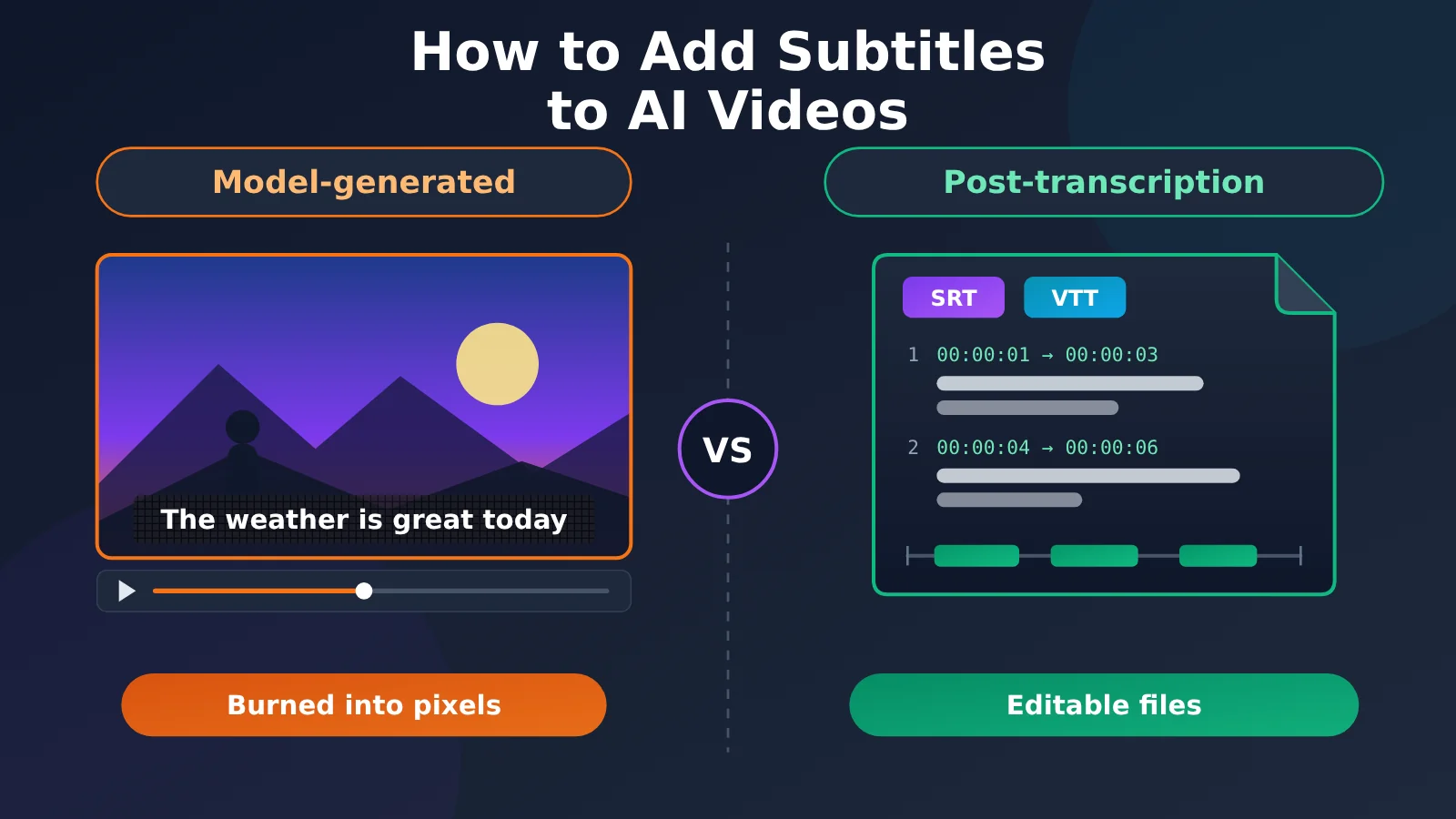
Before we talk about adding subtitles to AI-generated video, we need to pull “sound” and “subtitles” apart. A video model generates dialogue, sound effects, and visuals together, and what you get is an audio track embedded in the finished clip. Having lines of dialogue in the audio track doesn’t mean the clip has subtitles. Even if text shows up on screen, if it’s burned into the pixels, it’s just part of the image, not a subtitle track.
In this article, “usable subtitles” have to meet three conditions at once. First, the text is correct: no typos, no missing characters, and no garbled rare characters. Second, the timing lines up with the dialogue. Third, you can still edit the text afterward and translate it into other languages. Text burned into pixels can satisfy the first two at best, and it can never satisfy the third. To fix a single typo, you have to regenerate the entire video, and the same goes for producing an English version.
Volcano Engine’s prompt guide takes the same view. It treats “subtitles” as one type of on-screen text, listed in the same section as slogans and speech bubbles. There’s no mention of SRT, VTT, or a standalone subtitle track anywhere in the guide. Once you see that, you can ask a better question than “which video model has better subtitles?” Do you want text on the screen, or an editable subtitle file?
Two Approaches to Subtitling AI-Generated Video: The Core Differences
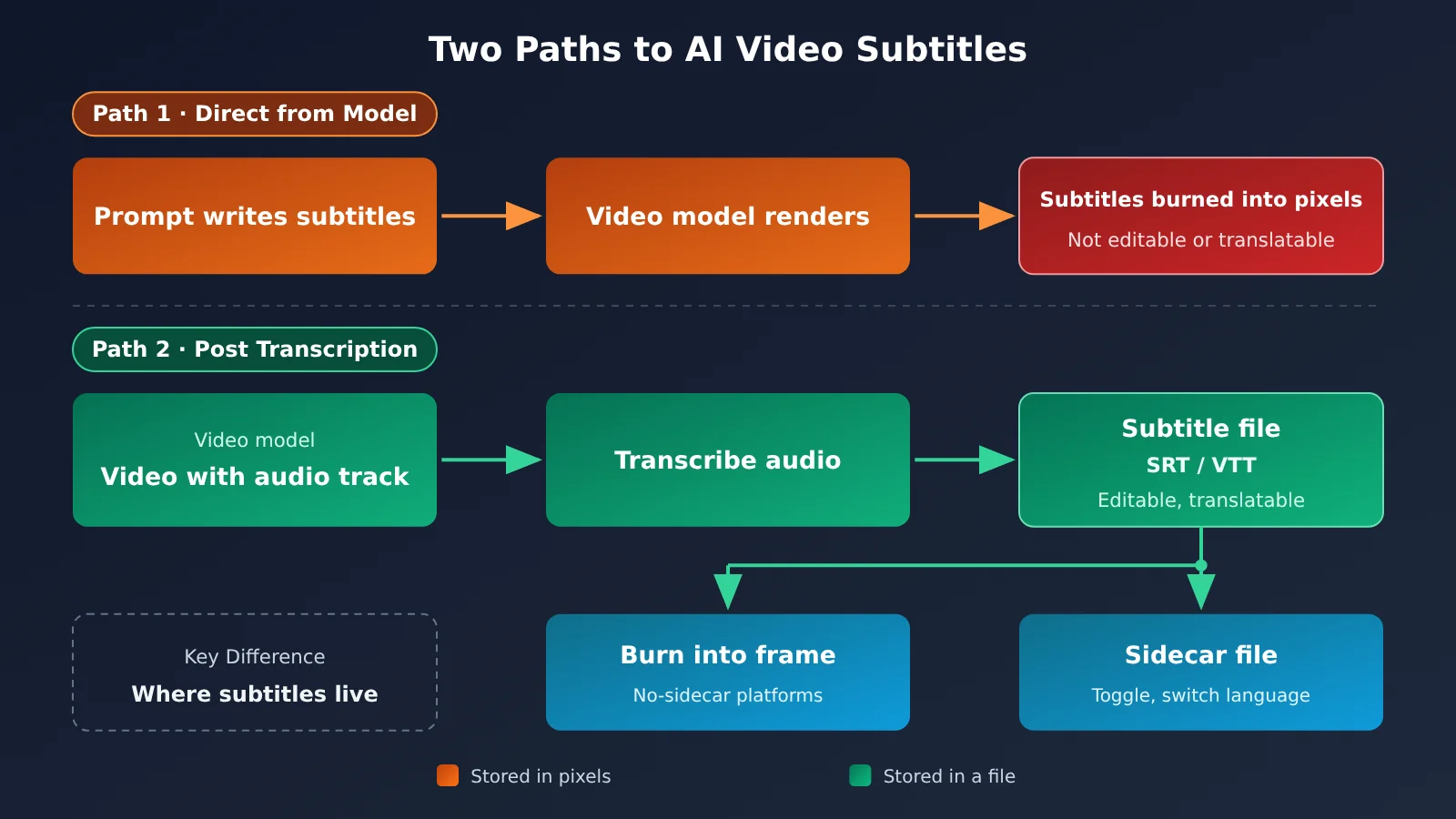
The difference between these two paths isn’t image quality or model tier. It’s where the subtitles end up living. Path 1 bakes subtitles into the pixels. Path 2 keeps them in a separate file. The table below compares them against three criteria for “usable subtitles.”
| Dimension | Path 1: Burn-in via prompt | Path 2: Transcribe the finished video’s audio track | Winner |
|---|---|---|---|
| Text accuracy | Depends on the model’s generation; the guide recommends common characters and avoiding rare characters and special symbols | Comes from speech recognition on the audio track, and can be proofread by hand | Path 2 |
| Alignment with dialogue | The prompt can say “perfectly synced with the audio rhythm,” but the result is a gamble | Aligned by transcription timestamps or editing software, and can be fine-tuned | Path 2 |
| Editing or translating afterward | Not possible; changing the text means regenerating the whole video | Possible; just edit the file, and you can export multilingual versions | Path 2 |
| Supported models | Only Seedance’s official guide documents this capability | Works with any finished video that has an audio track | Path 2 |
| Extra steps | None; the video comes out with subtitles | Needs a transcription service or editing software | Path 1 |
| When you want no subtitles | The official docs say stray subtitles can’t be avoided 100% of the time | Not an issue | Path 2 |
Path 1: Burning AI-Generated Video Subtitles with Seedance Prompts
Of the models currently available, Seedance is the only one whose official prompt guide says both “it can do subtitles” and “it may produce stray subtitles.” The text generation section of the guide says the model can generate common text, and you can specify its color, style, how it appears, when it appears, and where it appears. Use cases include slogans, subtitles, and speech bubbles. One caveat: the guide is titled for the 2.0 series and doesn’t say 2.5’s subtitle capability differs from 2.0’s, so you shouldn’t describe burned-in subtitles as exclusive to 2.5.
The table below pulls together the subtitle-related phrasing from the official prompt guide, so you can build your prompts straight from it:
| Purpose | Phrasing from the official prompt guide | Notes |
|---|---|---|
| Specify subtitle content | “Subtitles appear at the bottom of the frame, with the content “……”, and they must stay perfectly in sync with the audio rhythm.” | Stick to common characters in the subtitle text |
| Subtitles that follow the dialogue | “Subtitles appear at the bottom of the frame following the dialogue” / “Matching dialogue subtitles appear at the bottom of the frame” | The output is still pixel text, with no timeline file |
| No subtitles | “Keep it subtitle-free” / “Avoid generating any text or subtitles” | The guide says this can’t currently be avoided 100% of the time |
| Text style | You can specify color, style, how it appears, timing, and position | Avoid rare characters and special symbols |
The upside of this path is that there are no extra steps: the clip comes out with subtitles already in it, which suits short vertical videos for short-video platforms. The downside is just as clear. If a character is wrong, your only option is to regenerate, and you pay for every clip until you get one you like. If you want a version in another language, you have to generate it from scratch.
There are also a few pitfalls at the invocation level. When you create a token in the APIYI apiyi.com console, choose the SeeDance2 group (rate multiplier 0.18x), and set the billing mode to pay-as-you-go priority or pay-as-you-go. Use the /seedance/api/v3/... endpoint, not /v1/videos. The dedicated page notes that the generic endpoint passes the resolution incorrectly, while billing is still settled on the clip actually produced. Also, generate_audio defaults to true, so you must explicitly pass false if you want a silent video.
Route 2: Transcribe the Final Audio Track to Generate Subtitles for AI Video
The division of labor in the post-production approach is clear: the video model only produces a finished clip with an audio track, and subtitles are handled by a separate transcription service or by your editing software. Transcription gives you a subtitle file with timestamps, which you can use in two ways. One is to burn the subtitles into the picture, which works for platforms that don’t support external subtitles. The other is to distribute the file as a sidecar alongside the video, so the player can toggle subtitles on and off or switch languages.
Choosing a transcription service means checking its current status first. The OpenAI speech-to-text guide currently recommends gpt-transcribe for file transcription. The endpoint is POST /v1/audio/transcriptions, it returns the text along with the detected language, and each file is capped at 25 MB. The examples for word-level or sentence-level timestamps still point to the timestamp_granularities parameter of whisper-1, and that parameter only works with whisper-1. Models such as whisper-1, gpt-4o-transcribe, and gpt-4o-mini-transcribe have been marked as deprecated, with a shutdown date of 2027-02-26.
One more thing to note: in the APIYI model list as of 2026-11-10 15:40, there’s no whisper-1 and no gpt-transcribe. This post-production step isn’t covered by the video models in this article’s list, so you’ll need a separate transcription service, or the speech recognition built into your editing software, to handle it. You can also leave timeline alignment to the editing software and use transcription only to get the text recognized accurately.
AI Video Generation Models Online: Audio and Subtitle Capabilities at a Glance
The table below summarizes how each video model’s page describes audio and subtitles. The subtitle parameter column comes from a full-text search of every page on 2026-11-11, using the keywords “字幕” (subtitles), SRT, burned-in subtitles, and subtitle tracks.
| Series | Model ID | Audio (as described on the page) | Subtitle parameter | Key invocation notes |
|---|---|---|---|---|
| Seedance | doubao-seedance-2-5-260628, doubao-seedance-2-0-260128, doubao-seedance-2-0-fast-260128, doubao-seedance-2-0-mini-260615 |
generate_audio is on by default |
No subtitle file; you can burn subtitles in via prompt, following the Volcano guide | SeeDance2 group, uses /seedance/api/v3/... |
| Wan3.0 | wan3.0-video, wan3.0-video-prime |
audio defaults to true, output comes with an audio track |
None | Submit to /wan/api/v1/services/aigc/video-generation/video-synthesis with the header X-DashScope-Async: enable |
| Wan2.7 | wan2.7-t2v, wan2.7-i2v, wan2.7-r2v, wan2.7-videoedit |
Only wan2.7-i2v supports driving_audio for lip-sync |
None | 720P / 1080P only, duration 2–15 seconds |
| HappyHorse 1.1 | happyhorse-1.1-t2v, happyhorse-1.1-i2v, happyhorse-1.1-r2v, happyhorse-1.0-video-edit |
Image-to-video doesn’t support driving_audio; the page doesn’t mention default dialogue |
None | Duration 2–15 seconds; for lip-sync, switch to Wan2.7 |
| MiniMax H3 | MiniMax-H3 |
Built-in stereo audio track, can’t be turned off | None | 768P only, uses /hailuo/v2/video_generation |
| Oxygen | oxygen-1.0 |
Output video comes with an audio track | None | OpenAI Videos-compatible, POST /v1/videos |
| Grok Imagine | grok-imagine-video, grok-imagine-video-1.5, grok-imagine-video-1.5-lite |
Audio track included by default; turning audio off doesn’t lower the price | None | Requires the GrokOfficial group to be enabled |
The main takeaway from this table: apart from Seedance, none of the pages say anything about subtitles, so you can’t assume the other models can “also produce subtitles from a prompt.” All of the models above can be called with a single account on APIYI (apiyi.com). For the exact model versions and available groups, check the platform’s model list.
A few details are worth calling out. Wan2.7’s driving_audio makes the mouth movements follow the audio. That’s a lip-sync feature, and it has nothing to do with subtitles. The page’s own advice is to use 2.7 when you need audio-driven lip-sync, and Wan3.0 when you want a default audio track, longer durations, and lower prices. MiniMax H3 on APIYI is an open-weight, self-hosted deployment, not a forward of the original vendor’s API. Its audio track can’t be turned off: passing generate_audio=false returns a 400 with the error field unsupported field generate_audio, and passing a 2K resolution is rejected as well.
The three Grok Imagine models are a special case: the page lists prices, but the 2026-11-10 15:40 master model list doesn’t include these three rows. That doesn’t mean they aren’t available. Before calling them, confirm in the console that the GrokOfficial group is enabled.
AI-Generated Video Subtitles and Production Cost: What Switching Models Actually Saves
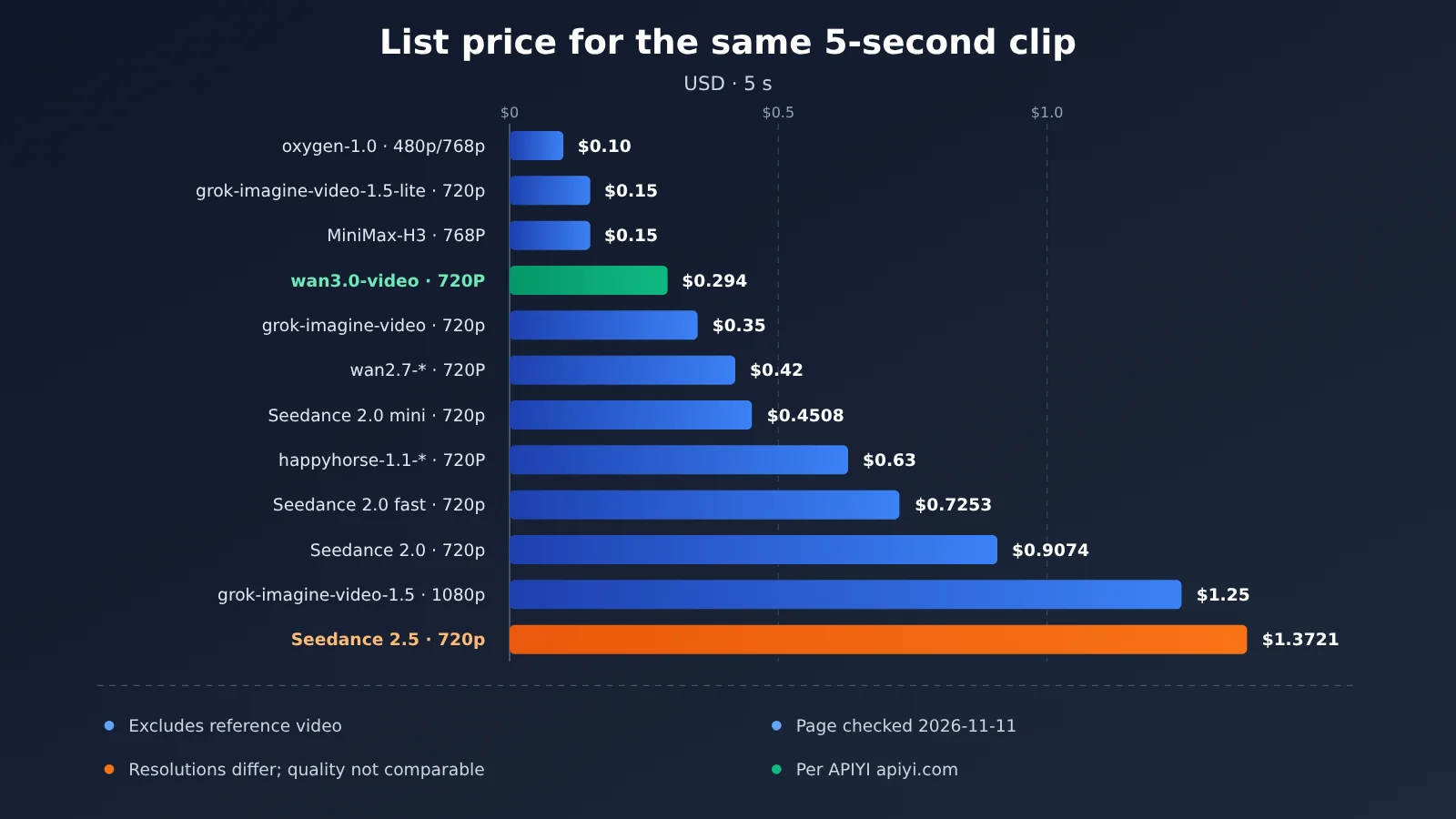
Subtitles don’t change with the video model, so the only thing a model swap can save you is the per-clip generation fee. The table below compares documented prices for the same 5-second clip. One caveat up front: the rows use different resolutions, so use this table to compare cost only, not as a quality comparison of the same clip.
| Model ID | Resolution | Duration | Reference Video | Documented Price | Price Source | Data Date |
|---|---|---|---|---|---|---|
oxygen-1.0 |
480p or 768p (same price) | 5 sec | Not included | $0.10 | Dedicated page per-second price × 5 | Dedicated page, verified 2026-11-11 |
grok-imagine-video-1.5-lite |
480p / 720p | 5 sec | Not included (input images not billed) | $0.10 / $0.15 | Dedicated page per-second price × 5 | Dedicated page, verified 2026-11-11 |
wan3.0-video |
480P / 720P / 1080P | 5 sec | Not included | $0.147 / $0.294 / $0.588 | Dedicated page 5-second total | Dedicated page, verified 2026-11-11 |
MiniMax-H3 |
768P | 5 sec | Not included | $0.15 | Dedicated page | Dedicated page, verified 2026-11-11 |
grok-imagine-video |
480p / 720p | 5 sec | Not included (input images not billed) | $0.25 / $0.35 | Dedicated page per-second price × 5 | Dedicated page, verified 2026-11-11 |
wan2.7-* |
720P / 1080P | 5 sec | Not included | $0.42 / $0.70 | Dedicated page 5-second total | Dedicated page, verified 2026-11-11 |
doubao-seedance-2-0-mini-260615 |
720p | 5 sec | Not included | $0.4508 | Dedicated page price list | Dedicated page, verified 2026-11-11 |
happyhorse-1.1-* |
720P / 1080P | 5 sec | Not included | $0.63 / $1.12 | Dedicated page 5-second total | Dedicated page, verified 2026-11-11 |
doubao-seedance-2-0-fast-260128 |
720p | 5 sec | Not included | $0.7253 | Dedicated page price list | Dedicated page, verified 2026-11-11 |
doubao-seedance-2-0-260128 |
720p | 5 sec | Not included | $0.9074 | Dedicated page price list | Dedicated page, verified 2026-11-11 |
grok-imagine-video-1.5 |
1080p | 5 sec | Not included (input images not billed) | $1.25 | Dedicated page per-second price × 5 | Dedicated page, verified 2026-11-11 |
doubao-seedance-2-5-260628 |
720p | 5 sec | Not included | $1.3721 | Dedicated page price list (billed by area × duration; a ±5% deviation is normal) | Dedicated page, verified 2026-11-11 |
For the same 720p, 5-second clip with no reference video (checked against the dedicated model pages on 2026-11-11), Seedance 2.5 at $1.3721 costs about 4.7x as much as wan3.0-video at $0.294, and about 3.0x as much as mini at $0.4508. That multiple only tells you what a clip costs to generate, not whether the subtitles come out better. One FAQ on the dedicated page also lists a 2.5 price that differs slightly from the price list, so this article goes by the price list.
A few cells in the summary table are easy to misread:
- The Seedance cells show the base price per million tokens, before the 0.18 group multiplier is applied. They aren’t dollars per video.
wan3.0-videohas only one per-second price in the summary table, and that cell is for 480P, not a flat rate for every resolution.- HappyHorse is listed in the summary table as a pay-as-you-go base price, not a per-second price. To see per-second pricing, check its dedicated page.
When you compare prices, use the model list on APIYI (apiyi.com) together with the tiered pricing on each model’s dedicated page.
Recommended Scenarios for Adding Subtitles to AI-Generated Video
Scenario 1: Subtitles You Need to Edit and Translate
This covers tutorials, product demos, and anything you’ll release in multiple languages. Subtitles for this kind of video will need changes sooner or later: a client spots a typo, terminology has to be unified, or marketing wants an English version. Post-production transcription is the only reliable approach, and the video model’s only job is to output the finished clip with an audio track.
In this scenario, pick the video model based on visual requirements and budget. Subtitle ability isn’t a selection factor. One caution: the finished clip can’t have messy subtitles burned in, or your post-production subtitles will overlap the text already on screen. If you use Seedance, add a no-subtitles constraint to the prompt. If you use another series, the dedicated page doesn’t mention subtitle ability, so check the frames yourself after generation.
Scenario 2: Short Video That Only Needs Dialogue Text at the Bottom, and You Can Tolerate Re-rolls
If you’re posting short vertical video to a platform, a single line of dialogue at the bottom is enough, and you can live with the occasional error and a re-roll, you can use Seedance alone and write burned-in subtitles following the Volcano template. In the prompt, spell out the subtitle content and ask for it to sync with the audio rhythm. Stick to common characters and avoid rare characters and special symbols.
Be clear that this isn’t reliable delivery. When you get a wrong character, the cost of a re-roll is another full generation fee. So tune the prompt on mini or fast first, and only consider a higher tier once the subtitle wording is stable. Don’t jump straight to 2.5 just for subtitle quality.
Scenario 3: No Subtitles Allowed in the Final Clip
Brand videos, footage you’ll edit further, and base footage you plan to subtitle in multiple languages later all need a clean frame. If you use Seedance, the prompt must say things like “keep the video free of subtitles” and “avoid generating any text or subtitles.” Also remove any text from your reference images or reference video first, and generate in landscape where you can. The official guide says landscape is noticeably less likely than portrait to produce stray subtitles. For portrait, you can fall back on cropping in the edit.
Even if you do all three, the official position is still that it can’t be avoided 100%. So you have to check the output by hand. For projects that demand a very clean frame, leave room for cropping in the composition.
Recommendations for Adding Subtitles to AI-Generated Video
Here’s everything above condensed into one decision table. Check it against your specific project:
| What you need | Which route | Video model direction | What not to do |
|---|---|---|---|
| Subtitles that are editable, translatable, and time-aligned | Route 2: post-production transcription | Choose by visuals and budget; just make sure it has an audio track | Expect any video model to output a subtitle file |
| Dialogue text at the bottom of short videos, and you can live with rerolls | Route 1: Seedance burn-in | Tune your prompt on mini / fast first | Upgrade to 2.5 just for the subtitle effect |
| The final video can’t have subtitles | Route 2, or Seedance with a no-subtitle constraint | Landscape first; strip text from reference material beforehand | Trust constraint words to remove subtitles 100% of the time |
| You need lip sync | Route 2 plus subtitles | wan2.7-i2v with driving_audio |
Use HappyHorse image-to-video for lip sync |
| You want a default audio track and a low price | Route 2 plus subtitles | Oxygen, Wan3.0 480P, Grok 1.5-lite, MiniMax H3 | Assume the cheaper tiers lack subtitle capability |
You can sum up the two routes in one sentence. Prompt-based burn-in wins on “subtitles come out with the video, no extra steps,” but the text lives in the pixels, so you can’t edit or translate it, and you can’t reliably remove it when you want it gone. Post-production transcription adds one step, but it comes out ahead across the board on subtitle accuracy, time alignment, and reuse across languages, which makes it the right fit for anything you actually have to deliver.
That also makes the way to save on testing costs clearer. If your clip is 15 seconds or shorter and 720p is enough, start with Seedance mini or Wan3.0 Standard. If you want a default audio track at a low price, look at Oxygen, Wan3.0 480P, Grok 1.5-lite, and MiniMax H3. As for differences between Grok, Hailuo, and Seedance, the dedicated page never ran a same-prompt subtitle comparison, so don’t treat “which one does subtitles better” as a reason to switch models.
💡 Recommendation: Decide on the subtitle approach first, then pick the video model. On APIYI (apiyi.com), you can use a single key to run the same test clip through two or three model tiers and compare only the visuals and audio track. Leave the subtitles to post-production, so you’re comparing the part you’re actually paying for.
Two channels are outside our recommendations. According to an APIYI announcement dated 2026-11-09, Google stopped veo-3.1-generate-preview and veo-3.1-fast-generate-preview on 2026-10-22, and APIYI’s official-relay VEO 3.1 has been shut down, so there are currently no Google-family video channels at all. The same notice says the Sora 2 channels have also been taken offline.
FAQ: Adding Subtitles to AI-Generated Video
Q1: What counts as “usable subtitles” for AI-generated video?
Usable subtitles have to meet three conditions: the text is correct, the timing lines up with the dialogue, and you can still edit or translate the text afterward. Video models generate an audio track, and text burned into the pixels can’t be edited separately, so it doesn’t count as usable subtitles.
Q2: If I switch to Grok, Hailuo, or Wan, which one can produce subtitles directly?
None of them. The dedicated pages for Wan3.0, Wan2.7, HappyHorse, MiniMax H3, Oxygen, and Grok Imagine only mention an audio track or audio-driven generation. There’s no subtitle parameter, and nobody has run a side-by-side subtitle comparison on the same prompt. Switching models can save you on generation costs, but you’ll still need post-production transcription for subtitles.
Q3: Is Seedance 2.5 better than 2.0 at burning in subtitles?
There’s no basis for saying so. Volcano Engine’s prompt guide is titled for the 2.0 series, and it doesn’t separately claim any difference in 2.5’s subtitle capability. The advantages of 2.5 are its 4–30 second duration, more reference images, and mov output, not subtitles.
Q4: I don’t see Grok Imagine in the model list. Is it not available?
It is available. The three Grok Imagine models have pricing on their dedicated pages; they just weren’t listed in the overall model list as of 2026-11-10 15:40. Before calling them, check in the APIYI apiyi.com console that the `GrokOfficial` group is enabled. Also, turning audio off doesn’t lower the price.
Q5: How do I quickly call these video models through the API?
Sign up for APIYI and get an API key (new users get free test credits), then call the endpoints listed on each model’s dedicated page:
– The OpenAI-compatible base_url is `https://api.apiyi.com/v1`, and Oxygen uses `POST /v1/videos` under it
– Seedance uses `/seedance/api/v3/…`, with the `SeeDance2` group selected for the token
– Wan3.0 submits to `/wan/api/v1/services/aigc/video-generation/video-synthesis` with the header `X-DashScope-Async: enable`
– MiniMax H3 uses `/hailuo/v2/video_generation`
Don’t use `/v1/videos` for Seedance or Wan3.0.
Q6: Which service should I use for post-production transcription?
APIYI’s current model list doesn’t include `whisper-1` or `gpt-transcribe`, so you’ll need a separate service or editing software for transcription. OpenAI now recommends `gpt-transcribe` for producing text, but the word-level timestamp example in its docs still points to `whisper-1`, which is scheduled to shut down on 2027-02-26. The single-file limit is 25 MB, so for long videos, extract the audio track first and then transcribe it.
Q7: What are the known limitations of burning in subtitles via prompt?
– Subtitles are baked into the pixels, so any text edit or translation means regenerating the entire video
– Subtitles can show up even when you don’t ask for them, and the official docs say this can’t be avoided 100%
– Vertical video is more likely to get unwanted subtitles than horizontal, and text in reference material increases the risk
– Rare characters and special symbols are error-prone, so stick to common characters
Key Takeaways: Adding Subtitles to AI-Generated Video
- An audio track isn’t a subtitle: Video models produce sound baked into the finished clip, not a subtitle file
- Only Seedance documents burn-in: The Volcano Engine guide supports burning subtitles into the pixels, but it doesn’t give you a subtitle file
- Removing subtitles can’t be 100% reliable: You need constraint words plus reference material with the text stripped out, and landscape orientation works best
- No other series has a subtitle parameter: The dedicated pages for Wan, HappyHorse, MiniMax H3, Oxygen, and Grok only mention audio tracks
- Editable subtitles come from post-production: Transcribe the finished clip’s audio track, then burn it into the picture or ship it as a sidecar file
- Switching models only saves on generation cost: Don’t upgrade to 2.5 just for subtitles. Look at lower tiers like mini and Wan3.0 first
- Getting started: Use a single key on APIYI to run sample clips across several tiers. Prices follow the platform’s model list
Summary
When it comes to adding subtitles to AI-generated video, there are really just three points to remember:
- Don’t count on the model to output editable subtitles: No video model delivers a subtitle file as output. If you need subtitles you can edit and translate, transcribe them in post-production.
- Seedance burn-in is a stopgap: Following the Volcano Engine prompt guide, you can burn text into the picture. That suits short videos where you can accept re-rolls, but it isn’t a reliable deliverable, and when you want to remove subtitles, they won’t come out cleanly.
- Save money by changing the generation tier, not by chasing subtitles: At 720p, 5 seconds, with no reference video (checked against the dedicated pages on 2026-11-11), 2.5 costs about 4.7 times as much as Wan3.0 Standard, and that price gap doesn’t buy you better subtitles.
As a next step, settle on your subtitle approach first, then choose the video model. We recommend using the free test credits on APIYI (apiyi.com) to run sample clips on lower tiers like mini, Wan3.0, and Oxygen to check the visuals and audio track, and leave subtitles to post-production across the board.
📚 References
- Volcano Engine, “Doubao Seedance 2.0 Series Prompt Guide”: How to write text generation and subtitles, the no-subtitle constraint, and how to handle stray subtitles
- Link:
docs.volcengine.com/docs/ark/seedance-2-0-prompt-guide -
Notes: The subtitle template in Approach 1 and the “can’t be avoided 100%” wording both come from this guide. Accessed 2026-11-11.
-
OpenAI Speech-to-Text Guide: The
gpt-transcribetranscription endpoint and timestamp parameters - Link:
platform.openai.com/docs/guides/speech-to-text -
Notes: Source for the endpoint, file size limit, and shutdown dates of deprecated models used in the post-production transcription approach. Accessed 2026-11-11.
-
APIYI Documentation Center · Video Model Pages: Parameters and tiered pricing for Seedance, Wan3.0, Wan2.7, HappyHorse, MiniMax H3, Oxygen, and Grok Imagine
- Link:
docs.apiyi.com/api-capabilities/ - Notes: Source for model names, endpoints, groupings, and the 5-second list prices. The VEO 3.1 retirement notice is on the same site at
/live/2026-11/veo-3-1-official-offline.
Author: APIYI Technical Team
Get in touch: Contact us from the APIYI website homepage. For more model parameters and invocation details, visit the docs.apiyi.com documentation center.