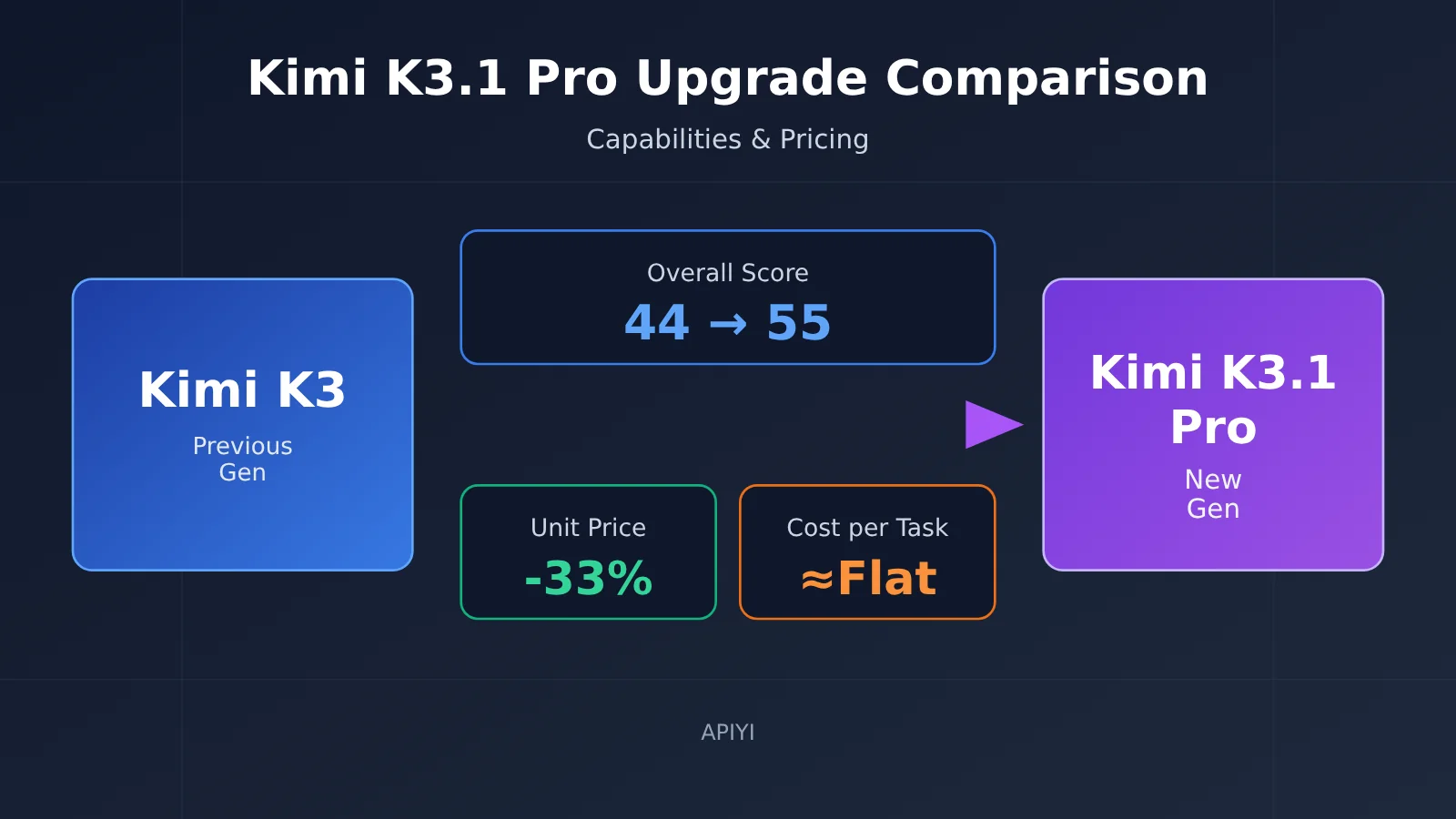
In terms of capabilities, Kimi K3.1 Pro is a clear step up from K3: its overall score from third-party evaluator Artificial Analysis rose from 44 to 55, while its score on Terminal-Bench 4.0, a benchmark for coding agents working in a terminal, jumped from 13% to 67%. Prices went the other way, dropping by a third: input, output, and cached input are all 33% cheaper than with K3. But K3.1 Pro produces longer outputs and always thinks, so the cost of running a task ends up about the same as with K3.
Below, I’ll lay out the evidence and label each claim by source as “officially reported,” “third-party,” or “unverified.” This isn’t a recap of the launch event, and I’m not urging everyone to switch right away. The goal is to help developers currently using K3 decide whether their workload is a good fit for migration, when to migrate, and what to watch out for.
1. Five key differences between Kimi K3.1 Pro and its predecessor
K3.1 Pro isn’t a new model trained from scratch. It’s the result of large-scale “post-training” on top of K3. Post-training means adjusting how a base model behaves after its initial training, using additional data and feedback. The company describes it as “the first model in the K3.1 series” and “the strongest 3T-class open-weight model.” Open-weight means the model’s parameter files are made public and can be downloaded for self-hosting. Artificial Analysis reports 2.8T total parameters, with 104B active parameters involved in computation at a time.
| Dimension | Kimi K3 | Kimi K3.1 Pro | Source |
|---|---|---|---|
| Training approach | Base version | Post-trained on K3, with a major increase in post-training compute | Officially reported |
| Overall capability | Intelligence Index 44 | 55, ranked 4th overall | Third-party (AA, 2026-10-23) |
| Price | $3 input / $15 output | $2 input / $10 output, down 33% | Official pricing |
| Output per task | Average of 48K tokens | Average of 55K tokens, up 14% | Third-party (AA) |
| Context / modalities | 1M / text + images | 1M / text + images, unchanged | Officially reported |
Tokens are the basic unit used to measure and bill for model usage. You can think of them roughly as “word fragments”; a Chinese character usually corresponds to one or two tokens. The two changes to notice first are that the capability score went up and the price per token went down. The “output per task” row determines how much you actually save after the price cut. We’ll take a closer look at that in Section 4.
As for the weights, the company has promised to release the full set by 2026-11-04. As of the current date (2026-10-24), this is still a promise that hasn’t been fulfilled, so it’s marked as “unverified.” Artificial Analysis estimates that once the weights are released, K3.1 Pro will be the highest-scoring open-weight model on its leaderboard, narrowing the gap between the highest-scoring open-weight and closed models from 12 points to 3.
2. Kimi K3.1 Pro Benchmark Comparison: Official Claims vs. Third-Party Results
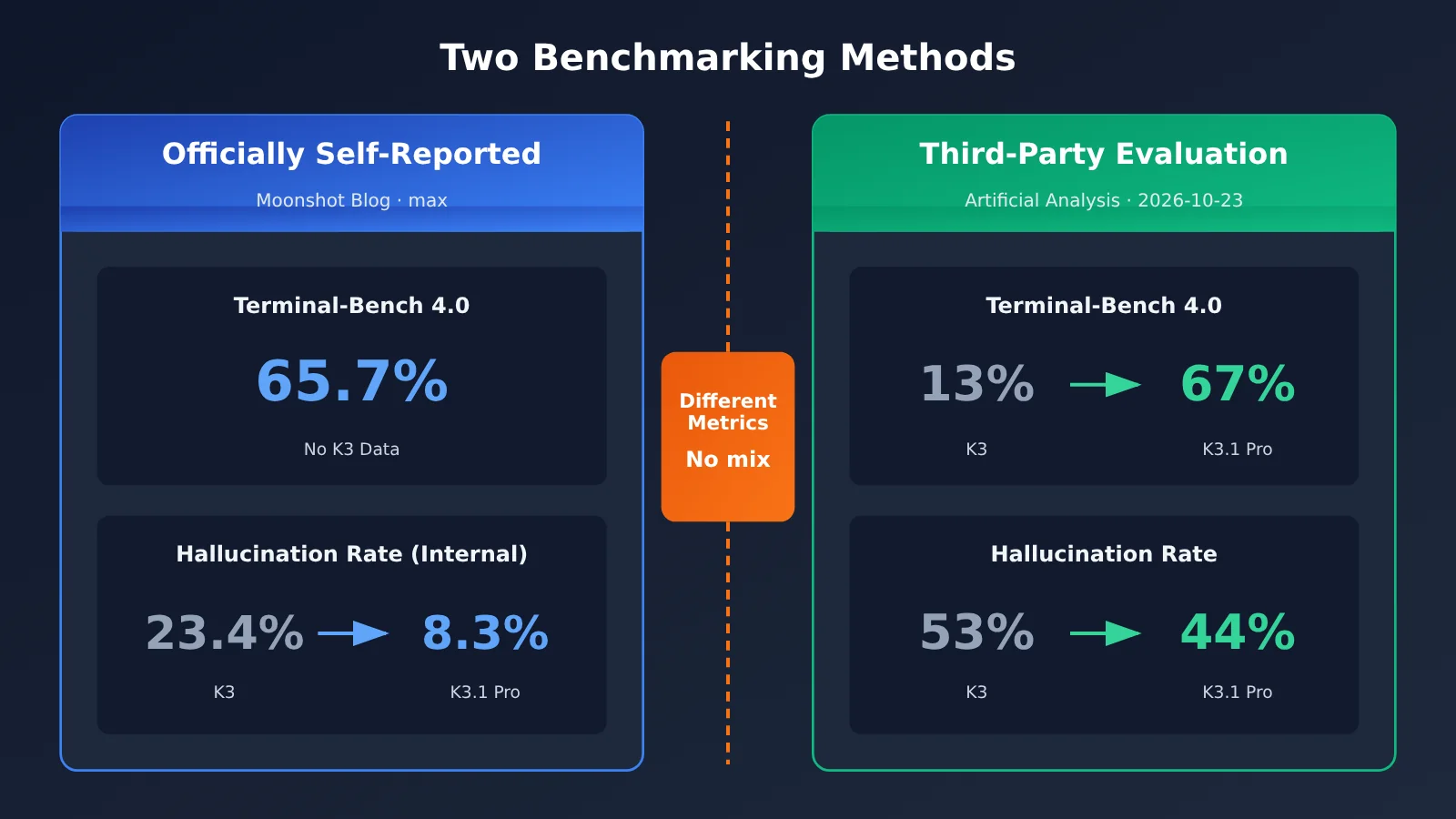
First, an important caveat: the two tables below come from different organizations and testing environments, so their results shouldn’t be compared directly. Terminal-Bench 4.0 is the clearest example: Moonshot’s official result is 65.7%, while Artificial Analysis independently measured 67%. These are scores from two separate tests—not two estimates of the same score. Moonshot hasn’t published a Terminal-Bench 4.0 result for K3; the 13% figure for K3 comes only from Artificial Analysis.
2.1 Kimi K3.1 Pro Official Benchmark Results
Source: Moonshot’s official blog. Test conditions: Unless otherwise noted, all tests used reasoning_effort=max (maximum reasoning effort), temperature=1.0, and top_p=0.95. Tests marked “internal” use datasets developed by Moonshot and can’t be reproduced externally.
| Benchmark | K3.1 Pro | Comparison | Notes |
|---|---|---|---|
| Terminal-Bench 4.0 | 65.7% | GPT-6 Astra 58.2%; Claude Opus 5.5 66.4% | Opus 5.5 was tested with the Claude Code harness |
| Kimi Code Bench 3.0 Long-horizon | 61.2% | K3 55.95% | Internal; long-horizon coding tasks |
| BenchCAD | 92.7% (with tools) | Opus 5.5 96.2%; GPT-6 Astra 95.9% | Converts multi-view drawings into CAD code |
| OfficeQA Pro v2 | 64.4 | Higher than K3 | Analysis of real financial reports; Moonshot claims state-of-the-art performance |
| Financial Modeling / Research | 7.2 / 11.6 points higher than K3 | K3 | Internal |
| Business Operation | About 4.2× K3’s score | K3 | Internal business simulation |
| Kimi Hallu Bench Hard | Claim-level hallucination rate: 8.3% | K3: 23.4% | Internal factuality stress test |
| xdev-bench-hard (pass@3) | 81.0% | 90.5% for the comparison version without safety filtering | Vulnerability discovery |
A few terms to clarify: A harness is the “driver framework” wrapped around a model during testing. It handles tool calls and command execution, and scores can vary depending on the framework—so the Opus 5.5 result should be considered separately. pass@3 means the model gets three attempts at a question, and passing any one of them counts as a success. The last row means Moonshot deliberately reduced the model’s vulnerability-discovery capabilities for safety reasons. The production version scored about 9.5 percentage points lower than the unrestricted internal version.
2.2 Third-Party Benchmarks for Kimi K3.1 Pro (Artificial Analysis)
Source: Artificial Analysis. Data as of 2026-10-23. The organization ran the tests using a standardized process, applying the same methodology to K3 and K3.1 Pro.
| Metric | K3.1 Pro | K3 | Change |
|---|---|---|---|
| Intelligence Index | 55 (4th) | 44 | +11 |
| GDPval-AA (Elo score for real-world work tasks) | 1846 (3rd) | 1534 | +312 |
| Terminal-Bench 4.0 | 67% | 13% | +54 percentage points |
| AutomationBench-AA (SaaS workflows) | 73% | 58% | +15 |
| Humanity’s Last Exam | 52% | 47% | +5 |
| CritPt / SciCode | 25% / 61% | 23% / 59% | +2 / +2 |
| AA-Omniscience Index | 30 | 20 | +10 |
| Hallucination rate / accuracy | 44% / 51% | 53% / 48% | Hallucination rate down 9 points |
| Average output tokens per task | 55K | 48K | +14% |
On the Artificial Analysis leaderboard, K3.1 Pro ranks 4th, behind Claude Opus 5.5 (58), Claude Sonnet 5.5 (56), and Muse Wonder Full (56). Its 67% score on Terminal-Bench 4.0 is the highest among all models tested by the organization; Sonnet 5.5 scored 64%.
The two evaluations agree on the direction of the change in hallucination rates, but their figures differ substantially: the official internal stress test shows a drop from 23.4% to 8.3%, while AA reports a drop from 53% to 44%. They use different test sets, with different difficulty levels and statistical methods. When citing these figures, specify the source rather than combining them into a statement like “the hallucination rate fell to 8%.”
3. Five Areas Where Kimi K3.1 Pro Is Clearly Stronger
This section covers only areas where both datasets point to improvement, or where the gains are large enough to stand out.
- Coding agents and terminal tasks. An agent is an AI assistant that can break down tasks, use tools, and carry out multi-step actions on its own. AA measured Terminal-Bench 4.0 at 13% for K3 and 67% for K3.1 Pro. The official internal benchmark for long-horizon coding tasks rose from 55.95% to 61.2%. If your coding agent often gets stuck running commands, working with files, or debugging across multiple steps, this is where you’ll see the biggest improvement.
- Real-world work tasks. GDPval-AA uses Elo scores to measure how well a model handles real-world professional tasks. Elo is a ranking system used in head-to-head competitions—like chess rankings. The bigger the score difference, the bigger the gap in win rates. K3.1 Pro scored 312 points higher than K3 and ranked third, pointing to clear improvements in everyday work such as writing proposals, creating spreadsheets, and organizing materials.
- SaaS workflow automation. AutomationBench-AA measures how well a model can automate workflows across different online software tools—for example, reading email, updating tickets, and syncing spreadsheets. K3.1 Pro’s score rose from 58% to 73%. On the official internal Business Operation simulation benchmark, it scored about 4.2 times higher than K3. Both results point to better performance on long workflows, but the Business Operation result is internal data and should be treated as a reference only.
- Factuality and hallucinations. A hallucination is when a model confidently makes up facts that aren’t true. In official internal tests, the claim-level hallucination rate—the rate of errors in individual factual claims—fell from 23.4% to 8.3%. The number of answers containing at least one factual error dropped to 42.4% of K3’s level. AA’s hallucination rate fell from 53% to 44%, while accuracy rose from 48% to 51%.
- Financial modeling and research reports. The company says K3.1 Pro scored 64.4 on OfficeQA Pro v2, a new state of the art (SOTA). On internal benchmarks, it scored 7.2 points higher than K3 on Financial Modeling and 11.6 points higher on Financial Research. These results haven’t yet been independently retested by third parties, so they fall into the “officially reported” category.
Metrics for scientific reasoning (Humanity’s Last Exam, CritPt, and SciCode) also improved, but only by 2–5 percentage points. If your work mainly involves academic Q&A or research coding, K3.1 Pro’s gains aren’t as large as they are on agent tasks, so there’s no need to rush into switching just for these metrics.
4. What Hasn’t Changed in Kimi K3.1 Pro—and the Real Cost Trade-Off
4.1 Three Things That Haven’t Changed in Kimi K3.1 Pro
- The context window is still 1M: 1,048,576 tokens, the same as K3. You can think of the context window as the total amount of content the model can “see” at once.
- It still supports text and images: No new input modes, such as audio or video, have been added.
- No official speed benchmarks have been published: AA measured an output speed of 80.7 tokens per second, placing it in the second of the organization’s four speed tiers. The official claim is that the highspeed version is 2–3 times faster, but no reproducible test conditions have been provided, so that claim remains “unverified” for now.
4.2 Kimi K3.1 Pro Pricing Across Five Categories
The following are official prices, captured on 2026-10-24, in USD per million tokens, excluding tax.
| Model | Input | Output | Cache hit | 5-minute write | 1-hour write |
|---|---|---|---|---|---|
kimi-k3.1-pro |
$2.00 | $10.00 | $0.20 | $2.00 | $4.00 |
kimi-k3 |
$3.00 | $15.00 | $0.30 | $3.00 | $6.00 |
A cache hit means that identical content sent repeatedly—such as a fixed system prompt or the same long document—is billed at a lower rate from the second request onward. The 5-minute and 1-hour write charges apply when storing content in the cache; the longer it’s stored, the more it costs. Caching can make a big difference for Agents and long-document Q&A. If your prompt structure stays consistent, you can save considerably on input costs.
4.3 The Cost Trade-Off of Kimi K3.1 Pro: Lower Prices Don’t Always Mean Lower Costs
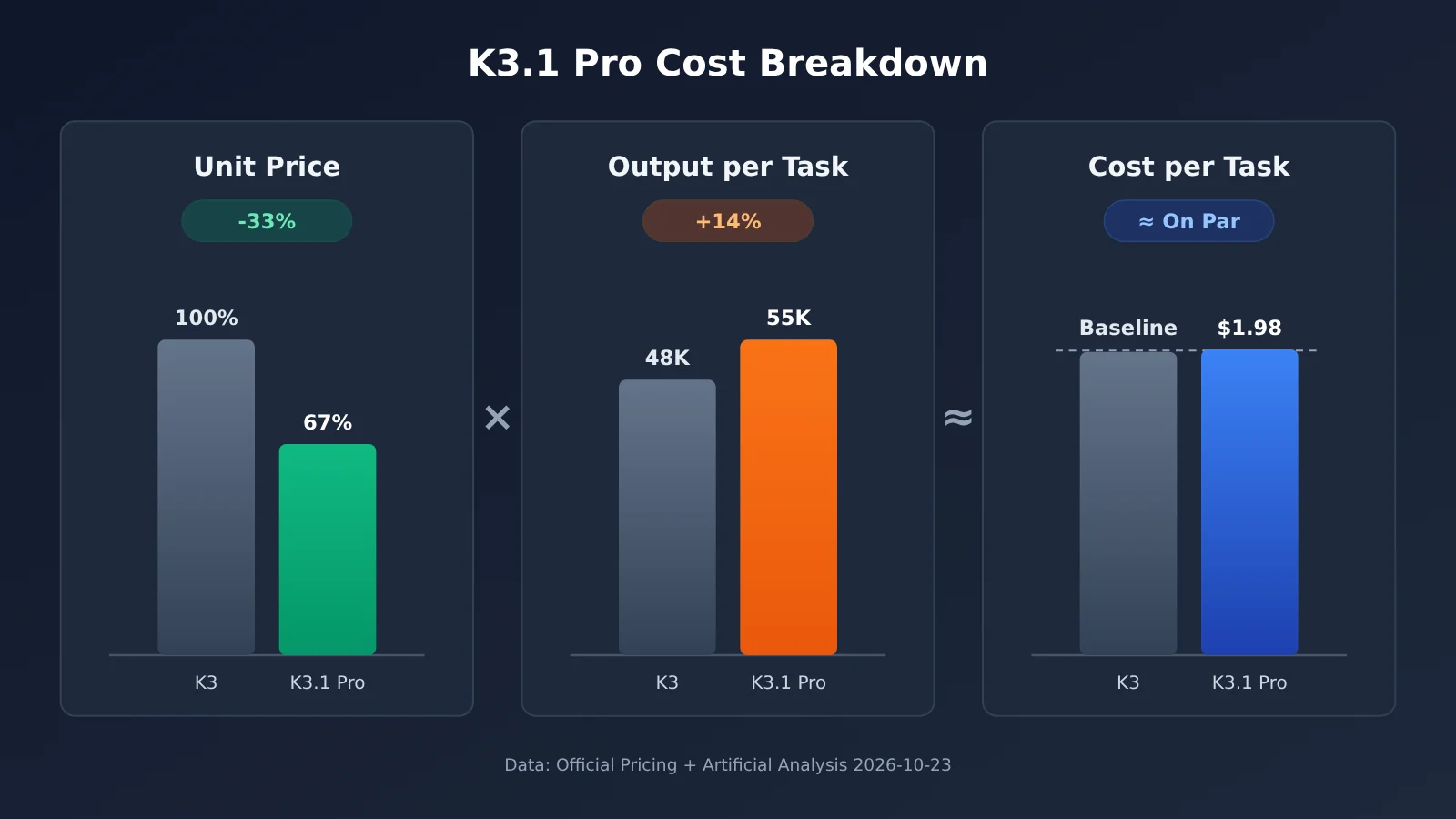
K3.1 Pro always thinks, meaning it performs internal reasoning before each response, and those reasoning tokens are billed as output tokens. AA measured an average output of 55K tokens per task, 14% more than K3’s 48K.
Based on the per-token prices, a 33% reduction should save quite a bit. But AA’s measured cost per task was about $1.98 (the model details page lists $2.11), roughly on par with K3. The organization hasn’t published a cost breakdown, so there’s no official explanation for why the savings haven’t materialized. One possibility is that input tokens also increase during the multiple calls involved in Agent tasks, but this is only speculation and remains “unverified.”
The highspeed version also costs twice as much as the standard version. If your team is cost-sensitive, run a sample of your own real-world tasks before switching and compare the total spend—not just the per-token prices.
To compare the actual costs of K3 and K3.1 Pro using the same codebase, you can start by connecting to APIYI’s OpenAI-compatible API at apiyi.com and running kimi-k3 as a baseline. The model availability and pricing for K3.1 Pro on the platform are subject to the platform’s model list. We’ll make this model available as soon as possible.
5. Kimi K3.1 Pro: When to Switch and When You Can Wait
Here are recommendations by task type for current K3 users.
| Task type | Recommendation | Why |
|---|---|---|
| Coding agents and terminal automation | Switch soon | A third-party Terminal-Bench score rose from 13% to 67%, while official results show gains of more than 5 points on long-horizon coding tasks |
| Document analysis, research reports, and financial modeling | Switch | GDPval Elo is up 312 points. The model leads K3 across official financial statement and research report tests, with significantly fewer hallucinations |
| SaaS workflows and multi-step business processes | Switch | AutomationBench-AA rose from 58% to 73% |
| High-volume, simple tasks (classification, extraction, rewriting) | No rush | Per-task costs are on par with K3. Always-on thinking increases output, and the capability gains don’t matter much for simple tasks |
| Latency-sensitive scenarios (real-time conversations, online customer support) | Test before deciding | No official speed data is available. Always-on thinking can increase time to first token, and highspeed doubles the price |
“No rush” doesn’t mean K3 isn’t good enough. K3 already handles simple tasks well, and its latency and costs are easier to predict. There’s no need to rewrite your entire batch-processing pipeline just to get a higher overall score. You can wait until K3.1 Pro weights are released and more complete third-party speed data is available before reassessing.
5.1 Typical Use Cases for Kimi K3.1 Pro
- Repository-wide bug fixes, refactoring, and test writing that require the model to run commands, inspect errors, and make changes on its own.
- Q&A and summarization over long financial statements, contracts, and research reports where factual accuracy matters.
- Automation across multiple online tools, with more than a dozen steps per task.
5.2 Typical Use Cases for Sticking with Kimi K3 for Now
- Classifying or extracting fields from hundreds of thousands of records per day, where costs are calculated per item.
- Real-time interactions that need consistently low latency and already have timeout and retry settings tuned for K3.
Recommendation: The most reliable approach is to take 50–100 real samples from your business use case, run them through both models, and compare completion rates and total costs. APIYI at apiyi.com lets you switch between models with a single API key, making it well suited to this kind of comparison. Before K3.1 Pro launches, you can establish a baseline with
kimi-k3. Check the platform’s model list for K3.1 Pro’s model ID and pricing. We’ll make this model available as soon as possible.
6. Migration Recommendations and Key Considerations for Kimi K3.1 Pro
6.1 Kimi K2 Series Deprecation Timeline
If you’re still making calls to the K2 series, prioritize migrating those first. According to the official documentation, starting October 31, 2026, the K2 series will be unavailable to newly registered users, and all K2 models will be discontinued by the end of 2026. Existing users may still be able to use them for now, but we recommend completing your migration within the next two months. Move directly to K3 or K3.1 Pro rather than waiting until the models are discontinued.
6.2 Three Tips for Switching to Kimi K3.1 Pro
- Start a new session; don’t switch models mid-conversation. The official recommendation is to use K3.1 Pro in a new session. Continuing an existing K3 conversation with K3.1 Pro may cause compatibility issues with the context format or reasoning content.
- Use the native APIs when possible. The official documentation recommends the native Responses, Chat Completions, and Messages APIs for the most reliable results.
- Double-check the model name. If you misspell
kimi-k3.1-proin a third-party tool, requests will fall back to K2.8 Preview, which doesn’t reason. This won’t trigger an error; you’ll just get worse results, which can take a long time to troubleshoot. Before deploying, check the model field in the response.
6.3 Kimi Code Membership Tiers
Using the new model in Kimi Code requires a qualifying membership tier:
k3.1-prorequires a Plus membership or higher.- 1M context requires a Pro membership or higher.
- The highspeed version requires a Pro membership or higher and uses about twice the quota.
Plus members can use K3.1 Pro, but they don’t get the full 1M context window. If you rely on an extra-long context window to read entire code repositories, check your membership tier before deciding whether to upgrade.
6.4 API Integration Checklist
- Set
base_urltohttps://api.apiyi.com/v1, the OpenAI-compatible endpoint from APIYI (apiyi.com). If you’re using the OpenAI SDK, you only need to change this and your key in your existing code. - Set
modeltokimi-k3first to verify that your workflow works, then enter the exact K3.1 Pro model name shown in the platform’s model list. The model name and pricing for K3.1 Pro are subject to the platform’s model list. We’ll make this model available as soon as possible. - Set a suitably long timeout. Always-on reasoning can make individual responses slower.
- Don’t set
max_tokenstoo low, or the reasoning content may crowd out the main response.
Frequently Asked Questions (FAQ)
Q1: What is Kimi K3.1 Pro, and how does it relate to K3?
K3.1 Pro is a new version that Moonshot created by increasing the post-training compute for K3. Moonshot describes it as the first model in the K3.1 series. It has the same context window and input modalities as K3, with the main improvements in coding agents, real-world work tasks, and factual accuracy.
Q2: Is Kimi K3.1 Pro’s Terminal-Bench score 65.7% or 67%?
Both figures are correct, but they come from different sources. The 65.7% score is self-reported by the official team, while Artificial Analysis independently measured 67%. The test environments and harnesses differ, so these scores aren’t directly comparable. Be sure to cite the source when quoting either one.
Q3: Kimi K3.1 Pro’s price per unit dropped by 33%. Why isn’t it cheaper to use?
K3.1 Pro always thinks, and its average output per task is 14% higher than K3’s. AA’s measured cost per task is about $1.98 (the model page lists $2.11), which is roughly on par with K3. The organization hasn’t broken down the specific reasons, so we recommend testing it with your own tasks.
Q4: When will Kimi K3.1 Pro’s weights be released?
The official team has promised to release the full weights by 2026-11-04. As of 2026-10-24, this is still a promise and hasn’t been fulfilled. If you’re planning a self-hosted deployment, wait for the official release.
Q5: How can I quickly compare Kimi K3.1 Pro and K3 through an API?
You can register at APIYI apiyi.com to get an API key and free testing credits, then use the OpenAI-compatible API to run `kimi-k3` as a baseline. The model name and pricing for K3.1 Pro on the platform will be listed in the platform’s model catalog. We’ll add the model as soon as possible; once it’s available, you can compare the two by changing the `model` parameter.
Q6: What are the known limitations of Kimi K3.1 Pro?
– The official team hasn’t published speed benchmarks, and the highspeed version costs twice as much.
– It always thinks, so it’s not a good fit for use cases that require extremely low latency.
– Some impressive results come from internal test sets that can’t be reproduced externally.
– Its vulnerability-finding capabilities are subject to safety restrictions and are weaker than those of the unfiltered version.
Q7: I’m still using K2. Should I migrate directly to K3.1 Pro?
The K2 series will stop accepting new users on 2026-10-31 and will be taken offline by the end of the year, so you’ll need to migrate. Coding agents and document-based workflows can move directly to K3.1 Pro; for batches of small tasks, K3 is a simpler option. You can start your migration with `kimi-k3` on APIYI apiyi.com. The model name and pricing for K3.1 Pro will be listed in the platform’s model catalog. We’ll add the model as soon as possible.
Kimi K3.1 Pro Key Takeaways
- A clear capability boost: The AA overall score rose from 44 to 55, placing it fourth, behind only three closed-source models.
- The biggest gains are in coding agents: Third-party Terminal-Bench 4.0 results rose from 13% to 67%.
- Keep the two sets of results separate: Official self-reported results use a different methodology from AA results. Always cite the source.
- Lower prices don’t necessarily mean lower costs: The per-token price dropped by 33%, but the cost per task is roughly the same as with K3.
- Core specs are unchanged: 1M context window, text and image support, and no official speed data.
- Use the exact model name when migrating: If you enter it incorrectly, requests will fall back to K2.8 Preview, which doesn’t use reasoning.
- How to get started: You can first use APIYI apiyi.com to establish a K3 baseline. Check the platform’s model list for K3.1 Pro’s model name and pricing. We’ll launch this model as soon as possible.
Summary: Is Kimi K3.1 Pro Worth Migrating to from K3?
The differences between Kimi K3.1 Pro and its predecessor come down to three points:
- Capabilities: Coding agents, terminal tasks, real-world work tasks, SaaS automation, and factuality have all improved significantly. Third-party and official results point in the same direction.
- Pricing: Per-token prices are 33% lower across all five tiers, but always-on reasoning leads to longer outputs, so the cost per task has barely changed.
- Migration: Coding agent and document research workloads should switch soon. For small batch tasks and latency-sensitive use cases, test first and decide later. K2 users should complete their migration before the end of the year.
APIYI apiyi.com currently offers Kimi models such as kimi-k3 (input $3 / output $15). You can use the same key and OpenAI-compatible API to establish a baseline for cost and performance. Check the platform’s model list for Kimi K3.1 Pro’s model name and pricing. We’ll launch this model as soon as possible; once it’s available, you can simply swap the model name to compare results.
References
- Moonshot official blog: Kimi K3.1 Pro announcement and official benchmark results
- Note: Source for the “official results” in this article. Test settings:
reasoning_effort=max,temperature=1.0,top_p=0.95 - Moonshot official documentation: Pricing, K2 deprecation schedule, model migration recommendations, and Kimi Code membership details
- Note: Prices were retrieved on 2026-10-24, in USD per million tokens, excluding tax
- Artificial Analysis: Independent third-party model evaluations
- Link:
artificialanalysis.ai - Note: Source for the “third-party results” in this article. Data dated 2026-10-23
Author: APIYI Technical Team
Technical support: Get in touch with us via the APIYI homepage. For more integration resources, visit the docs center at docs.apiyi.com. Check the platform’s model list for Kimi K3.1 Pro’s model ID and pricing. We’ll make this model available as soon as possible.