Author’s note: This article breaks down how Claude traced the origins of the NIST elliptic-curve seeds, explains the limits of the findings, and shares three practical ways researchers can use AI agents, complete with code and cost-control tips.
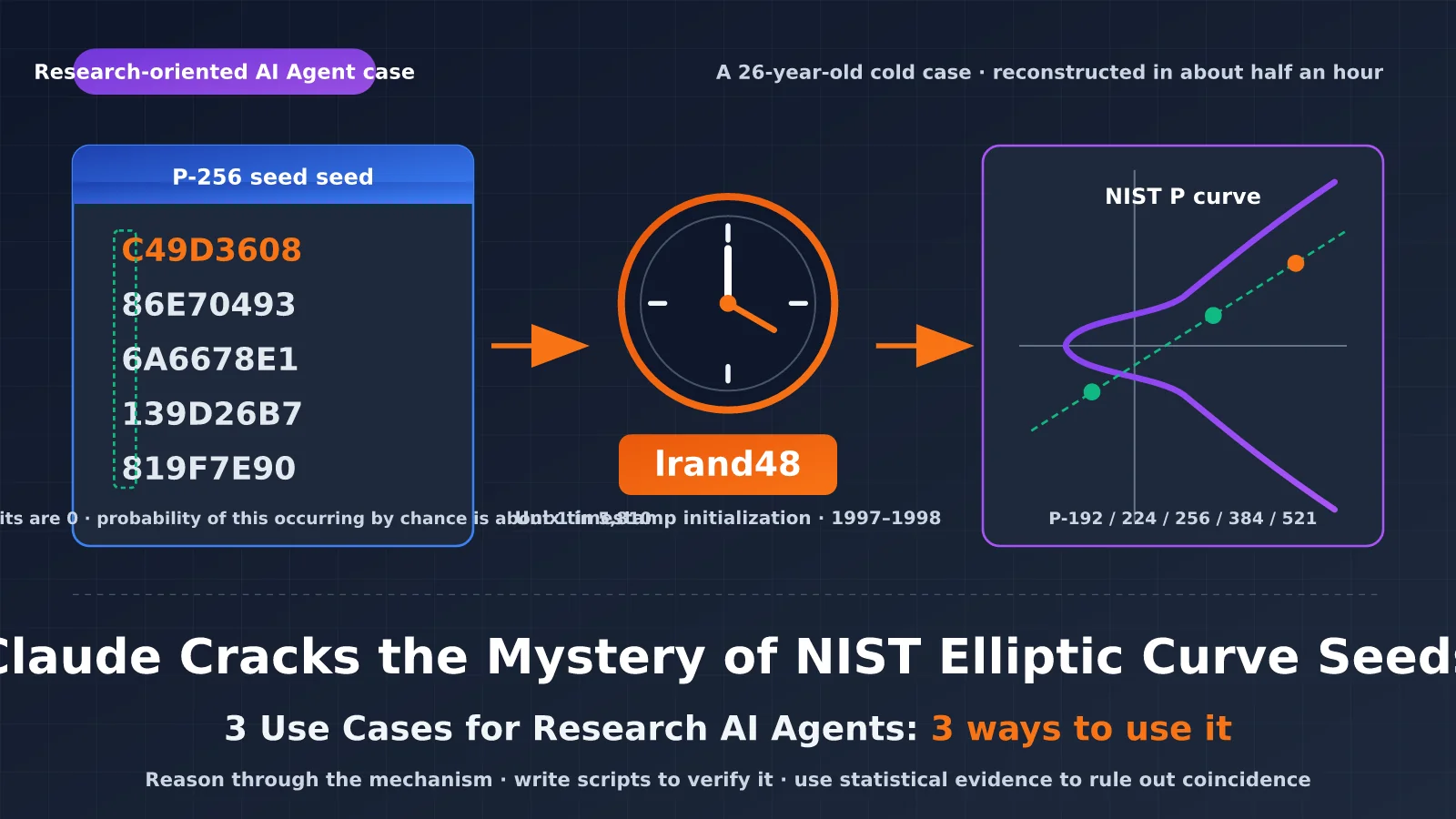
On October 17, 2026, Anthropic Frontier Red Team published a study: an internal research model figured out how the seeds for all five NIST curves—P-192, P-224, P-256, P-384, and P-521—were generated, in about half an hour and without any prompting. The seeds hadn’t been hashed. They were outputs from lrand48, a pseudorandom number generator included with C libraries in the 1990s, initialized with Unix timestamps. @AnthropicAI’s official post put it simply: “It is just timestamps.” It received about 855,000 views.
This wasn’t a cryptographic break or a new vulnerability. For researchers, the value of this case lies in how Claude worked: it reasoned through the mechanism, wrote a script to test its theory, and used statistical evidence to rule out coincidence. You can apply this workflow directly to your own research.
Why this matters: By the end of this article, you’ll know what this finding does and doesn’t prove, and you’ll have three practical AI agent workflows for research, each with step-by-step instructions and runnable code.
Claude Solves the Mystery of the NIST Elliptic-Curve Seeds: Key Takeaways
| Key point | Explanation | Why it matters to researchers |
|---|---|---|
| Background | In 2000, NIST adopted ECDSA in FIPS 186-2. The NSA supplied the curve seeds without explaining where they came from. | A question that went unanswered for 26 years can serve as a test of AI reasoning capabilities. |
| Finding | The seeds came from lrand48 outputs, initialized with timestamps from May 1997 through April 1998. | Anyone can reproduce the result, and verification is inexpensive. |
| Key method | Infer how the software was written, build a scanner, use statistical features to narrow down the possibilities, then recover the generator state. | These steps can be applied to experimental data analysis, reverse engineering, and similar research tasks. |
| Security implications | This isn’t a vulnerability. Users don’t need to change their settings or migrate to different curves. | Describe the result accurately in reviews and reports; don’t overstate it. |
| Open questions | The B-163 seed remains unsolved, and the method used to generate the base point G for P-224 through P-521 is still unknown. | AI-generated findings have limits too. Document what remains unresolved. |
The NIST elliptic-curve seed mystery: What this finding proves
The ECDSA standard publishes a seed for each curve. The seed’s hash is used to determine the curve coefficient b. The P-256 seed is C49D3608 86E70493 6A6678E1 139D26B7 819F7E90. Because its origin had never been explained, the community had long worried that the NSA might have deliberately chosen parameters with weaknesses. Koblitz and Menezes wrote a review titled A Riddle Wrapped in an Enigma, and Filippo Valsorda even offered a $36,864 bounty. One rumor claimed that Jerry Solinas had generated the seed by hashing a joke phrase. That claim was later shown to be wrong.
The practical effect of this finding is to increase confidence in these curves. The seeds came from a standard pseudorandom number generator initialized using a clock, leaving no room for deliberate selection. Anyone can reproduce the result. The original paper also notes that a small number of other valid candidate curves were skipped for unknown reasons, but there were so few that this doesn’t look like an attempt to select weak curves. The bounty will be donated to the Internet Security Research Group.
When you cite this finding in a paper or research meeting, a more accurate way to put it is: “AI reconstructed the generation process behind historical parameters and made it reproducible.” Don’t call it “AI breaking elliptic-curve cryptography.”
Breaking down Claude’s reasoning in 4 steps
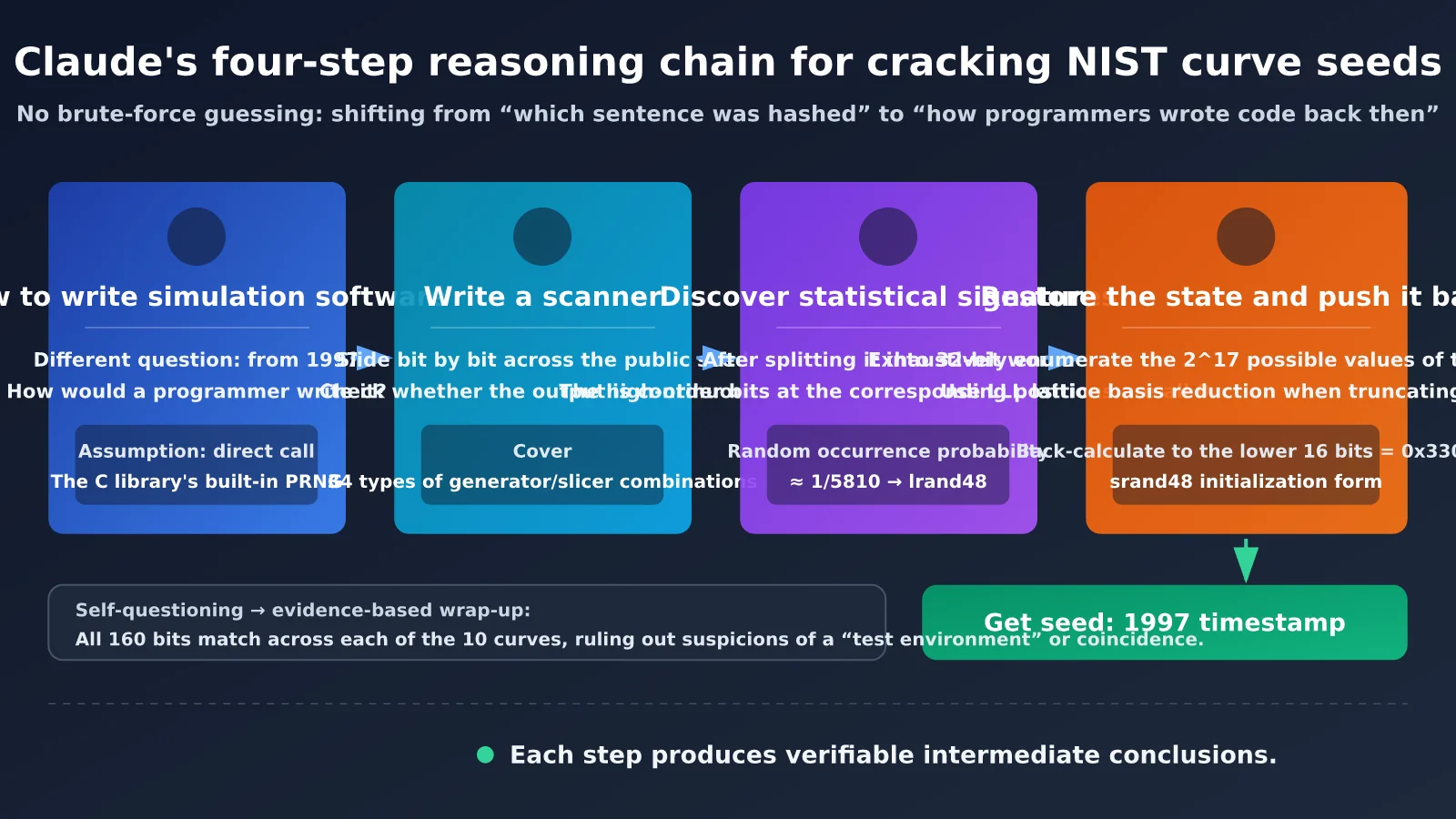
This wasn’t a brute-force guess. The process followed a chain of reasoning that can be checked:
- Reframe the question: Instead of guessing “What phrase was hashed?”, Claude reasoned about how someone writing a curve-generation program in 1997 would most likely have implemented it. The likely answer: they used the random number generator included with the C library.
- Build a scanner: Slide bit by bit across the published seeds and test whether adjacent segments look like consecutive outputs from 1990s-era generators. The search covered 34 generator-and-slice combinations.
- Find the statistical signature: Split the seeds into 32-bit words. The high bits at the corresponding positions were all zero, an outcome with odds of about 1 in 5,810 by chance. That matches lrand48’s behavior: it returns the high 31 bits of its 48-bit state.
- Recover the state and work backward: Brute-force all 2^17 possible values for the 17 hidden bits, then check them against subsequent words. For seeds with more bits truncated, use LLL lattice reduction. Finally, work backward through the state until reaching the initialization pattern used by srand48: the low 16 bits equal 0x330E.
There was another telling moment in the reasoning: the model briefly wondered whether it might be in a test environment, then used the fact that “10 curves, each matching across 160 bits, can’t be a coincidence” to put that doubt to rest. This approach—question your own assumptions, then settle the matter with evidence—is exactly what research agents need.
Getting Started with Research AI Agents: Call Flagship Models with a Single Key
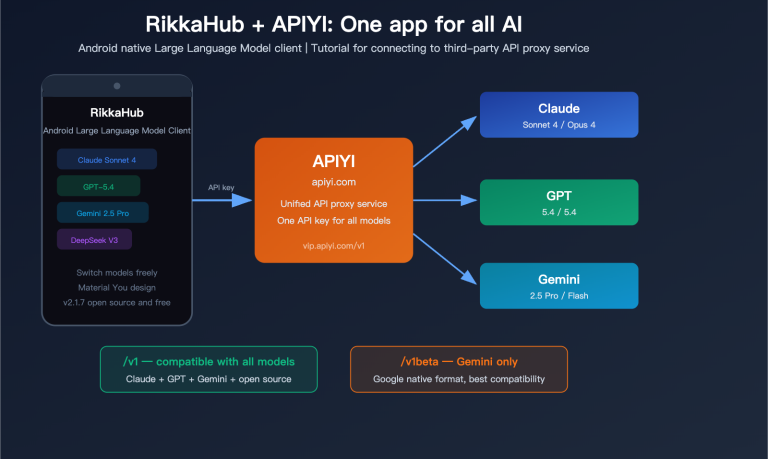
Before diving in, get the API call flow working end to end. APIYI provides an OpenAI-compatible interface. With a single key, you can call claude-opus-5-5 or switch to flagship GPT and Gemini models for cross-validation.
There’s no need to repeat the setup steps here. Just follow APIYI’s official quickstart guide at docs.apiyi.com/getting-started. Create a key in the console, get the base_url (https://api.apiyi.com/v1), and use the example in the guide to confirm the connection works. Check the console for billing details and available models.
The three workflows below all use the same small wrapper. Save it as research_client.py. It does two things: selects a model for each stage and tracks token usage to help control costs.
# research_client.py
import os
from openai import OpenAI

client = OpenAI(api_key=os.environ["APIYI_API_KEY"], base_url="https://api.apiyi.com/v1")
CHEAP = os.environ.get("CHEAP_MODEL", "claude-opus-5-5")  # Set this to the lightweight model name in the console
FLAGSHIP = "claude-opus-5-5"
USAGE = {"prompt": 0, "completion": 0, "calls": 0}


def chat(messages, stage="draft", max_tokens=2048, temperature=0.2):
    """Use a cheaper model for stage='draft' and a flagship model for stage='verify'."""
    r = client.chat.completions.create(model=FLAGSHIP if stage == "verify" else CHEAP,
        messages=messages, max_tokens=max_tokens, temperature=temperature)
    USAGE["prompt"] += r.usage.prompt_tokens
    USAGE["completion"] += r.usage.completion_tokens
    USAGE["calls"] += 1
    return r.choices[0].message.content


def ask(prompt, stage="draft", system=None, max_tokens=2048):
    msgs = ([{"role": "system", "content": system}] if system else []) + [{"role": "user", "content": prompt}]
    return chat(msgs, stage=stage, max_tokens=max_tokens)


def report():
    print(f"Total calls: {USAGE['calls']}, prompt={USAGE['prompt']}, completion={USAGE['completion']}")
Controlling Costs for Research AI Agents: Debug with a Cheaper Model, Use a Flagship Model for Critical Verification
Research tasks often take several rounds of iteration. If you use a flagship model for everything from the start, you’ll spend your quota on low-value issues like formatting mistakes and JSON parsing failures. A more reliable approach is to assign models by stage:
| Stage | Recommended model | Success criteria | Typical max_tokens |
|---|---|---|---|
| Workflow debugging (prompt format, parsing, evaluator) | Lightweight, inexpensive model | The pipeline runs end to end without errors | 512-1024 |
| Hypothesis generation (listing candidate mechanisms) | Start with a lightweight model; switch to a flagship if coverage is insufficient | The candidate list covers the mainstream hypotheses you already know | 1024-2048 |
| Mechanism analysis and critical verification | claude-opus-5-5 | The conclusion will go into a paper or determine how you invest in follow-up experiments | 2048-4096 |
| Cross-validation | Switch to another provider’s flagship model with the same key | Both models independently reach the same conclusion | 2048 |
As a rule of thumb: use a cheaper model the first time you run a script, and a flagship model the first time you finalize a conclusion.
Research AI Agent Workflow 1: Analyze the Mechanism, Then Verify It
This workflow applies Claude’s “change the question” approach: instead of guessing the answer directly, first reason through the mechanism that produced the data, then test it against the data. It’s useful when experimental data shows an unexpected pattern, when you need to infer how historical data was generated, or when you can’t find the parameter sources while reproducing a paper.
Steps
- Describe only the observations, without offering a guess: Give the model the observed data, known constraints, and historical context. Don’t write “I think XX caused this,” which could bias the model.
- Ask for mechanisms and falsifiable predictions: For each candidate mechanism, include a prediction of what feature should appear in the data if the mechanism is correct.
- Rank by verification cost: Ask the model to sort the mechanisms by the time needed to verify them, from shortest to longest. Start with the cheapest checks.
- Review the ranking with a flagship model: You can generate the candidate list with a cheaper model, then use
claude-opus-5-5for the final ranking and analysis.
Prompt Template
from research_client import ask, report

PROMPT = """You are a rigorous research assistant. Below is a set of observations and background information, with no clues about their cause.

[Observations]
{observation}

[Background constraints]
{context}

Please:
1. Reason about the most likely process that produced this data, and list at least 5 candidate mechanisms;
2. Give each mechanism a falsifiable prediction: a testable feature that must appear in the data if the mechanism is correct;
3. Estimate the cost of verifying each prediction (low/medium/high) and sort them in ascending order of cost;
4. Identify the part you are most uncertain about.
Format your response as a Markdown table followed by a brief explanation."""

draft = ask(PROMPT.format(
    observation="NIST P-256 seed: C49D3608 86E70493 6A6678E1 139D26B7 819F7E90",
    context="Generated by a government agency using software in 1997–1998; the official generation method was not published; a common guess is that it was derived from a phrase hash, but this has not been confirmed",
), stage="draft")

final = ask("Review and revise the following list of candidate mechanisms. Remove entries that cannot be falsified and reorder the list:\n" + draft,
            stage="verify", max_tokens=3000)
print(final)
report()
You can judge whether this step is successful by two criteria: Does each mechanism have a falsifiable prediction? Can the top-ranked verification be completed within an hour? If either criterion isn’t met, ask the model to rewrite its answer.
Research-Style AI Agent Use Case 2: Have the Model Write Scanning and Validation Scripts
This step mirrors Claude writing its own scanner to cover 34 generator-and-slice combinations. The key is to turn “it looks similar” into “it’s statistically unlikely to be a coincidence.” This approach also works for tasks like parameter sweeps, signal detection, and searching for hidden structures in data.
Steps
- Give the model the easiest-to-verify prediction from Use Case 1, and ask it to write a scanning script that uses only the standard library.
- Ask the script to run a set of random controls and report both the “hit rate on real data” and the “hit rate on random data.”
- Run the script locally. The model’s job is to write the code, not report the results.
- If the results are significant, ask a frontier model to write a more rigorous state-recovery or fitting script.
Example: Reproducing a Statistical Signature Like “All High Bits Are 0”
The script below demonstrates the principle behind the signature in this case. lrand48 returns the high 31 bits of a 48-bit state, so the most significant bit is always 0 when the result is stored in a 32-bit word. For truly random data, the probability that the most significant bit of each word is 0 is only one-half.
import os

def lrand48_stream(seed32, n):
    x = (seed32 << 16) | 0x330E          # srand48 initialization: the low 16 bits are fixed at 0x330E
    out = []
    for _ in range(n):
        x = (0x5DEECE66D * x + 0xB) % 2**48
        out.append(x >> 17)               # lrand48 returns only the high 31 bits
    return out

def top_bit_zero_ratio(words):
    return sum(1 for w in words if w >> 31 == 0) / len(words)

lr = lrand48_stream(870000000, 20)        # A Unix timestamp from around 1997
rnd = [int.from_bytes(os.urandom(4), "big") for _ in range(20)]
print("lrand48 fraction with top bit 0:", top_bit_zero_ratio(lr))   # Always 1.0
print("Random fraction with top bit 0: ", top_bit_zero_ratio(rnd))  # Fluctuates around 0.5
Verify the Final Conclusion with the Official Code
The Anthropic research page includes reproduction code released under the CC0 license. According to the official instructions, the following parameters should produce the seed in the P-256 standard:
from datetime import datetime, timezone

def unix(when):
    return int(datetime.fromisoformat(when).replace(tzinfo=timezone.utc).timestamp())

def candidate(t, n, per, shift, width):
    x, out = (t << 16) | 0x330E, ""
    for i in range(per * n):
        x = (0x5DEECE66D * x + 0xB) % 2**48
        if i >= per * (n - 1):
            out += "%0*X" % (width, x >> shift)
    return out

seed = candidate(unix("1997-08-16 01:52:34"), 1842, 20, 40, 2)
print(seed)
print("Matches the standard:", seed == "C49D360886E704936A6678E1139D26B7819F7E90")
The script works as follows: it initializes lrand48 with a timestamp, combines every 20 outputs into a 20-byte candidate seed, and selects the 1,842nd candidate as the seed in the standard. The entire verification takes less than a second on an ordinary laptop. “Generating a hypothesis is expensive; verifying it is cheap” is the ideal structure for this kind of research task.
Research-Style AI Agent Use Case 3: Add an Automatic Scorer and Iterate Until the Score Converges
The first two use cases rely on a person to judge the results. In the third, a program does the judging. You write a scorer, the model submits a solution each round, and the scorer returns a score and the failed examples. The model then revises its solution until the score stops improving. This approach works well for tasks with clear evaluation metrics, such as data-extraction rules, fitting function forms, and searching experimental parameters.
Steps
- Write the scorer before choosing a model: The scorer must be a deterministic program and must not rely on the model to grade its own work.
- Split the data into development and holdout sets: Use only the development set for feedback, then check the holdout set for overfitting.
- Restrict the submission format: Ask the model to submit data such as JSON or regular expressions, rather than code that will be executed directly. If you must run generated code, do so in a sandbox.
- Set convergence criteria: Stop when any one of these conditions is met: a perfect score, no improvement for two consecutive rounds, or the maximum number of rounds.
- Get the loop working with a cheaper model, then switch to a frontier model for the formal experiment.
Example: Iterating on Regular Expressions to Extract Parameters from Experimental Records
import json, re
from research_client import chat, report

DEV = [
    ("Sample A had a conductivity of 4.1 S/m after annealing at 350 °C for 2 hours.", {"temp_c": 350, "hours": 2, "cond": 4.1}),
    ("Annealing temperature: 420°C, hold time: 1.5 h, conductivity: 12.3 S/m.", {"temp_c": 420, "hours": 1.5, "cond": 12.3}),
    ("Group B: treated at 300 degrees Celsius for 3 hours, σ=0.85 S/m.", {"temp_c": 300, "hours": 3, "cond": 0.85}),
    ("Annealed at 450 °C for 4 h; measured conductivity: 20 S/m.", {"temp_c": 450, "hours": 4, "cond": 20}),
]
HOLDOUT = [
    ("Sample E was annealed at 380 °C for 2.5 hours; conductivity: 7.6 S/m.", {"temp_c": 380, "hours": 2.5, "cond": 7.6}),
    ("Group C was held at 500°C for 0.5 h, σ = 33.1 S/m.", {"temp_c": 500, "hours": 0.5, "cond": 33.1}),
]
FIELDS = ["temp_c", "hours", "cond"]

def score(patterns, data):
    hit, fails = 0, []
    for idx, (text, label) in enumerate(data):
        for f in FIELDS:
            try:
                m = re.search(patterns.get(f, "(?!)"), text)
                ok = m is not None and abs(float(m.group(1)) - label[f]) < 1e-9
            except (re.error, IndexError, ValueError, TypeError):
                ok = False
            hit += ok
            if not ok:
                fails.append(f"Sample {idx}, field {f}: extraction failed — {text}")
    return hit / (len(data) * len(FIELDS)), fails

def parse_json(text):
    return json.loads(text[text.find("{"): text.rfind("}") + 1])

messages = [{"role": "user", "content":
    "Write Python regular expressions to extract the three fields temp_c, hours, and cond from the following experimental records. Each regex must have exactly one capturing group, which should capture a number only. "
    "Output JSON only, for example {\"temp_c\": \"...\", \"hours\": \"...\", \"cond\": \"...\"}. Escape backslashes as needed.\n"
    + "\n".join(t for t, _ in DEV)}]

best, stale, patterns = -1.0, 0, {}
for rnd in range(6):
    reply = chat(messages, stage="draft", max_tokens=800)   # Once the loop works, change stage to "verify"
    try:
        patterns = parse_json(reply)
        s, fails = score(patterns, DEV)
    except (ValueError, json.JSONDecodeError):
        s, fails = 0.0, ["Output is not valid JSON"]
    print(f"Round {rnd + 1}: development score {s:.2f}")
    if s >= 1.0:
        break
    stale = stale + 1 if s <= best else 0
    best = max(best, s)
    if stale >= 2:
        break
    messages += [{"role": "assistant", "content": reply},
                 {"role": "user", "content": "The following extractions failed. Revise the regexes and output the complete JSON again:\n" + "\n".join(fails)}]

print("Holdout score:", score(patterns, HOLDOUT)[0])
report()
Keep in mind: a perfect development-set score followed by a noticeably lower holdout score means the model is “memorizing the answers.” In that case, expand the development set instead of continuing to iterate.
Comparing the Three Research-Style AI Agent Use Cases
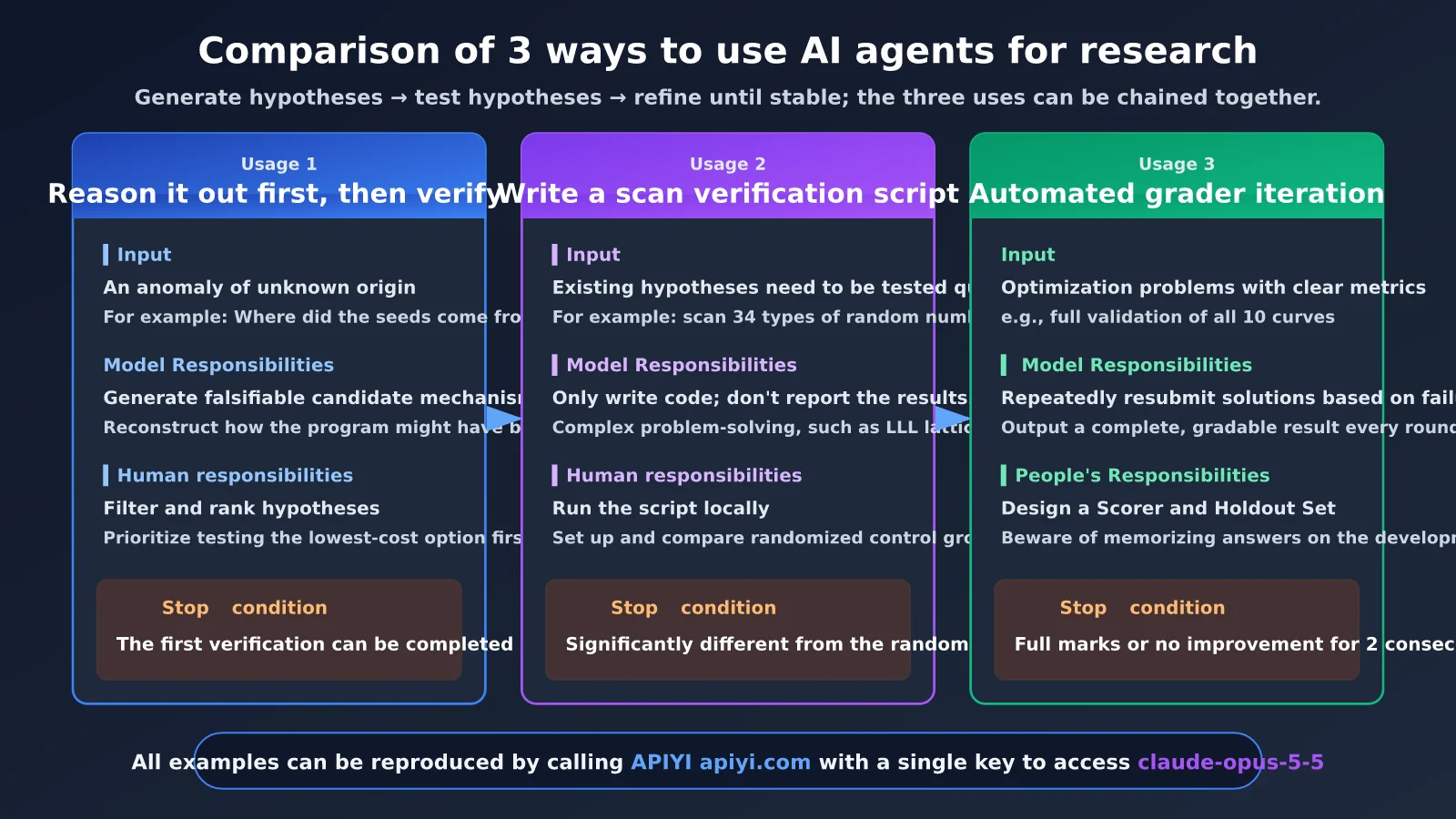
| Dimension | Use Case 1: Reason Through the Mechanism | Use Case 2: Scanning and Validation Scripts | Use Case 3: Iterate with an Automatic Scorer |
|---|---|---|---|
| Corresponding case step | Reason through how the program was written in 1997 | Scan 34 generators and find statistical signatures | Fully validate all 10 curves after state recovery |
| Best suited for | Anomalies with unknown causes; reverse-engineering hypotheses | Quantitatively testing an existing hypothesis | Optimization problems with clear metrics |
| Model’s role | Generate falsifiable candidate mechanisms | Write code, but don’t report results | Submit solutions iteratively |
| Person’s role | Filter and rank hypotheses | Run locally and inspect the control group | Design the scorer and holdout set |
| When to use a frontier model | Final reasoning and ranking | Write complex solvers, such as LLL | Formal experiment rounds |
| Stopping condition | The first test can be completed within an hour | Significant difference from the random control | Perfect score or no improvement for two consecutive rounds |
| How to access | Unified API through APIYI apiyi.com | Same | Same |
The three use cases can be chained together: Use Case 1 generates hypotheses, Use Case 2 tests them, and Use Case 3 refines validated solutions until they’re stable.
Why Research Tasks Like These Require a Flagship Model Like Claude
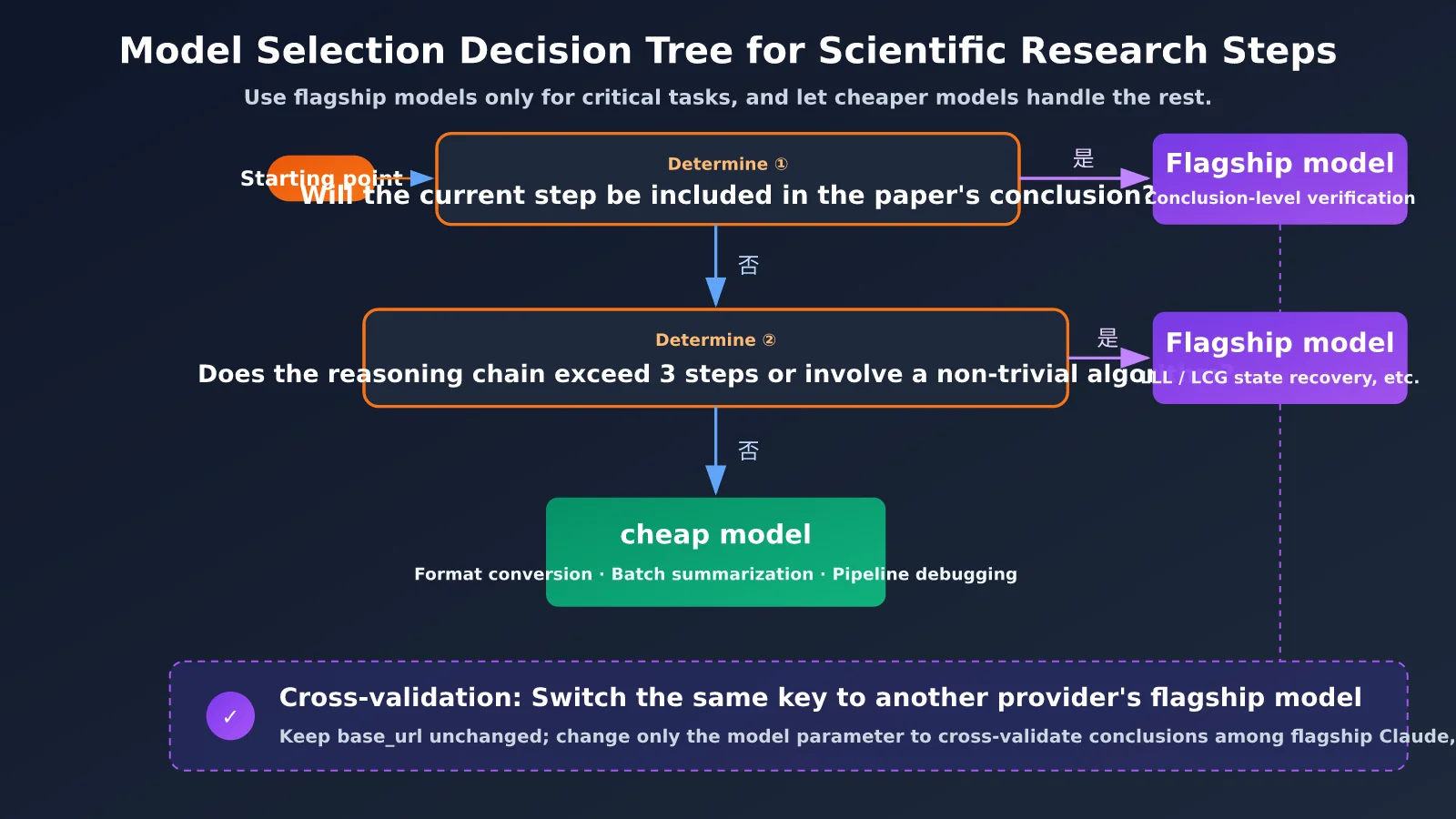
Not every step in a research project needs a flagship model, but some tasks are nearly impossible with a smaller model. Use the table below to decide:
| Criterion | When to use a flagship model | Why |
|---|---|---|
| Requires connections across domains | For example, connecting “curve seeds” to implementation details in a 1990s C library | Smaller models are more likely to focus on the surface of the problem, such as continuing to guess phrases |
| The reasoning chain has more than 3 steps, and each step depends on the previous one | For example, hypothesizing → scanning → signing → restoring state | If any intermediate step is wrong, everything that follows can go off track |
| Requires challenging its own assumptions | For example, asking, “Am I testing in an environment?” | Flagship models are more likely to actively look for counterexamples |
| Involves a nontrivial algorithm | For example, LLL lattice reduction or recovering the state of a truncated LCG | Whether the code is correct directly determines whether the result holds up |
| The conclusion will appear in a paper or determine how much to invest in an experiment | Any conclusion intended for publication | The cost of an error is far greater than the cost of the model call |
By contrast, cheaper models are enough for tasks like format conversion, batch summarization, and debugging a scoring pipeline. The key to controlling costs isn’t to avoid flagship models—it’s to use them only for the tasks listed above.
Frequently Asked Questions
Q1: Did Claude crack the NIST elliptic curves?
No. Claude reconstructed how the seeds were generated: they came from lrand48 initialized with a timestamp. This isn’t a new attack method, nor does it constitute a vulnerability. Users don’t need to change their configurations or migrate. If anything, the finding shows that the seeds weren’t chosen by hand.
Q2: How is this different from traditional brute-force search?
Brute force exhaustively searches within a fixed set of assumptions. Claude first changed the assumptions—from “which phrase was hashed” to “which random number generator was used”—and only then performed a limited brute-force search over 2^17 hidden bits. That first step was what made the difference.
Q3: When was this research published, and what questions remain open?
The Anthropic research page and the post from @AnthropicAI were both published on October 17, 2026. The seed for B-163 hasn’t been recovered yet, the method used to generate the base point G for P-224 through P-521 is still unclear, and a small number of candidate curves were skipped for unknown reasons.
Q4: Which research scenarios are a good fit for these 3 approaches?
– **Tracing experimental anomalies**: If instrument data contains periodic artifacts, use the first approach to infer how the data-collection software was implemented.
– **Reproducing historical papers**: If parameters are missing, use the second approach to scan candidate parameter combinations.
– **Data extraction and cleaning**: Use the third approach with a scorer to iteratively develop stable rules.
Q5: How can I use a single Key to cross-validate results with multiple flagship models?
Sign up at APIYI apiyi.com and create a Key. Set `base_url` to `https://api.apiyi.com/v1`, then switch between claude-opus-5-5 and flagship models from the GPT and Gemini families by changing only the `model` parameter. Check the console for the current list of available model names.
Q6: What are the known limitations of research AI agents?
– Models may invent plausible-sounding mechanisms, so every conclusion must be backed by a locally runnable verification script.
– Iterating on a scorer can lead to overfitting on the development set, so you must keep a holdout set.
– The cost of multiple calls can add up. Get the workflow working with a cheaper model first, and track usage. You can check billing details in the APIYI apiyi.com console.
Key Takeaways for Research-Focused AI Agents
- Know what the findings do—and don’t—show: Claude traced the seeds back to their source; it didn’t uncover a cryptographic vulnerability. If anything, confidence in the curve has increased.
- The key move: Changing the hypothesis space is more effective than throwing more compute at the old one.
- Verify first: Let the model write scripts, but run them yourself—and always compare the results against a random baseline.
- Close the loop with a scorer: Use deterministic scoring and a held-out set. Stop iterating when the score converges.
- Use models strategically: Use cheaper models to get the workflow running, and reserve flagship models for critical reasoning and verification.
- How to get started: Use a single API key through APIYI apiyi.com to call claude-opus-5-5, then switch to other models for cross-validation.
Summary
Claude’s solution to the mystery of the NIST elliptic curve seeds offers researchers three main lessons:
- Reason about the mechanism first: Start with “How was this data generated?” rather than guessing the answer directly.
- Let scripts do the talking: Pair every hypothesis with runnable verification code and a random control.
- Close the loop with a scorer: Let a deterministic program evaluate the results, iterate until they converge, and use a held-out set to check for overfitting.
Cost control is essential throughout: start by running the workflow with a cheaper model, then switch to a flagship model for steps involving research conclusions or complex algorithms. We recommend using APIYI apiyi.com to run all the code in this article, first confirming the P-256 seed with the official reproduction code, then applying these three approaches to your own research.
Further Reading
- 📘 How to Call Claude Models Using the OpenAI SDK — Learn about parameter differences in compatible APIs
- 📊 Cost Control Practices for Large Language Model APIs — Learn how to track usage and set budget alerts
- 🚀 Building a Cross-Validation Workflow for Multiple Models — Have different flagship models check each other’s conclusions
📚 References
- Anthropic Frontier Red Team research page: Research into the origins of ECDSA curve seeds
- Link:
www.anthropic.com/research/ecdsa-curve-origins -
Details: A primary source covering the full methodology, open questions, and CC0 reproduction code
-
Official @AnthropicAI post on X (2026-10-17): “It is just timestamps.”
- Link:
x.com/AnthropicAI -
Details: The official announcement, with community discussion
-
APIYI documentation center: Instructions for calling OpenAI-compatible APIs
- Link:
docs.apiyi.com - Details:
base_urlconfiguration, model list, and billing information
Author: APIYI Technical Team
Technical discussion: Share how you use AI agents in your research in the comments. For more integration resources, visit the APIYI documentation center at docs.apiyi.com.