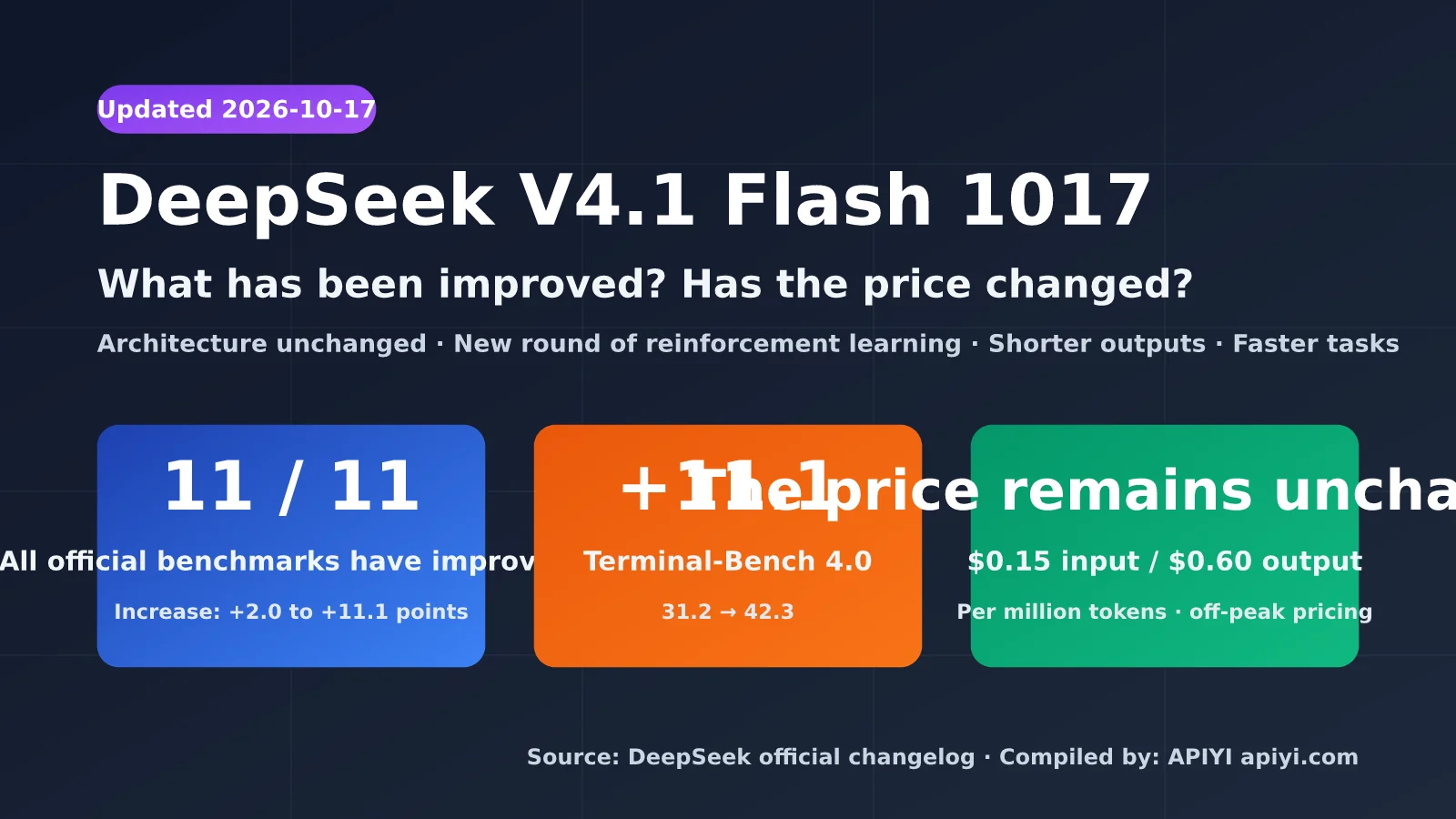
On October 17, 2026, DeepSeek quietly upgraded V4.1 Flash to DeepSeek-V4.1-Flash-1017. The company called it a minor update, but the published results tell a different story: all 11 listed benchmarks improved, and Terminal-Bench 4.0 jumped by 11.1 points. That’s more than a minor tweak.
Most developers have two questions: What exactly improved in DeepSeek V4.1 Flash 1017? Has the price changed? This article answers using only data from DeepSeek’s official update log and pricing page, plus the model card on Hugging Face. Third-party claims are clearly labeled.
What you’ll learn: the actual gains in version 1017, why “no price change” effectively means a lower cost, and how to cut your DeepSeek API costs in half by taking advantage of off-peak hours.
What Is DeepSeek V4.1 Flash 1017? A Minor Update with No Architecture Changes
DeepSeek V4.1 Flash is the smallest model in the new architecture family released on September 10, 2026, and natively supports image understanding. Version 1017 is its first iteration, released about a month later. DeepSeek’s update log is brief: the model was upgraded to DeepSeek-V4.1-Flash-1017, with the web version and app updated at the same time. The API and pricing remain unchanged.
According to the technical details on Hugging Face, 1017 retains the same architecture: a 552B-parameter backbone, with about 8B parameters activated per token during prefill and about 16B during decoding, plus 196B of Engram conditional memory. Analysts in the English-speaking community generally believe the changes came from another round of reinforcement learning post-training. The configuration files, tokenizer, and prompt encoding are unchanged, so existing code doesn’t need any modifications.
| Item | DeepSeek V4.1 Flash 1017 | Details |
|---|---|---|
| Release date | 2026-10-17 | First iteration of the September 10 release |
| API model name | deepseek-flash |
Alias automatically points to the latest version |
| Previous model names | deepseek-v4-flash, etc. |
Still callable; routed to 1017 and billed at the Flash rate |
| Architecture | MoE, 552B backbone, 8B/16B active parameters | Same as the initial release |
| Context / max output | 1M / 384K | Data from the official pricing page |
| Thinking mode | Thinking (default) and non-thinking | Both modes are available |
| Multimodal | Supports image input | Pro version doesn’t yet support vision |
| Open-source license | MIT | Weights published on Hugging Face and ModelScope |
| Concurrency limit | 2,500 | 500 for the Pro version |
One detail DeepSeek specifically calls out is that 1017 is optimized for DeepSeek Harness, Tencent CodeBuddy, and WorkBuddy. The company recommends using DeepSeek Harness 0.2.1-rc.1 or later. This suggests the training focused on agentic coding scenarios. If you’re using a custom-built agent loop, your actual gains may be smaller than the official figures suggest.
🎯 Technical tip: The model alias automatically points to the new version, so run regression tests on your own workloads before switching production traffic. With APIYI (apiyi.com), you can call DeepSeek and other leading models using the same API key, making it easier to compare them side by side with the same evaluation scripts.
What Improved in DeepSeek V4.1 Flash 1017: A Side-by-Side Comparison of 11 Benchmarks
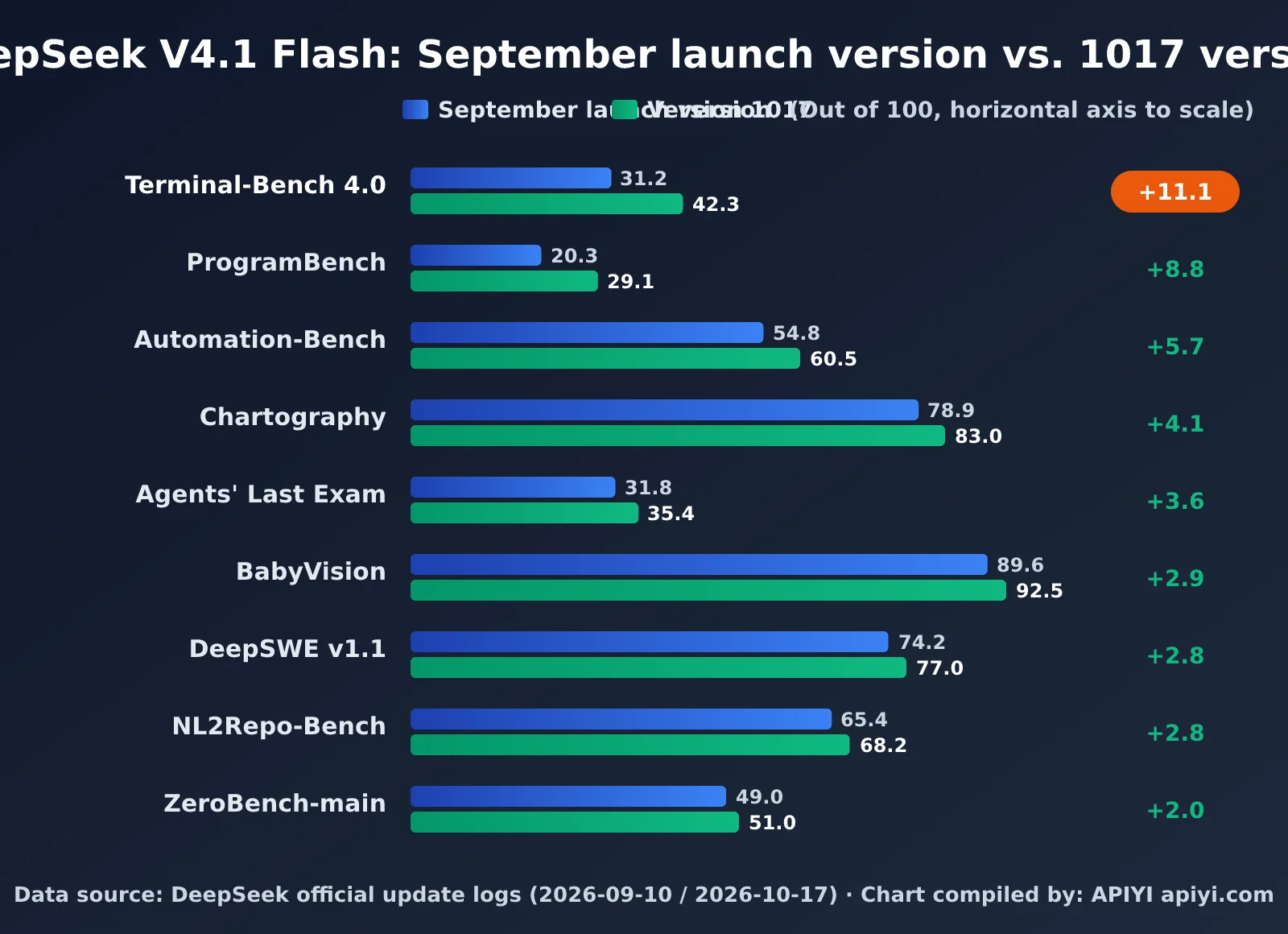
The clearest way to answer “What improved?” is to compare the scores from the official September launch version with those from the October 1017 version. All figures below come from DeepSeek’s official changelog, except for the old Apex Bench score, which wasn’t listed there and is cited from a compilation by the English-language community. Treat that figure as a reference only.
| Benchmark | Capability | September launch version | 1017 version | Improvement |
|---|---|---|---|---|
| Terminal-Bench 4.0 | Terminal Agent tasks | 31.2 | 42.3 | +11.1 |
| ProgramBench | Program generation | 20.3 | 29.1 | +8.8 |
| Apex Bench v1.1 | General reasoning (old score from third-party data) | 64.6 | 72.1 | +7.5 |
| HLE (without tools) | High-difficulty knowledge reasoning | 36.8 | 42.6 | +5.8 |
| Automation-Bench | Workflow automation | 54.8 | 60.5 | +5.7 |
| Chartography (with tools) | Chart understanding | 78.9 | 83.0 | +4.1 |
| Agents’ Last Exam | General-purpose Agent | 31.8 | 35.4 | +3.6 |
| BabyVision (with tools) | Visual understanding | 89.6 | 92.5 | +2.9 |
| DeepSWE v1.1 | Software engineering | 74.2 | 77.0 | +2.8 |
| NL2Repo-Bench | Repository generation from natural language | 65.4 | 68.2 | +2.8 |
| ZeroBench-main (with tools) | Visual reasoning | 49.0 | 51.0 | +2.0 |
The table points to three takeaways. First, the biggest gains are all in Agent and programming tasks. Terminal-Bench 4.0 and ProgramBench both improved by more than 35% relative to their previous scores, consistent with DeepSeek’s statement that the model was optimized for Harness and CodeBuddy. Second, visual benchmarks also saw steady gains of 2 to 4 points, suggesting that this round of post-training didn’t come at the expense of multimodal capabilities. Third, testing conditions weren’t fully consistent across all benchmarks. For example, the latest Automation-Bench result is labeled v1.0.6, while the launch version’s HLE result doesn’t specify whether tools were used. It’s best not to draw conclusions from any single score in isolation.
DeepSeek V4.1 Flash 1017’s Efficiency Gains: Shorter Outputs, Faster Tasks
Beyond the scores, DeepSeek also highlighted a change that’s easy to overlook: version 1017 completes tasks faster and produces shorter outputs. For APIs billed by token, this matters just as much as the scores do. If a task requires fewer output tokens, the bill goes down too.
One caveat: DeepSeek hasn’t disclosed the exact percentage reduction, and the English-language community hasn’t published reliable before-and-after measurements. The safest approach is to track changes in usage.completion_tokens across your own business samples and use real data to determine how much costs have fallen.
The English-language community has summarized the training approach as “Wish-Driven Programming”: the model completes a project end to end, scores its work against the goal, and then iterates. Examples shared by DeepSeek include a 3D reconstruction of the Forbidden City, a browser-based racing game, and a Godot remake of Portal 2. These long-running projects map closely to benchmarks like Terminal-Bench and ProgramBench, which also helps explain why Agent-related scores saw the biggest gains.
Has DeepSeek V4.1 Flash 1017 Pricing Changed? A Guide to Off-Peak and Peak Rates
The short answer: DeepSeek V4.1 Flash 1017’s API prices haven’t changed. They’re exactly the same as the September launch version. But “unchanged” needs a little context: prices had already been cut when the September version launched, and DeepSeek now has two pricing tiers—off-peak and peak—whose rates differ by a factor of two.
| Billing item (per million tokens) | Flash off-peak | Flash peak | V4 Pro off-peak | V4 Pro peak |
|---|---|---|---|---|
| Input (cache hit) | $0.003 | $0.006 | $0.022 | $0.044 |
| Input (cache miss) | $0.15 | $0.30 | $0.66 | $1.32 |
| Output | $0.60 | $1.20 | $1.98 | $3.96 |
The official peak hours are Monday through Friday, 01:00–04:00 and 06:00–10:00 UTC. In Beijing time, that’s 09:00–12:00 and 14:00–18:00 on weekdays. Chinese public holidays aren’t considered peak times. All other hours—including overnight, lunch breaks, weekends, and public holidays—are billed at off-peak rates, which are half the peak rates.
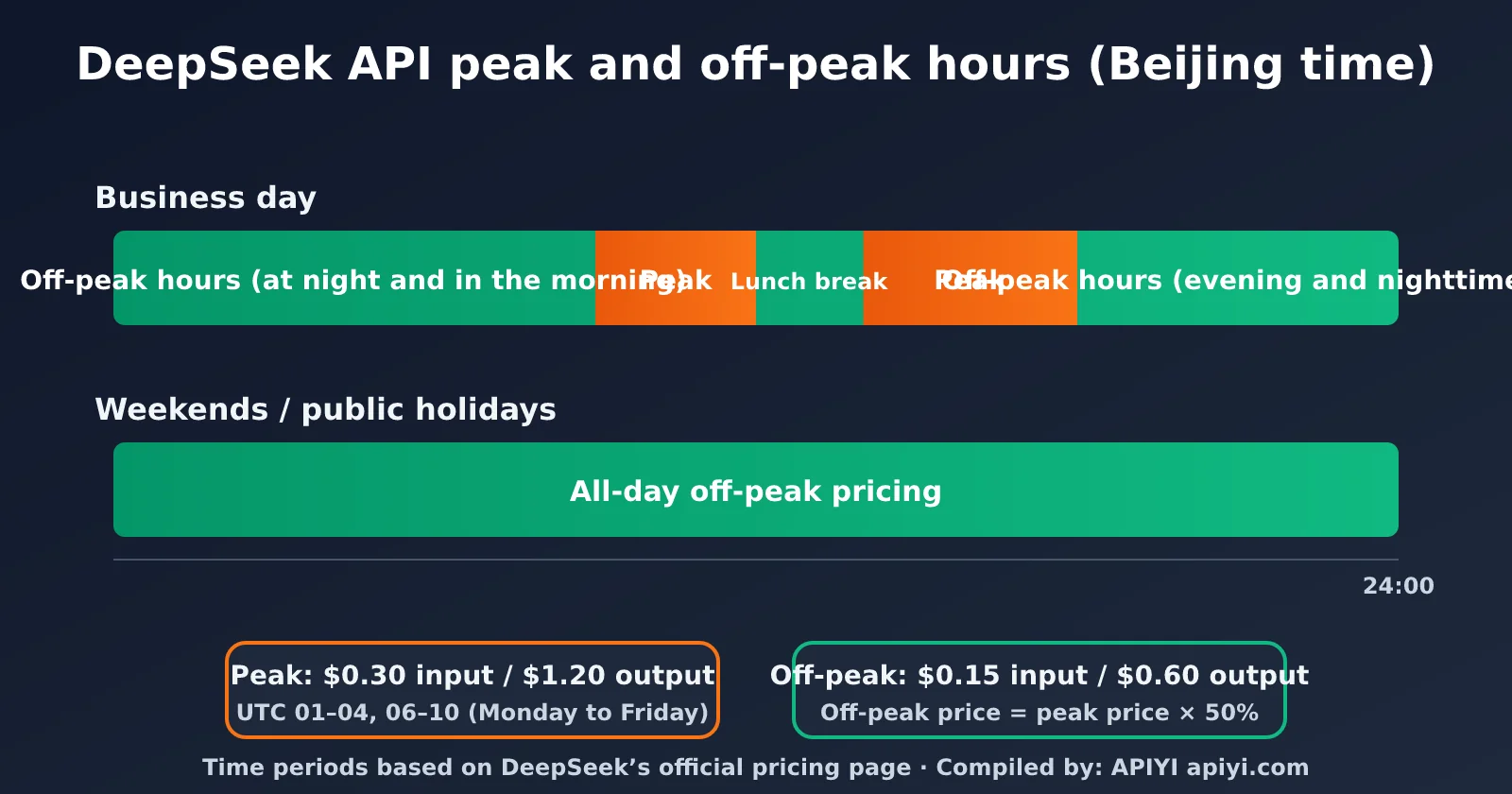
This schedule has a direct impact on teams in China: peak hours cover almost the entire workday. If you’re handling tasks that don’t need real-time responses—like batch translation, offline data annotation, or code repository scans—schedule them after 6 p.m. or on weekends, and the rate is immediately cut in half. That’s a more direct saving than any prompt optimization.
DeepSeek V4.1 Flash Pricing Timeline
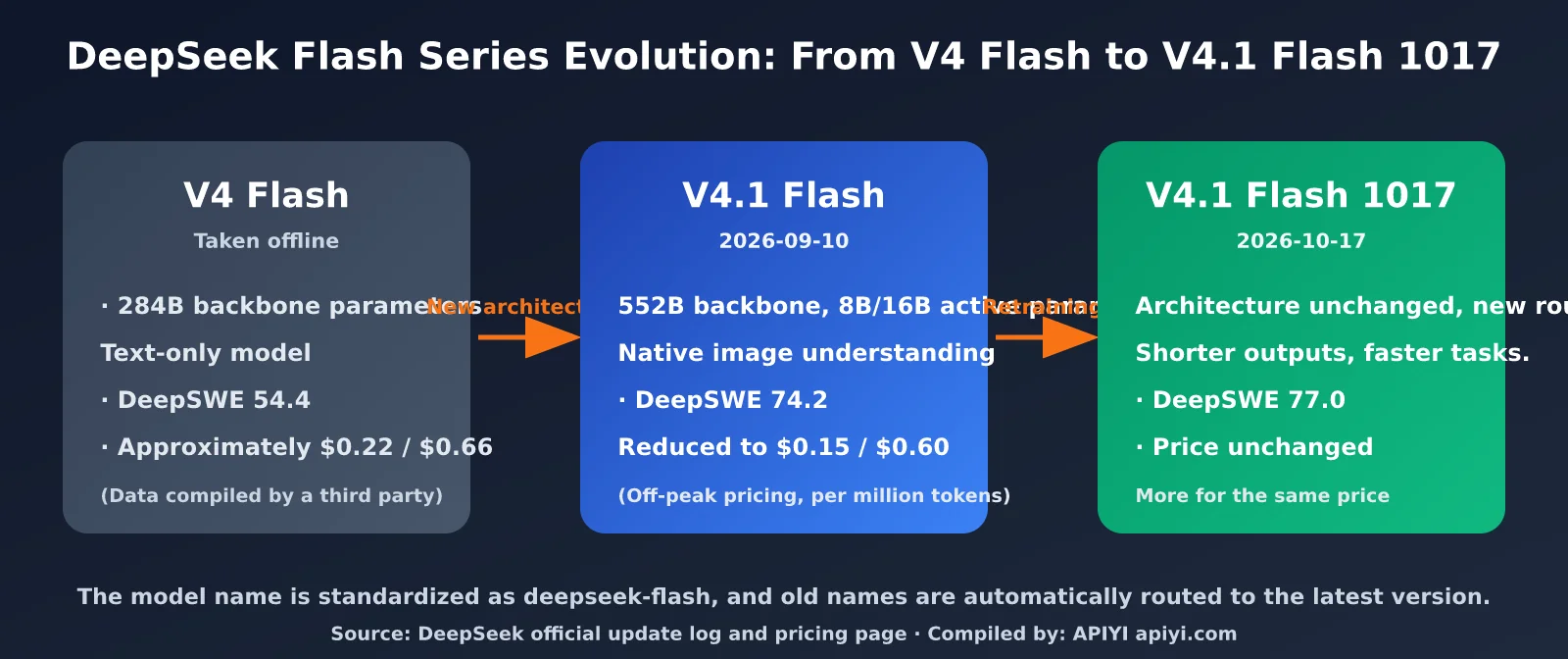
Looking at the longer timeline, the Flash series went through a “price cut, then more for the same price” phase over two months. The V4 Flash prices are based on information compiled by the English-language community and are provided for reference only. The September and October figures are from official sources.
| Version | Release date | Input (cache miss) | Input (cache hit) | Output | Change |
|---|---|---|---|---|---|
| V4 Flash | Before September 2026 | About $0.22 | About $0.007 | About $0.66 | Discontinued |
| V4.1 Flash | 2026-09-10 | $0.15 | $0.003 | $0.60 | Official price cut |
| V4.1 Flash 1017 | 2026-10-17 | $0.15 | $0.003 | $0.60 | Price unchanged, capabilities improved |
The V4.1 series prices shown are off-peak rates. Prices double during peak hours.
Why “No Price Change” Can Still Mean a Price Cut
The unit price is unchanged, but the total cost of a task depends on “unit price × number of tokens.” DeepSeek has confirmed that 1017 produces shorter outputs, so the same task uses fewer output tokens. Since output tokens cost four times as much as input tokens, shortening outputs saves more than shortening inputs.
Here’s an illustrative example: an Agent task uses 1 million input tokens (cache miss) and 200,000 output tokens during off-peak hours, for a total of about $0.15 + $0.12 = $0.27. If output volume drops by 20%—just an assumption; measure your own usage to see the actual impact—the output cost falls from $0.12 to about $0.096. Reusing long contexts with the $0.003 cache-hit rate can bring the real cost down further.
💰 Cost optimization: For batch workloads and budget-sensitive projects, schedule non-real-time tasks during off-peak hours and reuse fixed system prompts wherever possible to improve cache-hit rates. Calling models through the APIYI platform at apiyi.com also lets you review usage details across models in one place, making it easier to calculate the actual cost of each task type.
Search and Fetch APIs: New Billable Features Launched with 1017
Another change launched alongside 1017: DeepSeek opened its Search (web search) and Fetch (web page retrieval) features to external developers. These are billed separately per request at $0.75 per 1,000 successful requests, apart from model token costs.
The official pricing page also describes a transition period: requests of this type made through DeepSeek Harness, Claude Code, or Codex are currently free. Per-request billing starts at midnight Beijing time on November 1, 2026. If your Agent workflow relies heavily on web search, track your request volume before November so you can estimate this additional cost in advance.
DeepSeek V4.1 Flash 1017 Quick Start: API Call Example
Because 1017 keeps the model name deepseek-flash, existing code will automatically use the new version without any changes. Here’s a minimal example using the OpenAI-compatible SDK:
import openai

client = openai.OpenAI(
    api_key="YOUR_API_KEY",
    base_url="https://api.apiyi.com/v1"  # Use APIYI's unified API
)

resp = client.chat.completions.create(
    model="deepseek-flash",  # Check the platform's model list for the currently available model name
    messages=[{"role": "user", "content": "Write a Python function that reads a CSV file and sums each column"}],
)
print(resp.choices[0].message.content)
print(resp.usage)  # Track token usage to compare output lengths between versions
View full code: Script for comparing output lengths between versions
import time
import statistics
import openai

client = openai.OpenAI(
    api_key="YOUR_API_KEY",
    base_url="https://api.apiyi.com/v1"  # APIYI's unified API: one key for multiple models
)

PROMPTS = [
    "Explain the difference between generators and iterators in Python, and give an example",
    "Write an HTTP request function with retries and exponential backoff",
    "Rewrite this SQL query in pandas: SELECT city, AVG(price) FROM orders GROUP BY city",
]

def run(model: str, prompts: list[str]) -> dict:
    out_tokens, latency = [], []
    for p in prompts:
        start = time.time()
        resp = client.chat.completions.create(
            model=model,
            messages=[{"role": "user", "content": p}],
        )
        latency.append(time.time() - start)
        out_tokens.append(resp.usage.completion_tokens)
    return {
        "model": model,
        "avg_output_tokens": statistics.mean(out_tokens),
        "avg_latency_s": round(statistics.mean(latency), 2),
    }

if __name__ == "__main__":
    # Compare completion_tokens from historical records with the current results to estimate how much shorter 1017's outputs are
    print(run("deepseek-flash", PROMPTS))
A few practical tips can help you get up and running faster:
- Thinking mode:
deepseek-flashhas thinking mode enabled by default. For simple Q&A or format-conversion tasks, you can switch to non-thinking mode to save output tokens. Check the official documentation for the exact parameter syntax. - Sampling parameters: The Hugging Face model card recommends
temperature=1.0andtop_p=0.95. If you tuned the temperature for the previous version, it’s worth testing it again. - Legacy model name:
deepseek-v4-flashis still available, but it now routes to 1017. We recommend switching todeepseek-flashto avoid issues if the alias is retired in the future. - Regression testing: Shorter outputs may affect downstream parsers that rely on a fixed format or length. Run a test with real samples before switching.
🚀 Get started: Use the APIYI apiyi.com platform to quickly build a prototype. Its OpenAI-compatible API works out of the box, so you can connect DeepSeek V4.1 Flash 1017 to an existing project in minutes and run A/B comparisons with other models.
When to Use DeepSeek V4.1 Flash 1017: Comparing It with V4 Pro
After the 1017 update, one practical question is whether it’s still worth using the more expensive V4 Pro. According to the official pricing page, Flash has the edge in price, concurrency, and vision capabilities, while Pro remains DeepSeek’s largest model available to the public.
| Comparison | deepseek-flash (V4.1 Flash 1017) | deepseek-v4-pro (V4 Pro 0813) | Recommendation |
|---|---|---|---|
| Output price (off-peak) | $0.60 / million tokens | $1.98 / million tokens | Flash costs about 30% as much as Pro |
| Context / max output | 1M / 384K | 1M / 384K | Equal |
| Vision understanding | Supported | Not supported | Choose Flash if you need image input |
| Concurrency limit | 2,500 | 500 | Choose Flash for high-concurrency batch processing |
| Agent coding optimizations | Specifically optimized for Harness and CodeBuddy | General-purpose | Try Flash first for coding agents |
| Available platforms | DeepSeek official, APIYI apiyi.com, and others | Same as Flash | A unified API makes it easier to switch |
Based on these differences, here are a few guidelines for choosing a model:
- Coding agents and terminal automation: Start with Flash 1017. This is where the update delivers its biggest improvements, and it costs about one-third as much as Pro.
- Understanding charts, screenshots, and documents: Flash is the only option; Pro doesn’t currently support visual input.
- Large-scale offline tasks: Flash’s 2,500 concurrency limit and off-peak pricing make it the most cost-effective choice.
- Complex reasoning where answer quality matters most: Test Flash and Pro on the same set of samples before deciding. Don’t rely on benchmark scores alone.
💡 Choosing a model: The right choice depends on your task and quality requirements. Test Flash and Pro on the same set of real-world samples through the APIYI apiyi.com platform. The unified API lets you switch models by changing just one model name, making it easy to compare results.
Frequently Asked Questions
Q1: Do I need to change my code to use DeepSeek V4.1 Flash 1017?
No. DeepSeek has confirmed that the API call method remains unchanged. deepseek-flash will automatically point to version 1017, and the old name, deepseek-v4-flash, will also route to the new version. The only thing we recommend is running regression tests to make sure downstream parsing still works correctly with the shorter outputs. You can get test credits through the APIYI apiyi.com platform and quickly check how the new version performs on your use cases.
Q2: Has DeepSeek V4.1 Flash 1017’s pricing actually changed?
The per-token rates haven’t changed: during off-peak hours, uncached input costs $0.15, cached input $0.003, and output $0.60 per million tokens. Rates double during peak hours. However, because version 1017 produces shorter outputs, the total cost for the same task will usually be lower. The only new charges are for the Search and Fetch APIs, each billed at $0.75 per 1,000 successful requests.
Q3: What are the peak hours in Beijing time?
On weekdays, peak hours are 09:00–12:00 and 14:00–18:00 Beijing time, corresponding to 01:00–04:00 and 06:00–10:00 UTC. Chinese public holidays aren’t considered peak hours. All other times are billed at off-peak rates, which are half the peak rates.
Q4: Are the benchmark improvements for version 1017 credible?
The scores were published by DeepSeek, and independent third-party replications are still underway. Some benchmarks depend on specific frameworks—for example, Terminal-Bench 4.0 uses the Claude Code framework, while DeepSWE uses the Mini-SWE-V2 framework. Results may differ if you use your own Agent loop. The most reliable approach is to test the model with your own samples and framework before deciding whether to switch.
Q5: Can I deploy DeepSeek V4.1 Flash 1017 locally?
Yes. The weights are available under the MIT license on Hugging Face and ModelScope, and the model supports inference frameworks such as vLLM, SGLang, and Transformers. However, its 552B backbone parameters require substantial GPU memory, so calling the API is usually more cost-effective for small and midsize teams.
Key Takeaways
- What’s improved: The architecture is unchanged, but the model has undergone another round of reinforcement learning. It improved on all 11 official benchmarks, with Terminal-Bench 4.0 rising from 31.2 to 42.3.
- Efficiency changes: Tasks finish faster and outputs are shorter, directly reducing the cost per task when billing is based on tokens.
- Has pricing changed? Per-token rates are unchanged: $0.15 for input and $0.60 for output during off-peak hours, with rates doubling at peak times. Peak hours are 9:00–12:00 and 14:00–18:00 on weekdays in Beijing time.
- New charges: The Search and Fetch APIs each cost $0.75 per 1,000 requests. Starting November 1, calls through Harness, Claude Code, and Codex will be billed.
- How to integrate: Keep using
deepseek-flash; no code changes are needed. Just run a regression test before switching.
Summary
To answer the two questions in the title, here are the key points:
- What’s improved? DeepSeek V4.1 Flash 1017 is a retrained model with the same architecture. Its biggest gains are in agentic coding, with steady improvements in visual understanding. It also produces shorter outputs and runs faster.
- Has the price changed? No. It’s still at the rates introduced in September. Shorter outputs mean lower actual costs, and off-peak pricing cuts costs by another half.
- What should you do? You don’t need to change your code, but we recommend running a regression test and evaluating how per-call Search/Fetch billing, starting in November, will affect your agent workflows.
For teams already using DeepSeek—or considering it—for coding agents, batch processing, or chart understanding, 1017 is an update that delivers more at the same price and is worth testing soon. We recommend using APIYI at apiyi.com to quickly evaluate its performance. With a unified interface, you can compare DeepSeek V4.1 Flash 1017 with other leading models on the same set of samples before deciding how to allocate production traffic.
Further Reading: Related Articles
If you’re interested in the DeepSeek model family, check out these articles:
- 📘 DeepSeek V4.1 Flash Launch Review: New Architecture and Native Multimodality – Learn about the architecture changes in the September launch version
- 📊 DeepSeek API Cost Optimization Guide: Cache Hits and Off-Peak Scheduling – Pick up practical tips for reducing token costs
- 🚀 Choosing a Model for Coding Agents: Flash, Pro, and Leading Closed-Source Models Compared – Explore the best combinations for different use cases
References
- DeepSeek API Changelog: Official release notes and benchmark data for V4.1 Flash and version 1017
- Link:
api-docs.deepseek.com/updates -
Note: The primary source for the benchmark scores and version information in this article
-
DeepSeek Models and Pricing: Official pricing, peak-hour rates, and Search/Fetch billing rules
- Link:
api-docs.deepseek.com/quick_start/pricing -
Note: Refer to the official page for the latest pricing information
-
Hugging Face Model Card: DeepSeek-V4.1-Flash architecture, parameters, and recommended sampling settings
- Link:
huggingface.co/deepseek-ai/DeepSeek-V4.1-Flash -
Note: A reference for local deployment and parameter configuration
-
Regolo Comparison Article: Price and benchmark comparison of V4 Flash and V4.1 Flash
- Link:
regolo.ai - Note: The V4 Flash price cited in this article comes from this third-party roundup
Author: APIYI Technical Team
Technical discussions: Feel free to join the discussion in the comments. For more resources, visit the APIYI documentation center at docs.apiyi.com.