Many developers enter a Claude model in Workbuddy and find that simple conversations work fine, but Agent tasks or tool calls trigger errors related to content. They then wonder, “Does Workbuddy simply not support Claude’s native format?” As of 2026-10-18, based on the information available to us, Workbuddy can connect to Claude through an OpenAI-compatible API, but complex Agent scenarios may not be fully compatible. This article examines the capabilities and limitations of this integration, along with common issues you may encounter.
This isn’t a vague guide claiming that “switching models will fix everything.” Our takeaway is this: when you hit an error, getting the specific content field from the request and the full error path is more useful than switching models or providers.
What you’ll learn: By the end, you’ll understand how Workbuddy and Claude relate at the protocol level, know how to diagnose six common types of content errors, and have a reusable protocol conversion test checklist.
Does Workbuddy Support Claude’s Native Format? A Quick Summary
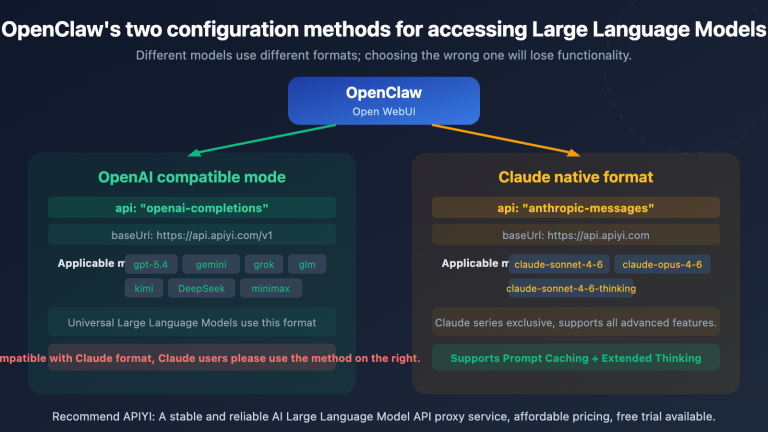
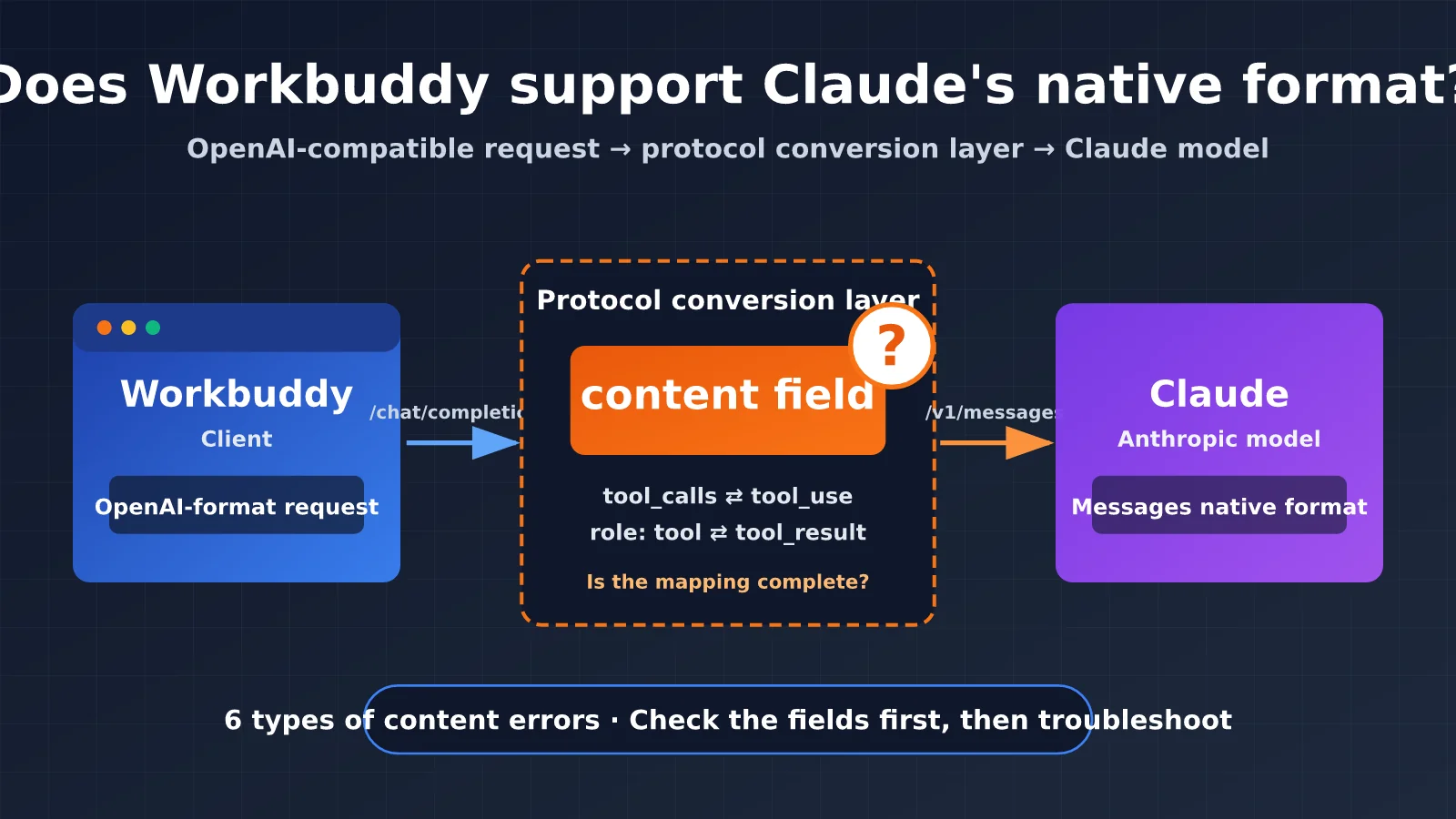
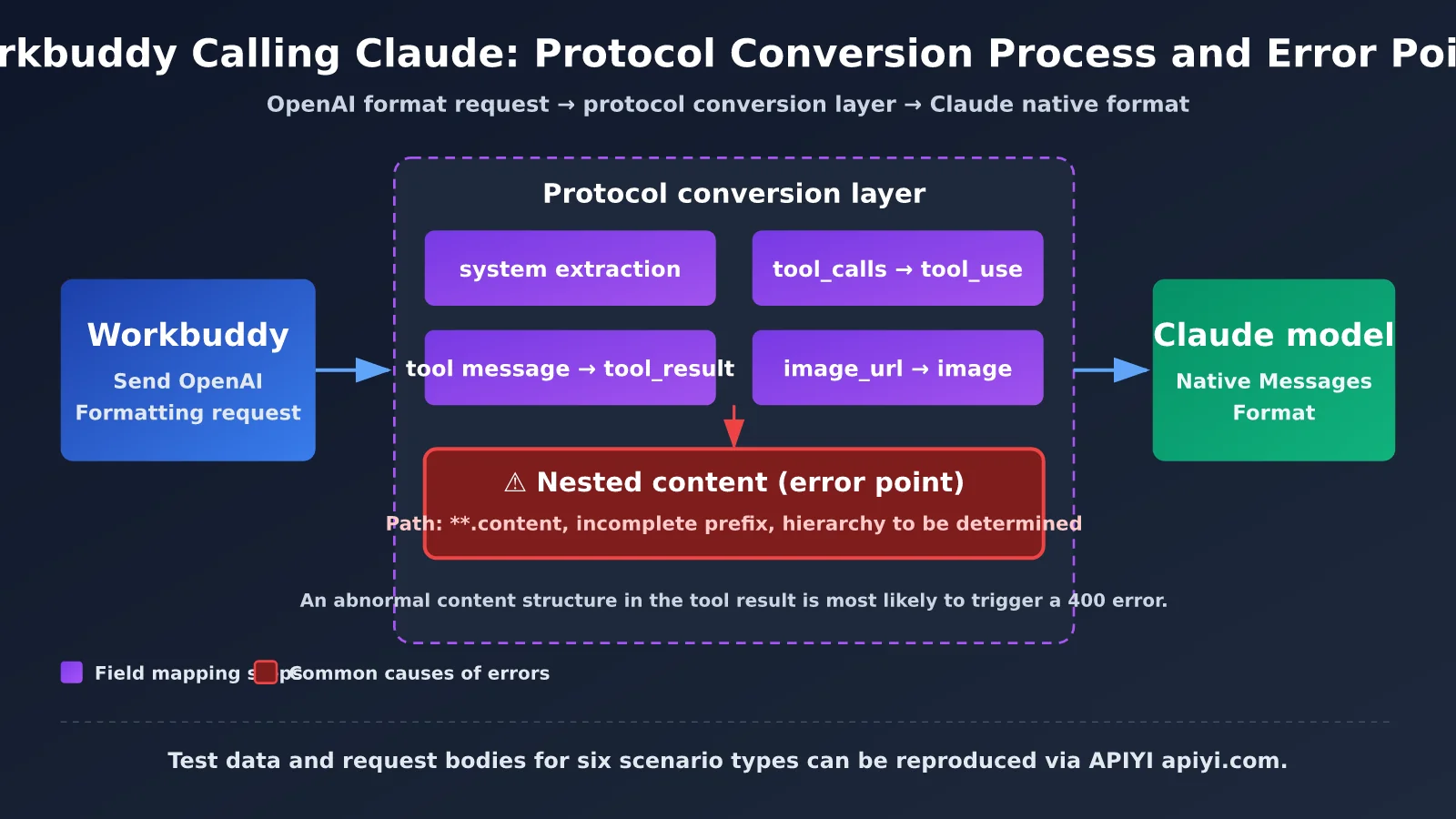
Here’s the short answer: Workbuddy’s main way of connecting to Claude is through an OpenAI-compatible API, not Anthropic’s native Messages format. In other words, you can use Claude, but requests are sent in OpenAI format and then converted to Anthropic format by the backend gateway.
This setup is generally reliable for plain-text conversations. For tool calls, multi-turn Agent loops, images, and Thinking, however, it depends on how completely the protocol conversion layer handles each field. The table below summarizes the key points.
| Consideration | Conclusion | What it means for you |
|---|---|---|
| Can you use Claude models? | Yes, through an OpenAI-compatible API | Configure the compatible endpoint and model name |
| Does it use Claude’s native format? | No. Requests use OpenAI format | Don’t construct requests using Anthropic-native fields |
| Simple conversations | Usually work fine | Suitable for everyday Q&A and text generation |
| Complex Agent scenarios | Compatibility may be incomplete | Test tool calls and nested content separately |
| First step when an error occurs | Capture the specific content field and full error path |
More useful than switching models or providers |
It’s worth noting that “doesn’t support the native format” doesn’t mean “Claude can’t be used.” What really affects the experience is whether the protocol conversion from OpenAI to Anthropic covers your use case.
What’s the Difference Between Claude’s Native Format and the OpenAI-Compatible Format?
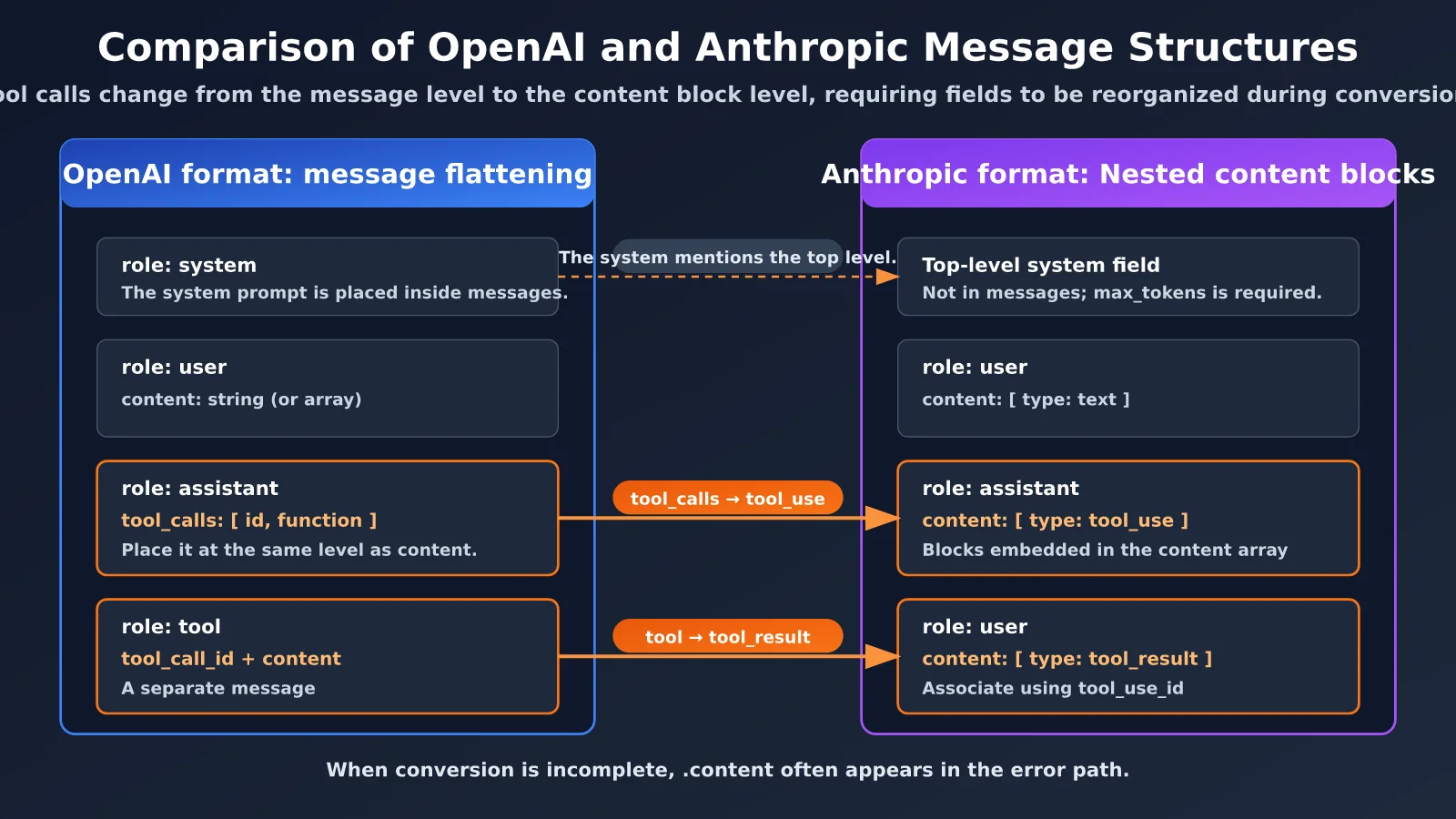
To understand why Workbuddy runs into content-related errors, it helps to first look at how the two protocols structure messages. Anthropic’s Messages API and OpenAI’s Chat Completions API were designed differently, so the protocol conversion layer has to map each field.
The table below compares the dimensions most relevant to this article.
| Comparison | OpenAI-compatible format | Claude native (Anthropic Messages) format |
|---|---|---|
| Endpoint | /v1/chat/completions |
/v1/messages |
| Authentication | Authorization: Bearer |
x-api-key plus the anthropic-version header |
| System prompt | role: system in messages |
A separate top-level system field |
| Message content | content is usually a string, but can also be an array |
content is usually an array of content blocks (text, image, tool_use, tool_result) |
| Tool calls | tool_calls in an assistant message |
tool_use blocks inside the assistant’s content |
| Tool results | A separate role: tool message |
tool_result blocks in a user message |
| Image input | image_url type |
An image block with a source structure |
| Output length | max_tokens is usually optional |
max_tokens is required |
The key difference is that in the OpenAI format, tool calls and tool results are message-level concepts. In the Anthropic format, they’re content blocks nested inside the content array. That’s why .content appears so often in the error path.
🎯 Technical tip: To verify that protocol conversion is complete, try the same Claude model through APIYI at apiyi.com with text-only, tool-call, and image-input tests. Using a consistent interface makes it easier to isolate the request structure as the variable.
Why Doesn’t Workbuddy Support Claude’s Native Format? 3 Reasons
There’s no single official explanation for why Workbuddy doesn’t support it. The points below are reasonable inferences based on the product’s positioning and the protocols involved. Check Workbuddy’s release notes for the definitive answer.
- The product primarily uses the OpenAI-compatible protocol. Most AI clients and agent tools use OpenAI Chat Completions as the general entry point for custom models, since it works with models from multiple providers. Workbuddy connects to Claude through this general-purpose path too, rather than implementing a native protocol for a single model provider.
- Maintaining a unified abstraction across models comes at a cost. If a client uses OpenAI’s message structure as its internal abstraction, adding Anthropic’s native protocol means maintaining a second set of parsing logic for messages, tools, and streaming events. For most general-purpose tools, it’s more practical to let a gateway handle the conversion.
- Protocol differences are pushed to the conversion layer. When the client only sends OpenAI-format requests, Claude-specific capabilities—such as returning Thinking blocks and nested
tool_resultstructures—depend on the gateway to map them. If the mapping is incomplete, the issue won’t show up in simple conversations; it’ll surface in more complex agent scenarios.
Together, these points suggest that “not supporting the native format” is fundamentally an architectural choice, not a limitation of Claude itself. What matters to users is whether the conversion layer works reliably for their use case.
Get Started Quickly with Claude in Workbuddy
To connect Claude in Workbuddy, you need to provide three things: a compatible Base URL, an API key, and a model name. Use the settings below as a reference; field names may vary slightly between versions.
| Setting | Value | Notes |
|---|---|---|
| Protocol type | OpenAI-compatible | Don’t select Anthropic native (ignore this if the option isn’t available) |
| Base URL | https://api.apiyi.com/v1 |
Connect through APIYI at apiyi.com |
| API key | Key generated by the platform | Don’t expose it in public repositories or screenshots |
| Model name | A Claude model name from the platform’s model list | Use the exact name supported by the platform |
Minimal Example
Before configuring Workbuddy, use the code below to check that your key and model name work. If it runs successfully, the connection itself is working.
import openai

client = openai.OpenAI(
    api_key="YOUR_API_KEY",
    base_url="https://api.apiyi.com/v1"  # Call Claude through APIYI's unified interface
)

response = client.chat.completions.create(
    model="YOUR_CLAUDE_MODEL_NAME",  # Use a model name from the platform's model list
    messages=[{"role": "user", "content": "Introduce yourself in one sentence"}]
)
print(response.choices[0].message.content)
View the Full Troubleshooting Script: Inspecting content Fields and Tool-Call Round Trips
The script below does two things. First, it recursively scans the request body and prints the full path and type of every `content` field, helping you spot suspicious values such as `None`, empty strings, or empty arrays. Second, it tests the conversion layer with a complete tool-call-and-result round trip.
import json
import openai

client = openai.OpenAI(
    api_key="YOUR_API_KEY",
    base_url="https://api.apiyi.com/v1"  # APIYI's unified interface
)

def find_content_paths(obj, prefix=""):
    """Recursively list the full path and type of every content field to help match error paths."""
    results = []
    if isinstance(obj, dict):
        for k, v in obj.items():
            path = f"{prefix}.{k}" if prefix else k
            if k == "content":
                results.append((path, type(v).__name__, v))
            results.extend(find_content_paths(v, path))
    elif isinstance(obj, list):
        for i, item in enumerate(obj):
            results.extend(find_content_paths(item, f"{prefix}[{i}]"))
    return results

tools = [{
    "type": "function",
    "function": {
        "name": "get_weather",
        "description": "Get the weather in a city",
        "parameters": {
            "type": "object",
            "properties": {"city": {"type": "string"}},
            "required": ["city"]
        }
    }
}]

messages = [
    {"role": "user", "content": "What's the weather like in Beijing today?"},
    {"role": "assistant", "content": None, "tool_calls": [{
        "id": "call_001", "type": "function",
        "function": {"name": "get_weather", "arguments": "{\"city\": \"Beijing\"}"}
    }]},
    {"role": "tool", "tool_call_id": "call_001", "content": "Sunny, 18°C"}
]

# Step 1: Print all content paths and check for None, empty strings, or empty arrays
for path, typ, val in find_content_paths(messages):
    flag = "  <-- suspicious" if val in (None, "", []) else ""
    print(f"{path:30s} {typ:8s}{flag}")

# Step 2: Send a request and check whether the conversion layer returns an error
try:
    resp = client.chat.completions.create(
        model="YOUR_CLAUDE_MODEL_NAME",
        messages=messages,
        tools=tools
    )
    print(resp.choices[0].message.content)
except Exception as e:
    print("Error details:", e)  # Save the full error path for troubleshooting
🚀 Get started quickly: We recommend getting test credits through APIYI at apiyi.com first. Use the script above to check whether the Claude model handles a tool-call round trip correctly, then enter the same settings in Workbuddy. This helps you distinguish configuration issues from protocol issues.
Workbuddy + Claude in Practice: A Six-Scenario Test Matrix
Before we get into the test results, let’s clarify our approach: there isn’t enough public evidence to conclude that any particular scenario will always fail, so this article doesn’t make unverified claims about success rates or latency. What we can confirm is that plain text works, complex Agent scenarios aren’t necessarily fully compatible, and a specific error involving a .content path has been observed.
With that in mind, the table below outlines six scenarios to test as standalone cases when providing long-term support for tools like Workbuddy, Cursor, and Claude Code through APIYI. You can use it to validate your own setup.
| Test scenario | What to verify | Key fields the conversion layer must handle | Risk level |
|---|---|---|---|
| Plain text | Basic request and response | Extracting system, string content |
Low |
| Multi-turn conversation | Role order and history concatenation | Merging consecutive messages from the same role | Medium |
| Tool Call | Tool definitions and calls | Converting tool_calls to tool_use blocks |
High |
| Tool Result | Returning tool results | Converting role: tool to tool_result blocks |
High |
| Thinking | Preserving thinking blocks | Returning thinking blocks and signatures unchanged | High |
| Image input | Multimodal content | Converting image_url to image blocks |
Medium |
For testing, make each scenario a separate case. If one fails, save the complete request body and full error response right away. Keeping the request body and error path together is essential for troubleshooting later.
What Are the Common content Errors? Six Issues and How to Diagnose Them
In one typical error observed so far, the error path included **.content, but the prefix was incomplete. That means we can’t yet tell whether the issue was with the top-level message’s content or with a nested content in a tool result. This is one of the easiest details to overlook when troubleshooting: without the full path, any attempt to “switch models” is just guesswork.
The table below lists common content issues in the conversion layer. Keep in mind that these are possible causes. You’ll need to verify them against the actual fields in your request rather than assuming one applies.
| No. | Possible issue | Typical symptom | How to verify |
|---|---|---|---|
| 1 | content is null when the assistant calls a tool |
The converted request is missing a valid content block | Check whether that message’s content is None |
| 2 | content is an empty string or contains an empty text block |
The server reports that a text block can’t be empty | Scan all content fields for "" |
| 3 | role: tool isn’t correctly converted to tool_result |
The tool result can’t be matched to its call | Check that tool_call_id matches the call ID |
| 4 | An unconverted type appears in an array | The server reports an invalid content block type | Check the type values in the content array |
| 5 | Thinking blocks aren’t returned as required | An error occurs when thinking is enabled and a tool is called | Check whether thinking blocks are missing from historical assistant messages |
| 6 | A nested content in a tool result has an invalid structure |
The path points to .content[i].content |
Print the full error path and inspect each level |
How to Get the Full content Error Path
Follow these steps to narrow down the issue in a few passes, instead of repeatedly switching models.
- Save the full error response: Don’t just capture the last line. Keep the complete path, including any message and block indexes.
- Capture the request body from the failing turn: Export the original JSON sent to the gateway from the proxy or logs.
- Use a script to list every
contentpath: Runfind_content_pathsfrom the section above, then match the indexes in the error to the relevant message. - Identify the level: Determine whether the issue is in a top-level message’s
contentor in a nested structure, such as a tool result. - Create a minimal reproduction: Isolate the failing message and remove fields step by step until only the structure that triggers the error remains.
💡 Recommendation: Once a minimal reproduction confirms that the issue is in protocol conversion, use the same request through APIYI (apiyi.com) to compare how different Claude models behave. This can help you determine whether the issue lies in mapping a specific field or in a constraint imposed by the model itself.
Pros and Cons of Connecting Claude to Workbuddy
Overall, connecting Claude through an OpenAI-compatible API offers clear convenience, but it also has limitations you need to keep in mind.
Advantages
- Low barrier to entry: Just enter the Base URL, API key, and model name. You don’t need to build a separate integration for Claude’s native protocol.
- Easy to switch models: You can use the same OpenAI-format configuration to quickly compare and switch between multiple models.
- Reliable for simple use cases: Plain text and standard conversational use generally work without noticeable issues.
Limitations
- Compatibility in complex Agent scenarios is uncertain: Tool calls, nested
content, and Thinking responses all depend on the conversion layer being fully implemented, so they need dedicated testing. - Native features aren’t directly available: Some Claude-specific parameters can’t be expressed directly in OpenAI format. Whether they’re supported depends on whether the conversion layer maps them through extensions.
- Error messages may not be very clear: Errors come from Anthropic’s backend validation. If path fields are truncated, it can take much longer to find the problem.
- What to do: Set up the six-category test matrix described earlier, then run regression tests whenever you upgrade Workbuddy or switch models.
| Dimension | Advantage | Limitation | Recommendation |
|---|---|---|---|
| Integration cost | Simple configuration | No native integration option | Start with a minimal example, then configure the rest |
| Feature coverage | Basic conversations are fully supported | Agent scenarios are uncertain | Test each item in the matrix |
| Troubleshooting difficulty | You can capture logs yourself | Path information may be truncated | Save the complete request and response |
| Portability | You can switch to other models | Behavior may vary between models | Document the differences between models |
Frequently Asked Questions
Q1: Does Workbuddy support Claude’s native API format?
Based on the available information, Workbuddy connects to Claude through an OpenAI-compatible API. Requests use OpenAI format rather than Anthropic’s native Messages format. You can still use Claude models, but the protocol needs to be converted in between.
Q2: If Workbuddy doesn’t support the native format, does that mean I can’t use Claude for Agents?
No. Simple scenarios should work fine. The issue is that complex Agent scenarios may not be fully compatible. Test your actual workflow with the six-category test matrix before deciding whether you need to change your approach. You can use APIYI at apiyi.com to run these comparison tests quickly.
Q3: What should I do if the error only mentions `.content`?
First, get the full error path and the request body from the failing turn. Don’t rush to switch models. Without the path prefix, you can’t tell whether the problem is in a top-level message or a nested field in a tool result. Switching providers without investigating often won’t help.
Q4: Can switching to another Claude model or provider fix the problem?
Usually not. If the issue is in the field mapping from OpenAI to Anthropic, the same request may trigger the same validation error even with a different model. A better approach is to identify the specific field and create a minimal reproduction.
Q5: How can I quickly check whether my API key and model name work?
Use the minimal example in this article and set `base_url` to `https://api.apiyi.com/v1`. Enter a model name from the platform’s model list. The APIYI platform at apiyi.com offers free testing credits. First confirm that a plain-text call succeeds, then gradually add more complexity, such as tool calls.
Q6: What should I do if I need Claude’s native features?
If you need Anthropic’s native fields, consider using a tool that supports the native format, such as Claude Code, or call the native API directly from your own code. When using Workbuddy, design your workflow around its OpenAI-compatible capabilities.
Q7: What limitations are known when connecting Claude to Workbuddy?
The main limitations involve complex scenarios: full compatibility with tool calls, tool results, Thinking, and image inputs needs to be verified. Also, this article’s conclusions are based on information available as of 2026-10-18. Behavior may change after tool updates, so run regression tests after upgrading.
Key Takeaways on Using Claude with Workbuddy
- Integration method: Workbuddy uses Claude through an OpenAI-compatible API, not Anthropic’s native format.
- Compatibility boundaries: Basic conversations are stable, but complex agent workflows may not be fully compatible.
- Root cause of errors: Errors involving
.contentoften stem from converting fields between OpenAI and Anthropic formats. - First troubleshooting step: Get the specific
contentfield and the full error path before considering a model switch. - Test checklist: Cover six scenarios: plain text, multi-turn conversations, tool calls, tool results, thinking, and images.
- Getting started: Use APIYI apiyi.com for a unified interface, and validate it with a minimal script before connecting a client.
Summary
Workbuddy can use Claude, but it doesn’t call Claude in its native format. Instead, it uses an OpenAI-compatible API with a protocol conversion layer. This makes integration convenient and switching flexible, but compatibility with complex agent workflows needs to be checked case by case.
When you encounter a content-related error, the most useful step is to retrieve the specific field from the failing turn and the full error path. This helps determine whether the issue is in a top-level message or a nested tool result. From there, building a minimal reproduction is usually faster than switching models or providers.
- Clarify the protocol relationship: Workbuddy uses the OpenAI format, while the conversion layer handles Claude’s native format.
- Build a test matrix: Validate all six scenarios individually, then run regression tests after upgrades.
- Keep complete records: Save the request body and error path together.
We recommend using APIYI apiyi.com to quickly validate the setup. The platform provides a unified Claude interface, making it easier to isolate protocol conversion issues from model issues.
Further Reading: Related Articles
If you’re interested in how Workbuddy invokes Claude, check out these articles:
- 📘 Complete Guide to Claude Tool Use — Learn about the native
tool_useandtool_resultstructures - 📊 Common Pitfalls When Calling Claude Through OpenAI-Compatible APIs — Understand field mapping in the protocol conversion layer
- 🚀 How to Configure Claude Code with APIYI — Explore how to use tools in their native format
References
- Anthropic Official Documentation: Messages API and Tool Use
- Link:
docs.anthropic.com -
Details: Learn about the native structures for content blocks,
tool_use, andtool_result -
OpenAI Platform Documentation: Chat Completions and Function Calling
- Link:
platform.openai.com/docs -
Details: Compare how
tool_callsandrole: toolare defined in the OpenAI format -
APIYI Documentation Center: API and model usage guides
- Link:
docs.apiyi.com - Details: Find model names, Base URLs, and usage examples
Author: APIYI Technical Team
Technical discussions: Feel free to share the content-related errors you’ve encountered in the comments. For more resources, visit the APIYI documentation center at docs.apiyi.com.