Recently a customer asked a very typical question in our group chat: “For a setup like ours at images2, can we generate e-commerce image sets?” The answer is yes — but you won’t get a whole set out of a single call. gpt-image-2’s API is “one prompt, one generation.” If you want a set of images with completely different content — hero image, selling-point image, scene image, detail page — you need to put a little design into how you invoke it.
This article splits gpt-image-2 e-commerce image sets into two paths. One is packing multiple dimensions of information into a single image, which suits long detail-page visuals. The other is using a text model to break down the requirements and write a prompt for each image, then calling gpt-image-2 concurrently, which is what a true multi-image set looks like. By the end you’ll have the complete workflow design, runnable code, and a few key tricks for keeping the whole set visually consistent.
The Core Constraint of gpt-image-2 E-commerce Image Sets: One Call, One Prompt
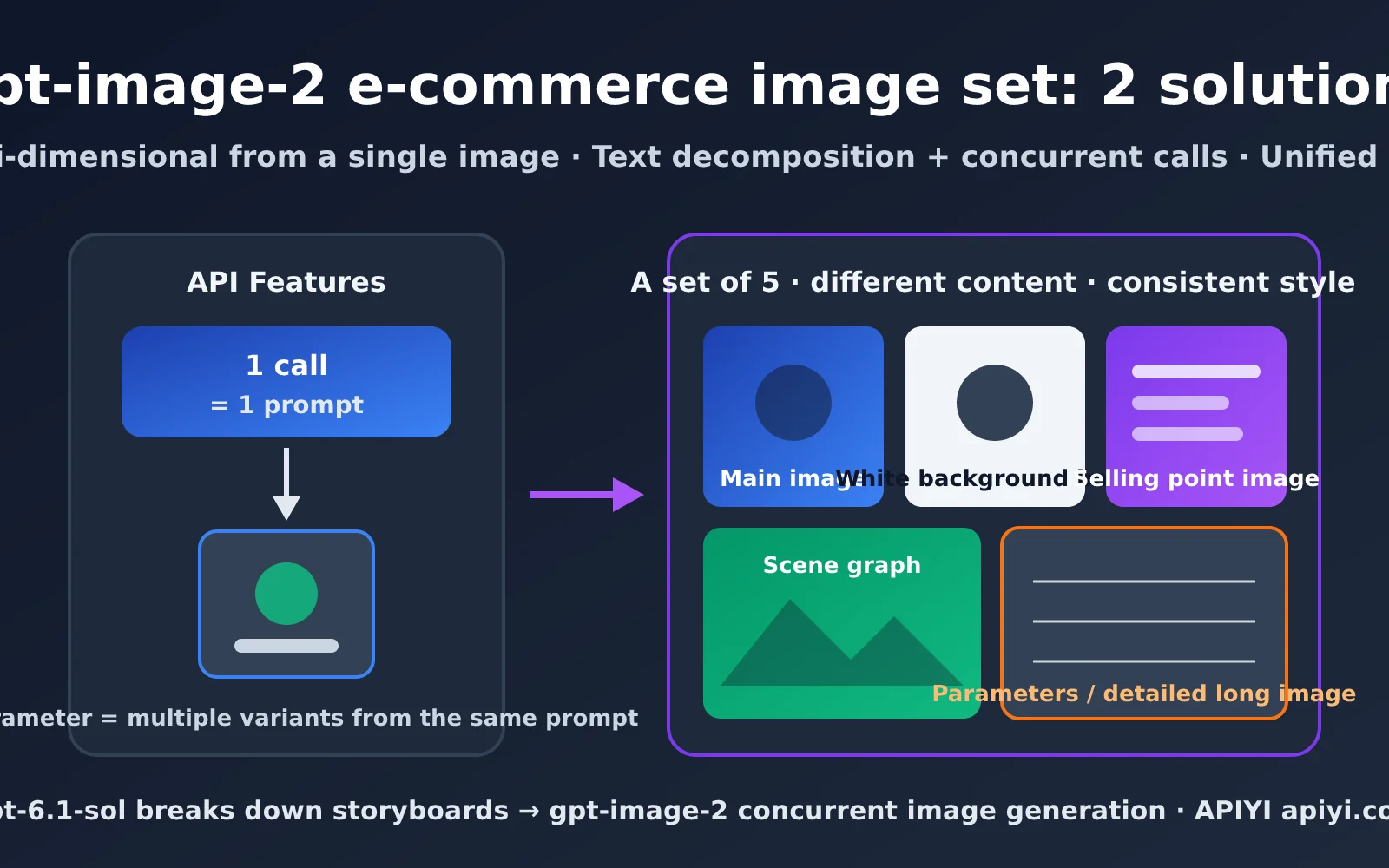
Let’s get the API behavior straight first, because everything below is built on this premise. gpt-image-2’s /v1/images/generations and /v1/images/edits endpoints accept only one prompt per request. The official gpt-image-2 and 2.5 series both support the n parameter, and APIYI supports it fully as well — but n means “generate n variations of the same prompt,” not “n prompts, one image each.”
So n=5 gives you 5 versions of the same picture. That’s great for “generate a few extra and pick the best one,” but useless for an image set. An e-commerce image set is fundamentally several images with different content and a unified style: the hero shot should spotlight the product, the selling-point image needs copy, the scene image needs a usage environment, and the spec image needs dimension callouts. Every image has a different prompt, so you’ll naturally need multiple calls.
The 3 Real Challenges of gpt-image-2 E-commerce Image Sets
Once the limitation is clear, you’ll realize the hard part isn’t “generating multiple images” — it’s these three things:
- Subject consistency: The product in all 5 images has to be the same product. Color, logo, and structure can’t drift from image to image.
- Style consistency: Color palette, lighting, background texture, and typography should look like they came from the same designer.
- Division of information: Each image handles a different marketing job. You can’t have all 5 pushing the same selling point.
Those three things mean you can’t solve an image set by “throwing one sentence at the model.” You have to plan before you call. The table below shows the standard composition of an e-commerce image set on common platforms — a solid starting point for your plan.
| Image slot | Main purpose | Recommended ratio | Information density | Text needed? |
|---|---|---|---|---|
| Hero image (first image) | Search result click-through rate | 1:1 | Low, product-focused | Optional, minimal |
| White-background image | Platform compliance, ad delivery | 1:1 | Very low | No |
| Selling-point image | Convey 2-3 core selling points | 1:1 or 3:4 | Medium | Yes |
| Scene image | Build a usage atmosphere | 1:1 or 4:5 | Medium | Optional |
| Size/spec image | Reduce inquiries and returns | 1:1 | High | Yes |
| Detail-page long image | Full product explanation | 9:16 or taller | Very high | Yes |
🎯 Planning tip: Before you touch any code, use the table above to decide how many images your platform needs and what job each one does. We recommend running 2-3 single images manually on gpt-image-2 at APIYI apiyi.com first, to confirm that product fidelity and text rendering meet your expectations, then move on to the batch image-set workflow.
Approach 1: gpt-image-2 Packs Multiple Dimensions into a Single Image (Long Detail Page Image)
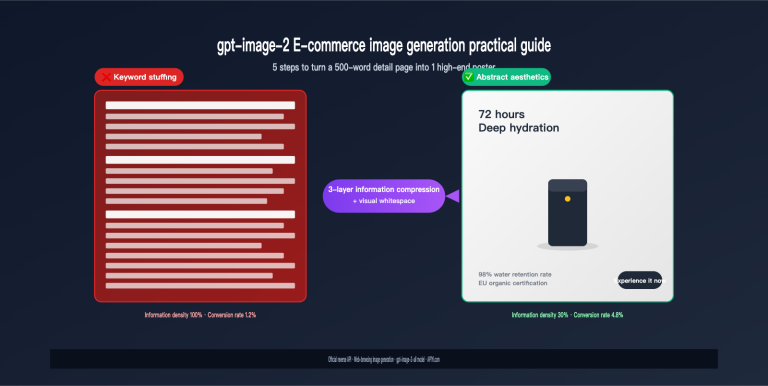
The first route is “tell the whole story in one image.” gpt-image-2 has strong Chinese text rendering and layout understanding, so it’s entirely feasible to arrange the hero visual, selling points, and spec table into distinct zones within a single vertical image. For needs like long detail page images, selling point collection images, or infographics, a single call can produce a finished asset packed with information.
The biggest advantage of this route is that it naturally has no consistency issues. All content is generated by the model in one shot within the same image, so color tones and style are automatically unified, and no extra orchestration code is needed. The downside is that a single image has limited space—when there’s too much content, the text gets smaller and more cramped, and you can’t split it into independent hero images for ad placement.
How to Write Zoned Prompts for gpt-image-2 Detail Long Images
The key to multi-dimensional single images is zoned description. Don’t write one big paragraph mixing everything together—instead, go top to bottom following the layout order and tell the model what to put in each zone. Here’s an example prompt structure for a thermos bottle detail long image:
Vertical 9:16 e-commerce detail page long image, overall style: minimalist Scandinavian, off-white background, soft natural light.
[Top zone] Product hero visual: a matte dark green thermos bottle placed at a 45-degree angle, title text "24-hour long-lasting heat retention".
[Middle zone] Three-column selling points, each with a linear icon plus short copy: "316 stainless steel inner liner", "one-touch flip lid, one-hand opening", "500ml large capacity".
[Bottom zone] Spec table: capacity 500ml, weight 320g, height 22cm, material 316 stainless steel.
All text uses a clean sans-serif Chinese font, no extra text.
As for size, long images work best in 9:16 vertical, such as 1152x2048 at the 2K tier. If you need higher-resolution final assets, use 2160x3840 at the 4K tier.
The single-image approach needs only 1 call—lowest cost, naturally unified style. The trade-off is limited information capacity: once you go beyond 5 zones, text starts getting crowded, and you can’t extract anything to use separately as a search hero image. It’s best suited for detail pages and selling point collections of spec-driven standard products like home appliances, digital accessories, and daily necessities.
💡 Practical tip: When zones exceed 5, the text rendering error rate rises noticeably. We recommend splitting the long image into 2-3 “half-screen images” generated separately, then stitching them vertically in the detail page. These half-screen images are themselves a small image set, which naturally transitions into Approach 2.
Approach 2: Text Model Breakdown + Multiple gpt-image-2 Calls to Generate E-commerce Image Sets
If what you want is a true multi-image set (separate hero image, selling point image, and lifestyle image), you’ll need a small pipeline. The idea is to hand “understanding requirements and planning shots” to a text model, and “rendering images” to gpt-image-2, connecting the two with structured JSON.
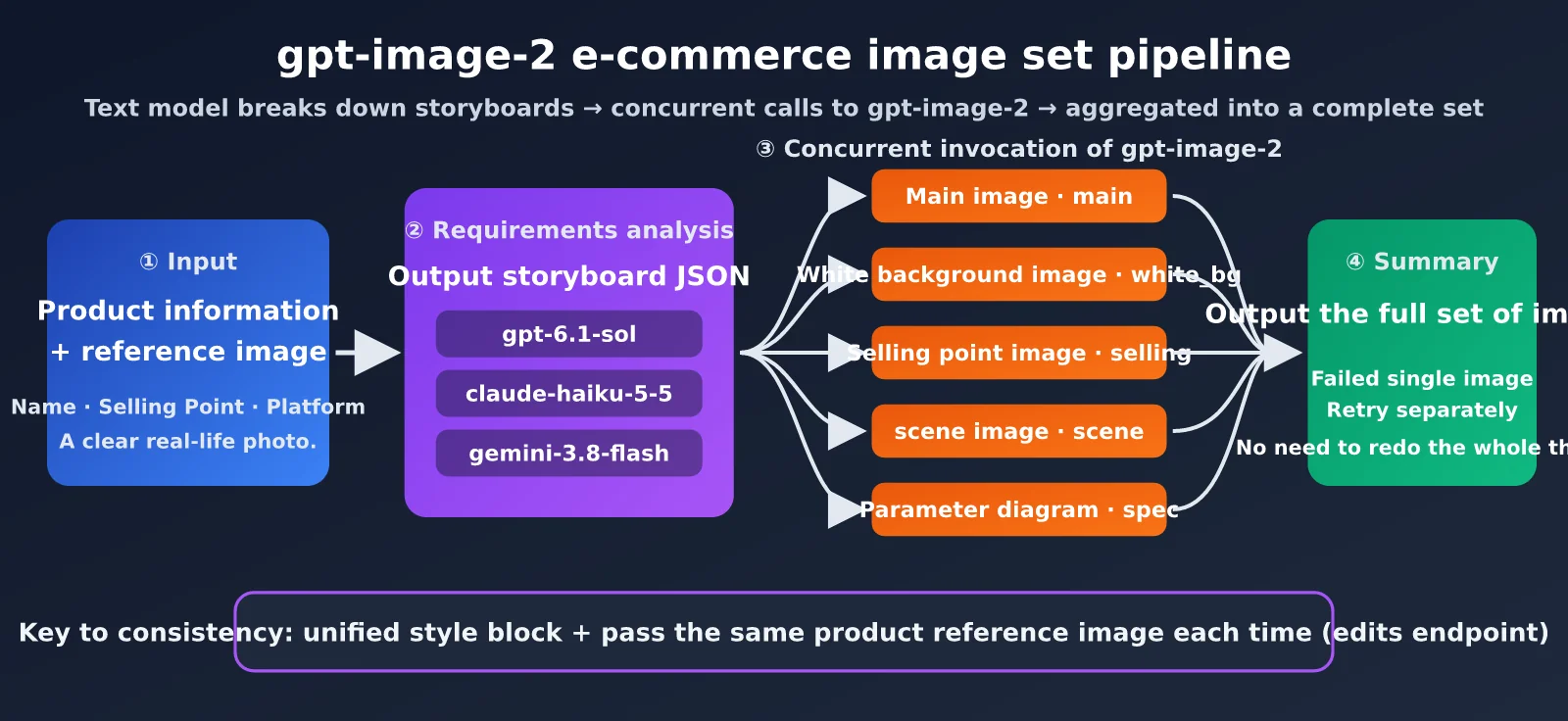
The full flow has 4 steps:
- Input: The merchant provides the product name, selling points, target platform, and at least one clear real product photo.
- Requirement analysis: The text model outputs a JSON array based on the input, where each element is a shot for one image—including purpose, prompt, size, and copy.
- Concurrent rendering: The program iterates through the shot array and calls gpt-image-2 once per shot, passing the same product reference image each time.
- Aggregate and verify: Collect all results, retry any failed single images individually, then output the full set in order.
How to Choose the Text Model: The “Brain” Behind gpt-image-2 Image Sets
The requirement analysis step demands the following from the text model: it must understand e-commerce marketing logic, reliably output JSON, and write vivid, visual prompts. Several of the latest models on APIYI can handle this:
| Model | Positioning | Suitable Scenarios | Why Choose It |
|---|---|---|---|
| gpt-6.1-sol | Flagship recommendation | High-ticket products, complex selling point distillation | Best quality for marketing copy and shot planning |
| claude-haiku-5-5 | Low cost, high speed | Batch SKUs, standardized categories | Stable instruction following, clean JSON output |
| gemini-3.8-flash | Low cost, high speed | High volume, multilingual cross-border products | Fast and cheap, natural multilingual copy |
Requirement analysis is called only once per image set, so token consumption is minimal—the cost is really in image rendering. We recommend using gpt-6.1-sol first to tune the prompt template to satisfaction, then switching to claude-haiku-5-5 or gemini-3.8-flash to cut costs when running at scale. All three models use the OpenAI-compatible interface on APIYI apiyi.com, so switching only requires changing the model parameter.
Designing the Shot JSON for gpt-image-2 E-commerce Image Sets
Getting the text model to output JSON with a fixed structure is the key to keeping the whole pipeline running stably. Here’s the recommended field design:
| Field | Type | Description | Example |
|---|---|---|---|
scene |
string | Image set position identifier | main / white_bg / selling |
purpose |
string | The marketing task of this image | Highlight product appearance, boost click-through rate |
prompt |
string | The complete prompt for gpt-image-2 | Matte dark green thermos on a wooden table… |
size |
string | Output size | 2048x2048 |
text_overlay |
string | Text that needs to be rendered in the image | 24-hour long-lasting heat retention |
Minimal gpt-image-2 Image Set Code
Here’s the minimal runnable version: first let the text model generate the shots, then call gpt-image-2’s edits endpoint one by one (with the product reference image).
import json, base64
from openai import OpenAI

client = OpenAI(api_key="YOUR_APIYI_KEY", base_url="https://api.apiyi.com/v1")

plan = client.chat.completions.create(
    model="gpt-6.1-sol",
    response_format={"type": "json_object"},
    messages=[{"role": "user", "content": "Plan 5 Taobao image set shots for a dark green 316 thermos, "
               "output {\"shots\": [...]}, each item containing scene/purpose/prompt/size/text_overlay, "
               "unified style: Scandinavian minimalist, off-white background, soft natural light"}],
)
shots = json.loads(plan.choices[0].message.content)["shots"]

for s in shots:
    img = client.images.edit(model="gpt-image-2", image=open("cup.png", "rb"),
                             prompt=s["prompt"], size=s["size"])
    open(f"{s['scene']}.png", "wb").write(base64.b64decode(img.data[0].b64_json))
This code runs serially—5 images wait on each other one after another. We’ll turn it into a concurrent version in the next section.
How to Keep gpt-image-2 E-commerce Image Sets Consistent in Style
The most common problem with multiple calls is that the 5 images look like they came from 5 different stores. Combining the following techniques can raise consistency to a commercially usable level:
- Unified style block: Write the color tone, lighting, background, and camera language into a fixed piece of text and append it to the end of every shot prompt. Don’t let the text model freely improvise the style description each time.
- Fixed product reference image: Pass the same real product photo through the edits endpoint on every call, and explicitly state in the prompt “keep the color, logo, and structure of the product in the reference image unchanged.” This is the most effective way to guarantee subject consistency.
- Fixed parameters: Use the same
qualitytier across the whole set, and only vary the size when necessary (for example, using vertical format for long images). - Use the n parameter to pick the best: For the most critical positions like the hero image, you can set
n=2orn=3to generate several variants, then pick the best one manually. This is exactly the right use of the n parameter.
🎯 Consistency advice: The style block is the “brand guideline” for the whole image set. We recommend building a fixed template for each store. When calling gpt-image-2 through APIYI apiyi.com, you can store the style block in a config file, share it across all SKUs, and just update it uniformly each season.
Serial generation of a 5-image set means your wait time is the sum of every image’s generation time — the more images, the slower it gets. Since the individual shots don’t depend on each other, you can absolutely fire them off concurrently and bring the total down to roughly “the slowest single image.”
APIYI doesn’t impose a concurrency cap on gpt-image-2 calls — anything under 500 RPM works out of the box, with no extra request needed. For the vast majority of merchants, even running dozens of SKUs’ image sets simultaneously won’t come close to that ceiling.
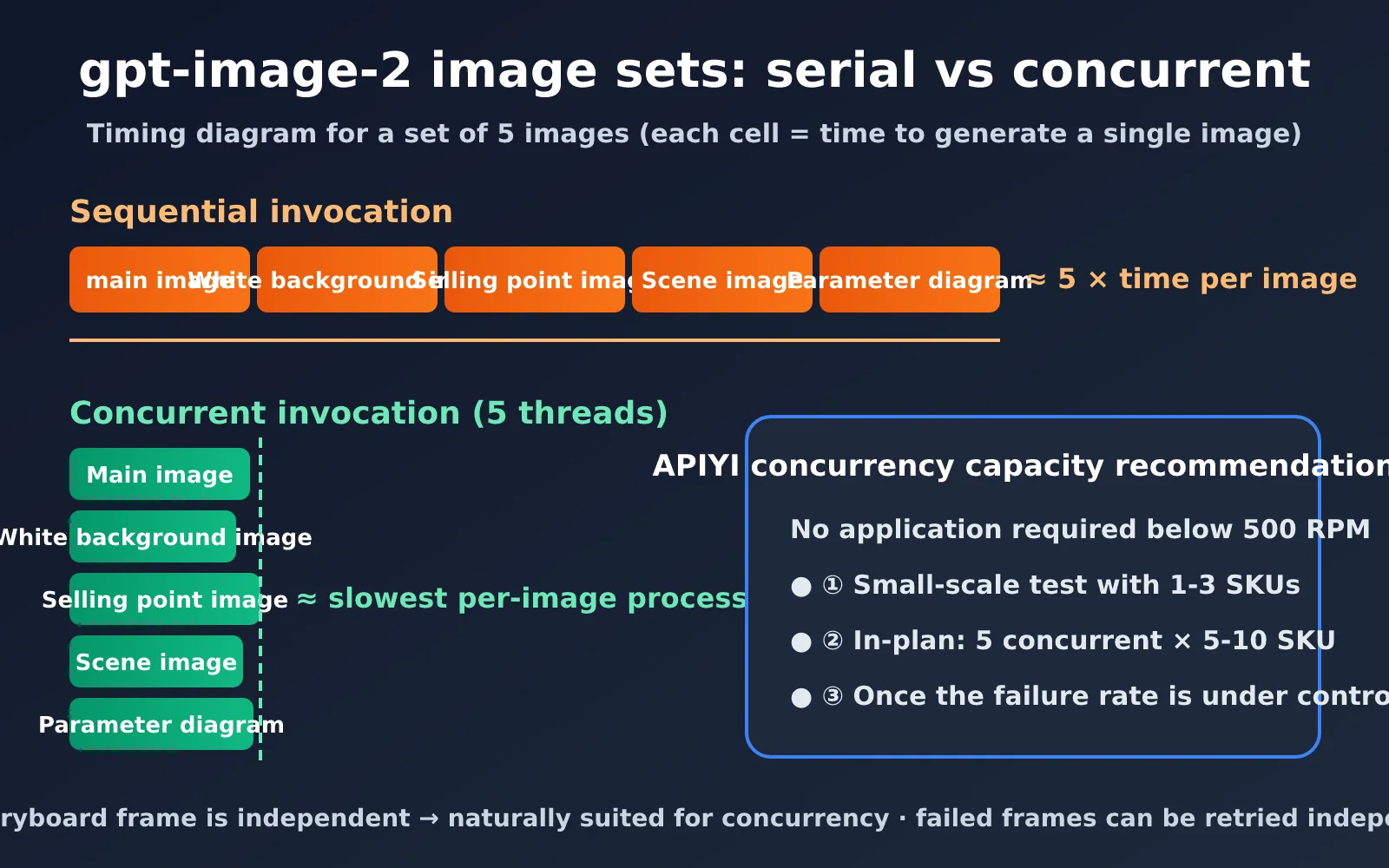
Concurrent gpt-image-2 image set code
Swap the serial loop above for a thread pool and you’ve got concurrent generation — plus retry-on-failure, so one bad image doesn’t force you to redo the whole set:
from concurrent.futures import ThreadPoolExecutor

def gen_one(s, retries=2):
    for i in range(retries + 1):
        try:
            img = client.images.edit(model="gpt-image-2", image=open("cup.png", "rb"),
                                     prompt=s["prompt"] + STYLE_BLOCK, size=s["size"])
            return s["scene"], img.data[0].b64_json
        except Exception as e:
            if i == retries:
                return s["scene"], None

with ThreadPoolExecutor(max_workers=5) as pool:
    results = dict(pool.map(gen_one, shots))
failed = [k for k, v in results.items() if v is None]
View the full version (with style block, multi-SKU batching, failed-shot regeneration, and saving results to disk)
import json, base64, time
from pathlib import Path
from concurrent.futures import ThreadPoolExecutor
from openai import OpenAI

client = OpenAI(api_key="YOUR_APIYI_KEY", base_url="https://api.apiyi.com/v1")

STYLE_BLOCK = (
    ". Overall style: Nordic minimalism, cream-white background, soft natural light, "
    "low-saturation palette. Keep the product's color, logo, and structure in the reference "
    "image completely unchanged; render any text in a clean sans-serif Chinese typeface."
)

PLAN_PROMPT = """You are a senior e-commerce visual planner. Based on the product info below, plan a {count}-image {platform} image set.
Product info: {product}
Output JSON: {{"shots": [{{"scene": "...", "purpose": "...", "prompt": "...",
"size": "2048x2048", "text_overlay": "..."}}]}}
Requirements: each image should serve a different marketing purpose; the prompt should describe
only the scene content, not the overall style; when text is needed, write the exact copy into the
prompt in quotes."""


def plan_shots(product: str, platform: str = "Taobao", count: int = 5,
               model: str = "gpt-6.1-sol") -> list:
    """Break the set into shots with a text model; for batches, switch to claude-haiku-5-5 / gemini-3.8-flash"""
    resp = client.chat.completions.create(
        model=model,
        response_format={"type": "json_object"},
        messages=[{"role": "user", "content": PLAN_PROMPT.format(
            count=count, platform=platform, product=product)}],
    )
    return json.loads(resp.choices[0].message.content)["shots"]


def gen_one(shot: dict, ref_image: str, retries: int = 2):
    """Generate a single image, retrying with exponential backoff on failure"""
    for attempt in range(retries + 1):
        try:
            with open(ref_image, "rb") as f:
                img = client.images.edit(
                    model="gpt-image-2",
                    image=f,
                    prompt=shot["prompt"] + STYLE_BLOCK,
                    size=shot.get("size", "2048x2048"),
                )
            return shot["scene"], img.data[0].b64_json
        except Exception as e:
            print(f"[{shot['scene']}] attempt {attempt + 1} failed: {e}")
            time.sleep(2 ** attempt)
    return shot["scene"], None


def gen_image_set(sku: str, product: str, ref_image: str, workers: int = 5):
    shots = plan_shots(product)
    out_dir = Path("output") / sku
    out_dir.mkdir(parents=True, exist_ok=True)
    (out_dir / "plan.json").write_text(json.dumps(shots, ensure_ascii=False, indent=2))

    with ThreadPoolExecutor(max_workers=workers) as pool:
        results = dict(pool.map(lambda s: gen_one(s, ref_image), shots))

    # One more pass to regenerate any failed shots
    failed = [s for s in shots if results.get(s["scene"]) is None]
    for s in failed:
        results[s["scene"]] = gen_one(s, ref_image, retries=3)[1]

    for scene, b64 in results.items():
        if b64:
            (out_dir / f"{scene}.png").write_bytes(base64.b64decode(b64))
    print(f"{sku}: {sum(1 for v in results.values() if v)}/{len(shots)} images succeeded")


if __name__ == "__main__":
    gen_image_set(
        sku="cup-green-500",
        product="Dark green 316 stainless steel insulated tumbler, 500ml, 24-hour insulation, one-touch flip lid",
        ref_image="cup.png",
    )
The 3 stages of scaling up concurrency
Even though there’s no concurrency cap, we still recommend ramping up in stages — validate quality first, then scale, so you don’t end up with hundreds of unusable images in one go:
- Small-scale test: Pick 1-3 SKUs and run them serially or at low concurrency. Manually check product fidelity, text accuracy, and style consistency.
- Moderate concurrency: Once results are stable, go to 5 concurrent threads per set and run 5-10 SKUs at a time. Watch the failure rate and average latency.
- Full-scale rollout: After confirming the failure rate is under control, raise concurrency to match your business volume. Anything under 500 RPM can run directly.
| Invocation mode | Time for a 5-image set | Stability | Best for |
|---|---|---|---|
| Serial | ~5x single-image time | Most stable, easy to debug | Prompt-tuning phase |
| Intra-set concurrency (5 threads) | Roughly the slowest single image | Stable | Day-to-day new product launches |
| Multi-SKU + intra-set concurrency | Close to a single set | Requires retries | Bulk launches before major sales |
🚀 Scaling tip: For concentrated pre-sale launches, we recommend the “multi-SKU + intra-set concurrency” pattern via APIYI apiyi.com. The platform requires no application for anything under 500 RPM, and combined with the failed-shot regeneration mechanism, you can finish entire image sets for dozens of SKUs in a very short window.
How to Choose a gpt-image-2 E-commerce Image Set Solution
The two approaches aren’t mutually exclusive — in real-world work, they’re often used together. Here are our recommendations by common platform and scenario:
| Platform/Scenario | Recommended Approach | Suggested Count | Notes |
|---|---|---|---|
| Taobao/Tmall main images | Approach 2 | 5 images | One each for main image, white background, selling points, scene, and specs |
| Taobao/Pinduoduo detail pages | Approach 1 + Approach 2 | 3–6 half-screen images | Generate in sections, then stitch vertically |
| Amazon Listing | Approach 2 | 7 images | First image must be a strictly compliant white background; the rest cover selling points and scenes |
| Standalone site product pages | Approach 2 | 4–6 images | Scene images carry more weight, emphasizing brand identity |
| Xiaohongshu recommendation posts | Approach 2 | 3–6 images | 3:4 portrait format, mostly lifestyle scenes |
| Campaign posters / selling-point roundups | Approach 1 | 1 image | Info condensed into a single image, high sharing efficiency |
The core principle for choosing is simple: for images that need to be deployed and displayed independently, use Approach 2; for content read continuously on a single page, use Approach 1. If you’re not sure, start with Approach 2 for the main and scene images, then use Approach 1 for a long selling-point roundup image — that covers the most ground.
💡 Combination tip: Both approaches use the same gpt-image-2 model and the same API key. We recommend packaging both workflows into a single service that automatically picks the approach based on product type — merchants just upload one product photo and a few lines of selling-point copy.
Frequently Asked Questions
Can the n parameter in gpt-image-2 directly generate an e-commerce image set?
No. The official gpt-image-2 and 2.5 series both support the n parameter, and APIYI supports it too, but it generates n variants of the same prompt. Each image in a set has different content and needs its own prompt, so you have to call the API multiple times. n is better suited for critical positions like the main image, where you can pick the best result.
What if the product looks different across the generated images?
This is the most common problem with image sets. The most effective approach is to pass the same real product photo to the edits endpoint on every call, and state in the prompt “keep the product’s color, logo, and structure unchanged from the reference image.” At the same time, lock the style description into a style block — don’t let the text model freestyle. Use real photos with a clean background and even lighting as reference images; that gives the best fidelity.
How do I handle garbled Chinese text rendering in images?
gpt-image-2’s Chinese rendering is already quite strong, but the more text there is, the higher the error rate. Keep each image’s text to 2–3 short sentences, and put the exact text in quotes in the prompt. If the text on a particular image comes out wrong, just regenerate that one — no need to redo the whole set.
Which model is most cost-effective for text breakdown?
Use gpt-6.1-sol while debugging prompt templates — it gives the best planning quality. Once the template is stable and you’re scaling up batch runs, switch to claude-haiku-5-5 or gemini-3.8-flash for lower cost and faster speed. This step only runs once per set, so the cost is far lower than image generation itself. All three models can be called on APIYI (apiyi.com) with the same API key.
Do I need to apply for quota to make concurrent calls?
No. APIYI doesn’t set a concurrency cap for gpt-image-2 — anything under 500 RPM is fine to use directly. We recommend testing with 1–3 SKUs on a small scale first, confirming the results, and then gradually ramping up concurrency to scale.
Conclusion
When it comes to generating e-commerce image sets with gpt-image-2, the key is understanding how its API works: one call maps to one prompt. The n parameter solves a picking-the-best problem — it gives you alternatives — but an image set needs multiple calls, each with a different prompt. With that in mind, content meant to be read continuously, like detail pages and selling-point collections, can be generated in one pass using the single-image, multi-dimension approach. Image sets that need to stand alone — main images, scene shots — are better handled in bulk through a text model breakdown + concurrent calls pipeline.
Both routes share the same core: consistency control. A fixed style block plus the same product reference image is what makes a set of images look like they came from the same design team. On the concurrency side, anything under 500 RPM can be scaled straight up; the safest path is three steps — small-scale test, then moderate concurrency, then full batch rollout.
We recommend running the whole pipeline end to end through APIYI apiyi.com: gpt-6.1-sol, claude-haiku-5-5, and gemini-3.8-flash handle requirement breakdown, gpt-image-2 handles image generation, and a single API key connects every step — so you can quickly build your own e-commerce image set generation service.
Author: APIYI Team | Focused on AI Large Language Model API technical sharing. For more model integration tutorials, visit APIYI apiyi.com