Author's Note: Without switching to cheaper, lower-quality model channels, this guide details how OpenClaw controls input token length to save costs. We'll cover 6 key strategies: task isolation for new conversations, precise code block retrieval instead of full-file ingestion, context pruning, local QMD search, and more.
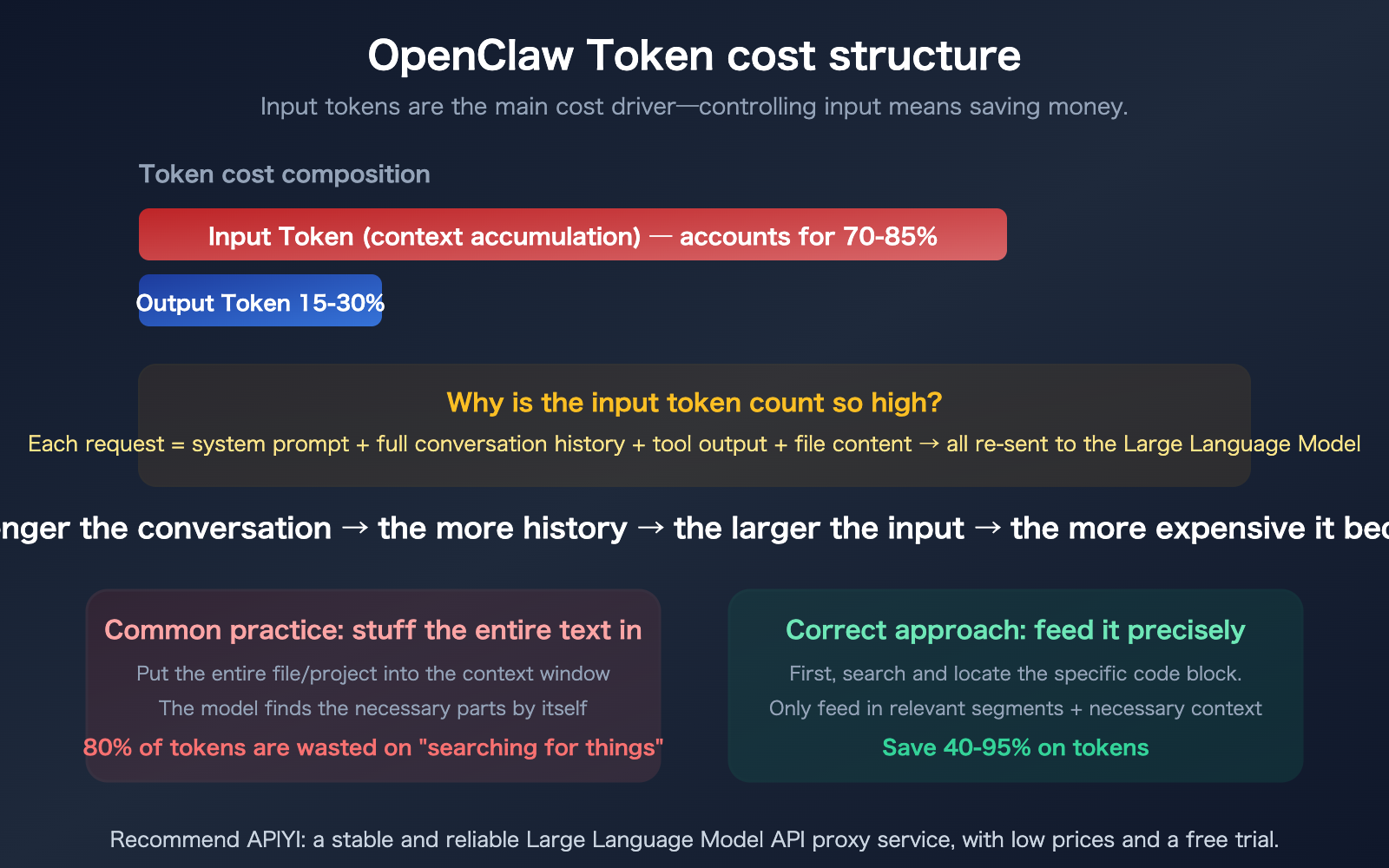
OpenClaw is notorious for being a "token burner"—some users have managed to torch 21.5 million tokens in a single day, leading to monthly bills exceeding $600. The knee-jerk reaction for many is to switch to cheaper model providers, but that almost always comes at the cost of quality. The real secret to saving tokens is controlling the input side—the amount of context you feed the model is the primary driver of your costs. This article focuses on one core question: How can you move from "dumping the whole file" to "feeding in exactly what's needed" without changing models or sacrificing performance?
Core Value: By the end of this article, you'll have mastered 6 practical strategies to control your input tokens, with the potential to cut your token costs by 50-90%.
OpenClaw Token Optimization: Core Essentials
First, let's clarify a premise: this article discusses methods to save tokens without switching models or sacrificing quality. Whether you're using Claude Opus 3.5 or GPT-4o, the model stays the same—we're just optimizing the input side.
| Strategy | Savings | Difficulty | Core Concept |
|---|---|---|---|
| New Chat for New Tasks | 60-80% | Low | Start a new chat for each task to avoid history bloat |
| Precise Code Retrieval | 40-95% | Medium | Feed only relevant snippets, not the entire file |
| Context Pruning | 30-50% | Low | Manually or automatically clear useless chat history |
| QMD Local Search | 80-90% | Medium | Use local vector search to send only relevant fragments |
| Prompt Caching | 80-90% (Input) | Low | Use caching to avoid re-sending system prompts |
| Disable Thinking Mode | 10-50x | Low | Turn off thinking mode for non-reasoning tasks |
The Underlying Mechanism of OpenClaw Token Consumption
To save tokens, you first need to understand why OpenClaw consumes them so quickly.
Every time you send a message in OpenClaw, it doesn't just send your latest input—it re-sends the entire conversation history to the model. The longer the conversation, the larger the input tokens for every single request.
Specifically, an input request includes:
- System Prompt: OpenClaw's core instructions, usually 2,000–5,000 tokens.
- AGENTS.md / SOUL.md: Workspace configuration files.
- Loaded Skills: Every enabled skill consumes tokens.
- Full Conversation History: Every message from the start of the session.
- Tool Call Results: Outputs from every file read or command execution.
- Memory Retrieval Results: Relevant content pulled from your memory bank.
In an OpenClaw session lasting 30 minutes, the input tokens for the final message could easily reach 100k or even 1M—even though most of the content from the first 29 minutes is no longer useful for the current task.
Strategy 1: Start New Chats for Different Tasks
This is the simplest and most effective strategy.
Why New Chats Save Tokens
Imagine you do three things in the same session: Fix Bug A → Write Feature B → Refactor Module C. By the third task, the model's input includes all the history and file reads from the first two tasks—none of which are useful for refactoring Module C.
Same Session:
Task A history (20K tokens)
+ Task A file content (30K tokens)
+ Task B history (25K tokens)
+ Task B file content (40K tokens)
+ Task C current message (5K tokens)
= 120K tokens input (115K of which is historical baggage)
New Session:
Task C current message (5K tokens)
+ System prompt (3K tokens)
= 8K tokens input (93% savings)
Best Practices for Chat Scenarios
| Scenario | Start New Chat? | Reason |
|---|---|---|
| Switching to a totally different task | Yes | Previous context is irrelevant |
| Iterative adjustments to a feature | No | You need the previous discussion context |
| Fixing bugs in different files | Yes | Each bug is independent; no cross-context needed |
| Continuous modification of one module | No | The model needs to understand previous intent |
| Chat exceeds 20 turns | Yes (or compact) | History has accumulated too much |
🎯 Pro Tip: A simple rule of thumb—if you find yourself saying, "Forget what we did before, let's do something else," just start a new chat.
This principle applies not only to OpenClaw but also to Claude Code and other AI coding tools. Every independent API request made via APIYI (apiyi.com) is naturally a "new session," so there's no issue with context accumulation.
Strategy 2: OpenClaw Precision Code Retrieval—Don't Dump the Whole File
This is the core focus of this article—how do you ensure the model only sees the specific code blocks that need changing, rather than dumping the entire file or even the whole project into the context?
The Problem: Why "Dumping Everything" is Wasteful
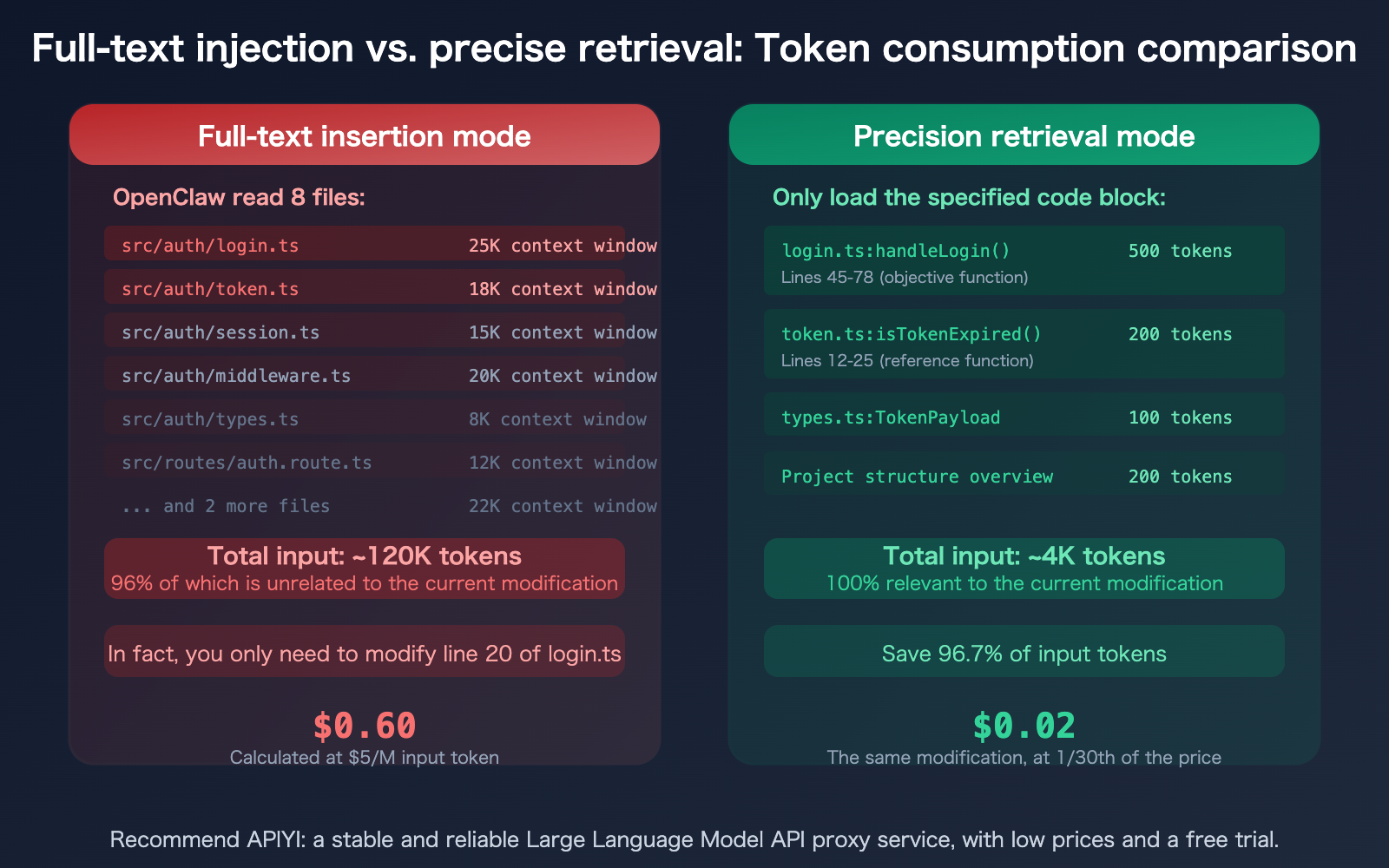
Research shows that AI coding agents waste 80% of their tokens just "looking for things." A typical scenario: you ask OpenClaw to modify a function, and it reads 25 files just to find the 3 that are actually relevant—and you're the one paying for the token cost of reading all 25 files.
A 1,000-line file is roughly 15,000–25,000 tokens. If you only need to change 20 lines (about 300–500 tokens), but the entire file is fed to the model, 96–98% of your input tokens are wasted.
4 Methods for OpenClaw Precision Code Retrieval
Method 1: Explicitly Specify Files and Line Numbers
Instead of saying "Fix the login feature," say "Modify the handleLogin function in src/auth/login.ts from lines 45–78." The more precise your instructions, the fewer files OpenClaw needs to read.
❌ "Fix login bug"
→ OpenClaw reads 10+ files, consumes 200K+ tokens

✅ "Fix the null pointer check on line 52 of src/auth/login.ts"
→ OpenClaw reads only the relevant part of 1 file, consumes ~20K tokens
Method 2: Leverage QMD Local Semantic Search
OpenClaw’s QMD (Quick Memory Database) can build a local vector index. It retrieves relevant code snippets and sends only the most pertinent content to the model.
How to enable it: Turn on QMD in your OpenClaw settings, and it will automatically index your project files and conversation history. During subsequent queries, QMD will first locate the relevant code blocks locally and send only the precisely matched segments to the model.
Method 3: Use the @file Syntax for Targeted References
In OpenClaw, you can use the @file syntax to precisely reference files, preventing the model from having to search on its own:
Modify the handleLogin function in @src/auth/login.ts,
adding logic to handle refreshToken expiration.
Refer to the isTokenExpired method in @src/auth/token.ts.
This way, OpenClaw only loads the 2 files you specified, rather than scanning the entire src/auth/ directory.
Method 4: Guide with a Project Structure File
Include a project structure overview in AGENTS.md or SOUL.md so OpenClaw knows "which feature is in which file," reducing exploratory file scanning.
## Project Structure
- Authentication: src/auth/ (login.ts, token.ts, session.ts)
- User Management: src/user/ (profile.ts, settings.ts)
- API Routes: src/routes/ (auth.route.ts, user.route.ts)
This overview takes up only a few hundred tokens, but it can save OpenClaw from performing tens of thousands of tokens' worth of blind file scanning.
Strategies 3–6: Advanced Token-Saving Tips for OpenClaw
Strategy 3: Context Pruning
OpenClaw supports both manual and automatic context pruning. When a conversation gets too long, you can clear out historical messages that are no longer needed.
OpenClaw 2026.3.7 introduced Context Engine Plugins, allowing third-party plugins to provide alternative context management strategies (this was previously hardcoded into the core). The lossless-claw plugin can compress conversation history without losing critical information.
Practical Tips:
- Manually clear irrelevant tool-call outputs after completing each sub-task.
- Set
contextTokens: 50000to limit the size of your context window. - Use the "compact" feature to compress conversation history.
Strategy 4: QMD Local Semantic Search
QMD (Quick Memory Database) is OpenClaw's local vector search feature. It builds a vector database on your local device to index conversation history and documents. When you run a query, it searches locally first and sends only the most relevant snippets to the model.
Result: Reduces input token costs by 80–90%.
Strategy 5: Leverage Prompt Caching
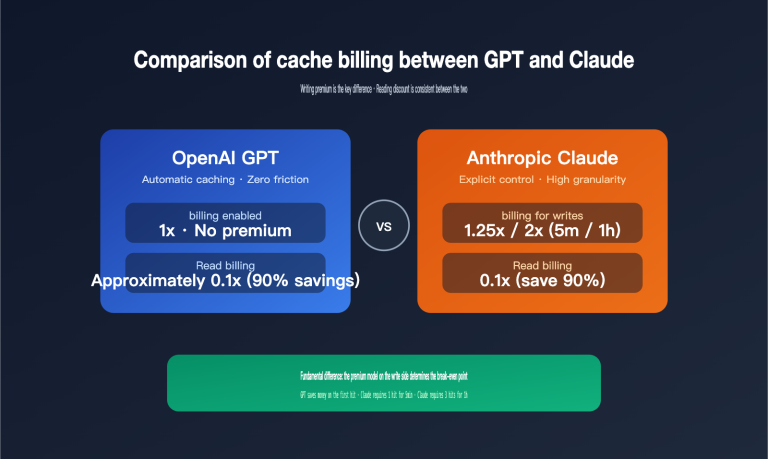
Both the Claude and GPT model families support Prompt Caching—when system prompts or frequently used context remain unchanged, the API automatically uses a cached version, reducing input token costs by 80–90%.
A Key Limitation: Prompt Caching is not supported when calling Claude via the OpenAI-compatible format (/v1/chat/completions); you must use the native Anthropic format (/v1/messages). If you use APIYI (apiyi.com), the platform fully supports native-format Prompt Caching.
Strategy 6: Disable Thinking for Non-Reasoning Tasks
Thinking/Reasoning modes can cause token consumption to skyrocket by 10–50x. If your current task doesn't require deep reasoning (like simple formatting, file moving, or text replacement), turning off Thinking mode can save you a significant amount of tokens.
| Task Type | Thinking Required? | Token Difference |
|---|---|---|
| Complex Bug Analysis | Yes | Normal consumption |
| Architecture Design | Yes | Normal consumption |
| Simple Formatting | No | 10-50x savings when disabled |
| File Move/Rename | No | 10-50x savings when disabled |
| Generating Boilerplate | Depends | Can be disabled for simple templates |
Tip: Claude Code's Context Compaction and OpenClaw's Context Pruning solve the same problem—controlling accumulated input tokens. If you use both tools, you can manage your API usage quotas centrally via APIYI (apiyi.com).
OpenClaw vs. Claude Code: Token-Saving Comparison
Both tools address the same problem, but their solutions differ.
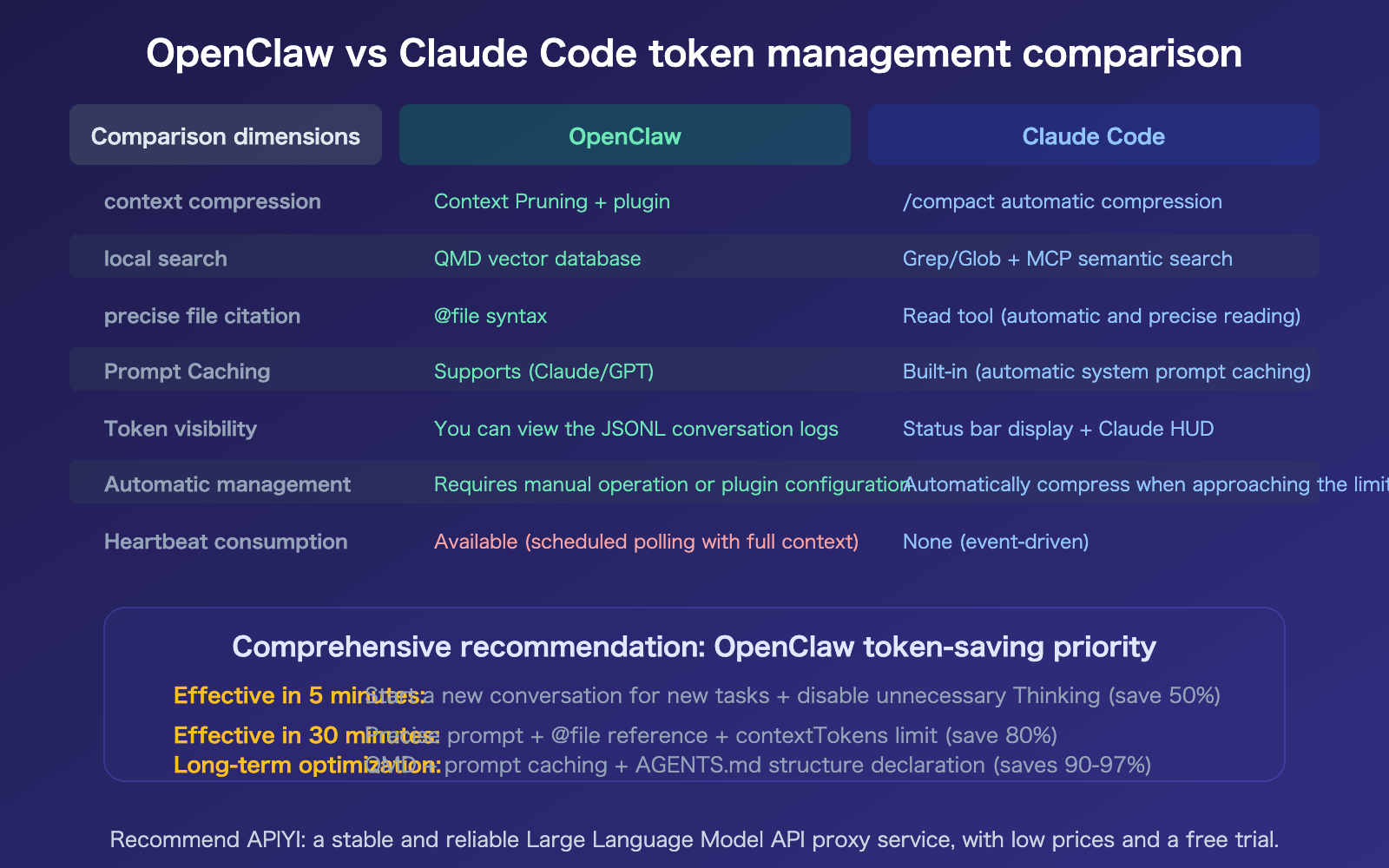
FAQ
Q1: What should I do if the model doesn’t know the project context when I start a new chat?
Use OpenClaw's Memory system and the AGENTS.md file. Memory automatically retrieves relevant project context for new sessions (sending only the most relevant snippets rather than the entire history). By defining your project structure and key conventions in AGENTS.md, they'll be loaded automatically with every new session—this is far more efficient than carrying over 20 rounds of chat history.
Q2: How can I check the token usage for the current session?
OpenClaw saves chat logs as JSONL files in the .openclaw/agents.main/sessions/ directory, where you can directly view the token count for each request. A more convenient way is to use your API provider's usage dashboard—when using APIYI (apiyi.com) for model invocation, you can see the precise token consumption and costs for every request in the backend.
Q3: What’s the difference between QMD and using grep?
grep is for exact matching—if you search for "handleLogin," you'll only find places containing that exact string. QMD is for semantic search—if you search for "error handling for user login," it finds all semantically related code blocks, even if the code doesn't contain the words "login" or "error handling." Semantic search is much more accurate, reduces the amount of irrelevant content sent to the model, and saves you more tokens.
Q4: Why does Heartbeat consume so many tokens?
OpenClaw's Heartbeat mechanism periodically checks task status. If the interval is set too short (e.g., every 5 minutes), each heartbeat sends the full session context to the model—some users have found that automatic email checking can burn through $50 in a single day. The solution: extend the heartbeat interval or pause Heartbeat when you don't need automatic monitoring.
Summary
The key points to saving tokens with OpenClaw (without switching models or sacrificing quality):
- Input tokens are the biggest cost (70-85%): Resending the entire chat history with every request makes long conversations expensive. The simplest way to save is to start a new chat for different tasks.
- Precise code block retrieval is the biggest lever: Moving from "stuffing the whole file in" (120K tokens) to "feeding in exactly what's needed" (4K tokens) saves 96% on the same task. Methods: specify file line numbers, use @file references, leverage QMD semantic search, and define structures in
AGENTS.md. - Three-stage optimization path: 5-minute results (new chat + turn off Thinking, save 50%) → 30-minute results (precise prompts + limit context, save 80%) → Long-term (QMD + Caching, save 97%).
We recommend managing your OpenClaw API calls through APIYI (apiyi.com). The platform provides precise token usage statistics and cost monitoring, helping you quantify the actual impact of every optimization you make.
📚 References
-
OpenClaw Token Usage and Cost Control Guide: Official token management documentation
- Link:
docs.openclaw.ai/reference/token-use - Description: Includes
contextTokensconfiguration and Heartbeat optimization.
- Link:
-
OpenClaw Token Savings in Practice: From $600 to $20: A complete three-stage optimization framework
- Link:
blog.laozhang.ai/en/posts/openclaw-save-money-practical-guide - Description: Includes specific configuration parameters and expected savings ratios.
- Link:
-
AI Coding Agents Waste 80% of Tokens Searching for Information: Research on context precision
- Link:
medium.com/@jakenesler/context-compression-to-reduce-llm-costs - Description: Explains why precise retrieval is more effective than simply increasing the context window.
- Link:
-
APIYI Documentation Center: Token usage statistics and cost monitoring
- Link:
docs.apiyi.com - Description: Supports API invocation management for OpenClaw and Claude Code.
- Link:
Author: APIYI Technical Team
Technical Discussion: Feel free to join the discussion in the comments section. For more resources, visit the APIYI documentation center at docs.apiyi.com.