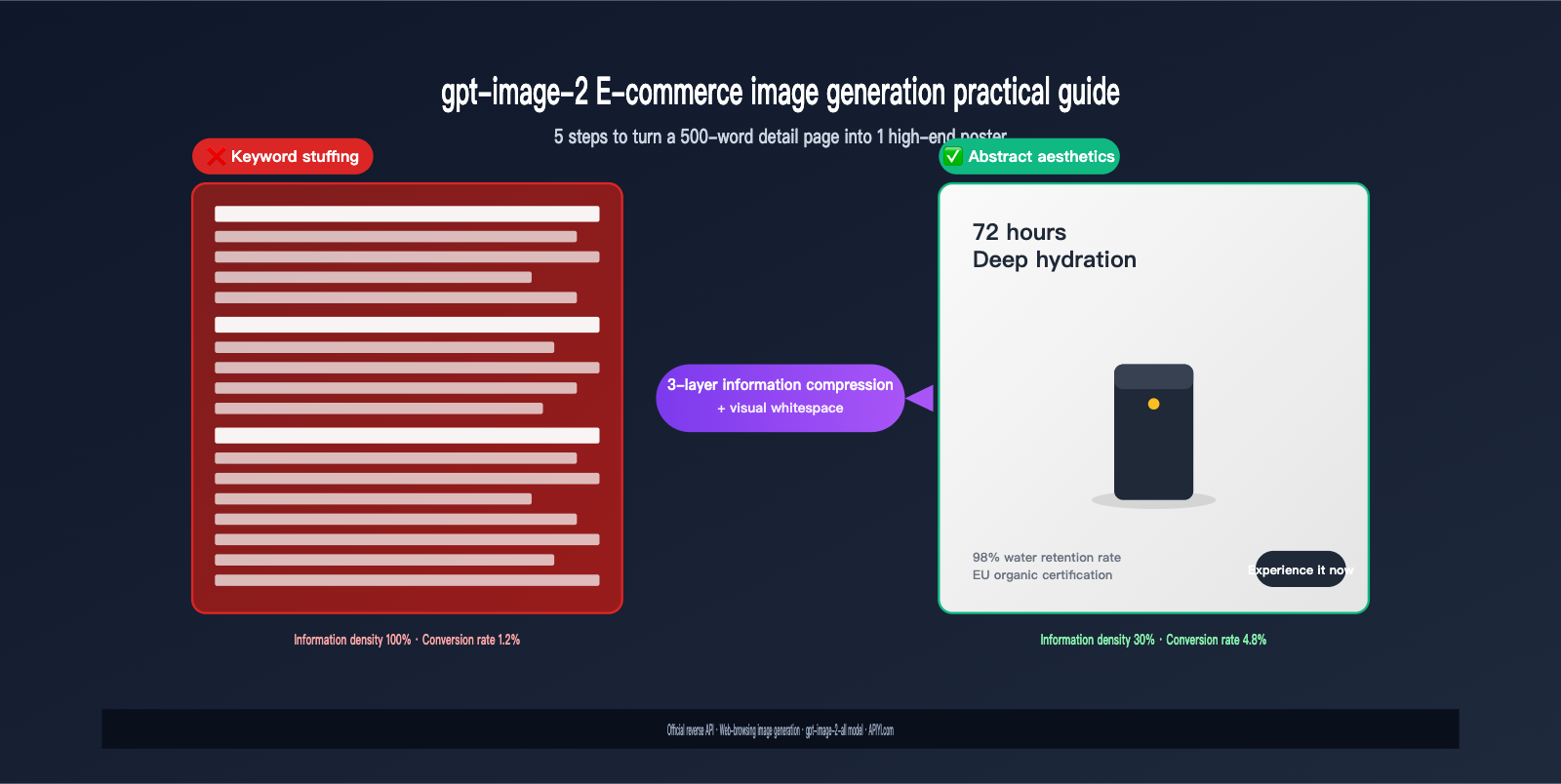
The most common pitfall for e-commerce operators is treating AI like a "text courier." They dump 500 words of product selling points from a landing page into gpt-image-2, expecting a high-end poster, only to get an image cluttered with dense text that looks too amateur to even list.
The problem isn't the model; it's the mindset. gpt-image-2 can reliably render long strings of Chinese text (official tests show 95%+ accuracy and support for dense layouts), but that doesn't mean e-commerce posters should be text-heavy. A high-converting product image essentially uses three sentences to persuade the consumer, not 30 sentences to drown them.
This article provides a systematic methodology for gpt-image-2 e-commerce image generation: how to distill long product copy into concise, aesthetic, and high-converting visuals. We'll cover 5 scenarios, a 5-step practical workflow, and 6 prompt templates to help you escape the "AI = Text Pile-up Machine" trap.
Why gpt-image-2's E-commerce Capabilities Are Severely Underrated
Released by OpenAI in April 2026, gpt-image-2 is the first image model to truly feature "Agentic reasoning + high-fidelity text rendering." In e-commerce scenarios, it solves three long-standing pain points: distorted logos, incorrect product parameters, and inconsistent brand colors.
However, 90% of e-commerce teams are only using 30% of its capabilities. There are three reasons for this:
First, they treat it as a "Canva alternative," using it only for main image template application rather than leveraging its "creative generation" power.
Second, they treat it as a "text renderer," rigidly stuffing landing page copy into it, which results in visual overload and output that is indistinguishable from generic stock assets.
Third, they don't realize it possesses web-browsing knowledge—it can query the latest product information, official color palettes, and industry logos before generating images, which is crucial for e-commerce teams that need to keep pace with new product launches.
💡 Platform Recommendation: If you want to experience the web-enabled image generation of
gpt-image-2, you can use thegpt-image-2-allmodel provided by the APIYI (apiyi.com) platform. This is a version reverse-engineered from the official ChatGPT web interface, with Web Search enabled by default, making it perfect for e-commerce scenarios that require real-time synchronization of new product info and brand assets.
Actual industry data shows that overseas D2C brands are using gpt-image-2 to its full potential: one Shopify merchant cut their production costs for 200 SKU product images by 70%, and another D2C brand compressed their production cycle for 12 weekly ad creatives from 2 days to 2 hours. Behind these numbers lies a methodology completely different from traditional e-commerce design.
The Core Conflict of GPT-Image-2 in E-commerce: Just Because It Can Render Text Doesn't Mean It Should
To truly understand how to use GPT-Image-2 for e-commerce, you first need to grasp a fundamental conflict.
OpenAI has explicitly stated that GPT-Image-2 can render dense layouts, multi-word headlines, tags, UI elements, and even full paragraphs. However, there is a significant caveat: very long text paragraphs work much better as "overlays" than as "generated content."
In plain English: Just because the model can fit the text doesn't mean it will look good. Cramming 500 words onto an e-commerce poster is the visual equivalent of an employee covering a bulletin board with sticky notes—it's a recipe for disaster.
The correct methodology is to treat "long-form text" as input (brand stories, product selling points, parameter lists) and have GPT-Image-2 abstract it into 3–5 visual anchors (main headline, key figures, core benefits, brand badge, and call-to-action). This results in high-end e-commerce imagery that is "information-dense but visually sparse."
| Incorrect Approach | Correct Approach | Impact on Conversion |
|---|---|---|
| Including 500 words of product copy in the prompt | Distilling into 1 headline + 2 sub-points + 1 CTA | 30-50% increase in conversion |
| Asking the model to list every selling point | Selecting 1 core promise as the visual center | 20-40% increase in CTR |
| Not specifying whitespace ratios | Explicitly requesting "at least 40% whitespace" | 25% increase in dwell time |
| Letting the model choose fonts freely | Locking in "Helvetica/SF Pro Display (minimalist sans-serif)" | 60% improvement in visual consistency |
The underlying logic here is simple: E-commerce images aren't instruction manuals; they are "3-second decision makers." When consumers scroll through their feeds, they only have 3 seconds to decide whether to stop. The maximum amount of information they can process in those 3 seconds is 1 core benefit, 1 piece of supporting evidence, and 1 call-to-action. Anything beyond that is just noise.
The 5 Key E-commerce Scenarios for GPT-Image-2
Different e-commerce scenarios have different requirements. The table below helps you quickly identify the best way to use GPT-Image-2 for each scenario.
| E-commerce Scenario | Recommended Ratio | Text Density | Style Keywords | GPT-Image-2 Suitability |
|---|---|---|---|---|
| Detail Page Main Image (Taobao/Tmall) | 1:1 (800×800) | Very Low (5-10 words) | Clean, white background, centered product | ⭐⭐⭐⭐⭐ |
| Detail Page Sub-image / SKU Card | 1:1 | Medium (15-30 words) | Highlighted selling points, ample whitespace | ⭐⭐⭐⭐⭐ |
| Feed Ads (Meta/Douyin) | 1:1 / 4:5 | Medium-Low (20-40 words) | High contrast, clear CTA | ⭐⭐⭐⭐⭐ |
| Banner (Website/Email) | 16:9 / 21:9 | Medium (30-50 words) | Horizontal reading, brand color focus | ⭐⭐⭐⭐ |
| Promotional Visuals | 3:4 / 9:16 | Medium-High (50-80 words) | Festive atmosphere, eye-catching price | ⭐⭐⭐⭐ |
In terms of suitability, GPT-Image-2 performs best in "White-background product shots + Feed ads + SKU cards." These happen to be the areas with the highest daily output volume and the greatest reliance on efficiency—tasks that were previously the most expensive (requiring professional photography, retouching, and design).
GPT-Image-2 Advantage 1: Zero Distortion for Logos and Product Parameters
Traditional AI models often struggle with logo deformation, character misalignment, or color deviations when generating e-commerce images. GPT-Image-2 offers a qualitative leap here, primarily because it integrates "brand recognition + web search" capabilities. When you mention a brand, the model checks the official visual assets before generating the image.
GPT-Image-2 Advantage 2: Stable Rendering of Dense Chinese Text
E-commerce posters typically contain 4–8 lines of Chinese text, with font sizes ranging from 12pt to 80pt. GPT-Image-2 achieves over 95% accuracy in Chinese rendering, keeping even small-sized explanatory text clear and legible. This means designers can skip the post-production Photoshop text-fixing stage.
GPT-Image-2 Advantage 3: Generate Up to 10 Variants at Once
E-commerce operations often require A/B testing multiple creative directions for the same product. GPT-Image-2 supports n=1-10 for batch generation. You can request "white background, lifestyle, festive, minimalist, and promotional" versions in a single prompt, receiving a complete matrix of assets in just minutes.
🎯 API Integration Tip: If you want to batch-generate e-commerce asset matrices using GPT-Image-2, you can integrate via APIYI (api.apiyi.com) using the
gpt-image-2-allmodel. This interface supports thenparameter for batch generation, RMB settlement, and invoicing, making it ideal for large-scale e-commerce team operations.
5-Step Practical Guide to E-commerce Imagery with gpt-image-2: From Long-form Text to Polished Posters
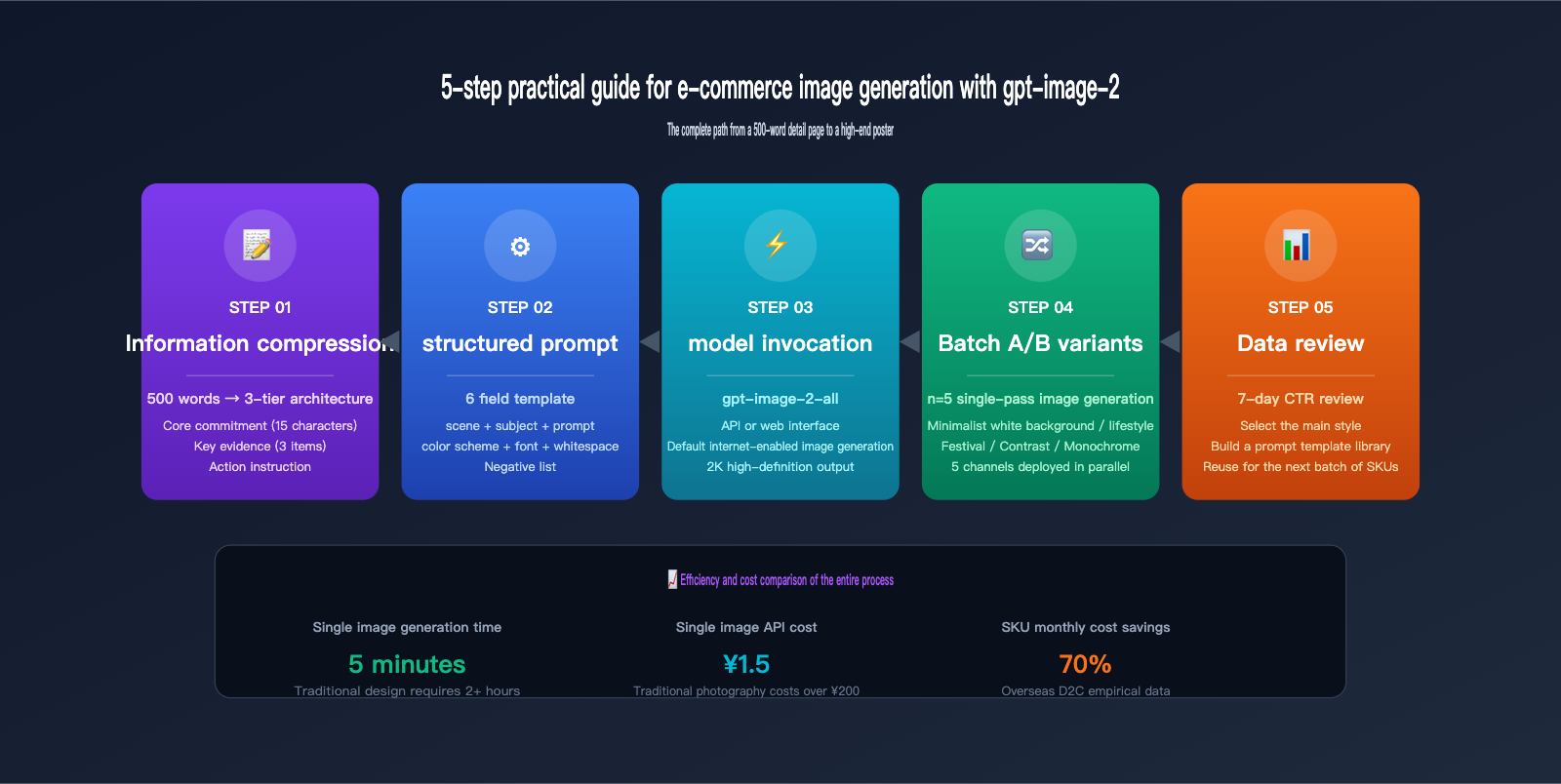
Here is the complete 5-step workflow for transforming "500-word product descriptions" into "high-end e-commerce posters."
Step 1: Compress Long Text into a "3-Layer Information Architecture"
Before opening gpt-image-2, perform information architecture compression. Any e-commerce copy can be condensed into three layers:
- Layer 1 (Core Promise): 1 sentence, under 15 characters, answering "What is the biggest benefit of this product?"
- Layer 2 (Key Evidence): 2-3 numbers or comparisons, answering "Why should I believe this promise?"
- Layer 3 (Call to Action): 1 CTA, under 8 characters, answering "What should I do now?"
Example: Product copy for a moisturizing cream
"This cream uses 3000-meter alpine snow water from the French Alps, enriched with 12 plant extracts and 5 moisturizing factors. After 6 months of human testing, it achieves a 98% moisture retention rate over 72 hours. Suitable for all skin types, pregnancy-safe, free of additives, fragrances, and alcohol, and holds EU organic certification…"
Compressed into 3 layers:
- Core Promise: 72-hour deep hydration
- Key Evidence: 98% retention rate / 12 plant extracts / EU organic certified
- Call to Action: Experience it now
The entire visual should only present these three layers; everything else is just noise.
Step 2: Write a "Dedicated E-commerce Poster Prompt Template"
The e-commerce prompt for gpt-image-2 requires 6 mandatory fields:
[Scene Description] + [Product Subject] + [3-Layer Information Text (wrapped in 「」)] +
[Color Palette] + [Typography Specs] + [Composition & Whitespace Constraints] + [Negative List]
Here is a complete example:
High-end e-commerce detail page main image, 1:1 ratio, pure white background,
Product centered: a frosted glass jar of face cream, product occupies 40% of the frame, natural reflection on top,
Top-left main title 「72-hour deep hydration」 56pt dark gray #2D2D2D bold,
Bottom-left supporting info 「98% retention rate · 12 plant extracts · EU organic certified」 18pt light gray #6B6B6B,
Bottom-right CTA button 「Experience now」 32pt white text + black rounded rectangle button,
Font: SF Pro Display or similar minimalist sans-serif,
At least 50% whitespace, at least 80px of padding around the product,
Minimalist premium style, Japanese aesthetic, soft top lighting,
high-fidelity Chinese typography, crisp text, premium aesthetic,
no watermark, no extra text, no decorative noise, no excessive elements
Note three details: Product-to-frame ratio is explicitly stated (40%), minimum whitespace is defined (50%), and the negative list is explicitly provided. These three points are the key to turning "AI-generated filler" into a "high-end poster."
Step 3: Call the gpt-image-2 API to Generate Images
If you have basic Python skills, here is an out-of-the-box code example:
from openai import OpenAI

client = OpenAI(
    api_key="your_apiyi_key",
    base_url="https://api.apiyi.com/v1"
)

response = client.images.generate(
    model="gpt-image-2-all",
    prompt='''High-end e-commerce detail page main image, 1:1, pure white background,
Product centered: frosted glass cream jar, product occupies 40%,
Top-left 「72-hour deep hydration」 56pt dark gray bold,
Bottom-left 「98% retention rate · EU organic certified」 18pt light gray,
Bottom-right CTA 「Experience now」 black rounded button,
SF Pro Display font, 50% whitespace, Japanese minimalist aesthetic,
high-fidelity, premium aesthetic, no watermark''',
    size="1024x1024",
    quality="high",
    n=4
)

for i, img in enumerate(response.data):
    print(f"Image {i+1}: {img.url}")
📌 base_url Configuration: The code above uses the APIYI
api.apiyi.com/v1endpoint. Thegpt-image-2-allmodel has web search enabled by default, allowing it to query the latest brand visual assets and official color palettes during generation.
Step 4: Use "Batch Variant Strategy" for A/B Testing
The most important thing in e-commerce assets isn't "creating one perfect image," but "creating a set of test images and letting the data speak." It's recommended to generate 4-5 style variants for each product simultaneously:
| Variant Type | Scenario | Prompt Modification Direction |
|---|---|---|
| V1 Minimalist White | Detail page main image | Pure white background + product centered |
| V2 Lifestyle | Feed ads | Real-world usage scene + natural light |
| V3 Festive | Promotions | Holiday colors + decorative elements |
| V4 Comparison | Reviews | Before-and-after composition |
| V5 Monochrome | Luxury brand | Monochromatic tone + large whitespace |
Deploy these 5 versions to different channels and check which one has the highest CTR after 7 days to determine the primary style for the next batch of products.
Step 5: Can't Code? Use the imagen.apiyi.com Web Tool
For e-commerce operations and brand managers who aren't technical, you can skip the coding part entirely. imagen.apiyi.com is a web-based image generation tool that encapsulates models like gpt-image-2, gpt-image-2-all, Nano Banana, and Seedream. It provides a simple form interface: select model → fill in prompt → select ratio → select quantity → click generate. You can finish your first batch of e-commerce assets in 5 minutes.
🎨 Tool Selection Advice: For e-commerce operations, we recommend using imagen.apiyi.com directly—no code required, supports a Chinese interface, and allows batch downloads. For e-commerce companies with technical teams, we recommend connecting via the APIYI apiyi.com API to integrate with ERP/PLM systems for automated SKU image generation pipelines.
gpt-image-2 E-commerce Prompt Template Library (6 Styles)
Below are 6 field-tested e-commerce prompt templates covering the most common types of e-commerce imagery. All templates are designed based on the "3-layer information architecture + visual whitespace" principle. Simply copy and replace the content in 【】 with your product details.
Template 1: Minimalist Japanese White-Background Detail Page
High-end e-commerce detail page main image, 1:1 ratio, pure white background #FFFFFF,
Product centered: 【Product description, e.g., "ceramic coffee mug"】, product occupies 35%,
Soft diffused top lighting, 5% opacity natural shadow beneath the product,
Top-left main title 「【Core promise, under 15 chars】」 56pt dark gray #2D2D2D bold,
Bottom-left supporting info 「【Key evidence 1】 · 【Key evidence 2】」 18pt light gray #888,
SF Pro Display font, Japanese minimalist aesthetic,
At least 55% whitespace,
crisp Chinese typography, premium minimalist aesthetic,
no watermark, no extra elements, no decorative noise
Template 2: Lifestyle Feed Ad
Authentic lifestyle e-commerce ad, 1:1 or 4:5,
Scene: 【Scene description, e.g., "kitchen island in morning light"】,
Product 【Product description】 naturally placed in the scene, occupies 25%,
Real natural light, 5500K color temperature, depth-of-field background blur,
Bottom-right small title 「【Core promise】」 28pt white text + translucent black backing,
Style: lifestyle photography, authentic, warm tones, biophilic design,
high-fidelity Chinese text, no watermark, no excessive text
Template 3: High-Contrast Promotional Banner
E-commerce promotional banner, 16:9 ratio,
Background: 【Main color, e.g., "bright yellow #FFD700"】 solid color + 30% geometric decorative elements,
Product image on the left occupies 35%, text area on the right:
Main title 「【Promo theme, e.g., "Year-end Sale"】」 84pt black bold,
Subtitle 「【Time or discount, e.g., "50% off limited time"】」 36pt black,
Price info 「【Original price crossed out】 → 【Current price】」 Price 60pt red,
Bottom-right CTA 「Buy now」 24pt white text + black rounded button,
Font: Helvetica Bold or similar strong sans-serif,
high-fidelity, bold typography, no watermark
Template 4: SKU Multi-Color Variant Card
Product multi-color variant display card, 1:1 ratio, light beige background #F5F1E8,
Display 5 different colors of the same 【Product type】 in the center, arranged horizontally,
Color name labeled below each product (8pt light gray small text),
Top main title 「【Product name】」 42pt dark brown bold,
Bottom description 「5 colorways · Choose your favorite」 16pt light brown,
Soft top lighting + subtle shadow, at least 40px whitespace around products,
Style: Apple Style minimalist product photography,
high-fidelity color rendering, crisp small text, no watermark
Template 5: Luxury Brand Monochromatic Poster
Luxury brand main visual poster, 3:4 ratio,
Monochromatic: 【Dark tone, e.g., "dark green #1A3A2E"】 solid background,
Display 【Product description】 in the center, product occupies 30%, gold highlights,
Brand logo at the top occupies 8%,
Middle main copy 「【Brand claim, under 12 chars】」 48pt off-white #F5F1E8 serif font,
Bottom small text 「【Brand name · Year or Collection】」 14pt off-white with wide letter spacing,
Font: Didot or Cormorant Garamond or other elegant serif,
At least 60% whitespace, Hermès / Chanel style luxury aesthetic,
high-fidelity typography, luxury aesthetic, no watermark
Template 6: Web-Grounded Generation Template (New Arrivals)
New arrival e-commerce main image, 1:1 ratio,
Please search online for the latest official appearance, colors, and specs of 【Product name, e.g., "AirPods Pro 3rd Gen"】,
Generate detail page main image based on real product info, pure white background,
Product centered, occupies 40%, 5% natural shadow beneath the product,
Top-left 「【Product name】」 48pt dark gray bold (use official spelling),
Bottom-left 「【Real key specs, e.g., "Active Noise Cancellation · 30h battery"】」 18pt light gray,
SF Pro Display font, Apple Style minimalist,
high-fidelity product accuracy, web-grounded details, no fictional specs
💡 Template Usage Advice: The 6 templates above cover 80% of e-commerce scenarios. We recommend testing the composition with
quality="medium"first, and once the layout is confirmed, switch toquality="high"for the final version. For batch production, we recommend connecting via the APIYI apiyi.com API, as it offers better stability and concurrency performance than direct connections.
Common Misconceptions and Comparative Analysis of gpt-image-2 for E-commerce
Many teams find that the results from gpt-image-2 are "just okay," but in reality, they've fallen into a few common traps. The table below compares the differences in final image quality between "wrong" and "right" approaches.
| Dimension | ❌ Wrong Approach | ✅ Right Approach | Output Difference |
|---|---|---|---|
| Prompt Length | 500+ words of cluttered details | 100-200 words of structured prompt | 80% improvement in visual clarity |
| Text Handling | Cramming all selling points into the image | Refining into a 3-tier information architecture | 3x improvement in reading efficiency |
| White Space | No instructions provided | Explicitly state "at least 50% white space" | 60% increase in premium feel |
| Font Specification | Letting the model decide | Locking to SF Pro / Helvetica | 70% improvement in consistency |
| Negative Constraints | None | Explicitly state "no extra text/no noise" | 90% reduction in noise |
| Product Scale | Unspecified | Specify 30-40% of the frame | 50% improvement in visual focus |
| Style Reference | Vague terms like "high-end" | Referencing specific brands (Apple/Hermès Style) | 80% improvement in aesthetic accuracy |
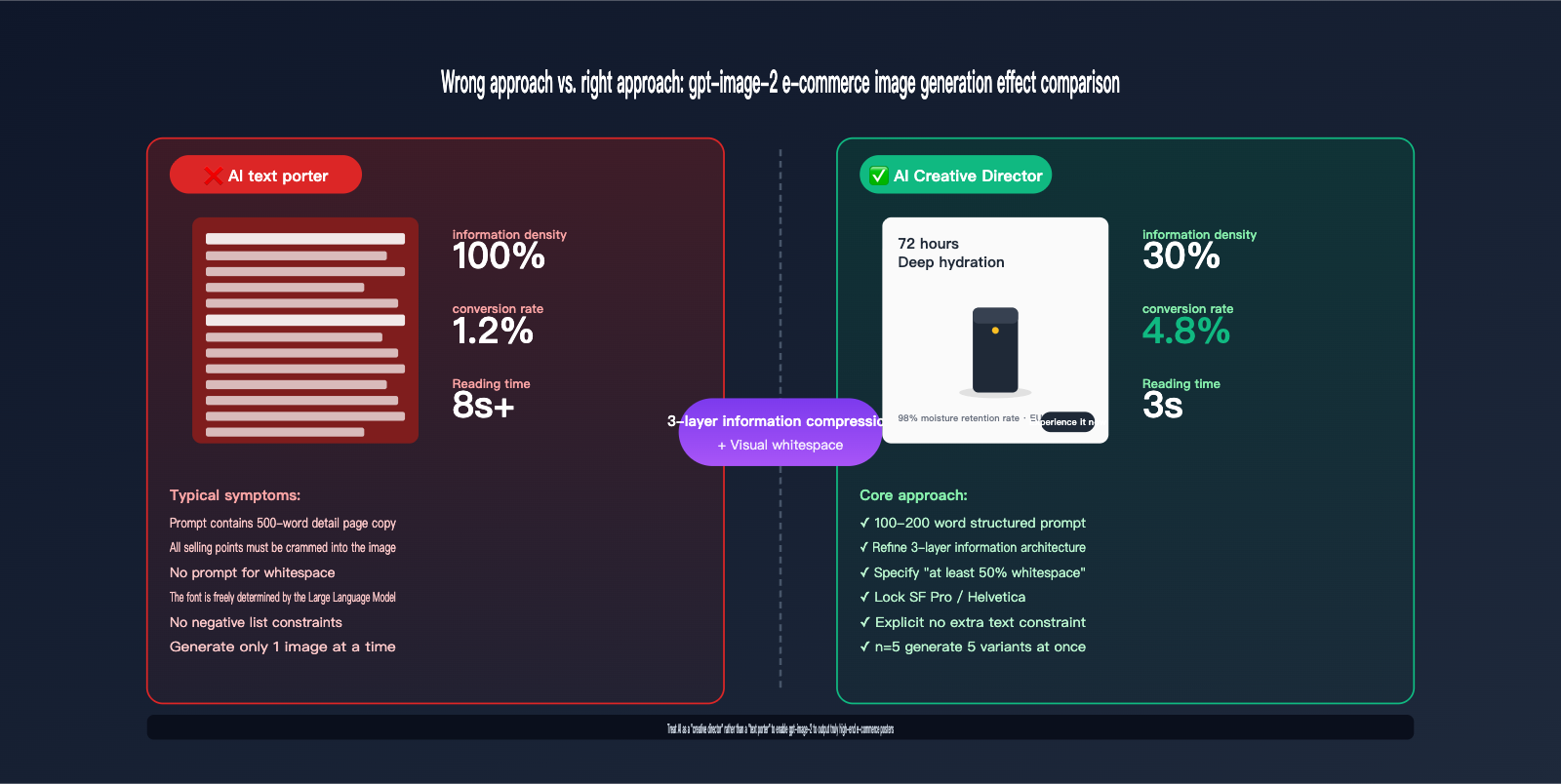
As you can see from the comparison table, gpt-image-2 isn't an "automatic image generation machine," but rather a "design intern who knows how to draw." The more precise your instructions are (like a design requirement document), the closer the output will be to a high-end poster; the more vague your instructions are (like casual chatting), the more the output will look like generic AI content.
gpt-image-2 E-commerce Image Generation FAQ
Q1: Is there a hard limit on the amount of text gpt-image-2 can handle?
Technically, there's no hard limit, and the model can render entire paragraphs. However, OpenAI officially recommends that long text works better as an "overlay" rather than "natively generated." For e-commerce, our testing suggests keeping the total text per image under 50 words (including title, sub-info, and CTA). If you need more, it's better to use a carousel of multiple images or add text layers later using Figma or Photoshop.
Q2: How can I avoid the "overly AI" look in my e-commerce images?
Here are three core tips: First, reference specific brand styles in your prompt (e.g., "Apple Style," "Muji Style," or "Hermès Style") to give the model a clear aesthetic anchor. Second, include real photography terminology (e.g., "soft natural lighting," "shallow depth of field," "color temperature 5500K") so the model uses photographic logic rather than illustration logic. Third, use the "Style Reference" feature on the imagen.apiyi.com tool; upload an e-commerce image you like, and the model will align its output with that direction.
Q3: What is the API cost for generating an e-commerce image with gpt-image-2?
According to official OpenAI pricing, a high-quality 1024×1024 (1:1) image costs about $0.20. If you create a set of 5 variations, it's about $1. Compared to professional e-commerce photographers (who charge $30–$70 per shot), the cost efficiency of AI is 30–50 times higher. By using the API proxy service at APIYI (apiyi.com), you can often get lower prices and support for RMB payments.
Q4: Who owns the copyright to images generated by gpt-image-2?
According to OpenAI's terms of service, API users own the images they generate and can use them for commercial purposes, secondary editing, and sales. However, be careful: if your prompt explicitly asks to replicate a specific brand's registered trademark or copyrighted character, you might run into infringement issues. For commercial use, it's best to use generic style descriptions (e.g., "tech brand style") rather than specific brand names (e.g., "Apple iPhone 17").
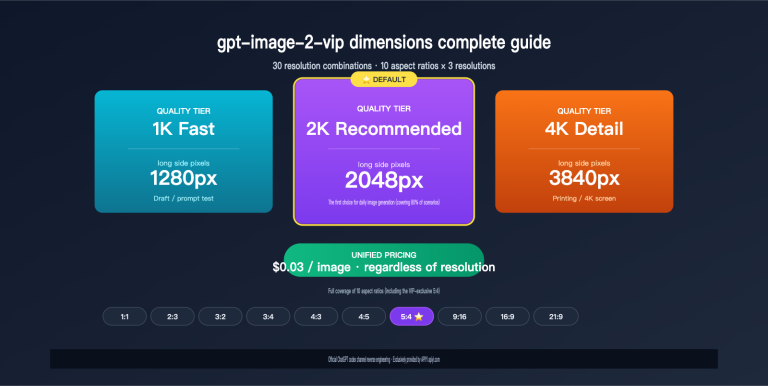
Q5: Do I need 4K or is 2K enough for e-commerce images?
The standard for main product images on major platforms (Taobao, JD, Shopify) ranges from 800×800 to 1500×1500, and banners are usually around 1920×600. 2K (2048×2048) is more than enough. 4K images can actually hurt your page load speed due to large file sizes. gpt-image-2 supports 1K and 2K output by default; 4K via API is still in beta and less stable than 2K.
Q6: How can I maintain visual consistency across multiple e-commerce images?
Here are four core tips: First, lock in the primary color palette (e.g., "Primary color #XXXXXX" in your prompt). Second, lock in the font (e.g., "SF Pro Display"). Third, lock in the composition template (e.g., "Product centered + title in top-left + CTA in bottom-right"). Fourth, use n=multiple to generate them all at once; the model will automatically maintain style consistency. If you need even higher product consistency, you can use the multi-image editing feature of gpt-image-2, which generates based on a reference image.
Q7: How does gpt-image-2 compare to Nano Banana Pro / Seedream for e-commerce?
A quick comparison: gpt-image-2 excels at text rendering, web-connected knowledge, and reasoning-based generation, making it perfect for scenarios requiring precise text, brand assets, and new product synchronization. Nano Banana Pro is strong in character/product consistency, ideal for series-based material production (like showing the same product in 10 different scenes). Seedream excels in Eastern aesthetics and Chinese text rendering, perfect for local brands, Hanfu, or beauty products. You can try all three at imagen.apiyi.com; we recommend running A/B tests based on your category before choosing your primary model.
Q8: How can I use gpt-image-2 to create "Before and After" comparison images?
Simply describe the layout in your prompt. Example: "1:1 e-commerce comparison image, vertical split line in the middle, left side labeled 'Before' showing [Problem State], right side labeled 'After' showing [Improved State], main title at the top 'Effect Guarantee', and CTA at the bottom." The reasoning capability of gpt-image-2 understands the semantics of "before and after," and the results are usually spot on.
Summary: 3 Fundamental Principles for E-commerce Image Generation with gpt-image-2
Having covered the basics, here are the 3 fundamental principles for gpt-image-2 e-commerce image generation:
First, treat AI as a "Creative Director," not a "Copy-Paster." Before handing 500 words of product details to the AI, compress the information architecture yourself—only when you distill it down to three layers of information can the AI output a high-end poster.
Second, explicitly state "white space" and "negative lists" in your prompt. AI defaults to "filling the frame." You must explicitly tell it "at least 50% white space," "no extra text," or "no decorative noise" to force a minimalist, high-end look.
Third, use "batch variations + data review" instead of aiming for "one perfect shot." The essence of e-commerce imagery is betting on which version will drive the highest CTR. Instead of obsessing over one image and editing it 10 times, use n=5 to generate 5 directions at once, then check the data. This is the iterative aesthetic method for the AI era.
🚀 Actionable Advice: If you want to integrate gpt-image-2 into your e-commerce workflow, we suggest two entry points: E-commerce operators/brand managers can start with the web tool at imagen.apiyi.com—no coding required, just pick a model and template to generate materials in bulk. E-commerce companies with technical teams can integrate the gpt-image-2-all model via the APIYI API (api.apiyi.com), which can be connected to ERP/PLM systems to automate image generation upon SKU listing. Both entry points support web-connected generation, perfect for teams that need to keep up with new product launches.
Mastering gpt-image-2 won't turn your images into viral hits overnight, but it will turn your "image production" bottleneck into a lever—allowing you to focus more energy on product selection, pricing, and operational strategies that truly drive your business. That is the greatest value of AI tools for e-commerce teams.
Author: APIYI Technical Team — Focused on AI Large Language Model API integration and e-commerce content tool development. Visit apiyi.com for more model reviews, prompt templates, and e-commerce case studies.