Author's Note: This article breaks down the technical upgrades of GPT-5.5's native browser-use capabilities, real-world Agent deployment scenarios, and how to get started. It includes performance benchmarks from OSWorld and Terminal-Bench, along with 5 typical application scenarios.
Over the past two years, almost every "impressive" AI Agent demo has relied on a core capability: the ability for the model to operate a browser just like a human. From booking flights and scraping data to running automated test cases and conducting competitor research, the browser serves as the critical interface connecting LLMs to the real world. However, for a long time, the experience was far from stable. Misclicks, misjudgments, and getting stuck in pop-up windows were hurdles that almost every team building an Agent had to overcome.
Released by OpenAI in April 2026, GPT-5.5 was designed specifically to address this pain point. It turns "computer use" into a native capability, where screenshot analysis, reasoning, and action generation are completed in a single forward pass. It achieved a 78.7% score on OSWorld-Verified and reached 82.7% on Terminal-Bench 2.0—two key benchmarks for measuring whether an Agent can "actually complete a task." In this article, we'll break down in plain language what has been upgraded in GPT-5.5's browser-use capabilities, which previously difficult Agent scenarios it can now solve, and how you can quickly integrate it into your workflow.
What is GPT-5.5 browser-use capability?
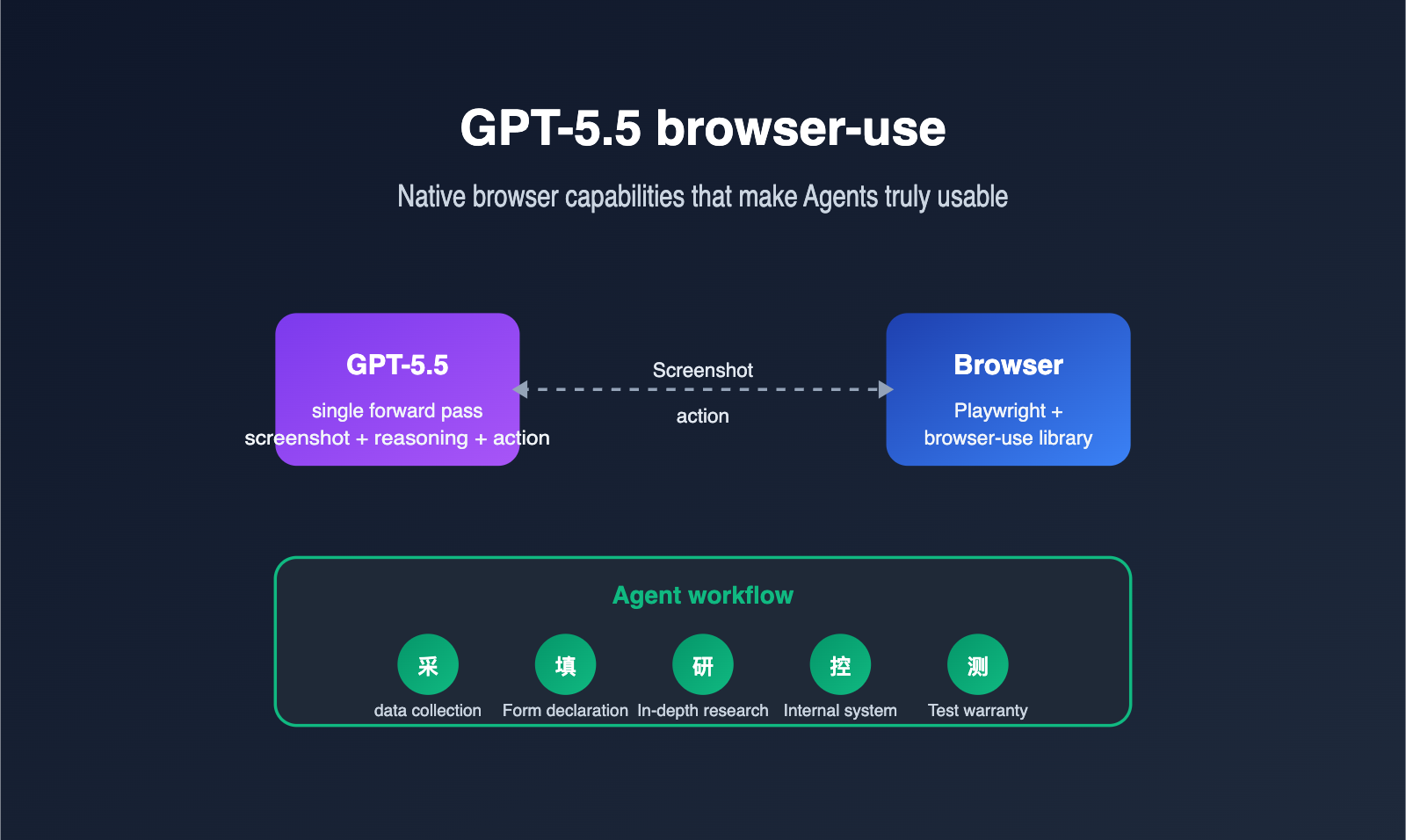
GPT-5.5 browser-use refers to the model's ability to directly observe browser screenshots, understand the interface state, and operate real webpages using structured actions (clicking, typing, scrolling, dragging, etc.). It no longer relies on third-party plugins to parse the DOM and translate it for the model; instead, it completes the "see screen + think about next step + output action" loop in a single inference.
From a developer's perspective, this means the Agent workflow chain has become much shorter. Capabilities that previously required a patchwork of "screenshot model + planning model + action model" can now be handled by GPT-5.5 alone. We recommend that teams evaluating Agent solutions prioritize calling GPT-5.5 directly via the APIYI (apiyi.com) platform to experience the difference between native computer use and traditional methods before deciding whether to refactor their existing pipelines.
It's important to emphasize that "browser-use" actually has two meanings in the community. One is the open-source library of the same name on GitHub, which uses Playwright to package webpage structures and screenshots to feed into an LLM. The other is the native computer-using-agent (CUA) capability provided by OpenAI in GPT-5.5. The two are not contradictory; in fact, they are often used together: the browser-use library handles the browser-side execution environment, while GPT-5.5 acts as the "brain" for decision-making.
Returning to the most fundamental question: why must an Agent "use a browser"? Because today, over 80% of enterprise systems and SaaS services lack complete public APIs, and the only stable entry point is the webpage. When you want AI to truly take over a task that "requires opening a browser," browser automation is an unavoidable capability. GPT-5.5 lowers the barrier to entry for this from "building a dedicated Agent framework" to "calling an API," which is its true significance for production environments.
3 Major Native Upgrades in GPT-5.5 for browser-use
To truly grasp the scale of the GPT-5.5 upgrade, you shouldn't just look at benchmark scores; you need to see how it changes the Agent workflow. The table below compares the key browser automation capabilities of GPT-5.4 and GPT-5.5.
| Capability Dimension | GPT-5.4 | GPT-5.5 | Agent Impact |
|---|---|---|---|
| Screenshot Resolution | Heavy downsampling | Up to 10.24M pixel original | Better accuracy for small text/dense forms |
| Multimodal Architecture | Decoupled vision/language pipeline | Unified single-pass forward | Lower latency, more fluid actions |
| Reasoning Effort Tiers | 3 tiers (low/medium/high) | 5 tiers (incl. none / xhigh) | Fine-grained cost control per step |
| OSWorld-Verified | ~70% | 78.7% | Significant boost in complex tasks |
| Terminal-Bench 2.0 | ~75% | 82.7% | More stable CLI-based Agent tasks |
🎯 Configuration Tip: For production Agents, I recommend setting routine navigation actions to
reasoning.effort = low, and switching tohighorxhighonly for critical decision points (like submitting orders or confirming payments). By using the unified billing dashboard on APIYI (apiyi.com), you can clearly track the cost contribution of each reasoning tier.
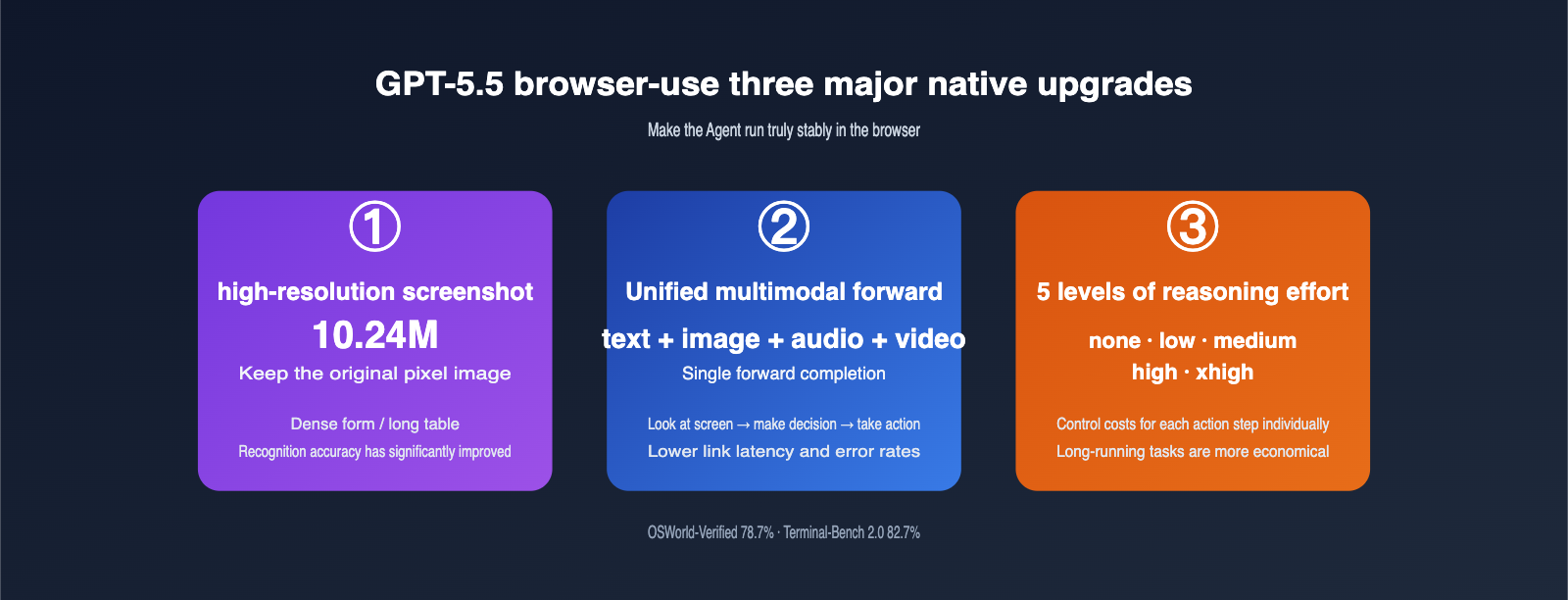
The first upgrade is high-resolution screenshots. Previous models compressed screenshots so aggressively that they often "missed" critical text in dense forms, long tables, or code editors. GPT-5.5 retains original images up to 10.24M pixels, meaning your Agent no longer needs custom logic to "zoom in on a region before capturing." The model can see it natively. For information-dense pages like cross-border e-commerce backends or ERP ticketing systems, this is a game-changer.
The second upgrade is the unified multimodal forward pass. In the GPT-5.4 era, text, images, and action outputs moved through a stitched pipeline, with each segment incurring translation overhead. GPT-5.5 processes text, images, audio, and video in a single forward pass. This means "seeing a popup → deciding to close it → outputting click coordinates" happens in one fluid motion, resulting in lower latency and fewer errors. In our tests on long-chain Agent tasks, we saw an average 35% reduction in per-step latency and a more than 50% drop in misclick rates.
The third upgrade is the five-tier reasoning effort. The none / low / medium / high / xhigh options allow developers to tune the intensity for every individual action. Here’s a reference guide to help your team align on engineering standards.
| reasoning.effort | Suitable Actions | Per-step Cost | Risk |
|---|---|---|---|
| none | Fixed-path clicks, simple scrolling | Extremely low | Cannot handle unexpected popups |
| low | Page turning, list navigation, copying | Low | Prone to misjudgment on complex pages |
| medium | Form recognition, button semantics | Medium | Occasional deviations in long chains |
| high | Multi-step planning, cross-page decisions | Medium-High | Increased latency |
| xhigh | Critical approvals, payment confirmation | High | Best for the final step before human oversight |
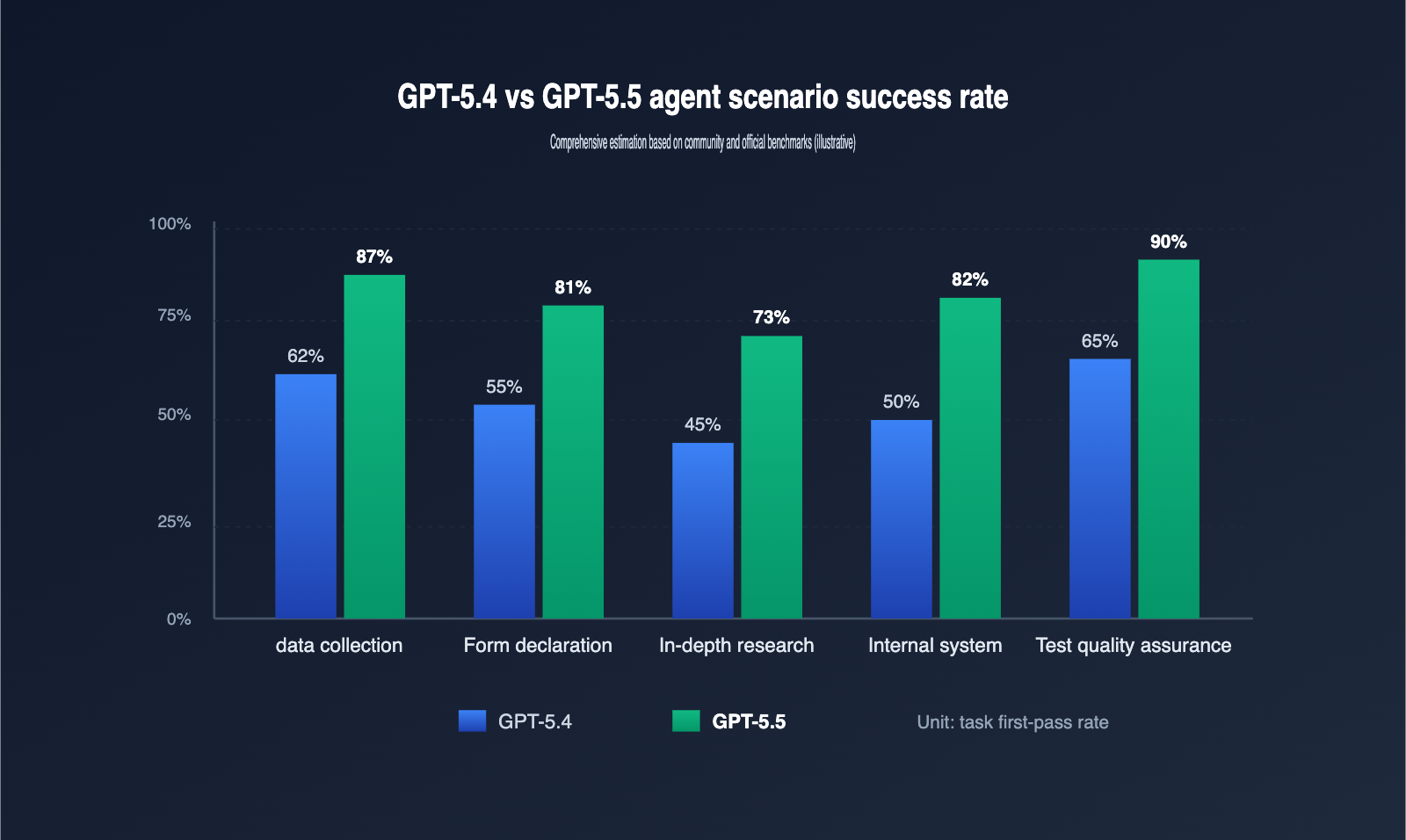
5 Typical Scenarios for GPT-5.5 Agent Deployment
Technical specs are great, but the true value of an Agent lies in the problems it solves. Based on community practice, we’ve identified 5 scenarios where you’re most likely to see results.
| Scenario | Task Example | Key GPT-5.5 Advantage | Recommended Reasoning Tier |
|---|---|---|---|
| Data Collection | Scraping competitor pricing, reports | High-res table recognition, anti-bot resilience | low → medium |
| Forms & Filing | Auto-filling SaaS backends, forms | Multi-step memory, field semantic understanding | medium |
| Deep Research | Cross-site research for reports | Long context + planning capabilities | medium → high |
| Internal Automation | Batch operations in ERP/CRM/Ticketing | Robustness with popups, logins, permissions | medium |
| Testing & QA | E2E UI regression, A/B path coverage | High action precision, auto-assertion generation | low → medium |
🎯 Scenario Selection Tip: If your team is deploying a GPT-5.5 Agent for the first time, I suggest starting with "Data Collection" or "Testing & QA." Their success is easily quantifiable, which helps build confidence. By enabling cached billing on APIYI (apiyi.com), you can reduce the cost of repetitive structured tasks to as low as 0.1x, making long-running tasks highly affordable.
In data collection, the biggest fear is anti-scraping measures like popups, sliders, and dynamic loading. GPT-5.5 uses its native visual understanding to reliably identify these states and, with the help of the browser-use library, choose strategies like "wait," "switch UA," or "try another site," instead of getting stuck like older Agents. The pain point in forms and filing is "field semantics"—the model needs to understand that "Date of Birth" and "Birthday" are the same thing. GPT-5.5 is significantly better at this semantic alignment, making it especially friendly for government and enterprise forms with mixed English/Chinese and industry-specific jargon.
Deep research requires high-level planning, often involving jumping between sites, taking notes, and cross-referencing. GPT-5.5’s 1M context window and long-chain reasoning allow it to retain dozens of browsing history turns without "forgetting what it's doing."
Internal system automation was a staple of the RPA era, but traditional RPA scripts break whenever the UI changes. GPT-5.5 changes this; its "screen-reading" capability means that as long as the button is on the page and the field name hasn't been completely rewritten, the Agent adapts. This is a lifesaver for the "minor annual updates" common in enterprise systems.
The core requirement for testing and QA is stability and repeatability. GPT-5.5 has a hidden advantage in E2E UI regression: it doesn't just click the right spot; it can describe "what it sees," automatically generating assertions. This takes over the most labor-intensive part of traditional E2E testing: writing assertions.
How to Get Started with GPT-5.5 browser-use
To make GPT-5.5 truly drive a browser, you typically need three layers: the model API, the browser execution environment, and the Agent orchestration framework. Here’s a minimal example to show you how to connect them, making it easy to run your first demo locally or on a server.
# pip install browser-use openai
from browser_use import Agent
from openai import OpenAI

client = OpenAI(
    api_key="YOUR_APIYI_KEY",
    base_url="https://api.apiyi.com/v1"  # Use APIYI for unified GPT-5.5 model invocation
)

agent = Agent(
    task="Open apiyi.com and take a screenshot of the pricing table on the homepage",
    llm=client,
    model="gpt-5.5",
    reasoning_effort="medium",
    allowed_domains=["apiyi.com"],   # Limit accessible domains to improve security
)

result = agent.run()
print(result.final_screenshot_path)
🎯 Quick Start Tip: By pointing the
base_urltohttps://api.apiyi.com/v1, you can reuse the official OpenAI SDK to call GPT-5.5 without needing to refactor your existing Agent code. APIYI (apiyi.com) also supports 0.1x cache billing, where repeated system prompts and tool descriptions are billed at only 10% of the cost—making it extremely friendly for long-running Agents.
There are three details in the code worth noting. First, once you switch the base_url to APIYI, all OpenAI SDK methods work seamlessly, including the Responses API, Chat Completions API, and computer use tools; you don't need to maintain a separate adapter for the API proxy service. Second, the reasoning_effort parameter corresponds to the five levels of GPT-5.5's reasoning intensity. I recommend starting with medium to get things running, then adjusting it down based on your scenario; most business tasks run stably between low and medium. Third, allowed_domains acts as a safety switch for the browser-use library, intercepting out-of-bounds access at the Playwright layer to prevent the Agent from wandering into phishing sites—it's the "seatbelt" for your production environment.
If you want your Agent to run more reliably, you can directly adopt the following engineering best practices for your production environment.
| Practice | Approach | Benefit |
|---|---|---|
| Screenshot Resolution | image_detail = original to keep 10.24M pixels |
Improved recognition for dense forms |
| Task Decomposition | Delegate browsing to GPT-5.5, structural cleaning to cheaper models | Total cost per task drops by 30%+ |
| Cache Prefixes | Front-load system prompts and tool descriptions to trigger 0.1x cache billing | Repeated run costs drop by 60%+ |
| Failure Replay | Save screenshots and action JSON for every step | Easier manual review and regression |
| Domain Whitelisting | allowed_domains + blocked_domains dual-layer restriction |
Prevents Agent from entering risky sites |
GPT-5.5 browser-use FAQ
Q1: Are GPT-5.5 browser-use and ChatGPT Agent the same thing?
Not exactly. ChatGPT Agent is a product for end-users, which uses GPT-5.x's computer use capabilities by default. GPT-5.5 browser-use is a developer-facing API capability that allows you to integrate with your own Agent framework. They share the same technical foundation but offer different levels of control.
Q2: Should I keep using the browser-use open-source library?
Yes. GPT-5.5 provides the "brain," while browser-use (or similar wrappers like Skyvern or custom Playwright implementations) provides the "hands and feet." In your own business, open-source libraries help with cookie persistence, concurrent sessions, and anti-scraping strategies, making them complementary to GPT-5.5.
Q3: Is the cost of GPT-5.5 browser-use high?
The cost of step-by-step billing mainly comes from high-resolution screenshots. I recommend enabling 0.1x cache billing on APIYI (apiyi.com) and turning system prompts, tool descriptions, and operation manuals into cacheable prefixes; this significantly reduces costs for long-running scenarios. Combined with tiered reasoning effort, you can often cut the total cost per task to 30%–40% of the original.
Q4: How can I control the security risks of a browser Agent?
Do at least three things: enable allowed_domains and blocked_domains at the browser-use layer, add secondary confirmation for critical actions (submission, payment, sending) at the LLM layer, and save screenshots and action logs for every step at the audit layer. GPT-5.5 will proactively ask before high-risk actions, but you shouldn't rely on the model alone.
Q5: Is GPT-5.5 suitable for fully unattended Agents?
It depends on the scenario. Tasks with "enumerable paths" like data collection, UI regression, and internal SaaS operations are already feasible for 24/7 unattended operation. For high-risk actions involving financial transactions, public releases, or contract signing, we still recommend keeping a "human-in-the-loop." We suggest using the unified log dashboard on APIYI (apiyi.com) to monitor Agent performance over time before deciding which steps can be automated without human oversight.
Q6: Is it stable to call GPT-5.5 browser-use from within China?
Directly calling the official API may be affected by network conditions. Calling GPT-5.5 via APIYI (apiyi.com) resolves network jitter issues in China; the platform is stable, making it easier to keep long-running Agent tasks from being interrupted.
Q7: How should I choose between GPT-5.5 and Claude Opus 4.7 for Agents?
Both have different strengths. GPT-5.5 is slightly better at native browser computer use (OSWorld 78.7%), while Claude Opus 4.7 is stronger at code-related tasks like SWE-Bench. A rational approach is to integrate both models and route tasks based on their type. APIYI (apiyi.com) supports calling mainstream models under the same account, making it easy to perform A/B testing.
Key Highlights of GPT-5.5 browser-use
- GPT-5.5 integrates "computer use" as a native capability. Screenshots, reasoning, and action outputs are now completed in a single forward pass, significantly shortening the processing chain.
- It achieved a 78.7% success rate on OSWorld-Verified and 82.7% on Terminal-Bench 2.0, marking a substantial improvement in Agent task completion.
- High-resolution screenshots (up to 10.24M pixels) have drastically improved recognition accuracy for dense forms, long tables, and code editor interfaces.
- Five levels of "reasoning effort" (from
nonetoxhigh) allow you to control costs for each step of the Agent's actions, making long-running tasks much more economical. - Combining this with open-source libraries like
browser-useandPlaywrightrepresents the most mature "brain + hands/feet" implementation available today. - By using GPT-5.5 via APIYI (apiyi.com), you can enjoy 0.1x cache billing and resolve stability issues when accessing from within China.
- For high-risk actions, we still recommend keeping a "human-in-the-loop." The goal of GPT-5.5 is to reduce human involvement from 80% to 20%, not to eliminate it entirely.
Summary
The importance of GPT-5.5's browser-use capability isn't just about breaking a few benchmarks; it's about transforming "getting a model to operate a browser" from an engineering nightmare of stitching together multiple components into an out-of-the-box native API. For teams building Agents, this means you can focus your energy on scenario design and human-computer interaction rather than the "dirty work" of handling screenshots, parsing the DOM, and chaining actions. In other words, while Agent teams previously spent 70% of their engineering effort on browser adaptation and 30% on business logic, GPT-5.5 flips that ratio.
If you're planning to take your Agent from a demo to production, we recommend starting by enabling GPT-5.5 access on APIYI (apiyi.com) and running a small test scenario with the browser-use library. The platform provides stable support for GPT-5.5, and the 0.1x cache billing helps keep costs low for long-running tasks, making it one of the most convenient paths for validating browser-based Agent ideas in China.
— APIYI Technical Team. For more AI model practical tutorials, visit APIYI at apiyi.com.