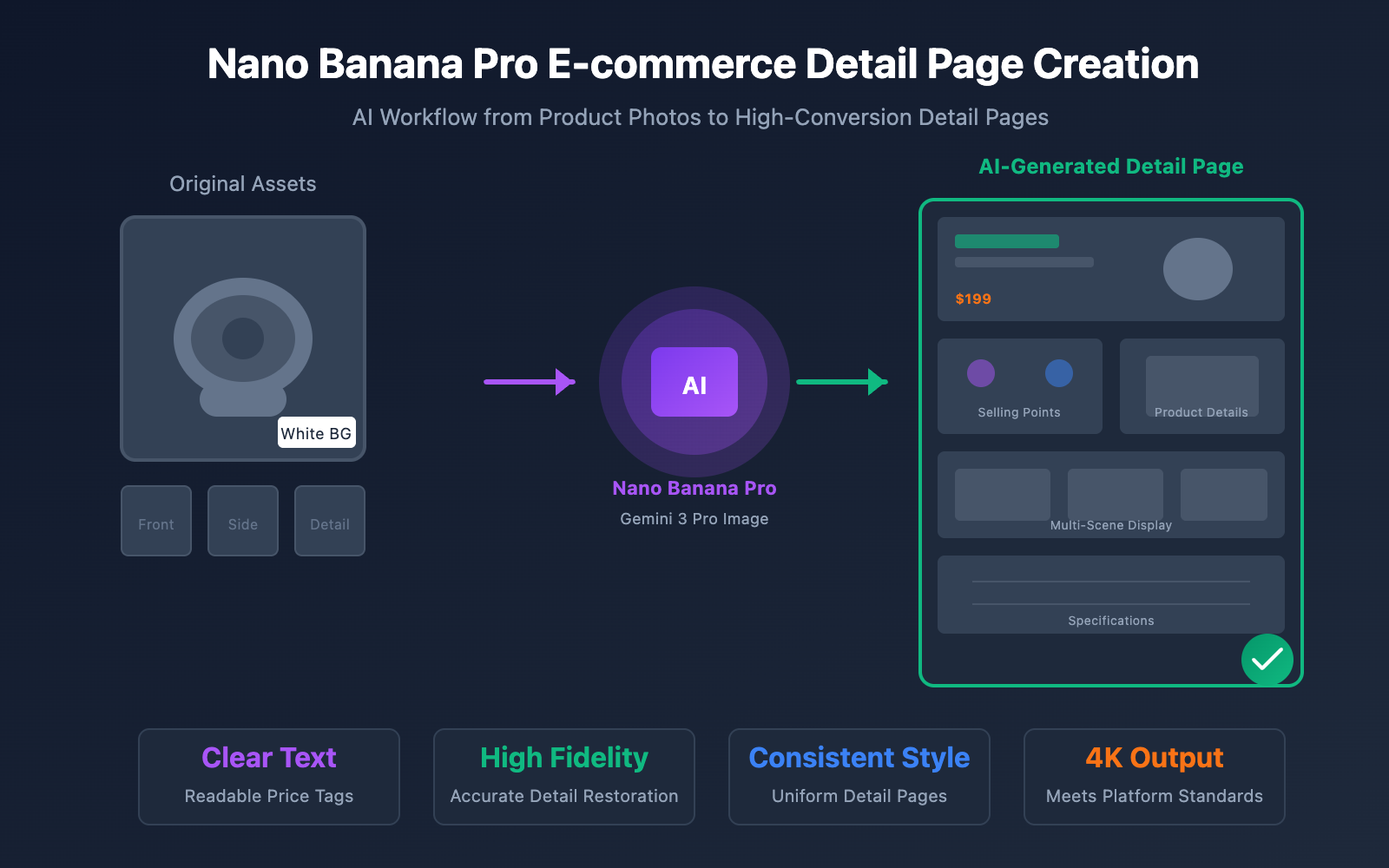
Want to use AI to whip up e-commerce product detail pages but keep ending up with images that look "obviously fake"? Blurry product details, unreadable text, inconsistent styles… Are these problems giving you a major headache?
As e-commerce sellers, we know how much the detail page matters—it's what drives conversions. The traditional way of hiring a designer is pricey and slow, while your average AI image generator often falls short of professional e-commerce standards.
The good news is: Google's newly released Nano Banana Pro (based on Gemini 3 Pro Image) has made a huge leap in text rendering, preserving product details, and maintaining consistency across multiple images. It's a game-changer for making product detail pages.
Core Value: By the time you finish this article, you'll have mastered the complete workflow for creating professional e-commerce detail pages with Nano Banana Pro. You'll learn 7 practical tips to level up your image quality and see how to handle batch generation via API.
Core Advantages of Creating E-commerce Detail Pages with Nano Banana Pro
Before we dive into the hands-on part, let's look at why Nano Banana Pro is so well-suited for e-commerce.
| Dimension | Traditional AI Image Gen | Nano Banana Pro | E-commerce Value |
|---|---|---|---|
| Text Rendering | Blurry/Gibberish | Clear & readable, multilingual support | Price tags, selling points |
| Product Details | Prone to distortion | High-fidelity reproduction | Avoids "expectation vs. reality" issues |
| Multi-Image Consistency | Style drift | Supports consistency for 14 input images | Uniform style for the entire detail page |
| Output Resolution | Mostly 1K | Native 2K/4K | Meets platform high-definition requirements |
| Editing Capabilities | Generation only | Integrated generation + editing | Easier fine-tuning and adjustments |
4 Core Capabilities of Nano Banana Pro for E-commerce
1. Precise Text Rendering
This is Nano Banana Pro's biggest breakthrough. It can accurately render Chinese, English, and numbers, making it perfect for generating:
- Promotional price tags (e.g., "¥99.9 Limited Time Offer")
- Product selling point copy (e.g., "3s Rapid Heat · Silent Design")
- Technical specification tables
2. High-Fidelity Product Details
Based on the visual understanding capabilities of Gemini 3 Pro, Nano Banana Pro can:
- Retain product textures, materials, and luster
- Accurately reproduce product colors
- Maintain product proportions without distortion
3. Multi-Image Style Consistency
It supports up to 14 input images, ensuring:
- A unified background style
- Consistent lighting and shadow effects
- The same design language
4. Flexible Image Editing
It allows for secondary editing of the generated results:
- Localized inpainting (change backgrounds, adjust elements)
- Image blending (combine up to 8 images)
- Smart outpainting (extend the frame)
🎯 Technical Tip: Want to quickly experience Nano Banana Pro's e-commerce capabilities? You can call the Nano Banana Pro API directly through the APIYI (apiyi.com) platform. No Google Cloud account configuration is required—you'll be generating images in just 5 minutes.
7 Practical Tips for Creating E-commerce Detail Pages with Nano Banana Pro
Here are 7 practical tips our team has gathered from real-world e-commerce projects. Every single one of them has been battle-tested and verified.
Tip 1: Always Use Real Photos for the Product Main Body
Core Principle: Let the AI generate the background and the scene, but the product itself must be a real photograph.
This is the golden rule of e-commerce AI image generation. The reason's simple:
- AI-generated products often suffer from distorted details.
- Using real product photos helps you avoid return disputes.
- Platform regulations usually require the product images to be authentic.
The Right Way:
Prompt Structure:
[Real Product Photo] + Scene Description + Style Requirements

Example:
"Place this white-background product photo in a modern, minimalist kitchen scene.
Marble countertop, soft natural light coming from a window on the left,
with the background slightly blurred to make the product stand out."
The Wrong Way:
❌ "Generate a product photo of a Bluetooth headset"
❌ "Create an image that looks like a real product"
Tip 2: Use Structured Prompt Templates
High-quality e-commerce detail pages require precise prompts. We've put together a template for you:
| Prompt Element | Description | Example |
|---|---|---|
| Product Description | A brief description of the product type | Wireless Bluetooth headphones, thermos, yoga mat |
| Scene Setting | The environment where it's used | On an office desk, in the gym, outdoor picnic |
| Lighting Requirements | The lighting method | Soft side lighting, ambient light, product spotlight |
| Style/Tone | The visual style | Minimalist modern, cozy home, tech-focused |
| Composition Guidance | The layout of the frame | Product centered, 45-degree overhead shot, close-up details |
| Text Elements | Text that needs to be rendered | "Limited Time Offer ¥199", "Buy One Get One Free" |
Full Prompt Example:
Product: Portable Bluetooth speaker (Focus on the uploaded product photo)
Scene: Placed on a wooden desk next to a cup of coffee and an open book
Lighting: Warm afternoon sunlight coming from the right, creating soft shadows
Style: Nordic minimalist style, clean and refreshing visuals
Composition: Product located in the right third of the frame, leaving space on the left for copy
Text: Add "Outdoor Essential · 20-Hour Battery Life" in the top left corner, white font
Output: 4K resolution, suitable for e-commerce detail pages
Tip 3: Master Image Blending for Comparison Charts
The "Before vs. After" comparison charts common in e-commerce can be generated with a single click using Nano Banana Pro's image blending feature.
API Call Example:
# Call Nano Banana Pro Image Blending via APIYI
import requests

response = requests.post(
    "https://api.apiyi.com/v1/images/generations",  # Unified APIYI interface
    headers={"Authorization": "Bearer YOUR_APIYI_KEY"},
    json={
        "model": "nano-banana-pro",
        "prompt": "Create a side-by-side comparison. The left side shows a messy desk, and the right side shows a clean desk organized with the storage box. Use a white divider in the middle and add 'Before/After' labels.",
        "input_images": ["messy_desk.jpg", "organized_desk.jpg", "storage_box.jpg"],
        "size": "2048x2048",
        "quality": "hd"
    }
)
🚀 Quick Start: Call the Nano Banana Pro API through APIYI (apiyi.com). It supports OpenAI-compatible formats, so you can integrate it with almost no changes to your existing code.
Tip 4: Use Batch Generation to Maintain Style Consistency
Detail pages usually require 5–10 images, so keeping the style consistent is absolutely crucial.
Method 1: Use the Same Seed Value
# Fix the seed to maintain style consistency
base_config = {
    "model": "nano-banana-pro",
    "seed": 42,  # Fixed random seed
    "style_reference": "template_image.jpg",  # Style reference image
}

scenes = [
    "Main product image, pure white background, 45-degree front angle",
    "Lifestyle shot, used on a kitchen countertop",
    "Detail shot, close-up of product buttons and ports",
    "Size comparison shot, showing size relative to common objects",
    "Packaging shot, showing the product box and accessories"
]

for i, scene in enumerate(scenes):
    response = generate_image({
        **base_config,
        "prompt": f"{product_description}, {scene}"
    })
    save_image(response, f"detail_page_{i+1}.jpg")
Method 2: Use Reference Images to Lock in the Style
Nano Banana Pro supports uploading reference images to control the generation style:
| Reference Type | Purpose | Suggestion |
|---|---|---|
| Style Reference | Controls overall visual style | Use brand visual guideline images |
| Composition Reference | Controls layout | Use screenshots of high-performing detail pages |
| Color Reference | Controls the color scheme | Use brand color palettes |
Tip 5: Best Practices for Text Rendering
Nano Banana Pro has powerful text rendering capabilities, but you'll still want to keep these tips in mind:
Recommended Practices:
- Keep text content short (under 10 characters works best).
- Specify the font style (e.g., "Modern sans-serif").
- Be clear about font color and size.
- Reserve a text area (avoid overlapping with the product).
Text Rendering Prompt Template:
Add the text "[Content]" at [Position] in the image,
using [Color] [Style] font,
font size [Size],
ensuring the text is clear, readable, and has enough contrast with the background.
Practical Example:
Add the text "Limited Time Offer" in the top right corner,
using a bold red modern font,
displayed in a large size for emphasis,
with smaller text below reading "¥199 Regular ¥399",
ensuring the text is clear, readable, and has enough contrast against the light background.
Tip 6: Optimize Output for Different Platforms
Different e-commerce platforms have different requirements for detail page images:
| Platform | Main Image Size | Detail Page Width | Special Requirements |
|---|---|---|---|
| Taobao/Tmall | 800×800 | 750px | No text on the first image |
| JD.com | 800×800 | 750px | Strict white background requirements |
| Pinduoduo | 750×750 | 750px | Promotional text allowed |
| Amazon | 1600×1600 | 970px | Pure white background, no text |
| Shopify | 2048×2048 | Responsive | Square recommended |
Generating White Background Images for Amazon:
# Generate a pure white background product image that meets Amazon's requirements
response = requests.post(
    "https://api.apiyi.com/v1/images/generations",  # Unified APIYI interface
    headers={"Authorization": "Bearer YOUR_APIYI_KEY"},
    json={
        "model": "nano-banana-pro",
        "prompt": "Place the product on a pure white background (RGB 255,255,255). The product should occupy 85% of the frame. No shadows, no reflections, no text or decorative elements. Professional product photography style.",
        "input_images": ["product_photo.jpg"],
        "size": "2048x2048",
        "background_color": "#FFFFFF"
    }
)
Tip 7: Build a Reusable Template Library
Efficient e-commerce detail page production relies on templates. We recommend setting up the following:
1. Scene Template Library
SCENE_TEMPLATES = {
    "kitchen": "Modern minimalist kitchen, marble countertop, natural lighting",
    "office": "Tidy office desk, monitor and keyboard, professional atmosphere",
    "outdoor": "Outdoor lawn picnic scene, sunny, relaxed and cozy",
    "gym": "Gym environment, exercise equipment background, dynamic and energetic",
    "bedroom": "Cozy bedroom, soft lighting, comfortable and relaxing atmosphere"
}
2. Copywriting Template Library
COPY_TEMPLATES = {
    "discount": "Limited Time Offer · {discount}% Off",
    "feature": "{feature1} · {feature2} · {feature3}",
    "guarantee": "{days}-Day Hassle-Free Returns",
    "bestseller": "Over {count}+ units sold"
}
3. Detail Page Structure Template
| Image No. | Content Type | Prompt Template |
|---|---|---|
| 1 | Main/Lifestyle Image | Product used in {Scene}, highlighting {Core USP} |
| 2 | Feature Image | Product close-up, labeling {3 Core Functions} |
| 3 | Detail Image | Close-up of {Product Part}, showing {Material/Craftsmanship} |
| 4 | Comparison Image | Compared with {Competitor/Old Model}, highlighting {Advantage} |
| 5 | Usage Image | Product in {Usage Scenario}, used by {Target User} |
| 6 | Specs Image | Product dimensions, compared with {Reference Object} |
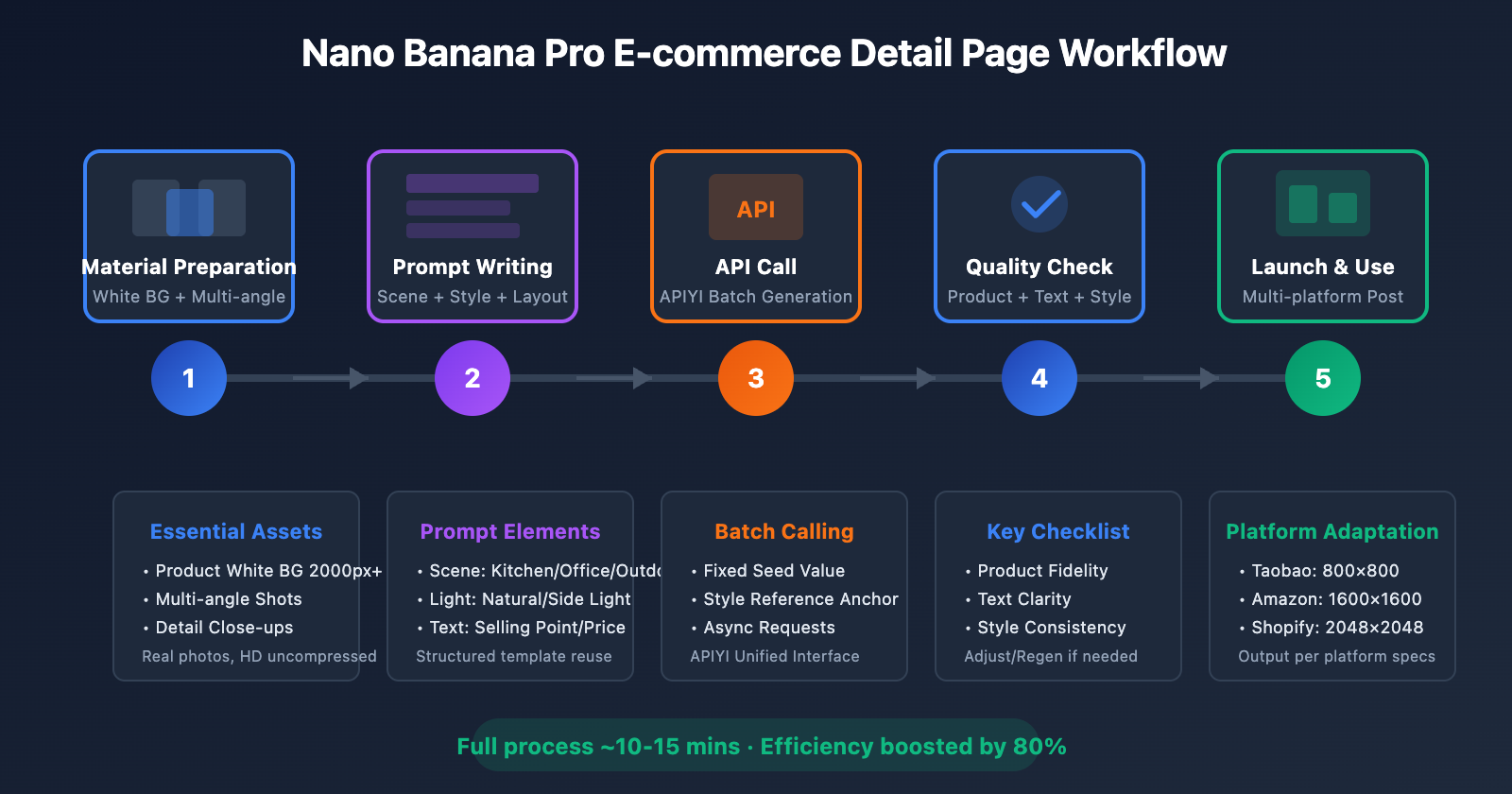
💡 Recommendation: Once you've built your template library, combined with the batch calling capabilities of APIYI (apiyi.com), you can complete a full set of detail pages in under 10 minutes, boosting efficiency by over 80%.
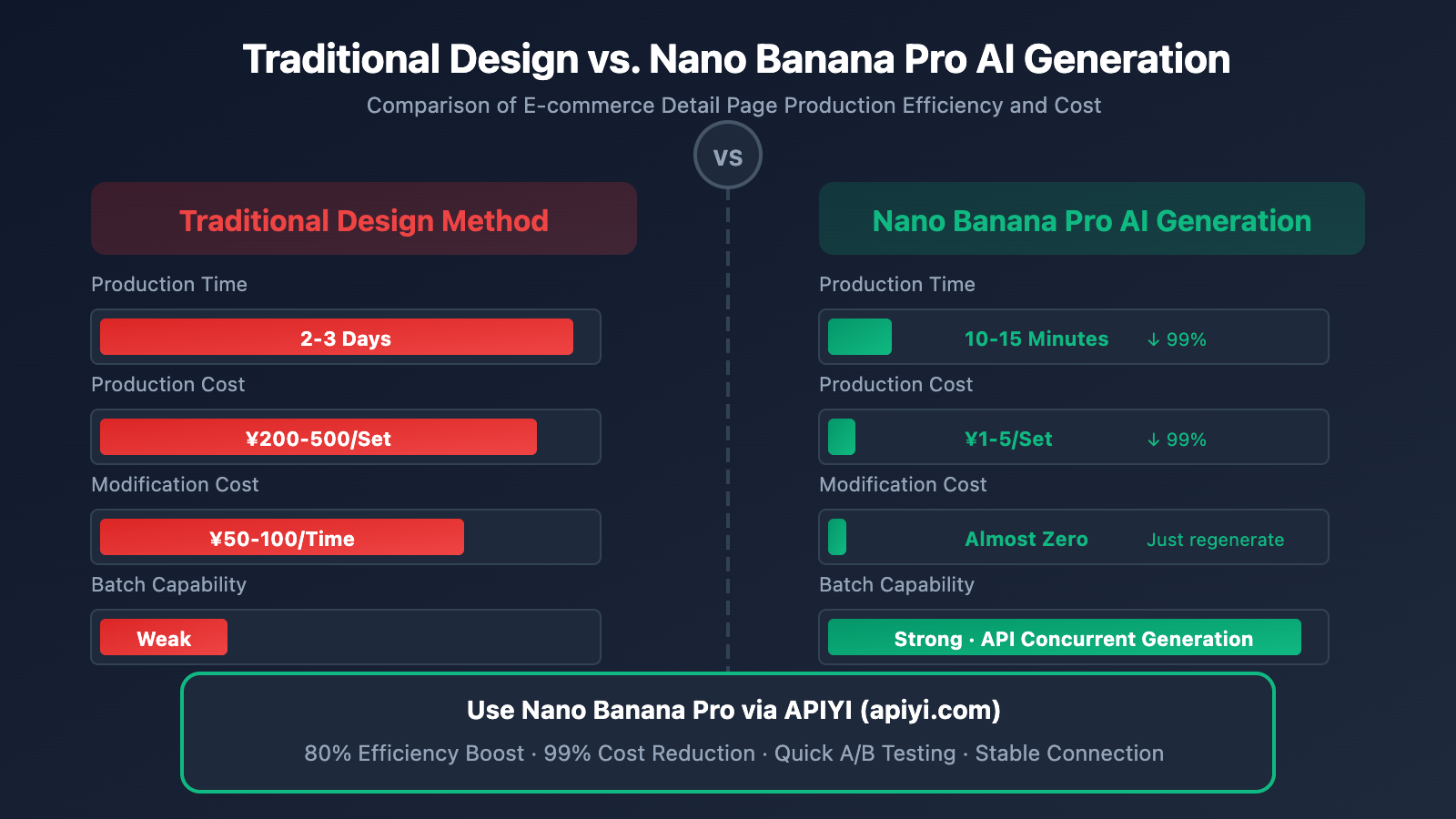
Nano Banana Pro E-commerce Detail Page: Complete Workflow
Here's a complete workflow for creating an e-commerce detail page, covering everything from asset preparation to the final output.
Step 1: Asset Preparation
What you'll need:
- Product images on a white background (High-definition, at least 2000px)
- Multi-angle product shots (Front, side, back)
- Close-up detail shots (Materials, ports, buttons, etc.)
Optional assets:
- Brand Logo
- Brand color palette
- Reference detail page screenshots
Step 2: Determine the Detail Page Structure
Plan your detail page structure based on your product's unique features:
Standard E-commerce Detail Page Structure:

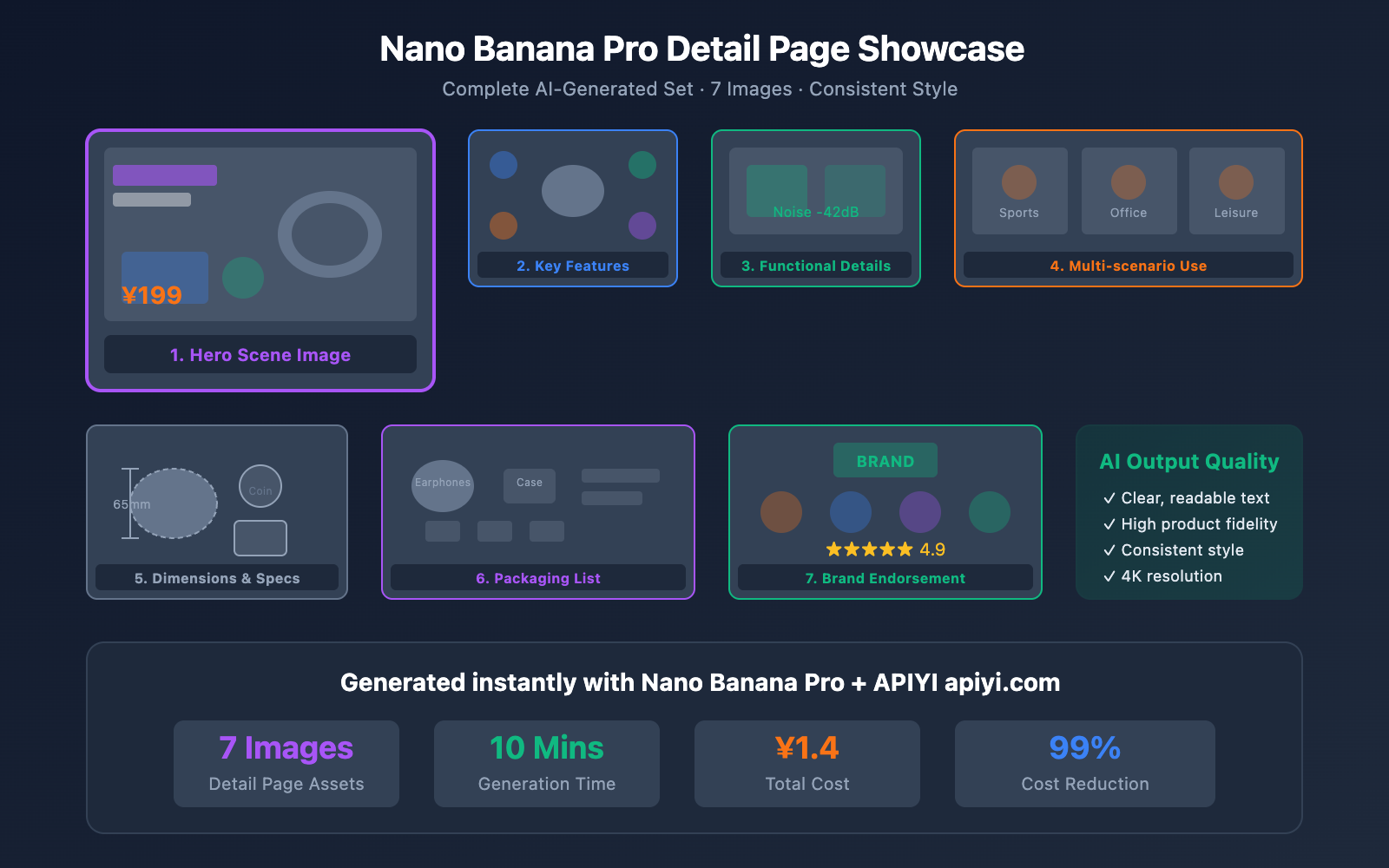
1. Hero Image (Scene-based/Main image)
   └── Showcases the product in its core usage scenario

2. Selling Points Overview
   └── Visualization of 3-5 key selling points

3. Product Detail Shots (2-3 images)
   └── Materials, craftsmanship, and functional details

4. Usage Scenario Shots (2-3 images)
   └── Demonstrations of the product in different environments

5. Specifications & Parameters
   └── Info on dimensions, weight, materials, etc.

6. Packaging List
   └── Shows everything the user will receive

7. Brand Endorsement
   └── Certifications, honors, and user reviews
Step 3: Writing Prompts
Write structured prompts for each image:
View full prompt examples (7-page detail set)
# Full E-commerce Detail Page Prompt Example - Using Bluetooth Headphones

prompts = [
    # Image 1: Hero Scene Image
    """
    Product: Wireless Bluetooth Headphones (using uploaded product image)
    Scenario: A young professional working in a cafe, wearing headphones and focused on work
    Style: Modern urban, warm tones, lifestyle style
    Composition: Product and person centered, background slightly blurred
    Text: None
    Resolution: 4K
    """,

    # Image 2: Selling Points Overview
    """
    Layout: Product centered, surrounded by 4 selling point icons
    Point 1: Top Left - Noise cancellation icon + "Active Noise Cancellation -42dB"
    Point 2: Top Right - Battery icon + "36-hour battery life"
    Point 3: Bottom Left - Connection icon + "Bluetooth 5.3 stable connection"
    Point 4: Bottom Right - Comfort icon + "Ergonomic design"
    Style: Clean infographic style, dark background, white text
    """,

    # Image 3: Noise Cancellation Details
    """
    Content: Visualization of headphone noise cancellation technology
    Elements: Soundwave graphics, headphone cross-section, close-up of noise cancellation chip
    Text: "Smart Noise Cancellation Tech" as title, "-42dB Ambient Noise" as data
    Style: High-tech feel, deep blue tones, light effect accents
    """,

    # Image 4: Wearing Comfort
    """
    Scenario: Different people wearing headphones comfortably
    Display: Wearing effects in three scenarios: running, working, and sleeping
    Layout: Three-grid horizontal arrangement
    Text: Label below each scenario: "Stays put during exercise", "Comfortable for long wear", "Side-sleep friendly"
    """,

    # Image 5: Product Dimensions
    """
    Content: Size comparison between headphones and common items
    Comparison items: Coin, phone, keys
    Labels: Precise dimensions (65mm x 45mm x 30mm)
    Style: Engineering blueprint style, clear annotation lines
    Background: Light gray grid background
    """,

    # Image 6: Packaging List
    """
    Layout: Top-down flat lay showing all accessories
    Items: Main headphones, charging case, Type-C cable, 3 pairs of ear tips, manual
    Labels: Name labeled next to each item
    Background: Solid white
    Style: Minimalist unboxing style
    """,

    # Image 7: Brand Endorsement
    """
    Content: Display of brand qualifications and positive user reviews
    Elements: Brand Logo, Hi-Res certification logo, sales data, featured reviews
    Layout: Brand info at the top, user review carousel style at the bottom
    Style: Trustworthy brand feel, gold accents
    """
]
Step 4: Batch Generate Images
# Batch generate e-commerce detail pages using APIYI
import asyncio
from openai import AsyncOpenAI

client = AsyncOpenAI(
    api_key="your-apiyi-key",
    base_url="https://api.apiyi.com/v1"  # APIYI unified interface
)

async def generate_detail_page(product_images, prompts, seed=42):
    """Batch generate e-commerce detail page images"""
    tasks = []

    for i, prompt in enumerate(prompts):
        task = client.images.generate(
            model="nano-banana-pro",
            prompt=prompt,
            n=1,
            size="2048x2048",
            quality="hd",
            extra_body={
                "input_images": product_images,
                "seed": seed,  # Keeps the style consistent
                "style_consistency": True
            }
        )
        tasks.append(task)

    results = await asyncio.gather(*tasks)
    return [r.data[0].url for r in results]

# Execute generation
product_images = ["product_front.jpg", "product_side.jpg"]
image_urls = asyncio.run(generate_detail_page(product_images, prompts))
Step 5: Quality Check and Adjustments
After generation, check the following:
| Check Item | Standard | How to Fix |
|---|---|---|
| Product Fidelity | Identical to original image | Adjust prompt to emphasize keeping original look |
| Text Clarity | Legible and clear | Reduce text amount or increase font size |
| Style Consistency | Uniform across the set | Check if the seed value is the same |
| Resolution | Meets platform requirements | Use 4K output and then scale down |
| Composition | E-commerce aesthetic | Adjust composition description and regenerate |
Nano Banana Pro E-commerce Detail Page FAQ
Q1: Can images generated by Nano Banana Pro be used commercially?
Yes, they can. According to Google's terms of service, users own the rights to images generated via the Nano Banana Pro API and can use them for commercial purposes, including e-commerce detail pages.
However, please note:
- You must have the rights to use the original product images you upload.
- You shouldn't generate content that infringes on others' trademarks or copyrights.
- It's recommended to keep generation records as proof of usage rights.
When calling via APIYI (apiyi.com), you enjoy the same commercial rights.
Q2: What’s the approximate cost of generating a set of detail pages?
Taking a set of 7 images at 2K resolution as an example:
| Channel | Cost per Image | Cost per Set | Notes |
|---|---|---|---|
| Google Official | ~$0.04 | ~$0.28 | Requires international credit card |
| APIYI Platform | ~¥0.2 | ~¥1.4 | Supports Alipay/WeChat |
Compared to traditional designers (¥200-500 per set), AI generation costs are reduced by 99%, and you can iterate and optimize much faster.
Q3: How do I handle blurry text in generated images?
Here are a few optimization tips:
- Reduce text count: Keep it under 10 words per image.
- Increase font size: Emphasize "large font" or "bold title" in your prompt.
- Increase contrast: Specify text colors that contrast with the background (e.g., black text on white).
- Reserve space: Clearly define text areas in the composition to avoid overlapping with the product.
- Post-processing overlay: For complex text, you can overlay it later using design software.
Text rendering is significantly better with the 4K output option on APIYI (apiyi.com).
Q4: Taobao/JD main images can’t have text. How do I handle this?
For main images, your prompt should be very specific:
"Pure product display image, no text, watermarks, icons, or decorative elements.
Product occupies over 80% of the frame, solid white background."
You can also generate two versions:
- Version A: No text → for the main listing image.
- Version B: With text → for the interior detail page.
Q5: How do I ensure style consistency across multiple images?
Three key settings:
- Fix the Seed value: Use the same random seed for all images.
- Style Reference Image: Upload a style reference image to act as an anchor.
- Unified Prompt Prefix: Use the same style description prefix for all prompts.
When calling via APIYI (apiyi.com), you can set the style_consistency: true parameter to automatically optimize consistency.
Nano Banana Pro vs. Other AI Image Generation Tools
| Tool | Text Rendering | Product Fidelity | Batch Capability | E-commerce Suitability | Recommendation |
|---|---|---|---|---|---|
| Nano Banana Pro | ⭐⭐⭐⭐⭐ | ⭐⭐⭐⭐⭐ | ⭐⭐⭐⭐⭐ | ⭐⭐⭐⭐⭐ | Highly Recommended |
| Midjourney | ⭐⭐ | ⭐⭐⭐ | ⭐⭐⭐ | ⭐⭐⭐ | Great for creative art |
| DALL-E 3 | ⭐⭐⭐ | ⭐⭐⭐ | ⭐⭐⭐⭐ | ⭐⭐⭐ | General use cases |
| Stable Diffusion | ⭐⭐ | ⭐⭐⭐⭐ | ⭐⭐⭐⭐⭐ | ⭐⭐⭐ | Requires fine-tuning |
| Claid.ai | ⭐⭐⭐ | ⭐⭐⭐⭐ | ⭐⭐⭐⭐⭐ | ⭐⭐⭐⭐ | Focused on E-commerce |
💰 Cost Optimization: If you need to use multiple AI models simultaneously, APIYI (apiyi.com) provides a unified interface. It supports various models like Nano Banana Pro, DALL-E 3, and Midjourney, allowing you to switch as needed with unified billing.
Summary
Mastering e-commerce detail pages with Nano Banana Pro comes down to these 7 core tips:
- Use real photos for the main product — Let AI handle only the background and scene.
- Use structured prompt templates — Include the five key elements: scene, lighting, style, composition, and text.
- Leverage image blending for comparison shots — Generate Before/After images with a single click.
- Batch generate to maintain style consistency — Use a fixed Seed + Style Reference images.
- Best practices for text rendering — Keep it short, use large fonts, and ensure high contrast.
- Optimize output for different platforms — Understand the specific requirements and specs for each marketplace.
- Build a reusable template library — Boost your long-term efficiency.
Nano Banana Pro's breakthroughs in text rendering and product fidelity mean that AI-generated e-commerce detail pages are finally ready for professional commercial use. Combined with the easy access provided by APIYI (apiyi.com), e-commerce sellers can now achieve:
- 80% Efficiency Boost: Cut down the time to create a full set of detail pages from 2 days to just 10 minutes.
- 99% Cost Reduction: Bring costs down from hundreds of dollars to just a few cents.
- Rapid Iterative Testing: Easily run A/B tests on different styles of detail pages.
We recommend getting started via APIYI (apiyi.com). The platform supports mainstream AI image generation models like Nano Banana Pro and offers an OpenAI-compatible interface with stable direct access.
References
-
Google AI – Nano Banana Pro Official Documentation
- Link:
ai.google.dev/gemini-api/docs/image-generation - Description: Nano Banana Pro API usage guide
- Link:
-
Shopify Magic – AI Product Description Generation
- Link:
www.shopify.com/magic - Description: Introduction to Shopify's official AI tools
- Link:
-
E-commerce AI Image Generation Best Practices
- Link:
claid.ai/blog/article/ai-product-photo-tools - Description: 2026 E-commerce AI tool summary
- Link:
📝 Author: APIYI Team
🔗 Technical Support: APIYI apiyi.com – One-stop Large Language Model API relay platform
📅 Updated: 2026-01-24