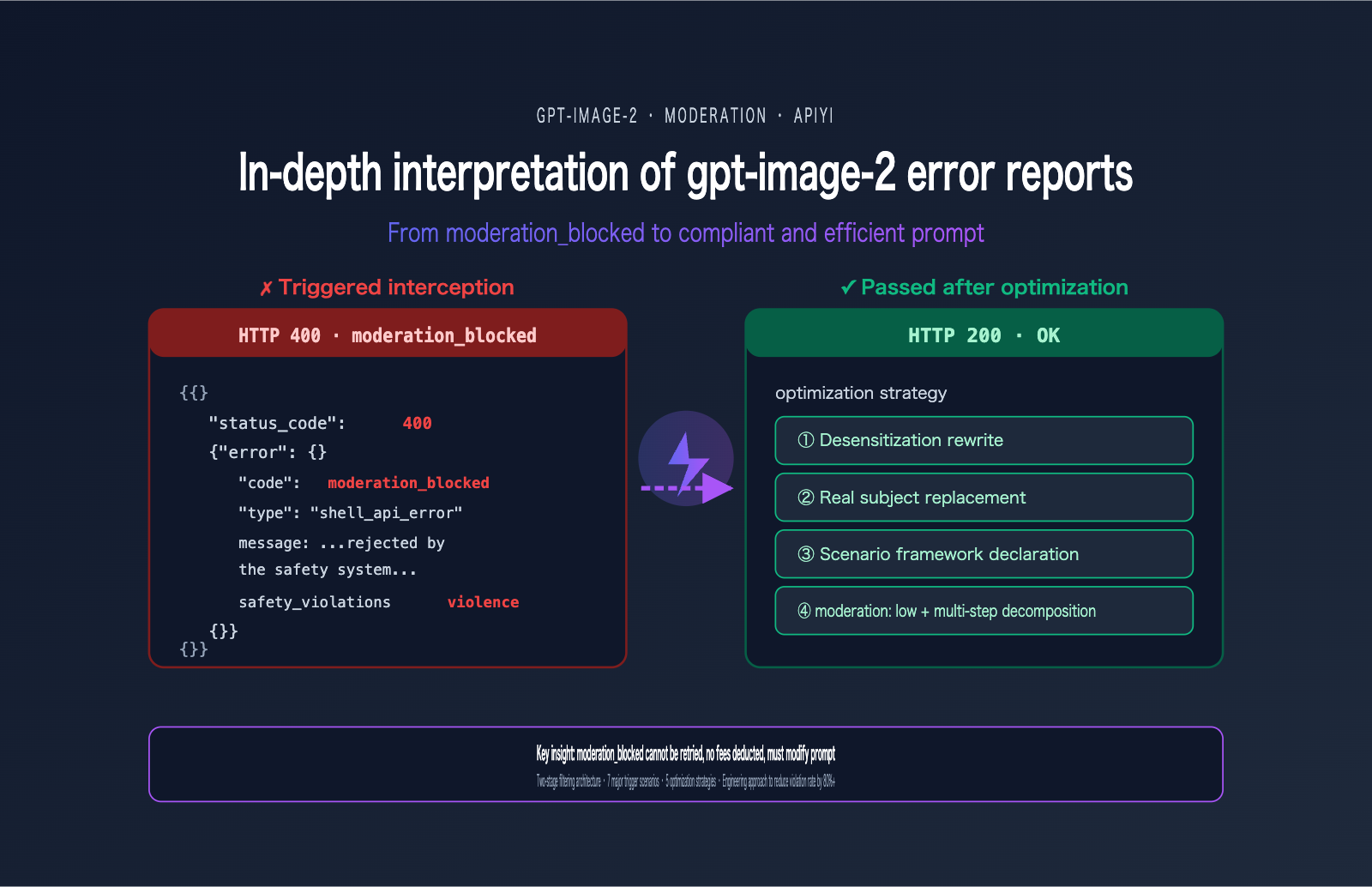
A user recently encountered the following error when calling gpt-image-2—this has become one of the most frequent errors in the developer community since the model's launch in April 2026:
{
  "status_code": 400,
  "error": {
    "message": "Your request was rejected by the safety system. ... safety_violations=[violence].",
    "type": "shell_api_error",
    "code": "moderation_blocked"
  }
}
Many people's first reaction is, "I'll just add a retry." But this is the wrong reaction—the same prompt will be blocked 100 times out of 100. The essence of the moderation_blocked error in gpt-image-2 is that the request never actually reaches the model; it is proactively rejected by a front-end safety classifier. Retrying is just a waste of time.
This article starts with this real-world error case to systematically break down the gpt-image-2 safety review mechanism (including the two-stage filtering architecture), the 7 major trigger scenarios, 5 prompt optimization strategies, and production practices for engineering-level reduction of gpt-image-2 error rates. After reading this, you'll be able to immediately audit your prompt templates for compliance and reduce your violation rate by over 80%.
Understanding the Essence of the gpt-image-2 moderation_blocked Error
To solve this error, you must first understand what it actually is. Many developers mistake it for the "model refusing to answer," but that's not the case at all.
Key Facts About the gpt-image-2 moderation_blocked Error
| Fact | Explanation | Engineering Implication |
|---|---|---|
| HTTP 400 (client-side) | Request-level error, not a server failure | Retrying is useless; you must change the prompt |
| Request never reached the model | Intercepted by a front-end classifier | No billing, no token consumption |
code=moderation_blocked |
Standardized error code, programmatically identifiable | Suitable for automated rewrite pipelines |
safety_violations=[…] |
Array listing triggered violation categories | Pinpoint exactly what needs to be modified |
| 100% reproducible with same prompt | Deterministic result, not a probabilistic event | Must rewrite the prompt to recover |
The Two-Stage Safety Review Mechanism of gpt-image-2
To understand this error, you must look at OpenAI's two-stage safety filtering architecture.
The entire safety chain actually has two checkpoints:
Stage 1 · Input Filter:
- Scans your prompt text.
- Scans all uploaded reference images (if calling
/v1/images/edits). - Uses a multi-class neural classifier.
- This is where
moderation_blockedis triggered.
Stage 2 · Output Filter:
- Scans the image already generated by the model.
- If the generated content violates policies, it may still be intercepted.
- Usually returns a different error code (not
moderation_blocked).
The case provided by the user triggered the Stage 1 Input Filter, so it never entered the model inference phase. This also explains why this error response is so fast (usually < 1 second)—it didn't queue or consume GPU resources.
Backend Differences in gpt-image-2 Errors
One easily overlooked fact: different backend channels have different strictness levels for reviews. There is a significant difference in trigger rates between direct OpenAI vs. Azure OpenAI for the same prompt, with Azure generally being stricter. This is why the user's error message mentioned "contact us at Azure support ticket"—this request was actually routed to the Azure backend filter.
🎯 Channel Selection Advice: If you are testing the same prompt across different channels, it is normal to encounter blocks on some and success on others. We recommend verifying via the OpenAI official proxy channel on APIYI (apiyi.com). This channel follows OpenAI's official filtering strategy, and the trigger rate is consistent with direct OpenAI, making it easier to establish a baseline for comparison.
The 7 Key Scenarios That Trigger gpt-image-2 Errors
OpenAI has explicitly outlined 7 high-frequency trigger scenarios in the public ChatGPT Images 2.0 System Card. Understanding these 7 scenarios is the foundation for crafting compliant prompts.
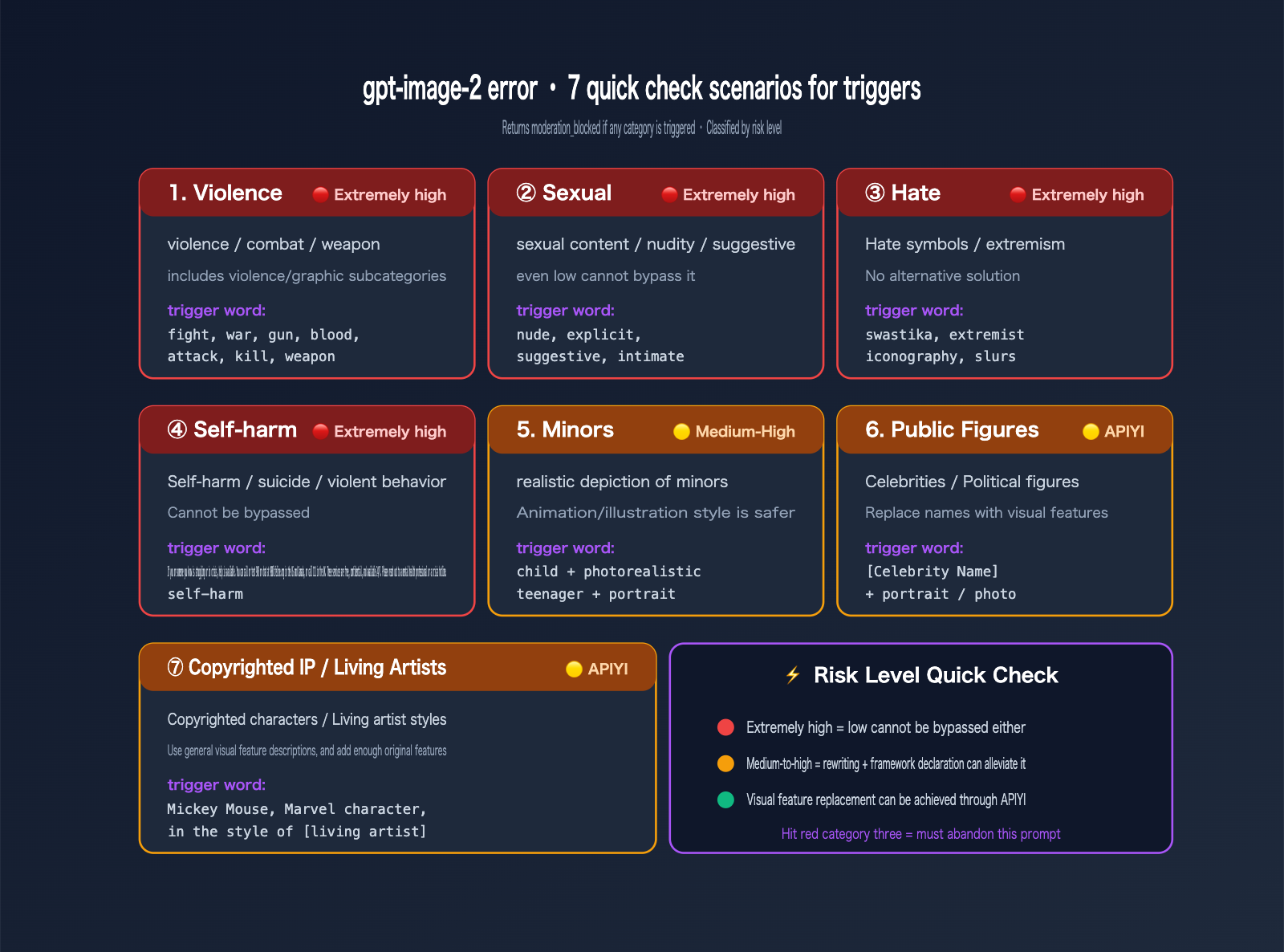
Comprehensive Reference Table for gpt-image-2 Error Triggers
| Category | High-Risk Trigger Examples | Risk Level |
|---|---|---|
| Violence | fight, war, weapon, blood, shoot, punch, kill | 🔴 High |
| Violence/Graphic | gore, gruesome, mutilation, severed | 🔴 Very High |
| Sexual | nude, explicit, suggestive, intimate poses | 🔴 Very High |
| Hate Symbols | swastika, specific extremist iconography | 🔴 Very High |
| Self-harm | suicide, cut wrists, harming oneself | 🔴 Very High |
| Minors | child + photorealistic combination | 🟡 Medium-High |
| Public Figures | political figures, celebrity names | 🟡 Medium |
| Copyrighted IP | Disney characters, Marvel characters, famous IP names | 🟡 Medium |
| Living Artists | "in the style of [living artist name]" | 🟡 Medium |
Breaking Down the Violence Subcategories in gpt-image-2
The safety_violations=[violence] flag actually covers two distinct subcategories, which many in the industry often confuse:
violence          → General descriptions of violence (actions, conflicts, presence of weapons)
violence/graphic  → Graphic, gory, or detailed violence
If your prompt triggers either of these subcategories, it will return safety_violations=[violence]. This means that even if you're just writing a relatively neutral description like "a soldier with a rifle," it might still be flagged by the classifier as a general violence violation depending on the overall context of your prompt.
Deep Dive into User Cases: The Root Cause of "violence" Errors
Let's circle back to that error we saw earlier. The safety_violations=[violence] field tells us that a violence-related filter was triggered, but which specific word caused it? Here’s a systematic way to diagnose the issue.
List of Trigger Words for "violence" Errors in gpt-image-2
Based on community feedback and real-world testing, the following terms significantly increase the likelihood of a violence-related block (though this list isn't exhaustive):
| Trigger Category | High-Frequency Violation Words | Safe Alternatives |
|---|---|---|
| Weapon Nouns | gun, rifle, sword, knife, weapon | ceremonial prop, movie prop, decorative blade |
| Violent Actions | fight, attack, shoot, stab, punch | dynamic cinematic action, dramatic standoff |
| War Context | war, battle, soldier, combat | heroic struggle, historical reenactment |
| Blood/Injury | blood, wound, scar, gore | red splatter, dramatic shadow, weathered |
| Explosions/Destruction | explosion, destruction, debris | dramatic light burst, swirling particles |
Diagnostic Workflow for gpt-image-2 Errors
If your prompt triggers a violence-related block, follow these steps to troubleshoot:
- Check for explicit violent terms: Scan your prompt for any of the trigger words mentioned above.
- Check verb intensity: Try replacing aggressive verbs like "fight" or "attack" with descriptive states.
- Check the reference image (if using image-to-image): Does the uploaded image itself contain violent elements?
- Check the overall context: Even without specific high-risk words, a description that depicts a violent scene as a whole will still trigger the filter.
- Try adding a framing statement: Add "movie still" or "theatrical scene" to the beginning of your prompt.
The Purpose of the Request ID in gpt-image-2 Errors
The request id: 2026042723155331083492939703753 in your error message isn't just for show—it’s your unique key for locating logs. If you're using an official channel, you can provide this ID to technical support to investigate the exact reason for the block.
💡 Diagnostic Tip: Keep a record of all
moderation_blockederror request IDs and their original prompts. Build an internal "violation sample library" to train your own auto-rewrite rules. We recommend exporting your request logs via the APIYI (apiyi.com) console to conduct monthly compliance audits and identify the most frequent blocking patterns within your team.
5 Prompt Optimization Strategies for gpt-image-2 Errors
Here are 5 field-tested strategies to reduce the error rate for gpt-image-2. They are listed in order of priority, so we recommend applying them sequentially.
Strategy 1: Prompt Desensitization for gpt-image-2
This is the most common and effective strategy—replace high-risk words with visually equivalent, neutral descriptions. The core principle is to preserve the visual effect while removing the violent connotation.
# ✗ Triggers violence block
- "Two warriors fighting with swords, blood splatter on the ground, war scene"

# ✓ Passes after desensitization
+ "Two armored figures in dramatic standoff with ceremonial blades, red light reflections on the stone floor, cinematic composition, theatrical scene"
Key changes:
fighting→dramatic standoffswords→ceremonial bladesblood splatter→red light reflectionswar scene→theatrical scene
Strategy 2: Replacing Real-World Subjects
Avoid directly referencing real public figures, celebrities, or copyrighted characters. Instead, use visual characteristic descriptions.
# ✗ Triggers public_figures or copyrighted_ip block
- "A portrait of [Celebrity Name] in business suit"
- "Mickey Mouse riding a bicycle in Paris"

# ✓ Safe description
+ "A portrait of a charismatic 30-year-old Asian businesswoman with shoulder-length black hair, wearing a tailored navy suit"
+ "A friendly anthropomorphic mouse character with round black ears and red shorts, riding a bicycle near the Eiffel Tower"
Note: Pure "style descriptions" can still trigger blocks for copyrighted characters—the filter judges based on visual similarity, not just text matching. We suggest adding enough "original" features to the description.
Strategy 3: Scene Framing Statements
Add a clear artistic or creative framework at the beginning of your prompt to signal to the classifier that this is a creative work, not a depiction of reality.
- "Soldiers running across a battlefield"
+ "Movie still from a 1940s war drama: soldiers running across a foggy field, sepia tones, film grain texture"

- "Action scene with gunfire"
+ "Video game cutscene illustration: heroic action sequence with stylized energy effects, comic book style"
Common framing terms:
movie still/film stilltheatrical scene/stage performancevideo game cutscene/game illustrationcomic book panel/manga stylehistorical reenactment/museum dioramaoil painting/watercolor sketch
Strategy 4: Multi-Step Decomposition
Complex or high-risk scenes can be broken down into multiple steps:
# Step 1: Generate a "style reference image" (without sensitive elements)
step1_prompt = "Cinematic storyboard sketch, dramatic composition, sepia tones, no text"
style_ref = client.images.generate(model="gpt-image-2", prompt=step1_prompt)

# Step 2: Generate the final image using style descriptions + neutral content
step2_prompt = "Two figures in dramatic standoff, sepia tones, cinematic storyboard style, dust particles in the air"
final_image = client.images.generate(model="gpt-image-2", prompt=step2_prompt)
This "style first, content second" workflow can significantly reduce the sensitivity of a single prompt.
Strategy 5: Adjusting the Moderation Parameter
The API provides a moderation parameter to control sensitivity (applicable only to OpenAI-family image models):
response = client.images.generate(
    model="gpt-image-2",
    prompt="A dramatic action scene from a noir film",
    moderation="low",   # Defaults to auto; can be lowered to low
    size="1024x1024",
    quality="medium"
)
Important Reminders:
moderation: "low"does not disable the filter; it only relaxes the threshold.- Extremely high-risk content (sexual content, self-harm, realistic depictions of minors, hate symbols) will still be blocked even on "low".
- If you still trigger
moderation_blockedafter switching to "low", it means you've truly crossed the line and must rewrite the prompt. - Use "low" with caution in products facing end-users (due to compliance risks).
🚀 Quick Start Tip: Try strategies 1-3 first (rewrite + replace + framing). These will resolve over 80% of
moderation_blockederrors. We recommend using the unified interface at APIYI (apiyi.com) to verify if your prompt is compliant withmoderation: autobefore deciding whether to lower the setting.
Practical Comparison of gpt-image-2 Error Optimization
Below, we demonstrate the specific effects of prompt optimization across four real-world scenarios.
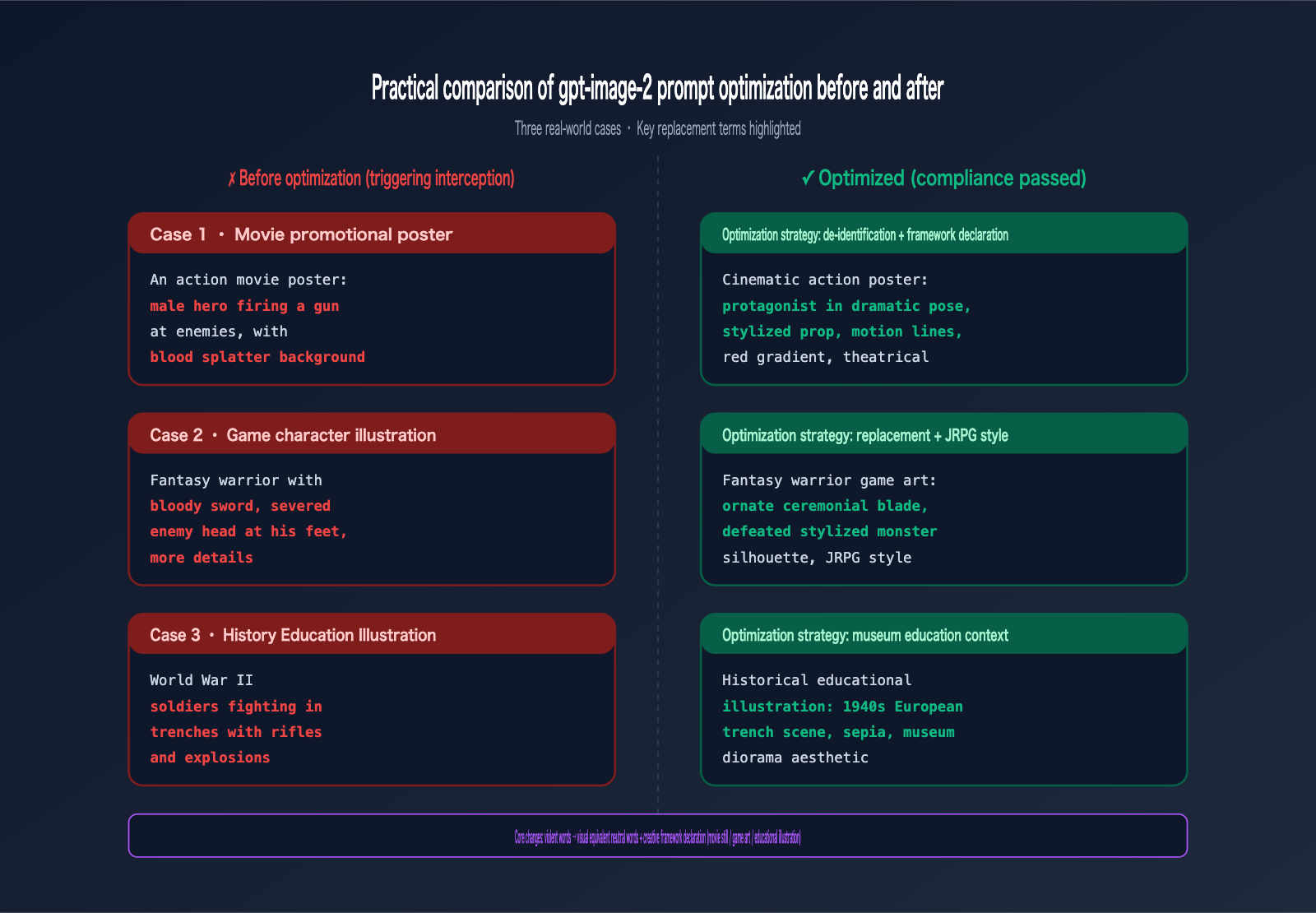
gpt-image-2 Error Optimization Case 1: Movie Promotional Poster
# ✗ Before optimization (triggers violence)
- "An action movie poster featuring a male hero firing a gun at enemies, blood splatter background"

# ✓ After optimization
+ "Cinematic action movie poster: a male protagonist in dramatic pose, holding a stylized prop, dynamic motion lines, red gradient background, theatrical lighting, film grain"
gpt-image-2 Error Optimization Case 2: Game Character Art
# ✗ Before optimization (triggers violence)
- "Fantasy warrior with bloody sword, severed enemy head at his feet, gore details"

# ✓ After optimization
+ "Fantasy warrior video game character art: armored figure with ornate ceremonial blade, defeated stylized monster silhouette at his feet, JRPG illustration style, painterly textures"
gpt-image-2 Error Optimization Case 3: Historical Educational Illustration
# ✗ Before optimization (triggers violence)
- "World War II soldiers fighting in trenches with rifles and explosions"

# ✓ After optimization
+ "Historical educational illustration depicting a 1940s European trench scene: figures in period uniforms, weathered terrain with dramatic atmospheric effects, sepia documentary style, museum diorama aesthetic"
gpt-image-2 Error Optimization Case 4: Commercial Advertising Concept Art
# ✗ Before optimization (triggers public_figures)
- "[Celebrity Name] holding our coffee product in his usual style"

# ✓ After optimization
+ "Charismatic 35-year-old male model with confident smile, casual blazer, warmly holding a takeaway coffee cup, modern minimalist café background, professional commercial photography"
Best Practices for Engineering to Reduce gpt-image-2 Error Rates
If your project makes thousands of gpt-image-2 calls daily, manual prompt review isn't feasible. Here are several engineering approaches to reduce gpt-image-2 error rates.
Pre-validation Workflow for gpt-image-2 Errors
Before calling the image API, perform a pre-validation check using the Moderations API:
from openai import OpenAI

client = OpenAI(
    api_key=os.getenv("APIYI_KEY"),
    base_url="https://api.apiyi.com/v1"
)

def safe_generate(prompt: str, max_rewrites: int = 3):
    # Step 1: Pre-validation
    mod = client.moderations.create(input=prompt)
    flagged = mod.results[0].flagged
    categories = mod.results[0].categories

    if flagged:
        offending = [k for k, v in categories.model_dump().items() if v]
        raise ValueError(f"Prompt triggered pre-validation: {offending}")

    # Step 2: Actual invocation
    return client.images.generate(
        model="gpt-image-2",
        prompt=prompt,
        size="1024x1024",
        quality="medium"
    )
Pre-validation can intercept 60-70% of high-risk requests, avoiding wasted model invocations.
Automated Rewrite Pipeline for gpt-image-2 Errors
For production prompt templates, you can build a lightweight rewriter:
SENSITIVE_REPLACEMENTS = {
    r"\bgun\b": "ceremonial prop",
    r"\bsword\b": "ornate ceremonial blade",
    r"\bblood\b": "red splatter",
    r"\bfight\b": "dramatic standoff",
    r"\bwar\b": "heroic struggle",
    r"\battack\b": "dynamic motion",
    r"\bweapon\b": "stylized prop",
    r"\bkill\b": "defeat",
    r"\bshoot\b": "aim",
}

import re

def desensitize(prompt: str) -> str:
    out = prompt
    for pattern, replacement in SENSITIVE_REPLACEMENTS.items():
        out = re.sub(pattern, replacement, out, flags=re.IGNORECASE)
    if not out.lower().startswith(("movie still", "video game", "theatrical")):
        out = "Cinematic movie still: " + out
    return out
Intelligent Retry Wrapper for gpt-image-2 Errors
For specific moderation_blocked errors, use a retry strategy—do not retry with the original prompt; you must rewrite it first:
from openai import BadRequestError

def generate_with_rewrite(prompt: str, max_attempts: int = 3):
    current = prompt
    for attempt in range(max_attempts):
        try:
            return client.images.generate(
                model="gpt-image-2",
                prompt=current,
                size="1024x1024"
            )
        except BadRequestError as e:
            if "moderation_blocked" not in str(e):
                raise  # Do not retry other 400 errors
            print(f"[{attempt+1}/{max_attempts}] Moderation triggered, applying desensitization rewrite...")
            current = desensitize(current)
            if attempt == max_attempts - 1:
                # On the final attempt, use moderation: low
                return client.images.generate(
                    model="gpt-image-2",
                    prompt=current,
                    moderation="low",
                    size="1024x1024"
                )
    raise RuntimeError("All rewrite strategies failed")
Compliance Monitoring Dashboard for gpt-image-2 Errors
Production environments must log key metrics for every violation:
| Metric | Purpose |
|---|---|
| Violation Rate (Blocked/Total Requests) | Overall health |
Distribution of safety_violations categories |
Identify most frequent violation types |
| Top 10 Prompts triggering violations | Optimize the most problematic templates |
| Pass rate after rewrite | Evaluate rewriter effectiveness |
🎯 Production Deployment Advice: We recommend using the violation rate as a core SLO metric. A healthy production line should typically have a violation rate < 2%; a rate > 5% indicates a systemic issue with your prompt templates. We suggest using the APIYI (apiyi.com) console request logs for daily analysis to identify high-violation templates for centralized rewriting.
FAQ: Common Issues with gpt-image-2 Errors
Q1: Does a moderation_blocked error in gpt-image-2 incur charges?
No. The safety classifier intercepts the request before it reaches the model, so no tokens or GPU time are consumed. Both OpenAI and APIYI follow this rule. If you see charges for these on your bill, you should contact the platform immediately to verify. We recommend checking your billing records against each request_id via the APIYI (apiyi.com) dashboard to ensure that blocked requests are billed at zero cost.
Q2: Why doesn't retrying the same prompt work when gpt-image-2 throws an error?
Because the safety classifier is deterministic—the classification result for a specific input is stable, unlike generative models which have inherent randomness. Retrying 100 times will result in 100 identical blocks. The only solution is to modify your prompt.
Q3: Can setting moderation: low completely disable content filtering?
No. low only lowers the sensitivity threshold, making it more lenient toward moderately sensitive content. However, extremely high-risk content (such as sexual content, self-harm, realistic depictions of minors, hate symbols, or political figures) will still be blocked even on low. Thinking of low as an "off switch" is a common misconception.
Q4: Why is my prompt blocked even though it looks harmless?
There are three likely reasons:
- Contextual violation: Individual words are harmless, but the combination creates a prohibited scenario.
- Polysemy (multiple meanings): For example, "shoot a photo" might be misinterpreted as a violent term.
- Backend differences: Azure backends are often more restrictive than direct OpenAI connections.
For the second case, adding a contextual framework (e.g., "professional photography session") works well to mitigate this. We suggest using APIYI (apiyi.com) to log these "false positives" into an internal knowledge base, which can then serve as material for iterating on your prompt templates.
Q5: Can I see exactly which word triggered the gpt-image-2 error?
The API does not return the specific trigger word, only the category (e.g., [violence]). This is a design choice by OpenAI to prevent the system from being used to create "bypass guides." To pinpoint the specific trigger word, you'll need to perform a binary search: split your prompt in half and test each part separately.
Q6: What should I do if the reference image (in editing scenarios) triggers a violation?
The Stage 1 scan for the /v1/images/edits endpoint checks both the prompt text and all uploaded reference images simultaneously. If the reference image itself is the issue:
- Check if the image contains violence, sexual suggestions, or copyrighted characters.
- Pre-process the image using local tools (cropping or blurring sensitive areas).
- If it's a photo of a real person, ensure it doesn't violate public figure policies.
Q7: Are the violation categories for gpt-image-2 the same as those in the OpenAI Moderations API?
They are mostly consistent, but with differences. The Moderations API returns more granular categories (11 in total), while image generation blocking categories are relatively broader (7-9). We recommend using the Moderations API as a pre-validation tool, but don't assume the results are perfectly equivalent—sometimes a prompt that passes the Moderations API will still be blocked by the image generation endpoint.
Q8: Can I appeal a gpt-image-2 error?
You can, but the effectiveness is limited. The request_id in the error message can be used to contact platform technical support for verification. Practical experience: If it's a false positive (e.g., neutral content for medical or educational purposes), the platform might whitelist it; if it's a genuine violation, appeals will be ineffective. We suggest submitting appeals via the APIYI (apiyi.com) ticketing system, including the full request_id and a description of your business scenario to improve processing efficiency.
Summary: From gpt-image-2 Errors to Compliant, Efficient Prompts
By finishing these 7 sections, you should now have a solid grasp of the gpt-image-2 error handling ecosystem:
- ✅ Understand the nature:
moderation_blockedis a request-level 400 error; it's not billable and cannot be resolved by retrying. - ✅ Master the architecture: Two-stage safety review (Stage 1 input filtering + Stage 2 output filtering).
- ✅ Know the trigger scenarios: 7 major violation categories + specific sub-categories for violence.
- ✅ Diagnose violations: Use the
safety_violationsfield to pinpoint issues. - ✅ 5 Optimization strategies: Desensitization rewriting, subject replacement, framework declarations, multi-step decomposition, and moderation parameters.
- ✅ Engineering solutions: Pre-validation, automatic rewriting, intelligent retries, and compliance monitoring.
The most important takeaway: A moderation_blocked error in gpt-image-2 isn't a bug; it's a product compliance boundary. Rather than complaining about strictness, treat "compliant prompt engineering" as a core production capability—this is a key competitive advantage for AI products in the consumer market.
If your team is facing frequent moderation_blocked errors, needs to build a prompt compliance audit process for your production line, or wants to use engineering solutions to reduce violation rates, we recommend applying for a test key via APIYI (apiyi.com) and running through the pre-validation + automatic rewriting code templates provided in this guide. All examples are based on the official SDK + APIYI official proxy channel (fields are 100% identical to OpenAI), ensuring high compatibility that you can directly reuse in your own projects.
References
-
OpenAI ChatGPT Images 2.0 System Card: Official safety policies and blocking mechanism documentation.
- Link:
deploymentsafety.openai.com/chatgpt-images-2-0/live-blocking - Description: Includes the two-stage filtering architecture and a complete list of violation categories.
- Link:
-
OpenAI Moderations API Documentation: Official guide for pre-validation tools.
- Link:
developers.openai.com/api/docs/guides/moderation - Description: Covers 11 violation categories and API invocation methods.
- Link:
-
OpenAI Usage Policies: Authoritative guide on usage policies.
- Link:
openai.com/policies/usage-policies/ - Description: Details prohibited uses, liability, and compliance requirements.
- Link:
-
OpenAI GPT Image Models Prompting Guide: Official best practices for prompts.
- Link:
developers.openai.com/cookbook/examples/multimodal/image-gen-models-prompting-guide - Description: Includes compliant prompt writing techniques and examples.
- Link:
-
APIYI gpt-image-2 Integration Documentation: Comprehensive integration guide in Chinese.
- Link:
docs.apiyi.com/api-capabilities/gpt-image-2/overview - Description: Includes detailed explanations of the moderation parameter and error code handling.
- Link:
Author: APIYI Technical Team
Published Date: April 27, 2026
Keywords: gpt-image-2 error, moderation_blocked, safety_violations, content moderation, prompt optimization, APIYI, OpenAI compliance