description: "A deep dive into the 6 key business scenarios for gpt-image-2, exploring how it breaks through traditional AI image generation bottlenecks."
tags: [AI, gpt-image-2, image generation, business automation, APIYI]
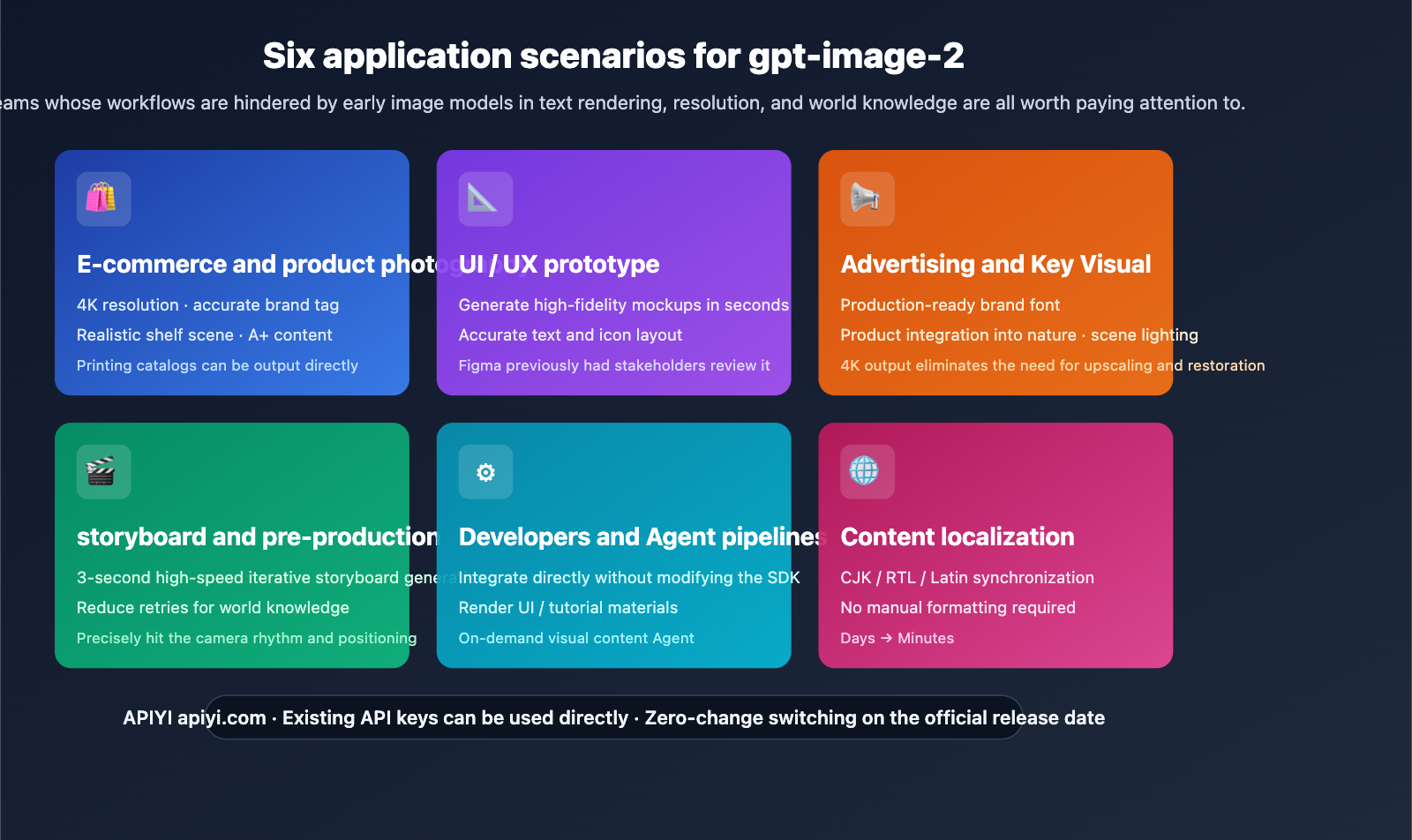
Author's Note: This guide systematically breaks down the practical value of gpt-image-2 across six major business scenarios—E-commerce, UI/UX, Advertising, Storyboarding, Developer Agents, and Content Localization—to help your team plan its integration once the API is live.
If you've been using AI for image generation, you've likely noticed a class of requirements that have been "stuck" for a long time—product images with misspelled labels, ad assets that require manual text fixes, or the inability to generate localized creative assets in multiple languages at once. These aren't just model capability issues; they are the hard ceilings of early image models regarding text rendering, resolution, and world knowledge.
This might sound like an old problem, but gpt-image-2 is systematically breaking through these ceilings. This article will deconstruct the gpt-image-2 use cases—real-world workflows across six business domains, how to integrate via API, and what this means for your team.
Core Value: From scenarios to implementation code, you'll gain a complete understanding of which business areas will benefit most from gpt-image-2 and know how to plug it into your existing pipeline the moment the API is released.
Key Takeaways for gpt-image-2 Scenarios
| Scenario | Core Value | Early Model Pain Points |
|---|---|---|
| E-commerce & Product Photography | 4K product images + accurate label text | Misspelled labels, low resolution |
| UI/UX Prototyping | High-fidelity mockups in seconds | Messy button text/icons |
| Advertising & Key Visuals | Print-ready brand fonts + 4K | Required manual PS fixes |
| Storyboarding & Pre-production | 3-second iteration + world knowledge | High cost of re-generating shots |
| Developer Agent Pipelines | Direct integration without SDK changes | Unstable generation, hard to automate |
| Content Localization | Synchronized CJK/RTL/Latin text | Manual layout for non-English |
Common Threads Across Scenarios
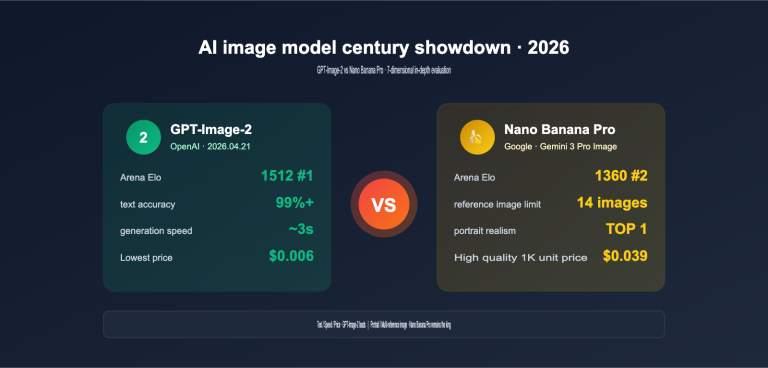
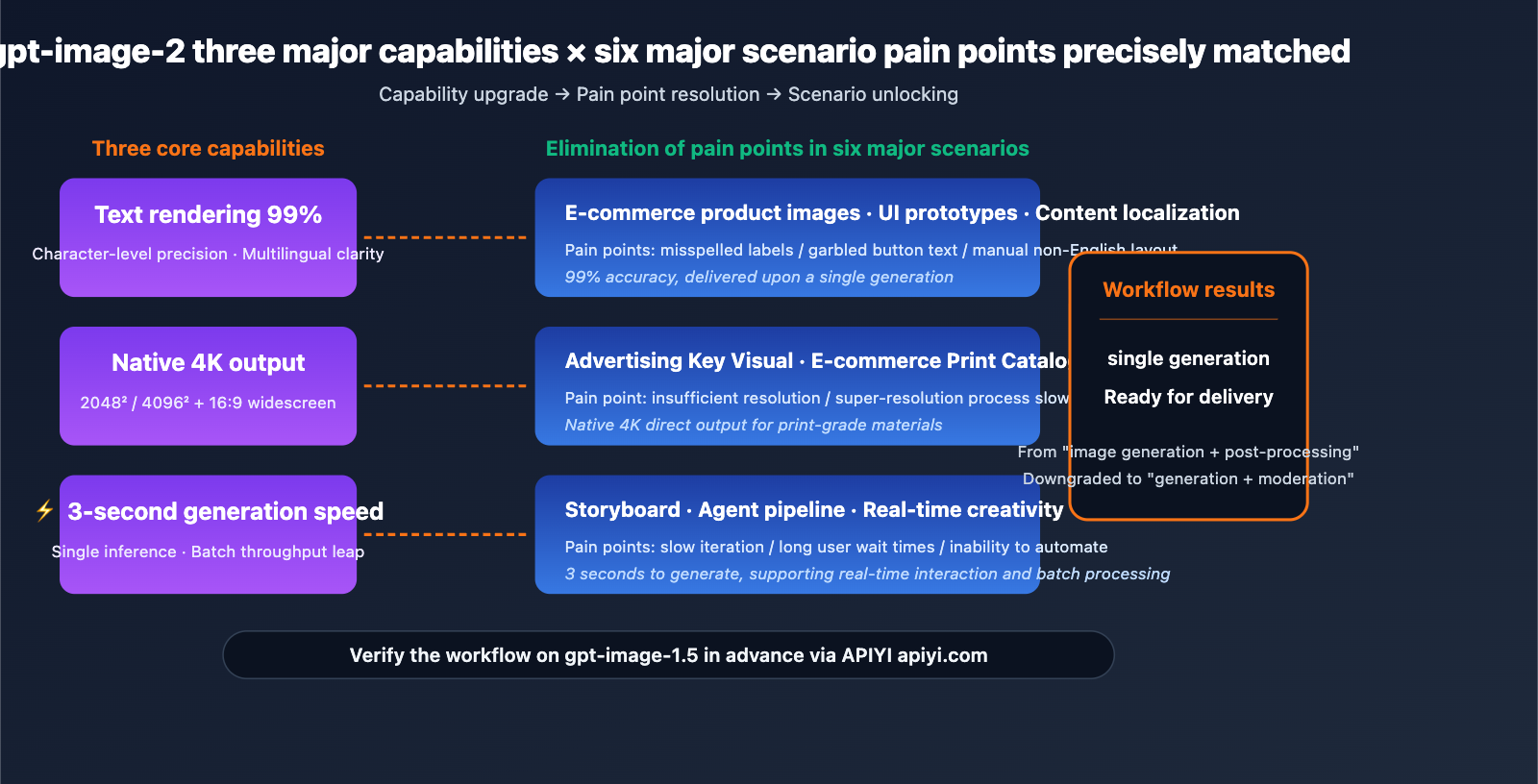
What these 6 scenarios have in common: Their workflows were previously blocked by the "hard ceilings of early image models regarding text rendering, resolution, and world knowledge." gpt-image-2’s three key metrics (99% text accuracy, 4K native output, and 3-second generation speed) precisely address these bottlenecks.
What this means for you: These scenarios previously required a two-stage workflow of AI generation + manual post-processing. With gpt-image-2, this can often be simplified to one-shot delivery, where human intervention shifts from "fixing" to "reviewing." Your team's image production efficiency is about to see a massive leap forward.
gpt-image-2 Use Case 1: E-commerce and Product Photography
Scenario Description
The biggest headache for e-commerce teams is maintaining brand consistency across bulk product images. For a single product, you might need dozens of A+ content assets—shelf displays, lifestyle shots, detail close-ups, and holiday-themed visuals. In the past, this meant either hiring professional photographers or spending hours fixing labels and packaging text after AI generation.
How gpt-image-2 Reshapes the Workflow
- Readable Labels and Accurate Packaging: With 99% text accuracy, product names, specifications, and ingredient labels are generated correctly on the first try.
- Realistic Shelf Scenarios: Its deep world knowledge ensures backgrounds (like cafes, kitchens, or office desks) align perfectly with your brand's aesthetic.
- 4K Resolution Ready for Print: Single-shot outputs are high-quality enough for printed catalogs and e-commerce A+ content, eliminating the need for extra upscaling steps.
Workflow Comparison
| Step | Traditional AI Generation | gpt-image-2 Workflow |
|---|---|---|
| Produce 1 Main Image | 3-5 retries + Photoshop text fixes | 1 generation |
| Batch 20 Variants | ~2-3 hours | ~10 minutes |
| Print-Ready Resolution | Requires upscaling software | Native 4K direct output |
| Brand Label Accuracy | Requires manual proofreading | ~99% automatic accuracy |
Pro Tip: E-commerce teams can integrate gpt-image-1.5 via APIYI (apiyi.com) to get familiar with the batch model invocation structure. Once gpt-image-2 is released, simply swap the
modelfield to immediately enjoy the dual upgrade of 4K resolution and 99% text accuracy.
gpt-image-2 Use Case 2: UI/UX Prototyping
Scenario Description
Product managers and designers often need to quickly present high-fidelity application interface mockups to stakeholders during the early stages of a project. Building from scratch in Figma takes hours, and outsourcing design work leads to high communication overhead. Previously, UI screenshots generated by image models were almost unusable, featuring garbled button text and misaligned icons.
How gpt-image-2 Reshapes the Workflow
- High-Fidelity Mockups in Seconds: 3-second generation with accurate text makes concept drafts "ready to use" right out of the box.
- Precise Text, Icons, and Layouts: Button copy, navigation labels, and data tables are all crisp and legible.
- Stakeholder Approval Before Opening Figma: Significantly shortens the product decision-making cycle.
Typical Prompt Example
A modern mobile banking app dashboard screen,
- Top navigation: "Accounts · Transfer · Pay · Invest"
- Account card showing balance "$12,847.50" with "Main Checking"
- Transaction list with 3 items: "Starbucks -$5.40", "Salary +$4,200", "Netflix -$15.99"
- Bottom tab bar: Home, Cards, Rewards, Settings
iOS-style, light mode, Apple system font
When you input this prompt into gpt-image-2, the text in the generated screenshot will be rendered verbatim—a feat that was impossible for all previous image models.
gpt-image-2 Use Case 3: Advertising and Key Visuals
Scenario Description
Marketing teams need key visual assets (posters, banners, social media covers) that meet production-grade quality: correct brand typography, natural product integration, and spot-on lighting. Traditional workflows require days of collaboration between photographers, retouchers, and designers.
How gpt-image-2 Reshapes the Process
- Correct Brand Typography: A 99% accuracy rate means slogans, product names, and CTA button text are perfect on the first try.
- Natural Product Integration: Its world knowledge ensures products appear in realistic consumer scenarios rather than looking like "floating" composites.
- Spot-on Scene Lighting: Improvements in realism ensure portraits, hands, and reflections match authentic photographic lighting.
- 4K Output Eliminates "Upscaling": You can skip the super-resolution step that was previously a mandatory part of most marketing pipelines.
Most Benefited Ad Types
| Ad Type | gpt-image-2 Value |
|---|---|
| Social Media Feed | 1:1 square images + accurate CTA text |
| YouTube Thumbnails | Native 16:9 + readable on 4K displays |
| Outdoor/LED Ads | 4096×4096 direct output for large screens |
| Printed Posters | Native 4K supports A3/A2 printing |
| Email Headers | Rapid iteration for A/B testing multiple versions |
Integration Tip: For advertising creative pipelines, we recommend using the unified API from APIYI (apiyi.com). You won't need to modify your business code when gpt-image-2 launches; just switch the model name.
gpt-image-2 Use Case 4: Storyboarding and Pre-production
Scenario Description
Film directors, creative directors, and animators need to iterate on storyboards quickly during pre-production. In traditional workflows, artists hand-draw scenes based on scripts, with each iteration taking hours. Even with AI assistance, previous models struggled with stability regarding "character consistency" and "scene accuracy."
How gpt-image-2 Reshapes the Process
- High-Speed Storyboard Iteration: A 3-second generation speed allows directors to adjust shot pacing in real-time while discussing with writers or clients.
- Nailing Shot Pacing, Scenes, and Character Positioning: Its world knowledge gets complex scenes—like "underground garage + rainy night + protagonist standing under a street lamp"—right on the first try.
- Lower Retrial Costs: Reduces the average number of attempts needed for a usable image from 5-6 down to 1-2.
Workflow Changes
Traditional Storyboard Workflow:
Script → Artist hand-drawing → Director review → Revisions → Redrawing (3-5 cycles)
Time: 1-2 weeks / episode

gpt-image-2 Assisted Workflow:
Script → gpt-image-2 generation (3 seconds) → Director adjusts prompt in real-time → Finalized
Time: 1-2 days / episode
Efficiency Gains: Pre-production cycles can be compressed by over 80%, freeing up time for more refined shot design. We recommend using the batch processing interface from APIYI (apiyi.com) to handle entire episode storyboards.
gpt-image-2 Use Case 5: Developer Tools and Agent Pipelines
Scenario Description
An increasing number of AI products require dynamic visual content generation: educational Agents generating tutorial screenshots, gaming Agents creating concept art, or document Agents generating illustrations. In the past, integrating image models meant modifying SDKs, managing multiple vendor accounts, and handling inconsistent API structures.
How gpt-image-2 Reshapes This
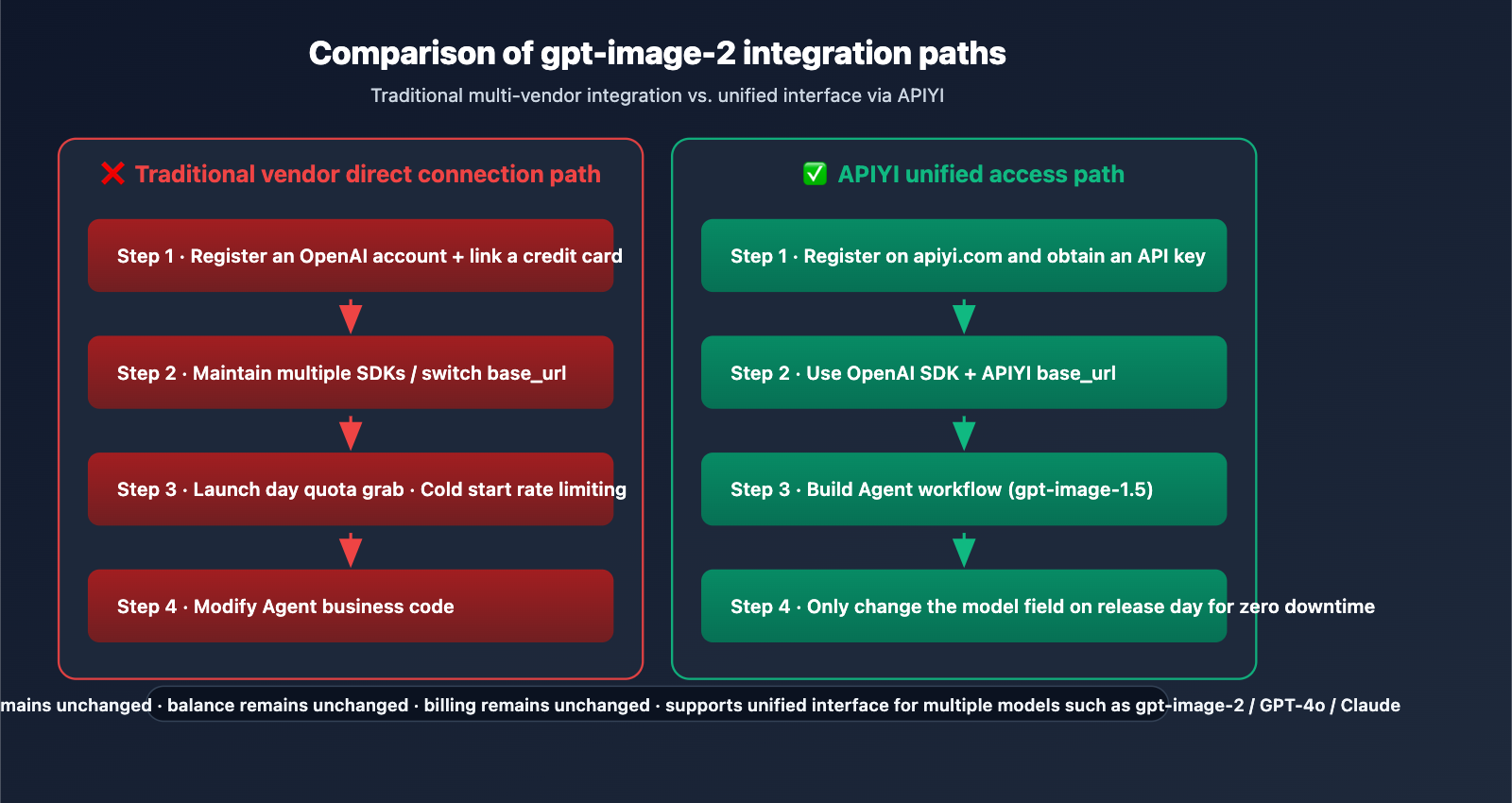
- No SDK modifications needed; plug-and-play integration: The API parameter structure is fully compatible with gpt-image-1.5.
- Perfect for Agents: Ideal for products that need to render UI, tutorial assets, or on-demand visual content.
- Native compatibility with OpenAI Agents SDK and AgentKit: Function calling can trigger image generation directly.
Minimalist Agent Pipeline Example
from openai import OpenAI

client = OpenAI(
    api_key="YOUR_APIYI_KEY",
    base_url="https://vip.apiyi.com/v1"
)

def agent_generate_image(scene_description: str) -> str:
    """Agent tool: Generate scene illustrations on demand"""
    response = client.images.generate(
        model="gpt-image-1.5",  # Switch to "gpt-image-2" after release
        prompt=scene_description,
        size="1024x1024",
        quality="high"
    )
    return response.data[0].url

image_url = agent_generate_image(
    "Step 3 of the tutorial: user clicks 'Connect API Key' button in settings"
)
View full Agent integration code (including Function Calling)
from openai import OpenAI
import json

client = OpenAI(
    api_key="YOUR_APIYI_KEY",
    base_url="https://vip.apiyi.com/v1"
)

tools = [{
    "type": "function",
    "function": {
        "name": "generate_image",
        "description": "Generate an image for the current tutorial step",
        "parameters": {
            "type": "object",
            "properties": {
                "prompt": {"type": "string", "description": "Image description"},
                "size": {"type": "string", "enum": ["1024x1024", "1536x1024"]}
            },
            "required": ["prompt"]
        }
    }
}]

def generate_image(prompt: str, size: str = "1024x1024") -> str:
    response = client.images.generate(
        model="gpt-image-1.5",
        prompt=prompt,
        size=size,
        quality="high"
    )
    return response.data[0].url

messages = [{"role": "user", "content": "Create a tutorial image for API key setup"}]
response = client.chat.completions.create(
    model="gpt-4o-mini",
    messages=messages,
    tools=tools
)

tool_call = response.choices[0].message.tool_calls[0]
args = json.loads(tool_call.function.arguments)
image_url = generate_image(**args)
print(f"Agent produced image: {image_url}")
Developer Tip: Use APIYI (apiyi.com) for unified access to the OpenAI ecosystem. A single API key allows you to call all models, including gpt-image-2 and GPT-4o, saving you from the hassle of maintaining multiple vendor accounts.
gpt-image-2 Use Case 6: Content Localization
Scenario Description
For global brands and cross-border e-commerce, the main pain point is covering multiple language markets with a single creative concept: English, Chinese (Simplified/Traditional), Japanese, Korean, Arabic, Spanish, etc. Previously, AI-generated non-English text was often garbled, requiring manual layout adjustments by localization teams.
How gpt-image-2 Reshapes This
- Generate CJK, RTL, and Latin versions from one creative: One prompt + language parameter outputs all versions.
- No manual layout required: Multilingual text rendering time is compressed from days to minutes.
- Drastically shortened localization cycles: Shifts from a linear "English draft → Translation queue → Manual remake" process to parallel batch processing.
Localization Efficiency Comparison
| Content Type | Traditional Localization | gpt-image-2 Localization |
|---|---|---|
| Product Packaging | 5-7 days/language | 10 minutes/language |
| Social Media Ads | 2-3 days/language | 5 minutes/language |
| Tutorial Screenshots | 1-2 days/language | 3 minutes/language |
| Email Headers | 0.5 days/language | 2 minutes/language |
Multilingual Batch Generation Example
languages = {
    "en": "Summer Sale — Up to 50% Off",
    "zh": "夏季特惠 — 低至 5 折",
    "ja": "サマーセール — 最大 50% オフ",
    "ar": "تخفيضات الصيف — خصم حتى 50%"
}

for lang, slogan in languages.items():
    prompt = f"E-commerce hero banner, product showcase with slogan '{slogan}', modern style"
    url = generate_image(prompt, size="1536x1024")
    print(f"[{lang}] {url}")
Localization Team Tip: Use the unified API from APIYI (apiyi.com) to process multilingual assets in batches. The platform offers free testing credits to verify rendering quality across different languages.
gpt-image-2 Use Case Comparison
| Use Case | Launch Priority | Expected ROI | Integration Complexity |
|---|---|---|---|
| E-commerce Product Images | ⭐⭐⭐⭐⭐ | High (Saves photography costs) | Low |
| UI/UX Prototypes | ⭐⭐⭐⭐⭐ | High (Shortens decision cycles) | Low |
| Advertising Visuals | ⭐⭐⭐⭐ | High (Eliminates post-production) | Medium |
| Storyboard Creation | ⭐⭐⭐ | Medium (Creative efficiency) | Low |
| Agent Pipelines | ⭐⭐⭐⭐ | Medium (Productization) | Medium |
| Content Localization | ⭐⭐⭐⭐⭐ | Extremely High (Days → Minutes) | Medium |
Priority Decision Guide
Plan for Immediate Launch (Switch on release day): E-commerce product images, UI/UX prototypes, and content localization. These three scenarios rely most heavily on the three core upgrades of gpt-image-2 (text rendering, 4K resolution, and multilingual support).
Mid-term Migration (Observe for 2-4 weeks): Advertising visuals and Agent pipelines. We recommend waiting until the API is stable and rate limits are clearly defined before rolling these out at scale.
Opportunity-based Exploration: Storyboard creation. This is ideal for small teams and independent creators, as there's less friction in transitioning from traditional workflows.
Decision Note: The specific priority depends on your team structure and business rhythm. We suggest piloting with gpt-image-1.5 on APIYI (apiyi.com) first. Evaluate the ROI using real business data before deciding on the scale of your investment once gpt-image-2 is released.
FAQ
Q1: Which use cases are best suited for gpt-image-2?
The 6 top-priority scenarios are: E-commerce product images (4K + accurate labels), UI/UX prototypes (high-fidelity mockups), advertising visuals (ad-grade quality), storyboards (rapid iteration), developer Agent pipelines (no SDK changes required), and content localization (multilingual generation in one go). The common thread is that previous models were held back by limitations in text, resolution, and world knowledge—all of which gpt-image-2 systematically addresses.
Q2: When should e-commerce teams start preparing for gpt-image-2?
We recommend building your batch generation pipeline on gpt-image-1.5 immediately. Get comfortable with prompt templates, dimension parameters, and quality settings. On the day gpt-image-2 is released, you'll only need to swap the model field to enjoy 4K resolution and 99% text accuracy. Teams that prepare early can launch new product images 1-2 weeks ahead of their competitors.
Q3: When will gpt-image-2 be officially ready for production?
As of 2026-04-17, OpenAI has not made an official announcement, and the "tape" series models are still in A/B testing on the LM Arena. Based on historical release patterns, we expect a launch between late April and mid-May 2026. There may be rate limits during the initial launch, so we recommend using an API proxy service like APIYI (apiyi.com) to avoid cold-start quota issues.
Q4: Can UI/UX prototype scenarios really replace Figma?
It doesn't replace it; it front-loads the process. gpt-image-2 is perfect for the pre-Figma conceptualization phase. Use mockups generated in seconds to help stakeholders make quick "Go/No-Go" decisions, avoiding hours of work in Figma on a high-fidelity draft that might be heading in the wrong direction. Once the direction is set, Figma/Sketch remain the go-to tools for final design delivery.
Q5: How can I integrate gpt-image-2 into my existing Agent via API?
We recommend integrating via APIYI (apiyi.com) to achieve a zero-change switch on the day gpt-image-2 is released:
- Visit apiyi.com to register an account and get your API key.
- Set the
base_urltohttps://vip.apiyi.com/v1and use the official OpenAI SDK. - For now, build your Agent Function Calling using
model="gpt-image-1.5". - On the day gpt-image-2 is released, simply update the code to
model="gpt-image-2".
APIYI updates to new models in sync with OpenAI. Your existing keys, balance, and billing remain unchanged, so there's no need to register a new account or switch SDKs.
Q6: What should I keep in mind for content localization?
Three key details: (1) Provide the target language text directly in the prompt rather than asking the model to translate it; (2) For RTL (right-to-left) languages like Arabic or Hebrew, explicitly include "right-to-left layout" in your prompt; (3) CJK (Chinese, Japanese, Korean) characters may appear slightly blurry at resolutions below 1536×1024, so we recommend using 4K output for scenarios where text is critical (which gpt-image-2 supports natively).
Q7: Which scenario should a small team with a limited budget start with?
We suggest starting with UI/UX prototypes and storyboard iteration. These two scenarios have low integration complexity, and even a few dozen to a few hundred calls per month can provide a significant boost in efficiency, allowing for quick ROI validation. Once your business grows, you can expand into e-commerce batch generation and Agent pipeline integration.
Q8: Are there any scenarios where gpt-image-2 is not a good fit?
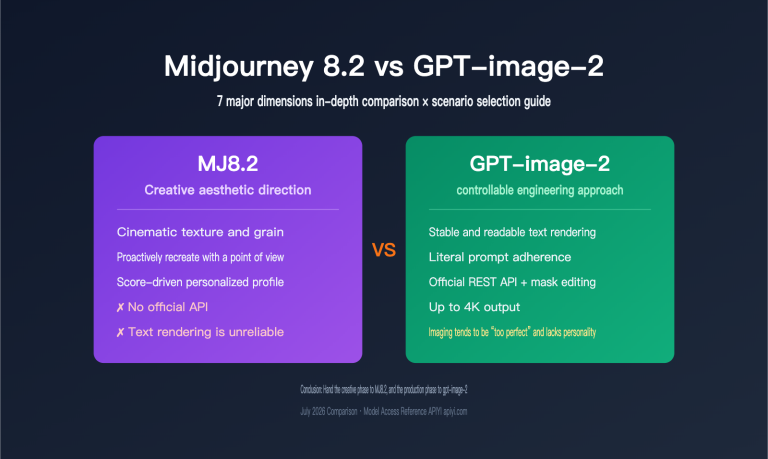
To be objective, here are three limitations: (1) High-end artistic styles: Midjourney remains stronger for specific aesthetic directions, while gpt-image-2 leans more toward photorealism; (2) Video generation: This is an image model; for video, please use specialized models like Sora; (3) Extremely long text: Accuracy for paragraphs with 50+ words in a single image may drop, so we recommend generating in chunks and stitching them together.
gpt-image-2 Use Cases Key Takeaways
- 6 Major Launch Scenarios: E-commerce products, UI prototypes, advertising key visuals, storyboards, Agent pipelines, and content localization.
- Core Commonalities: The three major pain points (text rendering/resolution/world knowledge) are precisely addressed by the three key upgrades in gpt-image-2.
- Top Priorities: E-commerce, UI prototypes, and localization—these rely most heavily on the new capabilities and offer the most significant ROI.
- Zero-Barrier Integration: The API structure is fully compatible with gpt-image-1.5, meaning no modifications to your Agent pipeline SDK are required.
- Getting Started: Use APIYI (apiyi.com) to prototype with gpt-image-1.5 now, and switch seamlessly the moment the official version is released.
Summary
The core insights regarding gpt-image-2 use cases are:
- Scenario-Driven, Not Tech-Driven: The real value isn't just "AI image generation," but rather reshaping workflows that were previously bottlenecked by early models. Tasks that used to require multiple people and steps—like e-commerce product shots, UI drafts, and localized assets—can now be generated and delivered in a single pass.
- Prioritized Layering: E-commerce, UI prototypes, and localization offer the highest immediate value; advertising and Agent pipelines require mid-term planning, while storyboards represent a great opportunity for smaller teams.
- Seamless Migration is the Key Advantage: API parameter compatibility means you can start building your pipeline with gpt-image-1.5 today. On the day gpt-image-2 launches, you'll simply swap the model name to enjoy all the upgrades.
For team decision-making, we recommend using APIYI (apiyi.com) to pilot 1-2 of the primary scenarios immediately. By using real business data to build your prompt library and batch pipelines now, you'll be ready to launch with a competitive edge the moment gpt-image-2 goes live.
Related Articles
If you're interested in gpt-image-2 use cases, we recommend checking out these articles:
- 📘 gpt-image-2 vs. gpt-image-1.5: A Deep Dive into the 8 Major Upgrades – Understand the underlying reasons for this leap in capabilities.
- 📊 Complete gpt-image-1.5 API Invocation Guide – Master best practices for the current flagship model.
- 🚀 Optimizing Batch Image Generation API Calls for Production – Explore batch pipelines, concurrency, and caching strategies.
📚 References
-
MindStudio Use Case Analysis: GPT Image 2 Capability Breakdown
- Link:
mindstudio.ai/blog/what-is-gpt-image-2 - Description: A systematic overview of gpt-image-2 in e-commerce, UI design, marketing, and other scenarios.
- Link:
-
EvoLinkAI GitHub Repository: awesome-gpt-image-2-prompts
- Link:
github.com/EvoLinkAI/awesome-gpt-image-2-prompts - Description: A community-tested collection of prompts for portraits, posters, UI mockups, and character design.
- Link:
-
OpenAI Agents SDK Documentation: Building Image Generation Agent Pipelines
- Link:
openai.github.io/openai-agents-python - Description: Official specifications for integrating image generation with Function Calling.
- Link:
-
ChatIMG In-depth Scenario Analysis: Web Screenshots, TikTok Templates, and UI Mockups
- Link:
chatimg.ai/en/blog/gpt-image-2 - Description: Specific case studies tailored for designers and developers.
- Link:
Author: APIYI Technical Team
Technical Discussion: Feel free to join the discussion in the comments. For more resources, visit the APIYI documentation center at docs.apiyi.com.