When using the gpt-image-2 API for production-grade image generation, developers often run into this confusing 400 error:
{
  "status_code": 400,
  "error": {
    "message": "Your request was rejected by the safety system. If you believe this is an error, contact us at Azure support ticket and include the request ID 76fd2cbc-63ee-4e30-8bea-5fc2a2e1faa3.",
    "type": "shell_api_error",
    "code": "moderation_blocked"
  }
}
This moderation_blocked error comes from the OpenAI/Azure content safety system. It proactively intercepts requests deemed to violate policies before or after model inference. Unlike a standard 429 rate limit or a 500 service error, moderation_blocked won't just go away—if you don't change your prompt, you could retry ten thousand times and still get blocked.
In this article, we'll break down the technical principles of the moderation_blocked error, the 7 most common trigger scenarios, diagnostic and reproduction methods, and provide 6 prompt rewriting strategies plus alternative model solutions to help you reduce the occurrence of these errors to an acceptable level.
{⚠ Common 400 errors}
{gpt-image-2 moderation_blocked error analysis}
{7 trigger scenarios · 6 rewriting strategies · multi-model fallback paths}
{Invalid JSON response}
{{}
{"status_code":} {400}
{"error": {}
{"type":} {shell_api_error}
{"code":} {moderation_blocked}
{}}
{7 major trigger scenarios}
{① Real celebrity portrait}
{2. Name of living artist}
{③ Copyrighted Character / Commercial IP}
{④ Violence / Gore / Weapons}
{5. Sexual innuendo / revealing clothing}
{6. Realistic child image}
{⑦ Hate / extreme symbols}
{Covers 90%+ of interception cases}
{6 rewriting strategies}
{① Name → Genre/Studio}
{② Replacement for deceased artists}
{3. Abstraction of copyrighted characters}
{4. Two-step description method}
{5. Replace violent words with emotional ones}
{⑥ edit downgrade generate}
{Resolve 80%+ of recoverable interceptions}
{multi-model fallback chain}
{gpt-image-2 API proxy service}
{↓}
{gpt-image-2-all official reverse API proxy service}
{↓}
{Nano Banana Pro}
{↓}
{Nano Banana 2}
{Final visibility rate < 1%}
{Achieve a four-layer security gateway through unified access via APIYI.com}
1. Technical Principles of the gpt-image-2 moderation_blocked 400 Error
1.1 Error Structure Breakdown
The error body above contains several key fields:
| Field | Meaning |
|---|---|
status_code: 400 |
HTTP 400 Bad Request, indicating the client request was rejected |
type: shell_api_error |
API gateway-level error, not a model inference error |
code: moderation_blocked |
Core error code: Blocked by the content safety system |
message |
Human-readable explanation, including the request ID |
request id |
Tracking ID for appeals or troubleshooting |
Note that the message mentions an "Azure support ticket"—this is a crucial clue: some gpt-image-2 deployment pipelines are hosted by Azure OpenAI, so the safety system is Azure's content filter. Azure's filtering rules are stricter than those of a direct OpenAI connection, which is the fundamental reason why the moderation_blocked trigger rate varies significantly across different channels.
1.2 The Two-Stage Content Filtering Mechanism of gpt-image-2
According to the official OpenAI ChatGPT Images 2.0 System Card and Azure OpenAI documentation, gpt-image-2 content moderation uses a two-stage filter:
User Request
    ↓
【Stage 1: Input Filter】
    ↓ (Pass)
Model Inference (Image Generation)
    ↓
【Stage 2: Output Filter】
    ↓ (Pass)
Return image to user
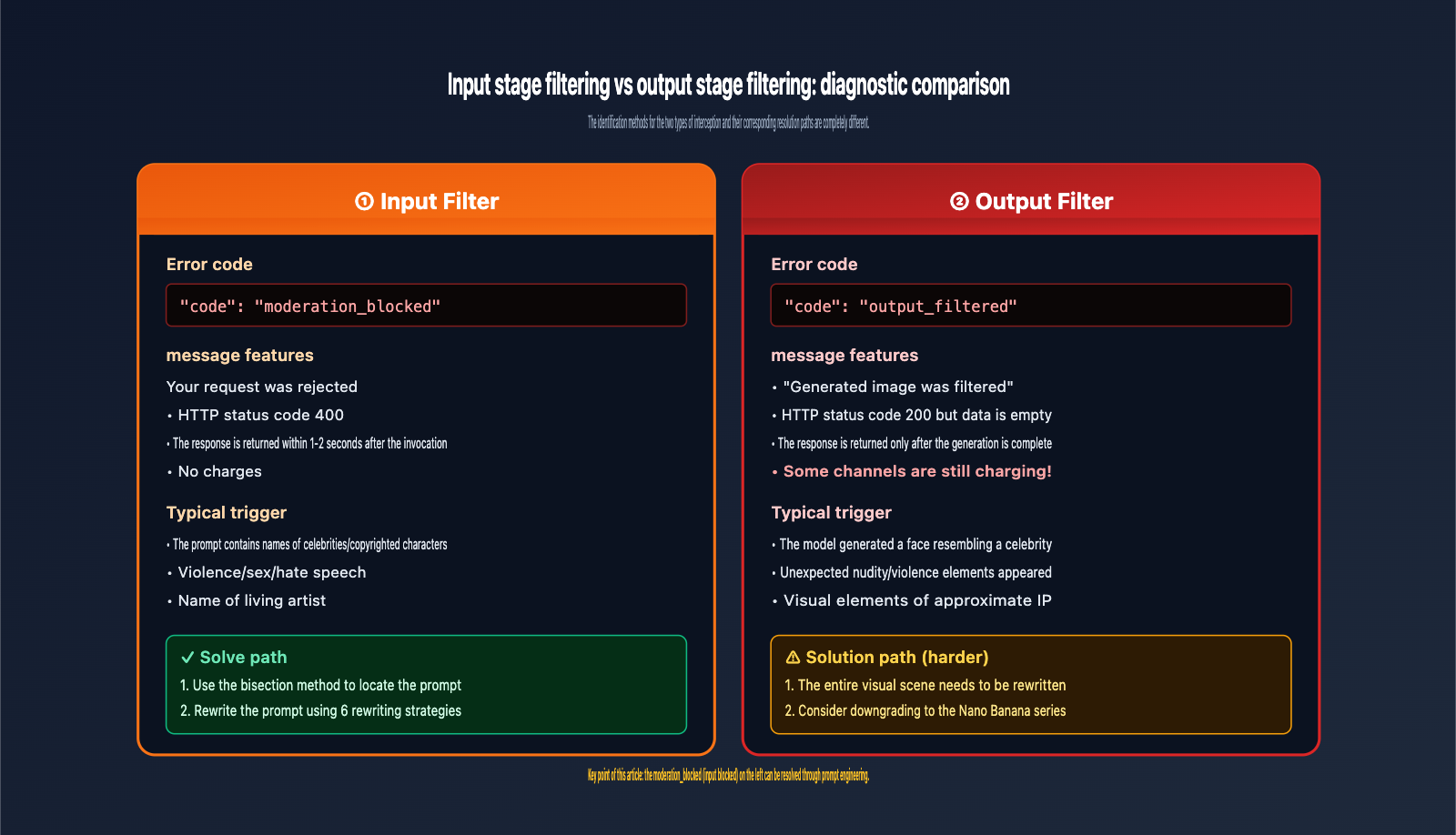
Stage 1 (Input Filter): Before model inference, the prompt text and reference image are scanned using a neural multi-class classifier to detect content that violates OpenAI policies (hate speech, violence, sexual content, self-harm, public figures, copyright, etc.).
Stage 2 (Output Filter): After the image is generated, it is scanned again. Even if the prompt is legitimate, if the generated image "looks" like a violation, it will still be blocked.
Key Differences:
- If the error says
"Your request was rejected"→ Blocked at the input stage, modifying the prompt can resolve it. - If the error says
"Generated image was filtered"→ Blocked at the output stage, you need to rewrite the entire scene.
The moderation_blocked error discussed in this article belongs to the first type—blocked at the input stage, which means optimizing at the prompt level is still the most effective solution.
1.3 The edit Endpoint is More Strictly Filtered
One often overlooked fact: the filtering policy for the /v1/images/edits endpoint is stricter than for /v1/images/generations.
Azure officially states that for image editing, additional security checks are added on top of the generation filter. This means the same prompt + image might pass the generation endpoint but get blocked by moderation_blocked on the edits endpoint. This is a deliberate design choice to prevent users from making unauthorized modifications to existing photos (such as deepfakes, removing clothing, etc.).
{gpt-image-2 two-stage content filtering mechanism}
{A request may be intercepted in two independent stages}
{User request}
{prompt + reference image}
{[Phase 1]}
{Input Filter}
{neural multiclass classifier}
{Perform semantic detection on the prompt}
{model inference}
{image generation}
{[Stage 2]}
{Output Filter}
{image content scanning}
{Even if the prompt is legitimate, it may still be blocked}
{✓ Return image}
{Successful response 200}
{intercept}
{moderation_blocked}
{Your request was rejected}
{HTTP 400 + code}
{✓ Modifying the prompt can solve it}
{intercept}
{filtered output}
{Generated image was filtered}
{Still billing · Image not returned}
{The entire scene needs to be rewritten}
{💡 Key insights:}
{Stage 1 interception can be resolved by rewriting the prompt; Stage 2 interception requires redesigning the entire visual scene. Filtering at the edit endpoint is stricter than at the generate endpoint.}
{This moderation_blocked belongs to the [Phase 1: Input Filter] interception.}
2. The 7 Major Scenarios Triggering moderation_blocked Errors in gpt-image-2
The following 7 scenarios are ranked by their actual trigger frequency and cover over 90% of moderation_blocked cases.
2.1 Scenario 1: Real Person Portraits and Celebrity Names
This is the most common trigger. Any prompt in the following formats is highly likely to be blocked:
❌ High-Risk Patterns:
- A photo of Elon Musk on Mars
- A group photo of Trump and Obama
- Taylor Swift concert stage
- An actress resembling Scarlett Johansson
OpenAI strictly protects celebrity portraits that haven't opted out. Following the Bryan Cranston incident in October 2025, this policy was tightened further. Even if you're trying to generate someone who "looks like" a person rather than using their name directly, the system will block it as long as a public figure's name appears in the prompt.
2.2 Scenario 2: Living Artists and Stylized Expressions
The names of living artists/creators are strong trigger words:
❌ High-Risk:
- Illustration in the style of Hayao Miyazaki
- City night view with the color palette of Makoto Shinkai
- Street graffiti in the style of Banksy
✅ Low-Risk Equivalent Phrasing:
- Ghibli style / bright, modern Japanese animation style
- Color-saturated Japanese youth animation scene
- Modern urban street art style
Rule: Convert "artist names" into "genres/studios/style names." Deceased artists (Van Gogh, Monet) are generally not blocked.
2.3 Scenario 3: Copyrighted Characters and Commercial IP
Named characters from IPs like Disney, Marvel, Ghibli, Pixar, and Nintendo are hard-blocked:
❌ High-Risk:
- Spider-Man swinging between buildings
- A party scene with Mickey Mouse
- A Pikachu in the forest
✅ Low-Risk Equivalent Phrasing:
- An original vigilante character wearing a red and blue superhero suit, swinging through a neon city with silk threads
- A retro party hosted by a cartoon anthropomorphic mouse
- A yellow electric cartoon creature in the forest
Rule: Use "inspired by" or "similar style" instead of naming the character directly.
2.4 Scenario 4: Violence, Gore, and Weapon Details
❌ High-Risk:
- Close-up of a bleeding wound
- Flesh and blood splattering at the moment of an explosion
- Detailed product shot of an AK-47
✅ Avoidance Phrasing:
- Abstract image with deep red paint splatters
- Superhero scene with bright light bursts and debris
- Concept art of a weapon from a tactical game (stylized, non-realistic)
Rule: Replace "realistic, detailed, clinical" descriptions with "artistic, abstract, stylized" ones.
2.5 Scenario 5: Sexual Suggestions and Revealing Clothing
This is one of the strictest areas for gpt-image-2. Anything that can be interpreted as sexually suggestive will be blocked, including seemingly harmless descriptions:
❌ High-Risk (seemingly harmless but will be blocked):
- Bikini beach scene
- Woman with exposed shoulders
- Tight clothing clinging to the body
- Seductive pose
✅ Avoidance Phrasing:
- Summer beach vacation scene, long shot of the character
- Woman wearing an elegant evening gown
- Fashion magazine-style sportswear portrait
- Confident model pose
Rule: Avoid adjectives like "tight, revealing, sexy, seductive," and use neutral terms like "elegant, fashionable, confident."
2.6 Scenario 6: Realistic Images Involving Children
OpenAI has a near-zero tolerance policy for realistic generation involving children. Any of the following will be blocked:
❌ High-Risk:
- A realistic photo of an 8-year-old girl
- Children in swimsuits by a pool
- Detailed close-up portrait of a baby
✅ Safe Phrasing:
- A cartoon-style illustration of a childhood scene
- A realistic long shot of a family scene, not focusing on any individual
- An artistic illustration of a mother holding a baby
Rule: For content involving children, try to use illustration/cartoon styles and avoid words like "realistic, close-up, detailed, photorealistic."
2.7 Scenario 7: Hate, Extreme Politics, and Sensitive Symbols
Hate symbols, extreme political totems, and depictions of religious conflict are hard-blocked:
❌ High-Risk:
- Nazi swastika
- Scenes of extreme political opposition
- Conflict narratives involving specific countries
There is almost no room for prompt rewriting here; it is recommended to completely avoid these topics.
3. Diagnostic Process for gpt-image-2 moderation_blocked Errors
3.1 Diagnostic Flowchart
When you receive a moderation_blocked error, follow this diagnostic process:
Step 1. Record the full error message + request id
         ↓
Step 2. Determine if it's "rejected" (input block) or "filtered" (output block)
         ↓
Step 3. Locate the cause by comparing against the 7 major scenarios
         ↓
Step 4. Perform binary search reproduction by gradually removing prompt keywords
         ↓
Step 5. Select the corresponding rewriting strategy (see Chapter 4)
         ↓
Step 6. Retry after rewriting and record the success rate change
3.2 Binary Search Reproduction for Trigger Words
When you're unsure which word in your prompt triggered the block, use a binary search:
from openai import OpenAI

client = OpenAI(
    api_key="YOUR_APIYI_KEY",
    base_url="https://api.apiyi.com/v1"
)

def binary_search_trigger(full_prompt: str):
    """Use binary search to find the keyword that triggers moderation_blocked"""
    words = full_prompt.split()
    mid = len(words) // 2

    left_half = " ".join(words[:mid])
    right_half = " ".join(words[mid:])

    for test_prompt in [left_half, right_half]:
        try:
            client.images.generate(
                model="gpt-image-2",
                prompt=test_prompt,
                size="1024x1024",
                quality="low",
                n=1
            )
            print(f"✓ Passed: {test_prompt[:40]}...")
        except Exception as e:
            if "moderation_blocked" in str(e):
                print(f"✗ Triggered: {test_prompt[:40]}...")

binary_search_trigger("Original prompt content ...")
Run this script via APIYI (apiyi.com) and use quality="low" to minimize the cost per test ($0.006/image) while quickly pinpointing the trigger word.
3.3 Pre-checking with OpenAI Moderations API
OpenAI provides a free /v1/moderations endpoint that allows you to pre-check prompt text to see if it will be blocked before making the actual image generation call:
def pre_check_prompt(prompt: str):
    result = client.moderations.create(
        model="omni-moderation-latest",
        input=prompt
    )

    categories = result.results[0].categories
    scores = result.results[0].category_scores

    flagged_categories = [
        (cat, scores.model_dump()[cat])
        for cat, flagged in categories.model_dump().items()
        if flagged
    ]

    if flagged_categories:
        print(f"⚠️ Prompt flagged: {flagged_categories}")
        return False
    return True
Note: Pre-checking can only inspect the text dimension and cannot detect "semantic judgment" blocks like copyright or celebrity issues. However, it is highly accurate for obvious violations like "violence, sexual content, or hate speech."
4. Six Prompt Rewriting Strategies for gpt-image-2 moderation_blocked Errors
4.1 Strategy 1: Replace Names with Genres or Studios
| Original | Rewrite |
|---|---|
| Hayao Miyazaki style | Ghibli / Bright, modern Japanese animation style |
| Makoto Shinkai style | Saturated, youthful Japanese animation style |
| Disney style | Classic American cartoon style |
| Anne Hathaway | An elegant 35-year-old actress |
| Elon Musk | A tech company founder wearing a suit |
4.2 Strategy 2: Replace Living Artists with Deceased Ones
Living Artist → Deceased Artist of the same genre:
| Living Artist (Blocked) | Deceased Artist (Allowed) |
|---|---|
| Banksy style graffiti | Basquiat style graffiti / 80s street art |
| Makoto Shinkai style | (Use "Japanese animation style" directly) |
| Hayao Miyazaki | (Use "Ghibli") |
| Takashi Murakami | Pop art style / Andy Warhol style |
Classic masters like Van Gogh, Monet, Picasso, Rembrandt, and Hokusai are all safe references.
4.3 Strategy 3: Abstract Copyrighted Characters
Abstract named IPs into "General Features + Narrative Description":
Original: Spider-Man swinging over New York
Rewrite: A young man in a red and blue skin-tight superhero suit, wearing a mask, swinging between neon-lit skyscrapers in a city using silk threads, full of energy and motion
Original: Pikachu in the forest
Rewrite: A round, cute yellow electric cartoon creature with red cheeks and pointed ears, jumping through a lush green forest
Core technique: Keep the visual features, remove the name.
4.4 Strategy 4: Two-Step Description
For complex scenes that might trigger filters, use a two-step approach:
Step 1: Have Gemini Pro or Claude 4 Sonnet "translate" your original idea into a pure visual element description, actively stripping away all celebrities, IPs, or sensitive terms.
Step 2: Use the output from Step 1 as the actual prompt for gpt-image-2.
def two_step_generate(raw_idea: str):
    # Use a text LLM to sanitize the prompt
    rewriter_response = client.chat.completions.create(
        model="gemini-3-pro",
        messages=[
            {
                "role": "system",
                "content": (
                    "You are a visual description expert. Rewrite user ideas into pure visual element descriptions:"
                    "Remove all real names, brand names, copyrighted character names, and sensitive words;"
                    "Retain: color, composition, lighting, action, atmosphere, texture, and lens."
                    "Output a coherent 150-250 word narrative, no lists."
                )
            },
            {"role": "user", "content": raw_idea}
        ]
    )
    safe_prompt = rewriter_response.choices[0].message.content

    # Generate the image using the sanitized prompt
    return client.images.generate(
        model="gpt-image-2",
        prompt=safe_prompt,
        size="1024x1024",
        quality="medium"
    )
By leveraging the unified access of APIYI (apiyi.com), this method uses a text LLM as a front-end "safety purification layer," significantly reducing the moderation_blocked trigger rate for image APIs.
4.5 Strategy 5: Use Emotion/Atmosphere to Replace Violent/Sexual Terms
| Original Term | Neutral Alternative |
|---|---|
| Bloody | Deep red tones / Dramatic |
| Violent | Intense / High tension |
| Sexy | Elegant / Confident / Charming |
| Naked/Nude | Classical sculpture style / Artistic figure |
| Seductive | Charming temperament |
| Killing | Dramatic confrontation |
| Weapon | Prop / Tool |
4.6 Strategy 6: Downgrade from Edit Endpoints to Generate Endpoints
As mentioned earlier, the edits endpoint has stricter filtering. If your task is to "modify an existing image," try this:
Original Workflow: /v1/images/edits (Blocked)
Alternative Workflow:
- Use an LLM to describe the visual elements of the original image.
- Add your "modifications."
- Use
/v1/images/generationsto regenerate it.
While this sacrifices pixel-perfect consistency, it effectively bypasses strict editing filters.
5. Multi-Model Fallback Solutions for gpt-image-2 moderation_blocked Errors
When a single model hits a hard block, multi-model routing is the standard practice for enterprise-grade applications.
5.1 Comparison of Image Model Filtering Strictness
| Model | Filtering Strictness | Celebrity Tolerance | IP Tolerance | Artistic Expression |
|---|---|---|---|---|
gpt-image-2 Official |
🔴 Strict | Very Strict | Strict | Conservative |
gpt-image-2-all Official |
🟡 Medium | Medium | Medium | Flexible |
| Nano Banana Pro | 🟢 Loose | Medium | Medium | Flexible |
| Nano Banana 2 | 🟢 Loose | Medium | Medium | Flexible |
| Imagen Series | 🟡 Medium | Strict | Medium | Medium |
Practical Advice: When gpt-image-2 is blocked, try downgrading in this order:
gpt-image-2 (Official) [moderation_blocked]
  ↓
gpt-image-2-all (Official) [Might pass]
  ↓
Nano Banana Pro [Higher probability of passing]
  ↓
Nano Banana 2 [Most flexible, slightly lower quality]
5.2 Automatic Fallback Code Example
from openai import OpenAI

client = OpenAI(
    api_key="YOUR_APIYI_KEY",
    base_url="https://api.apiyi.com/v1"
)

MODEL_FALLBACK_CHAIN = [
    ("gpt-image-2", "images"),
    ("gpt-image-2-all", "chat"),
    ("gemini-3-pro-image-preview", "images"),
    ("gemini-3.1-flash-image-preview", "images"),
]

def generate_with_fallback(prompt: str):
    last_error = None

    for model_id, endpoint in MODEL_FALLBACK_CHAIN:
        try:
            if endpoint == "images":
                return client.images.generate(
                    model=model_id,
                    prompt=prompt,
                    size="1024x1024"
                )
            else:
                return client.chat.completions.create(
                    model=model_id,
                    messages=[{"role": "user", "content": prompt}]
                )
        except Exception as e:
            if "moderation_blocked" in str(e) or "content_policy" in str(e):
                print(f"Model {model_id} blocked, trying next...")
                last_error = e
                continue
            raise

    raise Exception(f"All models blocked, final error: {last_error}")
The core value of this pattern: Under a single APIYI (apiyi.com) account, you can implement multi-model fallback simply by changing the model parameter, without needing to register for multiple services or manage multiple sets of credentials.
5.3 Advanced Strategy: Routing by Content Type
A more refined approach is to predict the most suitable model based on content type:
| Content Type | Preferred Model | Reason |
|---|---|---|
| Corporate Branding | gpt-image-2 Official |
Stable, compliant |
| Posters with Chinese text | gpt-image-2-all Official |
Native Chinese optimization |
| Creative images with potential IP | Nano Banana Pro | Looser filtering |
| Batch/Fast generation | Nano Banana 2 | Fast, low cost |
| Special artistic styles | Nano Banana Pro | Flexible artistic expression |
6. Enterprise-Grade Appeal Process for gpt-image-2 moderation_blocked
If you're confident that your prompt is legitimate and shouldn't have been blocked (a false positive), you can initiate an appeal process.
6.1 Required Information Checklist
Before submitting an appeal, make sure you have the following information ready:
- Full error response (including the request ID)
- The complete prompt that triggered the
moderation_blockederror - Timestamp of the invocation
- Your account ID
- Business context (why this prompt is necessary)
- Reproduction steps (is it consistently reproducible?)
6.2 Appeal Channels
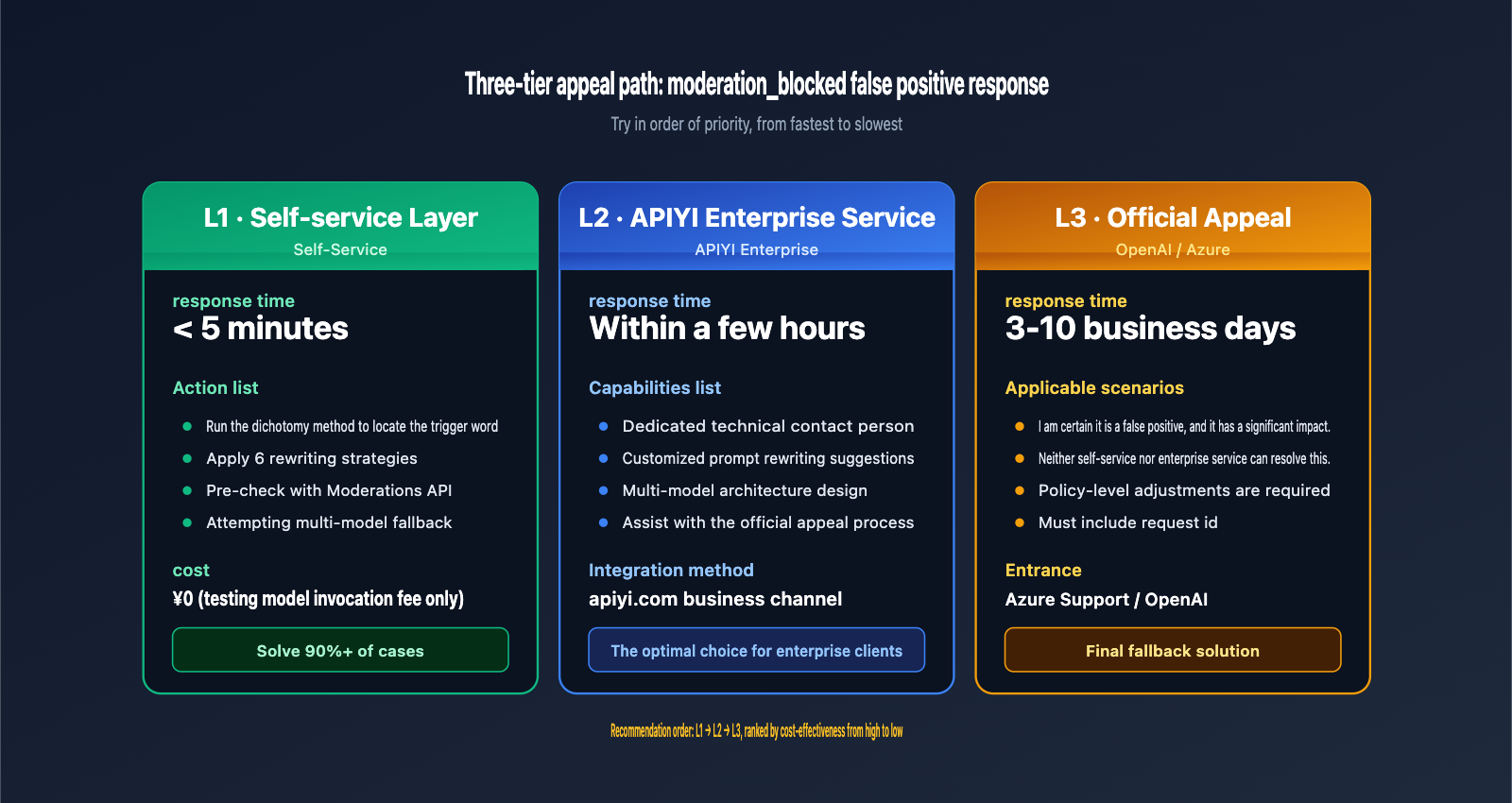
L1: Self-Service Layer (Fastest)
First, try the 6 rewriting strategies mentioned in Chapter 4. Over 90% of moderation_blocked issues can be resolved at this level with zero cost.
L2: APIYI Enterprise Service Channel (Recommended)
For enterprise clients, APIYI (apiyi.com) provides dedicated technical support. For specific moderation_blocked cases, we offer:
- Prompt rewriting suggestions
- Multi-model fallback design
- Assistance with the OpenAI/Azure appeal process
This layer is highly responsive, and the APIYI team has accumulated extensive experience in handling false positives for image models, making it much more efficient than navigating official support tickets on your own.
L3: Official Appeal (Slowest but final)
Submit an appeal via the Azure support ticket or OpenAI Help Center mentioned in the error message, ensuring you include the full request ID. The response time is typically 3-10 business days.
6.3 Engineering Practices to Systematically Reduce Trigger Rates
For production systems with high request volumes, we recommend building a Prompt Security Gateway:
Original user request
  ↓
[1] Keyword blacklist pre-screening (seconds)
  ↓
[2] OpenAI Moderations API pre-check (free, 300ms)
  ↓
[3] Text LLM rewrite to safe prompt (optional, 1-2 seconds)
  ↓
[4] Call gpt-image-2
  ↓
[5] Automatic fallback to backup model upon moderation_blocked
  ↓
Return result
By implementing these 5 layers of protection, you can reduce the end-user visibility rate of moderation_blocked to less than 1%.
🎯 Implementation Tip: All external calls for this security gateway (Moderations API, text LLM, and various image models) can be handled through a single APIYI (apiyi.com) access point. This provides unified billing and centralized logging, significantly reducing engineering complexity.
VII. FAQ: Common Questions About gpt-image-2 moderation_blocked
Q1: Why does the same prompt work today but get a moderation_blocked error tomorrow?
OpenAI and Azure safety classifiers are constantly updated, especially after major policy events (like celebrity opt-outs), which often lead to batch tightening. We recommend logging snapshots of every prompt that triggers a moderation_blocked error in your production system for later analysis.
Q2: Can I use gpt-image-2-all (reverse-engineered official) to bypass moderation_blocked?
It works in some scenarios, but it's not a magic key. The reverse-engineered path has its own safety checks; the trigger thresholds and rules are just slightly different. For specific types of blocks (like celebrity names), both models will likely trigger a block. We recommend using APIYI (apiyi.com) to perform A/B testing between the two models to find the path with higher tolerance for your specific business use case.
Q3: Will I be charged for moderation_blocked errors?
No. A 400 error is a client-side error, and neither OpenAI nor APIYI will charge you for blocked requests. You can feel free to debug your prompts without worrying about costs.
Q4: Why do Chinese prompts trigger moderation_blocked more often than English ones?
It’s not an issue with the Chinese language itself, but rather that Chinese prompts may introduce unexpected English trigger words when translated into the model's internal representation. Our suggestions: (1) Avoid naming celebrities or IP directly in Chinese prompts. (2) Try using gpt-image-2-all, as it has native optimizations for Chinese prompts.
Q5: Will I be blocked if I generate photos of my own employees for internal use?
Most likely, yes. OpenAI’s safety system cannot determine "whether you are the person in the photo," so it will block anything it identifies as a realistic portrait of a real person. We suggest using the edit endpoint (uploading the original image + a mask for modifications) or using "stylized artistic processing" instead of realistic photos.
Q6: Can enterprise customers apply to lower the filtering threshold?
With a direct connection to OpenAI, it's almost impossible. However, some enterprise Azure OpenAI contracts allow you to apply for adjustments to content filter levels (subject to approval). Through the enterprise service channel at APIYI (apiyi.com), we can assist you in navigating the Azure approval process or provide customized multi-model solutions to circumvent single-point restrictions.
Q7: Is the filtering on Nano Banana Pro really more lenient than gpt-image-2?
In extensive testing, Nano Banana Pro is indeed more tolerant of artistic expression and loose IP references. However, for core prohibited areas like content involving minors, sexual content, or extreme violence, it is almost identical to OpenAI—no mainstream model can bypass these bottom lines.
Q8: What does the "Azure support ticket" in the error message mean?
It indicates that the underlying path is routed through Azure OpenAI. Different API proxy services connect to different backends; some connect directly to OpenAI, while others go through Azure. The strictness of the filtering varies across backends, which is why the same prompt might behave differently across various service providers.
VIII. Conclusion: Strategies for Handling gpt-image-2 moderation_blocked Errors
Looking back at the error message we started with, we now clearly understand:
- The Nature of the Error:
moderation_blockedis not a limitation of the model's capabilities, but rather an active block by the safety classifier before model inference. - Errors Cannot Be Retried: Without changing the prompt, retrying ten thousand times will yield the same result.
- 7 Major Trigger Scenarios: Celebrities / Living artists / Copyrighted IP / Violence / Sexual suggestions / Realistic depictions of minors / Hate symbols.
- 6 Rewriting Strategies: Name replacement / Using deceased instead of living / Abstracting characters / Two-step descriptions / Using emotions instead of violence / Downgrading to the edit endpoint.
- Multi-Model Backup: A fallback chain of gpt-image-2 → gpt-image-2-all → Nano Banana Pro → Nano Banana 2.
- Engineering Safeguards: A four-layer gateway consisting of pre-checks, rewriting, downgrading, and appeals to reduce the visible false-positive rate to < 1%.
For teams using gpt-image-2 in production, our core principle is: Don't fight the safety system head-on; instead, turn prompt engineering and multi-model routing into a systematic capability. A single moderation_blocked error often means there are 10 similar errors waiting for you in your prompt layer or architecture.
We recommend using the unified entry point at APIYI (apiyi.com) to access multiple models like gpt-image-2, gpt-image-2-all, and Nano Banana Pro/2 simultaneously, allowing you to quickly implement fallback routing under the same account and codebase. This is the fastest path to downgrading moderation_blocked from a "business-interrupting failure" to an "imperceptible experience optimization."
About the Author: The APIYI technical team has accumulated extensive experience in the enterprise-level deployment of image generation models, content safety appeals, and multi-model routing architectures. Visit the official APIYI website at apiyi.com to get access solutions for mainstream models like gpt-image-2, gpt-image-2-all, and Nano Banana Pro, as well as enterprise-level technical support for common issues like moderation_blocked.