Author's Note: Real-world testing of Nano Banana 2 (gemini-3.1-flash-image-preview) vs. Nano Banana Pro (gemini-3-pro-image-preview) shows that the Flash architecture doesn't always mean faster and more stable. Here are 6 key differences to help you choose the right model.
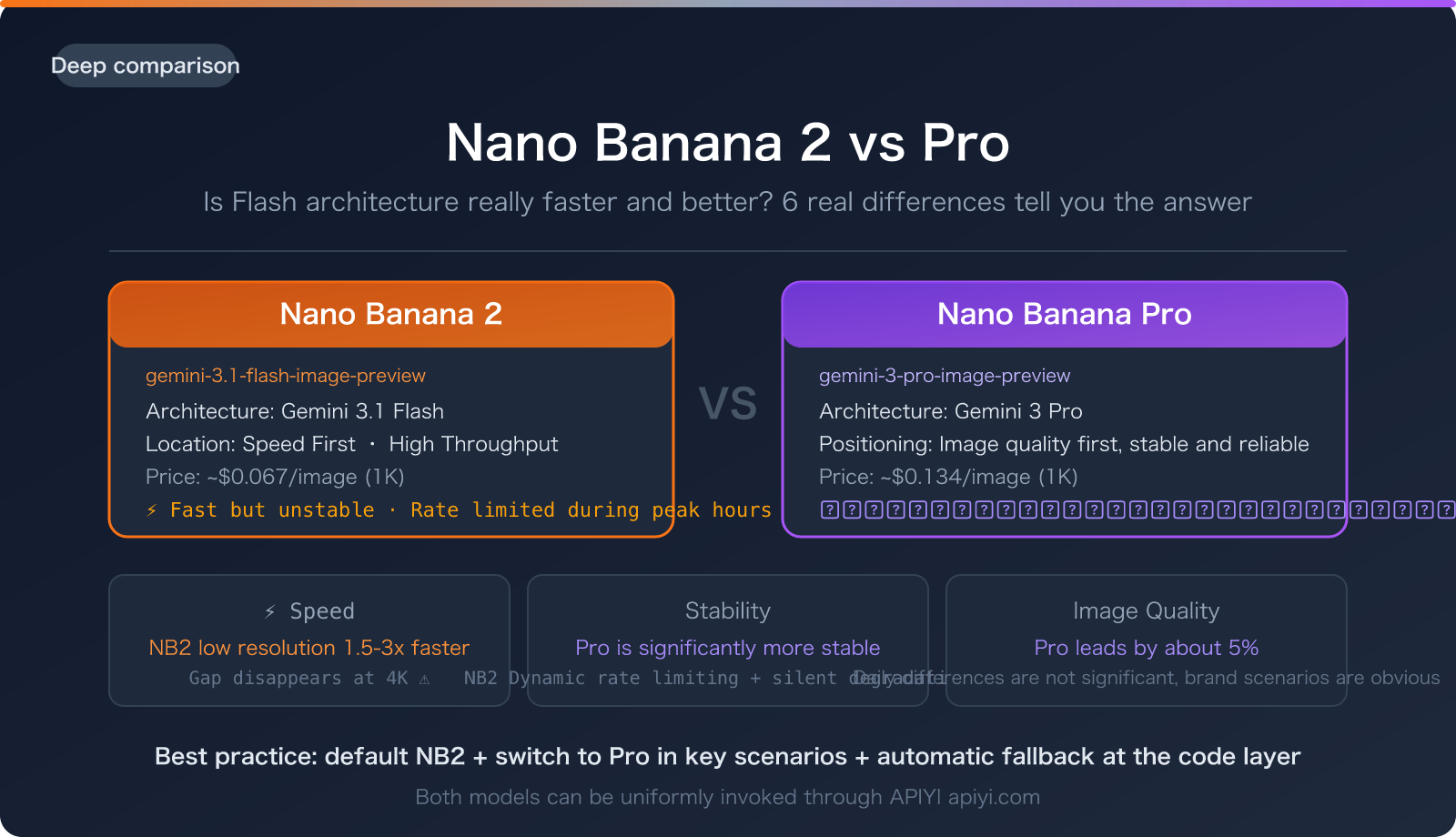
When Nano Banana 2 was released, Google's marketing pitch was: Pro quality + Flash speed.
Sounds perfect, right? You get Nano Banana Pro's high quality combined with the lightning-fast response of the Flash architecture. But in practice, many developers have felt that:
Nano Banana 2 isn't as fast as expected, and it's actually less stable than Pro.
This isn't an isolated incident. Nano Banana 2 (gemini-3.1-flash-image-preview), based on the Gemini 3.1 Flash architecture, should theoretically be much faster than Nano Banana Pro (gemini-3-pro-image-preview), which is based on the Gemini 3 Pro architecture. But the reality is: dynamic throttling during peak hours, silent degradation due to server overload, and the disappearance of speed advantages at 4K resolution—these issues significantly diminish Flash's promised "speed."
This article uses actual API invocation data to compare the real differences between these two models across 6 dimensions, including speed, stability, image quality, and price, helping you make the right choice for your production environment.
Core Value: After reading this article, you'll clearly understand when to choose Nano Banana 2 and when Pro remains the better option.
1. First, Let's Clarify: What's the Relationship Between Nano Banana 2 and Pro?
1.1 Model Family Relationship
Google's Gemini image generation model family currently has three main members:
| Codename | API Model Name | Underlying Architecture | Positioning |
|---|---|---|---|
| Nano Banana (Gen 1) | gemini-2.5-flash-image |
Gemini 2.5 Flash | Entry-level, fast but average image quality |
| Nano Banana Pro | gemini-3-pro-image-preview |
Gemini 3 Pro | Flagship, strongest image quality, slower speed |
| Nano Banana 2 | gemini-3.1-flash-image-preview |
Gemini 3.1 Flash | Mid-range, claims "Pro quality + Flash speed" |
Key information: Nano Banana 2's internal codename is GEMPIX2, and it's based on the Gemini 3.1 Flash architecture, not the Pro architecture. This means it's essentially an upgraded version of the Flash series, not a lightweight version of Pro.
1.2 Google's Official Positioning
Google positions Nano Banana 2 as: "Powerful, high-efficiency image generation and editing, optimized for speed and high-volume use cases".
Pay attention to the keywords: high-efficiency and high-volume. Google itself doesn't claim that Nano Banana 2's image quality surpasses Pro; instead, it emphasizes its advantages in efficiency and scalable scenarios.
🎯 Selection Tip: If your scenario involves batch generation and rapid iteration, Nano Banana 2 is indeed the more suitable choice. If you're aiming for ultimate single-image quality, Pro is still the right answer. Both models can be invoked via APIYI at apiyi.com.
2. Speed Comparison: Flash Architecture Doesn't Always Mean Faster
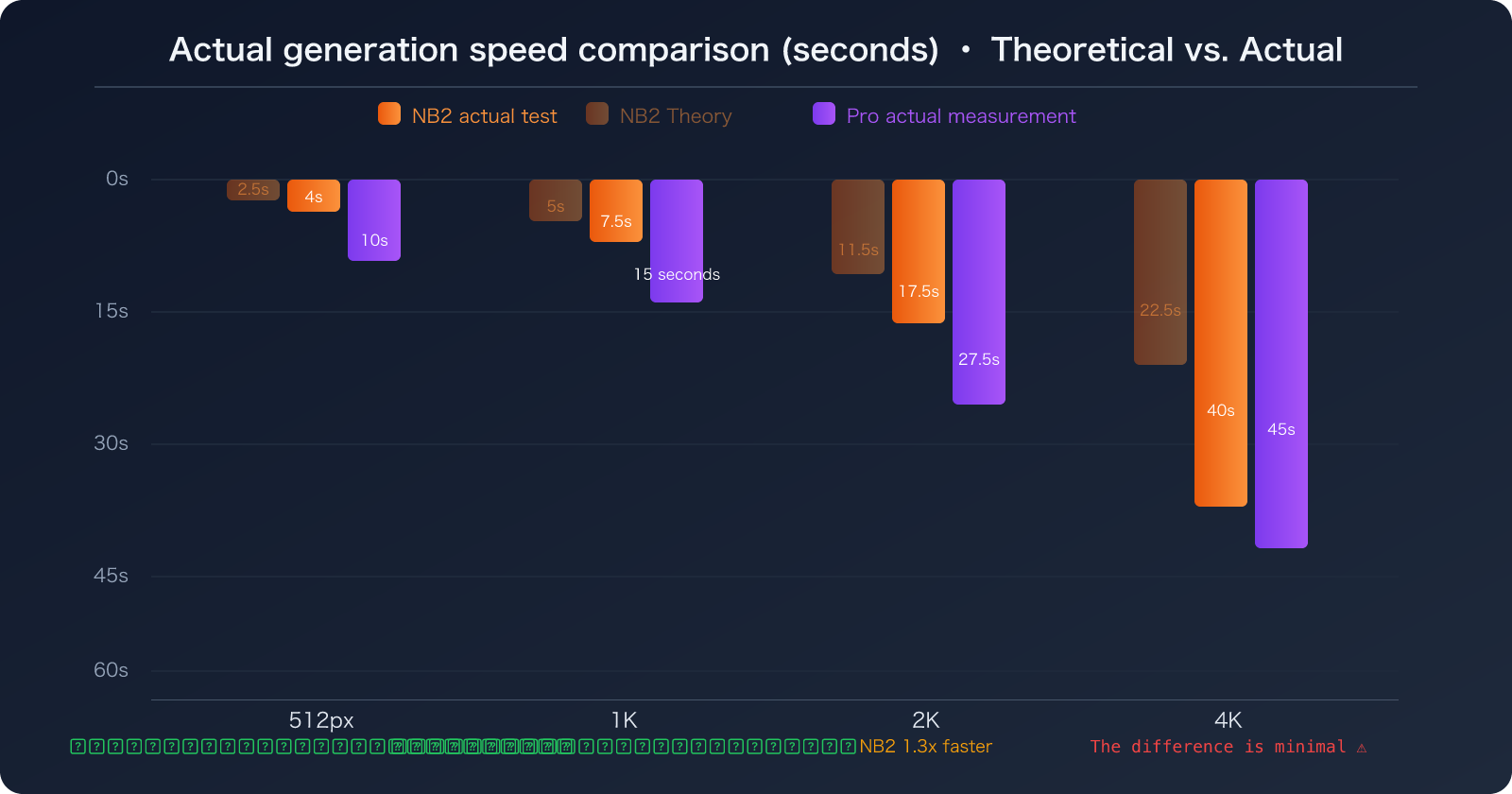
Here's the most unexpected finding: While Nano Banana 2 is indeed faster at lower resolutions, its speed advantage almost vanishes at 4K, and it can even be slower than Pro during peak hours.
2.1 Speed Comparison Across Different Resolutions
| Resolution | Nano Banana 2 (Theoretical) | Nano Banana 2 (Actual) | Nano Banana Pro (Actual) | Speed Difference |
|---|---|---|---|---|
| 512px | 2-3s | 3-5s | 8-12s | NB2 2-3x faster ✅ |
| 1K | 4-6s | 5-10s | 10-20s | NB2 1.5-2x faster ✅ |
| 2K | 8-15s | 10-25s | 20-35s | NB2 1.2-1.5x faster |
| 4K | 15-30s | 20-60s | 30-60s | Minimal difference, or even reversed ⚠️ |
2.2 Why the Speed Gap Disappears at 4K
Nano Banana 2's speed advantage comes from the Flash architecture's lighter inference overhead. However, when generating 4K images:
- Token Generation Explodes: 4K images generate around 2,000 output tokens, which is nearly double that of 1K images.
- Bottleneck Shifts to I/O: At higher resolutions, encoding and transmitting image data become the primary time sinks, diluting the Flash architecture's inference speed advantage.
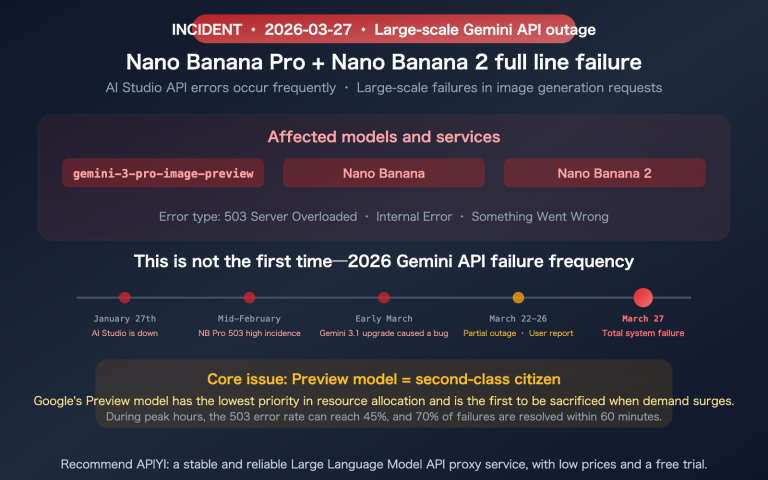
- Dynamic Throttling Impacts Flash More: During peak hours, Google implements more aggressive throttling for Flash models (because Flash requests significantly outnumber Pro requests).
2.3 Real-World Experience During Peak Hours
During UTC 10:00-14:00 (Beijing Time 18:00-22:00), Nano Banana 2:
- Response times can double or even more.
- May silently downgrade to an older model.
- Experiences a significant increase in 429 throttling errors.
Nano Banana Pro, on the other hand, tends to be more stable during peak hours due to lower request volumes.
🎯 Practical Tip: If your business operates primarily during peak hours, Nano Banana Pro might actually offer more consistent response times. By invoking both models via APIYI apiyi.com, you can implement automatic fallback in your code: use Pro during peak hours, and NB2 during off-peak hours to save costs.
3. Stability Comparison: Why Nano Banana 2 Isn't as Stable as Pro
This is probably the most noticeable difference in practical use. Nano Banana 2's instability manifests in several ways:
3.1 Four Major Stability Issues
Issue 1: 429 Quota Exhaustion (Most Common)
Nano Banana 2 has a daily quota limit, and this limit is dynamic—during peak hours, quotas are automatically reduced to "ensure system stability." The practical effect is: you might be able to generate normally in the morning, but suddenly get rate-limited in the afternoon.
// Typical 429 error response
{
  "error": {
    "code": 429,
    "message": "Resource has been exhausted (e.g. check quota).",
    "status": "RESOURCE_EXHAUSTED"
  }
}
Issue 2: Server Overload Silent Degradation
When Nano Banana 2 servers are under high load, Gemini will silently degrade to an older model—you might think you're using NB2, but you're actually getting output from the older Flash version. This degradation won't throw an error; it'll only show up as a difference in image quality.
Issue 3: IMAGE_SAFETY False Positives
Nano Banana 2's content moderation is more sensitive than Pro's. Some prompts that work perfectly fine on Pro will trigger an IMAGE_SAFETY block on NB2, returning an empty result.
Issue 4: Multiturn Conversation thought_signature Loss
When developers perform multiturn image editing via API, Nano Banana 2 requires the thought_signature parameter from the previous turn to be included in the request. Omitting this parameter will lead to generation failure, while the Pro model is more fault-tolerant in this regard.
3.2 Why Nano Banana Pro is More Stable
| Stability Dimension | Nano Banana 2 | Nano Banana Pro |
|---|---|---|
| Daily Quota | Dynamic adjustment, decreases during peak hours | Relatively fixed |
| Overload Handling | Silently degrades to older model | Queues, no degradation |
| Content Moderation | More sensitive, higher false positive rate | Relatively lenient |
| API Fault Tolerance | Strict parameter requirements | Better fault tolerance |
| Peak Performance | High fluctuation | Low fluctuation |
🎯 Stability-First Solution: For production environments with strict requirements for generation quality and stability, we recommend using Nano Banana Pro (
gemini-3-pro-image-preview) as the primary model. You can invoke both models simultaneously via APIYI apiyi.com and implement intelligent routing in your code.
4. Image Quality Comparison: 95% Similar, But Where Does the Critical 5% Differ?
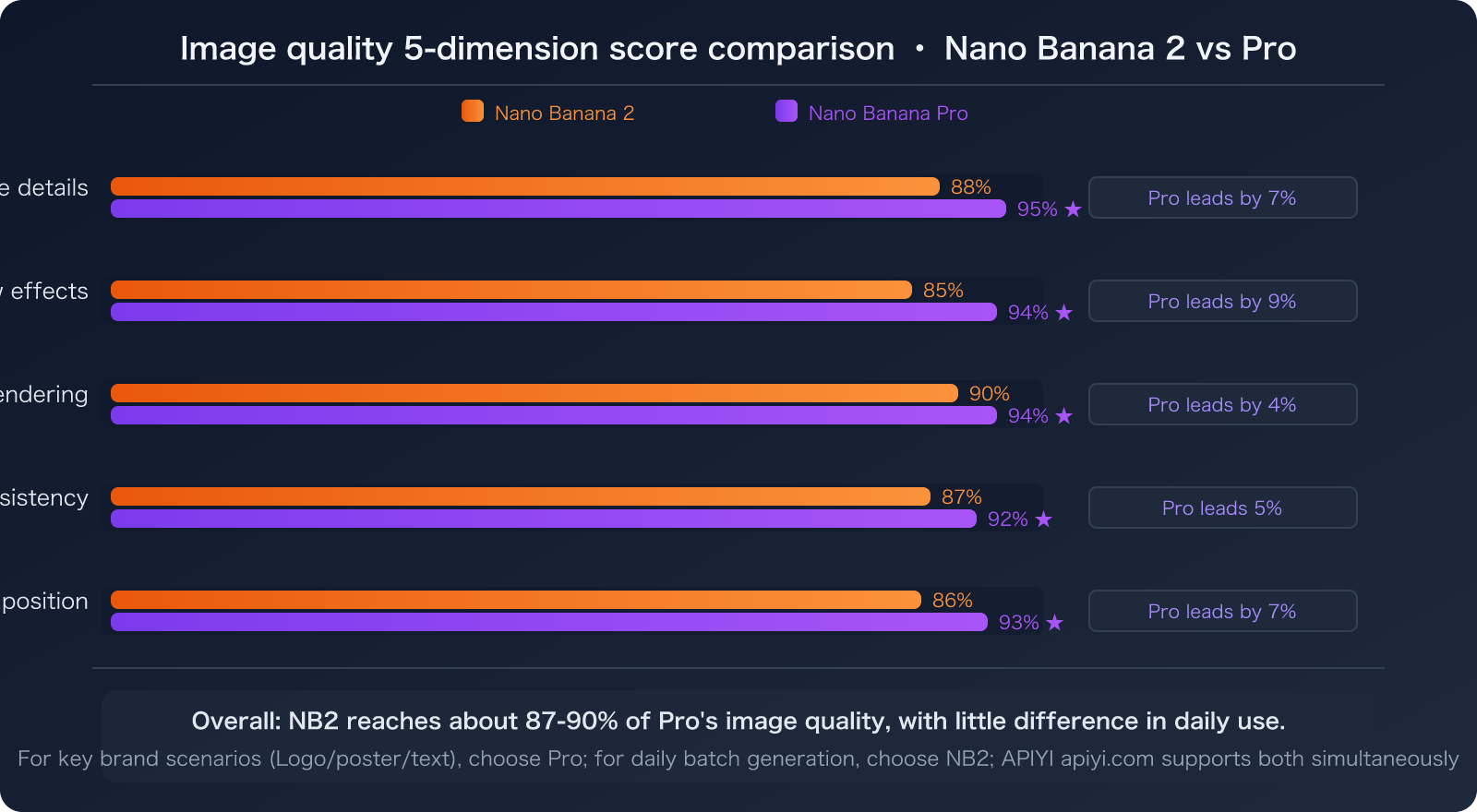
Multiple independent evaluations show that Nano Banana 2 can achieve about 95% of Pro's image quality. In daily use, the difference is hard to discern with the naked eye, but in specific dimensions, Pro still has clear advantages:
4.1 Five Image Quality Dimensions Compared
| Image Quality Dimension | Nano Banana 2 | Nano Banana Pro | Difference |
|---|---|---|---|
| Texture Detail | Excellent | Finer, more realistic texture | Pro leads by 5-8% |
| Lighting Effects | Good | More natural diffuse reflection and shadows | Pro leads by 8-10% |
| Text Rendering Accuracy | ~90% | ~94% | Pro leads by 4% |
| Character Consistency | 5 people/10 objects | More stable multi-character consistency | Pro slightly better |
| Spatial Composition | Good | Stronger three-dimensional sense | Pro leads by 5-7% |
4.2 When Does a 5% Difference Matter?
Less Critical Scenarios (Choose Nano Banana 2):
- Social media images, blog illustrations
- Rapid prototyping and proof-of-concept
- Batch generation of variations for A/B testing
- Non-brand-critical marketing materials
Highly Critical Scenarios (Choose Nano Banana Pro):
- Brand visual assets (logo peripherals, brand identity)
- Scenarios requiring precise text rendering (text on posters, banners)
- Commercial photography-grade quality requirements
- Scenarios where multi-character consistency is critical (IP characters, comic series)
V. Price Comparison: Pro is Twice the Price, But Potentially Offers Better Value
5.1 Official Pricing Comparison
| Metric | Nano Banana 2 | Nano Banana Pro | Multiplier |
|---|---|---|---|
| Output Token Price | $60/million tokens | $120/million tokens | Pro is 2x more expensive |
| 1K Image Cost | ~$0.067 | ~$0.134 | Pro is 2x more expensive |
| 2K Image Cost | ~$0.10 | ~$0.18 | Pro is 1.8x more expensive |
| 4K Image Cost | ~$0.15 | ~$0.24 | Pro is 1.6x more expensive |
| Free Tier | 5,000 calls/month | None | NB2 has a free tier |
5.2 Real Cost Calculation (Including Retries)
Nano Banana 2 might seem half the price, but when you factor in retry costs due to stability issues:
# Nano Banana 2 Real Cost
# Single call cost: $0.067
# Peak failure rate: ~15-20%
# Average retries: 1.2
# Real cost per image: $0.067 × 1.2 = $0.08

# Nano Banana Pro Real Cost
# Single call cost: $0.134
# Failure rate: ~3-5%
# Average retries: 1.04
# Real cost per image: $0.134 × 1.04 = $0.139
The difference shrinks from 2x to 1.7x. If your business is sensitive to latency (and retries introduce unacceptable delays), Pro's "first-time success" might actually be more cost-effective.
🎯 Cost Optimization: By invoking the Gemini image generation API through APIYI (apiyi.com), you might find prices more favorable than Google's official rates. The platform supports both Nano Banana 2 and Pro models, allowing you to switch flexibly based on your business needs.
VI. API Invocation in Practice: Code Examples for Both Models
6.1 Basic Invocation Comparison
Invoking both models is almost identical; you just need to switch the model name:
import requests

API_KEY = "sk-你的APIKey"
BASE_URL = "https://api.apiyi.com/v1"

def generate_image(prompt, model="gemini-3.1-flash-image-preview", resolution="1024"):
    """Unified invocation for Nano Banana 2 or Pro"""
    response = requests.post(
        f"{BASE_URL}/chat/completions",
        headers={
            "Authorization": f"Bearer {API_KEY}",
            "Content-Type": "application/json"
        },
        json={
            "model": model,
            "messages": [
                {"role": "user", "content": prompt}
            ],
            "image_resolution": resolution
        }
    )
    return response.json()

# Nano Banana 2: Fast generation
nb2_result = generate_image(
    "A cozy coffee shop interior with morning sunlight, watercolor style",
    model="gemini-3.1-flash-image-preview",
    resolution="1024"
)

# Nano Banana Pro: Highest quality
pro_result = generate_image(
    "A cozy coffee shop interior with morning sunlight, watercolor style",
    model="gemini-3-pro-image-preview",
    resolution="2048"
)
📦 Full Code: With Smart Routing and Automatic Fallback
import requests
import time

API_KEY = "sk-你的APIKey"
BASE_URL = "https://api.apiyi.com/v1"

# Model configuration
MODELS = {
    "fast": "gemini-3.1-flash-image-preview",   # Nano Banana 2
    "quality": "gemini-3-pro-image-preview",      # Nano Banana Pro
}

def generate_with_fallback(prompt, resolution="1024", prefer="fast", max_retries=2):
    """Smart routing: Prioritize preferred model, automatically switch on failure"""

    model = MODELS[prefer]
    fallback = MODELS["quality" if prefer == "fast" else "fast"]

    for attempt in range(max_retries + 1):
        current_model = model if attempt == 0 else fallback

        try:
            response = requests.post(
                f"{BASE_URL}/chat/completions",
                headers={
                    "Authorization": f"Bearer {API_KEY}",
                    "Content-Type": "application/json"
                },
                json={
                    "model": current_model,
                    "messages": [{"role": "user", "content": prompt}],
                    "image_resolution": resolution
                },
                timeout=90
            )

            if response.status_code == 200:
                result = response.json()
                print(f"Generation successful [{current_model}]")
                return result
            elif response.status_code == 429:
                print(f"Rate limited [{current_model}], switching to fallback model")
                continue
            else:
                print(f"Error {response.status_code}, retrying...")
                time.sleep(2)

        except requests.Timeout:
            print(f"Timeout [{current_model}], switching to fallback model")
            continue

    return None

# Usage example: Fast mode preferred, automatically falls back to Pro on failure
result = generate_with_fallback(
    "A majestic mountain landscape at golden hour, photorealistic",
    resolution="2048",
    prefer="fast"
)
🎯 One Key, Two Models: Get your API key from APIYI (apiyi.com) to simultaneously call both Nano Banana 2 and Pro models. You can implement smart routing and automatic fallback in your code, ensuring stable and cost-optimized generation services.
7. Selection Decision Guide
7.1 One-Sentence Decision Guide
| Your Scenario | Choose | Reason |
|---|---|---|
| Need quick image generation, acceptable quality is fine | Nano Banana 2 | 1.5-3x faster, half the cost |
| Production environment, stability is paramount | Nano Banana Pro | Lower failure rate, no silent degradation |
| Need precise text rendering | Nano Banana Pro | Text accuracy 94% vs 90% |
| Batch generation + A/B testing | Nano Banana 2 | Better cost-performance for high-throughput scenarios |
| 4K resolution output | Either is fine, Pro is slightly better | Speed difference is minimal at 4K, Pro has better image quality |
| Extremely limited budget | Nano Banana 2 | Has a free tier (5000 calls/month) |
| Peak hours (18:00-22:00) | Nano Banana Pro | NB2 is heavily throttled during peak hours, Pro is more stable |
7.2 Recommended Architecture
For production environments, the best practice is a dual-model architecture:
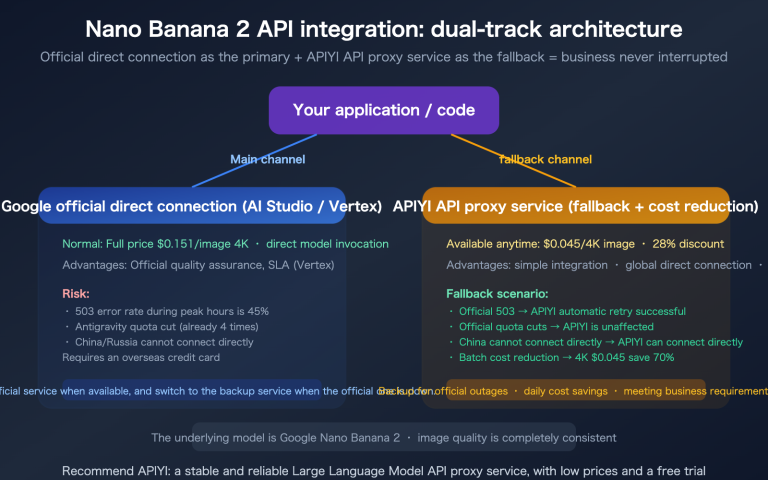
- Default to Nano Banana 2: Covers 80% of daily generation needs, saving costs
- Switch to Pro for critical scenarios: Brand assets, precise text, automatic switching during peak hours
- Implement fallback at the code level: When NB2 returns 429 or times out, automatically route to Pro
🎯 Best Practice: APIYI apiyi.com supports invoking both
gemini-3.1-flash-image-previewandgemini-3-pro-image-previewmodels under the same API key, no separate registration needed. Combined with the smart routing code above, you can achieve the optimal balance between cost and stability.
Frequently Asked Questions (FAQ)
Q1: Nano Banana 2 is touted for its "Flash" speed, so why isn't it actually faster?
Three reasons combine:
- Dynamic Throttling: During peak hours, Google actively slows down, and Flash models are more affected (due to higher request volume).
- 4K Bottleneck Shift: At high resolutions, image encoding and transmission become the primary time consumers, diluting the Flash model's inference speed advantage.
- Silent Degradation: When overloaded, it might degrade to an older model, which can actually be slower.
During off-peak hours and at 1K-2K resolutions, NB2's speed is indeed noticeably superior to Pro.
Q2: Is there a difference in how the two models are invoked via API?
Almost none. Both use the same API endpoint; you just need to switch the model parameter:
- Nano Banana 2:
gemini-3.1-flash-image-preview - Nano Banana Pro:
gemini-3-pro-image-preview
The only thing to note: NB2 requires passing the thought_signature parameter in multi-turn conversations, while Pro is more fault-tolerant in this regard.
🎯 Unified Interface: When invoking both models via APIYI apiyi.com, the interface format is identical, and switching only requires changing the model parameter.
Q3: Is there a quality difference between Nano Banana 2's 4K output and Pro's 4K?
Yes, but it's not significant. Pro's 4K has about a 5-8% advantage in texture detail and natural lighting/shadows. For social media or web display, the difference is almost imperceptible. For print or large-scale displays, Pro is better.
Cost difference: NB2's 4K is about $0.15/image, Pro is about $0.24/image — a difference of only 1.6x, which is smaller than the 2x difference at lower resolutions.
Q4: Is the free tier of 5000 calls sufficient?
Google AI Studio offers a free tier of 5000 NB2 calls per month. This is sufficient for personal projects and prototype development, but it's far from enough for a production environment.
For production environments, we recommend invoking via API (e.g., APIYI apiyi.com), which offers pay-as-you-go billing with no quota limits.
Summary
Nano Banana 2 isn't a replacement for Pro; instead, it's a complementary option that covers different scenarios:
- Conditional Speed Advantage: It's genuinely 1.5-3 times faster at low resolutions and during off-peak hours; however, this advantage disappears for 4K and during peak times.
- Pro Wins on Stability: NB2 has three main issues: dynamic rate limiting, silent degradation, and incorrect moderation flagging. Pro is simply more reliable.
- 5% Image Quality Difference: You won't notice it in everyday use, but for critical brand scenarios, Pro is still the right choice.
- 1.6-2x Price Difference: The actual gap narrows when you factor in retry costs.
- Best Practice is Dual Models: Default to NB2, switch to Pro for critical scenarios, and implement automatic fallback at the code level.
- Remember the Model Names: NB2 =
gemini-3.1-flash-image-preview, Pro =gemini-3-pro-image-preview.
🎯 Experience it Now: Visit APIYI at apiyi.com to get your API Key. You'll be able to invoke both Nano Banana 2 and Nano Banana Pro models simultaneously. The platform supports pay-as-you-go billing with no quota limits, and one Key gives you access to the entire Gemini image generation model series.
This article was compiled by the APIYI technical team based on actual API invocation data and updated in March 2026. For the latest updates on Gemini image models, please refer to the APIYI Help Center at help.apiyi.com.