Frequent security risks with OpenClaw are a problem many AI developers and regular users are facing. This article will introduce OpenClaw's 5 core security risks and complete uninstallation guides for 3 platforms, helping you quickly identify the risks and completely remove OpenClaw.
Core Value: After reading this article, you'll understand all the security risks of OpenClaw and master the complete steps to thoroughly uninstall it on macOS, Windows, and Linux, including the often-overlooked step of revoking OAuth tokens.
What is OpenClaw: The Evolution from Clawdbot to Moltbot
Before discussing OpenClaw's risks, let's quickly understand the background of this tool.
OpenClaw (formerly Clawdbot, Moltbot) is an open-source autonomous AI Agent tool created by Austrian developer Peter Steinberger. Its core functionality is to use messaging platforms (like Telegram, Discord, WhatsApp) as a user interface, allowing Large Language Models to autonomously execute various tasks.
OpenClaw Renaming Timeline
| Date | Name | Event |
|---|---|---|
| November 2025 | Clawdbot | Project first released |
| January 27, 2026 | Moltbot | Renamed due to Anthropic trademark complaint (lobster theme) |
| January 29, 2026 | OpenClaw | Second rename, emphasizing open-source + lobster tradition |
| February 14, 2026 | — | Steinberger announced joining OpenAI, project transferred to open-source foundation |
OpenClaw Core Features
OpenClaw can automatically sort emails, draft replies, manage calendars, execute shell commands, operate file systems, perform web automation, and more. It extends its capabilities through over 100 pre-configured AgentSkills, connecting to services like Google, Slack, Discord, and GitHub.
Sounds convenient, but it's precisely this "can-do-anything" design that brings serious security risks.
🎯 Security Tip: Before using any AI Agent tool, it's recommended to assess the security risks. If you need a secure and reliable Large Language Model API invocation service, we recommend accessing it through the APIYI apiyi.com platform. This platform provides a controlled API interface environment, eliminating concerns about local Agent security risks.
Deep Dive into OpenClaw's 5 Major Security Risks
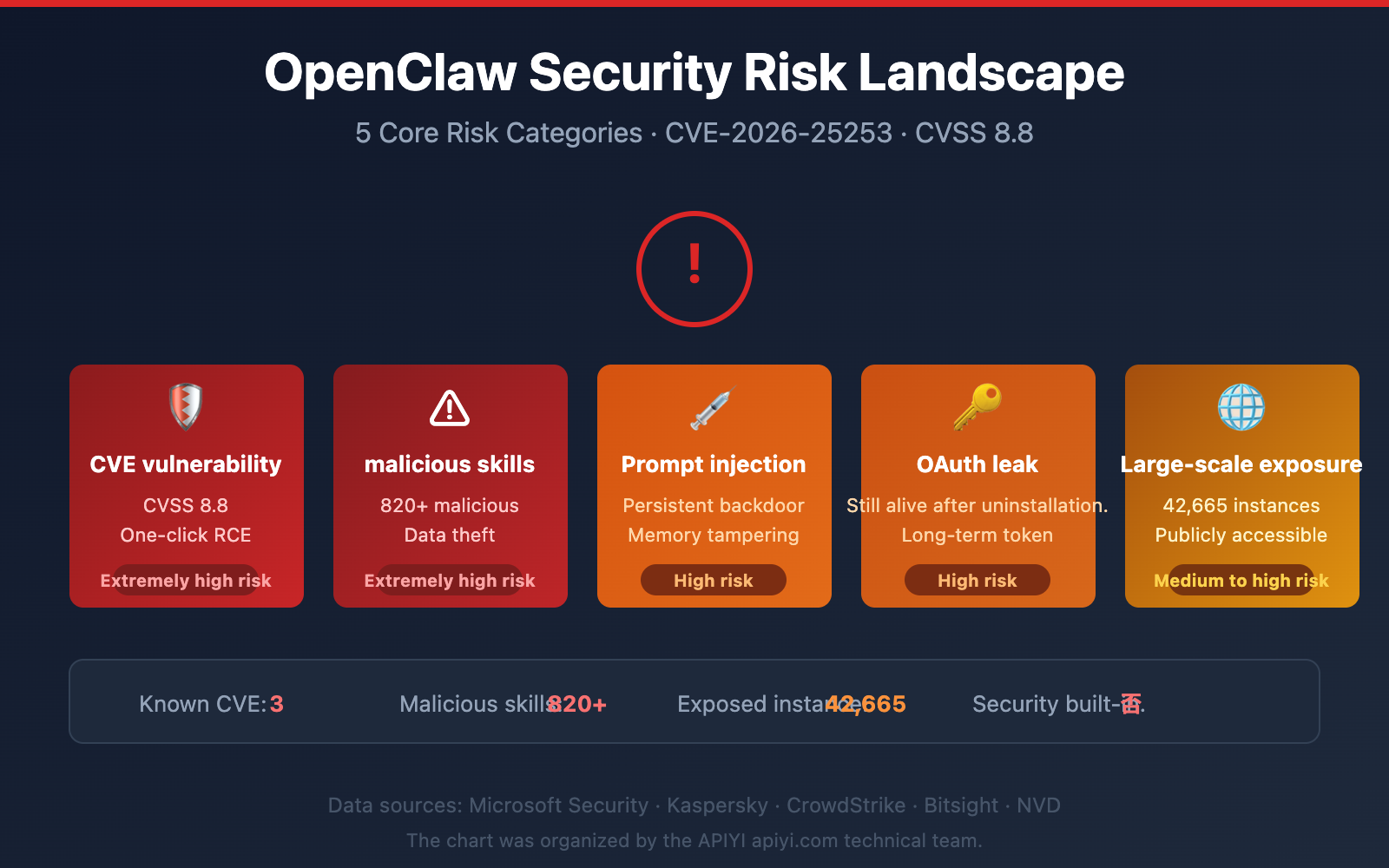
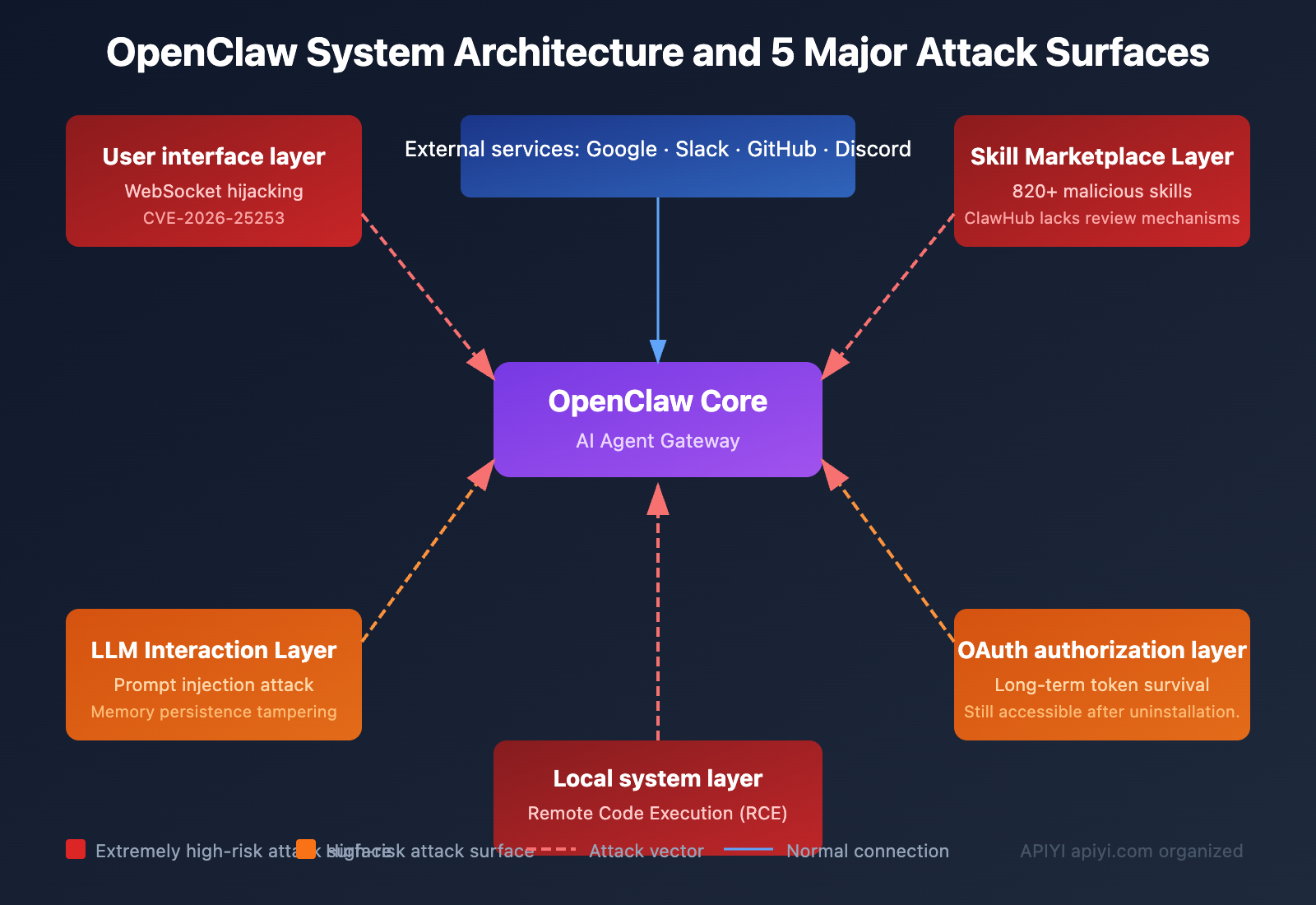
Based on analysis reports from multiple security agencies including Microsoft, Kaspersky, and CrowdStrike, OpenClaw currently faces the following 5 core security risks.
Risk 1: Critical CVE Vulnerabilities – One-Click Remote Code Execution
Multiple critical CVE vulnerabilities have been disclosed for OpenClaw, with CVE-2026-25253 being the most severe.
| Vulnerability ID | CVSS Score | Type | Impact | Fixed Version |
|---|---|---|---|---|
| CVE-2026-25253 | 8.8 (Critical) | Token Leak + RCE | One-click remote code execution | v2026.1.29 |
| CVE-2026-24763 | Critical | Command Injection | Arbitrary command execution | — |
| CVE-2026-25157 | Critical | Command Injection | Arbitrary command execution | — |
CVE-2026-25253 Attack Principle:
- OpenClaw's control interface trusts the
gatewayUrlfrom URL query strings and automatically connects upon loading. - The server doesn't validate WebSocket Origin headers, accepting requests from any website.
- Attackers craft malicious links; when a user clicks, authentication tokens are sent to the attacker's server.
- Attackers gain operational-level gateway access, allowing them to modify sandbox configurations and execute arbitrary code.
Even instances bound only to localhost are affected. An attacker only needs you to click a link or visit a malicious webpage to gain complete control of your OpenClaw gateway.
Risk 2: Malicious Skill Marketplace – Over 820 Malicious Skills
OpenClaw's skill marketplace, ClawHub, has serious security review issues.
According to security researchers' scans:
- ClawHub hosts approximately 10,700 skills in total.
- Over 820 have been confirmed as malicious (about 7.7%).
- Updated scans show the proportion of malicious skills is now close to 20%.
Cisco's AI security research team tested a third-party OpenClaw skill and found it performed data exfiltration and prompt injection without the user's knowledge.
These malicious skills disguise themselves as trading bots, financial assistants, content services, etc., but actually steal:
- Files and crypto wallet browser extensions
- Seed phrases and macOS Keychain data
- Browser passwords and cloud service credentials
Risk 3: Prompt Injection Attacks – AI Executes Malicious Commands
OpenClaw can't distinguish between legitimate instructions and malicious ones. Attackers can embed malicious commands within the content OpenClaw processes, causing the AI to unknowingly execute the attacker's operations.
Example Attack Chain:
Malicious email content → OpenClaw automatic processing → AI executes embedded command → Data leak
What's more dangerous is that OpenClaw's "security model" explicitly lists prompt injection as "out of scope" – as long as it doesn't bypass security boundaries. However, in practice, prompt injection can be chained with other features to achieve persistent attacks.
Once OpenClaw's agent state or "memory" is modified, it will persistently follow the attacker's instructions, creating a persistent backdoor.
Risk 4: OAuth Token Persistence – Uninstalling Software Doesn't Equal Safety
This is the risk most users easily overlook. OpenClaw uses long-lived OAuth tokens to connect to your Google, Slack, Discord, GitHub, and other accounts.
Key Fact: Even if you uninstall OpenClaw, these OAuth tokens remain stored on the respective service providers' servers, and your accounts remain accessible.
Simply deleting the local software does not revoke OAuth authorization. This is why many people think they've "uninstalled completely," but their accounts are still exposed to risk.
Risk 5: Massive Exposure – Over 42,000 Instances Exposed on the Internet
| Monitoring Agency | Detection Period | Exposed Instances |
|---|---|---|
| Censys | Jan 25-31, 2026 | 1,000 → 21,000+ |
| Bitsight | Extended analysis period | 30,000+ |
| Independent Research | Comprehensive scan | 42,665 (of which 5,194 verified as vulnerable) |
OpenClaw's own official documentation admits: "There is no 'perfectly secure' deployment method." Security is an optional configuration, not a built-in feature.
💡 Security Recommendation: If your project requires calling Large Language Model APIs, you don't need to bear the risks of local agent deployment. You can safely use API interfaces for mainstream models like Claude, GPT-4o, and DeepSeek through the APIYI apiyi.com platform, where all invocations are completed in a controlled environment.
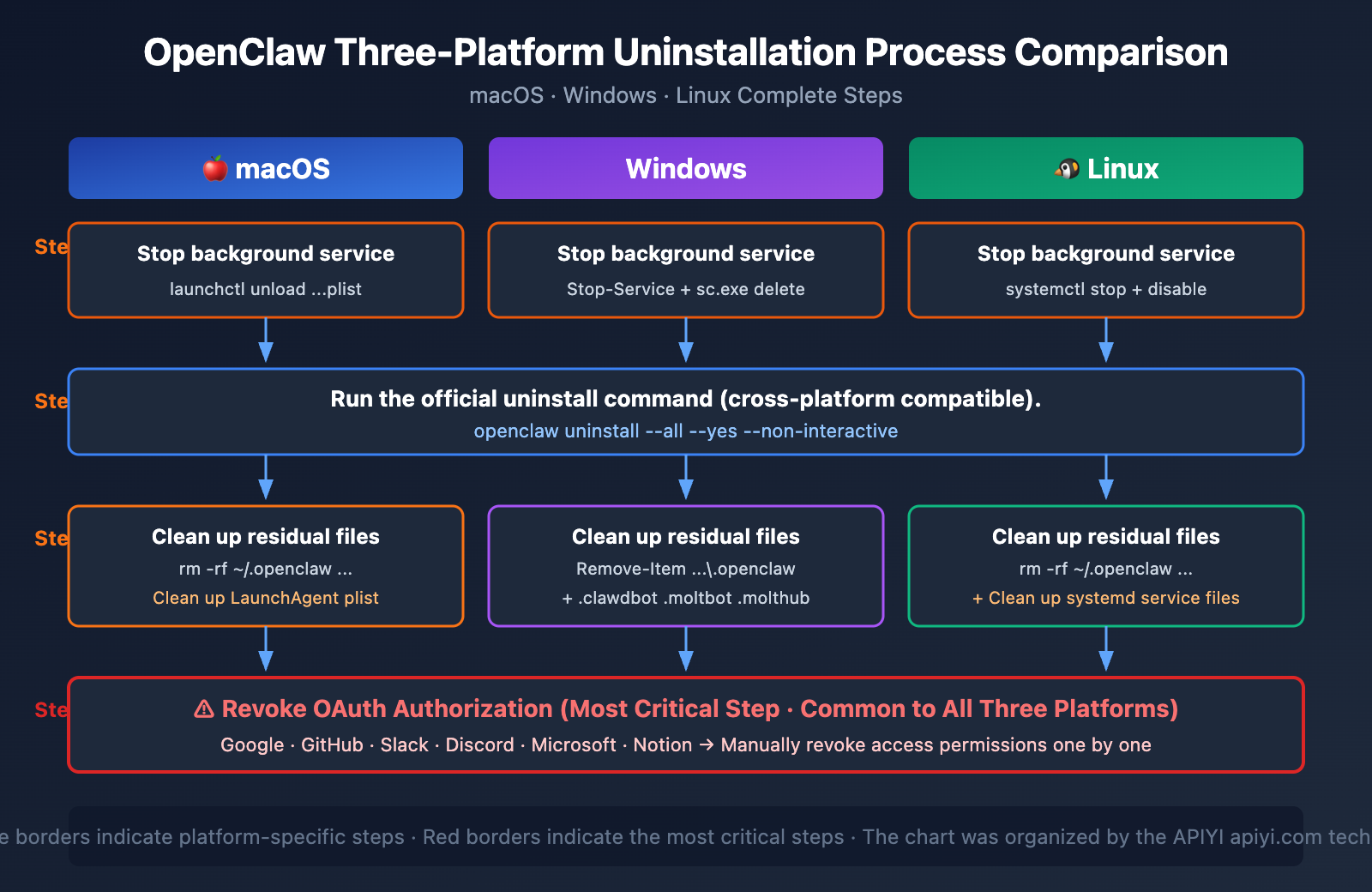
Complete OpenClaw Uninstall Guide: Full Steps for 3 Platforms
Here's the complete uninstall tutorial for macOS, Windows, and Linux.
Important Reminder: The order matters. If you delete the binary via npm uninstall -g openclaw first, you won't be able to use the official openclaw uninstall command, making cleanup much more complicated.
Step 1: Stop the OpenClaw Background Service
Before uninstalling, you must stop the OpenClaw background gateway process.
macOS:
# Stop the LaunchAgent background process
launchctl unload ~/Library/LaunchAgents/com.openclaw.gateway.plist
Linux:
# Stop the systemd service
sudo systemctl stop openclaw-gateway
sudo systemctl disable openclaw-gateway
Windows:
# Stop the background service
Stop-Service OpenClawGateway
sc.exe delete OpenClawGateway
Step 2: Run the Official Uninstall Command
# Recommended method: One-command complete uninstall
openclaw uninstall --all --yes --non-interactive
This command removes the OpenClaw binary and basic configuration. However, it does not clean up all residual files and OAuth authorizations.
Step 3: Clean Up Residual Directories
After running the official uninstall command, you still need to manually clean up the following directories:
macOS / Linux:
# Delete all configuration directories (including directories from historical name changes)
rm -rf ~/.openclaw
rm -rf ~/.clawdbot
rm -rf ~/.moltbot
rm -rf ~/.molthub

# macOS extra cleanup for LaunchAgent
rm -f ~/Library/LaunchAgents/com.openclaw.gateway.plist
Windows:
# Delete configuration directories
Remove-Item -Recurse -Force "$env:USERPROFILE\.openclaw"
Remove-Item -Recurse -Force "$env:USERPROFILE\.clawdbot"
Remove-Item -Recurse -Force "$env:USERPROFILE\.moltbot"
Remove-Item -Recurse -Force "$env:USERPROFILE\.molthub"
Step 4: Verify the Uninstall is Complete
# Check for any remaining processes
ps aux | grep -i openclaw
ps aux | grep -i clawdbot
ps aux | grep -i moltbot

# Check for any remaining files
ls -la ~/.openclaw 2>/dev/null && echo "Residual files exist!" || echo "Cleaned up successfully"
ls -la ~/.clawdbot 2>/dev/null && echo "Residual files exist!" || echo "Cleaned up successfully"
ls -la ~/.moltbot 2>/dev/null && echo "Residual files exist!" || echo "Cleaned up successfully"
🚀 Tech Tip: If you're uninstalling OpenClaw because you need a more secure way to call AI models, APIYI (apiyi.com) provides ready-to-use API interfaces. You don't need to deploy any local Agent, and you can integrate it in just 5 minutes.
OpenClaw OAuth Token Revocation Guide: The Most Critical Step
This is the most overlooked but most important step in uninstalling OpenClaw. Most uninstall tutorials only focus on deleting local files, but if you don't revoke the OAuth tokens, your account is still at risk.
OAuth Revocation Steps for Each Platform
| Platform | Path | Revocation Method |
|---|---|---|
| myaccount.google.com → Security → Third-party apps | Find OpenClaw/Clawdbot/Moltbot, click "Remove Access" | |
| GitHub | github.com/settings/applications → Authorized OAuth Apps | Find OpenClaw, click Revoke |
| Slack | Workspace Settings → App Management → Installed Apps | Remove OpenClaw integration |
| Discord | User Settings → Authorized Apps | Cancel OpenClaw authorization |
| Microsoft | account.live.com/consent/Manage | Remove OpenClaw permissions |
| Notion | Settings → My connections | Disconnect OpenClaw |
Why OAuth Revocation is So Important
Uninstall OpenClaw locally → Deletes local software
              ↓
     But OAuth tokens remain alive in the cloud
              ↓
    Your emails, files, code repositories can still be accessed
              ↓
    Must manually revoke authorization on each platform
It's recommended to change the passwords for related accounts after revoking OAuth, especially if you suspect you may have already been compromised.
🎯 Security Best Practice: When using AI services, prioritize API Key-based invocation over broad OAuth authorization. The APIYI apiyi.com platform uses a secure API Key authentication mechanism with controllable permission scopes, and won't access sensitive data like your emails or files.
OpenClaw Security Risk Self-Checklist
If you are currently using or have used OpenClaw in the past, please perform a security self-check against the following list:
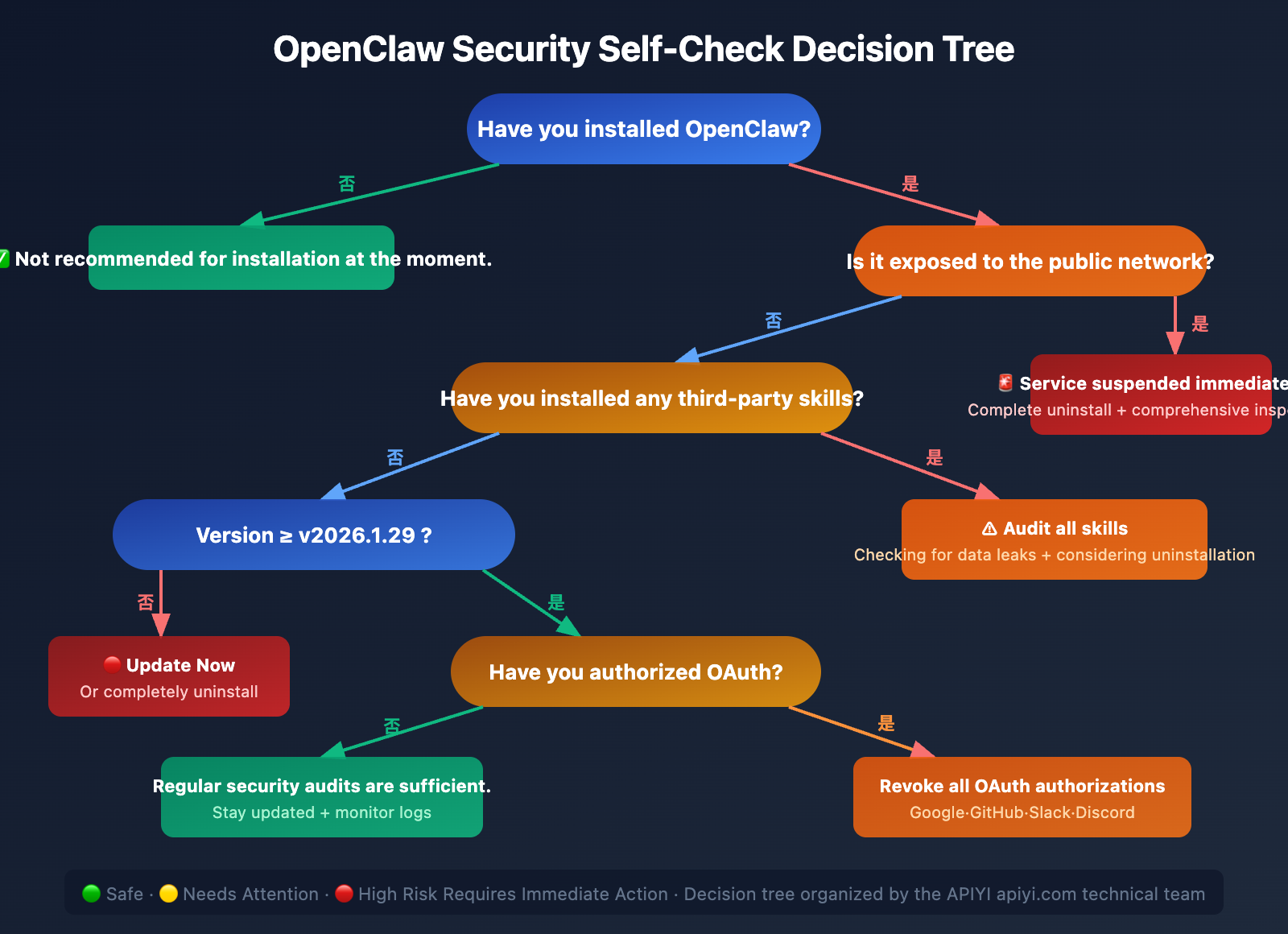
Security Self-Check Items
- Version Check: Have you updated to v2026.1.29 or later (fixes CVE-2026-25253)?
- Network Exposure: Is the OpenClaw gateway exposed to the public internet? (Should be limited to localhost)
- Skill Audit: Have you installed third-party skills from unknown sources?
- OAuth Review: Which services have you authorized for OpenClaw?
- Log Check: Are there any abnormal external connection records?
- Memory Audit: Has the Agent memory of OpenClaw been tampered with?
Recommended Actions for Different Users
| User Type | Recommended Action |
|---|---|
| Never used OpenClaw | Not recommended to install; monitor security updates |
| Only performed local testing | Complete uninstall + OAuth revocation |
| Currently using it daily | Update to the latest version immediately + security audit |
| Already exposed to the public internet | Stop service immediately + complete uninstall + comprehensive security check |
| Installed third-party skills | Audit all skills + check for data leaks + consider uninstalling |
Frequently Asked Questions
Q1: How is OpenClaw different from a regular AI chatbot, and why is it riskier?
Regular chatbots (like ChatGPT, Claude) run on the service provider's servers, and you only interact with them through a browser. OpenClaw, however, is an autonomous AI Agent that runs locally on your machine and has actual permissions to access your file system, email, code repositories, etc. This design makes it more powerful but also significantly expands its attack surface—if compromised, an attacker gains not just chat logs but operational control over your computer and cloud services. If you need to call AI models safely, it's recommended to use controlled API platforms like APIYI (apiyi.com) to avoid the security risks associated with local Agents.
Q2: I’ve already uninstalled OpenClaw. What else should I be concerned about?
Your primary concern should be OAuth tokens. OpenClaw uses long-lived OAuth tokens that are stored on service providers' servers (like Google, GitHub, Slack). These tokens do not expire just because you uninstalled the local software. It's crucial to log into every platform you ever authorized and manually revoke OpenClaw's access permissions. Additionally, if you installed any third-party skills, it's wise to check your system for any unusual processes or files.
Q3: How do malicious OpenClaw skills work?
Malicious skills disguise themselves as legitimate features (like trading bots, content services) and are distributed through the ClawHub marketplace. Once installed, they can execute data exfiltration in the background—stealing sensitive information such as browser passwords, encrypted wallet seed phrases, macOS Keychain data, and more. Testing by the Cisco security team confirmed that these skills can operate completely undetected by the user.
Q4: If my OpenClaw instance only runs locally and isn’t exposed to the public internet, is it safe?
Not entirely. The CVE-2026-25253 vulnerability demonstrates that even if OpenClaw is bound only to localhost, an attacker can still steal your authentication tokens via a malicious link, enabling one-click remote code execution. Simply clicking a carefully crafted link can bypass your local security perimeter.
Q5: Are there safer ways to use AI Agent functionality?
Here are a few recommendations: First, prioritize API-based model invocation over local Agents. You can safely call mainstream models like Claude, GPT-4o, and DeepSeek through the APIYI (apiyi.com) platform, where all requests are processed in a controlled environment. Second, if a local Agent is absolutely necessary, always keep it updated to the latest version, limit its network exposure, and only use officially vetted skills. Finally, regularly review your OAuth authorizations and system logs.
Summary
OpenClaw is a powerful open-source AI Agent tool, but its security issues cannot be ignored. From high-severity CVE vulnerabilities to a malicious skills marketplace, and from prompt injection to persistent OAuth tokens, each risk point can lead to serious security incidents.
Key Steps for Uninstalling OpenClaw – A Recap:
- Stop all background service processes.
- Run
openclaw uninstall --all --yes --non-interactive. - Manually clean up the
~/.openclaw,~/.clawdbot,~/.moltbot, and~/.molthubdirectories. - Revoke OAuth authorizations on all platforms (the most critical step).
- Verify the cleanup results.
If your project requires Large Language Model capabilities, we recommend using secure API calls via APIYI (apiyi.com). It provides a unified interface for calling mainstream models like Claude, GPT-4o, DeepSeek, and Gemini, allowing you to leverage AI power without taking on the security risks of a local Agent.
This article was written by the APIYI technical team, focusing on AI Large Language Model technology trends and security practices. For more AI technology tutorials, please visit the APIYI Help Center: help.apiyi.com