Author's Note: This article analyzes Nano Banana 2's limitation of outputting only 1 image per request, explains why parameters like n and numberOfImages are ineffective, compares its multi-image generation capabilities with models like Seedream, and provides efficient solutions for batch image generation.
Many developers, when calling the Nano Banana 2 API, try to include instructions like "generate 2 images" or "quantity 4" in their prompt, or attempt to pass parameters like n=4 or numberOfImages=2—none of which work. This isn't a bug; it's a design limitation of Nano Banana 2: each API request can output a maximum of 1 image.
Core Value: After reading this article, you'll understand the fundamental reason behind Nano Banana 2's single-image output limit, avoid common pitfalls, and master the correct approach for batch image generation using concurrent requests.
Why Does Nano Banana 2 Only Generate 1 Image?
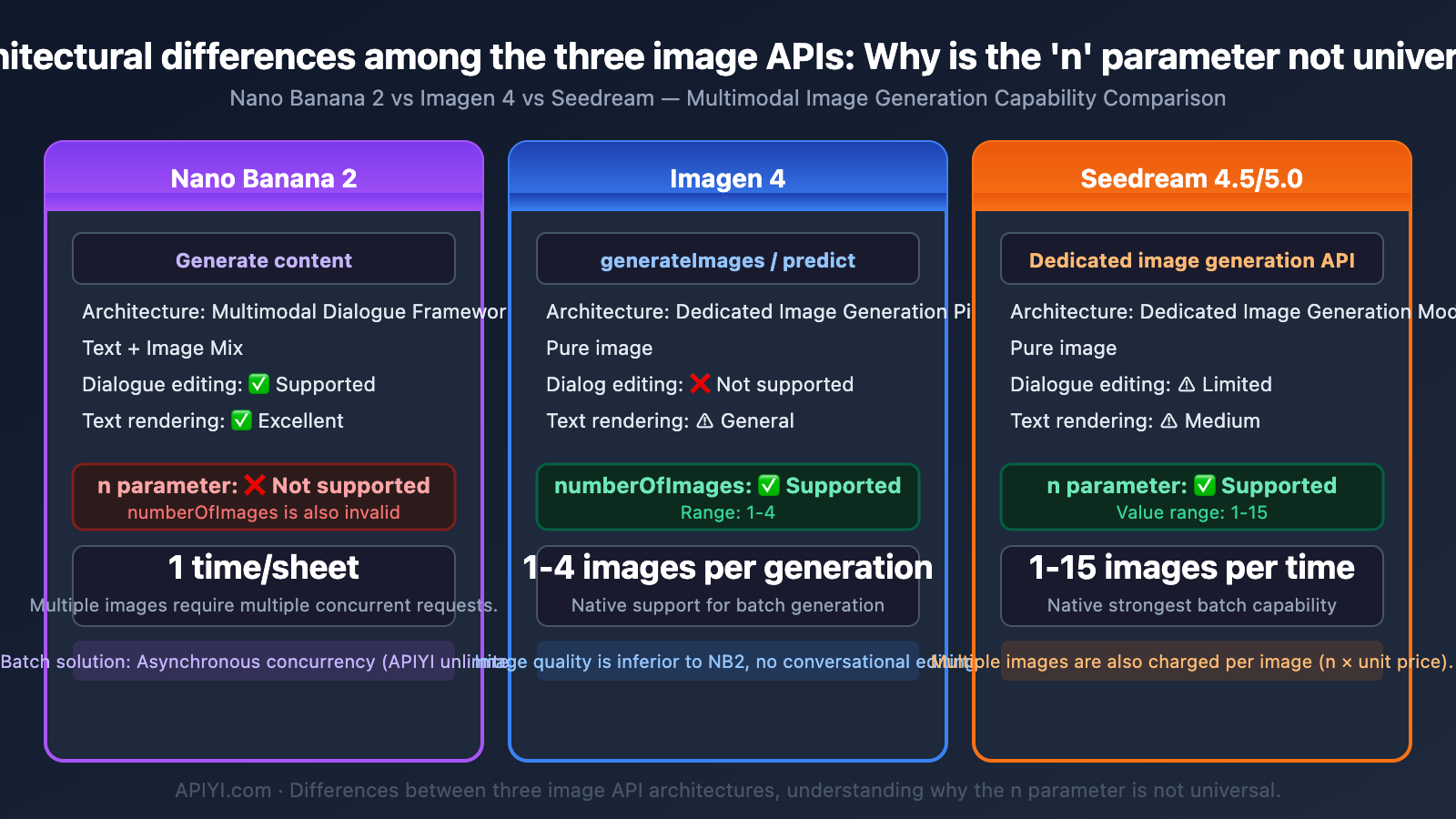
Nano Banana 2 uses Gemini's generateContent API, not a dedicated image generation API (like Imagen's generateImages). This means image generation is embedded within a multimodal content generation framework—the model can output a mix of text + images, but it only produces 1 image per response.
Google's official Vertex AI documentation clearly states:
The model might not create the exact number of images you ask for.
| Common Misconception | Reality | Explanation |
|---|---|---|
| Writing "generate 4 images" in the prompt | ❌ Ineffective | The model ignores quantity instructions and still outputs 1 image. |
Passing an n=2 parameter |
❌ Ineffective | The generateContent API does not support an n parameter. |
Passing a numberOfImages=4 parameter |
❌ Ineffective | This parameter is only for the Imagen API, not Gemini. |
Passing a number_of_images=2 parameter |
❌ Ineffective | Same as above; Gemini's image generation doesn't recognize this parameter. |
| Writing "output multiple images" in the prompt | ❌ Unreliable | The model might only return text or a single image. |
Key Differences Between Nano Banana 2 Image Generation and the Imagen API
Many developers confuse these two APIs, which is the core reason parameters don't work:
| Comparison Point | Nano Banana 2 (Gemini) | Imagen 4 |
|---|---|---|
| API Type | generateContent |
generateImages / predict |
| Model ID | gemini-3.1-flash-image-preview |
imagen-4.0-generate-001 |
| Output Format | Mixed text + image | Pure images |
| Images Per Request | 1 image | 1-4 images (numberOfImages) |
n Parameter |
❌ Not supported | ✅ Supported (1-4) |
| Images Only Output | ❌ Must contain text | ✅ Supported |
| Conversational Editing | ✅ Supports multi-turn | ❌ Not supported |
| Text Rendering | ✅ Excellent | ⚠️ Average |
⚠️ Critical Reminder: Nano Banana 2 is built on the Gemini architecture and uses the
generateContentendpoint. This endpoint is designed for multimodal conversation, not batch image generation. Therefore, it doesn't have annparameter and won't return multiple images in a single request.
The Right Way to Batch Generate Images with Nano Banana 2
Since a single request can only generate 1 image, there's only one path to batch generation: multiple concurrent requests.
Solution 1: Python Asynchronous Concurrent Requests
import asyncio
import aiohttp
import base64
import json

API_KEY = "your-apiyi-api-key"
ENDPOINT = "https://api.apiyi.com/v1beta/models/gemini-3.1-flash-image-preview:generateContent"

async def generate_one(session, prompt, index):
    """Generate a single image"""
    headers = {"Content-Type": "application/json", "x-goog-api-key": API_KEY}
    payload = {
        "contents": [{"parts": [{"text": prompt}]}],
        "generationConfig": {
            "responseModalities": ["IMAGE"],
            "imageConfig": {"aspectRatio": "1:1", "imageSize": "2K"}
        }
    }
    async with session.post(ENDPOINT, headers=headers, json=payload) as resp:
        result = await resp.json()
        img = result["candidates"][0]["content"]["parts"][0]["inlineData"]["data"]
        with open(f"output_{index}.png", "wb") as f:
            f.write(base64.b64decode(img))
        print(f"Image {index+1} saved")

async def batch_generate(prompt, count=4):
    """Generate multiple images concurrently"""
    async with aiohttp.ClientSession() as session:
        tasks = [generate_one(session, prompt, i) for i in range(count)]
        await asyncio.gather(*tasks)

asyncio.run(batch_generate("A cyberpunk-style cat with neon background", count=4))
Recommendation: Calling Nano Banana 2 via APIYI (apiyi.com) has no concurrency limits. You can send any number of requests simultaneously without worrying about 429 rate limiting. The platform offers a free image generation testing tool, AI Image Master (imagen.apiyi.com), where you can experience it without writing any code.
Solution 2: Thread Pool Synchronous Concurrency
import requests
import base64
from concurrent.futures import ThreadPoolExecutor

API_KEY = "your-apiyi-api-key"
ENDPOINT = "https://api.apiyi.com/v1beta/models/gemini-3.1-flash-image-preview:generateContent"

def generate_one(args):
    prompt, index = args
    headers = {"Content-Type": "application/json", "x-goog-api-key": API_KEY}
    payload = {
        "contents": [{"parts": [{"text": prompt}]}],
        "generationConfig": {
            "responseModalities": ["IMAGE"],
            "imageConfig": {"aspectRatio": "1:1", "imageSize": "1K"}
        }
    }
    resp = requests.post(ENDPOINT, headers=headers, json=payload, timeout=120)
    img = resp.json()["candidates"][0]["content"]["parts"][0]["inlineData"]["data"]
    with open(f"output_{index}.png", "wb") as f:
        f.write(base64.b64decode(img))
    return f"Image {index+1} completed"

with ThreadPoolExecutor(max_workers=8) as pool:
    prompt = "A cyberpunk-style cat with neon background"
    results = pool.map(generate_one, [(prompt, i) for i in range(8)])
    for r in results:
        print(r)
Multi-Image Generation Capability Comparison: Nano Banana 2 vs. Other Models
Different AI image generation models vary greatly in their support for "generating multiple images per request."
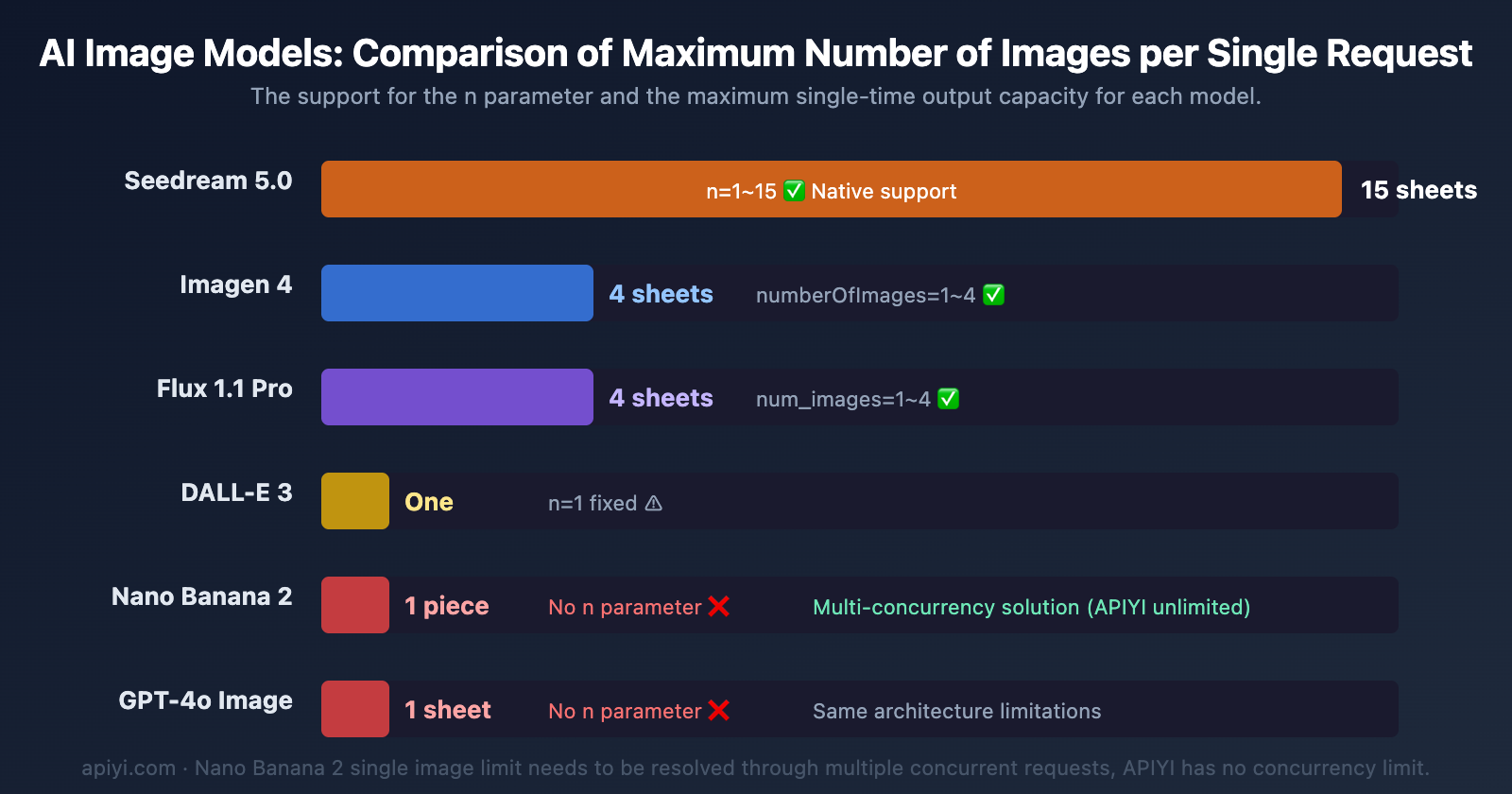
| Model | Max per Request | n Parameter |
API Type | Multi-Image Billing |
|---|---|---|---|---|
| Nano Banana 2 | 1 image | ❌ Not Supported | generateContent | Each request billed separately |
| Imagen 4 | 4 images | ✅ numberOfImages | generateImages | Billed per generated image |
| Seedream 4.5/5.0 | 15 images | ✅ n (1-15) | Dedicated endpoint | Billed per actual number generated |
| DALL-E 3 | 1 image | ✅ n=1 (fixed) | images/generations | Billed per image |
| GPT-4o Image | 1 image | ❌ Not Supported | chat/completions | Same as Nano Banana 2 |
| Flux 1.1 Pro | 4 images | ✅ num_images | Dedicated endpoint | Billed per image |
Cost Analysis for Batch Generation with Nano Banana 2's Single-Image Limit
Even though Nano Banana 2 can only generate 1 image per request, its actual efficiency isn't low when using concurrent requests—the key is whether the platform limits concurrency.
| Scenario | Google Official (Tier 1) | Google Official (Tier 3) | APIYI |
|---|---|---|---|
| Concurrency Limit | 10 RPM | 60 RPM | Unlimited |
| Time for 100 images (1K) | ~10 minutes | ~2 minutes | ~1-2 minutes |
| Cost for 100 images (1K) | $6.70 | $6.70 | $4.50 (per call) / $2.50 (usage-based) |
| Cost for 100 images (4K) | $15.10 | $15.10 | $4.50 (per call) / $4.50 (usage-based) |
| 429 Error Risk | High | Medium | None |
🎯 Key Takeaway: The single-image limit of Nano Banana 2 isn't the problem; concurrency limits are the real bottleneck. Calling it on APIYI (apiyi.com) with unlimited concurrency, combined with asynchronous concurrent code, makes batch generation far more efficient than queuing for quotas on Google's official platform.
Frequently Asked Questions
Q1: What happens if I write “generate 4 images” in the Nano Banana 2 prompt?
The model will ignore the quantity instruction. Nano Banana 2 is based on Gemini's generateContent API, which outputs exactly 1 image per request. The Google Vertex AI documentation explicitly states: "The model does not necessarily generate the exact number of images explicitly requested by the user." To get multiple images, you need to send multiple independent requests.
Q2: What’s the difference between Seedream’s `n` parameter and Nano Banana 2?
Seedream (ByteDance) natively supports the n parameter (1-15), allowing you to generate multiple images in a single API request, with billing based on the actual number generated. Nano Banana 2 doesn't have this parameter; it can only generate 1 image per call. However, Nano Banana 2 has advantages in image quality and text rendering. Batch needs can be addressed through concurrent requests. We recommend calling it via APIYI apiyi.com, which has no concurrency limits.
Q3: Are there any limits when calling Nano Banana 2 concurrently via APIYI?
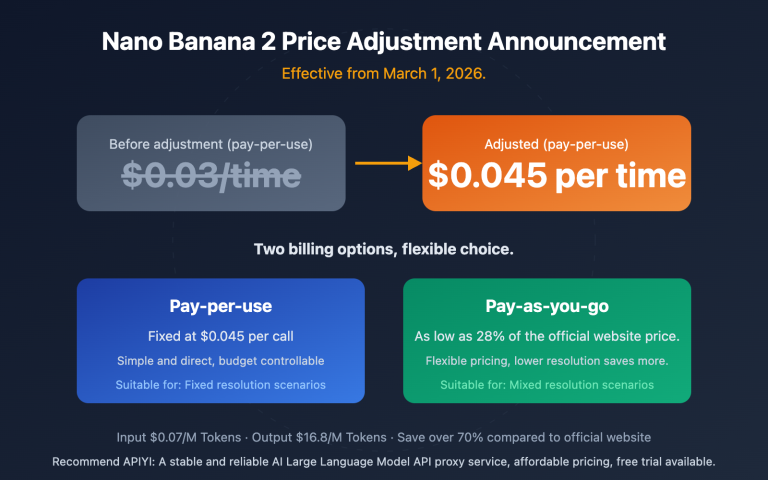
The APIYI platform has no concurrency limits and no RPM/RPD/IPM restrictions. You can initiate dozens or even hundreds of requests simultaneously. It's billed per call at $0.045/image (including 4K), or approximately $0.02-$0.05/image with volume pricing. Your code only needs to change the API endpoint from Google's official one to api.apiyi.com; everything else remains fully compatible.
Summary
Key points about Nano Banana 2's image output quantity limitations:
- Generates only 1 image per call: Nano Banana 2 uses the
generateContentAPI, which doesn't support thenornumberOfImagesparameters. Quantity instructions in the prompt are also ineffective. - It's a design choice, not a bug: Gemini series models embed image generation within a multimodal conversational framework, which differs from Imagen's dedicated image API architecture.
- Batch generation relies on concurrency: The correct approach is to generate multiple images simultaneously via multiple concurrent requests (async/thread pool). Efficiency depends on the platform's concurrency limits.
- Concurrency limits are the real bottleneck: Google's official Tier 1 only allows 10 RPM, and even Tier 3 is capped at 60 RPM.
We recommend accessing Nano Banana 2 through APIYI apiyi.com. It offers unlimited concurrency, prices as low as $0.045/image (including 4K, which is less than 30% of the official price), and volume pricing around $0.02-$0.05/image. The platform also provides a free AI image master tool: imagen.apiyi.com, which supports Google's native format for calls.
📚 References
-
Google AI Image Generation Documentation: Nano Banana 2 Official Usage Guide
- Link:
ai.google.dev/gemini-api/docs/image-generation - Description: Nano Banana 2's generateContent API calling methods and parameter explanations
- Link:
-
Vertex AI Image Generation Limitations: Known limitations list for Gemini image generation
- Link:
docs.cloud.google.com/vertex-ai/generative-ai/docs/multimodal/gemini-image-generation-limitations - Description: Official documentation clearly states "the model may not generate exactly the number of images requested by the user"
- Link:
-
Imagen API Documentation: numberOfImages parameter explanation
- Link:
ai.google.dev/gemini-api/docs/imagen - Description: The standalone Imagen API supports the numberOfImages parameter (1-4), which is different from the Gemini generateContent interface
- Link:
-
APIYI Nano Banana 2 Documentation: Unlimited concurrency calling method
- Link:
docs.apiyi.com/en/api-capabilities/nano-banana-2-image - Description: APIYI has no concurrency limits, supports Google's native format, and is the best choice for batch image generation
- Link:
Author: APIYI Technical Team
Technical Discussion: Feel free to discuss in the comments. For more resources, visit the APIYI docs.apiyi.com documentation center