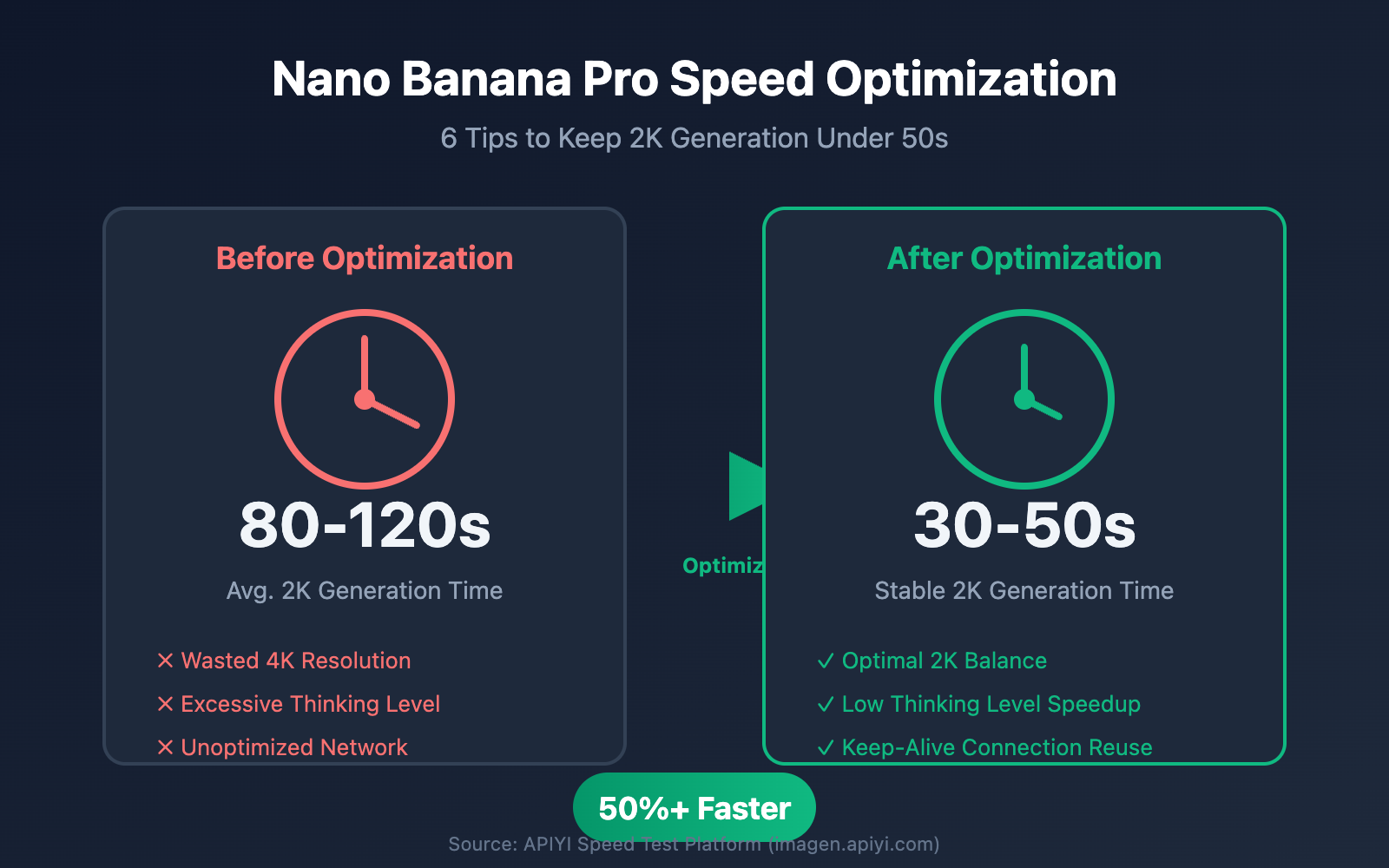
Slow image generation in Nano Banana Pro is a common complaint from developers. Clients often ask, "Why does generation take 20 seconds sometimes and over 50 seconds other times? Is it just random?" The answer is: Generation time is determined by three main factors: resolution, thinking level, and network transmission. In this post, I'll share six field-tested optimization tips to help you keep Nano Banana Pro's 2K image generation time consistently under 50 seconds.
Core Value: By the end of this article, you'll master a complete methodology for optimizing Nano Banana Pro's output speed. You'll be able to flexibly adjust parameters based on your specific business needs to achieve the perfect balance between quality and speed.
Key Factors Influencing Nano Banana Pro Generation Speed
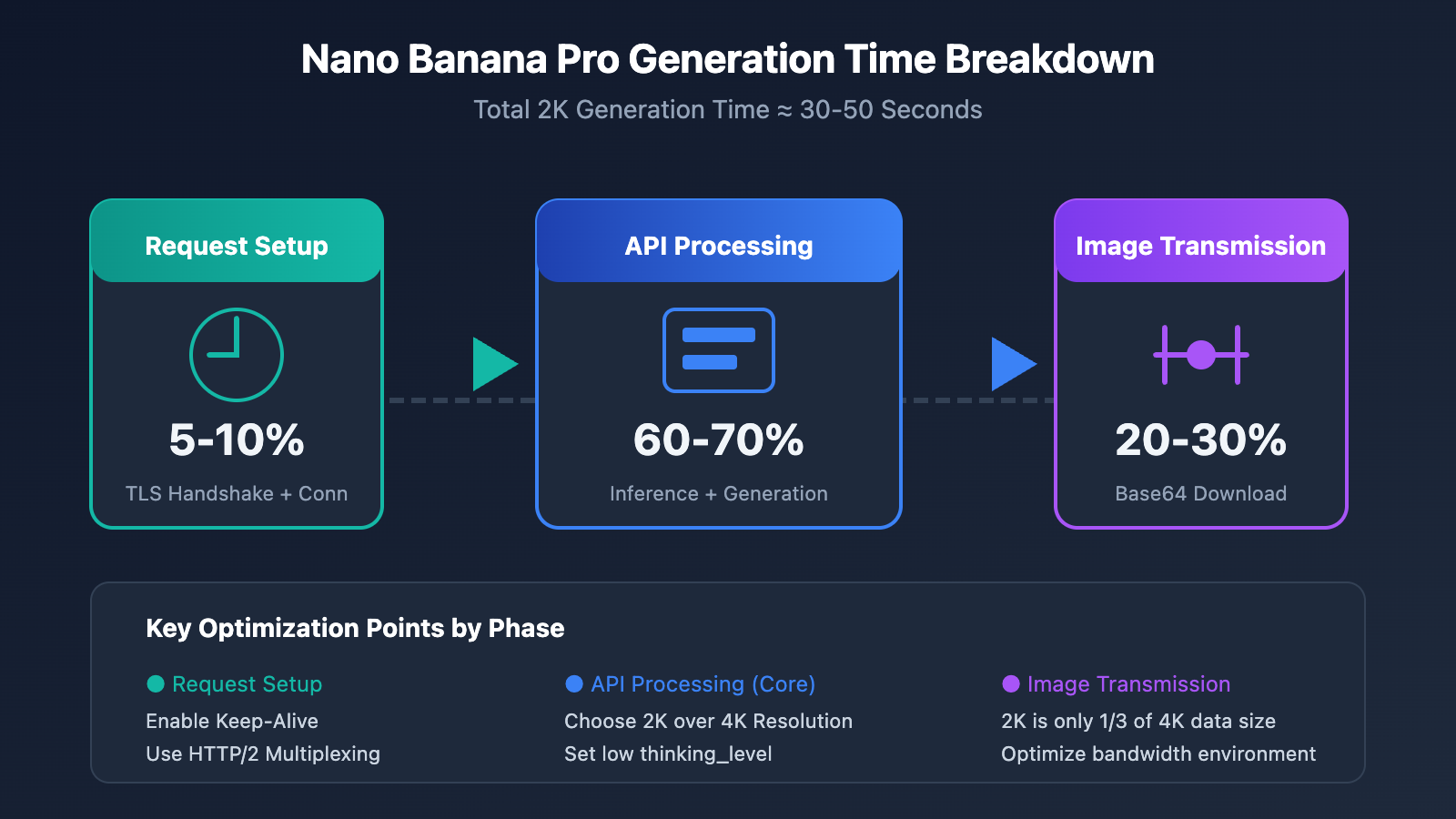
Before we dive into optimization, we need to understand the core factors affecting Nano Banana Pro's speed. Based on real-world data, the total elapsed time can be broken down into three stages:
| Phase | Time Share | Primary Factors | Optimization Potential |
|---|---|---|---|
| API Processing | 60-70% | Resolution, thinking level, model load | High |
| Image Transmission | 20-30% | Bandwidth, base64 data volume, geography | Medium |
| Request Establishment | 5-10% | Connection reuse, TLS handshake | Medium |
Field Test Data: Nano Banana Pro Generation Times
Based on speed test data from the APIYI platform (imagen.apiyi.com):
| Resolution | Thinking Level | Avg. Time | P95 Time | Recommended Use Case |
|---|---|---|---|---|
| 1K | low | 15-20s | 25s | Previews, bulk generation |
| 2K | low | 30-40s | 50s | Standard production, Web display |
| 2K | high | 45-60s | 75s | Complex composition, fine text |
| 4K | low | 50-70s | 90s | Printing, high-end design |
| 4K | high | 80-120s | 150s | Professional-grade output |
🎯 Key Takeaway: The combination of 2K resolution + low thinking level offers the best value, consistently delivering 2K images in under 50 seconds. If your use case doesn't strictly require 4K, I strongly recommend sticking with 2K.
Nano Banana Pro Speed Optimization Tip 1: Choosing the Right Resolution
Resolution is the most direct factor affecting Nano Banana Pro's generation speed. From a technical standpoint:
- 4K Image (4096×4096): Approx. 16 million pixels, requires around 2,000 output tokens.
- 2K Image (2048×2048): Approx. 4 million pixels, requires around 1,120 output tokens.
- 1K Image (1024×1024): Approx. 1 million pixels, requires around 560 output tokens.
Nano Banana Pro Resolution vs. Speed Reference Table
| Resolution | Pixel Count | Token Consumption | Relative Speed | Use Case |
|---|---|---|---|---|
| 1K | 1M | ~560 | Baseline (1x) | Previews, fast iteration |
| 2K | 4M | ~1120 | Approx. 1.8x | Regular production |
| 4K | 16M | ~2000 | Approx. 3.5x | Print-quality |
Recommendations for Choosing Resolution
# Nano Banana Pro 分辨率选择示例
def choose_resolution(use_case: str) -> str:
    """根据使用场景选择最优分辨率"""
    resolution_map = {
        "preview": "1024x1024",      # 快速预览,最快
        "web_display": "2048x2048",  # Web 展示,平衡
        "social_media": "2048x2048", # 社交媒体,2K 足够
        "print_design": "4096x4096", # 印刷设计,需要 4K
        "batch_process": "1024x1024" # 批量处理,速度优先
    }
    return resolution_map.get(use_case, "2048x2048")
💡 Optimization Tip: For most web applications, 2K resolution is more than enough. 4K is really only necessary for printing or ultra-large displays. Choosing 2K can save you about 45% in generation time, and the price is exactly the same ($0.134/image official price, $0.05/image via the APIYI platform).
Nano Banana Pro Speed Optimization Tip 2: Adjusting Thinking Level Parameters
Nano Banana Pro features a built-in "Thinking" mechanism based on Gemini 3 Pro. For simple prompts, this reasoning process can add unnecessary latency.
Nano Banana Pro thinking_level Parameter Details
| Thinking Level | Reasoning Depth | Extra Time | Use Case |
|---|---|---|---|
| low | Basic reasoning | +0s | Simple prompts, clear instructions |
| medium | Standard reasoning | +5-10s | Regular creative generation |
| high | Deep reasoning | +15-25s | Complex composition, precise text rendering |
Code Example: Setting the Thinking Level
import openai

client = openai.OpenAI(
    api_key="YOUR_API_KEY",
    base_url="https://api.apiyi.com/v1"  # 使用 APIYI 统一接口
)

# 简单场景: 使用 low 思考级别
response = client.images.generate(
    model="nano-banana-pro",
    prompt="一只橙色的猫坐在窗台上",
    size="2048x2048",
    extra_body={
        "thinking_level": "low"  # 简单提示词,低思考级别
    }
)

# 复杂场景: 使用 high 思考级别
response = client.images.generate(
    model="nano-banana-pro",
    prompt="一张专业的产品信息图,包含标题'2025新品发布'、三个产品特性、价格标签$99.99,采用科技蓝配色",
    size="2048x2048",
    extra_body={
        "thinking_level": "high"  # 复杂文本渲染,需要高思考级别
    }
)
🚀 Pro Tip: For simple scenarios like "a cat" or "a forest," setting the
thinking_leveltolowcan save 20-30% of generation time. You'll only really needhighwhen dealing with precise text rendering or complex spatial relationships.
Nano Banana Pro Speed Optimization Tip 3: Network Transmission Optimization
It's a fact that many developers overlook: just because an API endpoint responds quickly doesn't mean the total time spent is short. Real-world data shows that network transmission can account for 20-30% of the total latency.
Nano Banana Pro Network Latency Breakdown
Take a 2K image as an example. A base64-encoded 2K PNG image is roughly 4-6MB:
| Stage | Data Volume | 10Mbps Bandwidth | 100Mbps Bandwidth | 1Gbps Bandwidth |
|---|---|---|---|---|
| Request Upload | ~1KB | <0.1s | <0.1s | <0.1s |
| Response Download | ~5MB | 4s | 0.4s | 0.04s |
| TLS Handshake | – | 0.1-0.3s | 0.1-0.3s | 0.1-0.3s |
Network Optimization in Practice
import httpx
import time

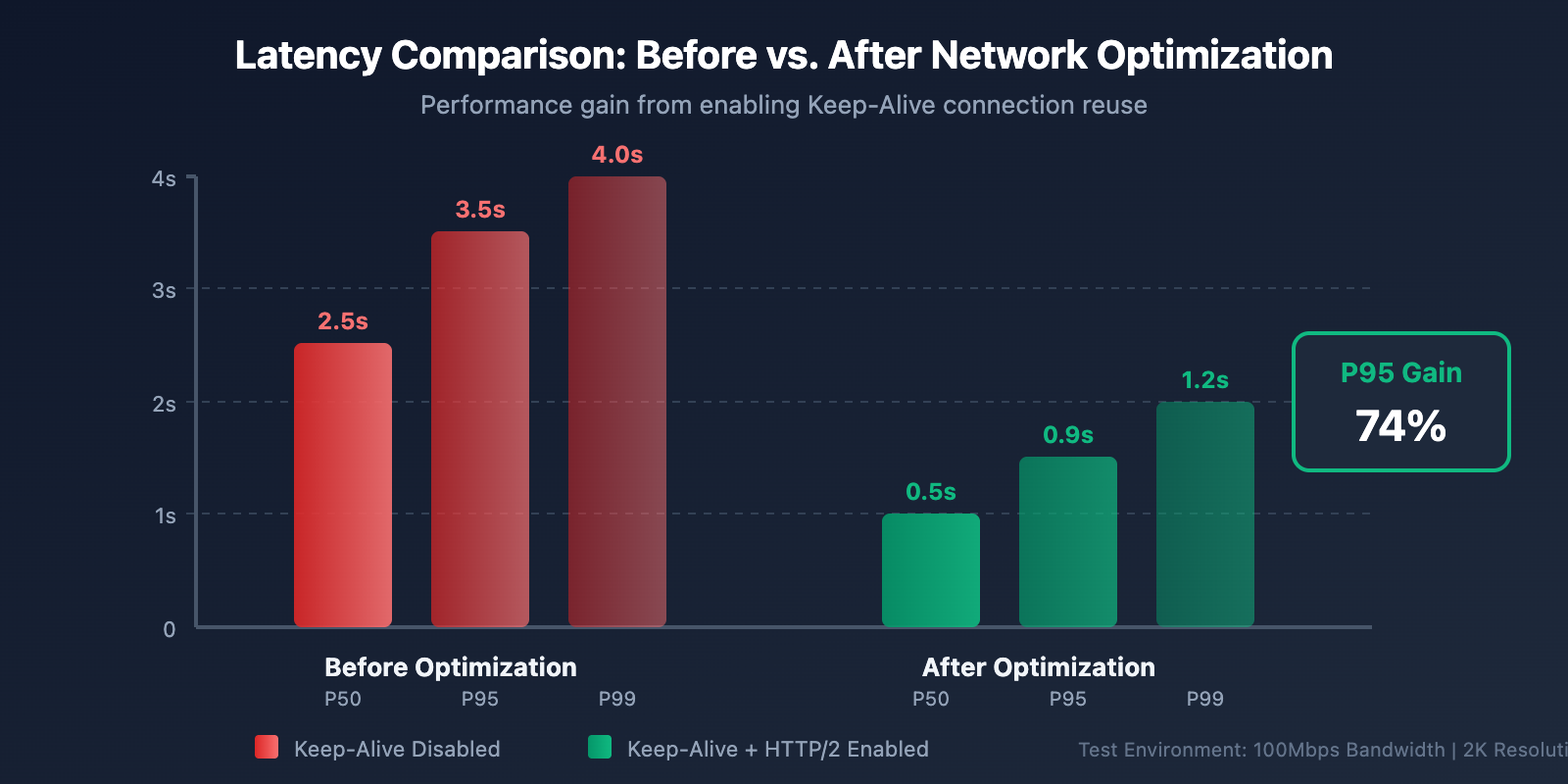
# 优化1: 启用连接复用 (Keep-Alive)
# 某团队通过启用 Keep-Alive 将 P95 延迟从 3.5s 降到 0.9s

client = httpx.Client(
    base_url="https://api.apiyi.com/v1",
    http2=True,           # 启用 HTTP/2
    timeout=60.0,
    limits=httpx.Limits(
        max_keepalive_connections=10,  # 保持连接池
        keepalive_expiry=30.0          # 连接存活时间
    )
)

# 优化2: 添加详细的耗时日志
def generate_with_timing(prompt: str, size: str = "2048x2048"):
    """带耗时统计的图像生成"""
    timings = {}

    start = time.time()

    # 发送请求
    response = client.post(
        "/images/generations",
        json={
            "model": "nano-banana-pro",
            "prompt": prompt,
            "size": size,
            "response_format": "b64_json"
        },
        headers={"Authorization": f"Bearer {api_key}"}
    )

    timings["api_total"] = time.time() - start

    # 解析响应
    parse_start = time.time()
    result = response.json()
    timings["parse_time"] = time.time() - parse_start

    print(f"API 耗时: {timings['api_total']:.2f}s")
    print(f"解析耗时: {timings['parse_time']:.2f}s")

    return result
📊 Real-world Benchmarks: Testing on the APIYI platform (imagen.apiyi.com) shows that for users in China accessing via optimized nodes, the 2K image API response time is about 20-30 seconds. Including download time, the total duration can be stabilized under 50 seconds.
Nano Banana Pro Speed Optimization Tip 4: Batch Output Using Grid Generation
If you need to quickly explore creative directions or generate multiple variations, grid generation is an underrated acceleration technique.
Grid Generation vs. Single Image Generation
| Method | Time for 4 Images | Cost Per Image | Use Case |
|---|---|---|---|
| Single x 4 | 4 × 30s = 120s | $0.05 | Need individual control for each |
| 2×2 Grid | ~40s | ~$0.034 | Rapid exploration, creative iteration |
Grid Generation Code Example
# 使用网格生成快速产出多个变体
response = client.images.generate(
    model="nano-banana-pro",
    prompt="现代简约风格的客厅设计",
    size="2048x2048",
    extra_body={
        "grid": "2x2",           # 生成 2x2 网格
        "thinking_level": "low"  # 探索阶段用低思考级别
    }
)

# 约 40 秒产出 4 张不同变体,单张约 $0.034
🎯 Usage Advice: Use grid generation during the creative exploration phase for rapid iteration. Once you've locked in a direction, switch to high-quality single-image generation. When calling via the APIYI platform (apiyi.com), grid generation is fully supported with even more flexible billing.
Nano Banana Pro Speed Optimization Tip 5: Sensible Timeout and Retry Settings
In production environments, a well-thought-out timeout and retry strategy can help you avoid request failures caused by those occasional network hiccups or latency spikes.
Recommended Timeout Configuration
| Resolution | Recommended Timeout | Retries | Retry Interval |
|---|---|---|---|
| 1K | 45s | 2 | 5s |
| 2K | 90s | 2 | 10s |
| 4K | 180s | 3 | 15s |
Production Code Example
import openai
from tenacity import retry, stop_after_attempt, wait_exponential

client = openai.OpenAI(
    api_key="YOUR_API_KEY",
    base_url="https://api.apiyi.com/v1",  # APIYI 统一接口
    timeout=90.0  # 2K 图像推荐 90 秒超时
)

@retry(
    stop=stop_after_attempt(3),
    wait=wait_exponential(multiplier=1, min=5, max=30)
)
def generate_image_with_retry(prompt: str, size: str = "2048x2048"):
    """带指数退避重试的图像生成"""
    return client.images.generate(
        model="nano-banana-pro",
        prompt=prompt,
        size=size,
        extra_body={"thinking_level": "low"}
    )

# 使用
try:
    result = generate_image_with_retry("一片金色的麦田,夕阳西下")
    print("生成成功!")
except Exception as e:
    print(f"生成失败: {e}")
Nano Banana Pro Speed Optimization Tip 6: Choosing the Right API Provider
The infrastructure differences between various API providers directly impact response speeds.
Nano Banana Pro API Provider Comparison
| Provider | Domestic Latency | 2K Generation Speed | Unit Price | Features |
|---|---|---|---|---|
| Google Official | 3-8s extra latency | 30-50s | $0.134 | Requires international credit card |
| APIYI | Optimized nodes | 30-40s | $0.05 | Supports Alipay/WeChat |
| Other Proxies | Unstable | 40-60s | $0.08-0.15 | Mixed quality |
💰 Cost Optimization: By calling Nano Banana Pro through APIYI (apiyi.com), the unit price is just $0.05 per image—that's a 63% saving compared to the official $0.134 price. Plus, with lower domestic latency, the overall experience is just better. High-volume customers can even get extra top-up credits, bringing the cost down as low as $0.04 per image.
Complete Optimized Configuration Example
Click to expand full code
"""
Nano Banana Pro 速度优化完整示例
通过 APIYI平台调用,集成所有优化技巧
"""

import openai
import time
import base64
from pathlib import Path
from tenacity import retry, stop_after_attempt, wait_exponential

class NanoBananaProClient:
    """优化后的 Nano Banana Pro 客户端"""

    def __init__(self, api_key: str):
        self.client = openai.OpenAI(
            api_key=api_key,
            base_url="https://api.apiyi.com/v1",  # APIYI 统一接口
            timeout=90.0,
            max_retries=0  # 使用自定义重试逻辑
        )

    def choose_params(self, use_case: str, quality: str = "balanced"):
        """根据场景智能选择参数"""
        configs = {
            "preview": {
                "size": "1024x1024",
                "thinking_level": "low"
            },
            "production": {
                "size": "2048x2048",
                "thinking_level": "low" if quality == "fast" else "medium"
            },
            "premium": {
                "size": "4096x4096",
                "thinking_level": "high"
            }
        }
        return configs.get(use_case, configs["production"])

    @retry(
        stop=stop_after_attempt(3),
        wait=wait_exponential(multiplier=1, min=5, max=30)
    )
    def generate(
        self,
        prompt: str,
        use_case: str = "production",
        quality: str = "balanced"
    ) -> dict:
        """生成图像,带自动参数优化"""

        params = self.choose_params(use_case, quality)

        start_time = time.time()

        response = self.client.images.generate(
            model="nano-banana-pro",
            prompt=prompt,
            size=params["size"],
            response_format="b64_json",
            extra_body={
                "thinking_level": params["thinking_level"]
            }
        )

        elapsed = time.time() - start_time

        return {
            "image_data": response.data[0].b64_json,
            "elapsed_seconds": elapsed,
            "size": params["size"],
            "thinking_level": params["thinking_level"]
        }

    def generate_batch(
        self,
        prompts: list[str],
        use_case: str = "preview"
    ) -> list[dict]:
        """批量生成,自动使用低配置加速"""
        results = []
        for prompt in prompts:
            result = self.generate(prompt, use_case=use_case, quality="fast")
            results.append(result)
        return results

    def save_image(self, b64_data: str, output_path: str):
        """保存 base64 图像到文件"""
        image_bytes = base64.b64decode(b64_data)
        Path(output_path).write_bytes(image_bytes)


# 使用示例
if __name__ == "__main__":
    client = NanoBananaProClient(api_key="your-api-key")

    # 场景1: 快速预览
    preview = client.generate(
        prompt="一只橙色的猫",
        use_case="preview"
    )
    print(f"预览生成耗时: {preview['elapsed_seconds']:.2f}s")

    # 场景2: 生产环境
    production = client.generate(
        prompt="专业的电商产品展示图,白色背景,侧面 45 度角",
        use_case="production"
    )
    print(f"生产生成耗时: {production['elapsed_seconds']:.2f}s")

    # 场景3: 高端设计
    premium = client.generate(
        prompt="4K 超高清,现代简约客厅,大落地窗,阳光洒落",
        use_case="premium"
    )
    print(f"高端生成耗时: {premium['elapsed_seconds']:.2f}s")
Nano Banana Pro Speed Optimization FAQ
Q1: Why does the generation time for the same prompt vary every time?
The generation time for Nano Banana Pro is influenced by several factors:
- Model Load Fluctuations: During peak hours (like US working hours), server loads are higher, which can increase response times by 10-30%.
- Prompt Complexity: Even with similar prompts, the model's internal reasoning paths can differ.
- Network Conditions: Cross-border data transmission is subject to fluctuations.
Optimization Tip: Calling the model through the APIYI (apiyi.com) platform can help mitigate network issues via their optimized nodes. We also recommend making off-peak calls (avoiding the US peak window, which is roughly 21:00-02:00 Beijing Time).
Q2: Since 2K and 4K cost the same, why wouldn’t I just use 4K?
Just because the price is the same doesn't mean the efficiency is:
| Metric | 2K | 4K | Difference |
|---|---|---|---|
| Generation Time | 30-40s | 50-70s | 4K is ~60% slower |
| Data Transfer | ~3MB | ~10MB | 4K has much larger payload |
| Storage Cost | Baseline | ~3.3x | Long-term storage costs are higher |
The Verdict: Unless your project explicitly requires 4K (e.g., for print or massive displays), 2K is the smarter choice. When doing batch calls through the APIYI platform, the efficiency advantage of 2K becomes even more apparent.
Q3: How can I tell if the bottleneck is the API or my network?
Adding detailed timestamp logs is the key to diagnosis:
import time

# Record when the request is sent
t1 = time.time()
response = client.images.generate(...)
t2 = time.time()

# Record data parsing time
data = response.data[0].b64_json
t3 = time.time()

print(f"API Response Time: {t2-t1:.2f}s")
print(f"Data Parsing Time: {t3-t2:.2f}s")
If the API response is fast but the total time is long, your bottleneck is network transmission. You can verify API-side performance using the online speed test tool at imagen.apiyi.com.
Q4: How do I maximize throughput for batch generation?
Here are strategies to optimize batch generation:
- Concurrent Requests: Set a reasonable number of concurrent requests based on API rate limits (usually 5-10).
- Use Grid Generation: A 2×2 grid produces 4 images at once, boosting efficiency by about 3x.
- Lower Configurations: For batch scenarios, prioritize 1K resolution + low thinking.
- Asynchronous Processing: Use
asyncioor thread pools to handle tasks in parallel.
Calling via the APIYI platform supports higher concurrency limits, making it ideal for large-scale generation needs.
Nano Banana Pro Speed Optimization Summary
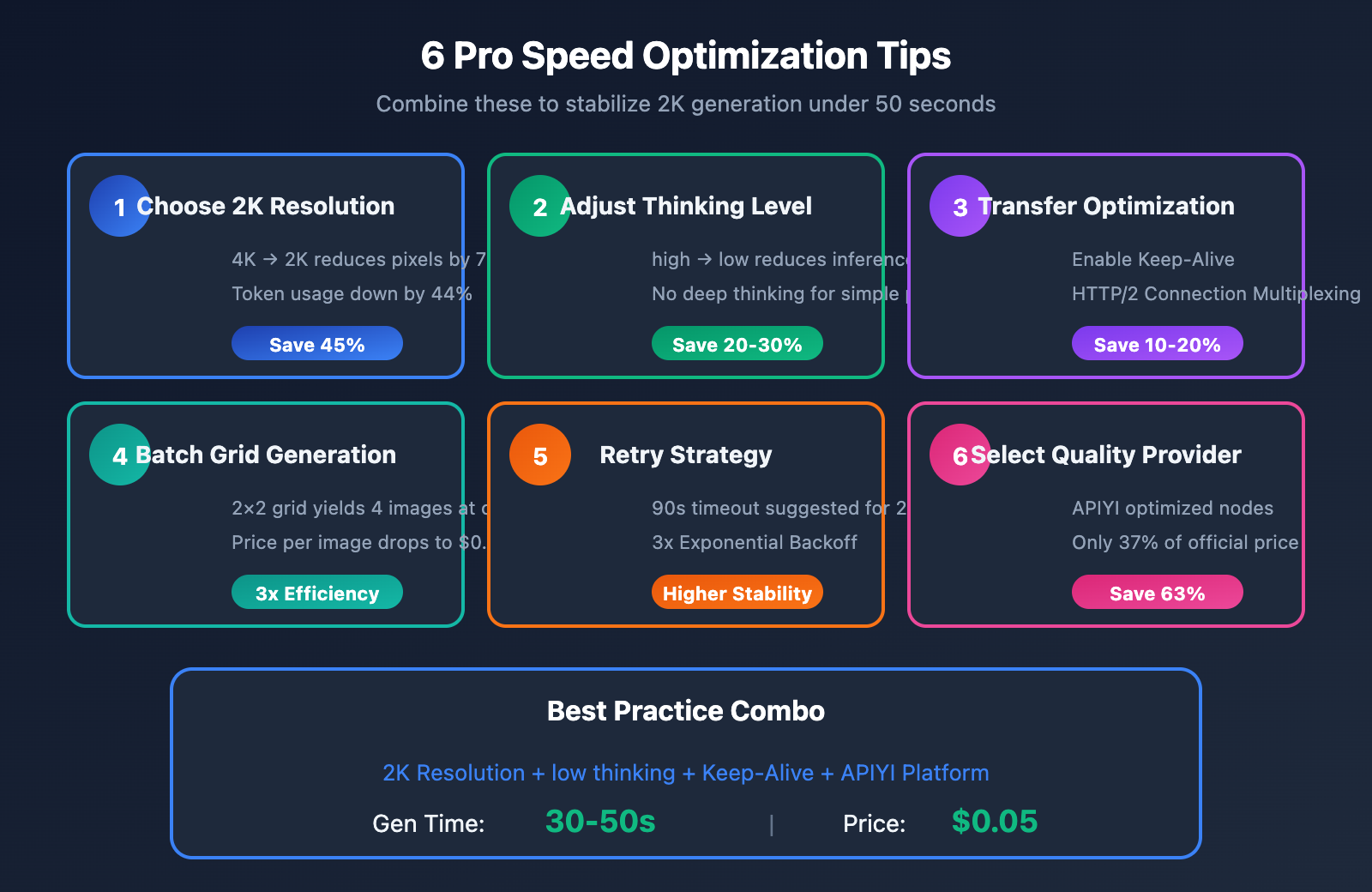
This article covered 6 speed optimization tips for Nano Banana Pro:
| Tip | Impact | Implementation Difficulty | Priority |
|---|---|---|---|
| Choose 2K Resolution | Save 45% time | Low | ⭐⭐⭐⭐⭐ |
| Adjust Thinking Level | Save 20-30% | Low | ⭐⭐⭐⭐⭐ |
| Transfer Optimization | Save 10-20% | Medium | ⭐⭐⭐⭐ |
| Batch Grid Generation | 3x Efficiency | Low | ⭐⭐⭐⭐ |
| Timeout & Retry Strategy | Better Stability | Medium | ⭐⭐⭐ |
| Select Quality Provider | Overall Boost | Low | ⭐⭐⭐⭐⭐ |
Core Conclusion: By combining 2K resolution, the "low" thinking level, and connection reuse, you can consistently generate 2K images within 50 seconds.
🎯 Final Recommendation: We suggest using APIYI (apiyi.com) to quickly verify these optimizations. The platform offers an online speed test tool at imagen.apiyi.com to help you monitor latency at every step. Plus, at $0.05 per image (just 37% of the official $0.134 price), it’s a cost-effective way to handle your testing and production.
Written by the APIYI Technical Team. For more tips on AI image generation APIs, visit apiyi.com for technical support.