Author's Note: A deep dive into the root cause of the 429 error in Nano Banana 2 (Gemini 3.1 Flash Image Preview), comparing the RPD/RPM/IPM limits of AI Studio and Vertex AI, and providing 5 strategies to overcome rate limiting.
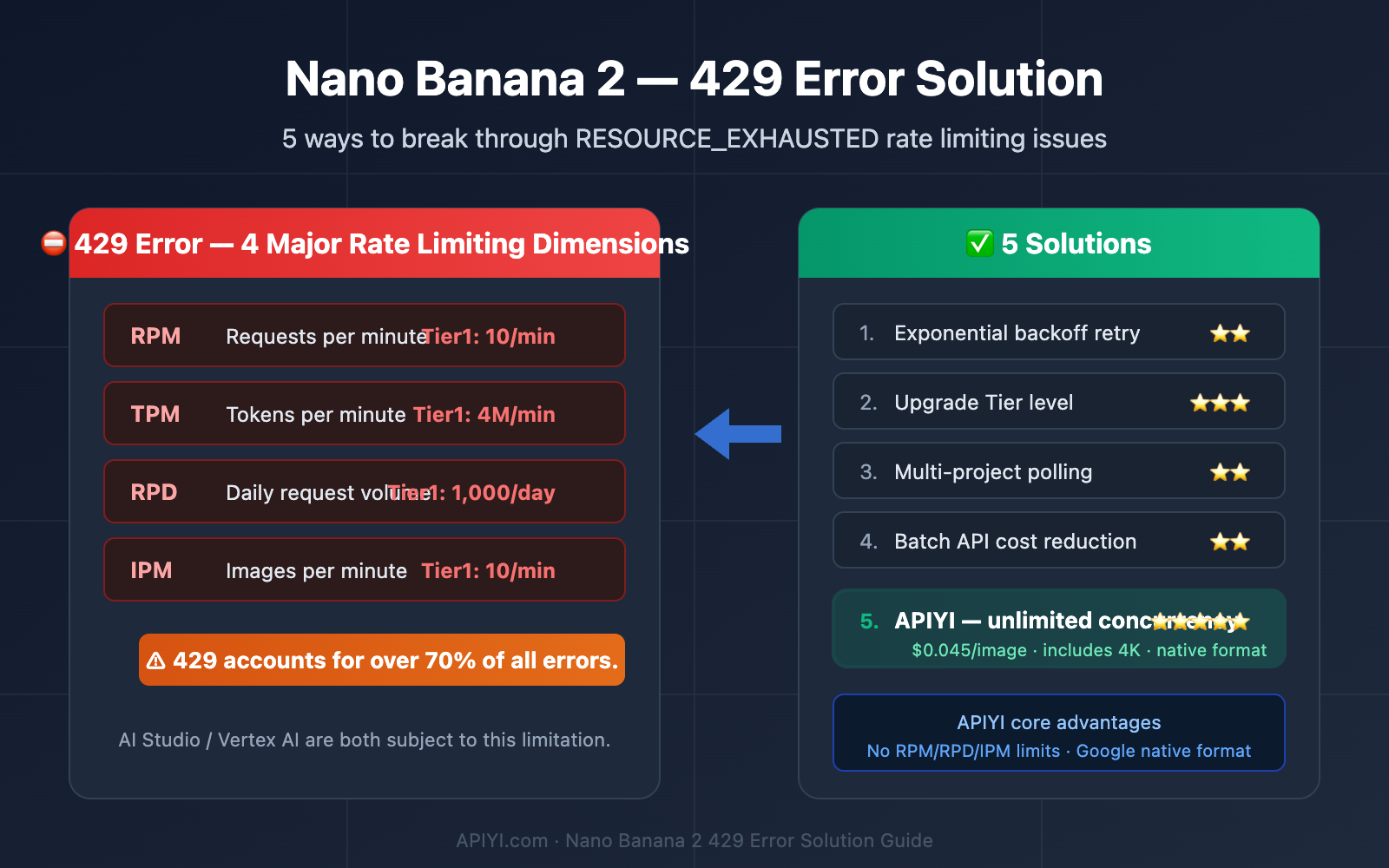
Constantly hitting the 429 RESOURCE_EXHAUSTED error when generating images with Nano Banana 2? You're not alone. According to community feedback, 429 errors account for over 70% of all reported issues with Nano Banana 2, making it the number one problem developers face.
Core Value: After reading this article, you'll fully understand the 4 key dimensions that trigger the 429 error, master 5 practical solutions, and no longer be troubled by Google's rate-limiting mechanisms.
The Core Cause of Nano Banana 2 429 Errors
The essence of a 429 error is API requests exceeding the rate limits set by Google. Nano Banana 2's rate-limiting system consists of 4 independent dimensions; hitting the limit on any one of them will trigger a 429.
| Rate Limit Dimension | Full Name | Description | Reset Time |
|---|---|---|---|
| RPM | Requests Per Minute | Maximum number of requests per minute | Rolling 60-second window |
| TPM | Tokens Per Minute | Maximum token throughput per minute | Rolling 60-second window |
| RPD | Requests Per Day | Maximum total requests per day | Resets at midnight Pacific Time |
| IPM | Images Per Minute | Maximum number of images generated per minute | Rolling 60-second window |
Nano Banana 2 429 Error Tier Limit Details
Google categorizes users into different Tiers (levels), and the limits vary dramatically between them. This is the root cause why many developers encounter 429 errors—most developers are stuck at Tier 1, which has extremely low limits.
| Tier Level | Entry Requirement | RPM | TPM | RPD | IPM |
|---|---|---|---|---|---|
| Free | Free User | 2 | 32K | 50 | 2 |
| Tier 1 | Billing Enabled | 10 | 4M | 1,000 | 10 |
| Tier 2 | 30-day spend ≥$250 | 30 | 10M | 5,000 | 30 |
| Tier 3 | 30-day spend ≥$1,000 | 60 | 20M | 10,000 | 60 |
⚠️ Key Information: Nano Banana 2 has no free tier. Even Free Tier users need to enable billing to use the image generation features normally.
Nano Banana 2 429 Errors: AI Studio vs. Vertex AI Comparison
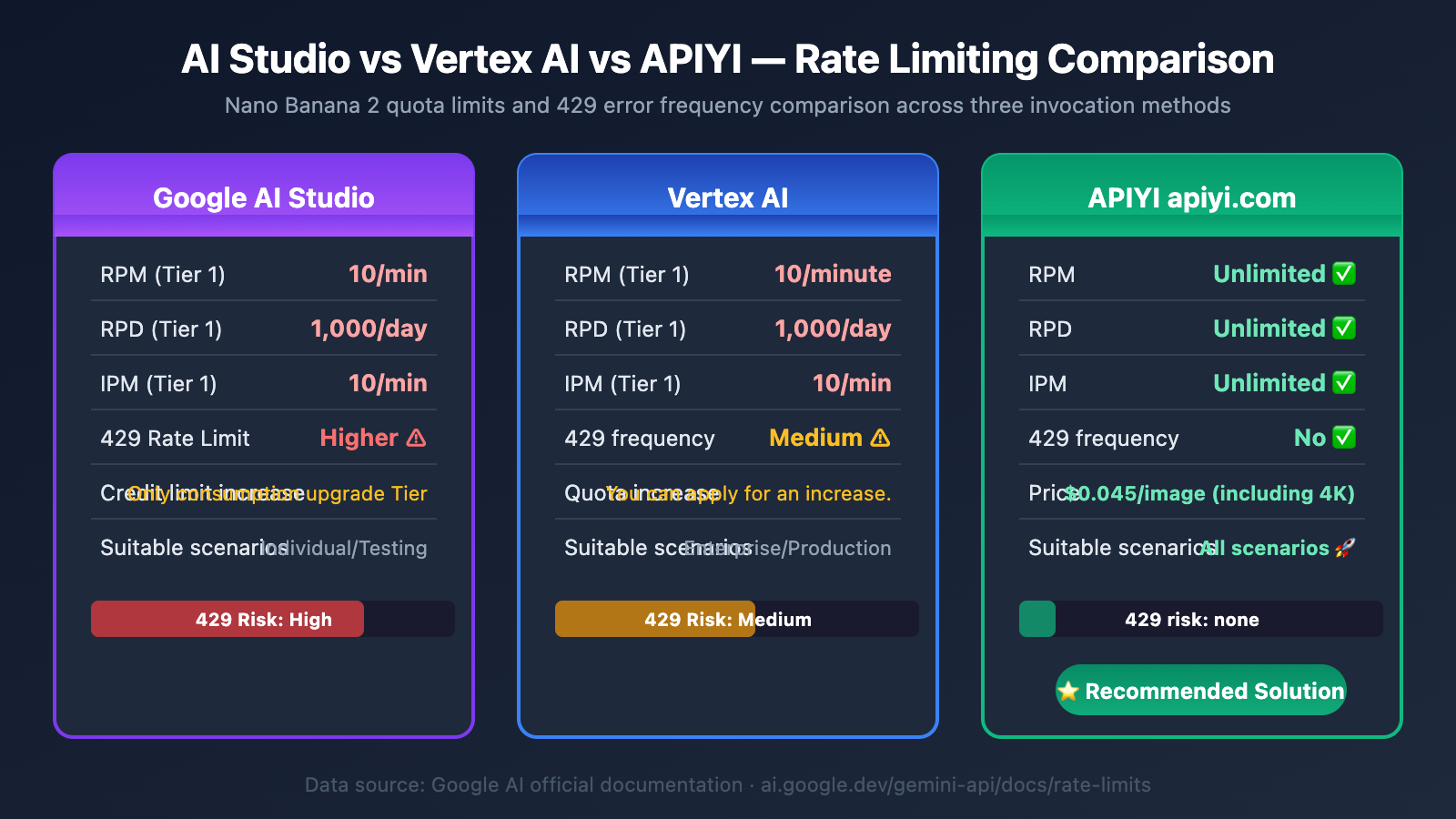
Many developers are confused when choosing between AI Studio and Vertex AI. Both platforms use the same model, but their rate-limiting policies and stability differ significantly.
| Comparison Item | Google AI Studio | Vertex AI |
|---|---|---|
| RPM Limit | Standard Tier limits | Higher custom quotas (requires application) |
| RPD Limit | Strictly enforced | Can be increased via quota request |
| 429 Frequency | Higher | Moderate |
| Stability | More volatile | Relatively stable but still has issues |
| Quota Increase | Only by spending to upgrade Tier | Can submit quota increase requests |
| Billing Method | Per-token billing | Per-token billing |
| Suitable For | Personal development/testing | Enterprise production |
The Shared 429 Error Dilemma for AI Studio and Vertex AI
Regardless of which platform you choose, Google's Nano Banana 2 rate-limiting design has the following core pain points:
- Tier 1 limits are too low: Only 1,000 requests per day (RPD) and 10 images per minute (IPM), which is completely insufficient for batch image generation scenarios.
- High Tier upgrade threshold: Requires $250 in spending within 30 days to reach Tier 2, and the upgrade isn't instantaneous.
- Limits are project-level: All API Keys under the same Google Cloud project share the quota, making multi-key rotation ineffective.
- Vertex AI is also unstable: Multiple developers have reported on Google Developer Forums that they frequently encounter RESOURCE_EXHAUSTED errors even on Vertex AI.
🔍 Developer Community Feedback: On the Google AI Developers Forum, some developers reported that even after setting
GOOGLE_GENAI_USE_VERTEXAItoFalse(switching back to the Gemini API), RESOURCE_EXHAUSTED errors decreased under the same load. This suggests Vertex AI's rate-limiting policy might be stricter.
5 Solutions to Fix Nano Banana 2 429 Errors
Solution 1: Exponential Backoff Retry (A Band-Aid Fix)
When you hit a 429 error, the most basic response is to implement an exponential backoff retry. The RPM limit resets after 60 seconds, so waiting and retrying should get you back on track.
import time
import requests

def generate_with_retry(payload, max_retries=5):
    """Nano Banana 2 call with exponential backoff"""
    for attempt in range(max_retries):
        response = requests.post(ENDPOINT, headers=headers, json=payload)
        if response.status_code == 429:
            wait = min(2 ** attempt, 60)
            print(f"429 rate limit hit, waiting {wait} seconds before retry...")
            time.sleep(wait)
            continue
        return response.json()
    raise Exception("Retries exhausted, still being rate-limited")
View Full Implementation Code (with RPD detection and auto-switch)
import time
import requests
from datetime import datetime, timezone, timedelta

API_KEY = "your-api-key"
ENDPOINT = "https://generativelanguage.googleapis.com/v1beta/models/gemini-3.1-flash-image-preview:generateContent"

headers = {
    "Content-Type": "application/json",
    "x-goog-api-key": API_KEY
}

daily_count = 0
daily_limit = 1000  # Tier 1 RPD

def check_daily_reset():
    """Check if it's past midnight PST"""
    global daily_count
    pst = timezone(timedelta(hours=-8))
    now = datetime.now(pst)
    if now.hour == 0 and now.minute < 5:
        daily_count = 0
        print("RPD counter has been reset")

def generate_image(prompt, aspect_ratio="1:1", image_size="1K", max_retries=5):
    global daily_count
    check_daily_reset()

    if daily_count >= daily_limit:
        print(f"RPD limit reached ({daily_limit}), please wait for midnight reset")
        return None

    payload = {
        "contents": [{"parts": [{"text": prompt}]}],
        "generationConfig": {
            "responseModalities": ["IMAGE"],
            "imageConfig": {
                "aspectRatio": aspect_ratio,
                "imageSize": image_size
            }
        }
    }

    for attempt in range(max_retries):
        response = requests.post(
            ENDPOINT, headers=headers,
            json=payload, timeout=120
        )
        if response.status_code == 200:
            daily_count += 1
            return response.json()
        elif response.status_code == 429:
            wait = min(2 ** attempt, 60)
            print(f"429 rate limit (attempt {attempt+1}/{max_retries}), waiting {wait}s...")
            time.sleep(wait)
        else:
            print(f"Error {response.status_code}: {response.text}")
            return None

    print("Retries exhausted, consider switching to a platform without concurrency limits")
    return None
Limitation: Exponential backoff only helps with RPM limits. If you've hit the RPD (daily) or IPM limit, waiting 60 seconds is pointless—you'll need to wait until midnight Pacific Time for the reset.
Solution 2: Upgrade Your Tier Level
Increase your Google Cloud spending to upgrade your tier and get higher quotas.
| Upgrade Path | Condition | RPD Increase | IPM Increase | Estimated Monthly Cost |
|---|---|---|---|---|
| Free → Tier 1 | Enable billing | 50 → 1,000 | 2 → 10 | $0+ |
| Tier 1 → Tier 2 | 30-day spend ≥$250 | 1,000 → 5,000 | 10 → 30 | ~$250 |
| Tier 2 → Tier 3 | 30-day spend ≥$1,000 | 5,000 → 10,000 | 30 → 60 | ~$1,000 |
The Reality: Even at Tier 3, you only get 10,000 requests per day and 60 images per minute. For scenarios requiring batch generation (e-commerce product images, multilingual posters, etc.), this quota is still insufficient.
Solution 3: Multi-Project Round Robin (Limited Effect)
Create multiple Google Cloud projects, each with its own independent quota, and distribute the request load through round-robin.
Note: Google's Terms of Service have restrictions on this. Creating too many projects might trigger a review, and the management overhead is high. Not recommended as a long-term solution.
Solution 4: Use Batch API to Reduce Costs
Google's Batch API, while not directly increasing quotas, can reduce the cost per image by 50%. Suitable for batch tasks that don't require real-time generation.
- Standard API: Output image $60/M Tokens → Batch API: $30/M Tokens
- Suitable for: Periodic batch content creation, offline image processing
Solution 5: Use a Third-Party Platform Without Concurrency Limits (Recommended)
If your business requires stable, high-frequency calls to Nano Banana 2, bypassing Google's rate-limiting system is the most thorough solution.
🎯 Final Choice: Due to the RPD and RPM limit issues inherent to AI Studio and Vertex AI, we ultimately chose the APIYI apiyi.com platform. Core advantages:
- No concurrency limits: No RPM/RPD/IPM limits, so you won't encounter 429 errors
- Price as low as $0.045/image: Pay-per-call pricing includes 4K resolution, no distinction between resolutions
- Pay-per-token is even cheaper: Approximately $0.02-$0.05/image
- Supports native Google format calls: API format is identical to Google's official one, minimizing migration cost
Practical Guide: Calling Nano Banana 2 via APIYI
Minimal Example
Switching to APIYI only requires changing the API endpoint and Key; your code barely needs modification:
import requests
import base64

API_KEY = "your-apiyi-api-key"
ENDPOINT = "https://api.apiyi.com/v1beta/models/gemini-3.1-flash-image-preview:generateContent"

headers = {
    "Content-Type": "application/json",
    "x-goog-api-key": API_KEY
}

payload = {
    "contents": [{"parts": [{"text": "A cat in an astronaut suit, digital art style"}]}],
    "generationConfig": {
        "responseModalities": ["IMAGE"],
        "imageConfig": {
            "aspectRatio": "1:1",
            "imageSize": "2K"
        }
    }
}

response = requests.post(ENDPOINT, headers=headers, json=payload, timeout=120)
result = response.json()

image_data = result["candidates"][0]["content"]["parts"][0]["inlineData"]["data"]
with open("output.png", "wb") as f:
    f.write(base64.b64decode(image_data))
print("Image saved as output.png")
Suggestion: You can directly experience Nano Banana 2's image generation capabilities through APIYI apiyi.com. The platform also offers a free image generation testing tool, AI Image Master: imagen.apiyi.com, allowing you to test without writing any code.
Nano Banana 2 429 Error Solution Comparison
| Solution | Effectiveness | Cost Impact | Implementation Difficulty | Recommended Scenario |
|---|---|---|---|---|
| Exponential Backoff | ⭐⭐ | No additional cost | Low | Low-frequency calls, occasional 429 errors |
| Upgrade Tier | ⭐⭐⭐ | $250-$1,000/month | Low | Medium frequency, acceptable upgrade cycle |
| Multi-Project Polling | ⭐⭐ | High management cost | Medium | Short-term transition (not recommended long-term) |
| Batch API | ⭐⭐ | Reduces by 50% | Medium | Offline batch processing |
| APIYI Platform | ⭐⭐⭐⭐⭐ | Per-call $0.045/image | Very Low | Batch production / High-frequency calls / Production environment |
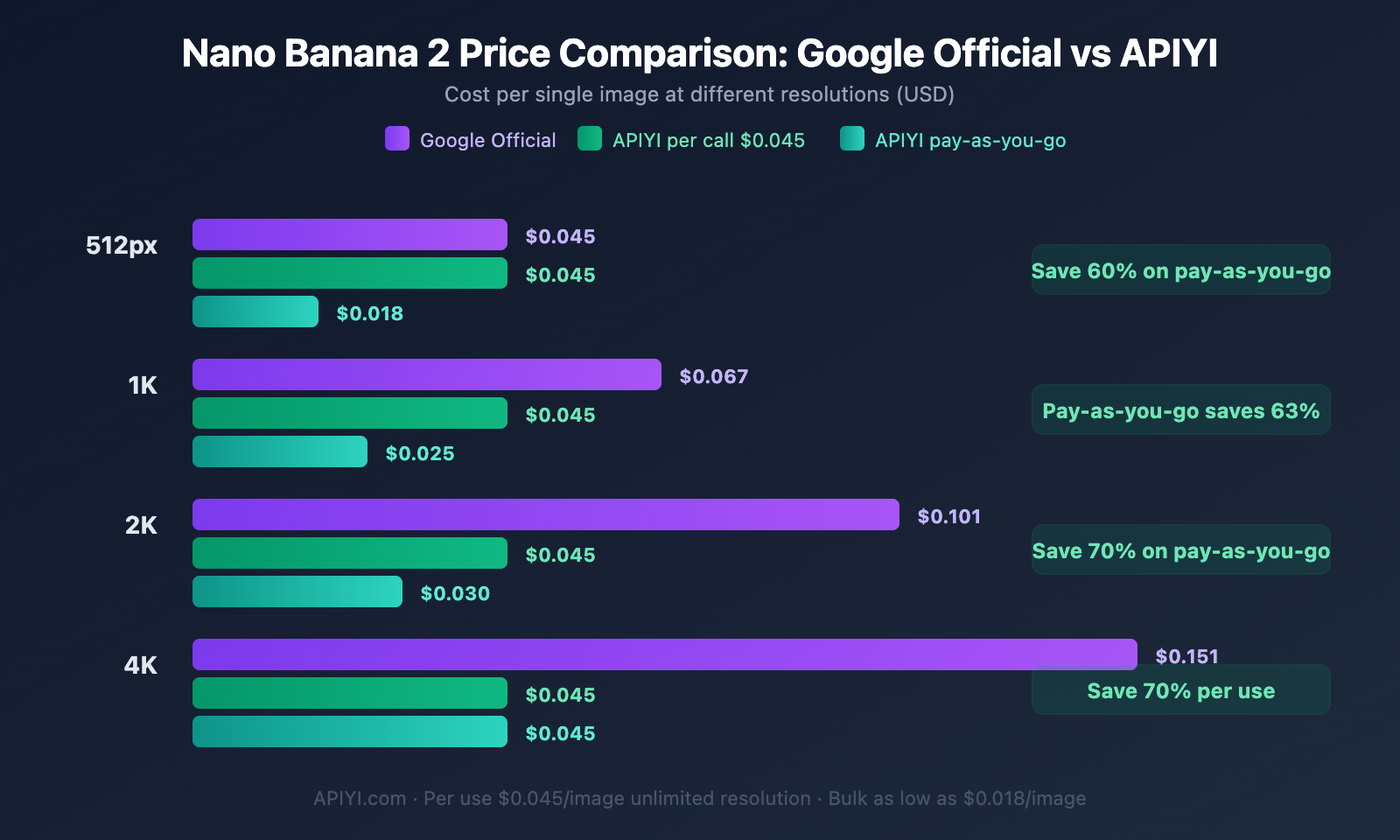
Nano Banana 2 Price Comparison for Different Solutions
| Resolution | Google Official | APIYI Per Call | APIYI Volume-Based | APIYI Savings Ratio |
|---|---|---|---|---|
| 512px | $0.045 | $0.045 | ~ $0.018 | Up to 60% |
| 1K | $0.067 | $0.045 | ~ $0.025 | Up to 63% |
| 2K | $0.101 | $0.045 | ~ $0.03 | Up to 70% |
| 4K | $0.151 | $0.045 | ~ $0.045 | Up to 70% |
Frequently Asked Questions
Q1: How long does it take for Nano Banana 2’s 429 error to recover?
It depends on which rate-limiting dimension was triggered. The RPM (Requests Per Minute) limit resets on a rolling 60-second basis; IPM (Images Per Minute) also resets every 60 seconds. However, if the RPD (Requests Per Day) limit is triggered, you'll have to wait until midnight Pacific Time (4 PM Beijing Time, or 3 PM during Daylight Saving Time) for it to reset.
Q2: Can multiple API Keys bypass the 429 rate limit?
No. Google's rate limiting is enforced at the Google Cloud Project level, not per API Key. All keys under the same project share the same quota pool. Creating a new key won't increase your quota. If you need a solution without concurrency limits, it's recommended to use a third-party platform like APIYI (apiyi.com).
Q3: How much code needs to be changed when migrating from Google’s official API to APIYI?
The migration cost is extremely low. APIYI supports calls in Google's native API format. You only need to:
- Change the API endpoint from
generativelanguage.googleapis.comtoapi.apiyi.com - Replace your API Key with an APIYI Key
- Everything else (request format, parameters, response parsing) remains completely unchanged
Summary
The key points about Nano Banana 2's 429 error:
- 429 Errors Account for 70%: This is the most common issue with Nano Banana 2, rooted in Google's 4-dimensional rate limiting system (RPM/TPM/RPD/IPM).
- Extremely Low Tier 1 Limits: Just 1,000 requests per day and 10 images per minute, which is completely insufficient for batch scenarios.
- Both AI Studio and Vertex AI Are Limited: Both platforms face the same rate-limiting design, with Vertex AI being even stricter in some cases.
- The Most Thorough Solution is to Bypass Rate Limits: Using a third-party platform with no concurrency limits fundamentally avoids 429 errors.
We recommend accessing Nano Banana 2 via APIYI apiyi.com, which offers unlimited concurrency, prices as low as $0.045/image (including 4K), and supports Google's native format for calls. The platform also provides a free AI image generation tool: imagen.apiyi.com, where you can quickly test the results.
📚 References
-
Google AI Rate Limits Documentation: Official Gemini API quota explanations.
- Link:
ai.google.dev/gemini-api/docs/rate-limits - Description: Check the latest Tier quota data and definitions of rate-limiting dimensions.
- Link:
-
Vertex AI 429 Error Documentation: Official Google Cloud error code explanations.
- Link:
docs.cloud.google.com/vertex-ai/generative-ai/docs/provisioned-throughput/error-code-429 - Description: Official troubleshooting guide for 429 errors in the Vertex AI environment.
- Link:
-
Google AI Developer Forum: Discussions on Nano Banana 2 stability.
- Link:
discuss.ai.google.dev - Description: Real-world feedback and solutions for RESOURCE_EXHAUSTED errors from the developer community.
- Link:
-
APIYI Nano Banana 2 Documentation: Third-party access guide.
- Link:
docs.apiyi.com/en/api-capabilities/nano-banana-2-image - Description: Access method and pricing for Nano Banana 2 API with no rate limits.
- Link:
Author: APIYI Technical Team
Technical Discussion: Feel free to discuss in the comments. For more resources, visit the APIYI documentation center at docs.apiyi.com.