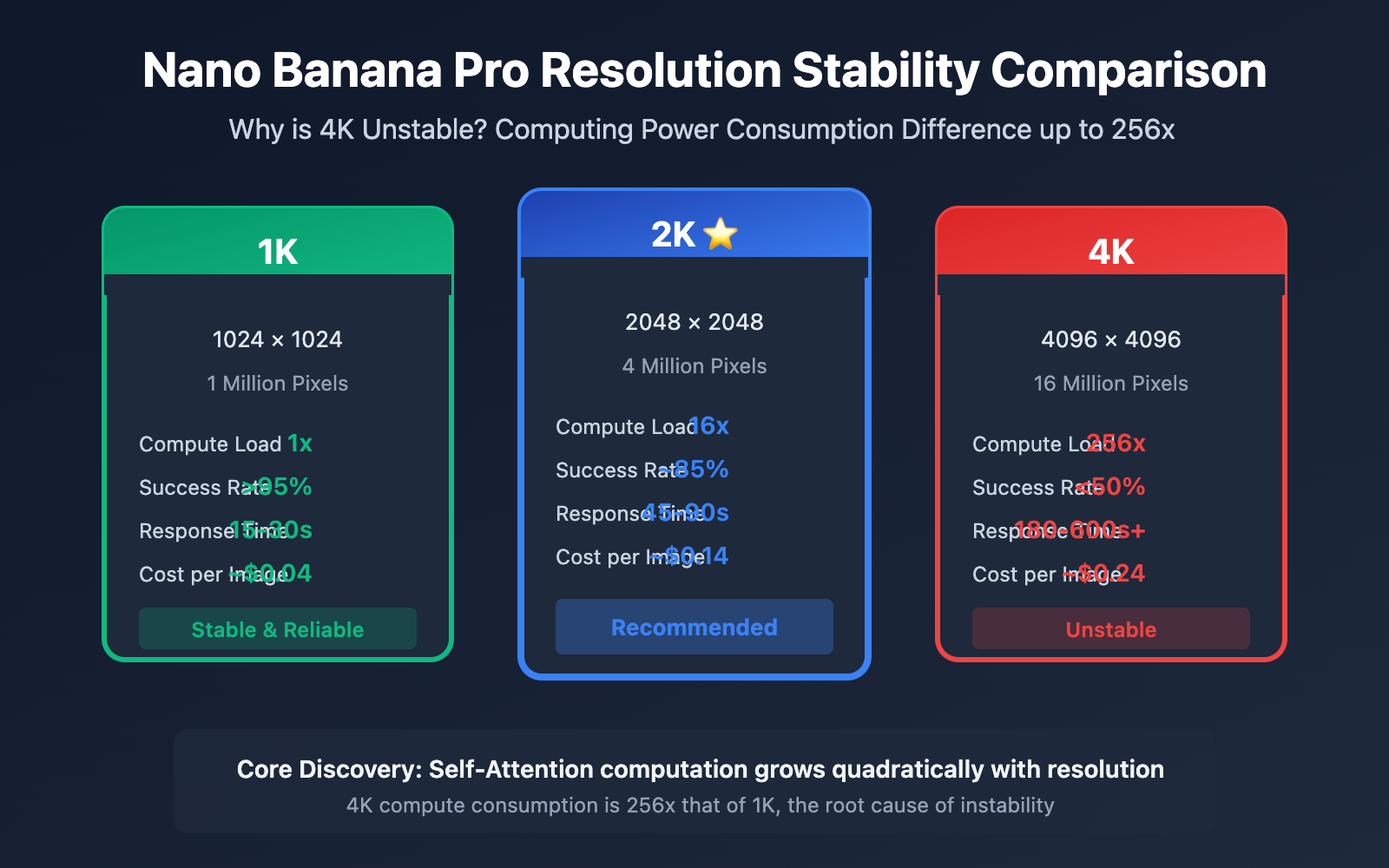
When generating 4K images with Nano Banana Pro, the timeout and failure rates are significantly higher than at lower resolutions, which has been a major headache for many developers. In this article, we'll dive into the underlying principles of computing power consumption to explain the root causes of 4K instability and provide practical advice on choosing the right resolution.
Core Value: Understand the technical essence of the computing power gap between 4K, 2K, and 1K, master the precautions for calling 4K APIs, and find the sweet spot between speed and quality.
The Root Cause of Nano Banana Pro 4K Instability
To understand why 4K is unstable, we first need to look at how Diffusion models consume computing power.
The Quadratic Curse of Diffusion Models
Nano Banana Pro uses a Diffusion model architecture, the core of which is the Self-Attention mechanism. This mechanism has a critical characteristic: computational complexity grows quadratically with the number of pixels.
| Resolution | Pixel Count | Relative Baseline | Self-Attention Computation |
|---|---|---|---|
| 1K (1024×1024) | 1,048,576 | 1x | 1x |
| 2K (2048×2048) | 4,194,304 | 4x | 16x |
| 4K (4096×4096) | 16,777,216 | 16x | 256x |
What does this actually mean?
- The pixel count increases by 16 times from 1K to 4K.
- But the Self-Attention calculation volume increases by 256 times.
According to technical analysis from Milvus documentation, this quadratic-to-quartic growth is the central bottleneck for high-resolution generation in Diffusion models.
Why 2K is Relatively Stable While 4K is Not
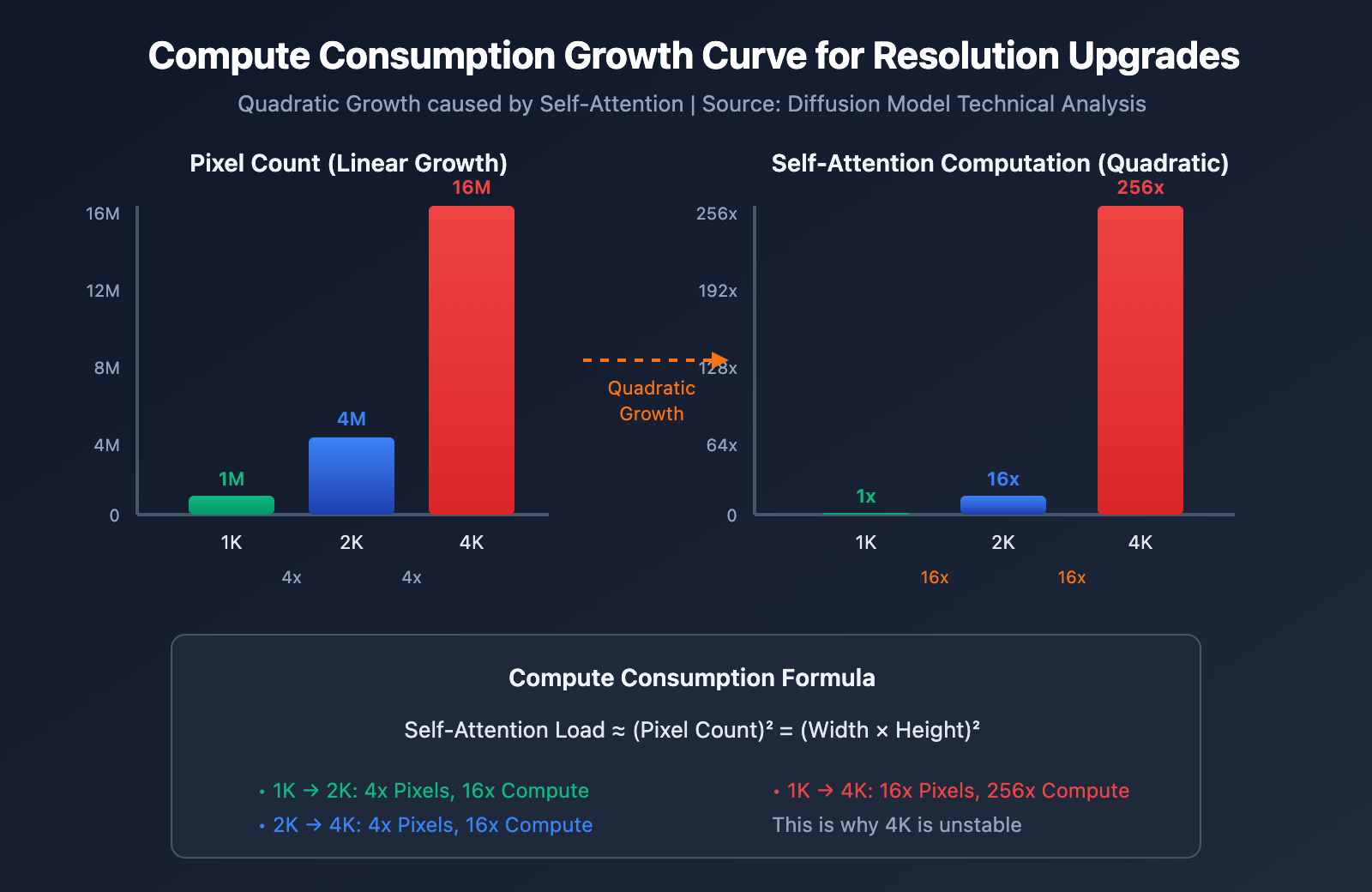
The key lies in the marginal effects of computing power consumption:
| Upgrade Path | Pixel Increase | Compute Increase | Marginal Efficiency | Actual Performance |
|---|---|---|---|---|
| 1K → 2K | 4x | 16x | 1:4 | Acceptable latency increase |
| 2K → 4K | 4x | 16x | 1:4 | Triggers timeout thresholds |
| 1K → 4K | 16x | 256x | 1:16 | High failure rate |
When upgrading from 2K to 4K, even though pixels only increase by 4 times, the compute load jumps by another 16 times. When Google's TPU clusters are under high load, the queuing time for 4K requests increases dramatically, eventually triggering the 600-second timeout limit.
Reality Constraints of Google's Infrastructure
Based on official Google information and industry analysis:
- TPU v7 Capacity Ramp-up: Released in April 2025, large-scale deployment isn't expected to finish until mid-2026.
- Training Priority: Massive computing resources are tied up in training tasks for the Gemini 3.0 series.
- Paid Preview Phase: Capacity planning is currently conservative and not yet fully open.
🎯 Technical Suggestion: At this stage, we recommend calling Nano Banana Pro through the APIYI (apiyi.com) platform. The platform provides real-time status monitoring to help developers understand the actual availability of upstream services.
If your business use case truly requires 4K resolution, here are 5 critical points you'll need to keep in mind.
Tip 1: Ensure Your Timeout Settings are Long Enough
The official timeout threshold has been extended from 300 seconds to 600 seconds, but that's just the server-side setting. You'll need to adjust your client settings accordingly.
from openai import OpenAI

client = OpenAI(
    api_key="YOUR_API_KEY",
    base_url="https://api.apiyi.com/v1"
)

# 4K 调用必须设置足够长的超时
response = client.images.generate(
    model="nano-banana-pro",
    prompt="A detailed architectural visualization",
    size="4096x4096",
    timeout=660  # 比服务端稍长,预留网络延迟
)
Tip 2: Implement a Robust Retry Mechanism
With 4K requests, failure is often the norm rather than an exception. Your code must have built-in retry logic.
import time
from typing import Optional

def generate_4k_with_retry(
    client,
    prompt: str,
    max_retries: int = 3,
    base_delay: int = 60
) -> Optional[dict]:
    """带指数退避的 4K 图像生成"""
    for attempt in range(max_retries):
        try:
            response = client.images.generate(
                model="nano-banana-pro",
                prompt=prompt,
                size="4096x4096",
                timeout=660
            )
            return response
        except Exception as e:
            if attempt < max_retries - 1:
                delay = base_delay * (2 ** attempt)
                print(f"尝试 {attempt + 1} 失败,{delay}s 后重试")
                time.sleep(delay)
            else:
                raise e
    return None
View full production-grade 4K integration code
import time
import asyncio
from typing import Optional, Dict, Any
from dataclasses import dataclass
from enum import Enum
from openai import OpenAI

class Resolution(Enum):
    K1 = "1024x1024"
    K2 = "2048x2048"
    K4 = "4096x4096"

@dataclass
class GenerationResult:
    success: bool
    resolution: str
    data: Optional[Dict[str, Any]] = None
    error: Optional[str] = None
    attempts: int = 0
    downgraded: bool = False

class NanoBananaProClient:
    """生产级 Nano Banana Pro 客户端"""

    def __init__(self, api_key: str):
        self.client = OpenAI(
            api_key=api_key,
            base_url="https://api.apiyi.com/v1"
        )
        # 不同分辨率的配置
        self.config = {
            Resolution.K4: {"timeout": 660, "max_retries": 3, "base_delay": 60},
            Resolution.K2: {"timeout": 180, "max_retries": 2, "base_delay": 30},
            Resolution.K1: {"timeout": 60, "max_retries": 2, "base_delay": 15},
        }

    def generate(
        self,
        prompt: str,
        resolution: Resolution = Resolution.K4,
        allow_downgrade: bool = True
    ) -> GenerationResult:
        """
        生成图像,支持自动降级

        Args:
            prompt: 图像描述
            resolution: 目标分辨率
            allow_downgrade: 是否允许降级到较低分辨率
        """
        resolutions_to_try = (
            [Resolution.K4, Resolution.K2, Resolution.K1]
            if resolution == Resolution.K4 and allow_downgrade
            else [resolution]
        )

        total_attempts = 0
        for res in resolutions_to_try:
            cfg = self.config[res]
            for attempt in range(cfg["max_retries"]):
                total_attempts += 1
                try:
                    response = self.client.images.generate(
                        model="nano-banana-pro",
                        prompt=prompt,
                        size=res.value,
                        timeout=cfg["timeout"]
                    )
                    return GenerationResult(
                        success=True,
                        resolution=res.value,
                        data=response,
                        attempts=total_attempts,
                        downgraded=res != resolution
                    )
                except Exception as e:
                    if attempt < cfg["max_retries"] - 1:
                        delay = cfg["base_delay"] * (2 ** attempt)
                        time.sleep(delay)

        return GenerationResult(
            success=False,
            resolution=resolution.value,
            error="所有尝试均失败",
            attempts=total_attempts
        )

# 使用示例
client = NanoBananaProClient(api_key="YOUR_API_KEY")

# 尝试 4K,允许降级
result = client.generate(
    prompt="Professional product photography",
    resolution=Resolution.K4,
    allow_downgrade=True
)

if result.success:
    print(f"成功: {result.resolution}, 尝试次数: {result.attempts}")
    if result.downgraded:
        print("注意: 已降级到较低分辨率")
Tip 3: Avoid Peak Hours
Based on our observations, 4K success rates tend to dip during the following periods:
| Time Slot (Beijing Time) | Corresponding US West Time | 4K Success Rate | Advice |
|---|---|---|---|
| 00:00 – 08:00 | 08:00 – 16:00 | ~30% | US working hours; avoid if possible |
| 08:00 – 16:00 | 16:00 – 00:00 | ~50% | Fair chance |
| 16:00 – 24:00 | 00:00 – 08:00 | ~70% | Recommended window |
Tip 4: Mind Your Budget
The cost of 4K images is significantly higher than low-resolution options:
| Resolution | Official Pricing | Relative Cost | APIYI Discount Price |
|---|---|---|---|
| 1K | ~$0.04 | 1x | Even better |
| 2K | ~$0.14 | 3.5x | Even better |
| 4K | ~$0.24 | 6x | Even better |
Tip 5: Have a Fallback Strategy Ready
Never assume 4K will always succeed. You should always have a fallback plan in place:
# 降级策略配置
FALLBACK_CONFIG = {
    "4096x4096": ["2048x2048", "1024x1024"],
    "2048x2048": ["1024x1024"],
    "1024x1024": []  # 最低级别,无降级
}
💡 Recommendation: For production environments, we suggest routing your calls through the APIYI (apiyi.com) platform. The platform supports smart routing and automatic downgrades, switching to 2K automatically if 4K requests consistently fail, ensuring your business stays up and running.
Real-World Use Cases for Nano Banana Pro 4K
4K (4096×4096 = 16.7 megapixels) currently stands as the highest native resolution for AI image generation. However, not every scenario requires 4K.
Best Scenarios for 4K
| Use Case | Why 4K is Necessary | Typical DPI Requirements |
|---|---|---|
| Large-scale Printing | Posters, display boards, and outdoor ads need high clarity | 150-300 DPI |
| Commercial Photography Assets | Product shots for magazines and brochures | 300+ DPI |
| Fine Art Giclée | Gallery-grade artwork reproductions | 300-600 DPI |
| Architectural Visualization | Renderings for large-scale display screens | Depends on screen size |
| Game/Film Assets | Source material intended for cropping or further editing | High raw asset requirements |
4K Physical Output Dimensions
Here's how 4K (4096×4096) translates to physical size at different DPI levels:
| DPI | Output Size (Inches) | Output Size (cm) | Use Case |
|---|---|---|---|
| 72 | 56.9 × 56.9 | 144.5 × 144.5 | Screen display only |
| 150 | 27.3 × 27.3 | 69.3 × 69.3 | Posters / Display boards |
| 300 | 13.7 × 13.7 | 34.8 × 34.8 | High-quality printing |
Key Insight: If your final output is meant for web displays or social media, 4K is pure overkill. 2K or even 1K is more than enough.
APIYI Recommendation: 2K is the Best Balance of Speed and Quality
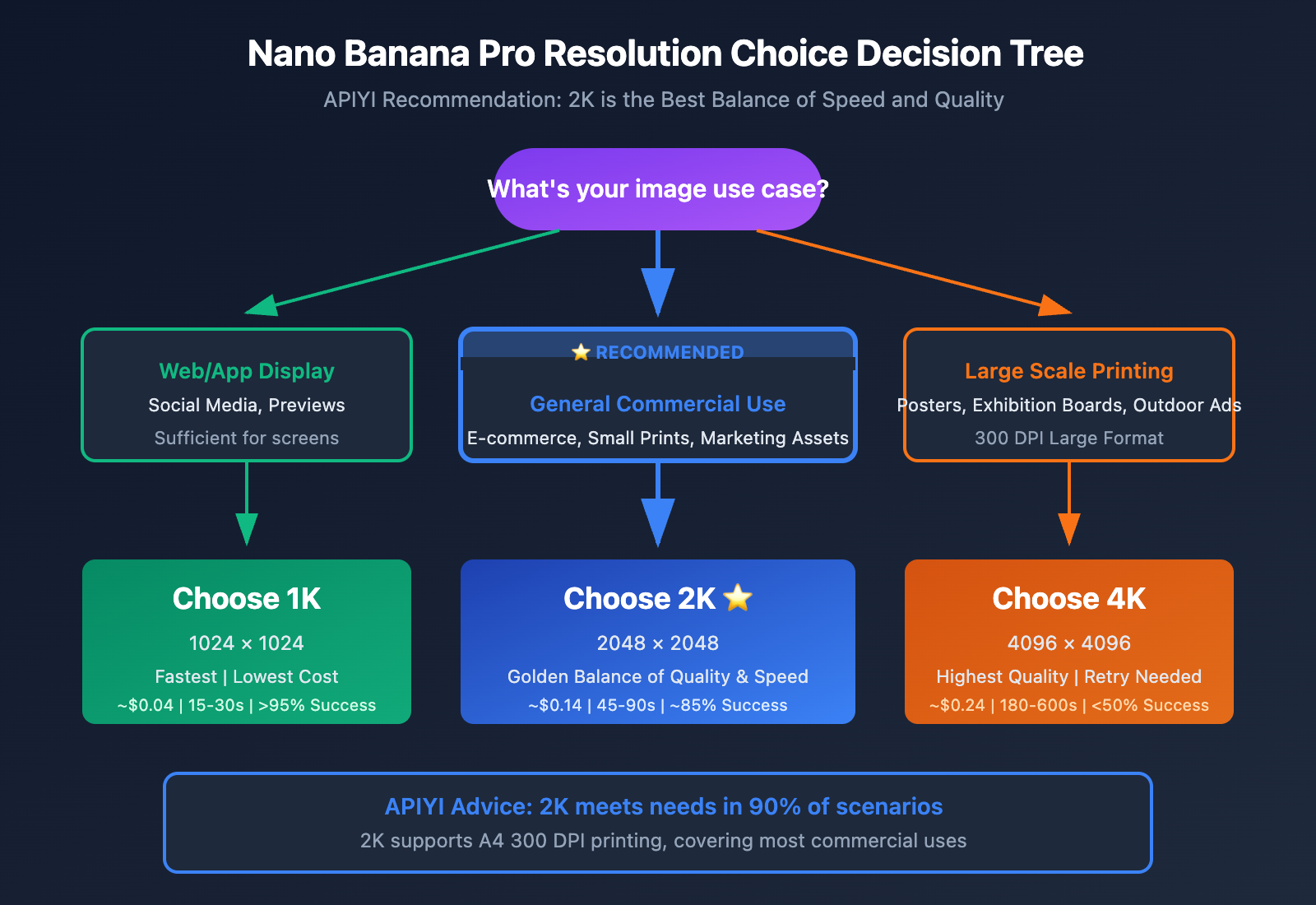
As a Nano Banana Pro API service provider, APIYI has compiled the following recommendations based on extensive user data and experience:
Why We Recommend 2K as the Default Choice
| Dimension | 1K | 2K | 4K |
|---|---|---|---|
| Generation Speed | 15-30s | 45-90s | 180-600s+ |
| Success Rate | >95% | ~85% | <50% |
| Cost per Image | ~$0.04 | ~$0.14 | ~$0.24 |
| Use Case | Previews / Social Media | Most Commercial Uses | Large Scale Printing |
| Recommendation Index | ⭐⭐⭐ | ⭐⭐⭐⭐⭐ | ⭐⭐ |
The Golden Balance of 2K
2K (2048 × 2048 = 4.2 Megapixels) provides:
- Sufficient Clarity: Supports A4 size printing at 300 DPI.
- Reasonable Wait Times: Usually finishes within 90 seconds.
- Acceptable Success Rate: Over 85% of requests succeed on the first try.
- Best Value for Money: Costs 40% less than 4K with minimal quality loss for most applications.
Resolution Choice Decision Tree
What do you need?
│
├── Pure Web/App Display
│   └── Choose 1K (1024×1024)
│       Reason: More than enough for screens and the fastest speed.
│
├── General Commercial Use (Social Media, E-commerce, Small Prints)
│   └── Choose 2K (2048×2048) ⭐ Recommended
│       Reason: Great quality, stable, and cost-effective.
│
├── Large Scale Printing (Posters, Exhibition Boards, Outdoor Ads)
│   └── Choose 4K (4096×4096)
│       Note: You must implement retry and fallback mechanisms.
│
└── Not Sure
    └── Default to 2K
        Reason: Covers 90% of all typical use cases.
🚀 Quick Start: On the APIYI (apiyi.com) platform, choosing 2K resolution by default will meet the vast majority of your needs. We offer flexible resolution switching, so you can quickly upgrade to 4K when necessary.
Hybrid Strategy: Start with 2K, then Upgrade
If you're unsure whether you need 4K, we recommend a hybrid strategy:
- Step 1: Use 2K for a quick generation to verify the visual effect.
- Step 2: If you're happy with the result, use the same prompt to generate the 4K version.
- Advantage: This reduces unnecessary 4K calls, lowering both costs and the risk of failure.
# Hybrid strategy example
def smart_generate(client, prompt):
    # Step 1: Use 2K for quick verification first
    preview = client.images.generate(
        model="nano-banana-pro",
        prompt=prompt,
        size="2048x2048",
        timeout=180
    )

    # Generate 4K only after user confirms the preview
    if user_confirms_preview(preview):
        final = generate_4k_with_retry(client, prompt)
        return final
    else:
        return preview
💰 Cost Optimization: The APIYI (apiyi.com) platform offers pay-as-you-go pricing, where a 2K call costs only about 58% of a 4K call. For high-volume generation tasks, choosing 2K can significantly cut costs while maintaining professional-grade quality.
FAQ
Q1: If 4K generation fails, can I upscale 2K images to 4K?
Yes, but you'll lose quality. AI upscaling (like Real-ESRGAN) can push 2K images to 4K, but it's essentially just interpolation and guessing—it can't recover native 4K details. This is especially noticeable with text rendering—Nano Banana Pro's real strength lies in text accuracy, and upscaling throws that advantage away. If your business needs sharp text, we recommend sticking with native resolution.
Q2: Why is DALL-E 3’s 4K more stable than Nano Banana Pro when they’re both Diffusion models?
Actually, DALL-E 3 doesn't support native 4K output; its maximum native resolution is 1792×1024. The so-called "4K" version is achieved through post-process upscaling. Nano Banana Pro is currently the only mainstream AI image generation model supporting native 4K (4096×4096). While this is its biggest advantage, it's also why stability is such a challenge.
Q3: Are there any specific optimizations for 4K calls on the APIYI platform?
The APIYI (apiyi.com) platform provides the following optimizations for 4K calls: smart queue management (to avoid peak times), automatic retry mechanisms, automatic timeout degradation, and real-time status monitoring. If upstream services hit a snag, the platform automatically triggers a fallback strategy to prioritize your business continuity.
Q4: What resolution should I choose for batch generation?
We strongly recommend using 2K or 1K for batch generation. Here's why: the lower success rate of 4K leads to tons of retries, causing both time and costs to skyrocket. For example, if you're generating 100 images, 4K (at a 50% success rate) requires 200 calls on average, while 2K (at an 85% success rate) only takes about 118. When you look at the total cost, 2K is actually much cheaper.
Summary
Core reasons why Nano Banana Pro 4K is unstable:
- Massive difference in compute consumption: 4K's Self-Attention calculation is 256x that of 1K and 16x that of 2K.
- TPU resource bottlenecks: Google's current infrastructure can't consistently support massive 4K requests.
- The Quadratic Curse: The computational complexity of Diffusion models grows quadratically with resolution.
5 Tips for developers calling 4K:
- Set timeouts to ≥ 660 seconds.
- You must implement a retry mechanism.
- Avoid peak hours (00:00-08:00 Beijing Time).
- Plan your budget (4K costs ~$0.24 per image).
- Have a fallback plan ready.
Resolution Recommendations:
- 1K: Web/APP display, quick previews.
- 2K: Most commercial uses ⭐ Recommended default.
- 4K: Limited to high-demand scenarios like large-format printing or fine art prints.
By calling Nano Banana Pro via the APIYI (apiyi.com) platform, you get smart routing, auto-degradation, and real-time monitoring, ensuring business continuity while getting the best cost-efficiency.
Author: APIYI Technical Team
Technical Exchange: Visit APIYI (apiyi.com) for more AI image generation API news and technical support.
References
-
Milvus AI Quick Reference – Diffusion Model Resolution Scaling: Technical Analysis
- Link:
milvus.io/ai-quick-reference/what-challenges-arise-when-scaling-diffusion-models-to-higher-resolutions - Description: Technical challenges of scaling diffusion models to higher resolutions.
- Link:
-
AI Free API – Nano Banana Pro Maximum Resolution Guide: Resolution Guide
- Link:
aifreeapi.com/en/posts/nano-banana-pro-maximum-resolution - Description: 4K specifications, API settings, and cost optimization.
- Link:
-
Data Studios – Nano Banana Pro 4K Quality: Performance Testing
- Link:
datastudios.org/post/nano-banana-pro-4k-quality-resolution-limits-and-real-performance - Description: Resolution limits and real-world performance.
- Link:
-
Google DeepMind – Nano Banana Pro: Official Release
- Link:
blog.google/technology/ai/nano-banana-pro - Description: Official introduction to the Gemini 3 Pro Image model.
- Link: