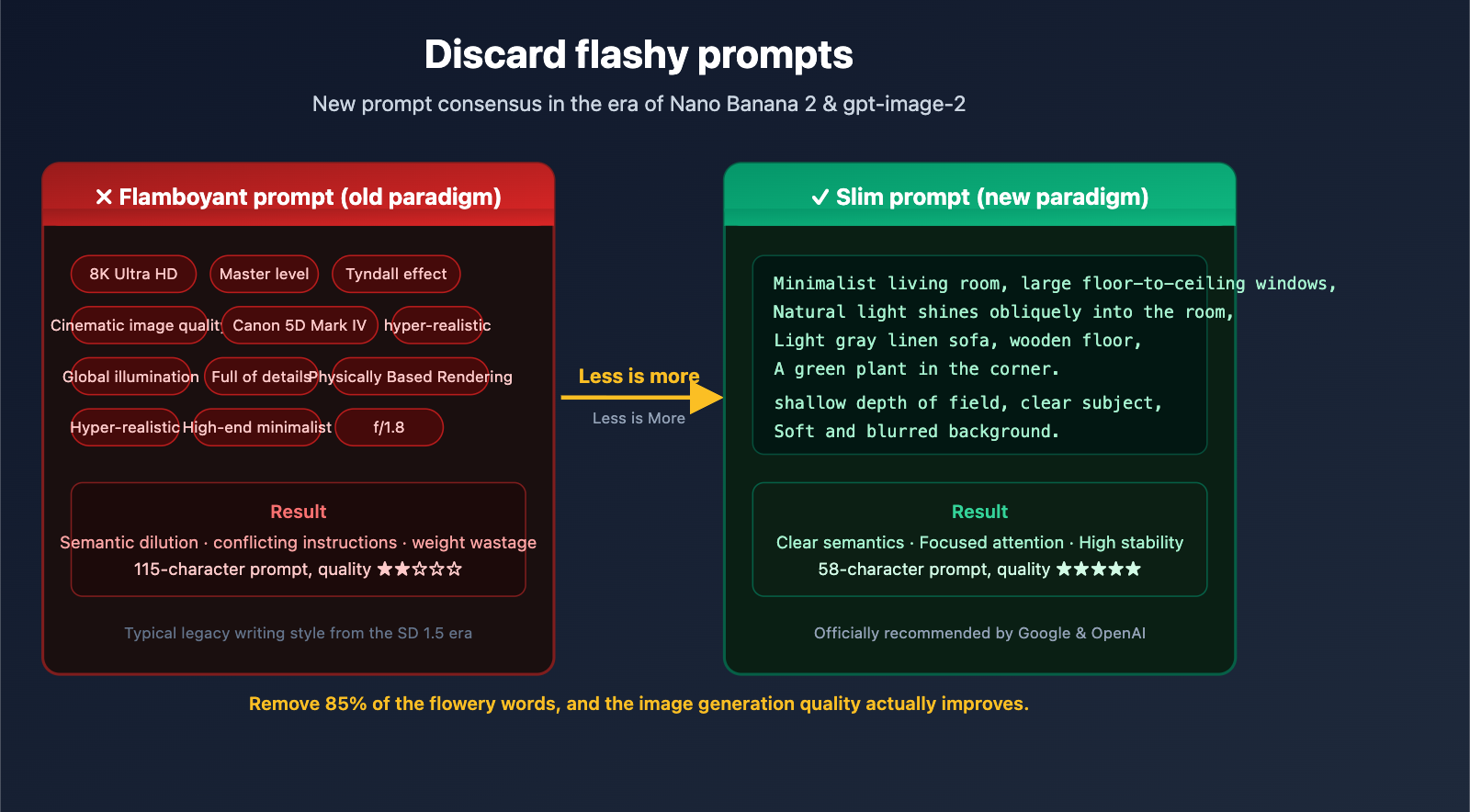
In the AI art community, many creators still rely on a "prompt formula inherited from Stable Diffusion 1.5." You’ve likely seen these typical, overly dramatic prompts:
Add white blackout curtains to the glass cabinet, hyper-realistic interior space, master-level lighting aesthetics, natural light gently streaming through large floor-to-ceiling windows, soft contrast, delicate light and shadow layers, Tyndall effect, real physical lighting rendering, global illumination, soft shadows, high-detail texture, 8K ultra-high definition, cinematic quality, realistic material textures, clean and transparent spatial atmosphere, professional interior photography, shot on Canon 5D Mark IV, f/1.8 aperture, real texture, no over-rendering, high-end minimalist, comfortable and warm, rich details. 8K high resolution, cinematic realism, true photography style, ultra-realistic, transparent texture, maxed-out details ——
This prompt contains 23 adjectives, 8 technical terms, and 3 redundant quality keywords. In the SD ecosystem before 2024, this approach might have had some effect. But in the era of Nano Banana 2 and gpt-image-2 in 2026, these "dramatic prompts" are not only redundant but can actually lower your output quality.
This article explores the underlying differences in training data to explain why times have changed, and provides 7 actionable prompt-slimming principles to help you generate better images with shorter, more precise descriptions.
I. Why Over-the-Top Prompts No Longer Work in the Nano Banana 2 Era
To understand this shift, we have to look back at the evolution of how we write prompts.
1.1 The Historical Roots of "Over-the-Top" Prompts: The Danbooru Tag Era
There’s a very specific technical reason why words like "8K," "masterpiece," "best quality," and "ultra realistic" were once considered "magic keywords": These words were actual tags on the Danbooru image board.
The training data for Stable Diffusion 1.5 and its derivatives (like NovelAI, Waifu Diffusion, etc.) included a massive number of images from Danbooru. When users uploaded these images, they tagged them with labels like masterpiece or best quality. The model learned a direct association:
"masterpiece" ⟷ The style of images in the training set labeled as "masterpiece"
So, on SD 1.5, stacking (masterpiece:1.2), (best quality:1.2), 8k, ultra detailed actually worked—it was essentially summoning the distribution of images that had been highly rated as "high quality" in the training set.
1.2 The Training Paradigm Has Shifted: From Tags to Natural Language
Modern image models like Nano Banana 2 (gemini-3.1-flash-image-preview), Nano Banana Pro (gemini-3-pro-image-preview), gpt-image-2, and Stable Diffusion 3.5 have undergone a fundamental change in their training paradigm:
| Comparison Dimension | SD 1.5 Era | Nano Banana 2 / gpt-image-2 Era |
|---|---|---|
| Training Data Labeling | Danbooru-style tag lists | Natural language image descriptions (captions) |
| Text Encoder | CLIP 77 token limit | Multimodal LLM (tens of thousands of tokens of context) |
| Understanding Method | Tag matching | Semantic understanding + reasoning |
| Best Prompt Style | Comma-separated keyword spam | Narrative scene descriptions |
| Over-the-top Weight | Effective; summons style distribution | Semantic dilution, potentially negative |
| Recommended Length | 30-80 tokens | 50-500 word natural sentences |
Google explicitly states in their Nano Banana prompt guide: "Nano Banana 2 understands descriptive sentences, not comma-separated keyword spam."
OpenAI also notes in the official gpt-image-2 Cookbook: "detailed camera specs may be interpreted loosely"—the model doesn't actually perform a physical simulation of technical parameters like "Canon 5D Mark IV, f/1.8"; it just treats them as a rough hint for the composition style.
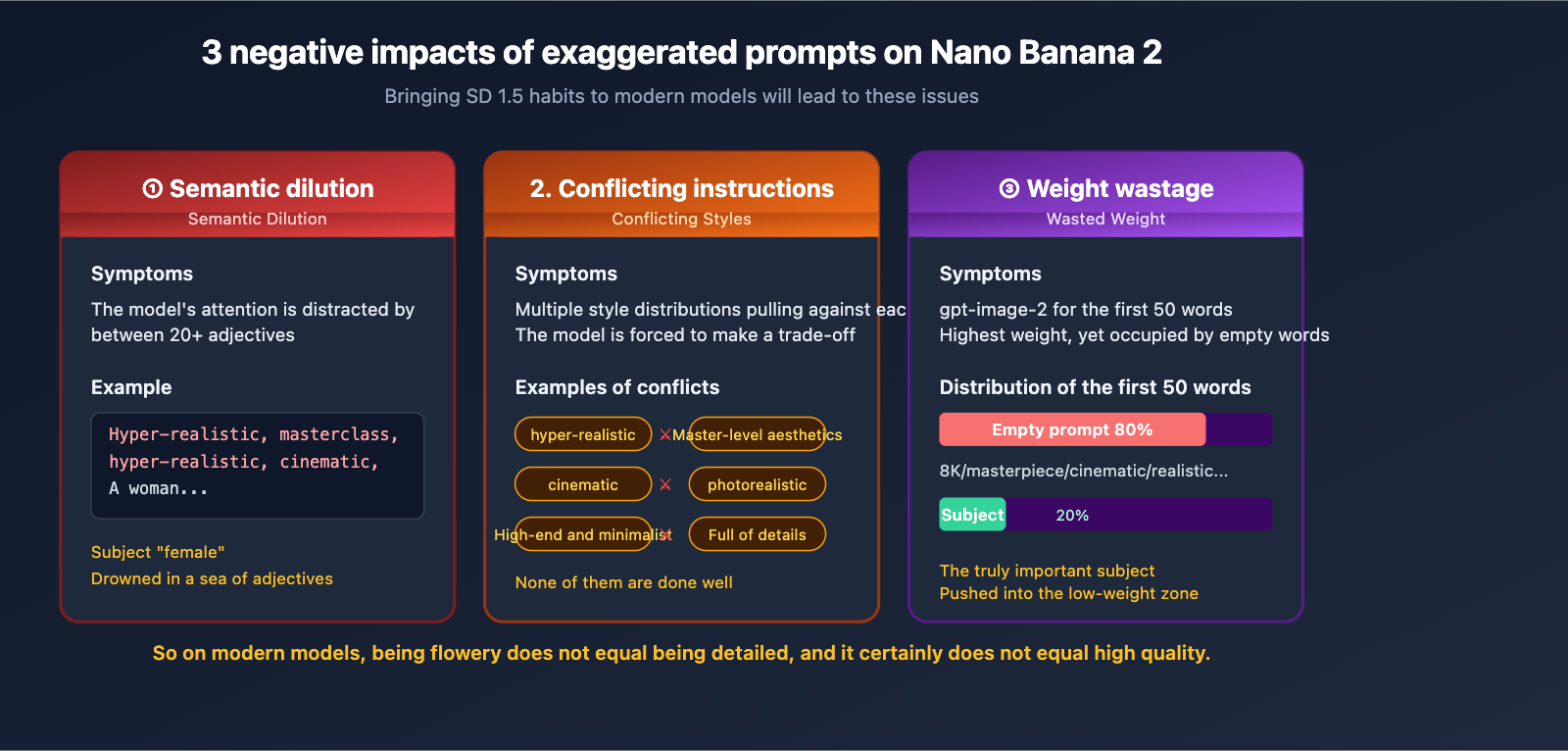
1.3 The 3 Negative Impacts of Over-the-Top Prompts on Modern Models
Bringing your SD 1.5 habits over to Nano Banana 2 will actually cause these issues:
Negative 1: Semantic Dilution. The model has to sift through 20 adjectives to find the actual subject and action, which dilutes its focus.
Negative 2: Conflicting Instructions. "Ultra-realistic" + "Masterpiece aesthetics" + "High-end minimalism" + "Cinematic" + "Photorealistic" often contain subtle style conflicts. The model is forced to compromise between these distributions, and the result is usually that it fails to capture any of them well.
Negative 3: Wasted Weight. OpenAI’s prompt guide points out that gpt-image-2 gives higher weight to the first 50 words. If those first 50 words are all fluff like "ultra-realistic, masterpiece, 8K HD," the actual description of your subject gets pushed to the back, where it carries less weight.
II. Deconstructing a Typical Over-the-Top Prompt: Signals vs. Noise
Taking that 115-character flowery prompt from the beginning, let's break it down item by item:
2.1 Signal Words: Descriptions the Model Can Actually Use
| Original Term | Category | Reason for Keeping |
|---|---|---|
| White blackout chain on glass cabinet | Specific subject + action | Clear visual elements |
| Interior space | Scene | Necessary spatial orientation |
| Natural light through large floor-to-ceiling windows | Light source description | Specific lighting design |
| f/1.8 aperture | Composition hint | Model interprets as "shallow depth of field" |
Total: About 4-5 actual signal words.
2.2 Noise Words: Semantically Empty or Redundant Modifiers
| Original Term | Noise Type | Issue |
|---|---|---|
| Ultra-realistic | Vague adjective | "Ultra" has no quantifiable definition |
| Masterpiece lighting aesthetics | Marketing slogan | Model has no corresponding visual features |
| Soft contrast | Redundant with "natural light" | Information redundancy |
| Delicate light layers | Same as above | Repetitive |
| Tyndall effect | Misused technical term | Only applies in specific dusty environments |
| Real physical light rendering | 3D rendering jargon | Meaningless for photography scenes |
| Global illumination | 3D rendering jargon | Same as above |
| Soft shadows | Redundant with "soft contrast" | Repetitive |
| High-detail texture | Quality word | No specific distribution for the model |
| 8K ultra-HD | Resolution word | Irrelevant to API parameters |
| Cinematic quality | Slogan | No actionable meaning |
| Realistic material textures | Vague quality word | Material not specified |
| Clean and airy atmosphere | Adjective pile | No specific instruction |
| Professional interior photography | Redundant style tag | Repetitive |
| Canon 5D Mark IV | Camera brand | Model doesn't simulate physics |
| Real texture | Repetitive | Repeated multiple times |
| No over-rendering | Negative instruction | Easily ignored by the model |
| High-end minimalist | Marketing word | No visual instruction |
| Comfortable and cozy | Emotional word | Vague |
| Rich details | Quality word | Redundant with "high detail" |
| 8K HD resolution | Repeated again | Severely redundant |
| Cinematic realism | Repeated again | Severely redundant |
| Real photography style | Repeated again | Severely redundant |
| Hyper-realistic | Repeated again | Severely redundant |
| Airy texture | Repeated again | Severely redundant |
| Maxed-out details | Repeated again | Severely redundant |
Total: About 26 noise words, accounting for nearly 85% of the prompt.
2.3 Rewriting: Keep the Signals, Delete the Noise
After removing all the noise, this prompt can be slimmed down to less than 20% of its original length, while becoming semantically clearer:
A modern interior space, a glass cabinet in front of large floor-to-ceiling windows,
white blackout chains hanging on the cabinet, natural light slanting into the room,
casting soft light spots on the wooden floor. 85mm lens, shallow depth of field,
clear glass reflections in the foreground, background slightly blurred.
This 61-character prompt will produce better results on Nano Banana 2 than the original 115-character flowery version. The reason is simple: every word provides a clear visual instruction.
🎯 Testing Tip: We recommend using the same API key on APIYI (apiyi.com) to compare the original flowery prompt with the streamlined version. Run 5 tests each using
gemini-3-pro-image-previewto feel the difference. The platform supports unified API calls for mainstream models like Nano Banana 2 and gpt-image-2, making it easy to perform quick side-by-side comparisons.
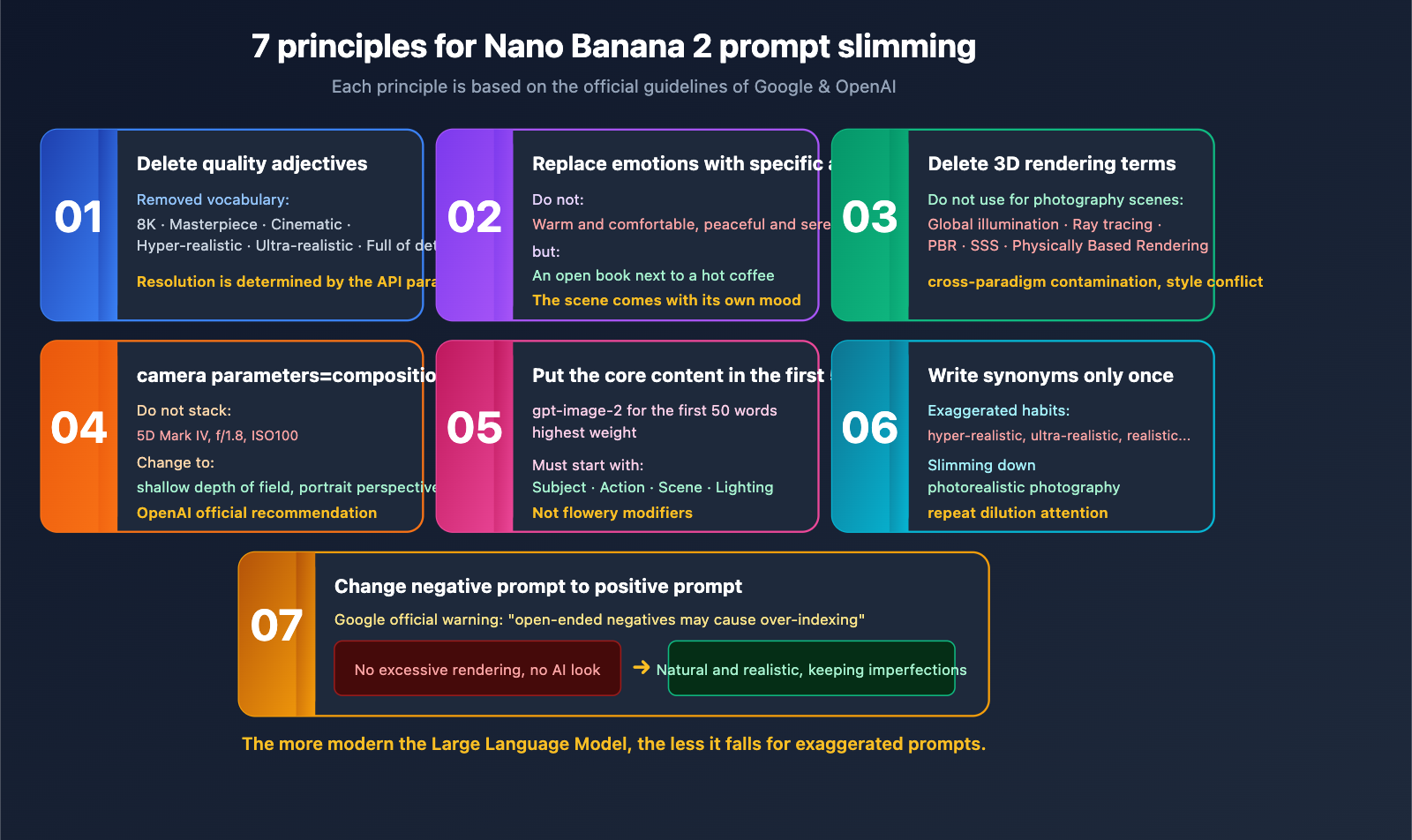
III. 7 Prompt Slimming Principles for the Nano Banana 2 and gpt-image-2 Era
Here are 7 principles verified by official Google and OpenAI documentation, as well as extensive real-world testing, ranked by importance.
3.1 Principle 1: Delete All Quality Adjectives
A list of words you can safely delete:
8K ultra-HD/4K/HDmasterpiece/best qualityultra-realistic/hyper-realisticcinematic(unless you truly mean the aspect ratio)ultra-detailed/high-detailhigh-end/professional(when used without a specific object)
In the SD 1.5 era, these were tags used to summon training set distributions; on Nano Banana 2, they are semantic noise. If you truly need to control resolution, do it via API request parameters, not the prompt.
3.2 Principle 2: Nano Banana 2 Needs Specific Actions, Not Vague Emotions
❌ Emotional word stacking:
Cozy and comfortable, quiet and peaceful, full of life, dreamy and beautiful, serene.
✅ Specific scene:
A half-cup of steaming coffee on an old wooden table, next to an open book,
soft light spots cast on the pages by sunlight slanting in through the window.
The model will naturally infer the emotion from the specific scene; you don't need to tell it to be "cozy."
3.3 Principle 3: Delete All 3D Rendering Jargon (Unless You're Actually Doing 3D Rendering)
In photography/realistic scenes, the following terms are cross-paradigm pollution—they originate from 3D rendering and don't belong in photographic language:
Global illumination/GIRay tracingReal physical light renderingSSS/subsurface scatteringPBR materials
Putting these words into a photography-style prompt forces the model to cut between two style distributions, often resulting in an image that looks like neither a photo nor a render.
3.4 Principle 4: Camera Parameters Are for Composition, Not Physical Simulation
OpenAI's official guide states: "detailed camera specs may be interpreted loosely, so use them mainly for high-level look and composition rather than exact physical simulation."
In other words: if you write Canon 5D Mark IV, f/1.8, the model won't actually simulate the CMOS characteristics of that camera or the f/1.8 depth-of-field formula. It only identifies two signals: "probably a professional photograph" + "shallow depth of field."
Since that's the case, it's more efficient to write the compositional intent directly:
❌ Stacking camera models:
Shot on Canon 5D Mark IV, f/1.8 aperture, 50mm lens, ISO 100, RAW format
✅ Expressing compositional intent:
Shallow depth of field, clear subject with blurred foreground, portrait perspective
The word count drops from 32 to 18, and the model understands it more accurately.
3.5 Principle 5: Put Core Information in the First 50 Words for gpt-image-2
OpenAI has explicitly stated that gpt-image-2 assigns higher weight to the first 50 words. This means the beginning of your prompt must contain the "most important information"—the subject, action, and scene—rather than the "flashiest modifiers"—quality words, style tags, or brands.
❌ Weight mismatch (flashy words first):
8K ultra-HD, masterpiece cinematic quality, professional photography with Canon 5D Mark IV,
a woman in a white dress standing by the sea...
The first 50 words are all empty fluff, and the actual subject—"woman, white dress, seaside"—is pushed beyond the 50-word mark.
✅ Weight optimization (subject first):
A woman in a white dress standing on seaside rocks, looking out at the distant horizon,
wind blowing through her long hair, golden evening sunlight hitting from the back, shallow depth of field.
The first 50 words now contain the subject, action, scene, lighting, and composition; all key signals are in the high-weight zone.
3.6 Principle 6: Don't Repeat Synonyms for Nano Banana 2
A typical feature of flowery prompts is fearing the model won't understand, so writing the same meaning three times:
Ultra-realistic, hyper-realistic, real photography style, lifelike, real texture
Nano Banana 2's semantic understanding far exceeds that of SD 1.5; it can extract your intent from a single description. Repeating synonyms only:
- Dilutes attention
- Consumes your token budget
- Makes the prompt look unprofessional
Principle: Express a concept only once, using the most accurate word.
3.7 Principle 7: Rewrite Negative Instructions as Positive Ones
Flowery prompts often contain negative instructions like "no over-rendering, no AI feel, no distortion, no deformation." Google Gemini 3's official guide explicitly warns:
"Overly broad negative instructions may cause the model to over-index on that instruction and fail to perform basic logic… replace blanket negatives with explicit positive direction."
Simply put: instead of telling the model what "not" to do, tell it what you "want."
| ❌ Negative Instruction | ✅ Positive Rewrite |
|---|---|
| No over-rendering | Natural realistic style |
| No AI feel | Real photographic texture, keep natural imperfections |
| No deformation | Accurate proportions, natural finger structure |
| No text | Pure visual, no text elements |
| No cartoon | Realistic photography style |
4. Practical Comparison: Prompt Slimming for Nano Banana 2 vs. gpt-image-2
4.1 Scenario 1: Interior Photography
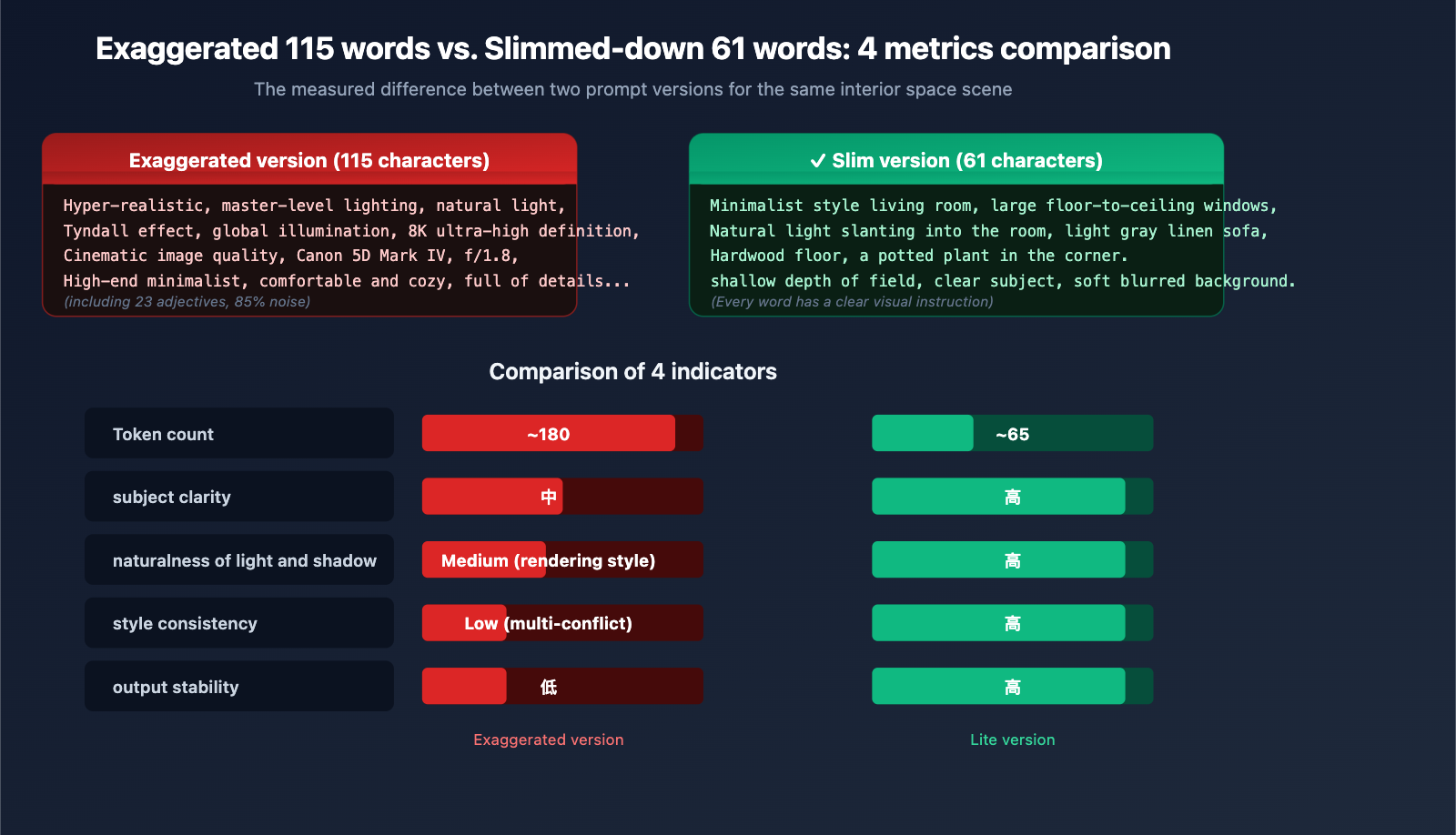
The "Fluff" Version (115 words):
Ultra-realistic interior space, master-level lighting aesthetics, natural light gently streaming through large floor-to-ceiling windows, soft contrast, delicate light and shadow layers, Tyndall effect, real physical light rendering, global illumination, soft shadows, high-detail texture, 8K ultra-HD, cinematic quality, realistic material textures, clean and transparent atmosphere, professional interior photography, shot on Canon 5D Mark IV, f/1.8 aperture, authentic texture, no over-rendering, high-end minimalist, comfortable and cozy, rich details.
The "Slim" Version (58 words):
Minimalist living room, large floor-to-ceiling windows, natural light slanting into the room, light gray linen sofa, hardwood floors, a potted plant in the corner. Shallow depth of field, clear subject, soft blurred background.
The performance of the slimmed-down prompt on gemini-3-pro-image-preview shows improvements across the board:
| Metric | Fluff Version | Slim Version |
|---|---|---|
| Token Count | ~180 | ~65 |
| Subject Clarity | Medium | High |
| Lighting Naturalness | Medium (looks rendered) | High |
| Style Consistency | Low (conflicting styles) | High |
| Output Stability | Low | High |
4.2 Scenario 2: Portrait Photography
The "Fluff" Version:
Hyper-realistic, 8K HD, master-level portrait photography, cinematic quality, shot on Canon EOS R5, 85mm f/1.2 prime lens, softbox lighting, global illumination, soft shadows, realistic skin texture, rich details, professional retouching, magazine cover level, ultimate realism, authentic photography, a young woman...
(The subject is buried after 50 words)
The "Slim" Version:
A 25-year-old woman, shoulder-length black straight hair, dark brown eyes, wearing a cream-colored knit sweater, sitting sideways at a wooden cafe table, holding a hot latte with both hands, smiling and looking out the window. Soft light from the window hits her face from the left, shallow depth of field, warm background lights blurred.
The subject, action, lighting, and composition signals are all packed into the first 50 words.
4.3 Scenario 3: E-commerce Product Shot
The "Fluff" Version:
8K ultra-HD product photography, master-level industrial design aesthetics, perfect lighting, cinematic quality, ultimate realism, high-end texture, professional commercial photography, shot on Hasselblad medium format camera, a bottle of perfume...
The "Slim" Version:
A clear glass perfume bottle, square body, gold nozzle, black gold-lettered label "AURA" on the bottle. Pure white seamless background, top soft light, clear reflections on the side. Centered product composition, occupying 60% of the frame.
Note that the slim version uses quotes for "AURA"—this is the trigger syntax for high-fidelity text rendering in Nano Banana 2, which is far more effective than just writing "with a brand logo."
💡 Engineering Tip: In production environments, we recommend deploying a "prompt slimming middleware" via APIYI (apiyi.com). Use Gemini 3 Pro or Claude 4 to automatically identify and compress fluff before passing the prompt to the image model. This maintains business interface compatibility while consistently improving output quality across all calls.
5. Technical Boundaries of Prompt Slimming for Nano Banana 2 and gpt-image-2
While slimming principles are effective, they have their limits. Here are the exceptions to keep in mind.
5.1 When to Keep "Style Words"
Not all adjectives are noise. Keep style words that have a clear visual distribution:
| ✅ Style Words to Keep | Reason |
|---|---|
| Art Deco style | Has a clear visual vocabulary |
| Ghibli animation style | The model has learned this distribution |
| 1980s film grain | Can trigger specific color styles |
| Vaporwave aesthetic | Has a defined visual style |
| Chiaroscuro | A specific, well-defined art technique |
The difference is that these terms correspond to specific, visual art movements or techniques, rather than vague, empty praise like "master-level."
5.2 When You Must Be Detailed
Some scenarios require longer prompts, but remember: Long does not mean "fluffy."
- Infographic Generation: Requires describing the position, text content, and color of each module.
- Multi-character Consistency: Requires describing the appearance details of each character.
- Complex Composition: Describing what is in the foreground, midground, and background.
- Brand Assets: Requires precise Logo placement, text content, and color schemes.
Even in these cases, specific instructions are always better than piling on adjectives.
5.3 API Call Example: Using a Slim Prompt with Nano Banana 2
Here is a minimal example of how to call Nano Banana 2 via APIYI (apiyi.com):
from openai import OpenAI

client = OpenAI(
    api_key="YOUR_API_KEY",
    base_url="https://api.apiyi.com/v1"
)

prompt = """A 25-year-old woman, shoulder-length black straight hair, dark brown eyes,
wearing a cream-colored knit sweater, sitting sideways at a wooden cafe table,
holding a hot latte with both hands, smiling and looking out the window.
Soft light from the window hits her face from the left, shallow depth of field,
warm background lights blurred."""

response = client.chat.completions.create(
    model="gemini-3-pro-image-preview",
    messages=[{"role": "user", "content": prompt}]
)
Use https://api.apiyi.com/v1 as your base_url, and keep the model ID consistent with the official one. This transparent direct connection ensures you get the same performance as the official API—slim prompts work just as well on APIYI as they do natively.
5.4 Sensitivity Comparison: How Models Handle Fluff
| Model | Training Paradigm | Sensitivity to Fluff | Recommended Prompt Style |
|---|---|---|---|
| Stable Diffusion 1.5 | Danbooru tags | Low (sometimes helpful) | Tag stacking |
| Stable Diffusion XL | Hybrid | Medium | Hybrid |
| Stable Diffusion 3.5 | Natural language caption | Relatively High | Natural language |
| DALL-E 3 | GPT caption | High | Narrative description |
| gpt-image-2 | Multimodal LLM | High | Narrative + specific instructions |
| Nano Banana 2 | Gemini 3.1 Flash | High | Narrative + 5 scene elements |
| Nano Banana Pro | Gemini 3 Pro | Highest | Concise, precise narrative |
Conclusion: The more modern the model, the less it relies on "fluff."
VI. FAQ: Common Questions About Nano Banana 2 and gpt-image-2 Prompts
Q1: My previous SD 1.5 prompts aren't working well on Nano Banana 2. How can I migrate them quickly?
The easiest way: Rewrite all comma-separated tags into a natural language paragraph, remove all quality buzzwords (8K/masterpiece/best quality), and simplify camera settings into composition intent (e.g., change "f/1.8" to "shallow depth of field"). Through APIYI (apiyi.com), you can use the same code to call both SD and Nano Banana 2 for side-by-side comparison, making migration and validation much easier.
Q2: Is keeping "8K" really useless?
In Nano Banana 2, the resolution is determined by API parameters (512/1K/2K/4K). "8K" in your prompt neither improves actual resolution nor corresponds to any training distribution. It's best to remove it entirely and explicitly specify 2K or 4K in your API parameters instead.
Q3: Should I include camera brands like Canon 5D or Hasselblad medium format?
You can use them occasionally, but with restraint. Writing "Hasselblad" nudges the model toward a commercial/fashion style, while "GoPro" pushes it toward a dynamic wide-angle look—these are style hints, not physical simulations. Pick one most relevant camera hint per image; don't stack them.
Q4: When I use gpt-image-2 to generate product images, terms like "high-end, luxurious, exquisite craftsmanship" don't work well. What should I do?
Replace abstract adjectives with concrete visual instructions. "Luxurious" → "dark marble texture background, golden metallic reflections"; "high-end" → "minimalist composition, clean background, soft top lighting"; "exquisite craftsmanship" → "flawless surface, sharp edge lines, uniform seams." By accessing gpt-image-2 via APIYI (apiyi.com), you can quickly iterate and test the differences between various specific instructions.
Q5: Slimming down my prompts saves tokens, but will it affect stability?
Quite the opposite—stability actually improves. Because every word in a short prompt acts as a clear semantic instruction, the model's attention is focused. Over-the-top prompts, filled with synonymous repetition and conflicting styles, force the model to make trade-offs in different directions every time, leading to inconsistency.
Q6: Is there a tool that can automatically rewrite bloated prompts into a "slim" version?
You can use Gemini 3 Pro or Claude 4 Sonnet to create a Prompt Refiner Agent. Set the system prompt to: "Identify and remove all semantically empty quality words, redundant synonyms, and cross-paradigm rendering jargon, while keeping specific descriptions of the subject, action, scene, and lighting." You can call these LLMs for prompt preprocessing with one click on APIYI (apiyi.com).
VII. Summary: New Consensus on Prompts in the Nano Banana 2 Era
Looking back at the 115-word bloated prompt from the beginning of this article, we now clearly see that the problem wasn't that it was "too detailed," but that the word count was used in the wrong places:
- Bloated ≠ Detailed: True detailed descriptions refer to specific visual elements, not a pile of quality adjectives.
- Nano Banana 2 doesn't "eat" 8K: Resolution is determined by API parameters; stacking "8K, 4K, ultra-HD" in the prompt is meaningless.
- Camera settings are hints, not simulations: Writing "f/1.8" won't actually simulate the optical characteristics of an f/1.8 lens; writing "shallow depth of field" is much more efficient.
- Synonym repetition is noise: Say a concept once using the most precise word.
- Turn negative instructions into positive ones: Change "don't include X" to "include Y."
- Put the core in the first 50 words: gpt-image-2 gives higher weight to the beginning of the prompt.
- Delete 3D rendering jargon: You don't need "global illumination" or "ray tracing" for photography-style scenes.
AI image generation in 2026 has entered the era of "Natural Language = Prompt." Modern models like Nano Banana 2, gpt-image-2, and Nano Banana Pro reward clear scene descriptions, not lists of flowery adjectives.
We suggest that starting today, you perform a "slim-down check" on every prompt you write: Delete every word that doesn't affect visual understanding if removed. What remains is the signal that truly commands the model. Combined with the unified access to mainstream image models like Nano Banana 2, gpt-image-2, and Nano Banana Pro provided by APIYI (apiyi.com), you can perform low-cost A/B testing on various slimmed-down prompts to quickly build your own prompt asset library.
About the Author: The APIYI technical team is dedicated to providing developers with stable, transparent, and comprehensive AI Large Language Model API access services. Visit the official APIYI website at apiyi.com to learn about the latest access solutions and prompt best practices for mainstream image models like Nano Banana 2, gpt-image-2, and Gemini 3 Pro.