Lately, many developers have encountered the following error message when performing Gemini API model invocations:
{
  "error": {
    "code": 503,
    "message": "This model is currently experiencing high demand. Spikes in demand are usually temporary. Please try again later.",
    "status": "UNAVAILABLE"
  }
}
In plain language, it means: This model is super popular right now, the servers can't handle the load, so please try again later.
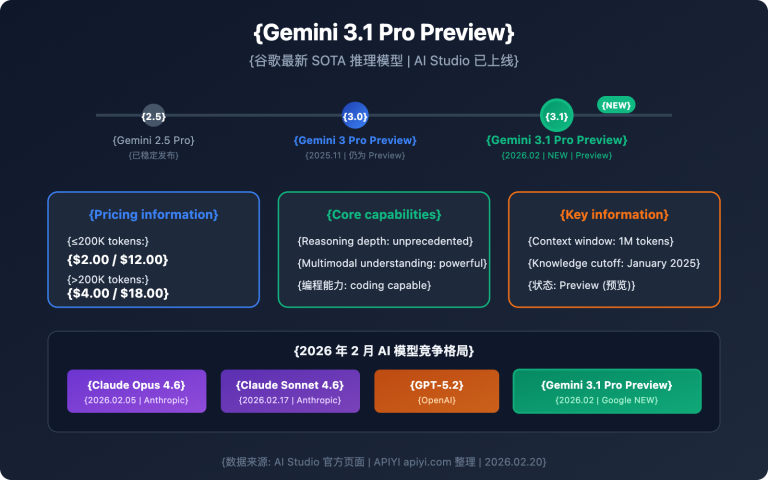
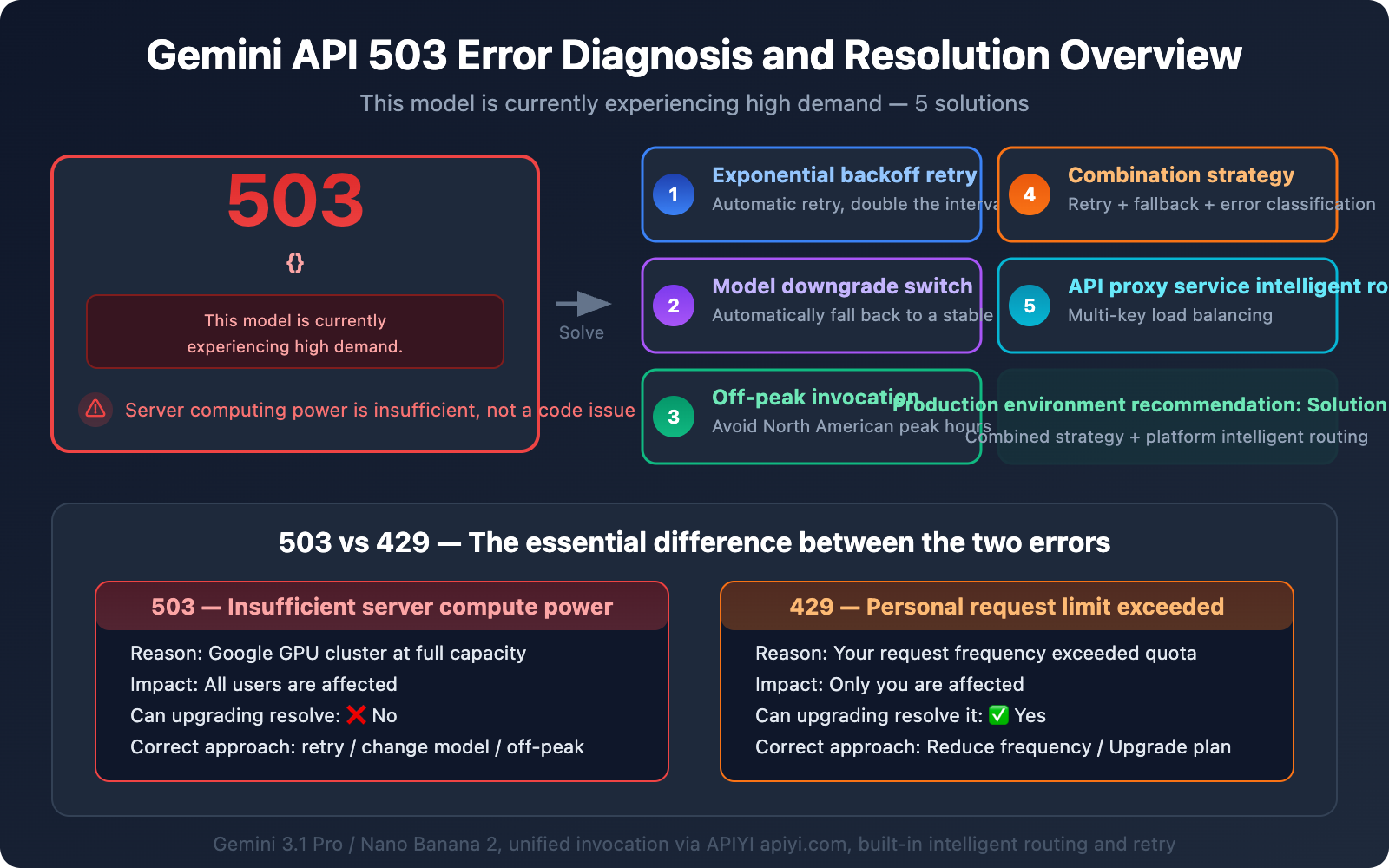
This issue is particularly severe with the new models, Gemini 3.1 Pro Preview and Gemini 3.1 Flash Image Preview (Nano Banana 2). This article will thoroughly explain the nature of this error, how it differs from other common errors, and provide 5 proven solutions that actually work.
Key Takeaway: After reading this article, you'll accurately understand the root cause of the 503 high demand error, master 5 actionable solutions, and avoid getting stuck on your development progress because of it.
What Does the Gemini API 503 High Demand Error Really Mean?
Let's start with a simple analogy to understand this issue:
Imagine Google's Gemini servers as a popular, trendy restaurant. Normally, business is good, and there are enough seats. Then, suddenly, it goes viral (a new model is released), and everyone in the city rushes to queue up. The restaurant's capacity is fixed; once it's full, it's full. When you get to the door, the waiter tells you: "Sorry, it's too crowded right now. Peak hours are usually temporary, please come back a bit later."
That's the essence of This model is currently experiencing high demand – it's not a problem with your code, nor with your API key; it's that Google's servers simply don't have enough computing power available.
3 Key Facts About the Gemini 503 Error
| Fact | Explanation | Impact |
|---|---|---|
| Server-side Issue | 503 indicates insufficient Google server capacity, unrelated to your code or configuration | Upgrading to a paid plan won't solve it |
| All Users Affected | Free users, paid users, and enterprise clients all encounter this | It's not a "pay-to-fix" problem |
| Usually Temporary | During peak times, about 70% of 503 errors resolve themselves within 60 minutes | Requires a retry mechanism, not a code fix |
Why Gemini 3.1 Pro and Nano Banana 2 Are Especially Prone to 503 Errors
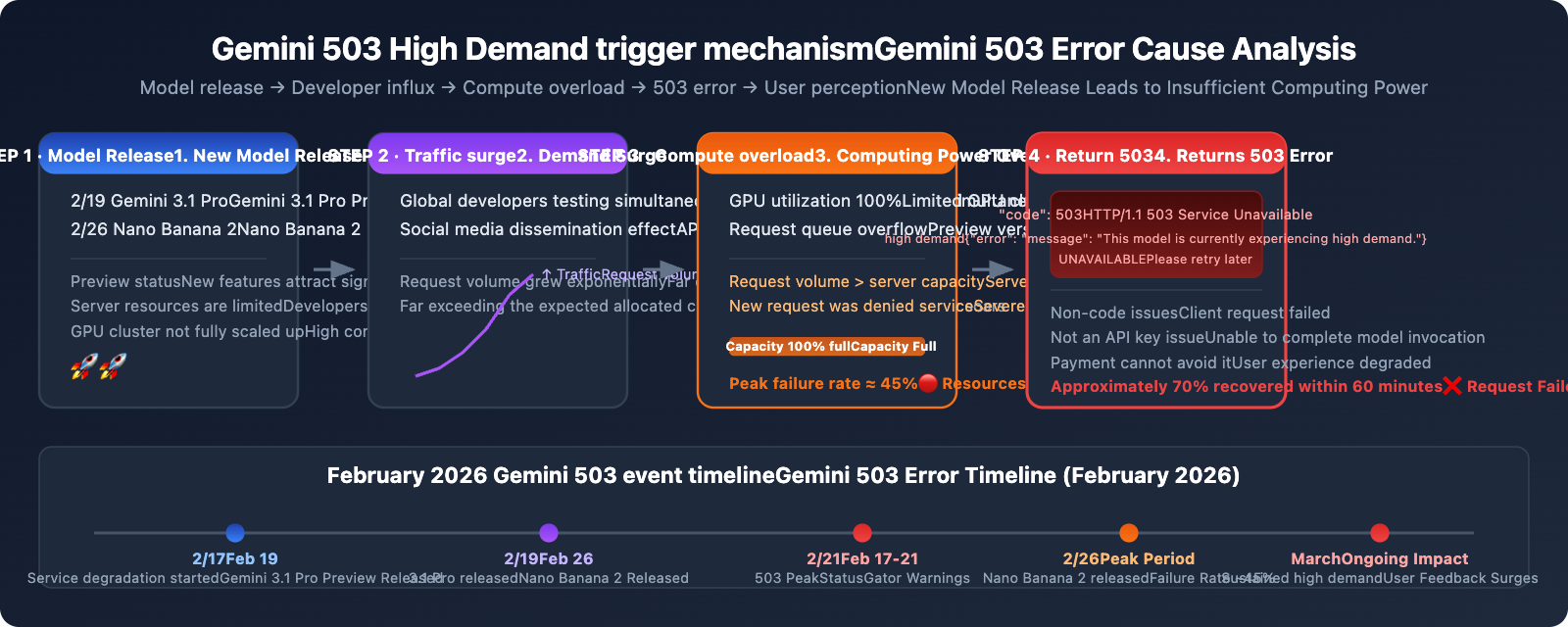
The surge in 503 errors in February 2026 has a clear timeline:
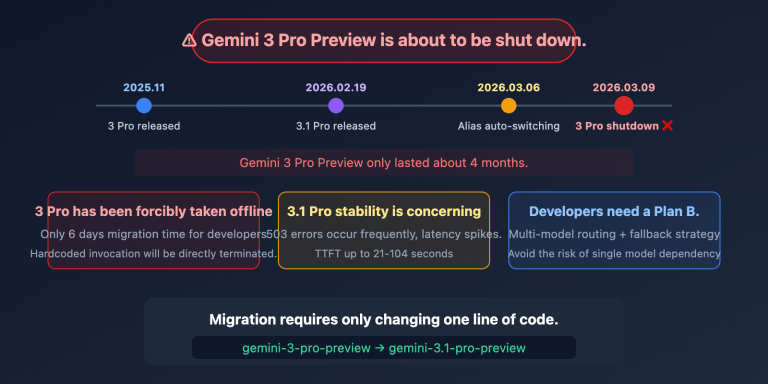
- February 19: Google released Gemini 3.1 Pro Preview, leading to a large influx of developers for testing.
- February 26: Nano Banana 2 (
gemini-3.1-flash-image-preview) was released, causing a surge in image generation demand. - February 17-21: StatusGator continuously recorded a full week of Gemini service degradation warnings.
- Peak failure rate around 45%: Community data showed that request failure rates during peak hours were nearly half.
The root cause: New models had just launched, and Google hadn't yet scaled up the allocated computing power (GPU clusters) on demand. Models in Preview status inherently have limited server resources, and when global developers simultaneously rush in to test them, it creates a situation where demand far outstrips supply.
The Essential Difference Between Gemini 503 High Demand and 429 Rate Limit
Many developers confuse 503 and 429, but the reasons for these errors are completely different, and so are their solutions. Getting them mixed up will only waste your effort.
| Comparison Dimension | 503 High Demand | 429 Rate Limit |
|---|---|---|
| Error Message | "This model is currently experiencing high demand" | "Resource has been exhausted" |
| Root Cause | Insufficient Google server capacity | Your personal request frequency exceeded |
| Scope of Impact | All users affected | Only you are affected |
| Can Upgrading Solve It? | ❌ Upgrading paid plan won't solve it | ✅ Upgrading to Tier 1 can solve it |
| Is Retrying Effective? | ✅ Waiting a bit usually recovers | ❌ Errors persist without reducing frequency |
| Peak Period Characteristics | Frequent during North American working hours (9 AM-5 PM PT) | Irrelevant to time of day; errors when limit exceeded |
| Fundamental Solution | Retry + fallback model + off-peak scheduling | Reduce request frequency or upgrade plan |
One-Sentence Judgment Method
- See 503 → It's Google's problem; wait a bit or switch models.
- See 429 → You're requesting too fast; slow down or upgrade your plan.
🎯 Technical Tip: Handling both 503 and 429 errors in a production environment is fundamental to API integration. When you invoke Gemini series models through the APIYI apiyi.com platform, it comes with built-in intelligent retry and load balancing mechanisms, which can significantly reduce the frequency of 503 errors perceived by end-users.
Solution One: Exponential Backoff Retry (The Basics)
Since a 503 error means "try again in a bit," the most direct response is automatic retry. But you can't just retry blindly—you need to use an "exponential backoff" strategy, doubling the retry interval each time to avoid exacerbating server pressure.
Gemini 503 Exponential Backoff Retry Code
import openai
import time
import random

client = openai.OpenAI(
    api_key="YOUR_API_KEY",
    base_url="https://api.apiyi.com/v1"  # APIYI unified interface
)

def call_gemini_with_retry(messages, model="gemini-3.1-pro-preview", max_retries=5):
    """Calls the Gemini API with exponential backoff"""
    for attempt in range(max_retries):
        try:
            response = client.chat.completions.create(
                model=model,
                messages=messages
            )
            return response
        except openai.APIStatusError as e:
            if e.status_code == 503:
                # Exponential backoff: 2s, 4s, 8s, 16s, 32s + random jitter
                wait_time = (2 ** attempt) + random.uniform(0, 1)
                print(f"⏳ 503 High Demand - Retrying attempt {attempt+1}, waiting {wait_time:.1f}s...")
                time.sleep(wait_time)
            elif e.status_code == 429:
                # 429 Rate Limit: wait longer
                wait_time = 60 + random.uniform(0, 10)
                print(f"🚫 429 Rate Limit - Waiting {wait_time:.1f}s...")
                time.sleep(wait_time)
            else:
                raise  # Raise other errors directly
    raise Exception(f"Failed after {max_retries} retries")

# Usage example
response = call_gemini_with_retry(
    messages=[{"role": "user", "content": "Hello, Gemini!"}]
)
print(response.choices[0].message.content)
Key Parameters for Exponential Backoff Retry
| Parameter | Recommended Value | Description |
|---|---|---|
| Max Retries | 5 times | More than 5 retries usually indicates it's not a temporary issue |
| Initial Wait | 2 seconds | Too short will exacerbate server load |
| Backoff Multiplier | 2x | Doubles each time: 2s → 4s → 8s → 16s → 32s |
| Random Jitter | 0-1 seconds | Prevents many clients from retrying simultaneously |
| Max Wait | 32 seconds | Beyond 32 seconds, you should switch to a fallback solution |
💡 Practical Tip: Random jitter is incredibly important. If all clients retry precisely after 2 seconds, it creates a "thundering herd" effect—all requests flood the server again simultaneously, leading to another round of 503s. Adding random jitter helps spread out the retry requests.
Solution Two: Model Downgrade / Automatic Fallback to Backup Models
When Gemini 3.1 Pro Preview consistently returns 503 errors, the most practical solution is to automatically switch to a more stable backup model.
Gemini 503 Model Downgrade Strategy
import openai

client = openai.OpenAI(
    api_key="YOUR_API_KEY",
    base_url="https://api.apiyi.com/v1"
)

# Model downgrade chain: Prioritize the strongest, downgrade if it fails
FALLBACK_MODELS = [
    "gemini-3.1-pro-preview",        # Primary choice: Latest and most powerful
    "gemini-3.0-pro",                 # Fallback 1: Previous generation Pro, more stable
    "gemini-2.5-flash-image-preview", # Fallback 2: Flash version, fast speed
    "gemini-2.5-flash",               # Ultimate fallback: Most stable Flash
]

def call_with_fallback(messages):
    """API call with model fallback"""
    for model in FALLBACK_MODELS:
        try:
            response = client.chat.completions.create(
                model=model,
                messages=messages
            )
            if model != FALLBACK_MODELS[0]:
                print(f"⚠️ Downgraded to fallback model: {model}")
            return response
        except openai.APIStatusError as e:
            if e.status_code in (503, 429):
                print(f"❌ {model} returned {e.status_code}, trying next model...")
                continue
            raise
    raise Exception("All models are unavailable")

response = call_with_fallback(
    messages=[{"role": "user", "content": "Analyze the performance bottleneck of this code"}]
)
Gemini Model Stability Ranking
| Model | Stability | 503 Frequency | Suitable Scenarios |
|---|---|---|---|
gemini-2.5-flash |
⭐⭐⭐⭐⭐ | Extremely Low | High-availability production environment fallback |
gemini-3.0-pro |
⭐⭐⭐⭐ | Low | Stable scenarios requiring Pro capabilities |
gemini-2.5-flash-image-preview |
⭐⭐⭐ | Medium | Image generation fallback |
gemini-3.1-pro-preview |
⭐⭐ | High | Requires latest capabilities but can tolerate occasional failures |
gemini-3.1-flash-image-preview |
⭐⭐ | High | Nano Banana 2 Image Generation |
🚀 Quick Start: With the APIYI apiyi.com platform, you can invoke all models in the table above using a single API key. Switching models only requires changing the model parameter, no need to reconfigure authentication. Implementing a model downgrade chain in your code is super convenient.
Solution Three: Off-Peak Calling (Zero-Cost Solution)
503 high demand errors show clear temporal patterns. Community data indicates:
- Peak Hours (9 AM-5 PM PT): Failure rate around 45%
- Off-Peak Hours (2 AM-7 AM PT): Failure rate below 5%
Converted to Beijing Time:
| Time Slot (Beijing Time) | Corresponding Pacific Time | Gemini 503 Frequency | Recommendation |
|---|---|---|---|
| 1:00 AM – 10:00 AM | 9 AM-6 PM PT (previous day) | 🔴 Peak | Avoid or use fallback models |
| 10:00 AM – 3:00 PM | 6 PM-11 PM PT (previous day) | 🟡 Medium | Call with retry mechanism |
| 3:00 PM – 11:00 PM | 11 PM-7 AM PT | 🟢 Off-Peak | Optimal calling window |
| 11:00 PM – 1:00 AM | 7 AM-9 AM PT | 🟡 Medium | Starting to warm up |
Scenarios Suitable for Off-Peak Calling
- Batch Data Processing: Tasks that don't require real-time responses can be scheduled to run during off-peak hours.
- Scheduled Tasks: Set up cron jobs to execute during off-peak hours.
- Content Generation: Scenarios like articles, images, etc., that can be generated in advance and published later.
Solution Four: Combined Strategy (Recommended for Production)
In real production environments, a single solution is often not enough. We recommend combining the previous 3 solutions:
Production-Grade Gemini API Invocation Strategy
import openai
import time
import random
from datetime import datetime

client = openai.OpenAI(
    api_key="YOUR_API_KEY",
    base_url="https://api.apiyi.com/v1"
)

FALLBACK_MODELS = [
    "gemini-3.1-pro-preview",
    "gemini-3.0-pro",
    "gemini-2.5-flash",
]

def smart_gemini_call(messages, max_retries=3):
    """
    Production-grade Gemini API invocation.
    Strategy: Exponential backoff retry + model fallback + error classification
    """
    for model in FALLBACK_MODELS:
        for attempt in range(max_retries):
            try:
                response = client.chat.completions.create(
                    model=model,
                    messages=messages,
                    timeout=30
                )
                return response, model

            except openai.APIStatusError as e:
                if e.status_code == 503:
                    if attempt < max_retries - 1:
                        wait = (2 ** attempt) + random.uniform(0, 1)
                        print(f"⏳ {model} 503 - Retrying {attempt+1}/{max_retries}, waiting {wait:.1f}s")
                        time.sleep(wait)
                    else:
                        print(f"⚠️ {model} persistent 503, falling back to the next model")
                        break  # Exit retry loop, switch model

                elif e.status_code == 429:
                    wait = 60
                    print(f"🚫 {model} 429 rate limit - Waiting {wait}s")
                    time.sleep(wait)

                else:
                    raise

            except openai.APITimeoutError:
                print(f"⏰ {model} request timed out, trying next model")
                break

    raise Exception("All models and retries failed. Please check your network or try again later.")

# Usage
response, used_model = smart_gemini_call(
    messages=[{"role": "user", "content": "你好"}]
)
print(f"✅ Model used: {used_model}")
print(response.choices[0].message.content)
View the complete production-grade wrapper (with logging, monitoring, caching)
import openai
import time
import random
import hashlib
import json
import logging
from datetime import datetime
from functools import lru_cache

logging.basicConfig(level=logging.INFO)
logger = logging.getLogger("gemini_client")

client = openai.OpenAI(
    api_key="YOUR_API_KEY",
    base_url="https://api.apiyi.com/v1"
)

# Simple request cache
_cache = {}

def get_cache_key(messages, model):
    """Generates a cache key for the request"""
    content = json.dumps(messages, sort_keys=True) + model
    return hashlib.md5(content.encode()).hexdigest()

def gemini_call_production(
    messages,
    models=None,
    max_retries=3,
    cache_ttl=3600,
    enable_cache=True
):
    """
    Production-grade Gemini API invocation wrapper

    Features:
    - Exponential backoff retry (handles 503s)
    - Automatic model fallback
    - Response caching (reduces duplicate requests)
    - Structured logging
    """
    if models is None:
        models = ["gemini-3.1-pro-preview", "gemini-3.0-pro", "gemini-2.5-flash"]

    # Check cache
    if enable_cache:
        cache_key = get_cache_key(messages, models[0])
        if cache_key in _cache:
            cached_time, cached_response = _cache[cache_key]
            if time.time() - cached_time < cache_ttl:
                logger.info("Cache hit, skipping API invocation")
                return cached_response, "cache"

    errors = []
    for model in models:
        for attempt in range(max_retries):
            try:
                start_time = time.time()
                response = client.chat.completions.create(
                    model=model,
                    messages=messages,
                    timeout=30
                )
                elapsed = time.time() - start_time
                logger.info(f"Success | model={model} | duration={elapsed:.2f}s")

                # Write to cache
                if enable_cache:
                    _cache[cache_key] = (time.time(), response)

                return response, model

            except openai.APIStatusError as e:
                errors.append(f"{model}:{e.status_code}")
                if e.status_code == 503:
                    if attempt < max_retries - 1:
                        wait = (2 ** attempt) + random.uniform(0, 1)
                        logger.warning(f"503 | model={model} | retry={attempt+1} | wait={wait:.1f}s")
                        time.sleep(wait)
                    else:
                        logger.warning(f"Persistent 503 | model={model} | falling back to next model")
                        break
                elif e.status_code == 429:
                    logger.warning(f"429 Rate limit | model={model}")
                    time.sleep(60)
                else:
                    raise
            except Exception as e:
                logger.error(f"Exception | model={model} | error={e}")
                break

    raise Exception(f"All attempts failed: {errors}")
Solution Five: Using an API Proxy Service with Smart Routing
If you'd rather not implement all that complex retry and fallback logic yourself, there's an easier option: use an API proxy service that comes with built-in smart routing capabilities.
How an API Proxy Service Solves Gemini 503 Issues
Professional API proxy services typically offer:
- Multiple API Key Rotation: The platform holds multiple Google API keys and automatically switches to another if one hits a rate limit.
- Smart Retries: The platform implements exponential backoff retries, transparently to the developer.
- Load Balancing: Requests are distributed across multiple Google accounts and regions.
- Failure Detection: If a model's 503 error frequency increases, the platform automatically reduces the request allocation for that model.
🎯 Tech Tip: The APIYI apiyi.com platform provides these smart routing capabilities for Gemini models. When you use an OpenAI-compatible interface for your model invocation, the platform automatically handles 503 retries and multi-API key load balancing on the backend, so you don't have to implement complex fault tolerance logic yourself.
Minimal Code Example for an API Proxy Service Solution
import openai

# Using the APIYI API proxy service; 503 handling is managed by the platform
client = openai.OpenAI(
    api_key="YOUR_API_KEY",
    base_url="https://api.apiyi.com/v1"
)

# It's that simple, no need to handle 503 yourself
response = client.chat.completions.create(
    model="gemini-3.1-pro-preview",
    messages=[{"role": "user", "content": "你好"}]
)
print(response.choices[0].message.content)
Complete Troubleshooting Guide for Gemini API Errors
When you encounter Gemini API errors, follow this process to quickly pinpoint the issue:
Step One: Check the Error Code
| Error Code | Error Message | Type | Immediate Action |
|---|---|---|---|
| 503 | "high demand" / "overloaded" | Server capacity insufficient | Wait and retry, or switch models |
| 429 | "resource exhausted" | Personal rate limit | Reduce request frequency or upgrade plan |
| 400 | "invalid request" | Request parameter error | Check request format and parameters |
| 401 | "unauthorized" | Authentication failed | Check API Key |
| 500 | "internal error" | Server internal error | Wait and retry |
Step Two: Distinguish Between 503 and 429
- If multiple API keys are failing → 503, it's a Google server issue.
- If only your API key is failing → 429, it's your personal rate limit.
Step Three: Choose the Corresponding Solution
- 503: Exponential backoff retry → Model fallback → Off-peak invocation
- 429: Reduce request frequency → Enable billing to upgrade to Tier 1 (Free tier is 5-15 RPM, Tier 1 is 150-300 RPM)
Frequently Asked Questions
Q1: Why am I still encountering 503 High Demand even after paying?
A 503 error has absolutely nothing to do with whether you've paid. It indicates insufficient computing power on Google's servers, and it affects everyone, whether you're a free user or an enterprise customer. This is different from a 429 rate limit error—a 429 can indeed be resolved by upgrading your plan, but a 503 cannot. If you encounter a 503, we recommend using exponential backoff retries or switching to a more stable model version. Calling models through the APIYI apiyi.com platform can help reduce the perceived frequency of 503s by leveraging multi-key load balancing.
Q2: When will the 503 issues for Gemini 3.1 Pro Preview improve?
Based on historical experience, the peak of 503 errors after a new model release typically lasts 1-3 weeks. It usually improves significantly as Google gradually expands its capacity. Gemini 3.0 Pro also experienced a similar wave of 503s when it was first released, but it's very stable now. While you wait, we recommend implementing a model degradation strategy, where a 503 automatically falls back to gemini-3.0-pro or gemini-2.5-flash.
Q3: Are “high demand” and “model is overloaded” the same error?
Essentially, they're different phrasings for the same problem. Both "This model is currently experiencing high demand" and "The model is overloaded" are 503 status codes, indicating insufficient computing power on Google's servers. The former is more common in newer API versions, while the latter appeared more in earlier versions. The handling method is exactly the same.
Q4: Is there a way to know in advance if the Gemini API will return a 503?
There's no official advance warning. However, you can watch for a few signals: (1) The 1-2 weeks after Google releases a new model are high-risk periods; (2) 503s are more frequent during North American working hours (Beijing time early morning to late morning); (3) The community forum discuss.ai.google.dev often has real-time feedback. We recommend always keeping retry and degradation logic in your code, rather than adding it only when you encounter issues. The APIYI apiyi.com platform provides model availability status monitoring, which can help you get an early sense of potential issues.
Q5: Should I handle both 503 and 429 errors in my code?
Absolutely. You'll encounter both 503s and 429s in a production environment, and while their handling strategies differ, they're equally important. For 503s, use exponential backoff retries + model degradation. For 429s, reduce request frequency + queue requests. The 'Solution Four: Combined Strategy' code in this article handles both types of errors simultaneously and can be used directly in a production environment.
Summary
The essence of the This model is currently experiencing high demand 503 error is quite simple—Google's server computing power is temporarily insufficient. This is almost inevitable, especially for new models like Gemini 3.1 Pro Preview and Nano Banana 2, during their initial launch phase.
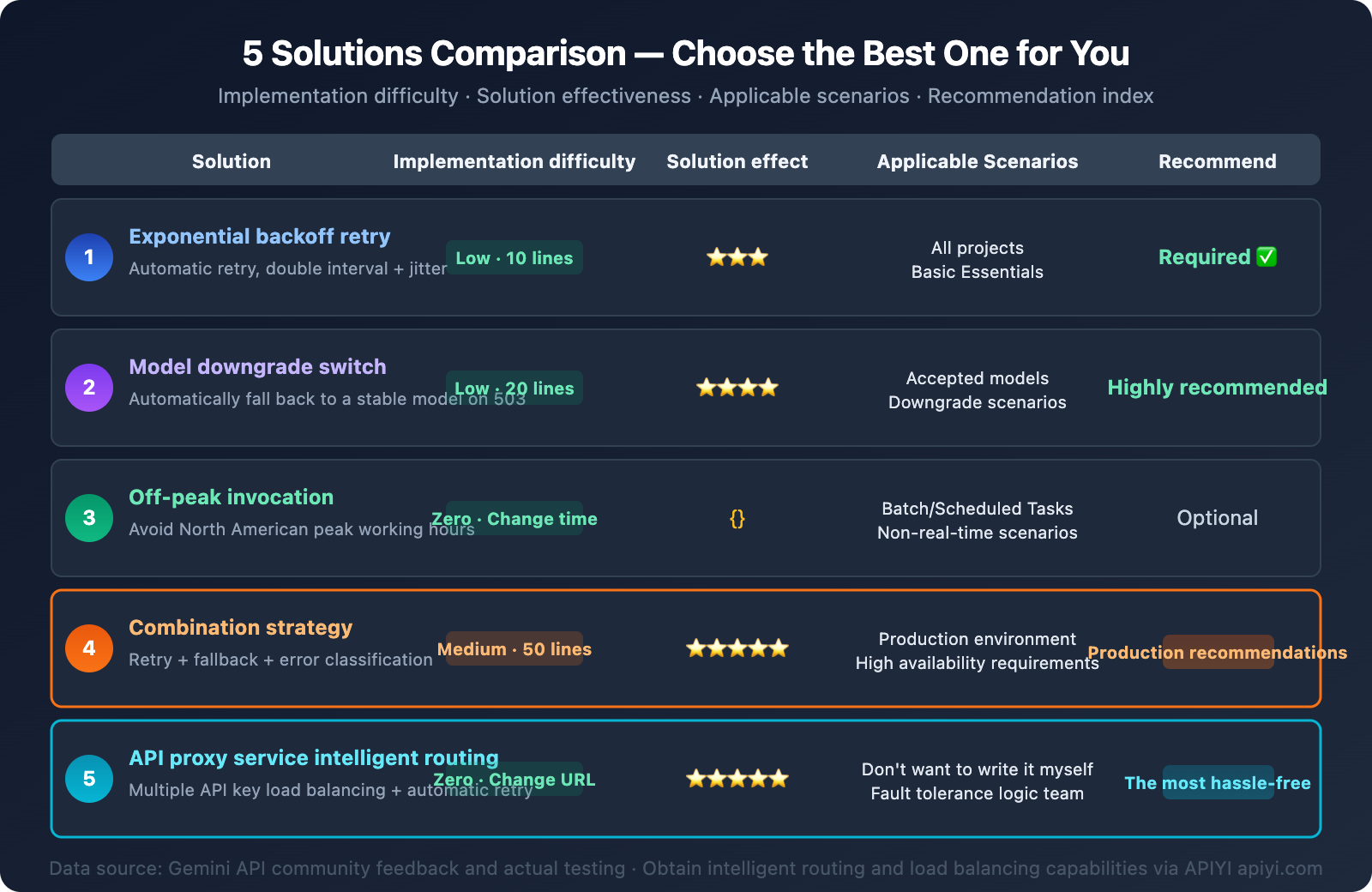
Here are 5 solutions, ranked by recommended priority:
- Exponential Backoff Retries — The most fundamental; every project should have this.
- Model Degradation Chain — Automatically switches to a more stable model on a 503.
- Off-Peak Invocation — Schedule non-real-time tasks during off-peak hours.
- Combined Strategy — Recommended for production environments: retries + degradation + error classification.
- API proxy service Smart Routing — The easiest option; the platform handles fault tolerance logic.
No matter which solution you choose, the core principle is: a 503 isn't your fault, but you need to handle it gracefully. We recommend integrating Gemini series models quickly through APIYI apiyi.com to enjoy its built-in smart routing and retry capabilities.
References
-
Google AI Developers Forum – 503 Error Discussions
- Link:
discuss.ai.google.dev - Description: Community discussions and official responses regarding Gemini API 503 errors.
- Link:
-
Google Gemini API – Rate Limits Documentation
- Link:
ai.google.dev/gemini-api/docs/rate-limits - Description: Official rate limit rules and quota explanations for each Tier.
- Link:
-
Google Gemini API – Troubleshooting Guide
- Link:
ai.google.dev/gemini-api/docs/troubleshooting - Description: Official error troubleshooting guide.
- Link:
📝 Author: APIYI Team | For technical exchanges and API integration, please visit apiyi.com