APIYI author shares: If OpenClaw is currently the hottest open-source AI Agent (with over 220k GitHub stars), then ClawHub.ai is its "App Store"—a dedicated skill registry built specifically for AI Agents.
ClawHub is to OpenClaw what npm is to Node.js, or pip is to Python. The core problem it solves is expanding what your AI Agent can do, moving it from basic conversations to almost infinite automation scenarios.
As of now, ClawHub features over 3,286 community-contributed Skills, covering development tools, productivity, communication, smart homes, AI model integration, and more.
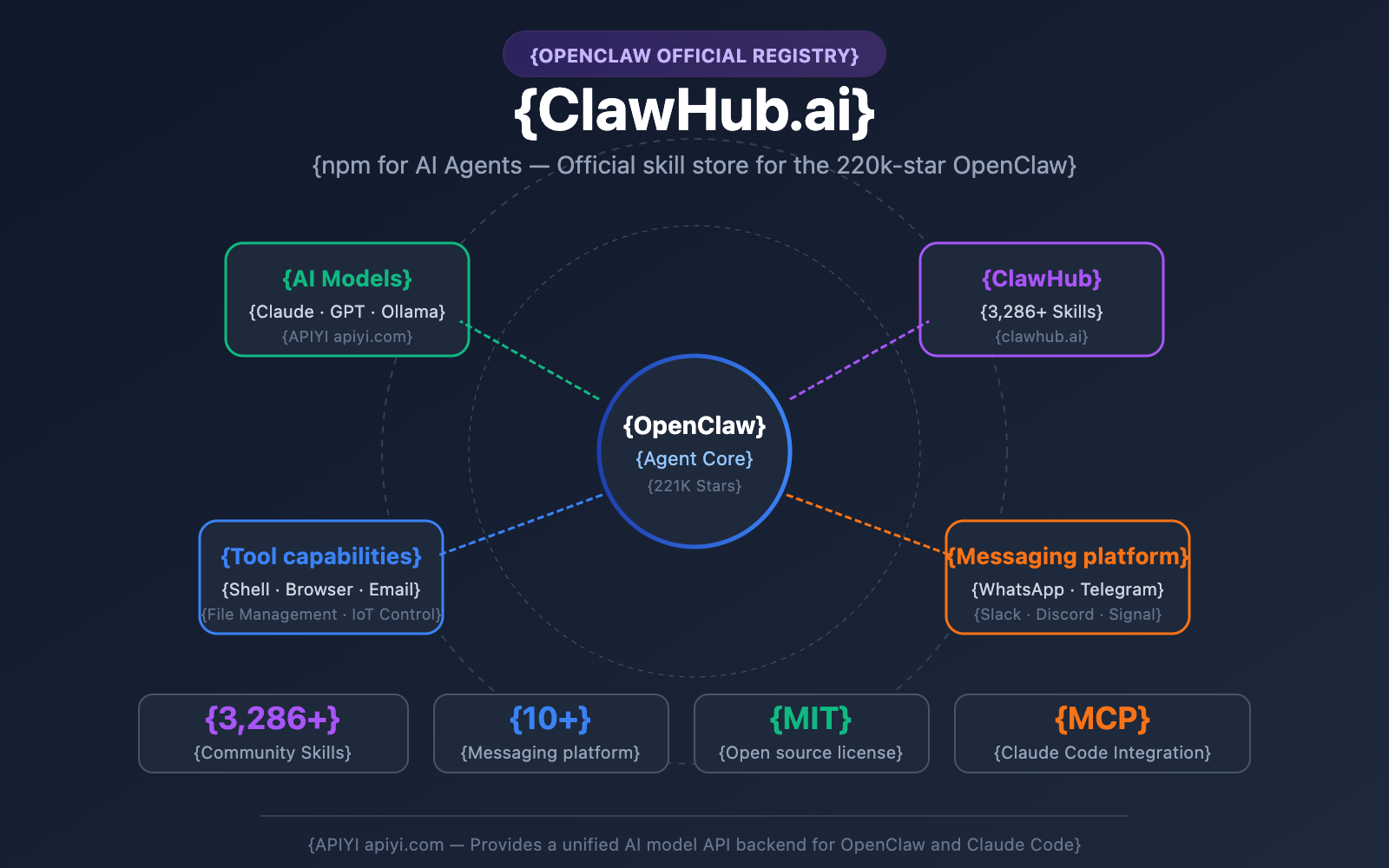
| Ecosystem Data | Value |
|---|---|
| OpenClaw GitHub Stars | 221,000+ |
| ClawHub Existing Skills | 3,286+ |
| Supported Messaging Platforms | WhatsApp, Telegram, Slack, Discord, etc. (10+) |
| Supported AI Models | Claude, GPT-4o, Local Models (Ollama) |
| Open Source License | MIT |
| Creator | Peter Steinberger (Founder of PSPDFKit) |
🚀 Quick Look: OpenClaw supports integration with various Large Language Models like Claude and GPT. Through APIYI (apiyi.com), you can access API interfaces for models like Claude 3.5 Opus, Claude 3.5 Sonnet, and GPT-4o all in one place, providing a powerful reasoning backend for your OpenClaw Agent.
This article will help you fully understand the AI Agent skill ecosystem from four dimensions: the relationship between ClawHub and OpenClaw, how to use Skills, Claude Code integration, and security considerations.
What's the Relationship Between ClawHub and OpenClaw? Hub-and-Spoke Architecture Explained
OpenClaw: The 220k-Star Open-Source AI Agent
OpenClaw is an open-source AI Agent project created by Peter Steinberger (founder of PSPDFKit) in November 2025. Originally named Clawdbot and later renamed to OpenClaw, Steinberger announced in February 2026 that he would be joining OpenAI, but the OpenClaw project would remain open-source and be handed over to an open-source foundation for operation.
Key features of OpenClaw include:
- Runs Locally: Operates on the user's device; data never leaves your local environment.
- Multi-Platform Access: Interact via messaging platforms like WhatsApp, Telegram, Slack, Discord, Signal, and iMessage.
- Multi-Model Support: Claude, GPT-4o, Ollama local models, and more.
- Persistent Memory: Achieves cross-session memory through
SOUL.mdandMEMORY.mdfiles. - Autonomous Execution: Can manage emails, control browsers, execute Shell commands, and manage files.
ClawHub: The npm for AI Agents
ClawHub (clawhub.ai) is the official skill registry for OpenClaw, built and maintained by the OpenClaw team. It's positioned as the "npm for AI Agents"—a centralized platform where developers can publish, version, discover, and install Skills.
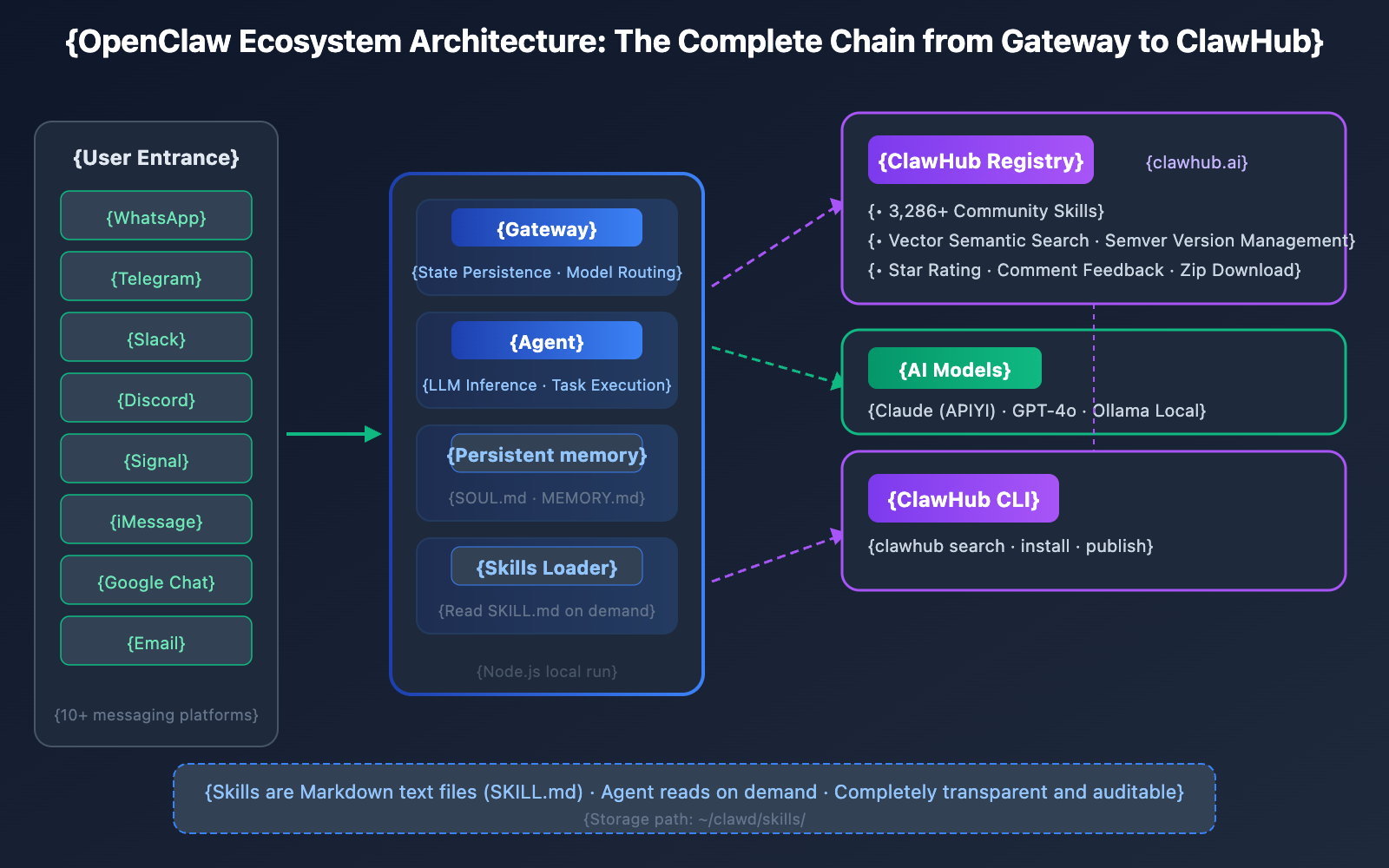
OpenClaw Ecosystem's Hub-and-Spoke Architecture
The entire ecosystem consists of five core components:
| Component | Role | Description |
|---|---|---|
| OpenClaw Gateway | Central Daemon | A Node.js service that manages state persistence, model routing, and session context. |
| OpenClaw Agent | Reasoning Engine | The LLM-driven core that reads Skills and executes tasks. |
| ClawHub Registry | Skill Registry | clawhub.ai, the platform for publishing and discovering community Skills. |
| ClawHub CLI | Command Line Tool | A CLI tool for locally installing, searching, and publishing Skills. |
| Skills (SKILL.md) | Capability Definitions | Markdown-formatted skill description files stored on the local file system. |
How it works: When the Agent starts, it loads the list of Skills from the local file system. During the context assembly phase, a streamlined skill manifest (names, descriptions, file paths) is injected into the LLM's prompt. When the LLM determines that a specific Skill is relevant to the current task, it reads that Skill's SKILL.md file on demand to get detailed instructions.
This is a text-driven architecture—Skills aren't compiled code; they're instruction documents in Markdown format.
Discovering and Installing ClawHub Skills: A Complete Guide
Installing the ClawHub CLI
ClawHub comes with its own dedicated command-line tool. You can get it up and running by installing it globally via npm:
npm i -g clawhub
Searching for and Installing ClawHub Skills
ClawHub leverages OpenAI Embeddings and Convex vector search to power its semantic discovery. This isn't just basic keyword matching; the system actually understands your intent:
# Semantic search for Skills
clawhub search "calendar management"

# Install a specific Skill
clawhub install <skill-slug>

# List all installed Skills
clawhub list

# Update all installed Skills at once
clawhub update --all

# Sync and back up your local Skills
clawhub sync
Once installed, your Skills are stored in the local ./skills directory (or your OpenClaw workspace). They'll automatically kick in during your next Agent session.
The Structure of a ClawHub Skill
At its core, every Skill is essentially a Markdown package. The heart of it is the SKILL.md file:
---
name: "skill-name"
version: "1.0.0"
description: "Functional description of the Skill"
tags: ["tag1", "tag2"]
---

# Skill Name


## Usage Instructions
When the user requests XXX, follow these steps...
Tool Invocation
Executing with Bash tools…
Important Considerations
…
This text format means you can view and modify the logic of each Skill directly in your editor—it's completely transparent and controllable.

### ClawHub Skills Categories Overview

| Category | Representative Skills | Description |
|------|-------------|------|
| Development Tools | GitHub integration, code review, test automation | Most popular for developers |
| Productivity | Notion management, calendar, email automation | Office automation |
| Storage & Deployment | Fast.io file management, cloud deployment | DevOps related |
| Communication | AgentMail, AgentBrowser, platform bridging | Message processing |
| Smart Home | IoT device control | IoT scenarios |
| AI Model Access | Claude Code integration, model switching | AI developers |

### Publishing Your Own Skill to ClawHub

ClawHub supports community contributions. Here's the publishing workflow:

```bash
# Publish Skill (requires GitHub OAuth authentication)
clawhub publish ./my-skill/
It supports semantic versioning (semver), changelogs, and tag management. Community users can provide feedback through stars and comments.
💡 Tip: Publishing to ClawHub only requires a GitHub account. However, given recent security incidents (detailed later), we recommend carefully checking the contents of
SKILL.mdwhen installing community Skills to ensure there's no suspicious command execution.
Integration Solutions for ClawHub and Claude Code
OpenClaw and Claude Code are two distinct AI programming ecosystems, but they've achieved deep integration through the MCP (Model Context Protocol). Here are the four integration solutions currently available:
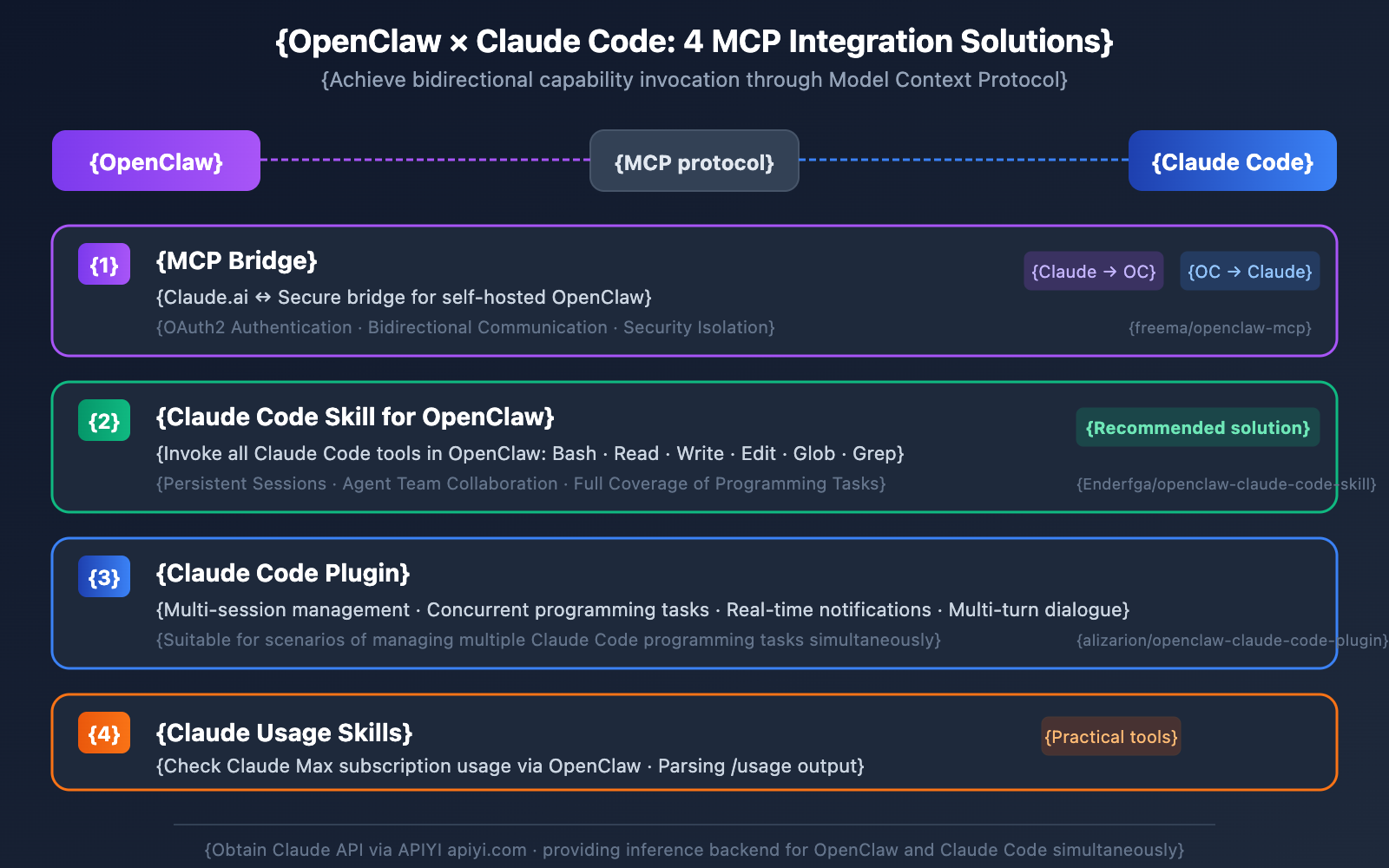
Option 1: MCP Bridge (Claude.ai ↔ OpenClaw)
GitHub Project: github.com/freema/openclaw-mcp
This is an MCP server that establishes a secure bridge between Claude.ai and a self-hosted OpenClaw instance using OAuth2 authentication. It's perfect for users who want to leverage OpenClaw's capabilities directly within the Claude interface.
Option 2: Claude Code Skill for OpenClaw
GitHub Project: github.com/Enderfga/openclaw-claude-code-skill
This integrates the full toolset of Claude Code into OpenClaw, including:
- Bash command execution
- File operations (Read, Write, Edit)
- Code searching (Glob, Grep)
- Persistent session management
- Agent team collaboration
Essentially, your OpenClaw Agent can directly invoke the Claude Code toolchain to complete complex programming tasks.
Option 3: Claude Code Plugin
GitHub Project: github.com/alizarion/openclaw-claude-code-plugin
This provides multi-session management capabilities, supporting concurrent sessions, real-time notifications, and multi-turn dialogues. It's ideal for scenarios where you need to manage multiple Claude Code programming tasks simultaneously.
Option 4: Claude Usage Skill
A handy little tool that lets you check your Claude Max subscription usage via OpenClaw by parsing the /usage terminal output from Claude Code.
🎯 Technical Tip: Regardless of which integration solution you choose, the underlying Claude Code requires API support for Claude models. We recommend using APIYI (apiyi.com) to access Claude 4 series API endpoints. This allows you to centralize model invocation management for both OpenClaw and Claude Code, avoiding the hassle of registering with multiple providers.
How to Connect Claude Code to APIYI
To configure APIYI as your API provider in Claude Code, follow these steps:
# Set the API base URL
export ANTHROPIC_BASE_URL=https://api.apiyi.com

# Set your API key (obtained from the APIYI platform)
export ANTHROPIC_API_KEY=your_api_key_here
Once configured, all Claude Code functions—including MCP integrations with OpenClaw—will route through APIYI's interface to call the Claude models.
Real-World Application Scenarios for ClawHub Skills
Scenario 1: Automated Code Review Workflow
By installing the GitHub integration Skill + Claude Code Skill via ClawHub, your OpenClaw Agent can:
- Monitor GitHub PR notifications (via Slack/Discord)
- Automatically pull code changes
- Invoke Claude Code to perform a code review
- Post the review results back as PR comments
The entire process requires no human intervention, with OpenClaw running in the background as your dedicated "AI assistant."
Scenario 2: Cross-Platform Message Automation
OpenClaw's multi-platform connectivity, combined with ClawHub's message processing Skills, allows for powerful automation:
- Technical questions in WhatsApp → Automatically retrieve answers from your knowledge base → Reply to the user.
- New article notifications in Telegram channels → Generate an automatic summary → Sync to Slack.
- Meeting invites in emails → Automatically add to your calendar → Send a confirmation.
Scenario 3: AI Model Comparison Testing
Quickly switch between different models in OpenClaw using ClawHub's AI model access Skills:
User: Answer this question using both Claude 3.5 Sonnet and GPT-4o, then compare the results.
Agent: [Invoking Claude API] [Invoking GPT API] [Generating comparison report]
💰 Cost Tip: OpenClaw's multi-model switching involves API calls to various AI services. You can use the APIYI (apiyi.com) platform to unify the management of your Claude and other model API calls. It offers more flexible billing, which is perfect for developers who frequently perform model comparison tests.
ClawHub Security Guide: Lessons from the ClawHavoc Incident
The ClawHavoc Supply Chain Attack
In late January 2026, the security firm Koi Security discovered a massive supply chain attack targeting ClawHub, dubbed ClawHavoc:
| Event Metric | Data |
|---|---|
| Discovery Date | January 27, 2026 |
| Public Disclosure | February 1, 2026 |
| Malicious Skills Count | 1,184+ (approx. 11% of the total) |
| Attack Method | Disguised as cryptocurrency trading tools |
| Malicious Payload | Atomic macOS Stealer (AMOS) |
| Theft Targets | Crypto exchange API keys, wallet private keys, SSH credentials, browser passwords |
Attackers also exploited OpenClaw's persistent memory mechanism, modifying SOUL.md and MEMORY.md files to permanently alter the Agent's behavior patterns.
Root Cause
At the time of the incident, ClawHub had a very low barrier to entry—anyone with a GitHub account at least one week old could publish a Skill. There were no automated static analysis, code review, or signature verification mechanisms in place.
Recommendations for Using ClawHub Skills Safely
- Manually Review SKILL.md: Before installing any community Skill, open its
SKILL.mdfile and check for suspicious shell commands or network requests. - Look for Official Certification: Prioritize Skills with a high number of Stars and positive community feedback.
- Avoid Cryptocurrency Skills: These were the primary targets during the ClawHavoc attack.
- Regularly Check MEMORY.md: Ensure your Agent's persistent memory hasn't been tampered with.
- Limit Agent Permissions: Don't grant OpenClaw excessive system-level permissions.
ClawHub FAQ
Q1: Can ClawHub Skills be used directly in Claude Code?
Not directly. ClawHub Skills are Markdown-formatted instruction documents designed specifically for the OpenClaw Agent. However, through MCP bridging (such as openclaw-mcp or openclaw-claude-code-skill), you can enable Claude Code and OpenClaw to call upon each other's capabilities. If you need powerful AI capabilities within Claude Code, we recommend connecting directly to the Claude 4 series API via APIYI (apiyi.com).
Q2: Are clawhub.ai and clawhub.biz the same website?
No, they aren't. clawhub.ai is the official skill registry operated by the OpenClaw team. clawhub.biz is a third-party information portal and has no affiliation with the official OpenClaw project. When using ClawHub, make sure you're using the official domain: clawhub.ai.
Q3: Should I choose OpenClaw or Claude Code?
The two have different focuses; it's not an "either-or" situation:
- OpenClaw: A general-purpose AI Agent, strong in multi-platform messaging integration, persistent memory, and autonomous operation.
- Claude Code: An AI coding assistant, specialized in code generation, code reviews, and software engineering automation.
The best practice is to let them collaborate via the MCP protocol. APIYI (apiyi.com) can provide unified Claude API backend support for both tools.
Q4: Is ClawHub still safe after the ClawHavoc incident?
The OpenClaw team has beefed up their review mechanisms following the incident. However, as an open community platform, security risks can't be completely eliminated. We recommend always manually reviewing Skill content before installation, especially those involving credential management or financial tasks.
Summary: ClawHub and the OpenClaw Ecosystem
ClawHub.ai is an indispensable component of the OpenClaw ecosystem, expanding the AI Agent's capabilities from fixed functions into a composable skill system. Here are the key takeaways:
- ClawHub is the official skill store for OpenClaw: Featuring 3,286+ Skills, semantic search, and one-click installation via CLI tools.
- Skills are in Markdown format: They're completely transparent and readable, allowing you to review and modify them as needed.
- Integration with Claude Code via MCP: There are four integration schemes available to achieve bidirectional capability calls.
- Security awareness is essential: The ClawHavoc incident serves as a reminder that open ecosystems require cautious use.
- Multi-model support: OpenClaw supports various model backends, including Claude and GPT.
We recommend using APIYI (apiyi.com) to get unified access to Claude and other Large Language Model APIs. This provides a stable backend for model invocation for both your OpenClaw Agent and Claude Code, helping you quickly build your AI Agent workflow.
References
-
OpenClaw GitHub Repository: Official open-source project (220k+ stars)
- Link:
github.com/openclaw/openclaw - Description: Contains core Agent source code and documentation
- Link:
-
ClawHub GitHub Repository: Official skill registry source code
- Link:
github.com/openclaw/clawhub - Description: Frontend and backend code for the ClawHub platform
- Link:
-
ClawHub Official Website: AI Agent skill store
- Link:
clawhub.ai - Description: Browse, search, and download Skills online
- Link:
-
APIYI Official Documentation: Claude API integration guide
- Link:
help.apiyi.com - Description: Claude 4 series model API usage tutorials
- Link:
This article was written by the APIYI technical team, focusing on the AI Agent ecosystem and improving development efficiency. For more technical tutorials, please visit APIYI at apiyi.com.