Ever wanted to analyze an entire codebase or process hundreds of pages of technical docs at once, only to get stuck by context window limits? Claude Opus 4.6 has arrived with a massive 1 million token context window. This is a first for the Opus series—equivalent to processing about 750,000 words in one go.
Core Value: By the end of this article, you'll know how to enable Claude 4.6's 1M token context window, understand the pricing strategy for long contexts, and master five high-value real-world use cases.

A Quick Look at Claude 4.6 Context Window Core Parameters
Released on February 5, 2026, Claude Opus 4.6's most striking upgrade is the massive expansion of its context window. Here are the core specs:
| Parameter | Claude Opus 4.6 | Previous Gen Opus 4.5 | Improvement |
|---|---|---|---|
| Default Context Window | 200K Tokens | 200K Tokens | Same |
| Beta Extended Window | 1,000K (1M) Tokens | Not Supported | First-time Support |
| Max Output Tokens | 128K Tokens | 64K Tokens | 2x Increase |
| MRCR v2 Benchmark (1M) | 76.0% | 18.5% | ~4x Increase |
| MRCR v2 Benchmark (256K) | 93.0% | — | Extremely High Accuracy |
| Recommended Thinking Mode | Adaptive Thinking | — | New Feature |
🎯 Key Info: Claude Opus 4.6's 1M context window is currently in Beta and requires a specific API header to enable. By default, it still uses a 200K context window. You can quickly test model performance across different context lengths via the APIYI (apiyi.com) platform.
3 Key Breakthroughs in the Claude 4.6 Context Window
Breakthrough 1: Opus Series Supports 1M Context for the First Time
Before Claude Opus 4.6, the 1-million-token context window was only available for the Sonnet series (Sonnet 4 and Sonnet 4.5). Opus 4.6 is the first flagship Opus model to support a 1M context, meaning you can now combine Opus's powerful reasoning capabilities with an ultra-large context.
To put it in perspective, 1M tokens is roughly equivalent to:
| Content Type | Capacity | Typical Scenario |
|---|---|---|
| Plain Text | ~750,000 words | A complete technical documentation library |
| Code | 75,000+ lines | An entire code repository |
| PDF Documents | Dozens of research papers | Batch literature reviews |
| Dialogue Logs | Hundreds of back-and-forth turns | Maintaining ultra-long sessions |
Breakthrough 2: Skyrocketing Long-Context Retrieval Accuracy
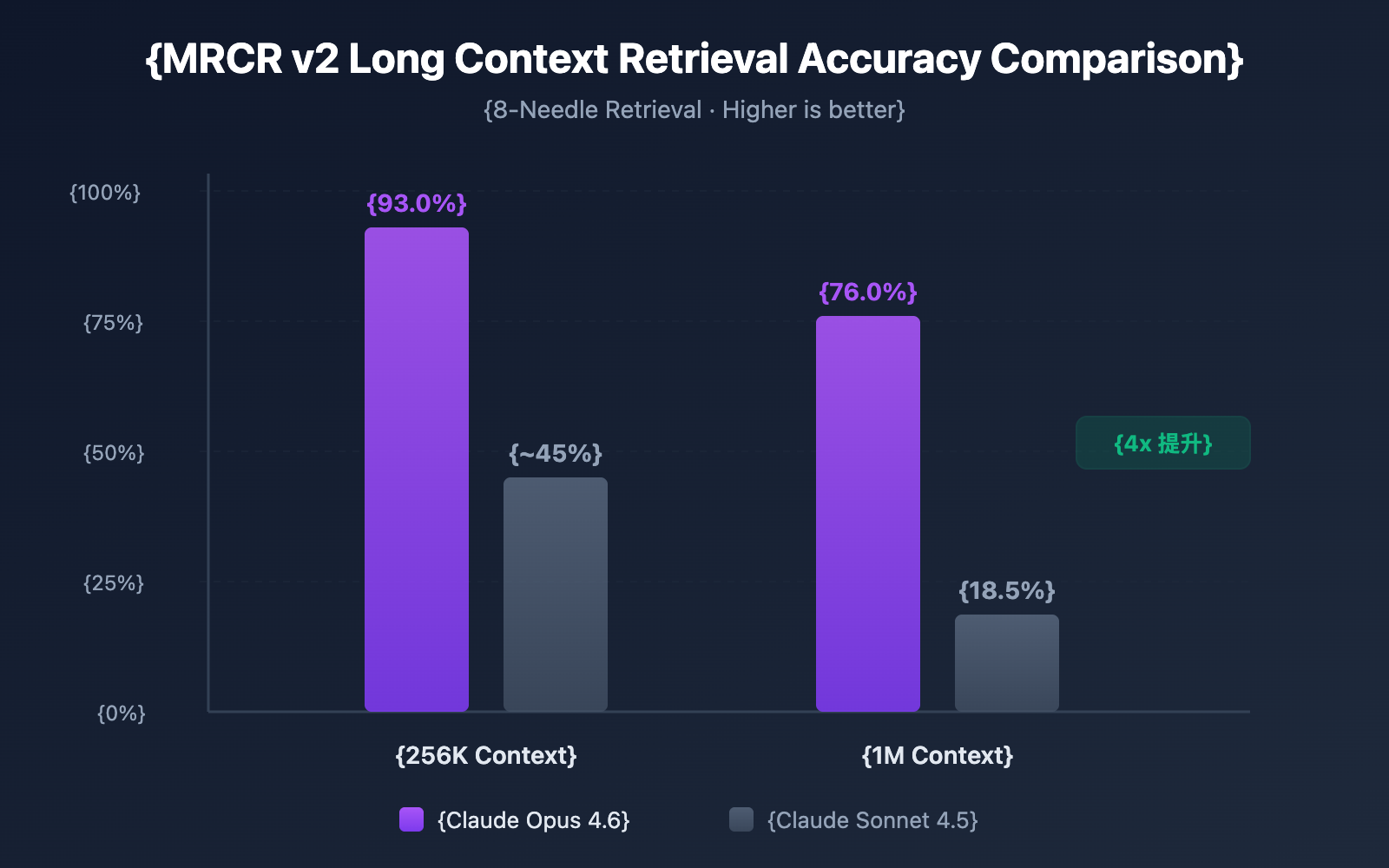
Having a massive context window is one thing, but being able to accurately find information within that window is another story. Claude Opus 4.6 performed impressively in the MRCR v2 (Multi-needle Retrieval with Contextual Reasoning) benchmark:
- 256K Token Context: Accuracy reached 93.0%
- 1M Token Context (8-needle): Accuracy reached 76.0%
MRCR v2 is a "needle in a haystack" style test—it hides 8 pieces of key information within 1 million tokens of text and requires the model to find all of them. Claude Opus 4.6's 76% accuracy is a qualitative leap compared to Sonnet 4.5's 18.5%, representing a 4-9x improvement in reliability.
Breakthrough 3: Compaction Mechanism Enables Infinite Dialogue
Claude Opus 4.6 introduces the Compaction mechanism, an automatic server-side context summarization feature:
- When a conversation nears the context window limit, the API automatically summarizes earlier parts of the dialogue.
- There's no need for manual context management, sliding windows, or truncation strategies.
- In theory, this supports conversations of infinite length.
This is particularly valuable for Agent workflows—in scenarios involving numerous tool calls and long reasoning chains, Compaction can significantly reduce the overhead of maintaining conversation state.
How to Enable the Claude 4.6 Context Window
Step 1: Confirm Account Eligibility
The 1M token context window is currently a Beta feature, available only to:
- Organizations at Usage Tier 4 and above.
- Organizations with custom rate limits.
You can check your current Usage Tier in the Anthropic Console.
Step 2: Add the Beta Header
To enable the 1M context window, you need to add a specific Beta Header to your API requests:
import openai

client = openai.OpenAI(
    api_key="YOUR_API_KEY",
    base_url="https://api.apiyi.com/v1"  # 通过 APIYI 统一接口调用
)

response = client.chat.completions.create(
    model="claude-opus-4-6-20250205",
    messages=[
        {"role": "user", "content": "分析以下完整代码仓库..."}
    ],
    extra_headers={
        "anthropic-beta": "context-1m-2025-08-07"
    }
)
print(response.choices[0].message.content)
If you are using the Anthropic SDK directly, the corresponding curl request looks like this:
curl https://api.apiyi.com/v1/messages \
  -H "x-api-key: $API_KEY" \
  -H "anthropic-version: 2023-06-01" \
  -H "anthropic-beta: context-1m-2025-08-07" \
  -H "content-type: application/json" \
  -d '{
    "model": "claude-opus-4-6-20250205",
    "max_tokens": 8192,
    "messages": [
      {"role": "user", "content": "你的超长文本内容..."}
    ]
  }'
🚀 Quick Start: We recommend using the APIYI (apiyi.com) platform to quickly test Claude Opus 4.6's long-context capabilities. The platform provides a unified API interface, eliminating the need to integrate with multiple providers separately. You can complete the integration in just 5 minutes.
Step 3: Verify the Context Window
After sending a request, you can confirm the actual number of tokens used via the returned usage field:
{
  "usage": {
    "input_tokens": 450000,
    "output_tokens": 2048
  }
}
If input_tokens exceeds 200,000 and the request is successful, it means the 1M context window has been correctly enabled.
View Full Python Code Example (Including Token Statistics)
import openai
import tiktoken

client = openai.OpenAI(
    api_key="YOUR_API_KEY",
    base_url="https://api.apiyi.com/v1"  # APIYI 统一接口
)

# 读取大型代码仓库文件
with open("full_codebase.txt", "r") as f:
    codebase_content = f.read()

print(f"输入内容长度: {len(codebase_content)} 字符")

response = client.chat.completions.create(
    model="claude-opus-4-6-20250205",
    messages=[
        {
            "role": "system",
            "content": "你是一个资深代码审查专家,请分析整个代码仓库。"
        },
        {
            "role": "user",
            "content": f"请分析以下代码仓库的架构设计和潜在问题:\n\n{codebase_content}"
        }
    ],
    max_tokens=16384,
    extra_headers={
        "anthropic-beta": "context-1m-2025-08-07"
    }
)

print(f"输入 Token: {response.usage.prompt_tokens}")
print(f"输出 Token: {response.usage.completion_tokens}")
print(f"\n分析结果:\n{response.choices[0].message.content}")
Claude 4.6 Context Window Pricing Explained
Using the 1M context window involves a tiered pricing mechanism. When a request exceeds 200K tokens, it automatically switches to long-context pricing:
| Pricing Tier | Input Price (per 1M Tokens) | Output Price (per 1M Tokens) | Range |
|---|---|---|---|
| Standard Pricing | $5.00 | $25.00 | ≤ 200K Tokens |
| Long-Context Pricing | $10.00 | $37.50 | > 200K Tokens |
| Price Multiplier | 2x | 1.5x | Automatically Applied |
Pricing Calculation Example
Let's say you send a 500K token long-text analysis request with a 4,000 token output:
- Input Cost: 500K × ($10.00 / 1M) = $5.00
- Output Cost: 4K × ($37.50 / 1M) = $0.15
- Total Cost per Request: $5.15
💰 Cost Optimization Tip: If your project needs frequent use of long context, you can call the Claude Opus 4.6 API via the APIYI platform. They offer flexible billing and more competitive pricing, helping small and medium teams keep costs under control.
Leverage Context Caching to Reduce Costs
If your use case involves repeated queries against the same set of documents (like "Chat with Docs" apps), you can use the Context Caching feature:
- Initial document uploads are billed at standard rates.
- Subsequent queries based on cached content enjoy discounted rates.
- It's perfect for high-frequency scenarios like batch document analysis and knowledge base Q&A.
Best Practices for Claude 4.6 Context Window Cost Control
| Optimization Strategy | Description | Estimated Savings |
|---|---|---|
| Use 1M on Demand | Only enable the Beta Header when you truly need ultra-long context | Avoid 2x input premium |
| Context Caching | Use caching for documents with repeated queries | 40-60% input cost |
| Pre-filter Input | Remove irrelevant content (comments, empty lines, etc.) before uploading | 10-30% token consumption |
| Tiering Strategy | Use Sonnet for simple tasks and Opus for complex ones | 50%+ overall cost reduction |
| Output Length Control | Set reasonable max_tokens to avoid redundant output |
Reduce output fees |
5 Real-World Scenarios for Claude 4.6's Context Window
Scenario 1: Full Repository Analysis
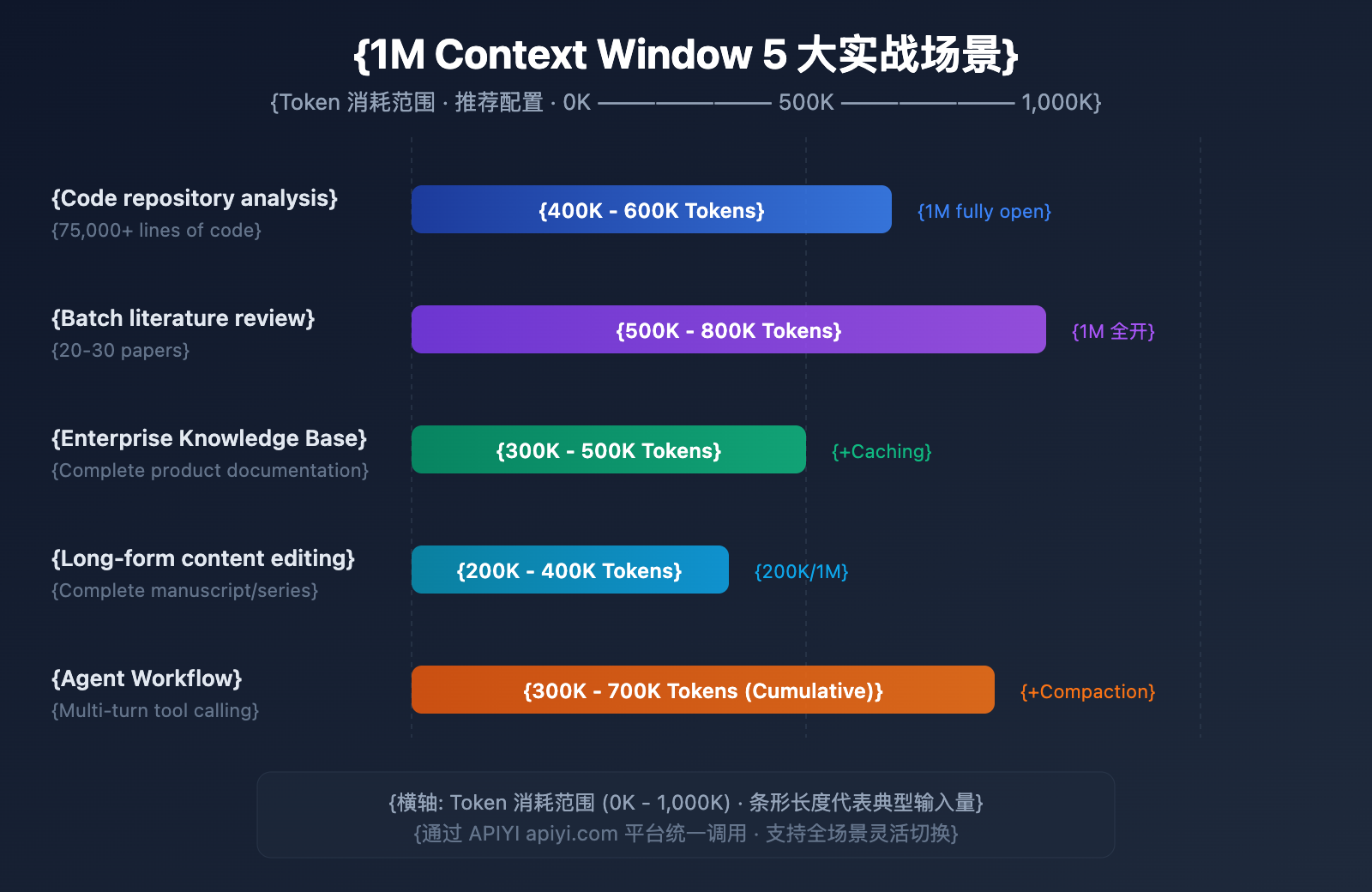
Input Scale: 50k-75k lines of code (approx. 400K-600K tokens)
This is the most direct beneficiary of the 1M context window. By submitting an entire project's source code to Claude Opus 4.6 at once, you can achieve:
- Global Architecture Review: Identify design issues across different modules.
- Dependency Analysis: Find circular dependencies and over-coupling.
- Security Vulnerability Scanning: Discover cross-file security risks within a full context.
- Refactoring Suggestions: Get refactoring plans based on a global understanding.
In the past, developers had to split code into fragments for step-by-step analysis, which prevented the model from understanding cross-file dependencies. Now, you can submit the core code of an entire monorepo in one go, letting Claude provide advice like an architect who truly understands the big picture.
Scenario 2: Batch Literature Review
Input Scale: 20-30 papers (approx. 500K-800K tokens)
Researchers can input dozens of related papers at once, allowing Claude to perform:
- Cross-Reference Analysis: Identify citation relationships and conflicting viewpoints between papers.
- Research Trend Summarization: Extract methodological evolution from a large volume of literature.
- Gap Analysis: Discover unexplored areas in existing research.
- Meta-Analysis Assistance: Compare experimental designs and results across different studies.
For researchers, manually reading 30 papers could take weeks. With the 1M context window, preliminary screening and key information extraction can be completed in minutes, drastically speeding up literature research.
Scenario 3: Enterprise Knowledge Base Q&A
Input Scale: Full product documentation (approx. 300K-500K tokens)
Loading the entire set of internal documents into the context enables:
- Precise Answers: Provide accurate answers based on the complete document library.
- Cross-Document Correlation: Discover information links between different documents.
- Real-Time Updates: No need for pre-processing or vectorization; just use the latest documents directly.
- Multi-Document Reasoning: Synthesize information from multiple technical documents to answer complex questions.
Compared to traditional RAG (Retrieval-Augmented Generation) solutions, the full-context approach eliminates the engineering overhead of vectorization, index building, and retrieval tuning. For small to medium knowledge bases under 1M tokens, using long context directly is a simpler and more efficient solution.
Scenario 4: Long-form Content Creation and Editing
Input Scale: Full manuscripts or article series (approx. 200K-400K tokens)
- Consistency Review: Ensure logical consistency throughout long-form content.
- Style Unification: Maintain a consistent linguistic style across the entire context.
- Structural Optimization: Get suggestions for chapter adjustments based on a full-text understanding.
- Terminology Standardization: Unify the use of professional terms across the entire book.
For example, a 200,000-word technical book is about 300K tokens—well within a single request for Claude to review the entire draft and point out contradictions.
Scenario 5: Complex Agent Workflows
Input Scale: Multi-round tool call logs (accumulated 300K-700K tokens)
Paired with Claude 4.6's Agent Teams feature:
- Long-Chain Reasoning: Maintain a complete reasoning chain in complex, multi-step tasks.
- Tool Call Memory: Remember all historical tool call results.
- Integration with Compaction: Automatically compress context for ultra-long workflows.
- Multi-Agent Collaboration: Share context information within Agent Teams.
Agent workflows are a core use case for Claude Opus 4.6. When performing complex tasks (like automated code reviews or data analysis pipelines), an agent might need to call tools dozens of times, with each input and output accumulating in the context. The 1M window ensures that even in long-running tasks, the agent won't "forget" critical early information.
🎯 Pro Tip: All five scenarios can be quickly validated on the APIYI platform. The platform supports various mainstream Large Language Models, including Claude Opus 4.6, providing a unified API experience for easy switching between different scenarios.
Claude 4.6 Context Window vs. Competitors
Understanding Claude Opus 4.6's edge in the long-context arena will help you make a more informed technical choice:
| Model | Context Window | Max Output | Long-Context Retrieval Performance | Pricing (Input/Output) |
|---|---|---|---|---|
| Claude Opus 4.6 | 1M (Beta) | 128K | MRCR 76.0% (1M) | $5-10 / $25-37.5 |
| Claude Sonnet 4.5 | 1M (Beta) | 64K | MRCR 18.5% (1M) | $3 / $15 |
| GPT-4.1 | 1M | 32K | — | $2 / $8 |
| Gemini 2.5 Pro | 1M | 65K | — | $1.25-2.5 / $10-15 |
| Gemini 2.5 Flash | 1M | 65K | — | $0.15-0.3 / $0.6-2.4 |
As you can see, Claude Opus 4.6 has a clear advantage in long-context retrieval accuracy. While the pricing is on the higher side, its reliability far exceeds competitors in scenarios requiring precise retrieval and complex reasoning.
💡 Selection Advice: Which model you choose depends mostly on your specific use case. If you're prioritizing reasoning quality within a long context, Claude Opus 4.6 is currently the top pick. We recommend running some real-world tests via the APIYI (apiyi.com) platform. It supports unified API calls for all these major models, making it easy to switch and evaluate them quickly.
Claude 4.6 Context Window Compaction Configuration
Compaction is a new server-side context compression feature in Claude Opus 4.6 that theoretically allows conversations to go on indefinitely.
How it Works
- The API monitors token usage for each turn of the conversation.
- When input tokens exceed a set threshold, it automatically triggers a summary.
- The model generates a conversation summary wrapped in
<summary>tags. - The summary replaces earlier parts of the conversation, freeing up context space.
How to Configure
Add the compaction_control parameter to your API request:
response = client.chat.completions.create(
    model="claude-opus-4-6-20250205",
    messages=conversation_history,
    extra_body={
        "compaction_control": {
            "enabled": True,
            "trigger_tokens": 150000  # Trigger threshold
        }
    },
    extra_headers={
        "anthropic-beta": "context-1m-2025-08-07"
    }
)
Strategies for Combining Compaction with the 1M Context Window
| Strategy | Context Window | Compaction | Use Case |
|---|---|---|---|
| Massive Single-shot Analysis | 1M (Full) | Disabled | Code reviews, literature reviews |
| Long-term Conversations | 200K (Default) | Enabled | Customer service, assistants, Agents |
| Hybrid Mode | 1M + Compaction | Enabled | Ultra-complex Agent workflows |
FAQ
Q1: Is the Claude 4.6 context window 1M by default?
Nope. Claude Opus 4.6 still defaults to a 200K token context window, just like the previous Opus 4.5. To unlock the 1M token window, you'll need to add the anthropic-beta: context-1m-2025-08-07 header to your API requests. Also, your organization needs to be at Usage Tier 4 or have a custom rate limit. If you're using the APIYI (apiyi.com) platform, it's super easy to add this header to your requests.
Q2: Does using the 1M context window cost extra?
Yes, there's a tiered pricing structure. When a request exceeds 200K tokens, the input price jumps from $5/M to $10/M (2x), and the output price goes from $25/M to $37.50/M (1.5x). For budget-sensitive projects, we recommend checking out the APIYI (apiyi.com) platform for more competitive pricing plans.
Q3: Can it accurately find specific info within a 1M context?
Claude Opus 4.6 performs exceptionally well on the MRCR v2 benchmark. In tests where 8 pieces of key information were hidden within a 1M token context, it hit a 76% accuracy rate—about 4 times better than Sonnet 4.5 (18.5%). In a 256K context, that accuracy climbs to a whopping 93%. This makes Claude Opus 4.6 one of the most reliable models available for long-context retrieval.
Q4: Does Compaction affect the quality of the answers?
Compaction uses smart summarization to compress earlier parts of a conversation, and in most cases, it won't noticeably impact the quality of the response. However, if your use case requires precise quotes from very early in the chat, you might want to disable Compaction and use the 1M context window directly. For Agent workflows, Compaction significantly boosts efficiency, so we definitely recommend keeping it on.
Q5: Which Claude models support the 1M context?
Currently, three Claude models support the 1M token context window: Claude Opus 4.6, Claude Sonnet 4.5, and Claude Sonnet 4. Among them, Opus 4.6 has a much higher long-context retrieval accuracy than the Sonnet series. Other models, like the Claude Haiku series, don't support the 1M context yet.
Summary
The 1M token context window for Claude Opus 4.6 is a major upgrade. By combining the powerful reasoning of the flagship Opus model with an ultra-large context, it opens up high-value use cases like full codebase analysis, bulk literature reviews, and enterprise-level knowledge base Q&A.
Key takeaways:
- 200K default, 1M via Beta: You'll need to add the
anthropic-beta: context-1m-2025-08-07header. - Industry-leading retrieval accuracy: 76% on the MRCR v2 benchmark (1M) / 93% (256K).
- Tiered pricing: For the portion over 200K, input prices are 2x and output prices are 1.5x.
- Compaction for "infinite" chat: Server-side context compression that's perfect for Agent workflows.
- 3 supported models: Opus 4.6, Sonnet 4.5, and Sonnet 4.
We recommend trying out the Claude Opus 4.6 long-context capabilities via APIYI (apiyi.com). The platform lets you call multiple mainstream Large Language Models through a single interface, helping developers quickly handle technical validation and product integration.
This article was written by the APIYI Team, focusing on sharing Large Language Model technology. For more tutorials and API guides, visit the APIYI Help Center: help.apiyi.com
References
-
Anthropic Official Blog – Introducing Claude Opus 4.6
- Link:
anthropic.com/news/claude-opus-4-6 - Description: Claude Opus 4.6 release announcement and introduction to core features
- Link:
-
Claude API Documentation – Context Windows
- Link:
platform.claude.com/docs/en/build-with-claude/context-windows - Description: Context window configuration and usage guide
- Link:
-
Claude API Documentation – Compaction
- Link:
platform.claude.com/docs/en/build-with-claude/compaction - Description: Detailed explanation of the Compaction context compression feature
- Link:
-
Claude API Documentation – Pricing
- Link:
platform.claude.com/docs/en/about-claude/pricing - Description: Model pricing and long context pricing details
- Link: