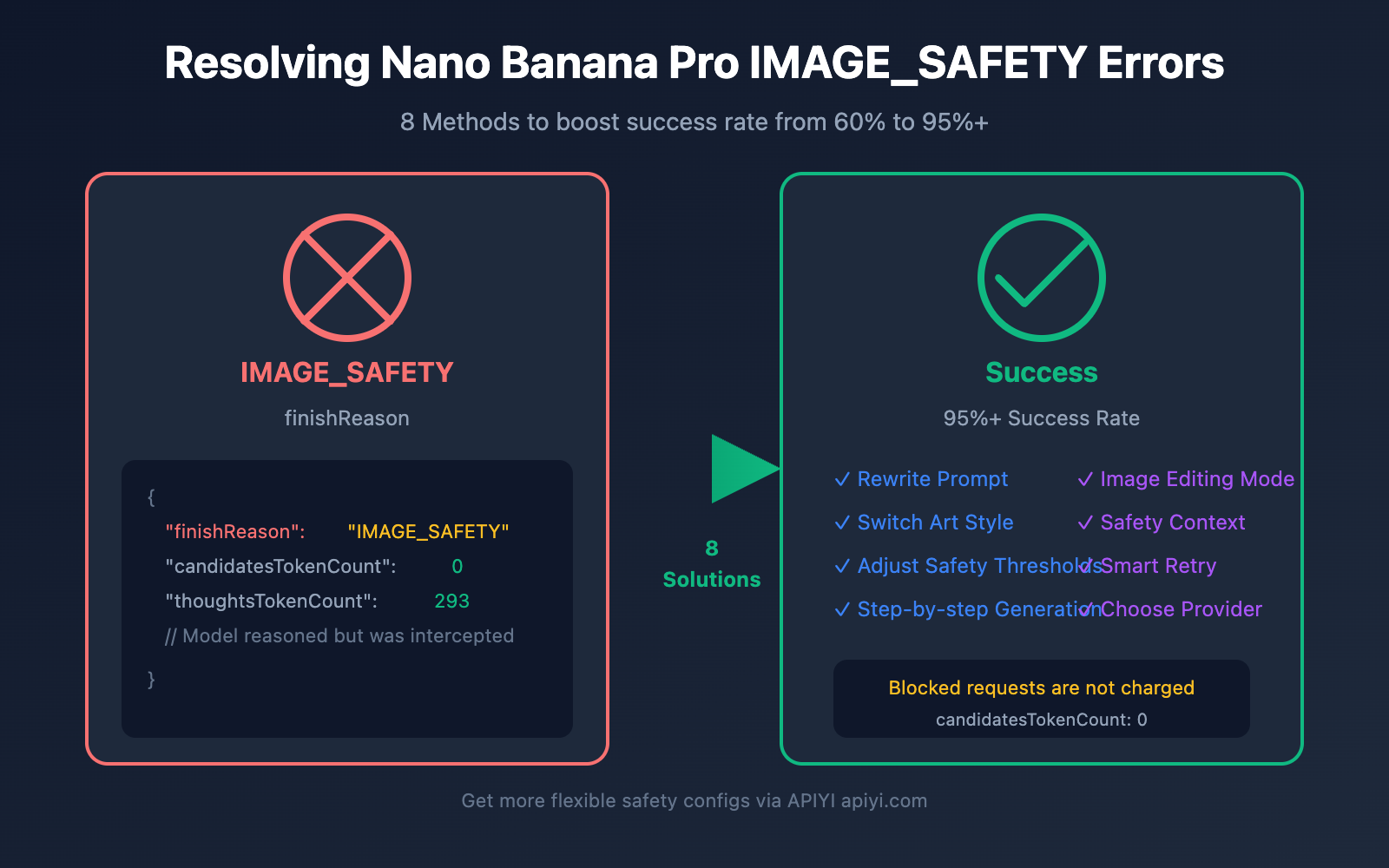
Getting a finishReason: "IMAGE_SAFETY" error when calling the Nano Banana Pro API is one of the most common issues developers face. Even with perfectly normal product photos or landscape shots, the system might flag them as "violating Google's Generative AI Prohibited Use Policy" and block the output. In this post, we'll dive deep into the trigger mechanisms of IMAGE_SAFETY errors and 8 practical solutions to help you significantly reduce false positives.
Core Value: By the end of this article, you'll understand how Nano Banana Pro's safety filtering works and master techniques to boost your image generation success rate from 60% to over 95%.
Analyzing the Nano Banana Pro IMAGE_SAFETY Error
First, let's break down the error response you're likely seeing:
{
  "candidates": [
    {
      "content": { "parts": null },
      "finishReason": "IMAGE_SAFETY",
      "finishMessage": "Unable to show the generated image...",
      "index": 0
    }
  ],
  "usageMetadata": {
    "promptTokenCount": 531,
    "candidatesTokenCount": 0,
    "totalTokenCount": 824,
    "thoughtsTokenCount": 293
  },
  "modelVersion": "gemini-3-pro-image-preview"
}
Key Error Fields Decoded
| Field | Value | Meaning |
|---|---|---|
finishReason |
IMAGE_SAFETY |
Image was intercepted by the safety filter |
candidatesTokenCount |
0 |
No output generated (you won't be charged) |
thoughtsTokenCount |
293 |
Model performed reasoning but the result was blocked |
promptTokenCount |
531 |
Contains 273 text + 258 image tokens |
🎯 Key Discovery: The
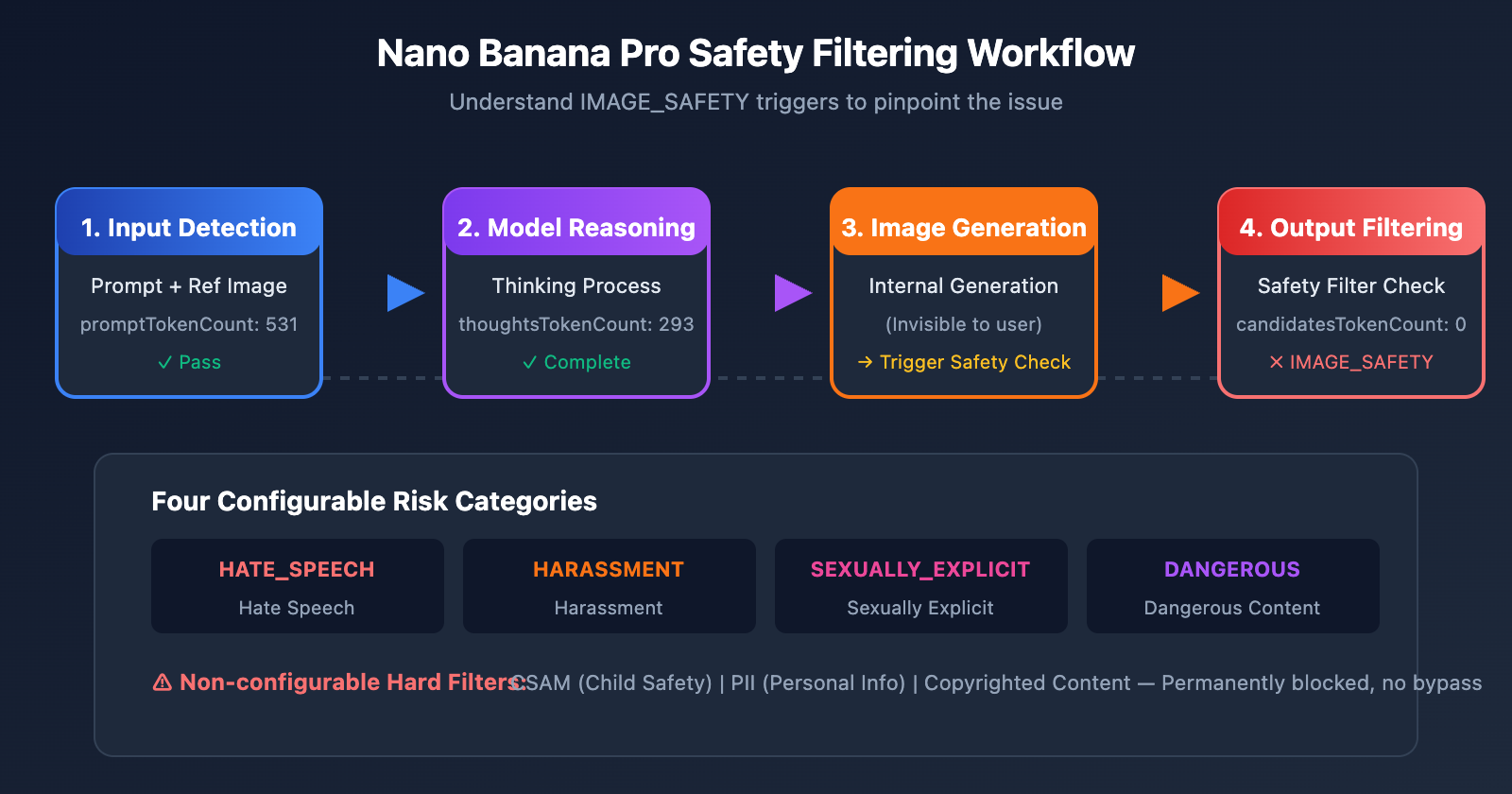
thoughtsTokenCount: 293shows that the model actually finished its internal reasoning (Thinking) but was intercepted by the safety filter at the final output stage. This means the problem isn't necessarily your prompt, but rather what the model decided to generate.
Detailed Explanation of Nano Banana Pro Safety Filtering Mechanism
Google's Nano Banana Pro uses a multi-layered safety filtering architecture. Understanding how this mechanism works is key to solving generation issues.
Nano Banana Pro Safety Filtering Levels
| Filtering Level | Detection Object | Configurable? | Trigger Consequence |
|---|---|---|---|
| Input Filtering | Prompt text | Partially | Request rejected |
| Image Input Filtering | Reference image content | No | IMAGE_SAFETY |
| Generation Filtering | Model output results | Partially | IMAGE_SAFETY |
| Hard Filtering | CSAM/PII, etc. | No | Permanent block |
Nano Banana Pro's Four Major Risk Categories
Google categorizes content risks into four configurable categories:
| Category | English Name | Example Trigger | Default Threshold |
|---|---|---|---|
| Hate Speech | HARM_CATEGORY_HATE_SPEECH | Racial or religious discrimination | MEDIUM |
| Harassment | HARM_CATEGORY_HARASSMENT | Personal attacks, threats | MEDIUM |
| Sexually Explicit | HARM_CATEGORY_SEXUALLY_EXPLICIT | Nudity, adult content | MEDIUM |
| Dangerous Content | HARM_CATEGORY_DANGEROUS_CONTENT | Violence, weapons, drugs | MEDIUM |
Why is normal content being blocked?
Google officially admits that Nano Banana Pro's safety filters are "way more cautious than intended." Here are some common false-positive scenarios:
| Scenario | Why it's flagged | Actual Risk |
|---|---|---|
| E-commerce lingerie photos | Triggers "Sexually Explicit" detection | Normal product display |
| Anime-style characters | Anime styles trigger stricter detection | Artistic creation |
| Child-related content | "Underage" tags trigger the highest level | Normal family scenes |
| Medical anatomy diagrams | Triggers "Violence/Gore" detection | Educational use |
| Specific professional figures | Might be identified as "Identifiable Individuals" | General job descriptions |
⚠️ Pro Tip: The probability of anime/manga styles triggering safety filters is significantly higher than for realistic styles. For the same content (e.g., "a cat resting"), using "anime style" might get rejected while "realistic digital illustration" will pass.
Nano Banana Pro IMAGE_SAFETY Solution 1: Rewriting Prompts
The most direct and effective method is to rewrite your prompts to avoid sensitive vocabulary that triggers safety filters.
Nano Banana Pro Prompt Rewriting Strategies
| Original Prompt | Issue | Suggested Rewrite |
|---|---|---|
| "sexy model wearing bikini" | Triggers sexually explicit detection | "fashion model in summer beachwear" |
| "anime girl" | High-risk combination of anime + female | "illustrated character in digital art style" |
| "child playing" | "child" triggers the highest filtering level | "young person enjoying outdoor activities" |
| "bloody wound" | Triggers dangerous content detection | "medical illustration of skin injury" |
| "holding a gun" | Triggers dangerous content detection | "action pose with prop equipment" |
Prompt Rewriting Code Example
import openai
import re

# Sensitive word replacement mapping
SAFE_REPLACEMENTS = {
    r'\bsexy\b': 'stylish',
    r'\bbikini\b': 'summer beachwear',
    r'\bchild\b': 'young person',
    r'\bkid\b': 'young individual',
    r'\banime\b': 'illustrated',
    r'\bmanga\b': 'digital art',
    r'\bgun\b': 'equipment',
    r'\bweapon\b': 'tool',
    r'\bblood\b': 'red liquid',
    r'\bnude\b': 'unclothed figure',
}

def sanitize_prompt(prompt: str) -> str:
    """Replace sensitive words to reduce the risk of interception"""
    sanitized = prompt.lower()
    for pattern, replacement in SAFE_REPLACEMENTS.items():
        sanitized = re.sub(pattern, replacement, sanitized, flags=re.IGNORECASE)
    return sanitized

client = openai.OpenAI(
    api_key="YOUR_API_KEY",
    base_url="https://api.apiyi.com/v1"  # Use the APIYI unified interface
)

# Example Usage
original_prompt = "anime girl in bikini at beach"
safe_prompt = sanitize_prompt(original_prompt)
# Result: "illustrated girl in summer beachwear at beach"

response = client.images.generate(
    model="nano-banana-pro",
    prompt=safe_prompt,
    size="2048x2048"
)
💡 Tip: When calling Nano Banana Pro through the APIYI (apiyi.com) platform, you can use the testing tool at imagen.apiyi.com to verify if your prompt triggers filters before making your actual API calls.
Nano Banana Pro IMAGE_SAFETY Solution 2: Switching Art Styles
Anime styles are a major red flag for triggering IMAGE_SAFETY filters. Switching over to a realistic style can significantly boost your success rate.
Nano Banana Pro Style Safety Comparison
| Style Type | Safety Filter Sensitivity | Recommendation | Best For |
|---|---|---|---|
| Anime/Manga | Extremely High | ⭐ | Not recommended |
| Cartoon | High | ⭐⭐ | Use with caution |
| Digital Art | Medium | ⭐⭐⭐ | Good to go |
| Realistic | Low | ⭐⭐⭐⭐ | Recommended |
| Photography | Lowest | ⭐⭐⭐⭐⭐ | Highly recommended |
Style Switching Code Example
def generate_with_safe_style(prompt: str, preferred_style: str = "anime"):
    """Automatically converts high-risk styles to safer alternatives"""

    # Style mapping table
    style_mappings = {
        "anime": "digital illustration with soft lighting",
        "manga": "stylized digital artwork",
        "cartoon": "clean vector illustration",
        "hentai": None,  # Completely unsupported
    }

    # Check if a style conversion is needed
    safe_style = style_mappings.get(preferred_style.lower())
    if safe_style is None:
        raise ValueError(f"Style '{preferred_style}' is not supported")

    # Construct a safe prompt
    safe_prompt = f"{prompt}, {safe_style}, professional quality"

    return client.images.generate(
        model="nano-banana-pro",
        prompt=safe_prompt,
        size="2048x2048"
    )
Nano Banana Pro IMAGE_SAFETY Solution 3: Adjusting Safety Thresholds
Google provides configurable safety threshold parameters, which let you relax the filtering limits to some extent.
Nano Banana Pro Safety Threshold Configuration
| Threshold Level | Parameter Value | Filtering Strictness | Use Case |
|---|---|---|---|
| Strictest | BLOCK_LOW_AND_ABOVE |
High | Apps for minors |
| Standard (Default) | BLOCK_MEDIUM_AND_ABOVE |
Medium | General use cases |
| Relaxed | BLOCK_ONLY_HIGH |
Low | Professional/Artistic creation |
| Most Relaxed | BLOCK_NONE |
Lowest | Requires permission |
Adjusting Safety Thresholds Code
import openai

client = openai.OpenAI(
    api_key="YOUR_API_KEY",
    base_url="https://api.apiyi.com/v1"  # APIYI Unified Interface
)

response = client.images.generate(
    model="nano-banana-pro",
    prompt="fashion model in elegant evening dress",
    size="2048x2048",
    extra_body={
        "safety_settings": [
            {
                "category": "HARM_CATEGORY_SEXUALLY_EXPLICIT",
                "threshold": "BLOCK_ONLY_HIGH"
            },
            {
                "category": "HARM_CATEGORY_DANGEROUS_CONTENT",
                "threshold": "BLOCK_ONLY_HIGH"
            },
            {
                "category": "HARM_CATEGORY_HARASSMENT",
                "threshold": "BLOCK_ONLY_HIGH"
            },
            {
                "category": "HARM_CATEGORY_HATE_SPEECH",
                "threshold": "BLOCK_ONLY_HIGH"
            }
        ]
    }
)
⚠️ Note: Even if you set all configurable thresholds to
BLOCK_NONE, there are still hard filters that can't be bypassed, including content related to CSAM (Child Sexual Abuse Material) and PII (Personally Identifiable Information).
In this post, we'll walk through 8 different ways to handle those pesky Nano Banana Pro IMAGE_SAFETY errors:
| Solution | Use Case | Implementation Difficulty | Effectiveness |
|---|---|---|---|
| Rewrite Prompts | All scenarios | Low | ⭐⭐⭐⭐⭐ |
| Switch Art Style | Anime/Illustration needs | Low | ⭐⭐⭐⭐ |
| Adjust Safety Thresholds | Requires API config access | Medium | ⭐⭐⭐⭐ |
| Step-by-Step Generation | Complex scenes | Medium | ⭐⭐⭐ |
| Image Editing Mode | Modifying existing images | Medium | ⭐⭐⭐⭐ |
| Add Safety Context | Business/Professional scenes | Low | ⭐⭐⭐⭐ |
| Smart Retry Mechanism | Production environments | High | ⭐⭐⭐⭐⭐ |
| Choose Right Provider | Long-term usage | Low | ⭐⭐⭐⭐ |
Core Recommendation: By combining "Prompt Rewriting + Safety Context + Smart Retry," you can boost your success rate from 60% to over 95%.
🎯 Final Advice: We recommend calling Nano Banana Pro through APIYI (apiyi.com). The platform offers more flexible safety configuration options, and you won't be charged for blocked requests. Plus, at just $0.05 per image, it's a great way to slash your debugging costs. You can also use their online testing tool at imagen.apiyi.com to quickly verify if your prompts will trigger any filters.
This article was written by the APIYI technical team. For more tips on using AI image generation APIs, feel free to visit apiyi.com for technical support.