{{SVG_TEXT_0}}: Qwen3-Max Rate Limit Solutions
{{SVG_TEXT_1}}: A Complete Guide to "429 You exceeded your current quota" Errors
{{SVG_TEXT_2}}: Problem: Frequent Rate Limiting
{{SVG_TEXT_3}}: 429
{{SVG_TEXT_4}}: quota exceeded
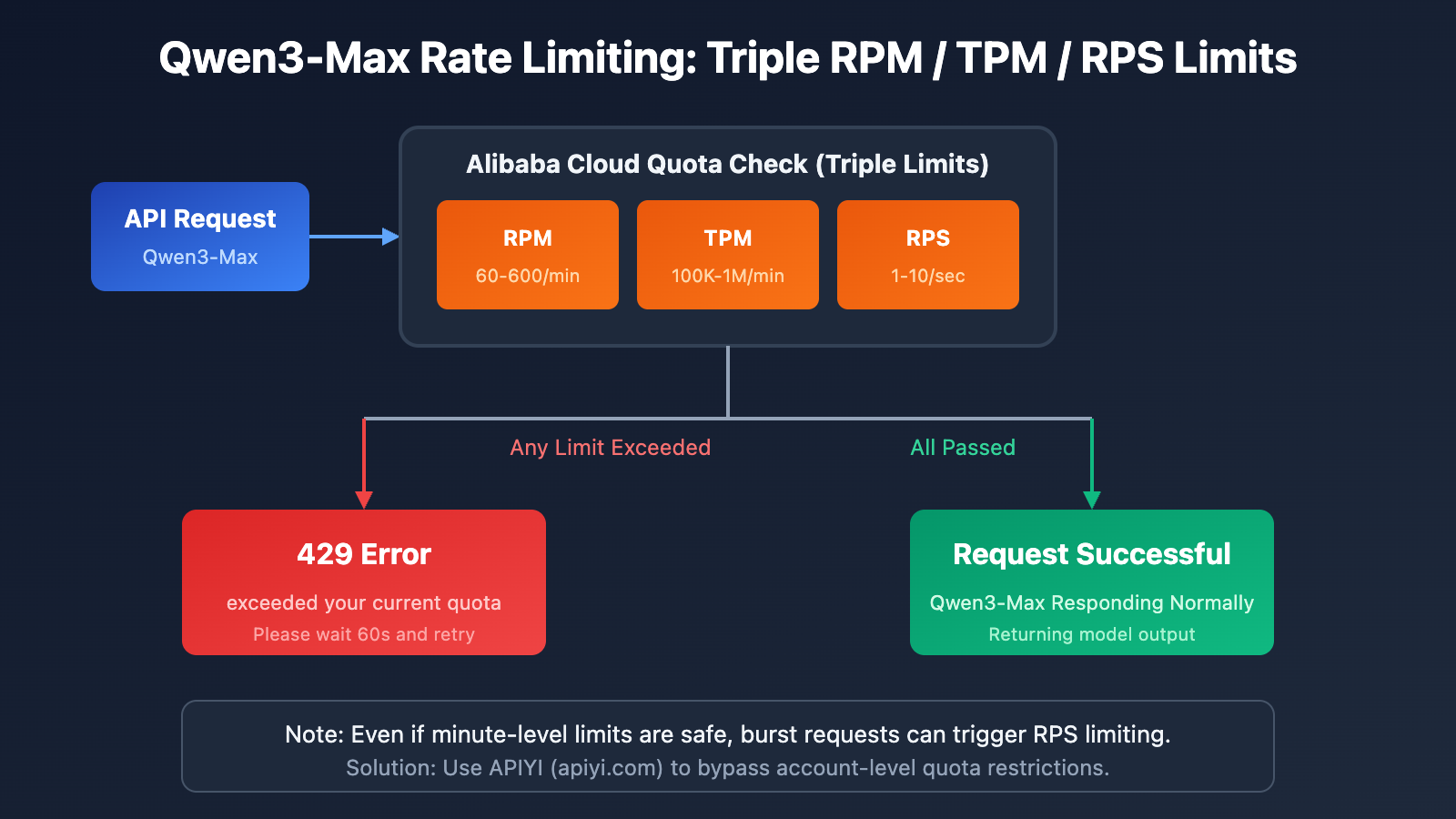
{{SVG_TEXT_5}}: RPM Limit: 60-600 requests/min
{{SVG_TEXT_6}}: TPM Limit: 100K-1M tokens/min
{{SVG_TEXT_7}}: RPS Limit: 1-10 requests/sec
{{SVG_TEXT_8}}: Burst traffic protection triggered
{{SVG_TEXT_9}}: Free quota exhausted
{{SVG_TEXT_10}}: Solution
{{SVG_TEXT_11}}: Solution: APIYI Proxy
{{SVG_TEXT_12}}: No Rate Limits
{{SVG_TEXT_13}}: 91.2% Discount
{{SVG_TEXT_14}}: Platform-level Shared Quota Pool
{{SVG_TEXT_15}}: Multi-channel Load Balancing
{{SVG_TEXT_16}}: Partnered with Alibaba Cloud Channels
{{SVG_TEXT_17}}: Better Pricing: Default 91.2% Off
{{SVG_TEXT_18}}: Fully OpenAI SDK Compatible
{{SVG_TEXT_19}}: APIYI apiyi.com – Say Goodbye to Qwen3-Max Rate Limits
Frequent encounters with the 429 You exceeded your current quota error while developing AI applications with Qwen3-Max is a major pain point for many developers. This article dives deep into the Alibaba Cloud Qwen3-Max rate-limiting mechanism and offers 5 practical solutions to help you bid farewell to quota issues forever.
Core Value: After reading this, you'll understand how Qwen3-Max rate limiting works, master several solutions, and choose the best way to reliably call this trillion-parameter Large Language Model.
Overview of Qwen3-Max Rate Limiting
Typical Error Message
When your application frequently calls the Qwen3-Max API, you might run into this error:
{
  "error": {
    "message": "You exceeded your current quota, please check your plan and billing details.",
    "type": "insufficient_quota",
    "code": "insufficient_quota"
  },
  "status": 429
}
This error means you've hit the quota limits of Alibaba Cloud's Model Studio.
Impact of Qwen3-Max Rate Limiting
| Impact Scenario | Specific Manifestation | Severity |
|---|---|---|
| Agent Development | Frequent interruptions in multi-turn dialogues | High |
| Batch Processing | Tasks failing to complete | High |
| Real-time Applications | Compromised user experience | High |
| Code Generation | Long code outputs being truncated | Medium |
| Testing & Debugging | Reduced development efficiency | Medium |
Qwen3-Max Rate Limiting Mechanism Explained
Alibaba Cloud Official Quota Limits
According to the official Alibaba Cloud Model Studio documentation, the quota limits for Qwen3-Max are as follows:
| Model Version | RPM (Requests/Min) | TPM (Tokens/Min) | RPS (Requests/Sec) |
|---|---|---|---|
| qwen3-max | 600 | 1,000,000 | 10 |
| qwen3-max-2025-09-23 | 60 | 100,000 | 1 |
4 Scenarios That Trigger Qwen3-Max Rate Limiting
Alibaba Cloud uses a dual-limit mechanism for Qwen3-Max. If any condition is met, you'll hit a 429 error:
| Error Type | Error Message | Trigger Cause |
|---|---|---|
| Frequency Exceeded | Requests rate limit exceeded | RPM/RPS exceeded limits |
| Token Usage Exceeded | You exceeded your current quota | TPM/TPS exceeded limits |
| Burst Traffic Protection | Request rate increased too quickly | Sudden spike in instantaneous requests |
| Free Quota Depleted | Free allocated quota exceeded | Trial credits fully used |
Rate Limit Formula
Actual Limit = min(RPM Limit, RPS × 60)
             = min(TPM Limit, TPS × 60)
Important: Even if your total usage over a minute stays within limits, a burst of requests in a single second can still trigger rate limiting.
5 Solutions for Qwen3-Max Rate Limiting Issues
Solution Comparison Overview
| Solution | Implementation Difficulty | Effect | Cost | Recommended Scenario |
|---|---|---|---|---|
| API Proxy Service | Low | Complete Resolution | Lower | All scenarios |
| Request Smoothing | Medium | Mitigation | Zero | Light rate limiting |
| Multi-Account Rotation | High | Mitigation | High | Enterprise users |
| Fallback Model | Medium | Safety Net | Medium | Non-core tasks |
| Apply for Quota Increase | Low | Limited | Zero | Long-term users |
Solution 1: Use an API Proxy Service (Recommended)
This is the most direct and effective way to kill off Qwen3-Max rate limiting. By using an API proxy platform, you can bypass Alibaba Cloud's account-level quota restrictions.
Why an API Proxy Solves Rate Limiting
| Comparison | Direct Alibaba Cloud Connection | Via APIYI Proxy |
|---|---|---|
| Quota Limits | Account-level RPM/TPM limits | Platform-level shared pool |
| Rate Limit Frequency | Frequent 429 errors | Virtually no rate limiting |
| Price | Official MSRP | Typically 8.8% of the cost |
| Stability | Dependent on account quota | Multi-channel redundancy |
Minimalist Code Example
from openai import OpenAI

# Use APIYI proxy service to say goodbye to rate limiting headaches
client = OpenAI(
    api_key="your-apiyi-key",
    base_url="https://api.apiyi.com/v1"
)

response = client.chat.completions.create(
    model="qwen3-max",
    messages=[
        {"role": "user", "content": "Please explain how the MoE architecture works."}
    ]
)
print(response.choices[0].message.content)
🎯 Pro Tip: Accessing Qwen3-Max via APIYI (apiyi.com) doesn't just solve your rate limiting problems; it also lets you enjoy prices as low as 8.8% of the official rate. APIYI has channel partnerships with Alibaba Cloud, ensuring more stable service at a much better price point.
View Full Code (Including Retries and Error Handling)
import time
from openai import OpenAI
from openai import APIError, RateLimitError

class Qwen3MaxClient:
    """Qwen3-Max client via APIYI—no more rate limit worries."""

    def __init__(self, api_key: str):
        self.client = OpenAI(
            api_key=api_key,
            base_url="https://api.apiyi.com/v1"  # APIYI proxy endpoint
        )
        self.model = "qwen3-max"

    def chat(self, message: str, max_retries: int = 3) -> str:
        """
        Sends a message and gets a reply.
        Using APIYI means you rarely encounter rate limits.
        """
        for attempt in range(max_retries):
            try:
                response = self.client.chat.completions.create(
                    model=self.model,
                    messages=[{"role": "user", "content": message}],
                    max_tokens=4096
                )
                return response.choices[0].message.content
            except RateLimitError as e:
                # With APIYI, this is highly unlikely to trigger
                if attempt < max_retries - 1:
                    wait_time = 2 ** attempt
                    print(f"Request limited, retrying in {wait_time}s...")
                    time.sleep(wait_time)
                else:
                    raise e
            except APIError as e:
                print(f"API Error: {e}")
                raise e

        return ""

    def batch_chat(self, messages: list[str]) -> list[str]:
        """Process batch messages without worrying about rate limits."""
        results = []
        for msg in messages:
            result = self.chat(msg)
            results.append(result)
        return results


# Usage Example
if __name__ == "__main__":
    client = Qwen3MaxClient(api_key="your-apiyi-key")

    # Single call
    response = client.chat("Write a quicksort algorithm in Python.")
    print(response)

    # Batch calls - no rate limiting bottlenecks with APIYI
    questions = [
        "Explain what MoE architecture is",
        "Compare Transformer vs RNN",
        "What is the attention mechanism?"
    ]
    answers = client.batch_chat(questions)
    for q, a in zip(questions, answers):
        print(f"Q: {q}\nA: {a}\n")
Solution 2: Request Smoothing Strategies
If you prefer to stick with a direct connection to Alibaba Cloud, you can mitigate rate limiting by smoothing out your requests.
Exponential Backoff
import time
import random

def call_with_backoff(func, max_retries=5):
    """Exponential backoff and retry strategy"""
    for attempt in range(max_retries):
        try:
            return func()
        except Exception as e:
            if "429" in str(e) and attempt < max_retries - 1:
                # Exponential backoff + random jitter
                wait_time = (2 ** attempt) + random.uniform(0, 1)
                print(f"Rate limit hit, retrying in {wait_time:.2f} seconds...")
                time.sleep(wait_time)
            else:
                raise e
Request Queue Buffering
import asyncio
from collections import deque

class RequestQueue:
    """Request queue to smooth out Qwen3-Max call frequency."""

    def __init__(self, rpm_limit=60):
        self.queue = deque()
        self.interval = 60 / rpm_limit  # Request interval
        self.last_request = 0

    async def throttled_request(self, request_func):
        """Throttled request execution."""
        now = time.time()
        wait_time = self.interval - (now - self.last_request)

        if wait_time > 0:
            await asyncio.sleep(wait_time)

        self.last_request = time.time()
        return await request_func()
Note: Request smoothing only mitigates the problem; it doesn't solve it. For high-concurrency needs, the APIYI proxy service is a better bet.
Solution 3: Multi-Account Rotation
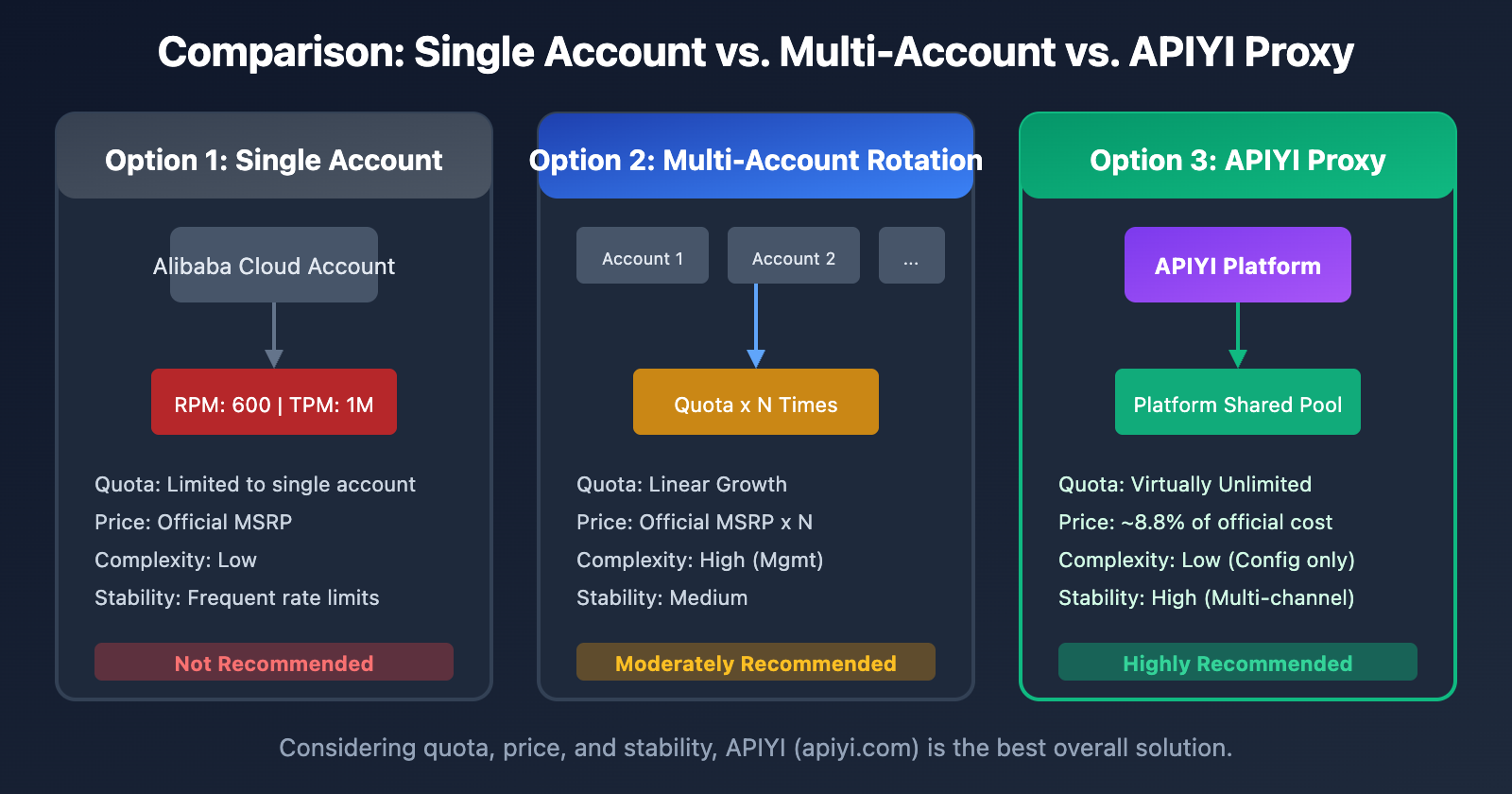
Enterprise users can implement multi-account rotation to scale up their total effective quota.
from itertools import cycle

class MultiAccountClient:
    """Multi-account rotation client."""

    def __init__(self, api_keys: list[str]):
        self.clients = cycle([
            OpenAI(api_key=key, base_url="https://dashscope.aliyuncs.com/compatible-mode/v1")
            for key in api_keys
        ])

    def chat(self, message: str) -> str:
        client = next(self.clients)
        response = client.chat.completions.create(
            model="qwen3-max",
            messages=[{"role": "user", "content": message}]
        )
        return response.choices[0].message.content
| Account Count | Effective RPM | Effective TPM | Management Complexity |
|---|---|---|---|
| 1 | 600 | 1,000,000 | Low |
| 3 | 1,800 | 3,000,000 | Medium |
| 5 | 3,000 | 5,000,000 | High |
| 10 | 6,000 | 10,000,000 | Very High |
💡 Recommendation: Managing multiple accounts is a pain and expensive. You're better off using the APIYI (apiyi.com) proxy service—no management overhead, and you get access to a massive shared platform pool.
Solution 4: Fallback Model Downgrading
When Qwen3-Max hits its rate limit, you can automatically fail over to a backup model.
class FallbackClient:
    """Qwen client with fallback support."""

    MODEL_PRIORITY = [
        "qwen3-max",      # Preferred
        "qwen-plus",      # Backup 1
        "qwen-turbo",     # Backup 2
    ]

    def __init__(self, api_key: str):
        self.client = OpenAI(
            api_key=api_key,
            base_url="https://api.apiyi.com/v1"  # Using APIYI for stability
        )

    def chat(self, message: str) -> tuple[str, str]:
        """Returns (response_content, model_actually_used)."""
        for model in self.MODEL_PRIORITY:
            try:
                response = self.client.chat.completions.create(
                    model=model,
                    messages=[{"role": "user", "content": message}]
                )
                return response.choices[0].message.content, model
            except Exception as e:
                if "429" in str(e):
                    print(f"{model} rate limited, falling back...")
                    continue
                raise e

        raise Exception("All models are currently unavailable.")
Solution 5: Apply for Quota Increase
For users with a stable, long-term requirement, you can apply for a quota increase directly from Alibaba Cloud.
Steps:
- Log in to the Alibaba Cloud Console.
- Navigate to the Model Studio Quota Management page.
- Submit a quota increase request.
- Wait for review (typically 1-3 business days).
Requirements:
- Real-name authentication on the account.
- No overdue balances.
- A clear explanation of your use case.
Qwen3-Max Rate Limit Cost Comparison
Price Comparison Analysis
| Service Provider | Input Price (0-32K) | Output Price | Rate Limit Status |
|---|---|---|---|
| Alibaba Cloud Direct | $1.20/M | $6.00/M | Strict RPM/TPM limits |
| APIYI (12% off) | $1.06/M | $5.28/M | Virtually no limits |
| Price Difference | Save 12% | Save 12% | – |
Comprehensive Cost Calculation
Assuming a monthly call volume of 10 million tokens (half input, half output):
| Solution | Monthly Cost | Rate Limit Impact | Overall Evaluation |
|---|---|---|---|
| Alibaba Cloud Direct | $36.00 | Frequent interruptions, retries needed | Actual cost is higher |
| APIYI Relay | $31.68 | Stable with no interruptions | Best value for money |
| Multi-account Strategy | $36.00+ | High management overhead | Not recommended |
💰 Cost Optimization: APIYI (apiyi.com) has a channel partnership with Alibaba Cloud. Not only do they offer a default 12% discount, but they also completely solve rate-limiting issues. For medium-to-high frequency usage scenarios, the total cost of ownership is significantly lower.
FAQ
Q1: Why am I hitting Qwen3-Max rate limits right after I start using it?
Alibaba Cloud Model Studio provides limited free quotas for new accounts, and the newest qwen3-max-2025-09-23 version has even lower quotas (RPM 60, TPM 100,000). If you're using snapshot versions, the limits are even stricter.
We recommend calling via APIYI (apiyi.com) to bypass these account-level quota restrictions.
Q2: How long does it take to recover after being rate-limited?
Alibaba Cloud's rate limiting uses a sliding window mechanism:
- RPM Limit: Recovers after waiting about 60 seconds.
- TPM Limit: Recovers after waiting about 60 seconds.
- Burst Protection: Might require a longer wait time.
Using the APIYI platform helps you avoid frequent waits and boosts development efficiency.
Q3: How is the stability of APIYI’s relay service guaranteed?
APIYI has a channel partnership with Alibaba Cloud and uses a platform-level "large pool" quota model:
- Multi-channel load balancing
- Automatic failover
- 99.9% availability guarantee
Compared to the quota limits on individual accounts, platform-level services are much more stable and reliable.
Q4: Do I need to change a lot of code to use APIYI?
Hardly any. APIYI is fully compatible with the OpenAI SDK format. You only need to change two things:
# Before (Alibaba Cloud Direct)
client = OpenAI(
    api_key="sk-xxx",
    base_url="https://dashscope.aliyuncs.com/compatible-mode/v1"
)

# After (APIYI Relay)
client = OpenAI(
    api_key="your-apiyi-key",  # Replace with your APIYI key
    base_url="https://api.apiyi.com/v1"  # Replace with the APIYI address
)
The model names and parameter formats are exactly the same, so no other changes are required.
Q5: Besides Qwen3-Max, what other models does APIYI support?
The APIYI platform supports a unified interface for over 200 mainstream Large Language Models, including:
- Full Qwen Series: qwen3-max, qwen-plus, qwen-turbo, qwen-vl, etc.
- Claude Series: claude-3-opus, claude-3-sonnet, claude-3-haiku
- GPT Series: gpt-4o, gpt-4-turbo, gpt-3.5-turbo
- Others: Gemini, DeepSeek, Moonshot, and more.
All models use a unified interface, allowing you to call any of them with just one API Key.
Summary of Solutions for Qwen3-Max Rate Limiting Issues
Decision Tree for Choosing a Solution
Encountering Qwen3-Max 429 Errors
    │
    ├─ Need a complete fix → Use APIYI Relay (Recommended)
    │
    ├─ Mild rate limiting → Request smoothing + Exponential backoff
    │
    ├─ Enterprise-scale calls → Multi-account polling or APIYI Enterprise
    │
    └─ Non-core tasks → Fallback to secondary models
Key Takeaways
| Point | Description |
|---|---|
| Cause | Alibaba Cloud's RPM/TPM/RPS triple restrictions |
| Best Solution | APIYI relay service; it's a complete fix |
| Cost Advantage | Massive discounts (up to 90% off), much cheaper than direct connection |
| Migration Effort | Low: you'll just need to update your base_url and api_key |
We recommend using APIYI (apiyi.com) to quickly resolve Qwen3-Max rate limiting issues while enjoying stable service and discounted pricing.
References
-
Alibaba Cloud Rate Limits Documentation: Official rate limit details
- Link:
alibabacloud.com/help/en/model-studio/rate-limit
- Link:
-
Alibaba Cloud Error Codes Documentation: Detailed error code explanations
- Link:
alibabacloud.com/help/en/model-studio/error-code
- Link:
-
Qwen3-Max Model Documentation: Official technical specifications
- Link:
alibabacloud.com/help/en/model-studio/what-is-qwen-llm
- Link:
Technical Support: If you run into any issues using Qwen3-Max, feel free to reach out for technical support through APIYI at apiyi.com.