Author's Note: A comprehensive analysis of common Sora 2 API error messages, covering 8 error types including content moderation violations, real person image restrictions, and celebrity bans. We'll provide detailed root cause analysis and strategies to avoid them.
When you're using the Sora 2 API to generate videos, the content moderation system is often the biggest "roadblock" developers face. OpenAI has built a three-tier safety detection mechanism (pre-generation, mid-generation, and post-generation) for Sora 2. This means even legitimate creative requests might trigger an error. This article will systematically break down 8 common Sora 2 API error messages to help you quickly pinpoint the problem and find a fix.
Core Value: By the end of this article, you'll understand why each error happens and master prompt optimization techniques to significantly reduce generation failures caused by content moderation.

sentinel_block Error:
{
  "error": {
    "code": "sentinel_block",
    "message": "Hmmm something didn't look right with your request.",
    "type": "invalid_request_error"
  }
}
- Trigger Timing: Request stage, before video generation begins.
- Characteristics: No credits consumed, fast response.
- Common Causes: Prompt contains sensitive keywords, or the uploaded image triggered a filter.
moderation_blocked Error:
{
  "error": {
    "code": "moderation_blocked",
    "message": "Your request was blocked by our moderation system."
  }
}
- Trigger Timing: Generation stage; video has started generating but was aborted.
- Characteristics: May consume some credits, longer wait time.
- Common Causes: Violating content appeared during the generation process.
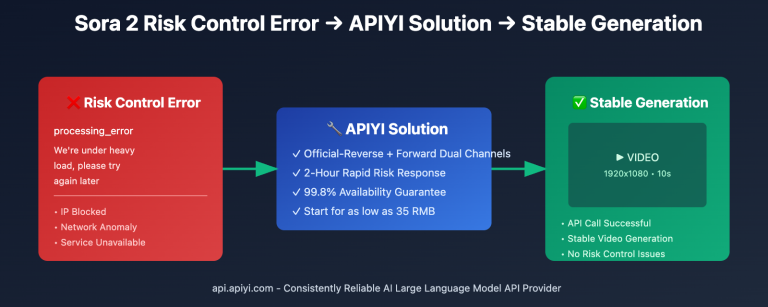
💰 Cost Tip: When using Sora 2 via APIYI (apiyi.com),
sentinel_blockerrors caused by content safety reasons aren't charged. You're only billed when a video is successfully generated, ensuring your budget is spent on valid requests.
Sora 2 Error Message Evasion Strategies
Prompt Optimization Checklist
| Optimization Dimension | Original Wording | Optimized Wording |
|---|---|---|
| Character age | a young person | a person in their late twenties |
| Clothing description | wearing little | wearing casual summer clothes |
| Action description | fighting | practicing martial arts |
| Emotional expression | in despair | in deep thought |
| Scene atmosphere | dark and dangerous | dramatic lighting |
General Evasion Tips
- Speak like a film director: Replace everyday descriptions with professional cinematography terms (like "shallow depth of field," "golden hour," or "gimbal shot").
- Add artistic style references: Mention the visual styles of famous directors (e.g., "inspired by Christopher Nolan's narrative style").
- Emphasize positive vibes: Use positive words like "heartwarming," "inspiring," or "tranquil."
- Specify adult subjects: Explicitly mark characters in all scenes involving people as adults.
FAQ
Q1: Why are my perfectly normal prompts getting blocked?
Sora 2's content moderation system uses a conservative "better safe than sorry" policy. Some word combinations might trigger automatic filters even if your intent is completely harmless. I'd recommend using more neutral, descriptive language and leveraging the smart retry features on the APIYI (apiyi.com) platform to minimize the impact of these false positives.
Q2: Which is harder to fix: sentinel_block or moderation_blocked?
sentinel_block is usually easier to handle because it's caught during the initial request phase, allowing you to quickly tweak the prompt and try again. moderation_blocked happens during the actual generation process, which might require a more significant overhaul of your prompt strategy. When calling via the APIYI platform, sentinel_block won't cost you any credits, so you can feel free to optimize and retry as many times as you need.
Q3: How do I tell if it’s a false positive or an actual violation?
If your prompt doesn't contain any sensitive content, try these steps:
- Simplify the prompt and keep only the core description.
- Check the OpenAI status page (status.openai.com) for any service outages.
- Wait a few minutes and try again (some
sentinel_blockerrors are just temporary server hiccups).
Q4: Is there any way to completely avoid content moderation errors?
You can't avoid them entirely, but you can significantly lower the odds:
- Build your own "safe prompt library" by collecting templates that have passed testing.
- Avoid all known sensitive keywords and scenarios.
- Use generic art or film terminology to describe your scenes.
- Use the APIYI (apiyi.com) platform to take advantage of its optimized request handling mechanisms.
Summary
Key takeaways for Sora 2 API error messages:
- Understand the Three-Layer Review: Detection happens before, during, and after generation.
sentinel_blockandmoderation_blockedcorrespond to these different stages. - Master Mitigation Strategies: Using neutral descriptions, explicitly mentioning adults, and adding artistic style references can significantly reduce false positives.
- Distinguish Error Types: Issues involving real people, celebrity likenesses, or minor detection require content changes. However, general violations can often be resolved by simply optimizing your prompts.
When facing strict content moderation, patiently refining your prompts is the only way forward. We recommend testing through APIYI (apiyi.com). Their policy of not charging for sentinel_block errors means you can iterate and optimize without worry until you find the phrasing that best fits your needs.
📚 References
-
OpenAI Usage Policies: Official guide for Sora content creation
- Link:
openai.com/policies/creating-sora-videos-in-line-with-our-policies - Description: Official content policy details on what is permitted.
- Link:
-
OpenAI Service Status: Real-time service monitoring
- Link:
status.openai.com - Description: Check if temporary errors are caused by service outages.
- Link:
-
Sora 2 System Card: OpenAI official safety whitepaper
- Link:
cdn.openai.com/pdf/sora_2_system_card.pdf - Description: Deep dive into the design of Sora 2's safety mechanisms.
- Link:
-
APIYI Sora 2 Documentation: Detailed API integration guide
- Link:
docs.apiyi.com - Description: Includes best practices for error handling and code samples.
- Link:
Author: Technical Team
Tech Exchange: Feel free to share any Sora 2 error cases you've encountered in the comments. For more resources, visit the APIYI (apiyi.com) technical community.