The biggest challenge designers face isn't a lack of tools; it's knowing how to use them efficiently and cost-effectively. Nano Banana Pro (Gemini 3 Pro Image), the most powerful AI image generation model of 2026, gives designers unprecedented creative power. However, many are still confused about how to choose the right way to use it.
Core Value: By the end of this article, you'll have a clear understanding of the pros, cons, cost differences, and use cases for the three ways to use Nano Banana Pro. You'll find the creative workflow that fits you best and save up to 95% in costs.
{{SVG_TEXT_0}}
{{SVG_TEXT_1}}
{{SVG_TEXT_2}}
{{SVG_TEXT_3}}
{{SVG_TEXT_4}}
{{SVG_TEXT_5}}
{{SVG_TEXT_6}}
{{SVG_TEXT_7}}
{{SVG_TEXT_8}}
{{SVG_TEXT_9}}
{{SVG_TEXT_10}}
{{SVG_TEXT_11}}
{{SVG_TEXT_12}}
{{SVG_TEXT_13}}
{{SVG_TEXT_14}}
{{SVG_TEXT_15}}
{{SVG_TEXT_16}}
{{SVG_TEXT_17}}
{{SVG_TEXT_18}}
{{SVG_TEXT_19}}
{{SVG_TEXT_20}}
{{SVG_TEXT_21}}
{{SVG_TEXT_22}}
{{SVG_TEXT_23}}
{{SVG_TEXT_24}}
{{SVG_TEXT_25}}
{{SVG_TEXT_26}}
{{SVG_TEXT_27}}
{{SVG_TEXT_28}}
{{SVG_TEXT_29}}
{{SVG_TEXT_30}}
{{SVG_TEXT_31}}
Nano Banana Pro Core Capabilities at a Glance
| Technical Feature | Performance Metric | Value for Designers |
|---|---|---|
| Native 4K Resolution | 3840×2160 pixels | Direct output for print and high-end displays |
| 99% Text Accuracy | Renders long sentences and complex logos perfectly | Generate marketing materials with accurate copy |
| Multi-Image Reference | Up to 14 reference images | Maintain brand visual consistency and character continuity |
| Character Consistency | Maintains similarity for 5 characters | Create a coherent visual narrative for the same project |
| Thinking & Reasoning Mode | Understands complex design requirements | Generates work that meets professional design standards |
Nano Banana Pro vs. Other AI Image Tools
For designers, the biggest advantages of Nano Banana Pro are "professionalism" and "controllability." Compared to Midjourney’s artistic style or DALL·E 3’s general-purpose nature, Nano Banana Pro excels in:
Commercial Design Scenarios:
- Product packaging design (precise text rendering)
- UI/UX prototyping (understanding spatial layout)
- Brand visual systems (consistency through multi-image references)
- Marketing materials (ready-to-use 4K high resolution)
Workflow Integration:
- Adobe Creative Suite plugins
- Direct Figma integration
- Deep API customization
- Batch automation processing
🎯 Designer's Tip: Nano Banana Pro isn't meant to "replace" designers; it's meant to "accelerate" the design process. It's best used for rapid prototyping, creative exploration, repetitive tasks, and large-scale asset production, allowing designers to spend more time on strategy and the core of the creative idea.
{{SVG_TEXT_32}}
{{SVG_TEXT_33}}
{{SVG_TEXT_34}}
{{SVG_TEXT_35}}
{{SVG_TEXT_36}}
{{SVG_TEXT_37}}
{{SVG_TEXT_38}}
{{SVG_TEXT_39}}
{{SVG_TEXT_40}}
{{SVG_TEXT_41}}
{{SVG_TEXT_42}}
{{SVG_TEXT_43}}
{{SVG_TEXT_44}}
{{SVG_TEXT_45}}
{{SVG_TEXT_46}}
{{SVG_TEXT_47}}
{{SVG_TEXT_48}}
{{SVG_TEXT_49}}
{{SVG_TEXT_50}}
{{SVG_TEXT_51}}
{{SVG_TEXT_52}}
{{SVG_TEXT_53}}
{{SVG_TEXT_54}}
{{SVG_TEXT_55}}
{{SVG_TEXT_56}}
{{SVG_TEXT_57}}
{{SVG_TEXT_58}}
{{SVG_TEXT_59}}
{{SVG_TEXT_60}}
{{SVG_TEXT_61}}
{{SVG_TEXT_62}}
{{SVG_TEXT_63}}
{{SVG_TEXT_64}}
{{SVG_TEXT_65}}
{{SVG_TEXT_66}}
{{SVG_TEXT_67}}
{{SVG_TEXT_68}}
{{SVG_TEXT_69}}
{{SVG_TEXT_70}}
{{SVG_TEXT_71}}
{{SVG_TEXT_72}}
{{SVG_TEXT_73}}
{{SVG_TEXT_74}}
{{SVG_TEXT_75}}
{{SVG_TEXT_76}}
{{SVG_TEXT_77}}
{{SVG_TEXT_78}}
{{SVG_TEXT_79}}
{{SVG_TEXT_80}}
{{SVG_TEXT_81}}
{{SVG_TEXT_82}}
{{SVG_TEXT_83}}
{{SVG_TEXT_84}}
{{SVG_TEXT_85}}
{{SVG_TEXT_86}}
{{SVG_TEXT_87}}
{{SVG_TEXT_88}}
{{SVG_TEXT_89}}
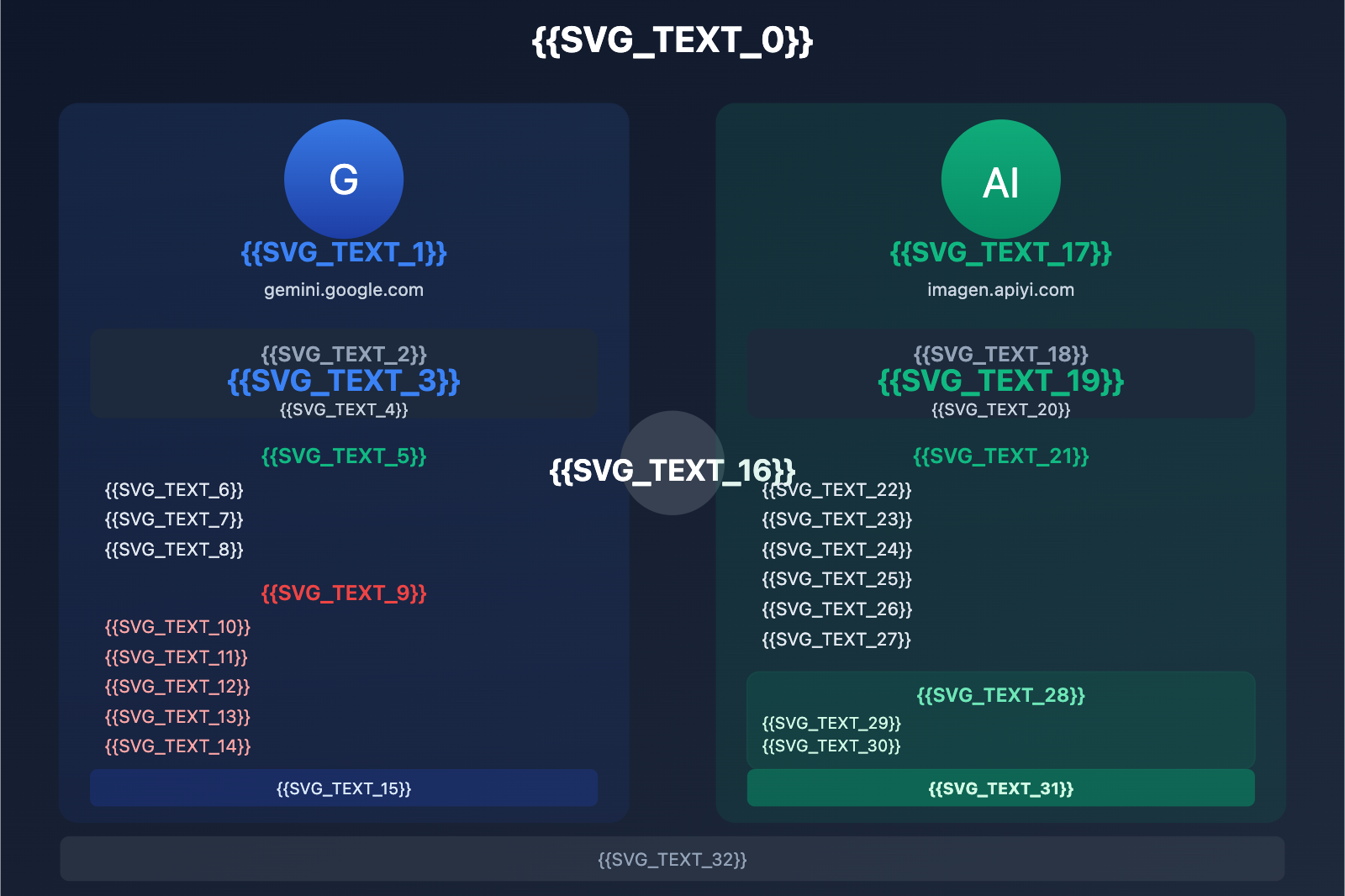
Option 1: Gemini Subscription – Best for Light Design Needs
How to Use
Subscribe through the official Google Gemini website (gemini.google.com) to access Nano Banana Pro features directly within the web interface.
Pricing Structure
| Plan | Monthly Fee | Nano Banana Pro Quota | Cost Per Image | Best For |
|---|---|---|---|---|
| Free | $0 | 3/day (low res) | $0 | Casual users |
| AI Pro | $19.99 | 100/day | $0.0066 | Light users |
| AI Ultra | $99.99 | 1000/day | $0.0033 | Power users |
Note: The free version only provides low resolution (~1MP). Once you exceed your quota, the system automatically downgrades you to Nano Banana 1.0.
Advantages
Best Scenarios:
- Individual designers with occasional needs
- Creative exploration and comparing different concepts
- Quick visualization for client proposals
- Simple requirements that don't need API integration
Key Benefits:
- Zero Technical Barrier: Simple web interface, ready to use out of the box.
- Bundled Features: You also get Gemini's text generation, coding assistance, and other AI capabilities.
- Official Support: Direct service from Google, ensuring stability and reliability.
- Commercial Rights: Generated content comes with full commercial usage rights.
Disadvantages
Limitations:
- Daily Quota Caps: AI Pro is limited to 100 images per day, which won't cut it for bulk requirements.
- No Automation: Everything must be done manually; you can't integrate it into a professional workflow.
- Lack of Batch Processing: Doesn't support generating multiple variants at once.
- Opaque Costs: For high-frequency users, the monthly fee might actually end up being more expensive than pay-as-you-go.
Cost Analysis:
Let's say you generate 200 images per month:
- AI Pro ($19.99/mo): Covers your needs, cost per image is $0.10.
- API Pay-as-you-go ($0.05/img): Total cost is $10, saving you 50%.
The Verdict: If you generate fewer than 400 images a month, AI Pro is a good deal. Once you cross that threshold, pay-as-you-go is the better way to go.
💡 Pro Tip: If you're a freelance designer with low daily needs but occasional bulk projects, you can use AI Pro for day-to-day tasks and supplement with the API during peak periods to optimize your costs.
Option 2: AI Image Master – The Top Choice for Designers
Product Intro
AI Image Master (imagen.apiyi.com) is a Nano Banana Pro web app built by the APIYI team specifically for designers. It offers a more flexible and economical alternative to the official subscription.
Pricing Structure
| Billing Method | Price | Advantage |
|---|---|---|
| Pay-as-you-go | $0.05/image | Pay only for what you use, no monthly fees |
| Bulk Package | 100 images for $4.5 (10% off) | Even cheaper for high volume |
| Enterprise | 1000 images for $40 (20% off) | Best for team collab and project management |
Cost Comparison:
- Gemini AI Pro: $19.99/month (approx. ¥145)
- AI Image Master: $0.05/image (approx. ¥0.36/image)
- Savings: Up to 95% cheaper than the subscription price on a per-image basis.
Core Advantages
1. No Monthly Fees, Pay-as-you-go
You don't have to commit to a fixed $19.99 monthly expense. You only pay when you actually use it. This is a lifesaver for designers with fluctuating workloads:
- Off-season (only 10 images): You spend just $0.50.
- Peak season (500 images): You spend $25 (still comparable to or better than the subscription).
2. Web Interface, No Coding Required
Unlike raw API calls, AI Image Master provides a designer-friendly web UI:
- Drag-and-drop reference images.
- Real-time prompt effect previews.
- History management.
- One-click high-res original downloads.
3. Designer-Specific Features
Optimized features built for a professional design workflow:
- Batch Generation: Submit once and get 10+ variants.
- Style Library: Save your most-used prompt templates.
- Asset Library: Manage brand visual references.
- Size Presets: Quickly toggle between common design dimensions.
- Color Palette Extraction: Automatically grab color schemes from reference images.
4. Team Collaboration
The Enterprise plan supports:
- Shared account quotas for multiple users.
- Project-based folder management.
- Generation history tracking.
- Role-based access control.
Real-World Use Cases
Scenario 1: Brand VI Design
A studio is designing a visual system and needs:
- Logo mockups: 20 images
- Brand mood boards: 15 images
- Product packaging renders: 30 images
Cost Comparison:
AI Image Master: 65 images × $0.05 = $3.25
Gemini AI Pro: $19.99 (Fixed fee)
Savings: $16.74 (83%)
Scenario 2: E-commerce Designer's Daily Routine
Average monthly volume of 300 images (hero shots, detail pages, marketing posters):
AI Image Master: 300 × $0.05 = $15
Gemini AI Pro: $19.99 (Might need extra API costs for overages)
Direct API Call: 300 × $0.05 = $15 (Requires coding)

Conclusion: AI Image Master = API costs, but with a professional UI.
Scenario 3: Ad Agency Proposal
Preparing 3 visual concepts for a client, with 5 scenes each:
Total: 15 images
Cost: 15 × $0.05 = $0.75
Time: 30 minutes

Traditional cost: ¥500-1000 (Outsourced photography + design)
Savings: 99%+
🎯 Why we recommend it: For most designers, AI Image Master is the optimal choice. It combines the ease of a subscription with the cost benefits of an API. You don't need to code, and you don't need to pay a fixed fee—you truly "pay for what you use."
Method 3: API Calls – Best for Automation Needs
How to Use
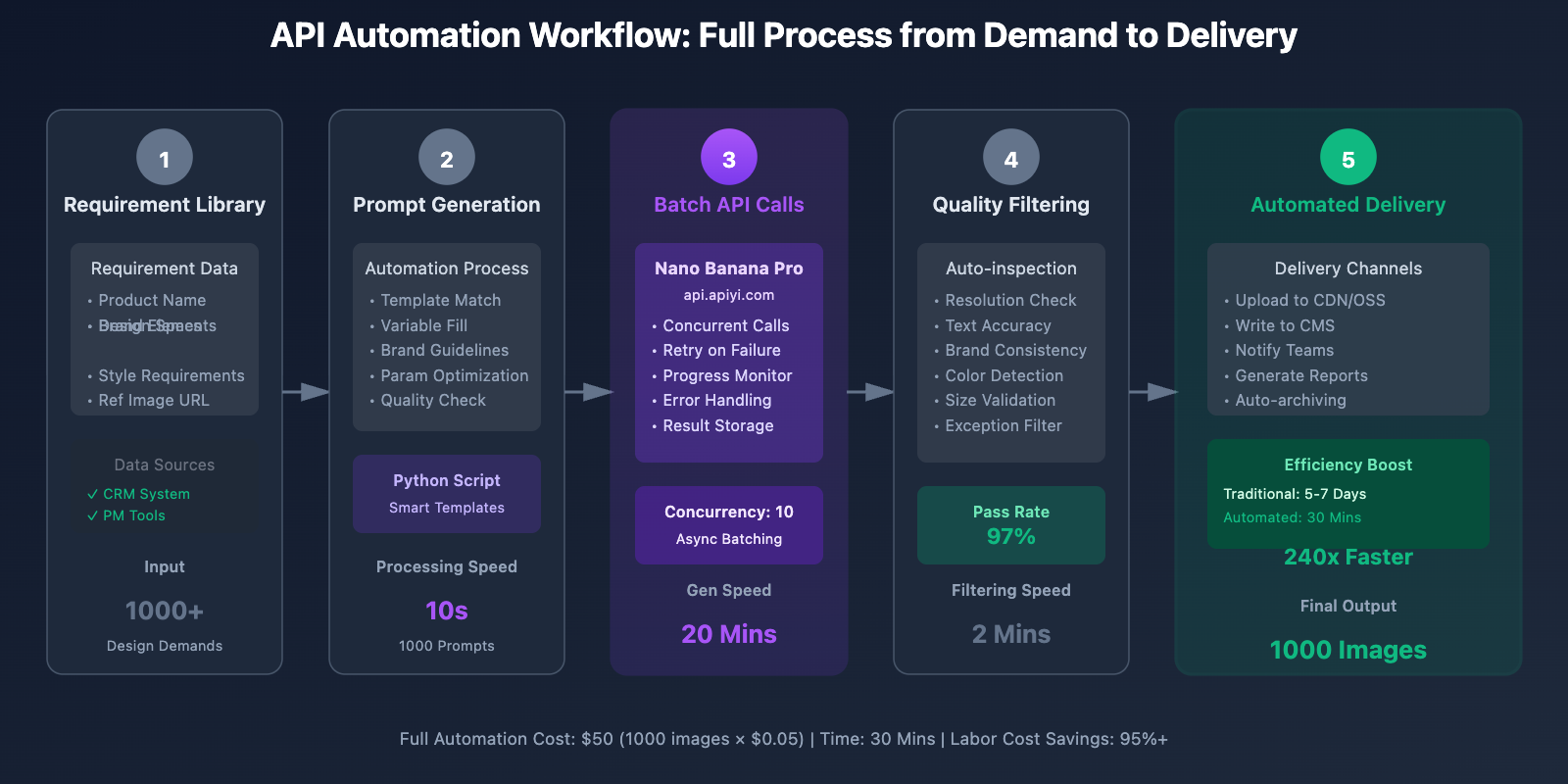
Call the Nano Banana Pro API via the APIYI platform (api.apiyi.com) to integrate it into your own systems or automation workflows.
Pricing Structure
| Resolution | Official Price | APIYI Price | Savings |
|---|---|---|---|
| 1K-2K | $0.134/image | $0.05/image | 63% |
| 4K | $0.24/image | $0.05/image | 79% |
Batch Asynchronous API:
- Official Batch API: 50% discount ($0.12/image for 4K)
- APIYI Price: $0.05/image (Fixed price, any resolution)
- Savings: 58%
Use Cases
Scenario 1: Design Automation Systems
Build internal design production systems to achieve:
- Automated generation of e-commerce product images
- Batch production of marketing materials
- Scheduled posting of social media content
Scenario 2: Design Tool Plugin Development
Develop plugins for Figma, Sketch, or Adobe XD:
- One-click generation of design placeholders
- Smart replacement of design elements
- Style transfer features
Scenario 3: SaaS Product Integration
Integrate AI image generation into your products:
- Online design tools (like Canva-style products)
- E-commerce SaaS platforms
- Marketing automation systems
Minimalist Code Example
import openai

# Configure API client
client = openai.OpenAI(
    api_key="YOUR_API_KEY",
    base_url="https://api.apiyi.com/v1"
)

# Generate design assets
response = client.images.generate(
    model="nano-banana-pro",
    prompt="""Professional product packaging design:
Product: Luxury skincare
Style: Minimalist luxury, gold accents
Requirements: 4K resolution, centered composition, clear and readable product labels

Professional studio lighting, commercial-grade texture.""",
    size="2048x2048",
    n=1,
    response_format="url"
)

image_url = response.data[0].url
print(f"Generated image: {image_url}")
View Full Automation Workflow Code
import openai
import asyncio
import aiohttp
from typing import List, Dict
import json

class NanoBananaProDesignAssistant:
    """Nano Banana Pro API assistant for designers"""

    def __init__(self, api_key: str):
        self.client = openai.OpenAI(
            api_key=api_key,
            base_url="https://api.apiyi.com/v1"
        )

    def generate_design_variations(
        self,
        base_prompt: str,
        variations: List[str],
        size: str = "2048x2048"
    ) -> List[Dict]:
        """Generate design variations

        Args:
            base_prompt: The base prompt
            variations: List of variation descriptions
            size: Output dimensions

        Returns:
            List of generation results
        """
        results = []

        for idx, variation in enumerate(variations, 1):
            full_prompt = f"{base_prompt}\nVariation {idx}: {variation}"

            try:
                response = self.client.images.generate(
                    model="nano-banana-pro",
                    prompt=full_prompt,
                    size=size,
                    n=1
                )

                results.append({
                    "variation": variation,
                    "image_url": response.data[0].url,
                    "prompt": full_prompt
                })

                print(f"✓ Variation {idx}/{len(variations)} generated")

            except Exception as e:
                results.append({
                    "variation": variation,
                    "error": str(e)
                })
                print(f"✗ Variation {idx} failed: {e}")

        return results

    def batch_generate_for_campaign(
        self,
        campaign_name: str,
        products: List[Dict],
        template: str
    ) -> Dict:
        """Batch generate design assets for marketing campaigns

        Args:
            campaign_name: Name of the campaign
            products: List of products
            template: Design template

        Returns:
            Batch generation report
        """
        results = {
            "campaign": campaign_name,
            "total_products": len(products),
            "generated": [],
            "failed": []
        }

        for product in products:
            prompt = template.format(
                product_name=product["name"],
                features=product["features"],
                color_scheme=product.get("color_scheme", "modern minimalist")
            )

            try:
                response = self.client.images.generate(
                    model="nano-banana-pro",
                    prompt=prompt,
                    size="2048x2048",
                    n=1
                )

                results["generated"].append({
                    "product": product["name"],
                    "image_url": response.data[0].url
                })

                print(f"✓ {product['name']} design generated")

            except Exception as e:
                results["failed"].append({
                    "product": product["name"],
                    "error": str(e)
                })

        # Generate summary report
        results["success_rate"] = f"{len(results['generated'])}/{len(products)}"

        return results

    def create_brand_style_variations(
        self,
        reference_image_url: str,
        subject: str,
        styles: List[str]
    ) -> List[Dict]:
        """Create brand style variations based on a reference image

        Args:
            reference_image_url: URL of the brand reference image
            subject: Design subject
            styles: List of style variations

        Returns:
            Style variation results
        """
        base_prompt = f"""Design {subject} referring to the image style.
Maintain brand visual consistency, including:
- Color scheme
- Typography style
- Overall tone

Professional design, 4K HD."""

        results = []

        for style in styles:
            full_prompt = f"{base_prompt}\nSpecific style: {style}"

            try:
                # Note: In actual use, reference images need to be uploaded via API
                response = self.client.images.generate(
                    model="nano-banana-pro",
                    prompt=full_prompt,
                    size="2048x2048",
                    n=1
                )

                results.append({
                    "style": style,
                    "image_url": response.data[0].url
                })

            except Exception as e:
                results.append({
                    "style": style,
                    "error": str(e)
                })

        return results

# Usage Example
if __name__ == "__main__":
    # Initialize assistant
    assistant = NanoBananaProDesignAssistant(
        api_key="your_api_key_here"
    )

    # Example 1: Generate Logo application scenario variations
    logo_variations = assistant.generate_design_variations(
        base_prompt="Brand Logo application design in different scenarios, minimalist modern style",
        variations=[
            "Coffee cup packaging design",
            "Tote bag design",
            "Store signage design",
            "Business card design"
        ]
    )

    # Example 2: Batch generate product posters for the 618 Sale
    campaign_results = assistant.batch_generate_for_campaign(
        campaign_name="618 Mid-Year Sale",
        products=[
            {
                "name": "Smartwatch",
                "features": "Health monitoring, long battery life",
                "color_scheme": "Tech Blue"
            },
            {
                "name": "Wireless Earbuds",
                "features": "Noise cancellation, Hi-Fi sound quality",
                "color_scheme": "Minimalist White"
            }
        ],
        template="""618 Promotion Poster Design:
Product: {product_name}
Key Selling Points: {features}
Color Scheme: {color_scheme}

Design Requirements:
- Eye-catching 618 logo
- Centered and highlighted product
- Clear discount info
- High-end commercial texture"""
    )

    # Output report
    print(f"\nCampaign: {campaign_results['campaign']}")
    print(f"Success Rate: {campaign_results['success_rate']}")
    print(f"Generated: {len(campaign_results['generated'])} designs")

    # Save results
    with open("design_results.json", "w", encoding="utf-8") as f:
        json.dump(campaign_results, f, ensure_ascii=False, indent=2)
API Pros
1. Fully Automated
- Deeply integrates with existing systems
- Scheduled tasks for automatic generation
- Requires zero manual intervention
2. Infinite Scalability
- No daily quota limits
- Supports concurrent calls
- Perfect for large-scale production
3. Controllable Costs
- Pay-as-you-go
- No fixed monthly fees
- Allows for precise budgeting
4. Technical Flexibility
- Custom parameter control
- Batch processing optimization
- Deep integration with workflows
API Cons
1. Requires Programming Skills
Basic Python/JavaScript knowledge is a must, which can be a barrier for non-technical designers.
2. Requires Development Investment
Building an automated system takes initial development time and ongoing maintenance costs.
3. Lacks a Visual Interface
Since it's pure code-based, you won't have an intuitive interface for previews or adjustments.
💰 Cost Advice: If you're an independent designer or part of a small team, go with the AI Image Master first. You only really need API calls when you're looking to build automated systems, develop plugins, or integrate features into a SaaS product.
Deep Cost Comparison of Three Methods
Monthly Usage Cost Analysis
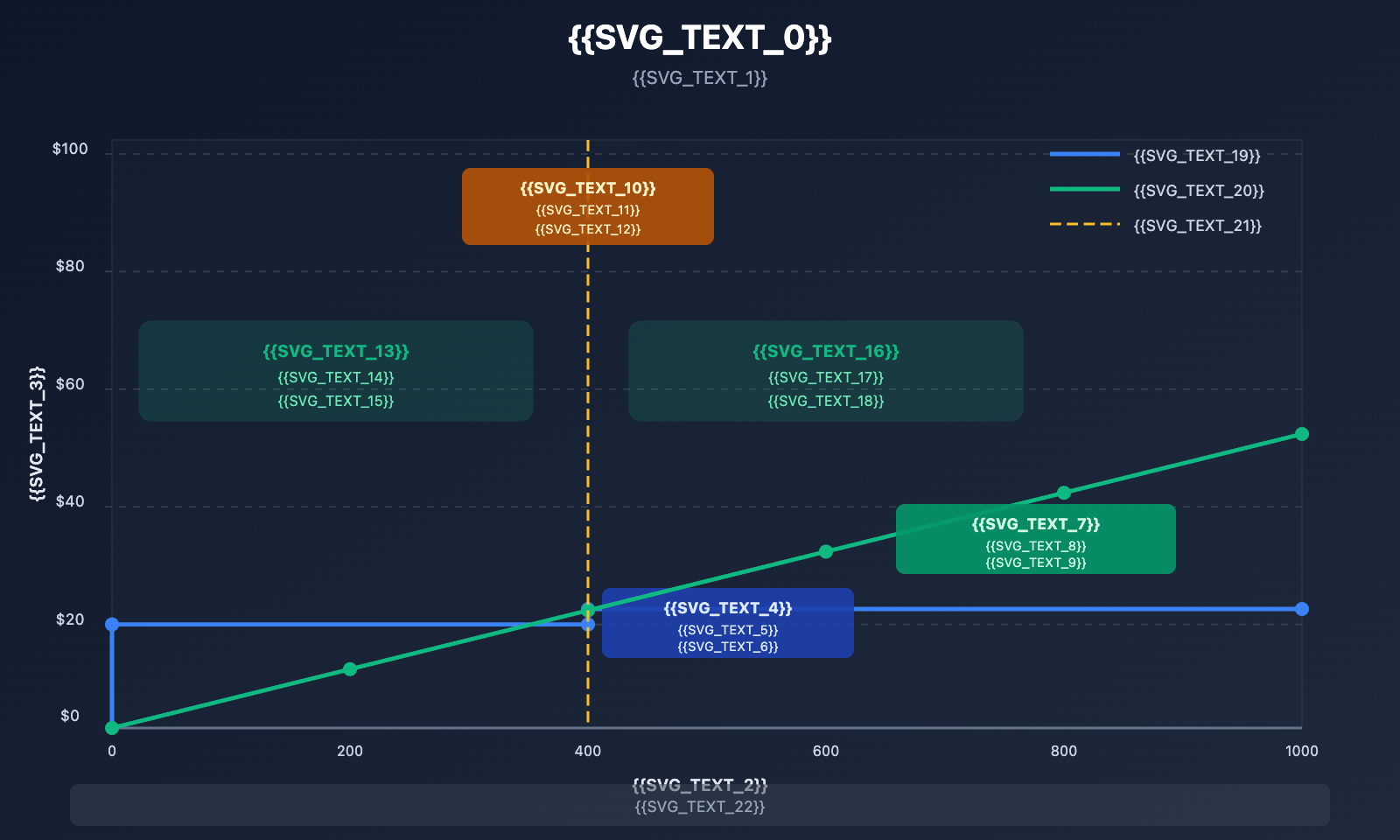
| Monthly Volume | Gemini Membership | AI Image Master | API Calls | Best Choice |
|---|---|---|---|---|
| 50 images | $19.99 | $2.5 | $2.5 | AI Image Master/API |
| 100 images | $19.99 | $5 | $5 | AI Image Master/API |
| 200 images | $19.99 | $10 | $10 | AI Image Master/API |
| 400 images | $19.99 | $20 | $20 | Gemini Membership (Break-even point) |
| 500 images | $19.99 + API | $25 | $25 | AI Image Master/API |
| 1000 images | Cannot meet demand | $50 | $50 | AI Image Master/API |
| 2000 images | Cannot meet demand | $100 | $100 | API (Automation) |
Conclusion:
- Monthly volume < 400 images: AI Image Master is the best choice (no monthly fee burden).
- Monthly volume 400–500 images: Costs are similar across all three; choose AI Image Master for better flexibility.
- Monthly volume > 500 images: AI Image Master or API (depending on whether you need automation).
Best Plans for Different Designer Types
1. Freelance Designers / Personal Studios
Typical Needs:
- Average of 50–200 images per month.
- Large fluctuations in demand (clear peak and off-peak seasons).
- Budget-sensitive.
- No need for automation.
Recommended Solution: AI Image Master
- Cost: $2.5–$10/month.
- Advantages: Pay-as-you-go, zero cost during slow months.
- Savings: 50–75% cheaper than a membership.
2. E-commerce Designers
Typical Needs:
- Average of 300–800 images per month.
- Product hero images, detail pages, and marketing assets.
- Requires bulk generation features.
- Team collaboration.
Recommended Solution: AI Image Master Enterprise Plan
- Cost: $15–$40/month.
- Advantages: Bulk features + team collaboration.
- Savings: 95%+ cheaper than traditional outsourcing.
3. Advertising Agencies / Brand Design Studios
Typical Needs:
- Average of 500–2000 images per month.
- Multiple projects running in parallel.
- Client proposal requirements.
- High-quality standards.
Recommended Solution: AI Image Master + API (Automation)
- AI Image Master: For fast daily outputs.
- API: For automated bulk production on large-scale projects.
- Cost: $25–$100/month.
- Advantages: Flexible enough to handle different scenarios.
4. Product Design Teams / SaaS Companies
Typical Needs:
- Average of 2000+ images per month.
- Needs to be integrated into a product.
- Fully automated.
- Requires stability and reliability.
Recommended Solution: API Calls + Enterprise Support
- Cost: $100+/month.
- Advantages: Fully controllable and deeply integrated.
- Savings: 60–80% cheaper than official APIs.
Hidden Cost Comparison
Beyond direct usage fees, you should also consider the hidden costs:
| Cost Item | Gemini Membership | AI Image Master | API Calls |
|---|---|---|---|
| Learning Curve | Low (5-min setup) | Low (10-min setup) | High (Requires coding) |
| Time Cost | Medium (Manual) | Low (Bulk features) | Extremely Low (Automated) |
| Maintenance Cost | None | None | Medium (Code maintenance) |
| Scalability Cost | Cannot scale | None (Platform-managed) | Low (Flexible scaling) |
| Trial & Error Cost | Consumes quota | $0.05/attempt | $0.05/attempt |
📊 Overall Recommendation: For 95% of designers, AI Image Master is the optimal choice. It strikes the best balance between cost, ease of use, and functionality. It doesn't require a fixed monthly fee or programming knowledge, yet still offers bulk features and team collaboration.
Practical Tips for Designers
Prompt Engineering: Designer-Specific Templates
Nano Banana Pro has an incredible grasp of prompts. Mastering the right prompt structure can significantly boost the quality of your results.
Basic Structure:
[Design Type] + [Subject] + [Style] + [Technical Requirements] + [Quality Control]
Example 1: Product Packaging Design
High-end skincare packaging design
Product: Anti-aging serum
Style: Minimalism, gold accents, white primary tone
Requirements:
- Product name clear and legible
- Prominent Logo placement
- 4K resolution, professional studio lighting
- Commercial-grade texture, print-ready
Example 2: UI Interface Design
Mobile App login interface design
Subject: Health management app
Style: Modern and minimalist, blue-green color palette, card-based layout
Requirements:
- Compliant with iOS design guidelines
- Clear buttons and distinct interactive elements
- Ample white space, clear visual hierarchy
- 2048x2048 optimized for mobile
Example 3: Brand Visual Design
Coffee brand visual identity design
Application: Takeaway coffee cup packaging
Style: Vintage hand-drawn illustration, warm tones
Brand Elements:
- Brand name "Morning Brew"
- Logo featuring a coffee bean pattern
- Brown and cream color scheme
Requirements: Illustration style, handcrafted feel, 4K resolution
Tips for Using Reference Images
Nano Banana Pro supports up to 14 reference images. Using them correctly can drastically improve brand consistency.
Reference Image Categories:
-
Brand Visual Reference (2-3 images)
- Brand color palette
- Logo guidelines
- Typography examples
-
Style Reference (2-3 images)
- Overall mood/vibe
- Lighting and color grading
- Composition style
-
Product Reference (1-2 images)
- Product shots on white backgrounds
- Different product angles
-
Scene Reference (1-2 images)
- Usage scenarios
- Environmental atmosphere
Best Practices:
- Keep the total number of reference images between 5-8 (too many can dilute the effect).
- Give the highest weight to core brand elements (Logo/colors).
- Use high-definition images (at least 1024×1024).
Batch Generation Workflow
For projects that require a large volume of assets, establishing a standardized workflow will save you a ton of time.
Step 1: Templatize Your Prompts
Build a prompt template library for common design types:
Product Hero Image Template:
{product_name} product photography
Style: {style}
Background: {background}
Requirements: Centered composition, 4K resolution, commercial-grade texture

Detail Page Template:
{product_name} usage scenario showcase
Scene: {scene}
Style: {style}
Requirements: Lifestyle feel, realistic, 2K resolution
Step 2: Build a Reference Asset Library
Organize your frequently used reference images:
/brand_assets
  /logos
  /colors
  /typography
/style_references
  /minimalist
  /vintage
  /modern
/product_images
  /electronics
  /fashion
  /food
Step 3: Batch Generation and Selection
- Generate 5-10 variants at once.
- Quickly filter for the best 2-3 concepts.
- Fine-tune the prompt based on the best results.
- Generate the final version.
Time Comparison:
Traditional Method:
- 1 design concept: 2-4 hours
- 3 concepts for comparison: 6-12 hours

AI-Assisted Method:
- 10 concepts generated: 5 minutes
- Filtering + Optimization: 30 minutes
- Efficiency Boost: 12-24x
Quality Control Tips
1. Resolution Selection
| Use Case | Recommended Resolution | Cost |
|---|---|---|
| Social Media | 1024×1024 | $0.05 |
| Web Display | 1024×1024 or 2048×2048 | $0.05 |
| Print Materials | 2048×2048 or 4096×4096 | $0.05 |
| Outdoor Ads | 4096×4096 | $0.05 |
Note: The APIYI platform offers a flat price of $0.05 for all resolutions, so we recommend just going with the highest resolution.
2. Verifying Text Accuracy
While Nano Banana Pro has a 99% text accuracy rate, you should still double-check:
- Brand name spelling
- Numerical accuracy
- Special symbol display
Checklist for Review:
- Zoom in to check text details.
- Compare against the original copy.
- Double-confirm all critical information.
3. Brand Consistency Check
Use a checklist to ensure the generated content meets brand standards:
- Logo position and proportions are correct
- Brand colors are accurate
- Font style is consistent
- Overall tone fits the brand positioning
- Design elements follow guidelines
🎨 Designer's Tip: Think of Nano Banana Pro as a "super assistant" rather than a replacement. It's responsible for generating options quickly, while you handle the creative direction, quality control, and final decisions. This human-AI collaboration can lead to a 10x or greater boost in efficiency.
FAQ
Q1: Is there a difference in image quality between the three methods?
There's no difference. All three methods call the same Nano Banana Pro (Gemini 3 Pro Image) model, so the generation quality is identical.
The differences lie only in:
- User Experience: Membership and AI Image Master provide a web interface, while the API requires programming.
- Features: AI Image Master offers designer-specific features like batch processing and templates.
- Cost Structure: Membership has a fixed monthly fee, while the other two are pay-as-you-go.
Recommendation: Choose based on your usage frequency and whether you need automation, not on quality concerns.
Q2: What’s the fundamental difference between AI Image Master and API calls?
They're essentially the same, just different in form:
AI Image Master:
- Web-based interface, visual operations.
- Ideal for a designer's daily workflow.
- Provides value-added features like batching, templates, and asset management.
- No coding required.
API Calls:
- Pure code interface.
- Ideal for automated systems and product integration.
- Requires programming skills.
- Offers higher flexibility.
Recommendation:
- Individual designers / Small teams → AI Image Master
- Need automation / Product integration → API calls
- You can use both simultaneously (switch as needed).
Q3: Why is APIYI so much cheaper than Google’s official pricing?
The reasonable price difference comes from:
- Bulk Purchase Discounts: As an enterprise customer, APIYI receives bulk discounts from Google.
- Relay Services: Providing a unified interface reduces access costs for users.
- Technical Optimization: Smart routing and caching strategies lower the actual cost of calls.
- High Volume, Low Margin: Lowering unit costs through scale.
Legitimacy Guarantee:
- APIYI is an official Google Cloud partner.
- We use official APIs, not reverse engineering.
- Generated content comes with full commercial rights.
- We provide official invoices and technical support.
Cost-Effectiveness:
Official 4K Price: $0.24/image
APIYI Price: $0.05/image
Savings: 79%

Savings on 5,000 images per year:
($0.24 - $0.05) × 5000 = $950
Q4: Are there copyright restrictions on generated images? Can they be used commercially?
They are fully commercial-ready with no copyright restrictions:
According to Google's official policy:
- Users have full usage rights over the generated content.
- It can be freely used for commercial purposes.
- No additional royalty fees are required.
- You don't have to label it as "AI-generated" (though it's optional).
However, please note:
- If your prompts involve copyrighted material (like celebrity likenesses or famous brands), you might be infringing.
- We recommend using your own assets as references.
- You shouldn't claim the generated content is "human-original" (required by law in some countries).
Best Practices:
- Save your generation logs and prompts (as proof of creation).
- Use your own brand elements as references.
- Perform human review and adjustments after generation.
Regardless of how you use Nano Banana Pro, the copyright and commercial rights of the generated content remain the same.
Q5: I’m a design beginner—which method should I choose to get started?
Recommended Learning Path:
Step 1: Free Trial (1-2 days)
- Use the free version of Gemini to try Nano Banana Pro.
- Get a feel for the basic functions and output quality.
- Learn prompt basics.
Step 2: Small Paid Experience (1 week)
- Register an AI Image Master account.
- Top up $5 to try 100 generations.
- Explore different design types and prompt techniques.
- Start building your own prompt template library.
Step 3: Decide on a Long-Term Plan (Based on frequency)
- Occasional use (< 50 images/month) → Stick with AI Image Master on a pay-as-you-go basis.
- Frequent use (100-400 images/month) → Compare the cost of membership vs. pay-as-you-go.
- High-volume use (> 500 images/month) → Use AI Image Master + learn API automation.
Learning Resources:
- AI Image Master Official Tutorials: imagen.apiyi.com/tutorials
- API Documentation: api.apiyi.com/docs
- Community Case Library: Check out prompts and work from other designers.
Beginner Pitfalls to Avoid:
- ❌ Don't subscribe to a membership right away (determine your usage frequency first).
- ❌ Don't dive straight into the API (it's hard without a programming foundation).
- ✅ Start with AI Image Master and explore step-by-step.
- ✅ Accumulate prompt templates to build your own workflow.
Summary
Key takeaways for choosing how to use Nano Banana Pro:
- Cost First: 95% of designers find AI Image Master to be the best choice—it's pay-as-you-go with no monthly fee burden, saving you 50-95% compared to standard subscriptions.
- Ease of Use: AI Image Master provides a web interface, batch processing, and team collaboration tools. No coding is required, making it much more user-friendly than an API.
- Flexibility: Pay-per-use is far more flexible than a fixed monthly fee. You'll have zero costs during the off-season and can scale up as needed during peak periods.
- Automation Needs: Only choose the API if you require deep integration and automation. For everything else, AI Image Master is more than enough.
- Consistent Quality: All three methods use the same model, so there's no difference in output quality. Your choice should be based purely on cost and your specific workflow.
Recommended Plans:
- Freelance Designers / Small Teams → AI Image Master (imagen.apiyi.com)
- E-commerce / Ad Agencies → AI Image Master Enterprise Plan
- Product Teams / Automation Needs → API Access (api.apiyi.com)
- Casual Users / Testing → Gemini Free Edition
Visit the APIYI official website at apiyi.com to learn more about Nano Banana Pro usage plans and start your journey toward high-efficiency AI-assisted design.
Author: APIYI Team | Focusing on Large Language Model API technical insights
Product Links:
- AI Image Master: imagen.apiyi.com (The top choice for designers)
- API Access: api.apiyi.com (Developer tools)
- Official Website: apiyi.com (Explore more services)