
Author’s note: With a single key, one fixed script, and one injected failure, I put multiple models’ multi-turn tool-calling ability side by side — and got conclusions you can reproduce and re-check.
When picking a model to build an Agent, plenty of teams hit the same wall. In single-turn Q&A, the models all look about the same. But the moment you get into the loop of “call a tool → get the result → call again → handle an error → return a structured answer,” the differences show up. This article walks through a small multi-turn tool-calling test that evaluates several models with one key, so you can turn those differences into data you can log and revisit — at very low cost.
This is not a model leaderboard. I’m not handing out any benchmark scores I haven’t actually run. The point is how to design the test so you can draw conclusions for your own use case. The key is controlling variables: the same key, the same tool definitions, the same block of mock data — only the model name changes. With an aggregator like APIYI (apiyi.com), one key gets you DeepSeek, Gemini, Qwen, Claude, GPT, and more, which cuts out a lot of the switching overhead when you compare them side by side.
The payoff: by the end of this article, you’ll have a 5-step, reproducible multi-turn tool-calling test. It covers the five critical checkpoints: tool selection, argument validation, call ID echo, failure retry, and final JSON validation.
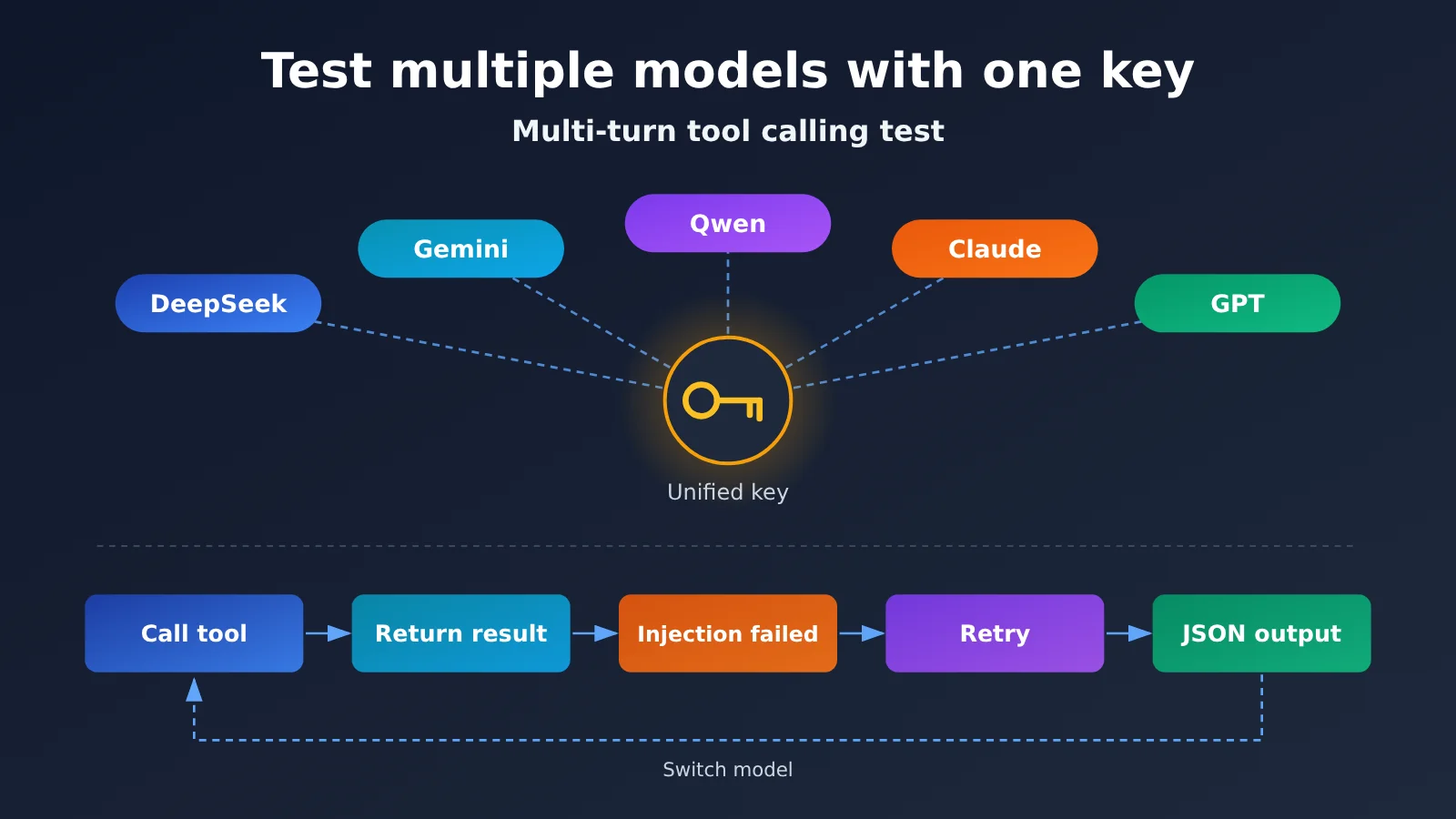
Key Points of a Small Multi-Turn Tool-Calling Test
Before you design a multi-turn tool-calling test, define what “reproducible” actually means. The same input, run at different times by different people, should produce the same kind of comparable result. A single impressive output isn’t a conclusion. The table below is the skeleton of the whole test.
| Key point | Description | Value |
|---|---|---|
| One key, multiple models | All models go through the same API entry point; you only change the model field | Removes interference from networking, authentication, and SDK versions |
| Fixed mock tools | Tool return values are hard-coded; no real database or external service is connected | Every run sees exactly the same tool results |
| Inject one failure | A tool’s first call always returns a retryable error | See whether the model retries correctly and whether it makes up data |
| Structured final output | The final answer must be JSON that conforms to the schema | A program can automatically decide pass or fail |
| Complete audit trail | Save request parameters, raw responses, usage, and latency | Conclusions are reviewable, and you can run regressions after switching model versions |
Why the Multi-Turn Tool-Calling Test Should Be “Small”
Keep the test small because large tests are hard to reproduce. A real-world tool chain might have a dozen tools and depend on external systems, so any fluctuation can be mistaken for a model problem. A good small test only needs two or three read-only tools plus one deliberately injected failure to cover the parts of a multi-turn loop where errors are most likely.
The test also needs to be “complete.” It has to run the entire loop—you can’t just check whether the model makes a tool call in the first turn. Many models look great in the first turn and then fall apart in the second or third: they don’t include the correct call ID, they give up as soon as they hit an error, or they invent a tracking number when there’s no data. You only see these problems if you run the loop all the way to the final turn.
Design Principles for Testing Multiple Models with One Key
Controlling variables is a prerequisite for comparative testing. If model A uses the official SDK, model B uses a third-party SDK, and model C goes through a different proxy address, you can’t tell whether the final difference comes from the model or the pipeline. With a unified entry point, authentication, retry policy, timeout settings, and log format all stay consistent—the only variable is the model itself.
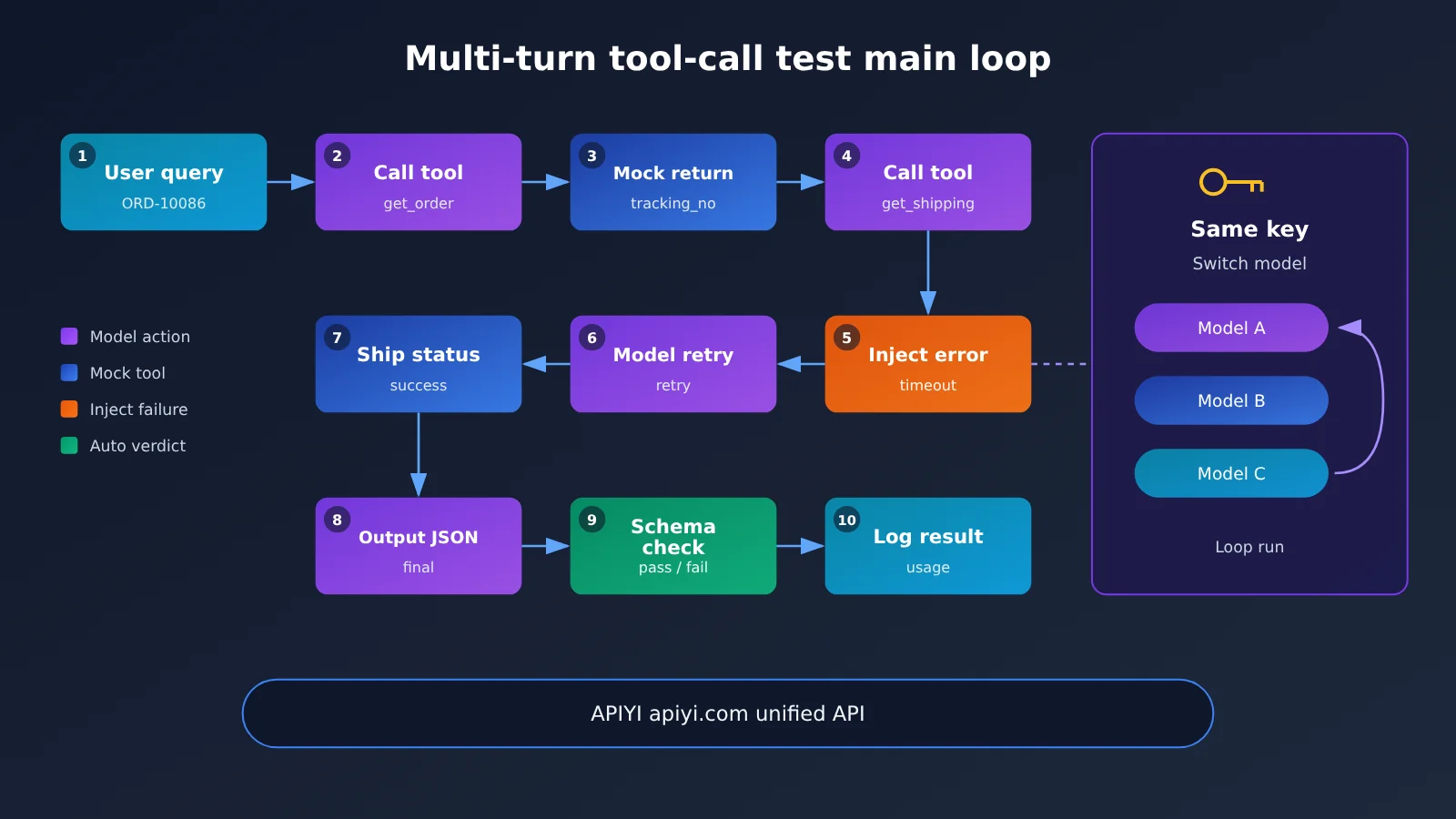
Quick Start: A Small Multi-Turn Tool Calling Test
No code in this section—just the parameters, tool definitions, and execution steps. You can implement it in any language you’re comfortable with: Python, Node.js, or even a shell script. The point is to write every configuration item into a fixed config file and save it alongside the test results.
Step 1: Unify the interface and runtime parameters
Start by locking down the endpoint and sampling parameters. APIYI is compatible with both OpenAI and Anthropic API formats, so the same key works for Chat Completions–style calls and Messages-style calls alike. The table below lists the settings you should keep fixed.
| Config item | Recommended value | Notes |
|---|---|---|
| base_url (OpenAI format) | https://api.apiyi.com/v1 |
Call through APIYI’s unified entry point; refer to docs.apiyi.com for the exact address |
| base_url (Anthropic format) | See the Anthropic-compatible address in the APIYI docs | Used to test the tool_use / tool_result protocol |
| api_key | The same key | Shared across all models so auth differences don’t skew results |
| temperature | 0 or as low as possible | Reduces randomness; if a reasoning model doesn’t support it, record the actual value |
| max_tokens | A fixed value | Prevents misjudgments caused by truncated output |
| tool_choice | auto | Lets you watch the model decide on its own instead of forcing a call |
| Max loop turns | A fixed cap, e.g. 6 turns | Keeps the model from getting stuck in endless retries |
| Runs per model | A fixed count, e.g. 5 | Judge stability from repeated runs, not a single one |
🚀 Quick-start tip: Sign up at APIYI (apiyi.com) and grab a key first, then call each candidate model in turn with that same key. Once you’ve confirmed every model returns a proper tool-calling response, move on to the real test. For integration details, see docs.apiyi.com.
Step 2: Define 2 to 3 read-only tools
Tool design comes with two requirements: read-only and deterministic. Read-only prevents tests from accidentally triggering write operations, and deterministic ensures the same return value every time. I recommend using a fictional order lookup scenario with two tools:
- get_order: the parameter is order_id (a string, with a fixed format of “ORD-” followed by digits). It always returns the order status, product name, and tracking number tracking_no.
- get_shipping: the parameter is tracking_no (a string). The first call always returns an error containing error as timeout and retryable as true; the second call and all subsequent calls return a fixed shipping status and estimated delivery date.
- Optional distractor tool get_coupon: unrelated to the question, used to observe whether the model makes unnecessary calls.
Write the parameter Schema strictly: field types, required fields, and regex formats all need to be explicit. Parameters generated by the model should go through Schema validation before being passed to the Mock function. Validation failures should be recorded as a “parameter error” — don’t quietly fix them.
Step 3: Write a fixed prompt and user question
The system prompt should contain only rules, not answers. You can require the model to answer only based on the data returned by the tools; to retry at most 2 times when a tool errors and is retryable; and to output only a single JSON object at the end, with fields including order_status, shipping_status, eta, and data_source. The user question is fixed to a single sentence, for example, “Help me check where order ORD-10086 is right now.”
Once the prompt is finalized, don’t change it again. If testing reveals that a model fails because of prompt ambiguity, the right approach is to open a new version number and retest all models with the new version, rather than tweaking the prompt for just that one model.
Step 4: Run the Loop and Inject a Failure
The execution logic proceeds in this order:
- Send the system and user messages, along with the tool definitions.
- If the response contains tool calls, validate the parameters one at a time, run the corresponding mock function, and send the results back as the protocol requires.
- For the first call to
get_shipping, always return a retryable error. - Repeat step 2 until the model produces a final reply with no tool calls, or the maximum number of rounds is reached.
- Validate the final reply against the JSON Schema, and save all messages, the raw response, and the
usagefor each round.
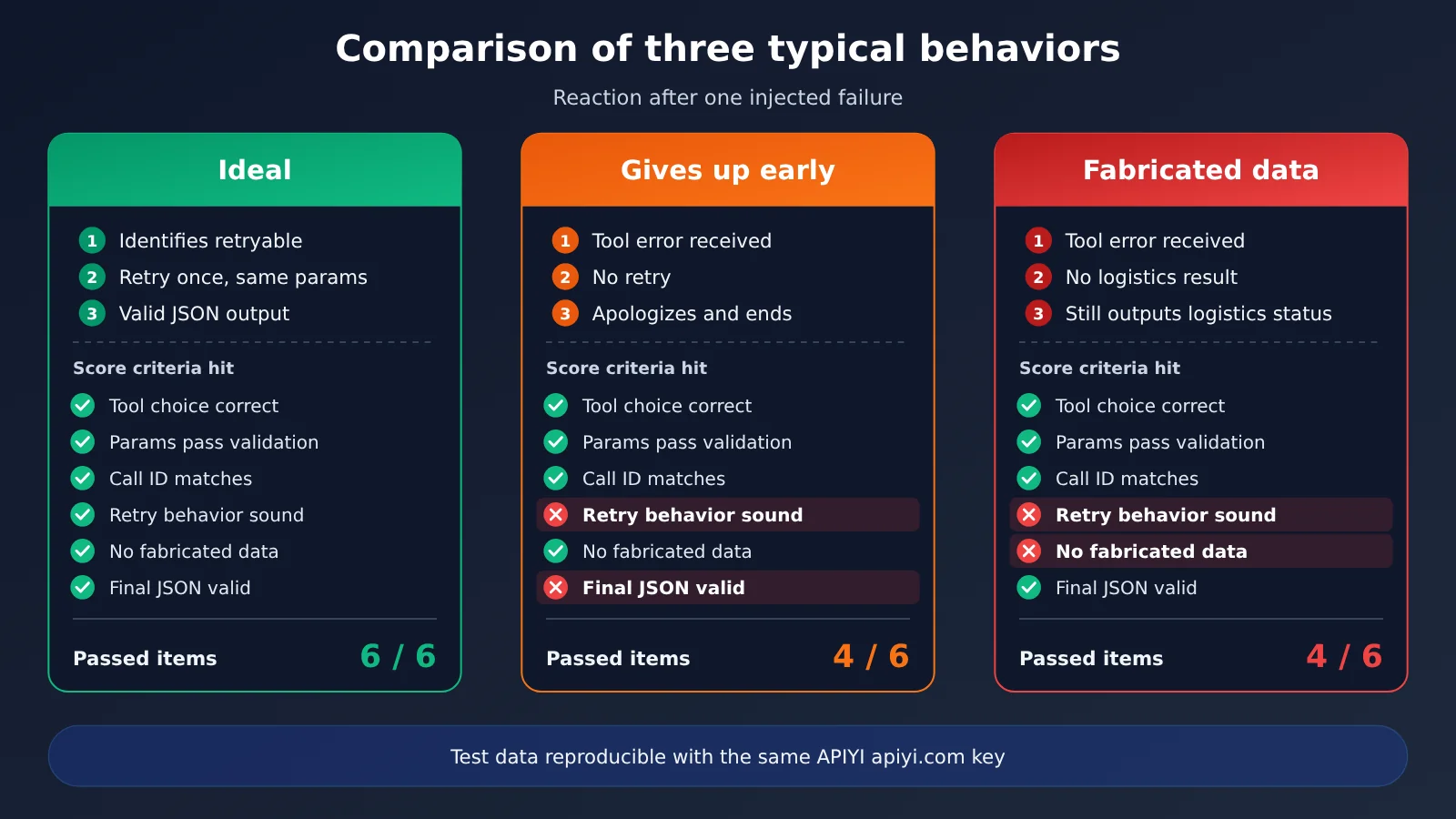
Failure injection is the part of the test that separates models the most. The ideal behavior is for the model to recognize that retryable is true and call get_shipping again with the same parameters. There are three common bad behaviors: apologizing to the user and stopping there; making up a shipping status; or changing the parameters and retrying over and over until it blows past the round limit.
Step 5: Score Against the Checklist and Keep a Record
After each run finishes, use a program to judge each item, relying as little as possible on subjective human scoring. Humans only step in to review the samples that the program flags as anomalous.
Multi-turn Tool Calling Protocol Differences: OpenAI and Anthropic Formats
To run the same test against both API formats, you first need to understand the protocol-level differences. Even tiny protocol differences can cause the “curl works, but the client doesn’t” kind of problem. Start with a minimal request to confirm the protocol is correct, then move on to comparing model capabilities.
| Stage | OpenAI-compatible format | Anthropic-compatible format |
|---|---|---|
| Tool definition | tools array; each item has type function, and parameters go under parameters | tools array; the parameter schema goes under input_schema |
| Model initiates a call | tool_calls in the assistant message, each with an id | tool_use in assistant content blocks, each with an id |
| Argument shape | arguments is usually a JSON string, and you need to parse it yourself | input is already a JSON object |
| Returning results | a message with role tool that carries tool_call_id | a tool_result content block in the user message that carries tool_use_id |
| Marking errors | usually a custom error field inside the result content | tool_result supports an is_error flag |
| Parallel calls | a single response may contain multiple tool_calls | a single response may contain multiple tool_use blocks |
A few pitfalls come up most often. First, with the OpenAI format, arguments is a string, and some models occasionally output extra characters that break parsing. That should count toward the score on its own, instead of being smoothed over with error handling in code. Second, when you send results back, the IDs must line up one-to-one with the IDs from the calls; this matters even more with parallel calls, where you need to watch the order. Third, some models output text and make tool calls in the same reply, so your handling logic needs to support both kinds of content at the same time.
💡 Technical tip: With the unified entry point at APIYI apiyi.com, you can use the same key to run the same test suite through both the OpenAI format and the Anthropic format. That makes it easier to tell whether the issue is the model itself or the protocol adaptation layer.
Multi-Turn Tool Calling Scorecard and Run Record Template
A scorecard is what makes your conclusions reproducible. Every item needs to be programmatically checkable and mapped to a real business risk. The table below lists the recommended checks—add or remove rows based on your use case.
| Check item | How to determine it | Corresponding business risk |
|---|---|---|
| Correct tool selected | First round calls get_order, with no distractor tool invoked | Extra calls add latency and cost |
| Parameters pass validation | Parameters satisfy the schema, including type, required fields, and format | Bad parameters hit the real system |
| Call ID correctly matched | The returned result matches the ID of the initiating call | Multi-turn context gets scrambled |
| Retry behavior is reasonable | After a retryable error, retries with the same parameters without exceeding the limit | Giving up too early or retrying forever |
| No fabricated data | Every field in the final answer can be found in the tool’s return value | Hallucinations directly affect users |
| Final JSON is valid | Passes JSON Schema validation with no extra text | Downstream parsing fails |
| Turn count and token usage | Record total turns, input tokens, and output tokens | Evaluate cost and latency |
After each model has run a fixed number of times, roll the results into a single table. Suggested columns: model ID, API format, run number, passed item count, details of failed items, total turns, input tokens, output tokens, elapsed time, test date. Check the headers and config files into version control alongside the code. When a model is upgraded or swapped for a new version, rerun the same scripts to get a regression comparison.
How to record cost for multi-turn tool calls
Record token usage per turn—you can’t just look at the last one. In a multi-turn loop, each turn re-sends the previous messages and tool results as input, so input tokens accumulate turn by turn. The more retries, the higher the cost. That’s exactly why “retry behavior is reasonable” deserves its own score.
To calculate the bill, multiply the input and output tokens from usage (plus cached tokens if there’s a cache hit) by their respective unit prices. Unit prices for input, output, and caching, as well as the billing basis for every model, should be taken from the actual data on the APIYI pricing page at docs.apiyi.com/models. This article doesn’t list specific numbers, because prices change—hardcoding them here would go stale fast.
Testing Multiple Models with One Key: Candidate Model List
Candidate models should ideally cover different vendors and different roles—for example, a cost-effective model, a main workhorse model, and a model with stronger reasoning. The table below lists only model series and testing focus areas, not conclusions; your conclusions should come from your own test data.
| Model series | Suggested testing focus | Recommended API format | Available platforms |
|---|---|---|---|
| DeepSeek series | Stability of parameter string parsing, retry after injection failure | OpenAI-compatible | APIYI apiyi.com, official API |
| Gemini series | Tendency to make parallel calls, whether the final JSON includes extra text | OpenAI-compatible | APIYI apiyi.com, official API |
| Qwen series | False calls to distractor tools, multi-turn ID mapping | OpenAI-compatible | APIYI apiyi.com, official API |
| Claude series | Handling is_error in tool_result, turn-count control |
Anthropic-compatible | APIYI apiyi.com, official API |
| GPT series | Strict schema adherence, token usage | OpenAI-compatible | APIYI apiyi.com, official API |
For the exact model IDs and versions available, refer to the APIYI model list. When recording results, always write the full model ID—not just the series name. Different versions within the same series can perform quite differently on tool calls.
💡 Selection tip: Which model you choose depends on your tool complexity, your tolerance for hallucinations, and your budget. We recommend running each candidate model for one round on APIYI apiyi.com with the same key, then combining that with the pricing data at docs.apiyi.com/models to make a holistic judgment.
Frequently Asked Questions
Q1: What is the multi-turn tool-calling smoke test?
It’s a very small, deterministic test. With 2 to 3 mock tools and one injected failure, it makes the model run through the full loop of “call a tool, handle the result, retry, output a structured answer,” and then a program judges item by item whether each step passed. What it cares about is whether the loop can run to completion reliably — not how much the model knows.
Q2: Why emphasize testing multiple models with a single API key?
To control variables. Different keys, SDKs, and proxy endpoints introduce differences in authentication, timeouts, and protocol adaptation that distort the comparison. Once you have a single entry point, the only thing that changes is the `model` field — so any measured difference can be attributed to the model itself.
Q3: Does setting temperature to 0 guarantee full reproducibility?
Not entirely. Even at temperature 0, some models still show slight output variation, and reasoning models may not support lowering the parameter at all. So the test should be run multiple times to look at the pass rate and the distribution of failures, rather than judging from a single run. Do record the actual parameter values you used.
Q4: What scenarios is this test good for?
– **Agent model selection**: compare how stable candidate models are on the tool loop before going live.
– **Regression testing on model upgrades**: after a new version ships, rerun the same script to confirm nothing degraded.
– **Protocol migration validation**: when switching from OpenAI format to Anthropic format, confirm the adaptation layer is fine.
Q5: How do I quickly get started calling these models?
1. Go to APIYI apiyi.com to register an account and get a key.
2. Read docs.apiyi.com to confirm the OpenAI-compatible and Anthropic-compatible endpoints.
3. Configure per the parameter table in Step 1 of this article, and start with a minimal request to confirm every model can return a tool call.
APIYI supports unified access to all the models mentioned in this article — switching models only requires changing the `model` field.
Q6: How do I estimate the test cost?
Cost is roughly “number of models × number of runs × cumulative tokens per run × unit price.” The input tokens in a multi-turn loop accumulate round by round, and retries add even more usage. For unit prices and cache billing rules, rely on the actual data on the APIYI pricing page at docs.apiyi.com/models. It’s a good idea to first run each model once to estimate usage, then decide how many official runs to do.
Q7: What are the limitations of this test?
A small test can only cover typical failure modes, not every complex business case. Mock tools return very clean data, whereas real systems may return messy or oversized data. Once the test passes, it’s worth adding real anomalous samples you’ve seen in production and expanding the test cases gradually.
Key Takeaways from the Multi-Turn Tool-Calling Mini-Test
- Control variables first: Use one API key, one configuration, and change only the
modelfield. - Tools should be read-only and deterministic: Hardcode mock return values so every run sees the same data.
- Failure injection is a must: A single retryable error is the best way to tell how well a model handles loops.
- Score programmatically: Every check should be decidable automatically; humans only review anomalies.
- Keep a full audit trail: Save raw responses, per-turn usage, and the full model ID for easy regression testing.
- Prices come from the official page: Calculate costs based on the APIYI pricing page at docs.apiyi.com/models.
- A unified entry point saves effort: APIYI is compatible with both OpenAI and Anthropic formats, so one script can cover both protocols.
Summary
A mini-test that uses one API key to test multi-turn tool calling across multiple models comes down to three things:
- Reproducible: Fixed configuration, fixed mock data, fixed prompt version, and run it multiple times.
- Decidable: Use schema validation and a scoring checklist instead of subjective impressions.
- Regressable: Keep a complete audit trail so you can quickly retest with the same script after a model upgrade.
This approach won’t tell you “which model is best,” but it will tell you which model is more stable in your toolchain, uses fewer tokens, and behaves more predictably when it fails. I recommend starting with the order-query scenario from this article to get the flow working, then swapping in your own business tools.
For cross-model validation, I recommend using the same API key through APIYI at apiyi.com. See docs.apiyi.com for integration details, and refer to docs.apiyi.com/models for pricing and billing standards.
📚 References
- OpenAI Function Calling Documentation: Protocol details for tools, tool_calls, and tool role messages
- Link:
platform.openai.com/docs/guides/function-calling -
Note: Understand how parameter strings and tool_call_id are handled in the OpenAI-compatible format
-
Anthropic Tool Use Documentation: Details on tool_use and tool_result content blocks
- Link:
docs.anthropic.com/en/docs/build-with-claude/tool-use -
Note: Learn how input_schema, tool_use_id, and is_error are used
-
APIYI Documentation Center: Unified interface integration guide
- Link:
docs.apiyi.com -
Note: Check the OpenAI and Anthropic compatible endpoints and usage examples
-
APIYI Models and Pricing Page: Model list and billing details
- Link:
docs.apiyi.com/models - Note: All input, output, and cache unit prices are based on the actual data on this page
Author: APIYI Technical Team
Technical Discussion: Feel free to contact us on the APIYI apiyi.com homepage. More integration resources are available at the docs.apiyi.com documentation center.