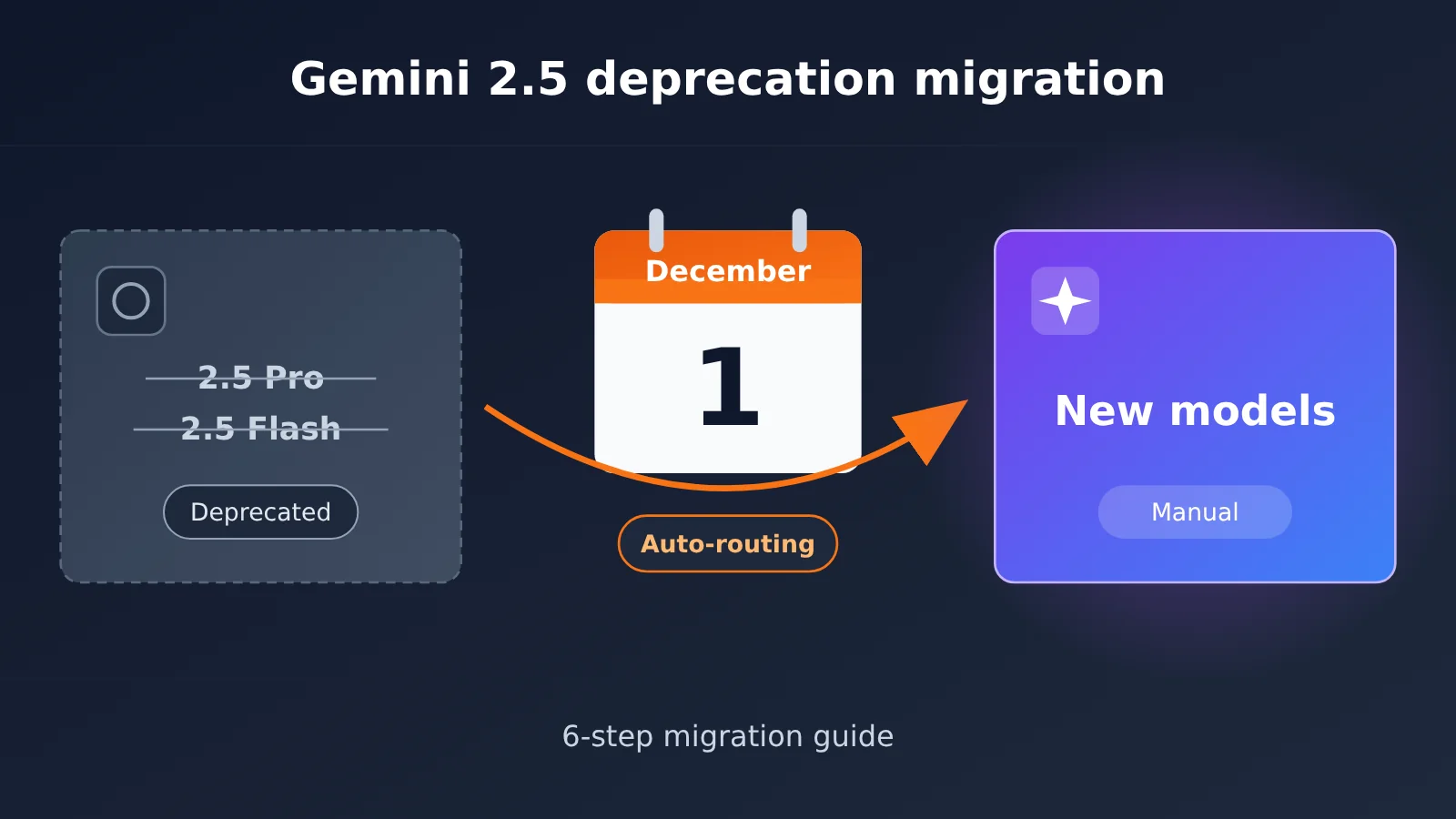
Author’s note: Google AI Studio has announced the deprecation of Gemini 2.5 Pro and 2.5 Flash, and starting December 1, requests to those APIs will be automatically routed to other models. This article gives you a 6-step, hands-on migration plan so your production app can be ready before the deadline.
If your production service is still calling Gemini 2.5 Pro or Gemini 2.5 Flash, you have less than a month before the December 1 auto-routing kicks in. According to the deprecation notice from Google AI Studio, both models have entered the deprecation process, and API requests sent to the old model IDs will be automatically forwarded to the officially designated successor models.
This isn’t the “you don’t have to do anything” kind of good news. Auto-routing keeps requests from failing outright, but model behavior, output style, latency, and billing can all shift along with it. For a production app that depends on a fixed output format, that’s essentially a “silent upgrade” nobody tested.
The payoff: By the end of this article, you’ll have a 6-step migration process you can use to swap out Gemini 2.5 Pro/Flash, run regression tests, and roll out gradually before December 1 — keeping the uncertainty of auto-routing to a minimum.
Gemini 2.5 Pro/Flash Deprecation and Auto-Routing: The Essentials
Before you start migrating, let’s get the key facts about the Gemini 2.5 Pro/Flash deprecation straight. The table below lists only what the reference material can confirm, plus the engineering impact we can infer from it.
| Point | Details | Impact on production apps |
|---|---|---|
| What’s being deprecated | Gemini 2.5 Pro and Gemini 2.5 Flash in Google AI Studio | Every service that hardcodes these two model IDs is in scope |
| Key date | Effective December 1 | The window for testing and canary rollouts is tight — you’ll need to work backward from the deadline |
| How it’s handled | API requests are automatically routed to the follow-up model Google designates | The endpoint won’t error out immediately, but the model actually doing the work changes |
| Biggest risk | “Silent changes” in output style, format, latency, and cost | Downstream parsing, eval metrics, and cost budgets can all drift |
| Recommended strategy | Switch explicitly before the deadline and run full regression tests | Turns “getting your model swapped for you” into a “controlled upgrade” |
Why you can’t just coast on Gemini 2.5 auto-routing
A lot of teams breathe a sigh of relief when they see “auto-routing”: if requests won’t fail, why not just let the December 1 transition happen on its own? The problem is that stability for Large Language Model apps never comes down to whether the endpoint returns a 200. Your prompts were tuned against the behavior of Gemini 2.5 Pro or Flash. Swap in a different model and the same prompt might produce longer or shorter output, and JSON field order and formatting can shift in subtle ways.
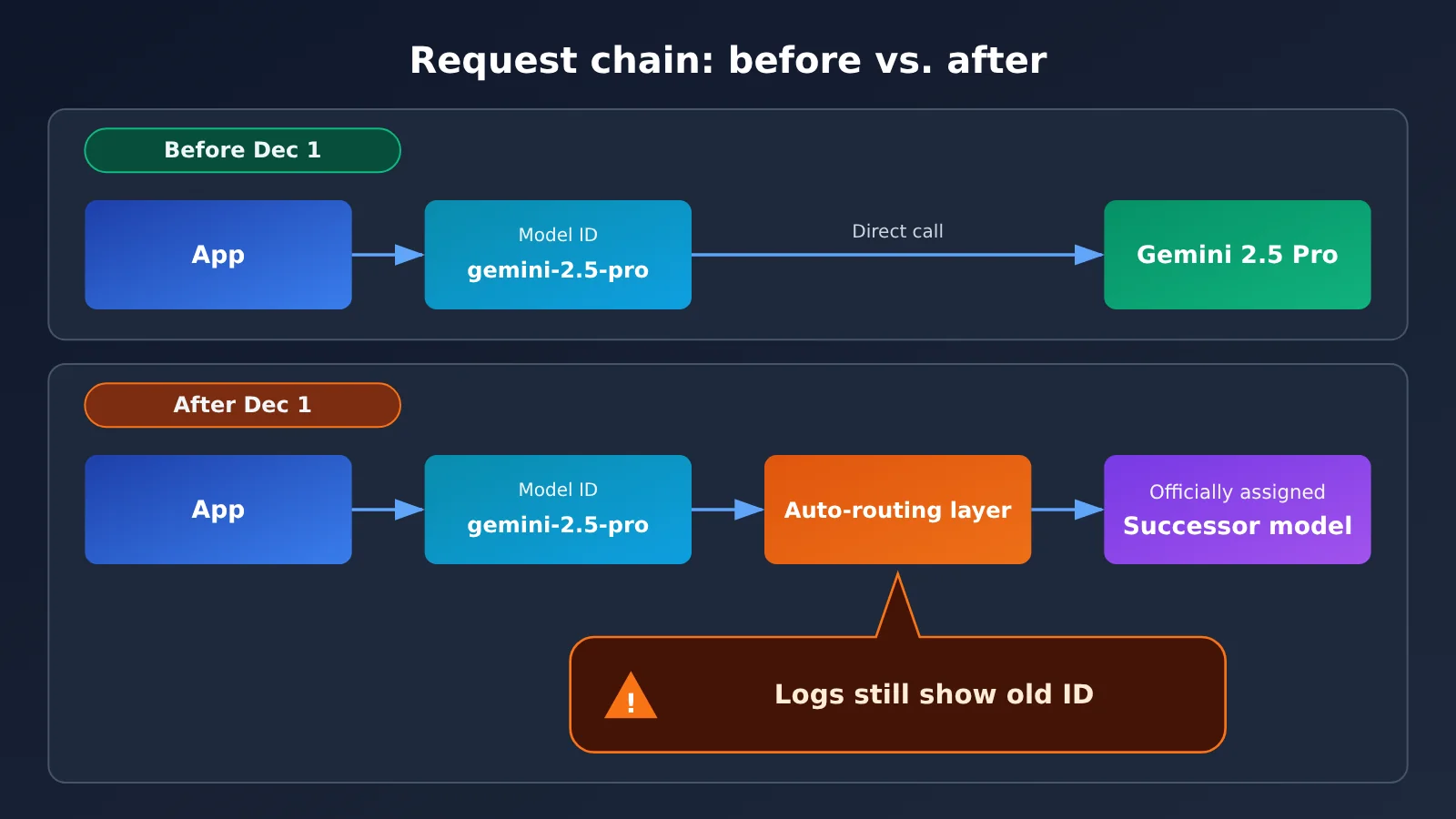
The sneakier risk is observability. After auto-routing kicks in, your logs still show the old model ID, but a different model is actually handling the requests. When quality complaints come in, the logs will mislead you during triage and you’ll burn a lot of time just figuring out where the problem is. The whole point of migrating proactively is to keep “the model in your logs” and “the model actually running” in sync.
How to confirm exactly which model auto-routing targets
The reference material confirms the auto-routing mechanism itself, but which model requests get routed to, whether Vertex AI channels are affected too, and whether the old model IDs get an alias grace period — for those, go by Google’s official deprecation announcement and the Gemini API changelog. This article won’t speculate on those details. Instead, it gives you a migration method that works no matter which model ends up being the target.
Gemini 2.5 Pro/Flash Deprecation Impact Assessment
How much an application gets affected by Gemini 2.5’s automatic routing varies a lot depending on the type of app. Doing an impact tiering first is the only way to decide migration priority and how deeply you need to test.
| Application Type | Typical Usage | Impact from Automatic Routing | Migration Priority |
|---|---|---|---|
| Structured output / information extraction | Requires model to return fixed JSON fields | High: missing fields or format changes directly break parsing | Highest |
| Agent / tool calling | Depends on function-calling parameter formats and invocation timing | High: call order and parameter generation habits may change | Highest |
| Long-document analysis | Uses long context for summarization, Q&A | Medium: quality may shift, latency and cost need re-evaluation | High |
| Customer service chat / content generation | Free-text output | Medium-low: style changes are noticeable but rarely fatal | Medium |
| Internal tools / offline batch processing | Non-realtime, can be re-run | Low: can observe and adjust after routing | Low |
The Three Most Commonly Overlooked Dependencies in Gemini 2.5 Migration
The first is implicit model dependency. Some teams don’t hard-code model IDs directly in business code — they put them in config centers, environment variables, low-code platform node configs, or even in the default parameters of third-party SDKs. These locations are easy to miss during a global search, so you need a dedicated checklist to track them down.
The second is parameter semantics dependency. The Gemini 2.5 series supports thinking-related configs, such as thinking budget parameters. Later models may support these parameters differently, with different defaults and value ranges, so reusing old parameters as-is can lead to them being ignored, throwing errors, or causing unexpected costs.
The third is evaluation baseline dependency. If your offline eval sets or A/B experiment metrics use baselines generated by Gemini 2.5 Pro or Flash, you must rebuild those baselines after switching models — otherwise every subsequent metric comparison will be skewed.
🎯 Technical Tip: Before migrating officially, you can use APIYI apiyi.com to call both the old model and candidate new models in parallel with the same batch of test samples, quickly comparing output differences. APIYI is compatible with both OpenAI and Anthropic interface formats, so switching candidate models usually just means changing the model name. Setup instructions are in the docs at docs.apiyi.com.
Gemini 2.5 Pro/Flash Migration Quick Start: The 6-Step Process
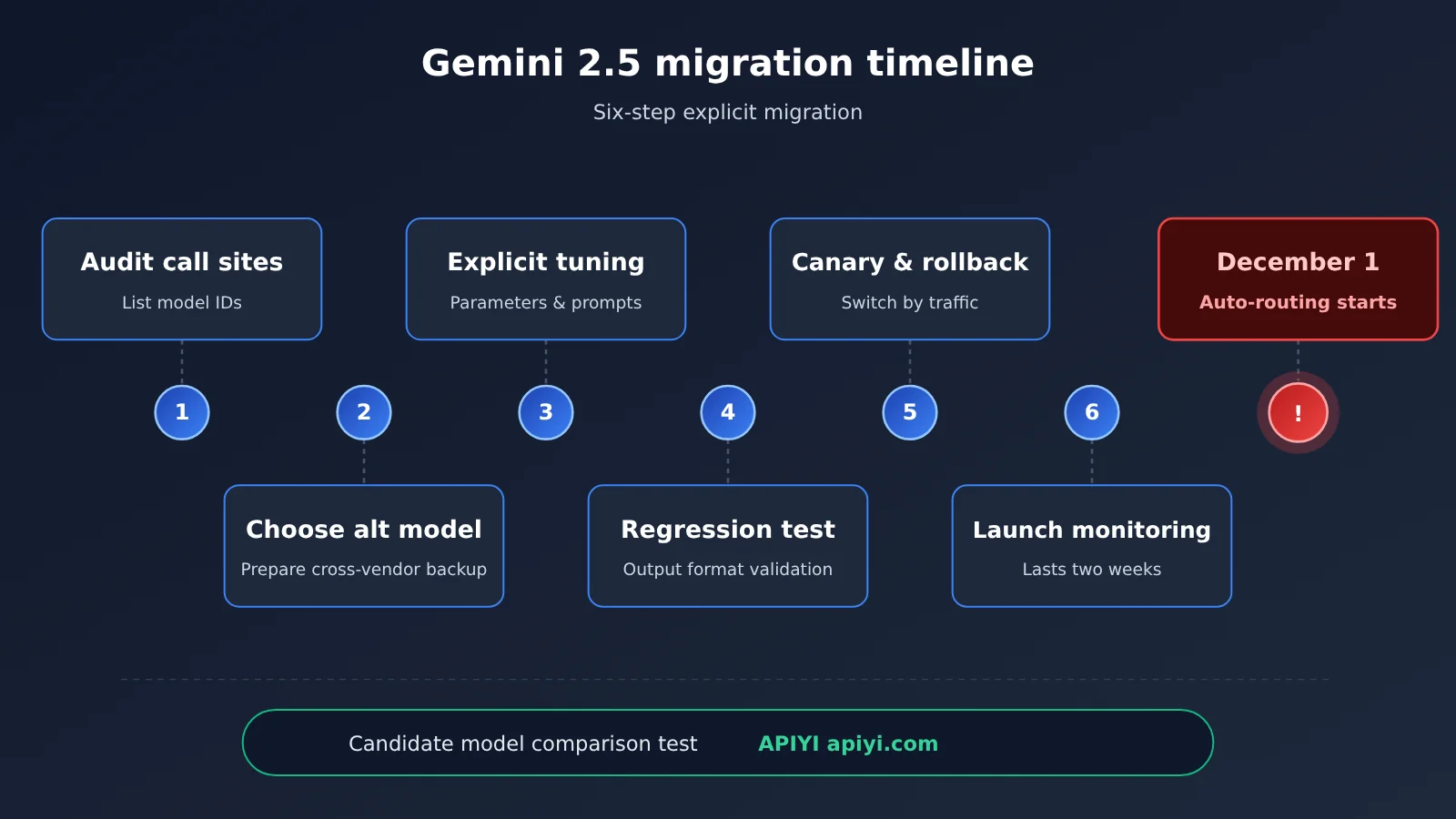
The 6 steps below are the standard migration process we recommend — they cover the entire chain, from inventory to post-launch monitoring. The whole process doesn’t depend on which follow-up model you end up choosing, so you can apply it as-is.
Step 1: Inventory every Gemini 2.5 model invocation point
Search globally for the two keywords gemini-2.5-pro and gemini-2.5-flash across your code repositories, configuration centers, deployment scripts, and low-code workflows — and keep an eye out for variant IDs with version suffixes or preview markers. Register each invocation point in a checklist, recording the owning service, the person responsible, the call volume, and the impact level from the previous section.
If your service calls Gemini through a gateway or aggregation platform, also check whether the gateway layer does any model alias mapping. Sometimes the business code references an internal alias, and the real Gemini 2.5 model ID is tucked away in the gateway config.
Step 2: Decide on the Gemini 2.5 replacement models
Use the automatic routing targets from Google’s official announcement as a reference, and combine that with your own business requirements to pick a replacement model for each call site. As a general rule: for scenarios where you originally used Gemini 2.5 Pro for complex reasoning, long documents, and coding tasks, start by evaluating the equivalent tier of next-generation Pro-class models. For scenarios where you originally used Gemini 2.5 Flash to prioritize speed and cost, start by evaluating the next-generation Flash-class models.
Keep in mind that the official automatic routing targets aren’t necessarily the best fit for your business. Some teams take this opportunity to re-evaluate and downgrade a portion of their lower-quality-requirement traffic to lighter-weight models to optimize costs.
💡 Selection tips: Choosing a replacement model mainly depends on the specific scenario and quality requirements. We recommend running small-scale real-world tests on candidate models through APIYI apiyi.com. The platform supports unified API calls across many mainstream models, making it easy to compare them side by side before deciding.
Step 3: Explicitly change the model ID and calibrate parameters
Don’t wait for automatic routing—instead, explicitly replace the old model ID with the new one in your code and configuration. The benefit is that the model shown in logs, monitoring, and billing matches the model actually running, so you won’t be misled when troubleshooting.
While changing the model ID, also verify each call parameter one by one. The table below lists the configuration items that deserve the most attention during migration:
| Configuration item | Checkpoints during migration | Recommended approach |
|---|---|---|
| Model ID (model) | Are there any remaining old IDs or aliases? | Consolidate them uniformly in a config center to avoid scattered hardcoding |
| Thinking-related config | How the new model supports thinking budgets and other parameters, and their defaults | Reset them after consulting the new model’s docs; don’t copy them over as-is |
| Max output length | The new model’s output ceiling and defaults may differ | Set them explicitly to avoid truncated or overly long output |
| Structured output / JSON Schema | The degree to which field constraints are followed may change | Test together with tolerance and validation in the parsing layer |
| Tool / function call definitions | Parameter generation style and call frequency may change | Validate by replaying real conversation samples |
| Sampling parameters like temperature | The same values produce different results across models | Re-tune based on evaluation results |
Step 4: Run Regression Tests with Real Samples
Pull representative real requests from your production logs to build a regression test set. The samples should cover high-frequency scenarios, long-tail scenarios, and edge cases that have caused problems in the past. For apps that produce structured output, also include the samples with the most complex formats.
Run these samples through both the old and new models, then compare them across several dimensions: format pass rate (whether the JSON parses successfully), accuracy on key fields, average output length, time to first token and total latency, and token consumption per request. As long as the format pass rate and key metrics haven’t dropped noticeably, you can move on to the canary phase. If they drop significantly, adapt to the new model by adjusting the prompt first.
Step 5: Canary Rollout and Rollback Plan
Don’t switch everything over at once. A gradual ramp of 5%, 20%, 50%, then 100% is recommended, observing at least one full business cycle at each stage. It’s best to put the canary switch in a config center so the model ID can be switched dynamically by traffic percentage or by user group.
The rollback plan deserves special mention: after December 1, the old model IDs will be automatically routed, which means “rolling back to Gemini 2.5” is effectively no longer an option. So your rollback target should be another fallback model you’ve already validated, not the old one. This is exactly why it’s worth preparing at least one cross-vendor fallback ahead of time.
🚀 Quick start: If you need to quickly set up a cross-model fallback chain, you can use APIYI apiyi.com to access multiple models through a unified interface. Since it’s compatible with both OpenAI and Anthropic API formats, your fallback model and primary model can share the same calling logic—during a rollback, you only need to swap the model name.
Step 6: Continuous Monitoring After Launch
After the migration is complete, closely monitor the following metrics for at least two weeks: error rate and timeout rate, structured output parsing failure rate, user-side quality feedback (downvote rate and complaint rate), and token consumption and cost curves. I recommend breaking out model ID as a separate dimension in the monitoring dashboard so you can easily compare changes before and after the switch.
Also, pay extra attention on December 1: if requests with the old model ID still show up in monitoring at that point, it means something was missed during the inventory phase. Those requests are being handled by automatic routing, so you need to locate them as soon as possible and migrate them explicitly.
Gemini 2.5 Response Plan Comparison: Passive Routing vs Active Migration
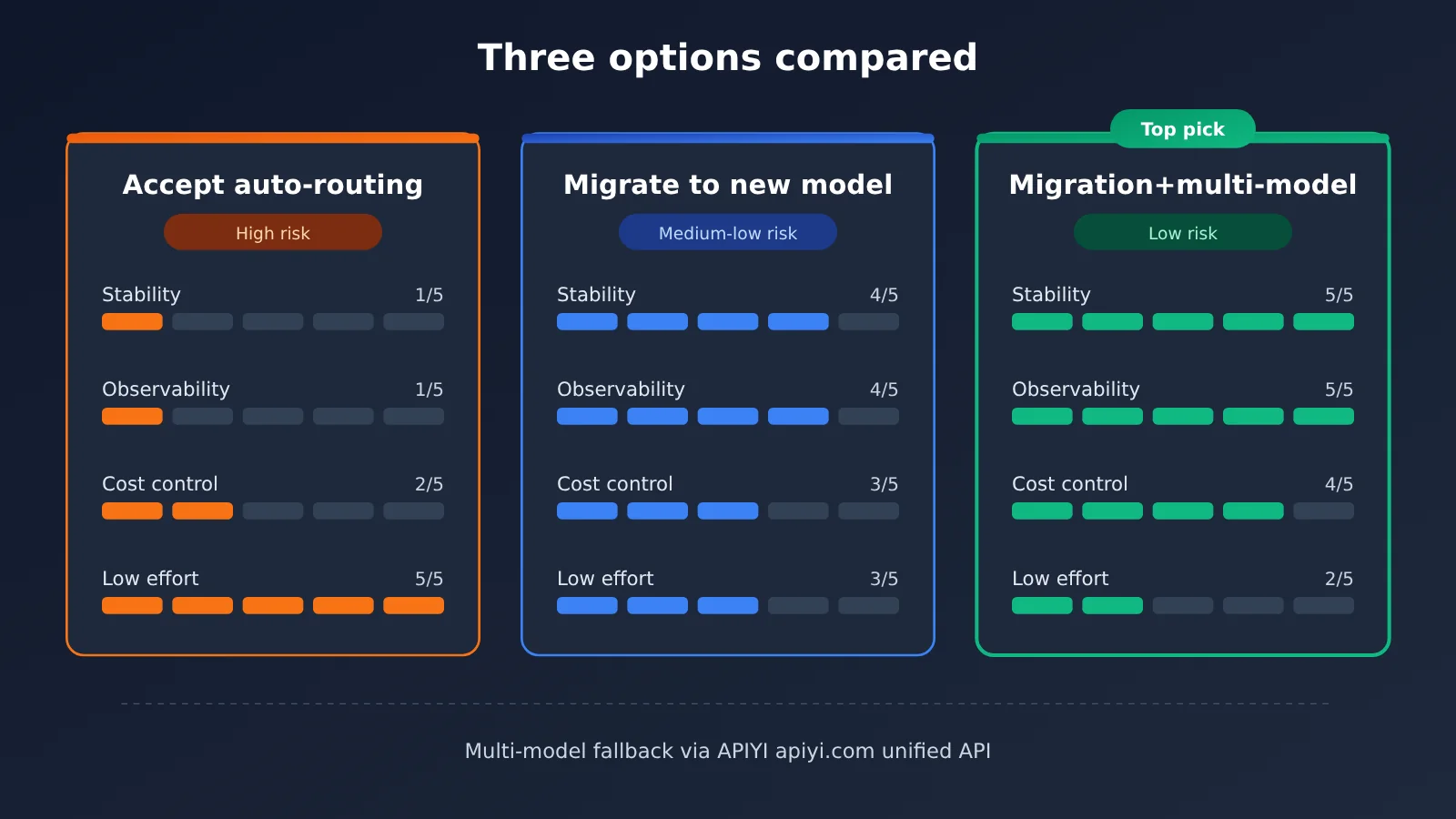
When Gemini 2.5 Pro/Flash automatic routing kicks in on December 1, teams usually have three options. The table below compares them across stability, observability, workload, and other dimensions.
| Option | Key Characteristics | Best For | Risk Level |
|---|---|---|---|
| Accept automatic routing | No code changes; routing handled officially after December 1 | Low-priority internal tools, offline jobs | High: behavior changes silently, logs no longer match reality |
| Explicit migration to the new Gemini model | Actively update the model ID and complete regression testing | Most production workloads | Medium-low: changes are controllable and observable |
| Explicit migration + multi-model fallback | Migrate the primary workload to the new model while preparing a cross-vendor fallback | Core business, services with high availability requirements | Low: a genuinely usable rollback path |
| Re-evaluate model choice along the way | Reassess by use case and split traffic across different model tiers | Cost-sensitive workloads with high call volume | Medium: more work, but clear long-term payoff |
Reading the Gemini 2.5 Options Side by Side
Accepting automatic routing is the least effort in terms of workload, but it hands both the timing and the target of the model switch to an external party. For production services that depend on a fixed output format, it’s like shipping a core dependency upgrade without testing — and when something breaks, it’s hard to pinpoint the cause quickly.
Explicit migration to the new Gemini model offers the best value. You stay within the Gemini ecosystem, your prompts and integration approach need minimal changes, and you get full observability and test coverage. It suits the vast majority of teams.
Explicit migration plus a multi-model fallback is for core business. Given that you can’t roll back to Gemini 2.5 after December 1, having a validated cross-vendor fallback model is what makes a rollback plan real.
💰 Cost note: For model pricing, per-token input/output rates, cache pricing, and billing rules, rely on the actual data on the APIYI pricing page at https://docs.apiyi.com/models. This article doesn’t list specific price figures; when evaluating a migration, we recommend combining that page’s data with your own token consumption to calculate the cost difference.
FAQ
Q1: What is automatic routing for Gemini 2.5 Pro/Flash?
Automatic routing means that after Google AI Studio deprecates Gemini 2.5 Pro and 2.5 Flash, API requests sent to these two old model IDs won’t fail outright starting December 1 — instead, they’ll be forwarded to the officially designated successor models. At the API level, it looks seamless, but the model actually doing the work has already changed.
Q2: What’s the difference between automatic routing and proactive migration?
Automatic routing is convenient for compatibility, but the switch timing and target models are decided externally, and your logs still show the old model IDs, making troubleshooting difficult. Proactive migration requires effort in testing, but the model changes are controllable and observable, and you can take the opportunity to recalibrate parameters and prompts — which makes it a better fit for production workloads.
Q3: When does Gemini 2.5 automatic routing take effect? Does it affect all channels?
According to Google AI Studio’s announcement, automatic routing takes effect starting December 1. As for whether it also affects other channels like Vertex AI, and whether there’s an alias retention period, please refer to Google’s official deprecation notice and the Gemini API changelog. Be sure to verify the channel you’re using before migrating.
Q4: Which applications need to deal with the Gemini 2.5 deprecation first?
The highest priorities are these categories:
– **Structured output**: information extraction and form parsing services that depend on fixed JSON fields
– **Agent and tool invocation**: automated workflows that rely on function calling parameter formats
– **Long document analysis**: long-context tasks that need quality, latency, and cost re-evaluation
Q5: How can I quickly compare Gemini 2.5 with candidate replacement models?
We recommend using a platform that supports unified multi-model access for parallel testing:
1. Visit APIYI apiyi.com to register and get an API key
2. Follow the integration guide in the docs center at docs.apiyi.com, and configure calls using the OpenAI- or Anthropic-compatible format
3. Use the same batch of regression samples to call both the old model and the candidate models, comparing format pass rate, latency, and token consumption
APIYI provides API access to the Gemini series and other mainstream models mentioned in this article — switching models usually just requires changing the model name.
Q6: What are the known limitations or risks of migrating from Gemini 2.5?
A few limitations deserve an honest look. First, after December 1 you can’t roll back to Gemini 2.5 — rollbacks must point to another validated model. Second, new models may support parameters like thinking budget differently, so you can’t just carry settings over as-is. Finally, costs may change; please refer to the actual data on APIYI’s pricing page at docs.apiyi.com/models for specific unit prices and billing rules to avoid budget surprises.
Gemini 2.5 Pro/Flash Deprecation Response: Key Takeaways
- The core fact: Gemini 2.5 Pro and 2.5 Flash are being deprecated, and starting December 1, requests will be automatically routed
- The biggest risk: The model switches silently—logs still show the old ID, while format and cost can drift
- The first move: Take a global inventory of model IDs, including config centers, gateways, and low-code platforms
- How to migrate: Explicitly replace the model IDs and recalibrate parameters like thinking and output length
- Quality assurance: Run regression tests with real production samples, then roll out gradually by percentage
- Rollback plan: Once the cutoff passes, you can’t go back to Gemini 2.5, so line up cross-vendor fallback models in advance
- How to get started: Use APIYI to access multiple models through a single integration and quickly compare candidates
Summary
After the Gemini 2.5 Pro/Flash deprecation, here are the key points for handling the December 1 automatic routing:
- Don’t rely on automatic routing: it only guarantees the API won’t throw errors—it doesn’t guarantee output quality or an unchanged format
- Migrate proactively in 6 steps: inventory, model selection, explicit changes, regression testing, gradual rollout and rollback, and ongoing monitoring
- Prepare fallback paths in advance: after the cutoff you can’t roll back to the old model, so cross-vendor fallbacks are your real safety net
There’s less than a month left before December 1. I’d suggest finishing the inventory of call sites and impact grading this week, moving into regression testing next week, and completing the gradual rollout by the end of the month—leaving some buffer before the cutoff.
I recommend using APIYI (apiyi.com) to quickly validate candidate model performance. The platform is compatible with OpenAI and Anthropic API formats; see docs.apiyi.com for integration details, and refer to https://docs.apiyi.com/models for authoritative model pricing and billing terms.
📚 References
- Google AI Studio deprecates Gemini 2.5 Pro and 2.5 Flash: coverage of this deprecation and the automatic routing event
- Link:
aihot.news/items/ewvepczpb5fewcbzo2tkqdldm -
Note: Confirms which models are being deprecated and the December 1 automatic routing date
-
Gemini API changelog: Google’s official record of model updates and deprecations
- Link:
ai.google.dev/gemini-api/docs/changelog -
Note: Used to verify the target models for automatic routing and the affected channels
-
APIYI documentation center: multi-model integration guide
- Link:
docs.apiyi.com -
Note: Invocation configuration for OpenAI- and Anthropic-compatible formats
-
APIYI model pricing page: model pricing and billing basis
- Link:
docs.apiyi.com/models - Note: Pricing reference for assessing migration costs
Author: APIYI Technical Team
Technical discussion: Feel free to reach out to us on the APIYI website homepage; for more resources, visit the docs.apiyi.com documentation center