Author’s note: using NVIDIA FOX’s SMT production line reference example, this piece lays out how to divide work among management agents, specialized agents, and human review points when multi-agent systems land on the production floor.
When a circuit board triggers an alarm at the AOI station, the team has to pull inspection images, dig through production records, dispatch rework, and check whether the reflow oven temperature drifted out of spec. The evidence is scattered across multiple systems — and the real time sink is usually coordination. On November 4, 2026, NVIDIA publicly introduced the Factory Operations Blueprint (FOX), laying out a reference architecture built on management agents + specialized agents + human review points.
This isn’t another explainer on multi-agent concepts. This article uses the officially published SMT (surface-mount technology) production line example as its factual basis and turns the division-of-labor approach into actionable implementation steps. The review criteria and rollout cadence described here are our own practical recommendations, and we’ll keep them clearly separated from FOX’s official capabilities.
Key takeaway: By the end of this article, you’ll know how to split agents along responsibility boundaries, place human review points according to risk level, and plan the rollout from shadow mode to controlled execution.
Key points for deploying multi-agent systems in production
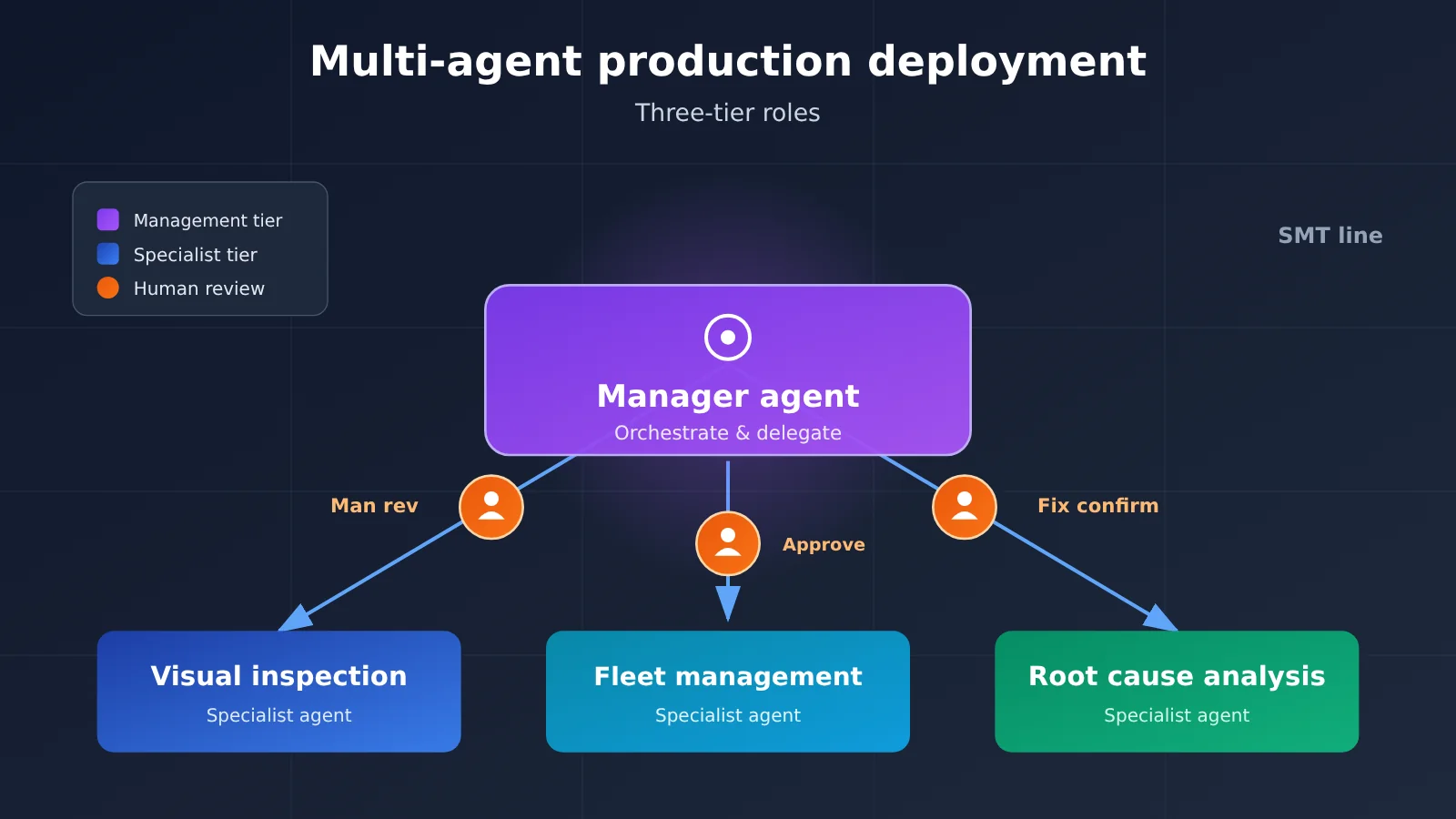
The key to dividing responsibilities across a multi-agent system is to first clarify who handles orchestration, who makes specialist judgments, and who bears ultimate accountability. The table below outlines the basic division of responsibilities among the three roles; the steps later in this article build on it.
| Role | Primary responsibilities | Responsibilities it should not take on | Production value |
|---|---|---|---|
| Manager agent | Understand tasks, create plans, delegate tasks, aggregate results | Replace specialist models in making granular judgments | Connect evidence across systems and reduce manual coordination |
| Specialist agent | Perform inspection, scheduling, and analysis within a bounded context, and return evidence | Overstep to decide the overall workflow or modify global policy | Judgments are verifiable and easier to replace independently |
| Human review checkpoint | Handle uncertain conclusions, approve high-risk actions, confirm remediation plans | Review every low-risk result one by one | Hold the line on safety and quality accountability |
What the manager agent is responsible for in a multi-agent system
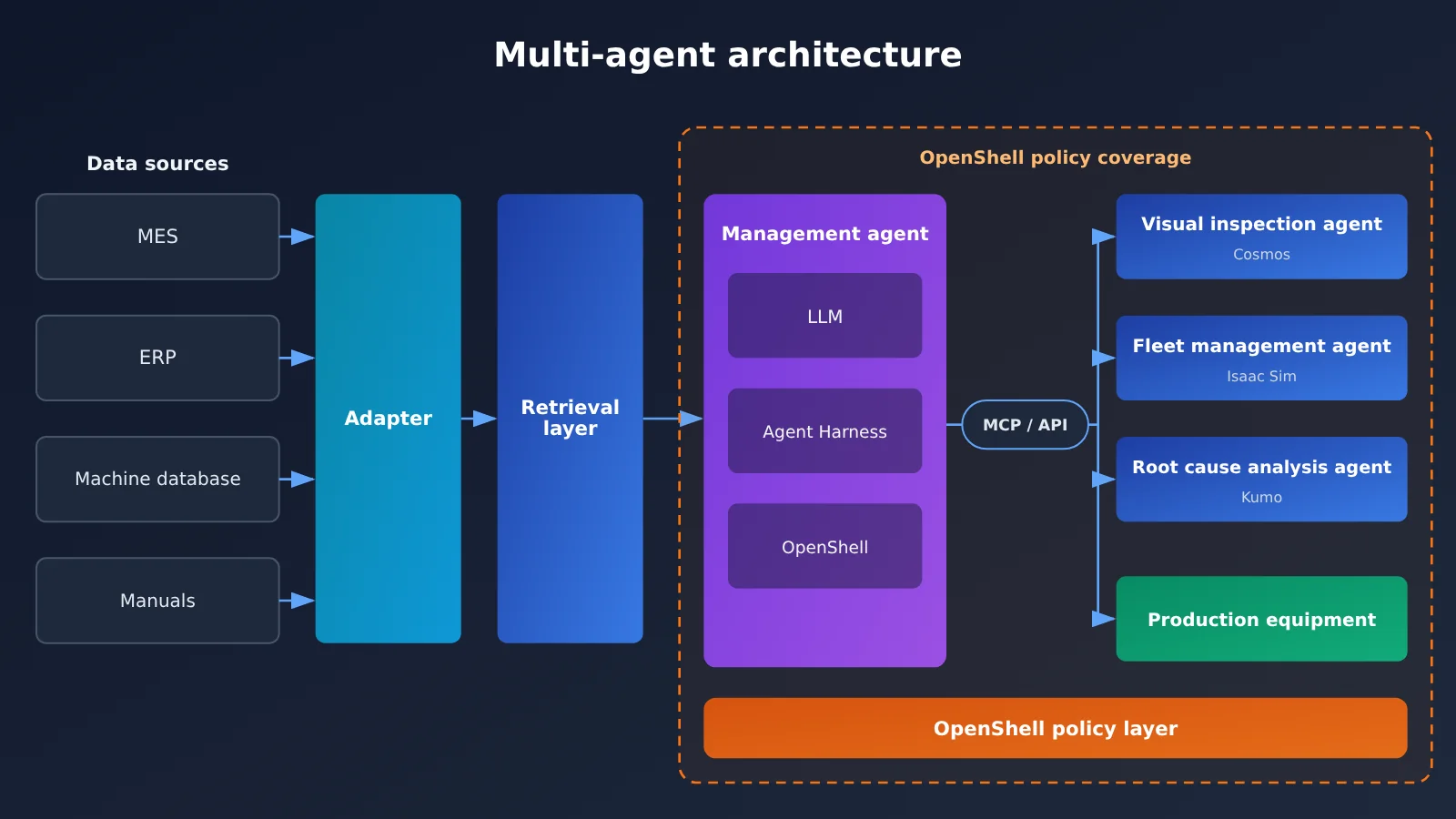
FOX’s manager agent has three components: a Large Language Model (LLM) interprets tasks, correlates data, creates plans, and evaluates results; Agent Harness connects tools, skills, persistent memory, and specialist agents—it uses NemoClaw by default and also supports alternatives; NVIDIA OpenShell isolates the execution environment and enforces access policies for files, commands, and network destinations.
This design shows that the manager agent is not just a prompt; it’s a long-running execution environment. It must keep responding to operators while handling background and scheduled tasks, and it must remember investigation progress. So when dividing responsibilities, put task state, delegation logic, and completion criteria in the management layer rather than spreading them across specialist agents.
How to draw boundaries for specialist agents in a multi-agent system
Specialist agents in FOX are also based on LLMs, each with its own instructions, context, skills, and tools. They can call dedicated models—for example, using NVIDIA Cosmos for visual inspection and Kumo for time-series anomaly detection—and then return their findings to the manager agent, which decides what to do next.
To decide whether to split out a specialist agent, ask three questions: does it need dedicated data or models, does it have independent acceptance criteria, and might it need to call high-privilege tools? If none of the three applies, it’s usually simpler to make it a skill of the manager agent.
How to Split Manager Agents and Specialist Agents: An SMT Production Line Example
The official example starts with an AOI alert. The manager agent gets the board ID, affected components, and inspection images through an MCP server or API, then initiates a second-pass judgment. The board ID is the key field that runs through the entire workflow. The adapter needs to preserve the ID, timestamp, units, and source references so downstream agents can trace production history and machine state.
| Specialist Agent | Input | Capabilities Invoked | Output | Handoff Rules |
|---|---|---|---|---|
| Vision Inspection Agent | Board images, reference samples, approved inspection criteria | NVIDIA Cosmos | Findings, evidence, uncertainty | Confirmed defects move to disposition and investigation; inconclusive results go to a human |
| Fleet Management Agent | Board ID and destination for confirmed defects | NVIDIA Isaac Sim and ROS 2 in the example | Permission and capability check results, completion status | In the initial deployment, operator approval is required before transport |
| Root Cause Analysis Agent | Board ID, process history, inspection and test records | Kumo Anomaly, Elasticsearch | PDF report with source records, suspicious measurements, possible causes, and corrective action recommendations | Sent to the production line manager for review |
Two details here are worth learning from. First, the vision inspection agent doesn’t just output “pass” or “fail”—it also returns evidence and uncertainty, so the manager agent can decide which path to take. Second, root cause analysis can be triggered by a functional test failure. Even if optical inspection finds no visible defect, it doesn’t have to rely on the previous specialist agent’s conclusion.
The root cause analysis agent’s evidence-gathering process is just as clear. For a suspected solder defect, it first uses the reflow oven entry and exit times to locate the oven temperature readings, then uses Kumo Anomaly to find anomalous patterns and compares them against other batches, inspection results, and machine manuals. Historical investigations can guide the search direction, but conclusions must be based on current procedures and records. This lowers the risk of relying on outdated experience.
One more thing to note: in the reference workflow, fleet management is demonstrated in a digital twin environment. When you connect real robots and AMRs (autonomous mobile robots), you must separately complete factory-specific equipment integration. A successful simulation does not mean the system is production-ready.
How to Set Human Review Checkpoints for Multi-Agent Systems
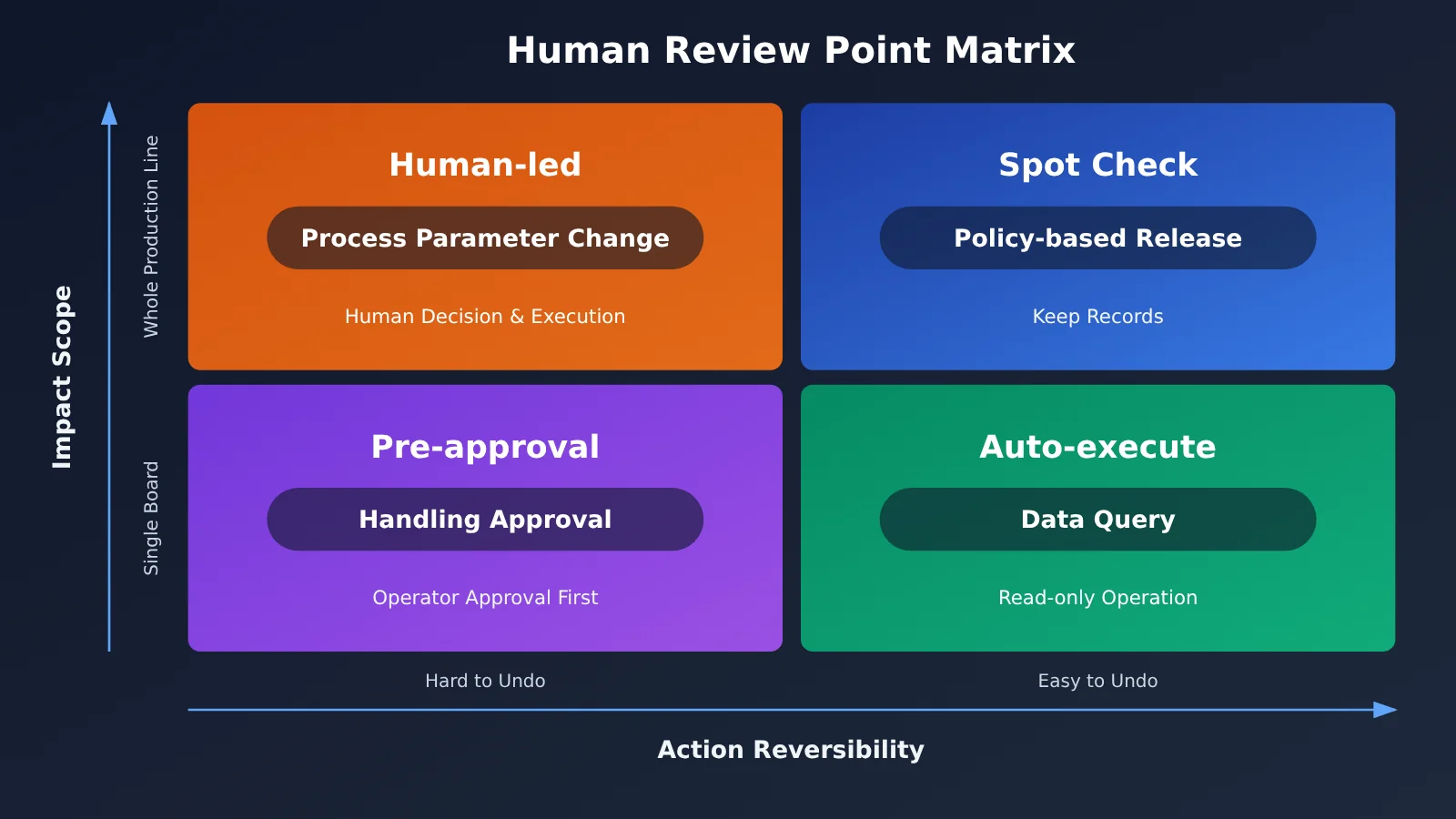
More review checkpoints isn’t automatically better. If reviews are too dense, operators quickly get fatigued and start clicking “approve” out of habit; if reviews are too sparse, wrong actions can directly affect the physical production line. Using the FOX example, the table below works as a first-draft review matrix.
| Decision Scenario | Handling in the Example | Suggested Review Method | Suggested Reviewer |
|---|---|---|---|
| Suspected defect falls within acceptable deviation | Return evidence, continue production per factory policy | Policy-based release, keep records and spot-check | Quality engineer |
| Visual determination is inconclusive | Escalate to human review | Manual item-by-item determination | Quality inspector |
| Confirmed defect requires transport for rework | Initial deployment requires operator approval first | Approval before action | On-site operator |
| Board repair and re-testing | Operator completes it, then packaging | Manual execution with results recorded | Rework operator |
| Root-cause conclusion and remediation recommendations | Output a report for the line manager to review | Decide after report review | Line manager |
The first two columns above come from the official example; the last two are our recommendations for putting it into practice. When you hit a new decision that isn’t in the matrix, ask three questions in order:
- Is the action reversible? Read-only queries and report generation are easy to undo; moving a physical board or changing process parameters costs much more.
- How big is the blast radius? Affecting a single board versus affecting the entire production line should require different approval levels.
- Is the evidence sufficient? When evidence conflicts, data is missing, or the model explicitly says it’s uncertain, escalate to a human instead of continuing to infer.
Ideally, review rules shouldn’t live only in the prompt. FOX uses a policy layer like OpenShell to define which operations are allowed and when operator review is required, so even if the model judges incorrectly, it can’t bypass the execution boundary. Prompts can guide behavior, but real permission control should be enforced by the runtime environment.
Getting Multi-Agent Systems into Production Fast: 6 Implementation Steps
FOX is currently available in early access. The blueprint already covers quite a few patterns, but the factory-specific parts still have to be built by developers. Clarifying the division of responsibility before you start keeps you from mistaking the reference architecture for an out-of-the-box product.
| Module | What the blueprint provides | What the developer owns |
|---|---|---|
| Management agent | Persistent environment with skills, tools, memory, and delegation capabilities | Task definitions, completion criteria, application integration |
| Factory knowledge | Data ingestion and retrieval patterns | Identifier, timestamp, unit, and source-permission mapping |
| Specialist agents | Examples for inspection, root cause analysis, reporting, and fleet management | Factory decision criteria, new roles, output validation |
| Equipment integration | MCP and API patterns, ROS 2 and Isaac Sim connections | Physical device connections and transport strategies |
| Deployment | Service, model endpoint, and optional simulation cell configuration | Resource selection, endpoint configuration, access boundary checks |
Whether or not you adopt FOX, you can move forward with these 6 steps:
- Pick a single closed-loop scenario: Start with a process that has a clear trigger condition, such as “AOI alert to rework and root cause report,” and write down the completion criteria at the same time.
- Unify the data primary keys: Map MES, ERP, and machine databases to one shared set of identifiers, and keep timestamps, units, and source references. Manuals and SOPs should also go into the searchable knowledge base.
- Define the agent output contract: Require specialist agents to return at least a conclusion, the evidence sources, and an uncertainty measure. You can name the fields however you like, but they must be programmatically verifiable.
- Enforce least privilege: Assign tools and network access by role. For example, root cause analysis gets read-only access to production records, while only fleet management can initiate transport — and only after passing permission and capability checks.
- Run in simulation or shadow mode first: Let the agents make recommendations without taking action, use human conclusions as the baseline, and focus your review on false positives, false negatives, and missing evidence.
- Open up automation gradually: Start with pre-action approval. Once the metrics are stable and the responsible person signs off, switch low-risk, reversible actions to policy-based release with spot checks.
For every step, keep an audit trail: input data version, tools invoked, model conclusions, and the approver. The official examples attach source records and suspicious measurements to reports for the same reason — so reviewers can verify the conclusions instead of simply choosing whether to trust them.
Multi-Agent Model Selection and Interface Configuration
FOX lets you choose frontier models or open models based on deployment requirements. Official examples include GPT-6 Astra and NVIDIA Nemotron. In practice, you can evaluate models separately by role—there’s no need for every agent to share the same model.
| Role | Model considerations | Official example capabilities | Prototyping validation channels | Billing basis |
|---|---|---|---|---|
| Management agent | Planning ability, tool calling, long context | GPT-6 Astra, NVIDIA Nemotron | Internal factory endpoints, APIYI (apiyi.com), etc. | Subject to the billing rules of the actual endpoint |
| Specialist agent | Control accuracy and cost on a per-task basis | Based on an LLM and calls specialized models | Internal factory endpoints, APIYI, etc. | For the APIYI channel, refer to the pricing page |
| Vision and time-series models | Domain accuracy, deployment method | NVIDIA Cosmos, Kumo Anomaly | Prioritize deployment according to the blueprint solution | Calculated according to the actual deployment plan |
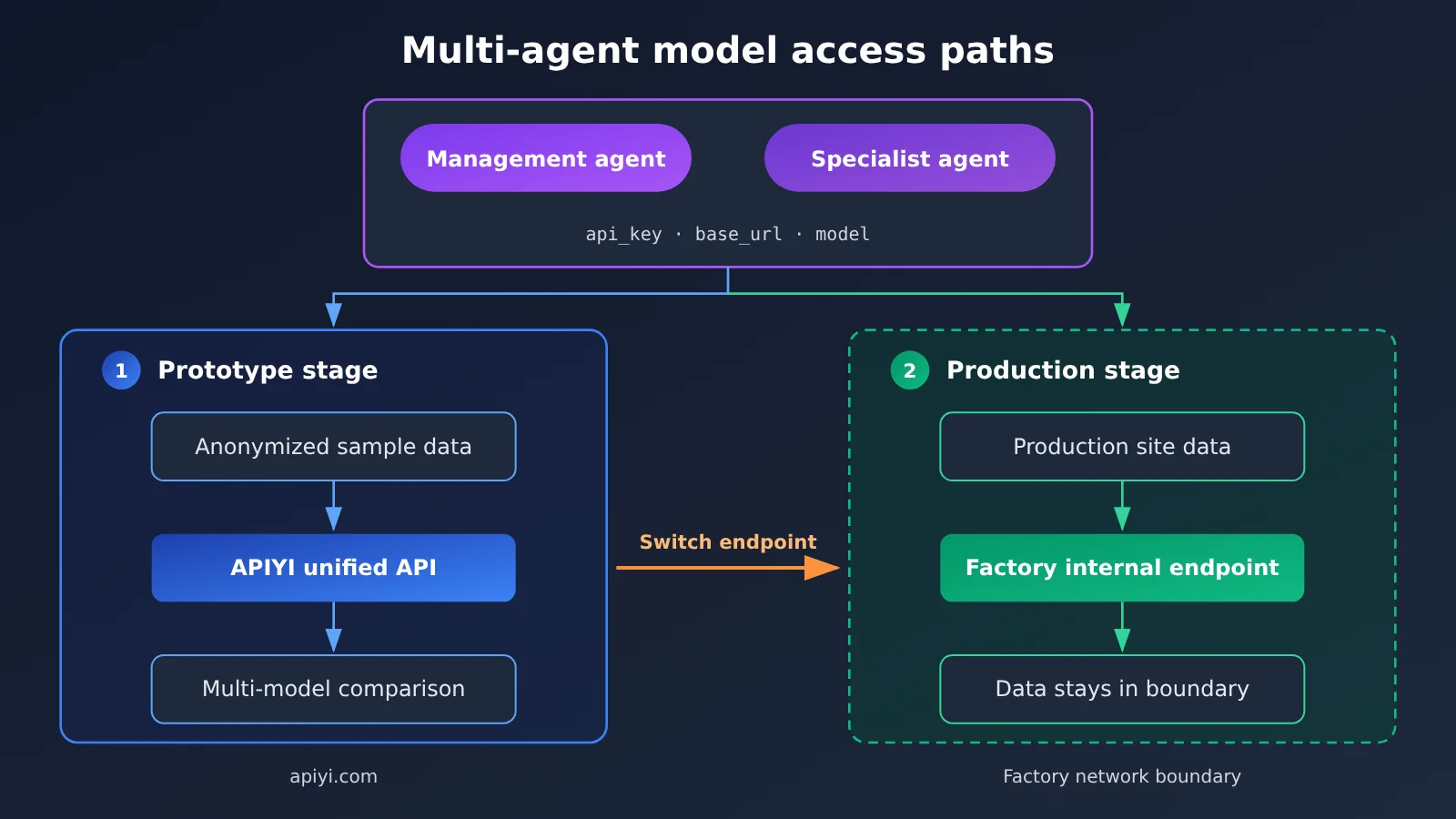
Integration recommendation: If you want to first use anonymized data to validate the division of labor and prompts at the LLM layer, you can call the models covered in this article through APIYI. APIYI is compatible with OpenAI and Anthropic API formats. Usually, you only need to configure three items:
api_key,base_url, andmodel. For the specific endpoint and available models, see the documentation: https://docs.apiyi.com.Pricing note: Model prices, billing methodology, input/output unit prices, and cache pricing are all subject to the actual data on APIYI’s pricing page: https://docs.apiyi.com/models. This article doesn’t list specific numbers. When estimating, it’s recommended to count invocation volume separately for the management layer and the specialist layer.
Frequently Asked Questions (FAQ)
Q1: What is a manager agent in a multi-agent system?
It’s the coordinator responsible for understanding the task, creating a plan, delegating to specialist agents, and consolidating results. In FOX, it also connects memory, skills, and tools, and runs long-term under access policy constraints.
Q2: What’s the difference between a manager agent and a specialist agent?
The manager agent focuses on “what to do next,” while specialist agents focus on “what’s the expert conclusion on this matter.” The former owns the overall workflow; the latter completes focused tasks using only a limited context, skills, and tools, then hands the evidence back to management.
Q3: Which decisions in a multi-agent system must retain human review?
Prioritize judgments with unclear conclusions, physical equipment actions, process parameter changes, and remediation decisions. The official examples explicitly require escalating uncertain results to humans, operator approval before initial transport, and root cause reports reviewed by the line manager.
Q4: Can the factory multi-agent system be fully deployed on-premises?
Yes. FOX supports locally hosting the agent environment, models, and data storage on an NVIDIA DGX Station. But fully on-premises deployment requires all models and service endpoints to be inside the factory network, so that production records, images, prompts, and investigation results stay local.
Q5: How can I quickly validate the multi-agent division of labor through the API?
Start with desensitized samples to set up the manager and specialist roles, then compare how different models break down tasks and invoke tools. With APIYI apiyi.com you can connect using OpenAI- or Anthropic-compatible formats; see docs.apiyi.com for configuration.
Q6: What are the limitations of using externally hosted models? How do I estimate costs?
When using external models, you must assess which data gets sent to the endpoint. Workflows involving sensitive production data should be desensitized first or switched to local models. Costs depend on the number of calls and context length. When calling through APIYI, unit prices and cache pricing are subject to https://docs.apiyi.com/models.
Key Takeaways for Taking Multi-Agent Systems into Production
- Manager agents own the process: One agent is responsible for planning, delegation, status tracking, and aggregating results.
- Specialist agents own the judgment: Carve out independent roles by data, acceptance criteria, and tool permissions.
- Outputs must carry evidence: Conclusions need sources and uncertainty attached so downstream systems can verify them.
- Set review levels by risk: Tier reviews by reversibility, blast radius, and how strong the evidence is.
- Back permissions with policy: Put access boundaries in the runtime environment, not just in the prompt.
- Simulation isn’t mass production: Connecting real equipment requires factory-specific integration and approval workflows.
- Prototype to validate the division of labor first: Compare models through APIYI using desensitized data, then settle on a deployment plan.
Summary
When taking multi-agent systems into production, the core of the split is the boundary of responsibility, not the number of agents:
- Manager agent: Holds the global goal and task state, and coordinates cross-system evidence and next actions.
- Specialist agents: Call dedicated models and tools around a clearly defined task, and return verifiable findings.
- Human review points: Placed on uncertain conclusions, high-risk actions, and final remediation decisions, and enforced by the policy layer.
Start with a single closed-loop workflow with clear triggers. Run data, evidence, and approval chains in shadow mode first, then gradually open up automation. If you need to quickly compare LLM-layer options, you can prototype through APIYI at apiyi.com using a unified interface, then determine the final deployment approach in production based on data boundaries.
📚 References
- NVIDIA Technical Blog: How NVIDIA Factory Operations Blueprint Coordinates AI Agents to Investigate Production Issues
- Link:
developer.nvidia.com/blog/how-nvidia-factory-operations-blueprint-coordinates-ai-agents-to-investigate-production-issues/ -
Note: The factual source for the FOX architecture, the SMT example, and the deployment approach in this article. Published November 4, 2026.
-
APIYI Documentation Center: API integration guide
- Link:
docs.apiyi.com -
Note: Look up the specific configuration details for OpenAI- and Anthropic-compatible formats.
-
APIYI Pricing Page: Model list and billing data
- Link:
docs.apiyi.com/models - Note: Verify model availability, billing rules, input/output unit prices, and cache pricing.
Author: APIYI Technical Team
Technical discussion: Feel free to reach out to us on the APIYI homepage at apiyi.com. For more resources, visit the docs.apiyi.com documentation center.