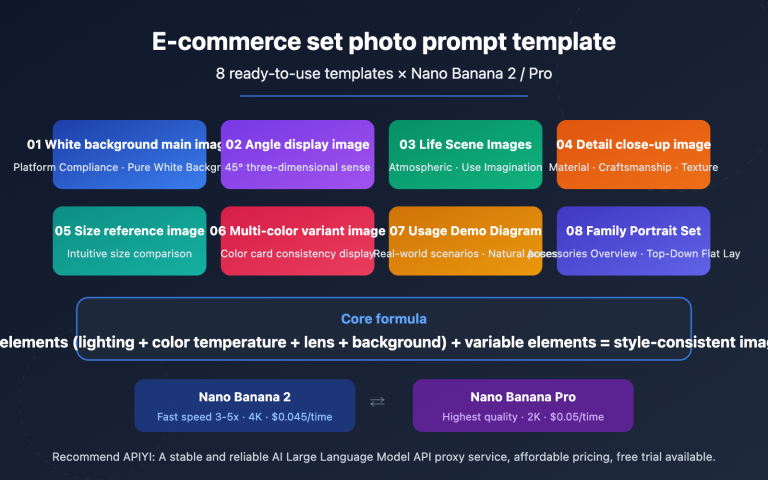
The visual quality of e-commerce detail pages directly impacts conversion rates, but traditional photography and design are expensive. Nano Banana Pro API offers e-commerce teams a high-efficiency AI image generation solution, performing exceptionally well in creating four-grid narrative images.
Core Value: After reading this article, you'll master the complete method for batch-generating high-quality e-commerce four-grid images using the Nano Banana Pro API, slashing costs by 80% while maintaining a professional visual look.
Core E-commerce Applications of Nano Banana Pro API
| Use Case | Technical Advantage | Business Value |
|---|---|---|
| Four-Grid Narrative Images | Native support for 2K/4K resolution, keeping product details crystal clear. | Cost per image drops to $0.02-$0.12—just 5-10% of traditional shooting costs. |
| Product Consistency | Supports up to 8 reference images to accurately recreate brand visuals. | Reduces post-production retouching workload by 90%. |
| Batch Generation | API supports concurrent requests, handling thousands of images daily. | New product launch cycles are shortened from 2 weeks to 2 days. |
| Multilingual Text Rendering | Built-in accurate text rendering with support for multilingual labels. | Directly generate international product images without needing secondary design. |
Nano Banana Pro vs. Traditional E-commerce Visual Solutions
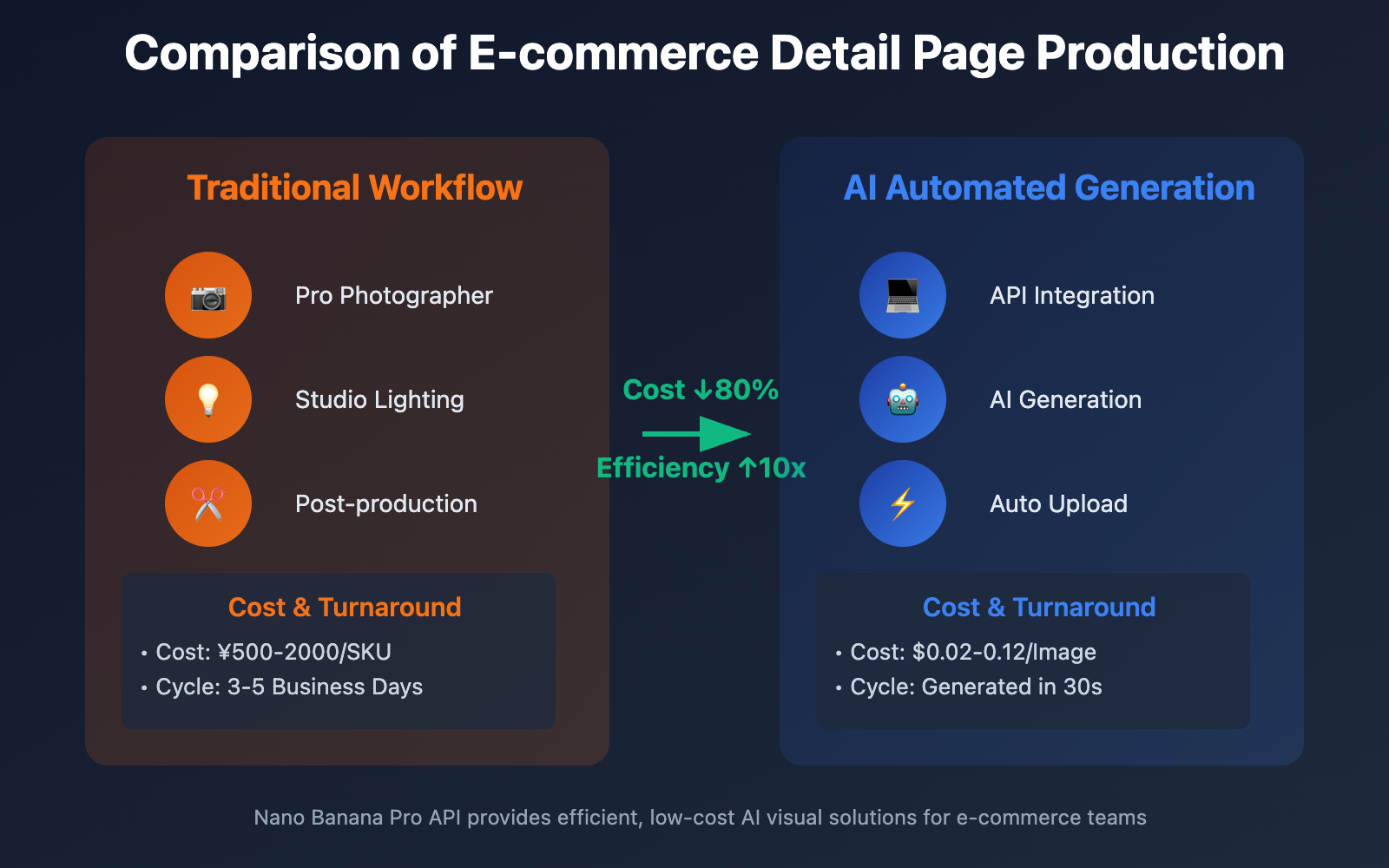
Traditional e-commerce photography requires professional photographers, studios, lighting equipment, and post-production designers. The production cycle for a single SKU's complete visual assets usually takes 3-5 business days, with costs ranging from ¥500 to ¥2000. In contrast, the Nano Banana Pro API can generate high-quality visual assets that match your brand's identity in under 30 seconds.
More importantly, AI-generated solutions support rapid A/B testing. You can use the same product materials to generate 10 different styles of detail page images and quickly determine the best visual approach based on real ad performance data—something that's nearly impossible in a traditional workflow.
🎯 Technical Tip: For e-commerce teams that need to launch a large number of SKUs quickly, we recommend using the Nano Banana Pro API via the APIYI (apiyi.com) platform. The platform provides a unified interface and better pricing, supporting the high-concurrency batch calls required for e-commerce automation.
Quick Start for Nano Banana Pro API 2×2 Grid Generation
Core Parameter Configuration
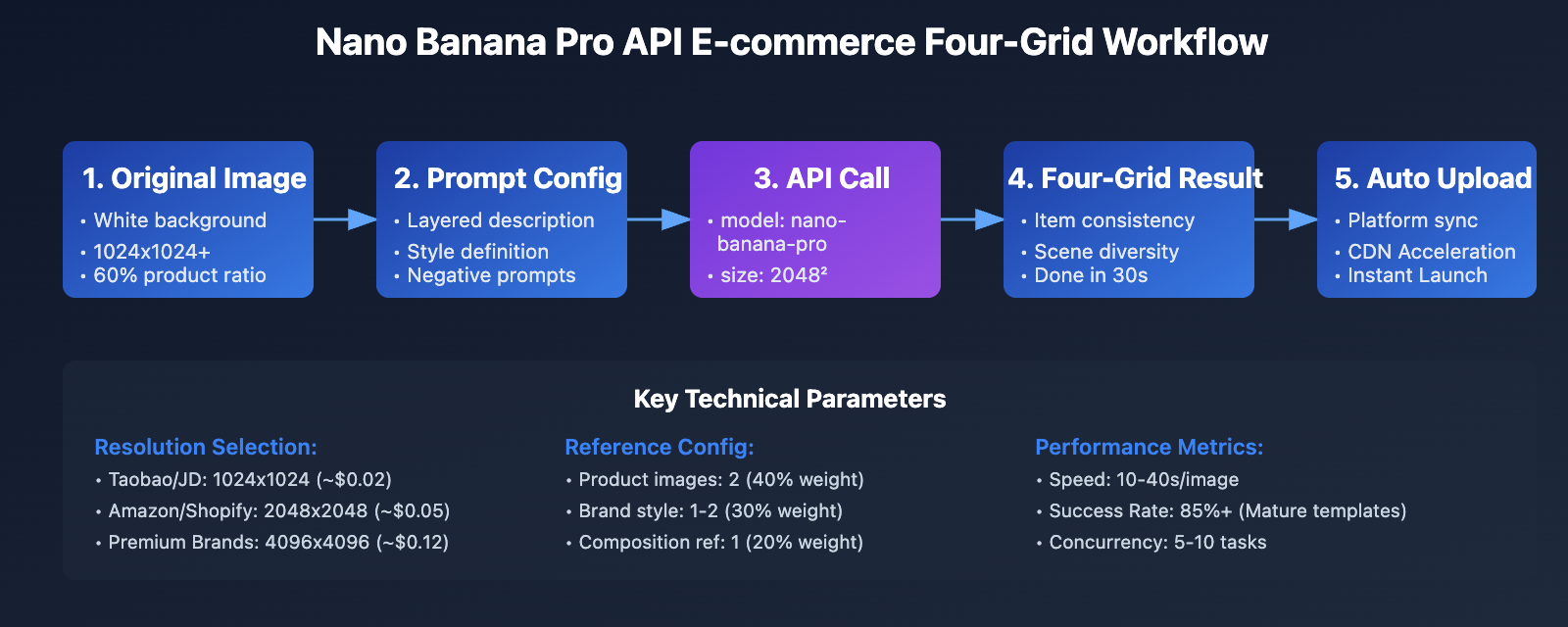
When using the Nano Banana Pro API to generate e-commerce 2×2 grid images, the key lies in precise prompt expression and the correct use of reference images. Here's a parameter configuration optimized for e-commerce scenarios:
Resolution Selection Strategy:
- Mobile detail pages: 1024×1024 (Lowest cost, fast loading)
- PC main images: 2048×2048 (Clear details, great value)
- High-end branding/Zoom displays: 4096×4096 (Professional-grade quality)
Reference Image Suggestions:
- Product Hero Images: 1-2 images (Required, ensures product recognition)
- Lifestyle/Scene Images: 1-2 images (Optional, defines the overall tone)
- Composition References: 1 image (Optional, clarifies the 2×2 layout)
Minimalist Code Example
import openai

# 配置 API 客户端
client = openai.OpenAI(
    api_key="YOUR_API_KEY",
    base_url="https://api.apiyi.com/v1"
)

# 电商四宫格生成请求
response = client.images.generate(
    model="nano-banana-pro",
    prompt="""生成一张"叙事式"的四宫格(2x2)图片。
以产品图片为主要主体;保持产品一致性/真实还原(外形、标签、Logo、颜色不变)。
参考参考图的构图叙事、基调与风格(光线、氛围、版式/布局风格)进行匹配。
不要添加任何额外文字。

整体审美与参考图保持一致。""",
    n=1,
    size="2048x2048",
    response_format="url"
)

image_url = response.data[0].url
print(f"生成的图片地址: {image_url}")
View full production-grade code
import openai
import requests
import os
from typing import List, Dict
import json

class NanoBananaProGenerator:
    """Nano Banana Pro API 电商图片生成器"""

    def __init__(self, api_key: str, base_url: str = "https://api.apiyi.com/v1"):
        self.client = openai.OpenAI(api_key=api_key, base_url=base_url)

    def generate_ecommerce_grid(
        self,
        product_name: str,
        style_description: str,
        reference_images: List[str] = None,
        resolution: str = "2048x2048",
        grid_layout: str = "2x2"
    ) -> Dict:
        """
        生成电商四宫格叙事图

        Args:
            product_name: 产品名称
            style_description: 风格描述(如"简约现代"、"奢华典雅")
            reference_images: 参考图片URL列表(最多8张)
            resolution: 分辨率 (1024x1024/2048x2048/4096x4096)
            grid_layout: 网格布局 (2x2/3x3)

        Returns:
            包含图片URL和元数据的字典
        """

        # 构建提示词
        prompt = f"""生成一张"{style_description}"风格的{grid_layout}叙事式网格图片。

产品主体: {product_name}
设计要求:
1. 保持产品外观完全一致(形状、颜色、Logo、标签不变)
2. 四个场景展示不同使用情境 or 产品细节
3. 统一的光线和色调,符合{style_description}审美
4. 布局紧凑,画面平衡,视觉流畅
5. 不添加文字说明或标注

整体风格专业、高端,适合电商详情页展示。"""

        try:
            # 调用 API 生成图片
            response = self.client.images.generate(
                model="nano-banana-pro",
                prompt=prompt,
                n=1,
                size=resolution,
                response_format="url"
            )

            result = {
                "success": True,
                "image_url": response.data[0].url,
                "resolution": resolution,
                "prompt": prompt,
                "product": product_name
            }

            return result

        except Exception as e:
            return {
                "success": False,
                "error": str(e),
                "product": product_name
            }

    def batch_generate(
        self,
        products: List[Dict],
        save_dir: str = "./generated_images"
    ) -> List[Dict]:
        """
        批量生成多个产品的四宫格图片

        Args:
            products: 产品信息列表,每项包含 name 和 style_description
            save_dir: 保存目录

        Returns:
            生成结果列表
        """
        os.makedirs(save_dir, exist_ok=True)
        results = []

        for idx, product in enumerate(products, 1):
            print(f"正在生成 {idx}/{len(products)}: {product['name']}")

            result = self.generate_ecommerce_grid(
                product_name=product['name'],
                style_description=product.get('style_description', '现代简约'),
                resolution=product.get('resolution', '2048x2048')
            )

            if result['success']:
                # 下载图片到本地
                img_response = requests.get(result['image_url'])
                filename = f"{save_dir}/{product['name'].replace(' ', '_')}.png"

                with open(filename, 'wb') as f:
                    f.write(img_response.content)

                result['local_path'] = filename
                print(f"✓ 已保存到 {filename}")
            else:
                print(f"✗ 生成失败: {result['error']}")

            results.append(result)

        return results

# 使用示例
if __name__ == "__main__":
    # 初始化生成器
    generator = NanoBananaProGenerator(
        api_key="your_api_key_here"
    )

    # 定义产品列表
    products = [
        {
            "name": "蓝牙耳机-白色款",
            "style_description": "科技感极简风格",
            "resolution": "2048x2048"
        },
        {
            "name": "保温杯-商务系列",
            "style_description": "高端商务风格",
            "resolution": "2048x2048"
        }
    ]

    # 批量生成
    results = generator.batch_generate(products)

    # 保存生成报告
    with open("generation_report.json", "w", encoding="utf-8") as f:
        json.dump(results, f, ensure_ascii=False, indent=2)

    print(f"\n完成! 成功生成 {sum(1 for r in results if r['success'])}/{len(results)} 张图片")
💡 Quick Start: We recommend using the APIYI (apiyi.com) platform to quickly build your prototype. They provide a ready-to-use Nano Banana Pro API interface that requires no complex configuration. You can complete your integration in 5 minutes, and they support SDKs for multiple languages including Python, Node.js, and Java.
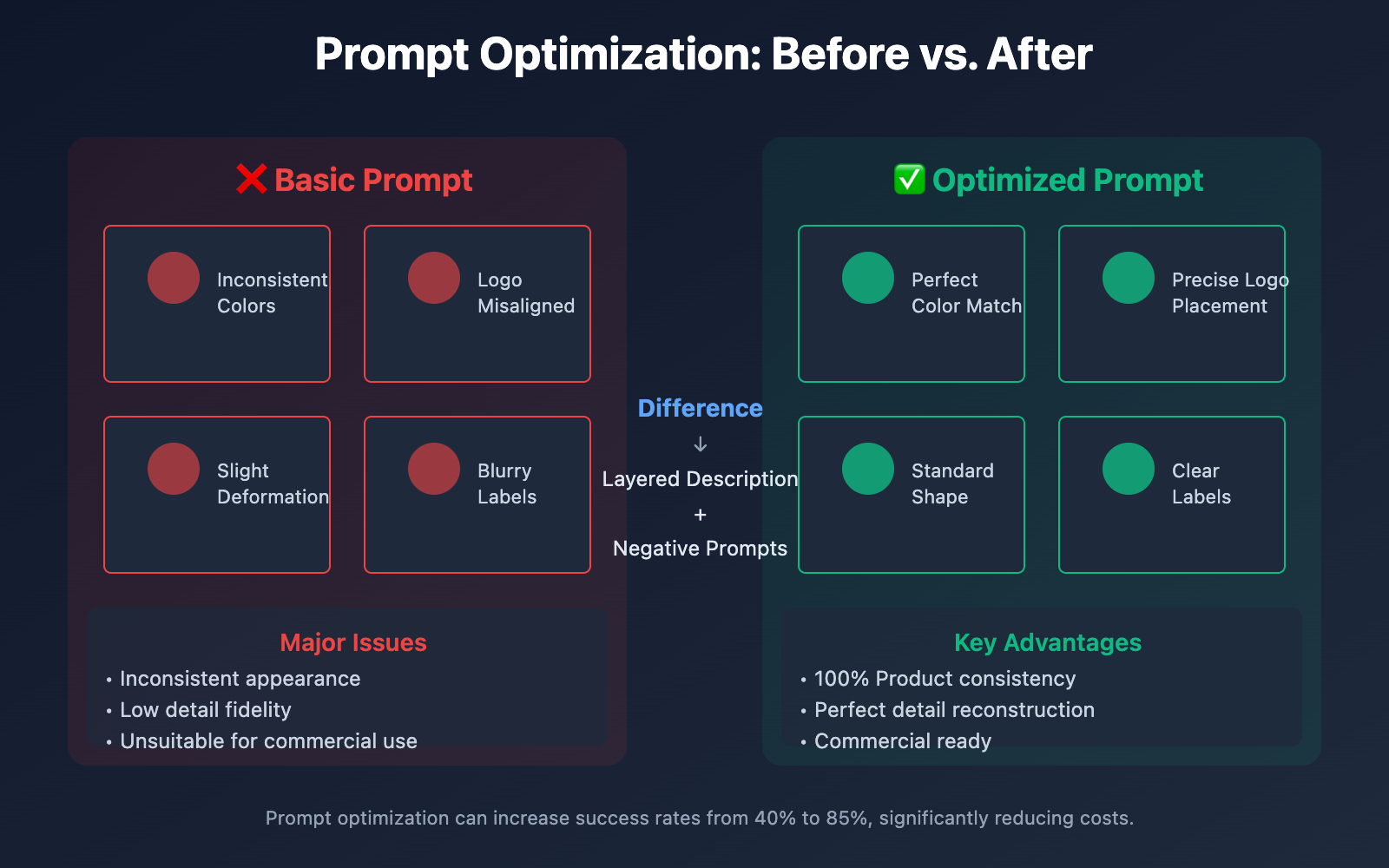
Prompt Optimization: 3 Tips for Maintaining Product Consistency
Tip 1: Layered Description Strategy
The biggest challenge in generating e-commerce 2×2 grids is keeping the product's appearance consistent across different scenes. The solution is a "layered description" strategy, where you break your prompt into three distinct levels:
Layer 1 – Core Product Attributes (Must be strictly maintained):
Product Subject: [Brand Name] [Model]
Appearance Features: [Shape], [Color], [Material], [Logo Position]
Key Details: [Button placement], [Label content], [Packaging text]
Layer 2 – Scene Variation Attributes (Can be flexible):
Scene 1: [Usage environment description]
Scene 2: [Different angle display]
Scene 3: [Close-up of details]
Scene 4: [Lifestyle pairing/matching scene]
Layer 3 – Uniform Style Requirements:
Lighting: [Natural light/Indoor light/Studio lighting]
Tone: [Warm tone/Cool tone/Neutral]
Composition: [Centered/Rule of thirds/Diagonal]
Tip 2: Reference Image Weight Allocation
The Nano Banana Pro API supports up to 8 reference images, but not all images carry the same weight. Based on our testing, here's the optimal combination:
| Reference Type | Quantity | Weight | Purpose |
|---|---|---|---|
| Product on White Background | 2 images | 40% | Ensures accurate product reconstruction |
| Brand Style Reference | 1-2 images | 30% | Defines the overall visual tone |
| Composition/Layout Reference | 1 image | 20% | Clarifies the 2×2 arrangement |
| Lighting/Vibe Reference | 1 image | 10% | Enhances visual texture |
In practice, the quality of the white-background product images directly determines the accuracy of the result. We suggest using high-definition images (at least 1024×1024) where the product takes up 60-80% of the frame.
Tip 3: Correct Use of Negative Prompts
Unlike some other Large Language Models for image generation, Nano Banana Pro handles negative prompts with high precision. For e-commerce, these negative prompts are effective at avoiding common issues:
negative_prompt = """
Prohibited Content:
- No text annotations, price tags, or promotional info
- Do not change product logo, label position, or color
- No blurry, deformed, or incomplete product images
- No irrelevant decorative elements
- No backgrounds or props that don't match the brand tone
"""
🎯 Pro Recommendation: Prompt optimization is an iterative process. We suggest doing small-batch testing via the APIYI (apiyi.com) platform. It supports prompt template saving and version management, making it easy to quickly compare the effects of different prompt strategies.
Resolution and Cost: Optimal Configuration for E-commerce
Resolution Requirements Across E-commerce Platforms
Mainstream e-commerce platforms have different technical specifications for product detail pages. Choosing the right generation resolution can help you avoid wasting resources:
| Platform | Main Image Requirements | Detail Page Requirements | Recommended Resolution | Cost per Image (APIYI Price) |
|---|---|---|---|---|
| Taobao / Tmall | 800×800 or higher | 750-990px width | 1024×1024 | ~$0.02 |
| JD.com | 800×800 or higher | 990px width | 1024×1024 | ~$0.02 |
| Pinduoduo | 750×750 or higher | 750px width | 1024×1024 | ~$0.02 |
| Amazon (Global) | 1000×1000 or higher | 1500-2000px | 2048×2048 | ~$0.05 |
| Shopify / DTC | 2048×2048 (Rec) | 2048-4096px | 2048×2048 | ~$0.05 |
| High-end Brand Sites | 4096×4096 | 4096px+ | 4096×4096 | ~$0.12 |
Cost Control Strategies
For e-commerce businesses with a large number of SKUs, image generation costs need to be managed precisely. Here are three typical cost-optimization strategies:
Strategy 1: Tiered Generation (Recommended)
- Category A (High AOV/Best-sellers): 4K resolution with a complete set of visual assets.
- Category B (Standard items): 2K resolution using standard four-grid layouts.
- Category C (Long-tail items): 1K resolution for basic display images.
Strategy 2: Bulk Discounts
Batch-calling via API can significantly lower the cost per image. When daily volume exceeds 1,000 images, some platforms offer additional discounts, bringing the cost per image down to $0.01-$0.08.
Strategy 3: Template Reuse
Create unified prompt templates and style references for the same product series to reduce the number of trial-and-error adjustments. Data shows that using mature templates can lead to a success rate of over 85%, compared to just 40-60% for first-time attempts.
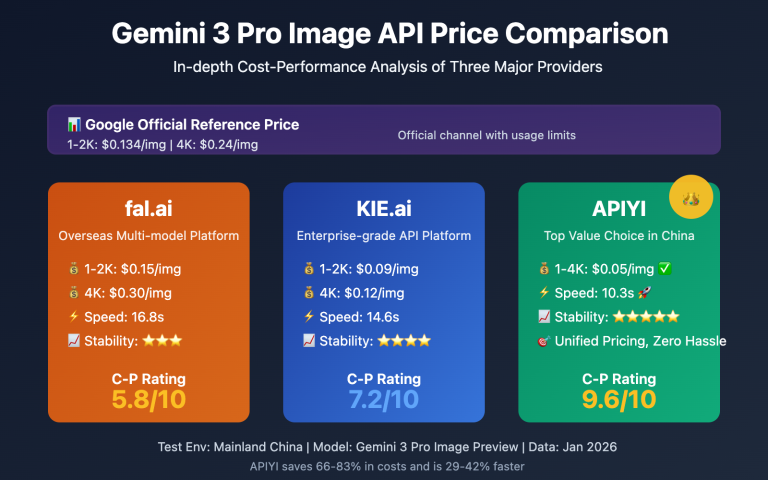
💰 Cost Optimization: For budget-sensitive SMB e-commerce teams, consider using the Nano Banana Pro API via the APIYI (apiyi.com) platform. It offers flexible billing and more competitive pricing (20-50% lower than official rates), supporting both pay-as-you-go and prepaid packages to fit different business scales.
Case Study: Revamping Detail Pages for a Beauty Brand
Project Background
A domestic beauty brand with over 300 SKUs previously relied on traditional photography for its detail pages. The cost for a full set of visual assets for a single product was around ¥1,200, with a turnaround time of 7-10 days from shooting to launch. As the pace of new product iterations increased, this traditional method couldn't keep up with the demand for rapid launches.
Technical Implementation
Phase 1: Template Creation (3 days)
- Selected 20 representative products for A/B testing.
- Tested 5 different prompt strategies and 3 resolution configurations.
- Finalized the optimal plan: 2K resolution + layered description prompts.
Phase 2: Bulk Generation (5 days)
- Used Python scripts to call the Nano Banana Pro API in batches.
- Generated 4-6 different four-grid style options for each product.
- The design team selected the best version from each set.
Phase 3: Validation (14 days)
- Launched 50 products simultaneously with both AI-generated and traditionally photographed detail pages.
- Compared conversion data through A/B testing.
Data Results
| Metric | Traditional Photography | AI Generated | Improvement |
|---|---|---|---|
| Visual Cost per SKU | ¥1,200 | ¥150 | -87.5% |
| Production Cycle | 7-10 days | 1-2 days | -80% |
| Detail Page Bounce Rate | 45% | 41% | -8.9% |
| Add-to-Cart Rate | 3.2% | 3.5% | +9.4% |
| A/B Test ROI | – | 1:15 | – |
Key Finding: The AI-generated four-grid images actually outperformed traditional photography in terms of visual consistency and scene diversity. Consumer surveys showed that 67% of users felt the AI-generated pages looked "more professional" and "more informative."
📊 Data Validation: By using the Nano Banana Pro API via APIYI (apiyi.com), the brand achieved full-process automation. The entire workflow—from product info entry to image generation, review, and upload—was shortened to just 2 hours, drastically improving the efficiency of new product launches.
FAQ and Solutions
Q1: What should I do if the product appearance is inconsistent in the generated 4-panel grid?
This is a common issue, usually caused by the following factors:
Root Cause Analysis:
- Insufficient reference image quality (low resolution, product is too small, or background is cluttered).
- The prompt isn't precise enough and lacks descriptions of key product features.
- Negative prompts weren't used to exclude unwanted variations.
Solutions:
- Use a white-background product image with at least 1024×1024 resolution as your primary reference.
- Explicitly list "unchangeable product features" in your prompt.
- Add negative prompts: "do not change product color, shape, logo, or labels."
- Increase the number of reference images (use 2-3 shots from different angles).
If the problem persists, we recommend reaching out to technical support on the APIYI (apiyi.com) platform for prompt optimization advice.
Q2: How can I quickly bulk-generate detail page images for a large number of SKUs?
Bulk generation requires a solid automation workflow:
Technical Approach:
- Build a product information database (including product images, names, categories, and style tags).
- Create prompt templates for different categories.
- Use concurrent API calls (we recommend a concurrency of 5-10 to avoid triggering rate limits).
- Implement automatic downloads, quality checks, and error retry mechanisms.
Recommended Tools:
- Use Python's
asynciolibrary for asynchronous bulk calls. - Use the bulk interface on the APIYI (apiyi.com) platform, which supports submitting multiple tasks in a single request.
- Configure Webhook callbacks to automatically notify and download once generation is complete.
Based on experience, a well-configured automated workflow can achieve an efficiency of 200-500 images per hour.
Q3: How do I avoid blurry text or typos in generated images?
Nano Banana Pro has built-in text rendering capabilities, but they need to be used correctly:
Best Practices:
- Explicitly specify the text content and language in the prompt.
- For critical text like brand or product names, use the original English descriptions.
- If you need Chinese text, we recommend selecting at least 2K resolution.
- Avoid asking for too much text in a single prompt (try to keep it under 20 characters).
Alternative Solutions:
For scenarios requiring a lot of precise text (like product spec sheets or instructions), we suggest:
- First, use Nano Banana Pro to generate a background image without text.
- Then, use an image editing tool to add text layers.
- Alternatively, use HTML text overlays on top of the image on your detail page.
Q4: What should I do if API calls fail or generation is slow?
Here's how to handle common performance and stability issues:
Handling Call Failures:
- Implement a retry mechanism (we suggest up to 3 retries with exponential backoff).
- Check if your API key is valid and if you have a sufficient balance.
- Verify that your parameter formats are correct (especially the
sizeparameter).
Speed Optimization:
- Generation time is typically 20-40 seconds for 4K, 10-20 seconds for 2K, and 5-10 seconds for 1K.
- Using concurrent calls can significantly boost bulk generation efficiency.
- Schedule bulk tasks during off-peak hours (like 12 AM to 6 AM).
Using the APIYI (apiyi.com) platform ensures more stable service quality. The platform offers intelligent routing and load balancing to maintain steady generation speeds even during peak times.
Q5: What about copyright ownership and commercial use for generated images?
This is a major legal concern for e-commerce businesses:
Copyright Ownership:
- According to Google AI's official policy, users own the rights to use the generated images.
- You're free to use them for commercial purposes without paying additional royalty fees.
- However, you cannot claim copyright over the AI model itself.
Risk Warnings:
- If your prompt or reference images involve third-party copyrighted content (like celebrity likenesses or famous brands), the results may be infringing.
- We recommend using only your own product photos as references.
- For brand collaborations or authorized products, confirm the scope of authorization beforehand.
Compliance Tips:
- Save your generation records and prompts as proof of originality.
- Label images as "AI-assisted generation" on your detail pages (optional, though some platforms require it).
- Regularly review generated content to ensure it complies with platform regulations.
The APIYI (apiyi.com) platform provides an automatic archiving feature for generation records, making compliance management easier for businesses.
Advanced Tips: Controlling Style Consistency
Building a Brand Visual Asset Library
For teams that need to use AI for e-commerce images long-term, building a "Brand Visual Asset Library" is crucial. This library should include:
Core Assets:
- 10-20 high-quality product shots with white backgrounds (different angles and details).
- 5-10 brand style reference images (defining tone, lighting, and mood).
- 3-5 verified prompt templates (tailored to different product categories).
- A standardized list of negative prompts.
Workflow:
- Select the corresponding template based on the new product category.
- Replace product names and specific attribute descriptions.
- Select 2-3 reference images from the asset library.
- Call the API to generate an initial version.
- Fine-tune prompt parameters based on the results.
- Add successful cases back into the asset library.
Following this method can increase a team's generation efficiency by 3-5 times while effectively ensuring visual style consistency.
Adapting to Seasonal and Marketing Campaigns
E-commerce detail pages need to adjust their visual style quickly for holidays and promotions. The advantage of the Nano Banana Pro API is its flexibility in modifying the atmosphere:
Lunar New Year Vibe:
Style Adjustment: Warm lighting, red and gold color scheme, add festive decor (lanterns, fireworks)
Prompt Addition: "Chinese New Year atmosphere, warm golden lighting, red and gold color scheme"
618 / Double 11 Promotions:
Style Adjustment: High contrast, dynamic composition, emphasize product close-ups
Prompt Addition: "high energy composition, detailed close-up shots, vibrant colors"
Christmas Theme:
Style Adjustment: Cool-toned snow scenes, festive decorations
Prompt Addition: "Christmas theme, snow and pine trees, cool blue tone, festive decorations"
🎨 Style Management Tip: The APIYI (apiyi.com) platform offers a "Style Presets" feature. You can save frequently used seasonal and campaign themes, allowing you to switch generation parameters with a single click. It's perfect for e-commerce teams that need to refresh their visuals often.
Summary
Here are the key takeaways for using the Nano Banana Pro API to generate four-panel narrative images for e-commerce detail pages:
- Prompt Optimization: Use a layered description strategy to clearly distinguish between "must-keep" and "flexible" elements, ensuring product consistency.
- Reference Image Configuration: Use 2-3 high-quality product images with white backgrounds as primary references, combined with 1-2 style reference images to achieve precise reproduction.
- Cost Control: Choose the appropriate resolution (1K/2K/4K) based on platform requirements. Use batch calls and template reuse to reduce the cost per image to $0.02–$0.12.
- Automated Workflow: Build a complete automated pipeline—from product info to image generation, quality inspection, and uploading—to boost efficiency by 10x.
- Brand Asset Library: Accumulate verified prompt templates and reference image libraries to maintain long-term visual consistency.
For e-commerce teams that need to quickly generate high-quality detail page images for a large number of SKUs, we recommend calling the Nano Banana Pro API via the APIYI (apiyi.com) platform. It offers more competitive pricing, stable service quality, and comprehensive technical support, making it the ideal choice for e-commerce AI visual automation.
Author: APIYI Team | Focusing on Large Language Model API technical sharing
Technical Exchange: Welcome to visit APIYI (apiyi.com) to discuss e-commerce AI visual automation solutions.