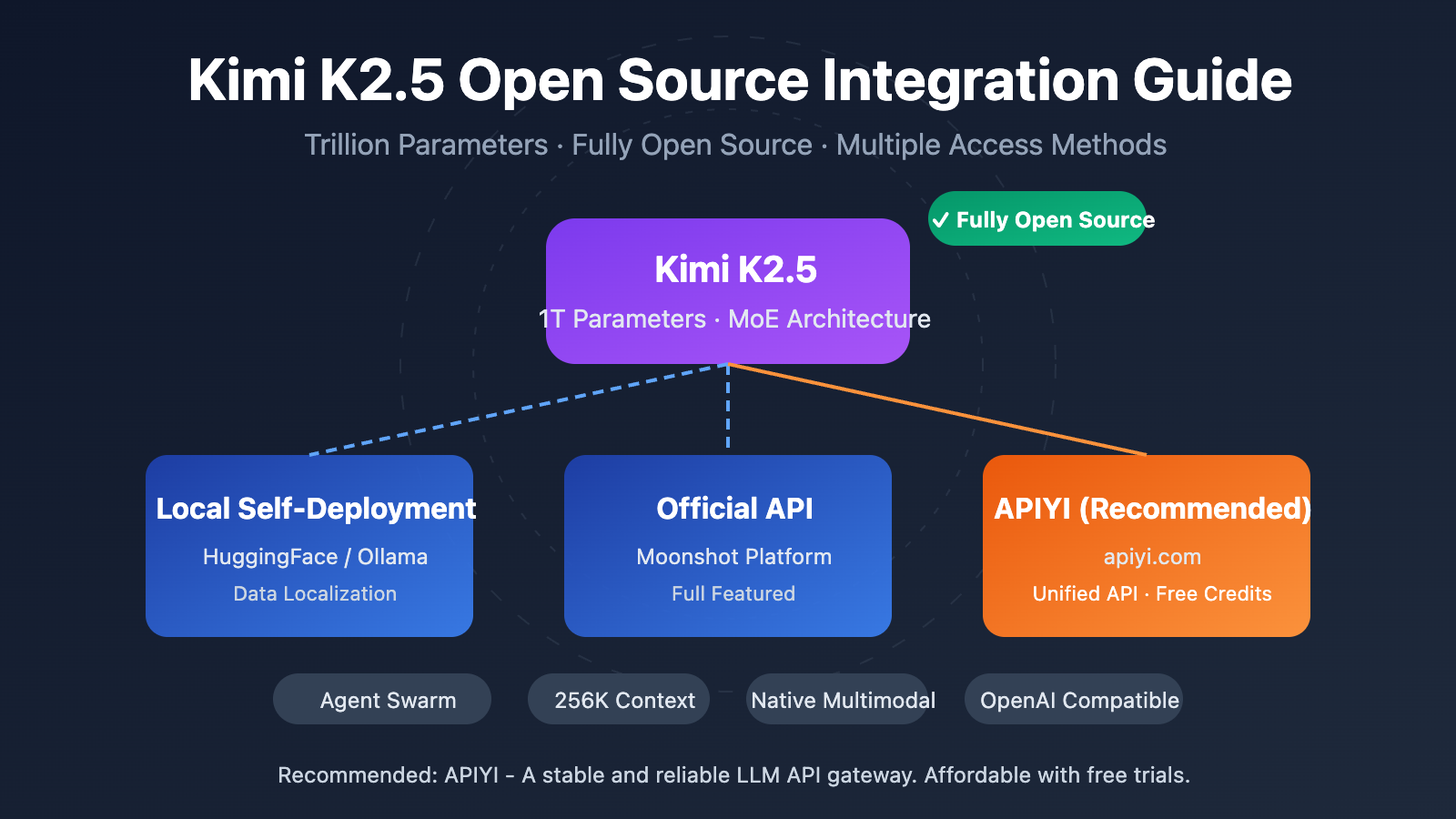
Author's Note: Kimi K2.5 is now fully open-source. This article explains the open-source license, model download links, and API access methods in detail, and provides a complete code example for quickly calling Kimi K2.5 via APIYI.
Has Kimi K2.5 gone open source? That's been the top question for many developers lately. Well, good news: Moonshot AI officially released and completely open-sourced Kimi K2.5 on January 26, 2026. This includes both the code and the model weights under a Modified MIT License.
Core Value: By the end of this post, you'll understand the details of Kimi K2.5’s open-source release and master three ways to integrate it—self-deployment, the official API, or third-party platforms like APIYI (apiyi.com). You'll be ready to use this trillion-parameter multimodal Large Language Model in your projects in no time.
Key Highlights of Kimi K2.5 Open Source
| Key Point | Description | Benefit for Developers |
|---|---|---|
| Fully Open Source | Both code and weights are open source under Modified MIT License | Supports commercial use, local deployment, and fine-tuning |
| Trillion-Parameter MoE | 1T total parameters, 32B activated parameters | Performance rivals closed-source models at a lower cost |
| Native Multimodal | Supports image, video, and document understanding | One model handles various input types |
| Agent Swarm | Up to 100 parallel sub-agents | 4.5x efficiency boost for complex tasks |
| OpenAI Compatible | API format is fully compatible with OpenAI | Near-zero cost to migrate existing code |
Deep Dive into Kimi K2.5's Open Source License
Kimi K2.5 uses the Modified MIT License, which means:
- Commercial Use: You can use it in commercial products without paying any licensing fees.
- Modification and Distribution: You're free to modify the model and redistribute it.
- Local Deployment: It fully supports private deployment, ensuring your data stays local.
- Fine-tuning: You can perform domain-specific fine-tuning based on the open-source weights.
Unlike the more restrictive licenses of the LLaMA series, Kimi K2.5’s license is much friendlier to developers, making it especially suitable for enterprise-level applications.
How to Get Kimi K2.5 Open Source Resources
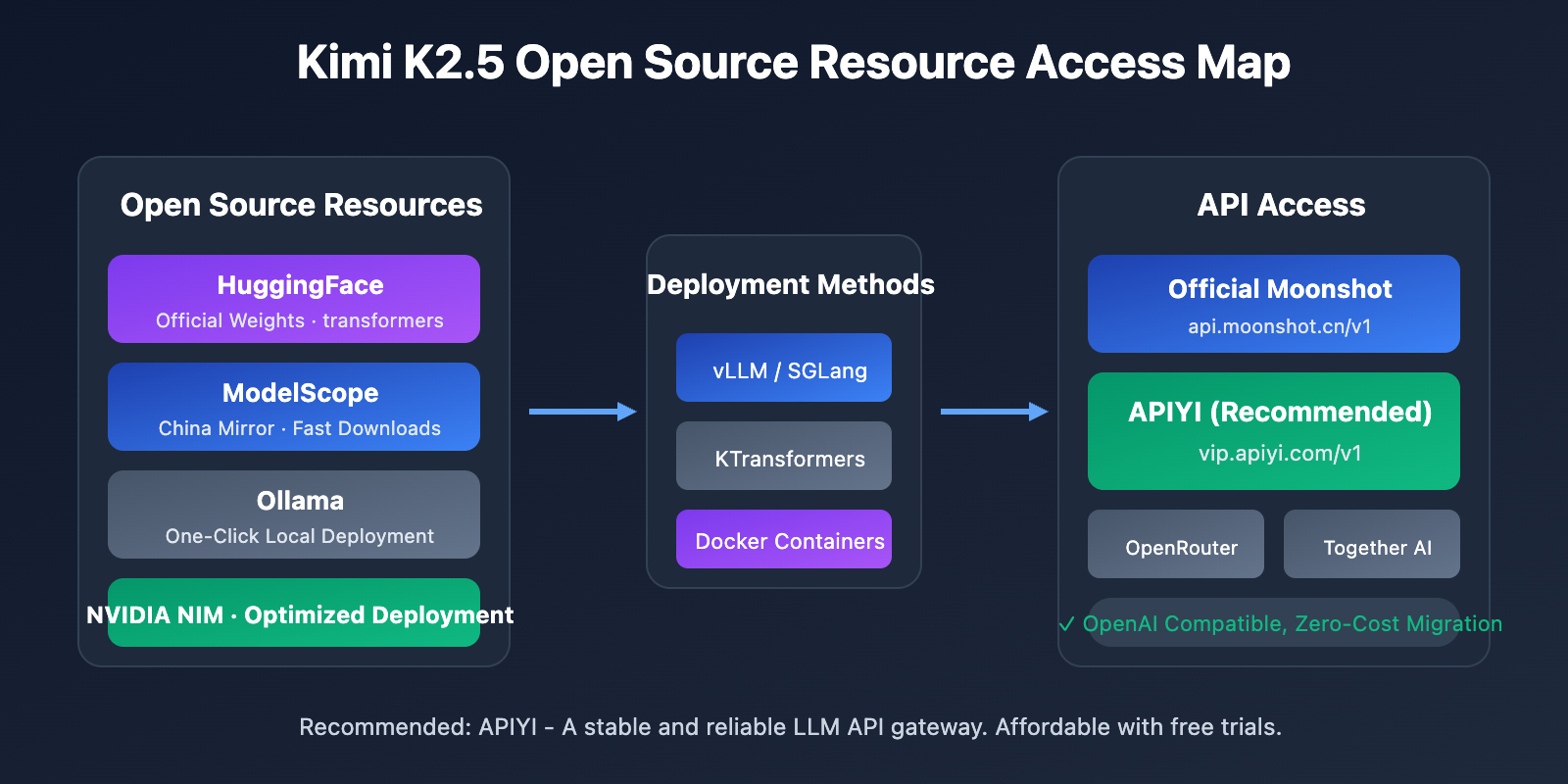
You can grab the model weights and code through the following channels:
| Resource | Address | Description |
|---|---|---|
| HuggingFace | huggingface.co/moonshotai/Kimi-K2.5 |
Official weights, supports transformers 4.57.1+ |
| NVIDIA NIM | build.nvidia.com/moonshotai/kimi-k2.5 |
Optimized deployment images |
| ModelScope | modelscope.cn/models/moonshotai/Kimi-K2.5 |
Mainland China mirror for faster downloads |
| Ollama | ollama.com/library/kimi-k2.5 |
One-click local execution |
Quick Start: Integrating Kimi K2.5
There are three main ways to integrate Kimi K2.5: self-deployment, the official API, or third-party platforms. For most developers, I'd recommend the API integration method. It lets you quickly test things out without needing any GPU resources.
Minimalist Example
Here's the simplest code snippet to call Kimi K2.5 via the APIYI platform—you can get it running in just 10 lines:
import openai

client = openai.OpenAI(
    api_key="YOUR_API_KEY",  # Get this at apiyi.com
    base_url="https://vip.apiyi.com/v1"
)

response = client.chat.completions.create(
    model="kimi-k2.5",
    messages=[{"role": "user", "content": "Explain the basic principles of quantum computing"}]
)
print(response.choices[0].message.content)
View full code for Kimi K2.5 Thinking Mode
import openai
from typing import Optional

def call_kimi_k25(
    prompt: str,
    thinking_mode: bool = True,
    system_prompt: Optional[str] = None,
    max_tokens: int = 4096
) -> dict:
    """
    Call the Kimi K2.5 API

    Args:
        prompt: User input
        thinking_mode: Whether to enable thinking mode (deep reasoning)
        system_prompt: System prompt
        max_tokens: Maximum output token count

    Returns:
        A dictionary containing the reasoning process and the final answer
    """
    client = openai.OpenAI(
        api_key="YOUR_API_KEY",
        base_url="https://vip.apiyi.com/v1"
    )

    messages = []
    if system_prompt:
        messages.append({"role": "system", "content": system_prompt})
    messages.append({"role": "user", "content": prompt})

    # Configure reasoning mode
    extra_body = {}
    if not thinking_mode:
        extra_body = {"thinking": {"type": "disabled"}}

    response = client.chat.completions.create(
        model="kimi-k2.5",
        messages=messages,
        max_tokens=max_tokens,
        temperature=1.0 if thinking_mode else 0.6,
        top_p=0.95,
        extra_body=extra_body if extra_body else None
    )

    result = {
        "content": response.choices[0].message.content,
        "reasoning": getattr(response.choices[0].message, "reasoning_content", None)
    }
    return result

# Usage example - Thinking Mode
result = call_kimi_k25(
    prompt="Which is larger, 9.11 or 9.9? Please think carefully.",
    thinking_mode=True
)
print(f"Reasoning process: {result['reasoning']}")
print(f"Final answer: {result['content']}")
Pro-tip: Grab some free test credits at APIYI (apiyi.com) to quickly verify Kimi K2.5's reasoning capabilities. The platform has already launched Kimi K2.5, supporting both Thinking and Instant modes.
Kimi K2.5 Integration Method Comparison
| Method | Key Features | Use Case | Cost Consideration |
|---|---|---|---|
| Self-deployment | Data localization, total control | Data-sensitive enterprise scenarios | Requires 48GB+ VRAM (INT4) |
| Official API | Stable performance, full features | Standard dev/test scenarios | $0.60/M input, $3/M output |
| APIYI | Unified interface, easy model switching | Quick verification, cost-sensitive | Pay-as-you-go, free credits for new users |
Deep Dive into the Three Kimi K2.5 Integration Methods
Method 1: Local Self-Deployment
Ideal for enterprises with GPU resources and high data privacy requirements. I recommend using vLLM or SGLang for deployment:
# One-click deployment with Ollama (requires 48GB+ VRAM)
ollama run kimi-k2.5
Method 2: Official API
Access it through the official Moonshot platform to get the latest feature support:
client = openai.OpenAI(
    api_key="YOUR_MOONSHOT_KEY",
    base_url="https://api.moonshot.cn/v1"
)
Method 3: Integration via APIYI Platform (Recommended)
Kimi K2.5 is now live on APIYI (apiyi.com), offering these benefits:
- Unified OpenAI-format interface with zero learning curve
- Easily switch between and compare with models like GPT-4o and Claude
- Free test credits for new users
- Stable local access without needing a proxy
Integration Tip: I'd suggest starting with APIYI (apiyi.com) to validate features and evaluate performance. Once you're sure it fits your business needs, you can then consider a self-deployment path.
Kimi K2.5 vs. Competitors: API Cost Comparison
| Model | Input Price | Output Price | Cost per Request (5K Output) | Comparison |
|---|---|---|---|---|
| Kimi K2.5 | $0.60/M | $3.00/M | ~$0.0138 | Baseline |
| GPT-5.2 | $0.90/M | $3.80/M | ~$0.0190 | 38% more expensive |
| Claude Opus 4.5 | $5.00/M | $15.00/M | ~$0.0750 | 444% more expensive |
| Gemini 3 Pro | $1.25/M | $5.00/M | ~$0.0250 | 81% more expensive |
While its performance approaches or even exceeds that of some closed-source models, Kimi K2.5 costs only about 1/5 of Claude Opus 4.5. This makes it one of the most cost-effective trillion-parameter Large Language Models currently available.
FAQ
Q1: Is Kimi K2.5 open-source? Can it be used commercially?
Yes, Kimi K2.5 was fully open-sourced on January 26, 2026, under the Modified MIT License. Both the code and model weights are freely available, supporting commercial use, modification, and distribution.
Q2: What’s the difference between Thinking mode and Instant mode in Kimi K2.5?
Thinking mode returns a detailed reasoning process (reasoning_content), making it perfect for complex problems. Instant mode provides answers directly with faster response times. We recommend using Thinking mode for math and logic tasks, while sticking to Instant mode for everyday conversations.
Q3: How can I quickly test the Kimi K2.5 integration?
The easiest way is to use an API aggregation platform that supports multiple models:
- Visit APIYI at apiyi.com and sign up for an account.
- Grab your API Key and some free credits.
- Use the code examples from this article, set the
base_urltohttps://vip.apiyi.com/v1. - Just set the model name to
kimi-k2.5to start making calls.
Summary
Here are the core takeaways for accessing the open-source Kimi K2.5:
- Fully Open Source: Kimi K2.5 uses the Modified MIT License, meaning both code and weights are ready for commercial use.
- Flexible Access: You've got three ways to get started—self-hosting, the official API, or third-party platforms. Just pick what works best for your needs.
- Incredible Value: It's a trillion-parameter model, yet it costs only about 1/5th as much as Claude Opus 4.5.
Kimi K2.5 is already live on APIYI (apiyi.com). New users can snag some free credits, so I'd definitely recommend using the platform to quickly test out the model's performance and see if it's the right fit for your business.
References
⚠️ Link Format Note: All external links use the
Resource Name: domain.comformat. They're easy to copy but aren't clickable to avoid losing SEO authority.
-
Kimi K2.5 HuggingFace Model Card: Official model weights and technical documentation
- Link:
huggingface.co/moonshotai/Kimi-K2.5 - Description: Get model weights, deployment guides, and API usage examples.
- Link:
-
Kimi K2.5 Technical Report: Detailed look at model architecture and training methods
- Link:
kimi.com/blog/kimi-k2-5.html - Description: Learn about core technical details like Agent Swarm and MoE architecture.
- Link:
-
Moonshot Open Platform: Official API documentation and SDK
- Link:
platform.moonshot.ai/docs/guide/kimi-k2-5-quickstart - Description: The official integration guide, including pricing and rate limit details.
- Link:
-
Ollama Kimi K2.5: One-click local deployment solution
- Link:
ollama.com/library/kimi-k2.5 - Description: Perfect for local testing and small-scale deployment scenarios.
- Link:
Author: Tech Team
Join the Conversation: We'd love to hear about your experience with Kimi K2.5 in the comments. For more model comparisons and tutorials, visit the APIYI (apiyi.com) tech community.