OpenClaw Integration with Nano Banana Pro: The Strongest Open-Source AI Agent Meets the Strongest Image Generation Model
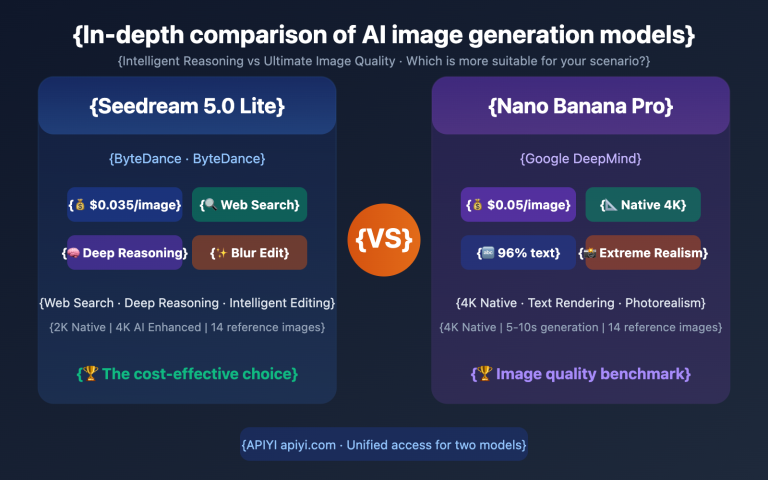
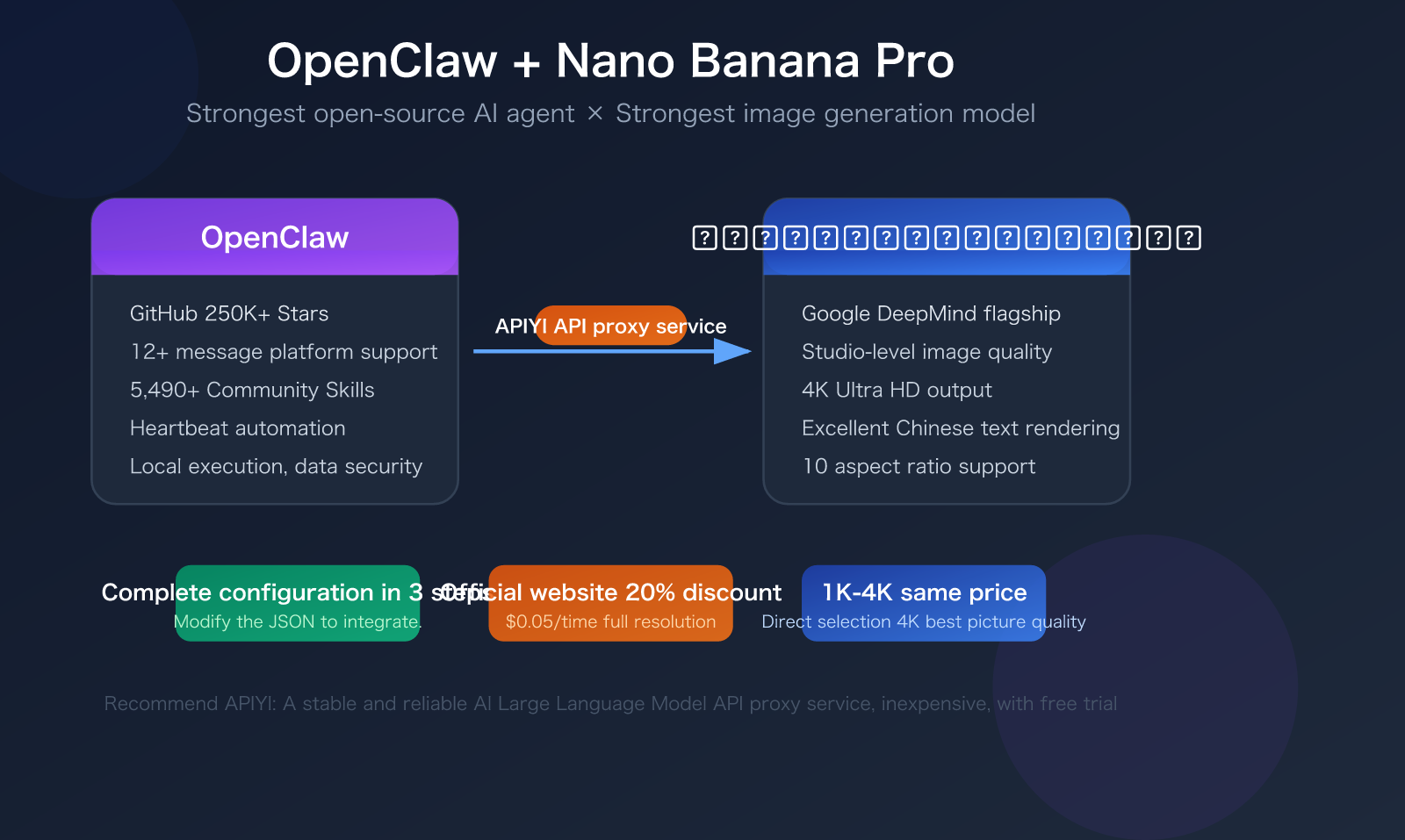
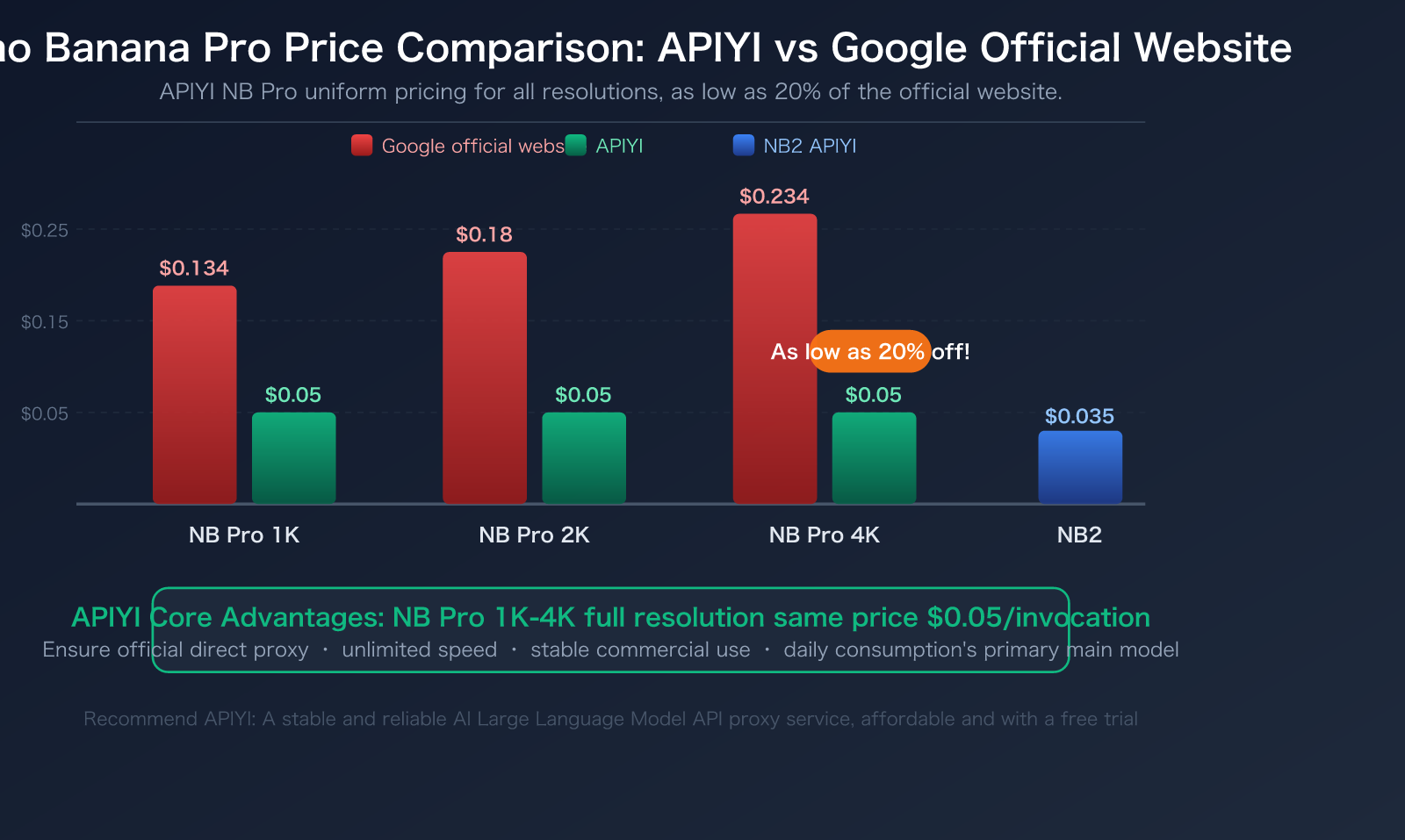
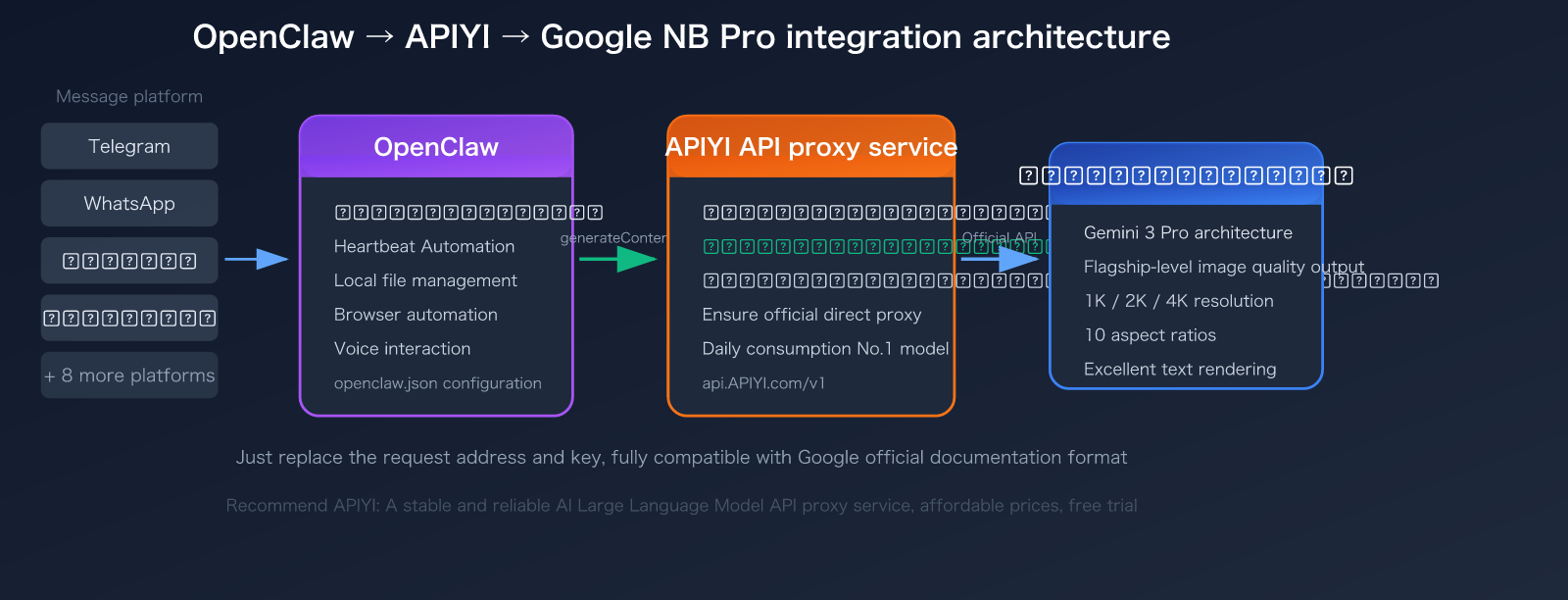
OpenClaw is currently the hottest open-source AI agent platform on GitHub (250k+ Stars), and Nano Banana Pro is Google DeepMind's flagship image generation model. Combining them means you can invoke Studio-level AI image generation capabilities anytime on 12+ platforms like WhatsApp, Telegram, Slack, etc. — and through APIYI, NB Pro 1K to 4K full resolutions are priced the same at just $0.05/invocation, which is equivalent to 20% of the official website's price.
Core Value: After reading this article, you will complete the integration configuration of OpenClaw + NB Pro, master the code invocation methods, and learn about 5 OpenClaw Skills that can significantly improve image generation efficiency.
OpenClaw Platform Overview: Why Choose It for Integrating Nano Banana Pro
Before we dive into the configuration, let's quickly go over OpenClaw's core capabilities and why it's the ideal platform for integrating NB Pro.
OpenClaw Core Information at a Glance
| Feature | Details |
|---|---|
| Positioning | Open-source personal AI agent platform |
| Founder | Peter Steinberger (Founder of PSPDFKit) |
| GitHub Stars | 250,000+ (MIT License) |
| Supported Platforms | Mac / Windows / Linux |
| Messaging Platforms | WhatsApp, Telegram, Slack, Discord, and 12+ others |
| Core Capabilities | File read/write, Shell commands, Browser automation, Voice interaction |
| Skill Ecosystem | ClawHub official skill directory, 5,490+ community skills |
| Data Security | Runs locally, data stays on your device |
| Configuration File | ~/.openclaw/openclaw.json |
What makes OpenClaw unique is its "Heartbeat" mechanism — the AI can proactively wake itself up via Cron jobs and Webhooks, without you needing to send a message to trigger it. This means you can set up automated workflows like "automatically generate today's marketing materials at 9 AM every day," and combined with NB Pro's image generation capabilities, you can truly achieve unattended AI creation.
🚀 Quick Try: If you haven't installed OpenClaw yet, you can first experience NB Pro's image generation effects online at imagen.apiyi.com before deciding whether to integrate. APIYI offers free trial credits, allowing you to generate images without any configuration.
OpenClaw Installation
# macOS / Linux
curl -fsSL https://get.openclaw.ai | bash

# Or use npm
npm install -g @openclaw/openclaw
After installation, run the openclaw command to start the configuration wizard.
Integrating OpenClaw with Nano Banana Pro API: A 3-Step Configuration Guide
Integrating with Nano Banana Pro is straightforward. The core idea is to register APIYI as a custom model provider within OpenClaw and then configure the Nano Banana Pro model. Since APIYI is fully compatible with Google's official API format, you only need to change the request endpoint and your API key.
Step 1: Obtain Your APIYI API Key
- Visit the APIYI official website at apiyi.com and register for an account.
- Navigate to your console and create a new API Key.
- In the model list, ensure that Nano Banana Pro (
gemini-3-pro-image-preview) is enabled for your account.
Step 2: Edit Your OpenClaw Configuration File
Open your OpenClaw configuration file, typically located at ~/.openclaw/openclaw.json, and add APIYI as a custom provider:
{
  "models": {
    "providers": {
      "apiyi": {
        "baseUrl": "https://api.apiyi.com/v1",
        "apiKey": "your-apiyi-key",
        "api": "google-generative-ai",
        "models": [
          {
            "id": "gemini-3-pro-image-preview",
            "name": "Nano Banana Pro"
          },
          {
            "id": "gemini-3.1-flash-image-preview",
            "name": "Nano Banana 2"
          }
        ]
      }
    }
  }
}
Step 3: Set the Default Image Generation Model
Within the same configuration file, designate NB Pro as the default model for image generation:
{
  "agents": {
    "defaults": {
      "model": {
        "primary": "apiyi/gemini-3-pro-image-preview"
      }
    }
  }
}
View Full Configuration Example
{
  "agents": {
    "defaults": {
      "model": {
        "primary": "apiyi/gemini-3-pro-image-preview"
      }
    }
  },
  "models": {
    "providers": {
      "apiyi": {
        "baseUrl": "https://api.apiyi.com/v1",
        "apiKey": "sk-your-apiyi-key-here",
        "api": "google-generative-ai",
        "models": [
          {
            "id": "gemini-3-pro-image-preview",
            "name": "Nano Banana Pro",
            "contextWindow": 65536,
            "cost": {
              "input": 0.25,
              "output": 60.0
            }
          },
          {
            "id": "gemini-3.1-flash-image-preview",
            "name": "Nano Banana 2",
            "contextWindow": 131072,
            "cost": {
              "input": 0.125,
              "output": 30.0
            }
          }
        ]
      }
    }
  }
}
After completing these steps, restart OpenClaw for the changes to take effect.
Key Configuration Points for OpenClaw with NB Pro
| Configuration Item | Value | Description |
|---|---|---|
baseUrl |
https://api.apiyi.com/v1 |
APIYI API endpoint |
api |
google-generative-ai |
Uses Google's native protocol |
| Model ID (NB Pro) | gemini-3-pro-image-preview |
Flagship image quality model |
| Model ID (NB2) | gemini-3.1-flash-image-preview |
Speed-optimized model |
apiKey |
Obtained from apiyi.com | Supports free trial credits |
💡 Important Note: The
apifield must be set togoogle-generative-ai, notopenai-completions. NB Pro uses Google's nativegenerateContentendpoint format, which APIYI fully supports. Using the OpenAI compatible mode will prevent the image generation functionality from working correctly.
Calling the Nano Banana Pro API: Direct Use with Official Format
APIYI is fully compatible with the calling format described in Google's official documentation. If you're already using Google's official API, you only need to make two changes:
- Replace the request endpoint: Change
generativelanguage.googleapis.comtoapi.apiyi.com. - Replace the API Key: Use the API key provided by APIYI.
Nano Banana Pro Code Example (Python)
import google.generativeai as genai

# Configure the APIYI endpoint - just replace the address and API key
genai.configure(
    api_key="your-apiyi-key",
    client_options={"api_endpoint": "api.apiyi.com"}
)

model = genai.GenerativeModel("gemini-3-pro-image-preview")

response = model.generate_content(
    "An orange cat sitting on a windowsill watching the rain, Japanese anime style, warm indoor lighting",
    generation_config=genai.GenerationConfig(
        response_modalities=["TEXT", "IMAGE"],
        image_config={"image_size": "2K", "aspect_ratio": "16:9"}
    )
)

# Extract the generated image
for part in response.candidates[0].content.parts:
    if hasattr(part, "inline_data"):
        with open("output.png", "wb") as f:
            f.write(part.inline_data.data)
        print("Image saved: output.png")
    elif hasattr(part, "text"):
        print(f"Description: {part.text}")
View cURL Example
curl -X POST "https://api.apiyi.com/v1/models/gemini-3-pro-image-preview:generateContent" \
  -H "x-goog-api-key: your-apiyi-key" \
  -H "Content-Type: application/json" \
  -d '{
    "contents": [
      {
        "role": "user",
        "parts": [
          {
            "text": "Generate a cyberpunk city night view, with neon lights reflecting on wet streets"
          }
        ]
      }
    ],
    "generationConfig": {
      "responseModalities": ["TEXT", "IMAGE"],
      "imageConfig": {
        "imageSize": "4K",
        "aspectRatio": "21:9"
      }
    }
  }'
View Node.js Example
const { GoogleGenerativeAI } = require("@google/generative-ai");
const fs = require("fs");

// Configure the APIYI endpoint
const genAI = new GoogleGenerativeAI("your-apiyi-key", {
  baseUrl: "https://api.apiyi.com/v1"
});

const model = genAI.getGenerativeModel({
  model: "gemini-3-pro-image-preview"
});

async function generateImage() {
  const result = await model.generateContent({
    contents: [{
      role: "user",
      parts: [{ text: "A Chinese landscape painting in ink wash style, with distant mountains and nearby water, emphasizing empty space and artistic conception" }]
    }],
    generationConfig: {
      responseModalities: ["TEXT", "IMAGE"],
      imageConfig: { imageSize: "4K", aspectRatio: "3:2" }
    }
  });

  const response = result.response;
  for (const part of response.candidates[0].content.parts) {
    if (part.inlineData) {
      const imageBuffer = Buffer.from(part.inlineData.data, "base64");
      fs.writeFileSync("output.png", imageBuffer);
      console.log("Image saved: output.png");
    }
  }
}

generateImage();
Nano Banana Pro Full Resolution Parameter Details
| Parameter | Optional Values | Description |
|---|---|---|
imageSize |
1K, 2K, 4K |
APIYI offers 1K-4K at the same price: $0.05 per generation. |
aspectRatio |
1:1, 2:3, 3:2, 3:4, 4:3, 4:5, 5:4, 9:16, 16:9, 21:9 |
10 supported aspect ratios. |
responseModalities |
["TEXT", "IMAGE"] |
Must include both TEXT and IMAGE. |
🎯 Cost Advantage: With APIYI, NB Pro costs a flat $0.05 per generation for all resolutions from 1K to 4K. This means generating a 4K (4096×4096) ultra-high-definition image costs the same as a 1K image. You can directly choose 4K for the best image quality without extra cost.
OpenClaw Nano Banana Pro Image Generation Test and Verification
Once configured, you can directly send messages within OpenClaw to test image generation.
Testing in OpenClaw
Simply send the following message in any connected messaging platform (Telegram, WhatsApp, etc.):
Generate an image for me: A Shiba Inu wearing sunglasses surfing on a beach, sunny day, cartoon style
OpenClaw will automatically invoke the configured NB Pro model, generate the image, and reply within the chat.
Online Image Generation Test
If you want to test the image quality of NB Pro before configuring OpenClaw, you can use the online testing tool provided by APIYI:
- Image Generation Test URL:
imagen.apiyi.com - No coding required; just input your prompt online to generate images.
- Supports all resolution and aspect ratio parameters.
- Ideal for quickly verifying prompt effectiveness.
Code Example Download
APIYI offers a complete development reference code package, including call examples in various languages like Python, Node.js, and cURL:
- Example Code Download:
xinqikeji.feishu.cn/wiki/W4vEwdiCPi3VfTkrL5hcVlDxnQf - Google Official Documentation:
ai.google.dev/gemini-api/docs/image-generation
💰 Cost Control Tip: For development and testing phases, we recommend using NB2 ($0.035/request) to save costs. Switch to NB Pro ($0.05/request) for the best image quality in production. On the APIYI platform, you only need to change the model ID between these two models, without altering any other code.
OpenClaw Skills Recommendation: 5 Skills to Boost Nano Banana Pro Image Generation Efficiency
OpenClaw's strength lies in its skill ecosystem. With over 5,490 community skills on ClawHub, here are 5 most relevant to image generation:
Skill 1: Image Generator
| Attribute | Details |
|---|---|
| Function | Generates images from natural language, automatically optimizes prompts |
| Use Cases | Daily image creation, social media assets, product images |
| Installation | Search image-generator on ClawHub |
| With NB Pro | Automatically expands short descriptions into detailed English prompts |
The core value of this Skill is prompt optimization. Simply say "Draw me a cat," and it will automatically expand it into a professional prompt including style, lighting, and composition details, significantly improving the output quality of NB Pro.
Skill 2: Batch Image Creator
This is ideal for scenarios where you need to generate multiple images at once, such as for e-commerce product photos or a week's worth of social media content. This Skill can:
- Generate multiple images from different angles/styles based on a single theme.
- Automatically manage the generation queue to avoid rate limits.
- Support templated prompts, allowing batch image generation by replacing key variables.
Skill 3: Image Editor
NB Pro doesn't just generate images; it also supports editing based on reference images. This Skill encapsulates the image editing workflow:
- Upload original image + text description of modification needs.
- Supports localized edits (change background, alter colors, add elements).
- Automatically handles image format conversion and Base64 encoding.
Skill 4: Social Media Poster
A Skill specifically designed for social media image creation:
- Built-in optimal size templates for platforms like Instagram, Twitter, and Xiaohongshu.
- Automatically generates posters with text (leveraging NB Pro's excellent text rendering capabilities).
- Supports brand color and style consistency settings.
Skill 5: Heartbeat Image Scheduler
Utilizes OpenClaw's unique Heartbeat mechanism for scheduled automatic image generation:
- Set Cron expressions to trigger image generation at specific times.
- For example, "Generate a good morning greeting image every day at 8:00 AM."
- Generated images are automatically sent to a designated messaging platform.
- Suitable for operations teams automating content production.
How to Install Skills
Installing Skills in OpenClaw is straightforward:
# Install via ClawHub
openclaw skill install image-generator

# Or ask the AI to install directly in a message
# Send: "Install the image-generator skill"
You can also browse the complete skill catalog on the ClawHub website: clawhub.openclaw.ai
🎯 Best Practice: We recommend installing the Image Generator Skill first. It helps automatically optimize your prompts, significantly enhancing the output quality of NB Pro. Combined with the cost-effectiveness of APIYI apiyi.com, you can iterate multiple times with confidence to quickly find the most satisfactory results.
Nano Banana Pro vs NB2: How to Choose in OpenClaw
APIYI supports both NB Pro and NB2 models, and both have been added to the OpenClaw configuration. Choose the appropriate model based on your specific scenario:
| Scenario | Recommended Model | Reason | APIYI Price |
|---|---|---|---|
| High-quality commercial assets | NB Pro | Highest image quality, delicate lighting | $0.05/invocation |
| 4K Ultra HD output | NB Pro | 1-4K at the same price, choose 4K directly | $0.05/invocation |
| Chinese text posters | NB Pro | Better text rendering quality | $0.05/invocation |
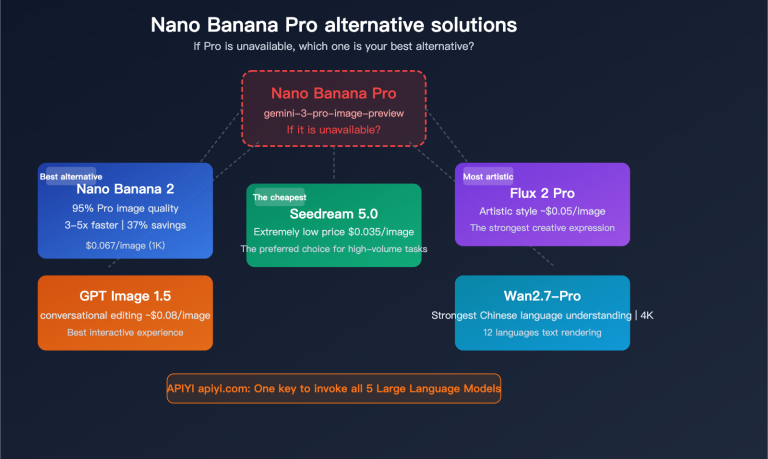
| Rapid prototype iteration | NB2 | 3-5x faster | $0.035/invocation |
| Batch content production | NB2 | 30% lower cost | $0.035/invocation |
| Requires search enhancement | NB2 | Exclusive Image Search Grounding | $0.035/invocation |
Switching models in OpenClaw only requires modifying the message command:
# Generate image with NB Pro (default)
Use NB Pro to help me generate a product promotional image

# Switch to NB2 for fast image generation
Use NB2 to quickly generate 5 different logo design options
Or temporarily switch the default model in the configuration file:
{
  "agents": {
    "defaults": {
      "model": {
        "primary": "apiyi/gemini-3.1-flash-image-preview"
      }
    }
  }
}
Frequently Asked Questions
Q1: After integrating OpenClaw with APIYI, what should I do if image generation fails?
The most common reason is an incorrect configuration in the api field. NB Pro uses the native Google protocol, so it must be set to "google-generative-ai". If it's set to "openai-completions", image generation requests will fail due to incompatible formats. Also, ensure that responseModalities includes ["TEXT", "IMAGE"]. Setting it to just ["IMAGE"] will cause generation to fail. If you encounter issues, try testing image generation first on imagen.apiyi.com to determine if the problem lies with the model or the configuration.
Q2: What’s the difference between APIYI’s NB Pro and direct Google connection?
The functionality is identical – APIYI forwards requests directly through the official API, ensuring it's an official, direct transfer. The core differences lie in pricing and stability. On APIYI, NB Pro costs $0.05 per invocation for 1-4K resolutions (compared to $0.234 on the official website, about a 20% discount) and has no speed limits. APIYI has invested significant operational resources into NB Pro, making it the platform's top-consuming model daily, with its stability validated for commercial use. You can get free testing credits to experience it quickly by registering at apiyi.com.
Q3: Can I use NB Pro and other AI models simultaneously in OpenClaw?
Absolutely. OpenClaw supports multiple model providers concurrently. You can register various providers in the same configuration file, such as APIYI (for NB Pro/NB2 image generation), OpenAI (for GPT text chat), and Anthropic (for Claude's coding capabilities). Through APIYI at apiyi.com, you can also access multiple mainstream models from a single point, using one API key to access the full series of models like NB Pro, Claude, and GPT.
Summary: Key Points for Integrating OpenClaw with Nano Banana Pro
Here are the core steps to integrate OpenClaw with Nano Banana Pro:
- Get Your API Key: Register on APIYI at apiyi.com and obtain your API Key.
- Edit Configuration: Add the APIYI provider to your
~/.openclaw/openclaw.jsonfile and setapitogoogle-generative-ai. - Choose Your Model: Select NB Pro ($0.05/invocation, highest quality) or NB2 ($0.035/invocation, speed prioritized).
- Install Skills: Enhance efficiency by installing skills like Image Generator from ClawHub.
- Start Generating Images: Send natural language descriptions on any messaging platform to generate images.
Nano Banana Pro is APIYI's top-consuming model daily, and the platform has dedicated significant operational resources to ensure its stability – guaranteeing official direct forwarding, unlimited speed, and commercial usability. The price is a unified $0.05 per invocation for all resolutions from 1K to 4K, compared to $0.234 for equivalent services on the official website, making it about a 20% discount.
We recommend integrating Nano Banana Pro through APIYI at apiyi.com, combined with OpenClaw's Skills ecosystem, to build an efficient AI image generation workflow.
Technical Support: APIYI apiyi.com – A stable and reliable API proxy service for Large Language Models, with NB Pro series starting at 20% off.