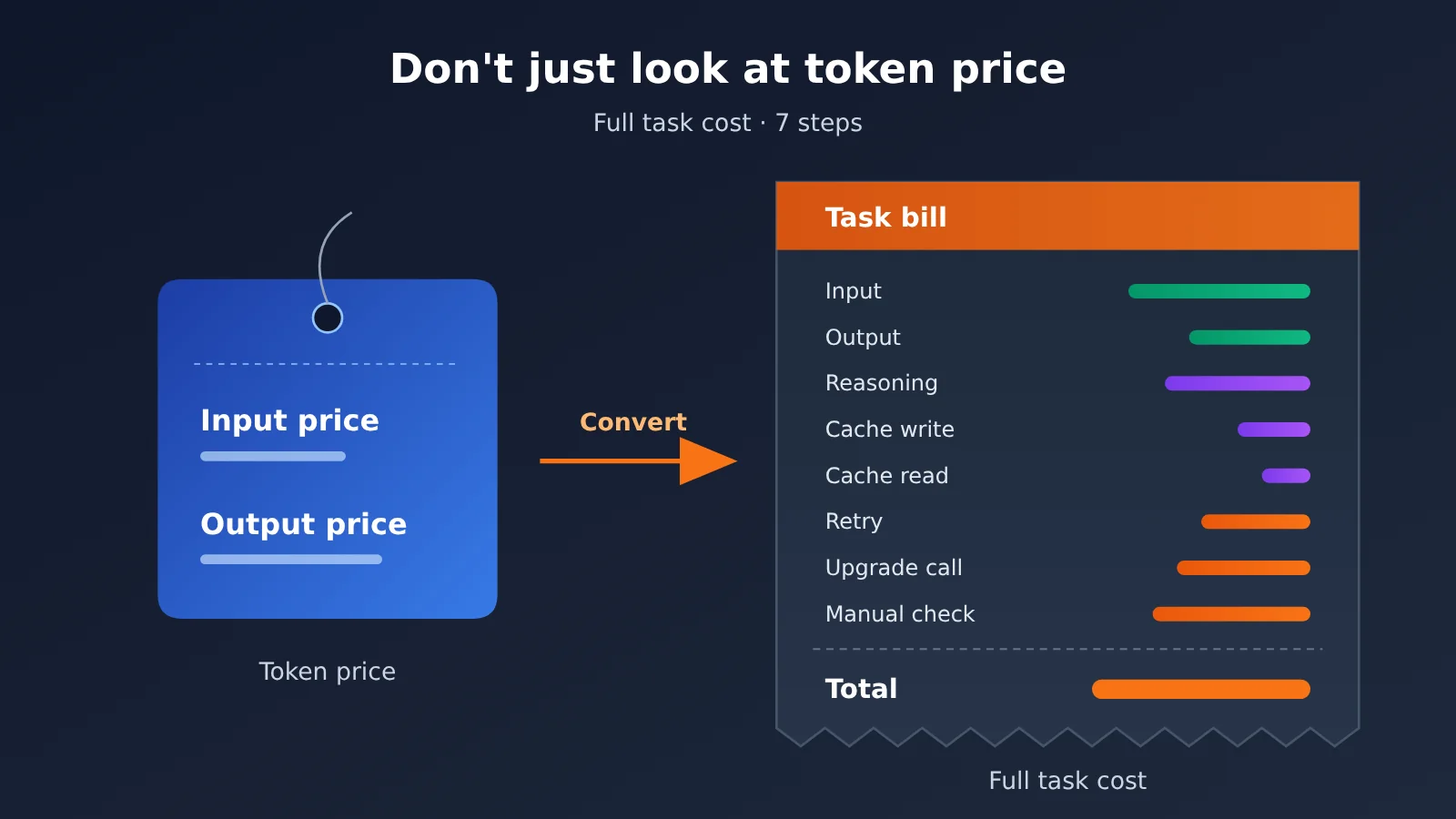
Author’s note: From input, output, reasoning, caching, and retries to verification and escalation — 7 steps to convert “how much per million tokens” into “how much per completed task.”
When many teams pick a model, the first thing they look at is the input and output unit prices on the pricing table, and then they conclude “this one is half the price.” A month after launch, the bill arrives, and it turns out the cheap model didn’t save any money — sometimes it cost more. This article introduces a cost estimation method based on “cost per accepted task” to help you see the costs that live beyond the per-token price.
This isn’t an article telling you to buy expensive models. Cheap models really are more cost-effective in plenty of scenarios. The point is that you can only judge whether they’re actually worth it once you factor in retries, reasoning tokens, caching, and human verification.
Core value: By the end of this article, you’ll have a reusable task cost worksheet, you’ll know what data to collect and how to apply the formulas, and you’ll know which steps are most often left out of the calculation.
Full Task Cost: The Key Points
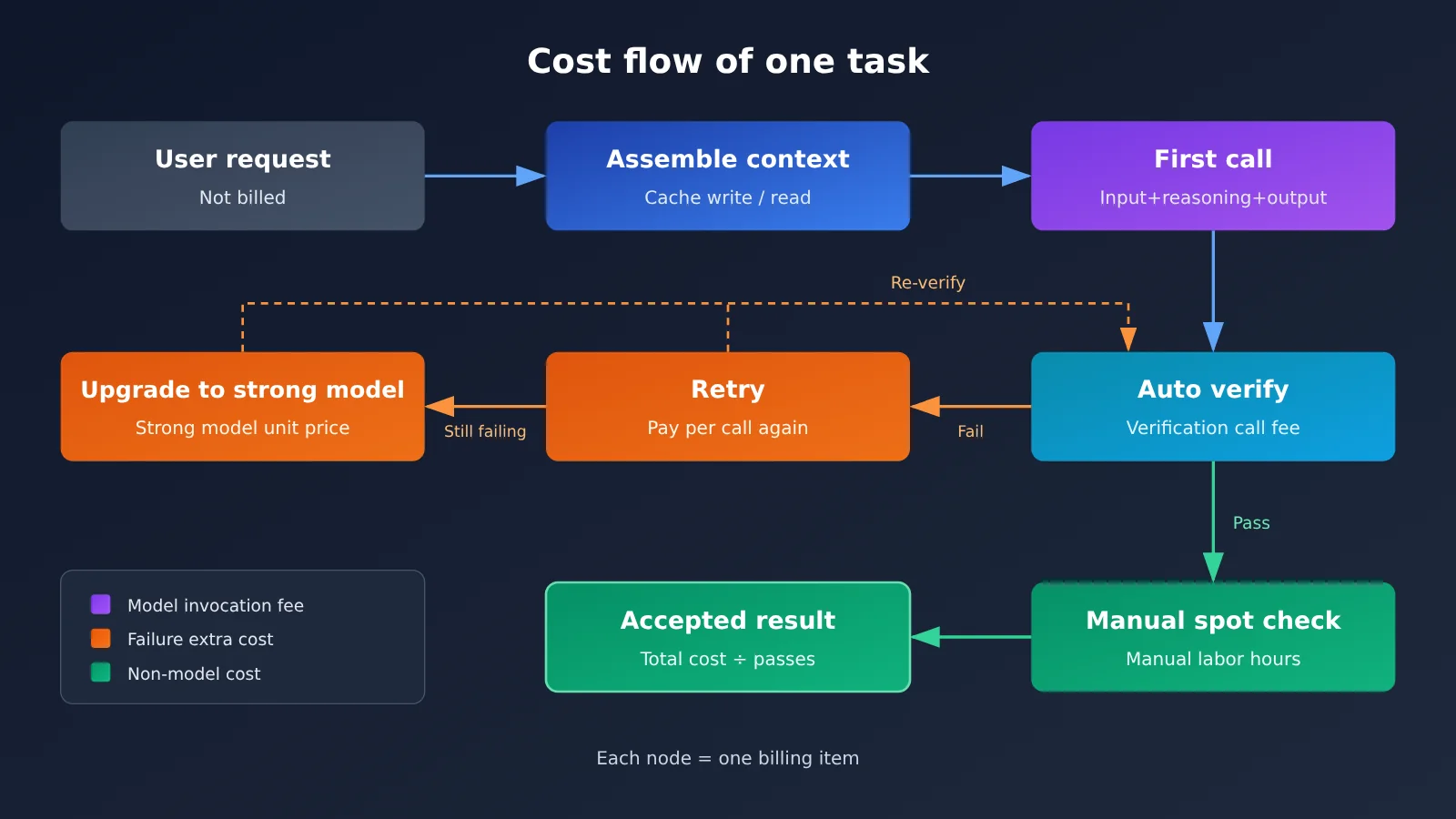
When you estimate the full cost of a task, you first have to accept one fact: the price list gives you the unit price of raw materials, but what you actually care about is the unit price of the finished product. A single task often consists of multiple calls, several kinds of tokens, and a handful of non-model overheads. The table below lists the most common cost items.
| Cost item | What it covers | Why it’s easy to miss |
|---|---|---|
| Regular input tokens | System prompt, user input, retrieved context, conversation history | History gets re-counted on every turn of a multi-turn chat |
| Output tokens | The visible content the model finally returns | Structured output often runs longer than you expect |
| Reasoning tokens | Internal thinking consumed by reasoning models, usually billed at the output rate | Users never see them, but they show up on the bill |
| Cache writes and reads | Creating and hitting the cache for repeated prefixes | Writes and reads are priced differently from regular input |
| Retry calls | Re-requests after timeouts, malformed output, or failed validation | Rare in testing, common at scale in production |
| Escalation calls | Handing off to a stronger model after a smaller one fails | Routing strategies stack two calls’ worth of charges |
| Long-context tiers | The unit price shifts once you cross a context threshold | Only triggers on a few long-input requests, so it’s easy to overlook |
| Human review cost | Results someone has to check or rework | Not on the API bill, but very real |
Why unit price misleads: a closer look at full task cost
The first source of confusion is reasoning tokens. Reasoning models burn through a stretch of internal thinking before they answer, and that’s typically billed at the output rate — with the length varying by the reasoning effort setting. There’s no shortage of public discussion comparing the same model at high and xhigh reasoning effort, and it all lands in the same place: whether the extra reasoning is worth it depends on how much the task pass rate improves, not on whether the unit price stays the same.
The second is that valid format doesn’t mean valid result. In text extraction, getting legal JSON back is easy; whether the field values actually come from the source text — and aren’t mismatched — takes extra validation. If a cheap model’s extractions need human rework at a high rate, the money you saved on the API bill will likely come back doubled as labor cost.
The third is vendor framing. When a model launches, you’ll often see token price cuts and “lower task cost” announced together, but those two aren’t equivalent. Lower task cost can come from shorter outputs, fewer retries, or reliance on a specific caching pattern — and your workload may not reproduce the same ratio.
How to Estimate the Full Cost of a Task: Quick Start
You don’t need to write any code for this workflow — a spreadsheet is enough. The core idea is simple: first work out the token structure of a single call, then multiply by the various probabilities, and finally divide by the number of accepted results.
7 Steps to Estimate the Full Cost of a Task
- Define the boundary of “one task”: for example, “process one ticket and output structured fields that can be stored in a database,” not “make one API call.” Different boundaries mean completely different cost baselines.
- Break down the token structure of a single call: record the average length of the system prompt, retrieved context, user input, visible output, and reasoning tokens separately — ideally with both P50 and P95 values.
- Mark the parts that can be cached: fixed system prompts, tool definitions, and few-shot examples can usually go through the cache. Record how often the cache is written and the estimated hit rate.
- Check the billing rules: the unit prices for input, output, cache writes, and cache reads, and whether a long-context tier exists. Base all unit prices on the actual data on the APIYI pricing page at docs.apiyi.com/models.
- Measure the failure rate with real samples: run at least one representative batch, count the proportions of format failures, validation failures, and timeouts, and convert them into retry and escalation rates.
- Add non-model costs: the percentage of manual spot checks, the time spent validating each item, and convert those into money where necessary.
- Calculate the cost “per accepted result”: divide total cost by the number of results that pass final acceptance — that’s the metric you can actually use to compare models.
Task-level cost worksheet fields
Put the steps above into a table, and we recommend including at least the following fields. You can adjust the field naming to match your team’s habits — what matters is that every item has a data source.
| Field | Meaning | Data source |
|---|---|---|
in_cached |
Number of input tokens that hit the cache | usage field in the invocation logs |
in_uncached |
Number of regular input tokens that missed the cache | Invocation logs |
cache_write |
Number of tokens written to the cache in this call | Invocation logs |
out_visible |
Number of visible output tokens | Invocation logs |
out_reasoning |
Number of reasoning tokens | Invocation logs (only available for reasoning models) |
retry_rate |
Share of calls that need a retry | Sample test statistics |
escalate_rate |
Share of calls that need escalation to a stronger model | Routing policy logs |
accept_rate |
Share of outputs ultimately accepted | Automated checks plus manual spot checks |
| Unit prices | Unit price for input, output, cache writes, and cache reads | Actual data from the APIYI pricing page |
🚀 Quick-start tip: If you want to compare task costs across several models at once, run the same batch of samples on each of them at APIYI apiyi.com. The platform provides API access to the mainstream models covered in this article and is compatible with both OpenAI and Anthropic interface formats — to switch models, you only change the model name, which makes it easy to compare them in a single worksheet. For integration details and the base_url, refer to the APIYI docs at docs.apiyi.com.
Complete cost calculation example for a task
Here’s a walkthrough using a ticket field extraction task. To avoid quoting unverified prices, the example only gives token counts and formulas — fill in the unit prices from the actual figures for the corresponding model on the APIYI pricing page at docs.apiyi.com/models.
| Stage | Token composition (average) | Probability | Cost formula |
|---|---|---|---|
| First call | Cache hit 6,000 + regular input 2,000 + visible output 800 + reasoning 1,500 | 100% | 6,000 × cache-read price + 2,000 × input price + 2,300 × output price |
| Cache write | 6,000 (rewritten after the cache expires) | Amortized by write frequency | 6,000 × cache-write price ÷ number of requests covered per write |
| Retry call | Same as the first call | 10% | First-call cost × 0.1 |
| Escalation call | Strong-model input 8,000 + output and reasoning 2,000 combined | 5% | After plugging in the strong model’s unit prices × 0.05 |
| Human spot check | No tokens consumed | 5% sampled | Manual cost per item verified × 0.05 |
Add those five rows together and you get the “expected cost per ticket.” Divide that by the final acceptance rate — 95%, say — and you get the “cost per accepted result.” Note that retries here are costed at the full first-call cost, since a retry usually resends the context exactly as it was.
One thing worth noticing in this example: visible output is only 800 tokens, but reasoning tokens come to 1,500. At the output unit price, the reasoning portion is actually the bigger half of the output side. If you estimate from visible output alone, you’ll underestimate output-side cost by more than half.
Total Task Cost: Comparing Common Misconceptions
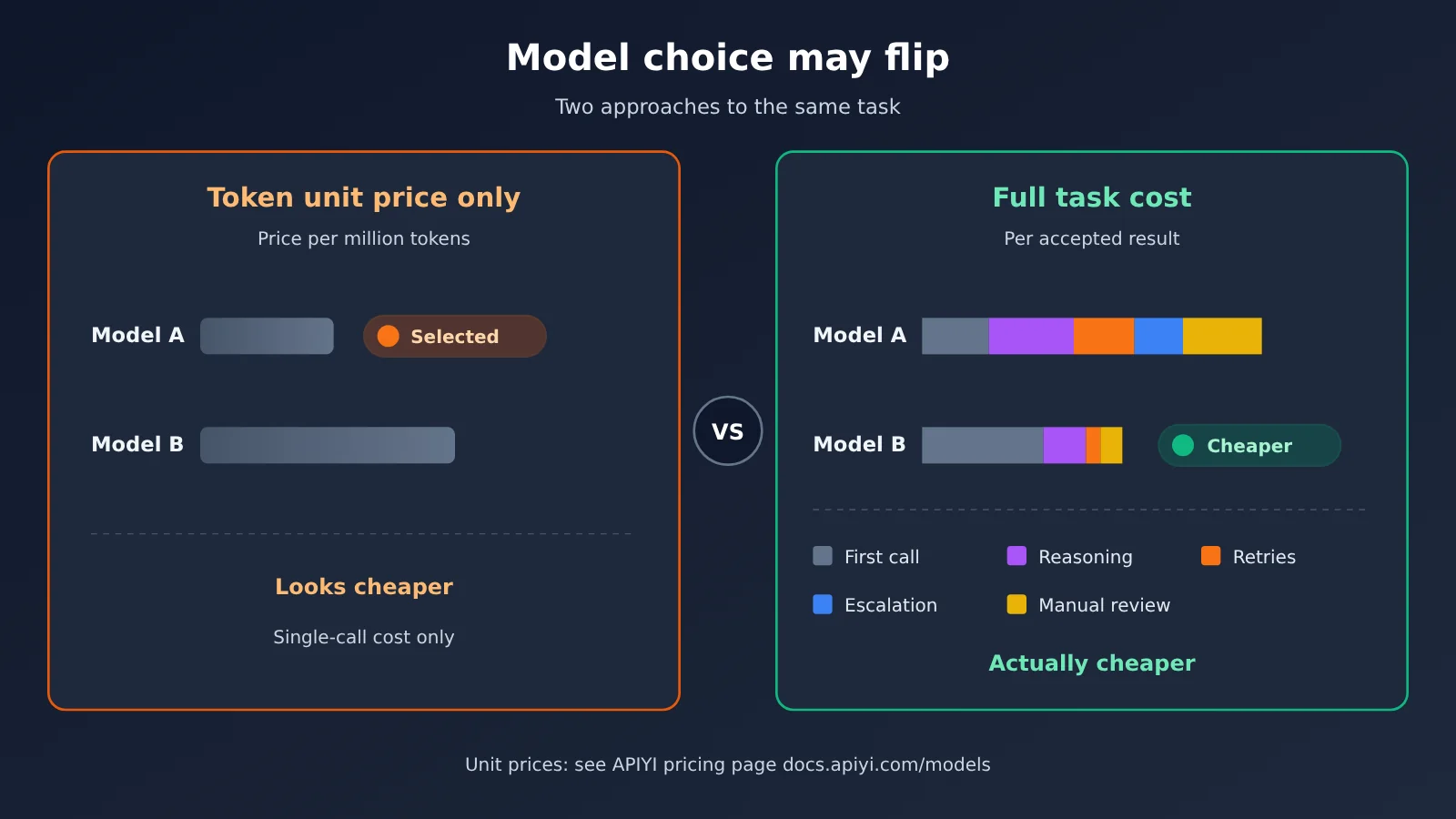
The same requirement, viewed through two different lenses — “unit price only” versus “total task cost” — often leads to opposite conclusions. The table below summarizes a few typical scenarios.
| Scenario | Conclusion from unit price alone | Conclusion from total task cost | Key variables |
|---|---|---|---|
| Structured extraction | Pick the cheapest lightweight model | If the field error rate is high, a stronger model may actually save money | Acceptance rate, manual rework |
| Coding agent | Pick the model with the lowest output unit price | Multi-turn tool calls inflate the context, so caching strategy matters more | Cache hit rate, number of turns |
| Long document analysis | Estimate based on average input length | A few very long requests trigger long-context tiered pricing | Context threshold, P95 length |
| Choosing reasoning effort | The unit price is the same for the same model, so pick the highest tier | Higher tiers use more reasoning tokens, so check whether the pass rate improves | Reasoning tokens, pass rate |
| Batch offline jobs | Calculate using the real-time invocation unit price | The batch channel may use a different pricing basis | Whether Batch is supported |
💡 Note on the comparison: The conclusions in the table are reasoning at the methodology level; which model is actually more cost-effective depends on your samples. We recommend running multiple models on the same samples on APIYI apiyi.com, filling in the table with the actual unit prices from the pricing page, and then making a decision.
Long context and cache details in total task cost
Long-context tiers are the item most likely to produce a “low probability, high cost” surprise. Public sources mention that some models apply a different unit price once the input exceeds a certain threshold (for example, one article discusses a 272K threshold for GPT-6 Sol). If your request-length distribution has a long tail, be sure to count the requests above the threshold separately rather than glossing over them with an average length.
Caching, meanwhile, is a double-edged sword. Cache reads are usually cheaper than regular input, but for some providers the cache-write unit price can be higher than regular input, and caches expire. If your requests are spaced far apart and the prefix changes often, the write cost can offset the savings from reads. For the specific cache write price, read price, and billing basis, refer to what’s stated on the APIYI pricing page docs.apiyi.com/models.
5 Practical Ways to Reduce the Total Cost of a Task
Once you’ve done the math, the direction for optimization usually becomes clear. The following approaches work in most scenarios, but you should verify their impact with a worksheet instead of relying on intuition.
| Approach | Cost item affected | What to watch out for |
|---|---|---|
| Use a fixed prefix and enable caching | Input tokens | Put volatile content at the end of the prompt to improve the cache hit rate |
| Limit output format and length | Output tokens | Use structured output to constrain fields and avoid verbose explanations |
| Route by task difficulty | Escalation calls, reasoning tokens | Make the rules explicit and audit “accepted incorrect results” |
| Add automated validation up front | Manual review, rework | Validate the source of the evidence, not just the JSON format |
| Control reasoning effort | Reasoning tokens | Use the pass rate to decide the tier; don’t default to the highest setting |
There’s a commonly overlooked risk with routing: results that a small model returns as “successful” may contain errors, and those errors won’t trigger an escalation. So when evaluating a routing strategy, besides the escalation rate, spot-check the results that the small model passes through directly, and factor the missed errors into the cost.
Frequently Asked Questions (FAQ)
Q1: What is full task cost?
Full task cost is the total cost of completing a task in the business sense — and having the result accepted. It includes input, output, reasoning, and cache costs for every call, plus the overhead of retries, escalations, and human verification. It’s much closer to your actual bill than a raw per-token price.
Q2: How is full task cost different from per-token pricing?
Per-token pricing is the cost of raw materials; full task cost is the cost of the finished product. A cheap model that needs more retries, longer reasoning, or more human rework can end up costing more per task. A pricier model with a high first-pass success rate can actually be cheaper.
Q3: How many samples do I need to estimate full task cost?
There’s no fixed number. The key is that your samples cover the real distribution — especially long inputs, hard cases, and edge cases. With too few samples, retry and acceptance rates swing wildly. Start with a small batch, then correct your estimate using real logs during the early days after launch.
Q4: Which scenarios most need full task cost calculations?
Mainly these:
– **Structured data extraction**: when field errors need human correction, labor costs dominate
– **Coding agents**: multi-turn tool calls make the context grow fast
– **Long-document Q&A**: long-tail requests can trigger long-context tiered pricing
– **Multi-model routing**: escalation calls stack two charges on top of each other
Q5: How can I quickly get each model’s pricing and billing rules?
Check the APIYI pricing page at docs.apiyi.com/models. It lists input, output, and cache-related unit prices for the models the platform supports — use the actual figures on that page for your estimates. APIYI is compatible with both OpenAI and Anthropic API formats, so after setting up per the docs at docs.apiyi.com, you can test multiple models with the same sample batch and drop the `usage` data from your call logs straight into your worksheet.
Q6: Can I compare subscription product usage with API billing directly?
Not advisable. Subscription products are usually capped by quota or number of uses, while APIs bill by token — different units, different use cases. If you want to compare, first convert the subscription’s actual usable task volume, rather than assuming a fixed number of messages.
Q7: What are the limitations of full task cost estimation?
It depends on how representative your samples are — samples that skew simple will underestimate costs. Converting human verification costs into a number is also subjective and varies a lot between teams. On top of that, model pricing and billing rules can change, so the worksheet needs periodic updates with the latest prices and logs instead of being calculated once and reused indefinitely.
Task Total Cost: Key Takeaways
- Change the unit of comparison: Compare models by “cost per accepted result,” not by price per million tokens
- Reasoning tokens must be tracked separately: They’re usually billed as output, and can exceed visible output
- Caching means counting both writes and reads: Writes may cost more than regular input, and your hit rate decides whether it pays off
- Retries and escalations are the hidden big-ticket items: Failure rates in production are often higher than what you observed during testing
- Valid JSON doesn’t mean correct data: Validate the evidence sources and factor manual rework into the cost
- Long context is a long-tail problem: Use P95 length to check whether you’re triggering tiered pricing
- The pricing page is the source of truth: For estimates, always pull actual numbers from the APIYI pricing page at docs.apiyi.com/models
Summary
The core points for estimating total task cost:
- Define the task boundary first: Measure by business outcome, not by individual call
- Break out every cost item: Input, output, reasoning, caching, retries, escalations, and human validation—none can be skipped
- Measure probabilities with real samples: Retry rate, escalation rate, and acceptance rate determine the final cost multiplier
“Don’t just look at the token unit price” doesn’t mean unit price doesn’t matter—it means it’s just one variable in the formula. Build the worksheet, fill it with your own samples and logs, and your model selection conclusions will be more reliable than any leaderboard.
A recommended approach: use APIYI at apiyi.com to compare multiple models on the same batch of samples, then combine that with the actual unit prices on the pricing page at docs.apiyi.com/models to calculate total task cost. The platform is compatible with OpenAI and Anthropic API formats, so switching models is cheap.
📚 References
- Ofox.ai Blog – Model Pricing and Task Cost series: A set of articles discussing the relationship between cache billing, long-context thresholds, reasoning effort, and task cost
- Link:
ofox.ai/blog/page/12 -
Note: Great for understanding the difference between a “unit price reduction” and a “task cost decrease”
-
Ofox.ai Blog – Model Routing and Structured Extraction articles: Covers escalation rules from small models to stronger models, and why “valid JSON doesn’t mean correct data”
- Link:
ofox.ai/blog/page/11 -
Note: A useful reference when designing routing strategies and validation pipelines
-
APIYI Model Pricing page: Input, output, and cache-related unit prices for the models the platform supports
- Link:
docs.apiyi.com/models -
Note: All pricing and billing details in this article follow the actual data on this page
-
APIYI Documentation Center: Integration methods, API formats, and parameter descriptions
- Link:
docs.apiyi.com - Note: Includes integration instructions for OpenAI- and Anthropic-compatible formats
Author: APIYI Technical Team
Technical discussion: Feel free to reach us through the APIYI official website apiyi.com homepage. More integration resources are available at the docs.apiyi.com documentation center.