Author's Note: banana-slides is an open-source AI PPT generation application based on nano banana pro. In this article, I'll walk you through the entire fork and deployment process from a beginner's perspective. I'll also show you how to replace the default AIHubMix proxy with APIYI to achieve more stable model invocations.
There's an open-source AI PPT generator that's been blowing up on GitHub recently called banana-slides. Built on Google's latest nano banana pro image model, it focuses on "generating editable PPTs from a single sentence, supporting video exports, and allowing natural language modifications to any area." It has already racked up over 14K stars on GitHub.
This isn't just another AI PPT wrapper. It's a true "Vibe PPT" system that can be deployed locally with fully open source code. It supports various model formats, including Gemini, OpenAI, Anthropic, and Vertex AI. The official documentation recommends using AIHubMix as a proxy by default.
Core Value: By the end of this article, you'll know how to fork the banana-slides project and complete a local deployment. More importantly, you'll master the configuration for replacing the default AIHubMix proxy with the APIYI (apiyi.com) API proxy service, allowing you to enjoy unlimited concurrency, native formatting, and a cost advantage of 10% bonus credit on $100 deposits.
<!-- 4 Input formats -->
<g transform="translate(220, 0)">
  <rect width="200" height="130" rx="12" fill="url(#bsBadgeBlue)" opacity="0.95" />
  <text x="100" y="55" text-anchor="middle" font-family="-apple-system, system-ui, sans-serif" font-size="56" font-weight="800" fill="#ffffff">4</text>
  <text x="100" y="85" text-anchor="middle" font-family="-apple-system, system-ui, sans-serif" font-size="14" font-weight="600" fill="#ffffff" opacity="0.95">material input format</text>
  <text x="100" y="108" text-anchor="middle" font-family="-apple-system, system-ui, sans-serif" font-size="11" fill="#ffffff" opacity="0.8">PDF / DOCX / MD / TXT</text>
</g>

<!-- 3 Export formats -->
<g transform="translate(440, 0)">
  <rect width="200" height="130" rx="12" fill="url(#bsBadgePurple)" opacity="0.95" />
  <text x="100" y="55" text-anchor="middle" font-family="-apple-system, system-ui, sans-serif" font-size="56" font-weight="800" fill="#ffffff">3</text>
  <text x="100" y="85" text-anchor="middle" font-family="-apple-system, system-ui, sans-serif" font-size="14" font-weight="600" fill="#ffffff" opacity="0.95">export format</text>
  <text x="100" y="108" text-anchor="middle" font-family="-apple-system, system-ui, sans-serif" font-size="11" fill="#ffffff" opacity="0.8">PPTX / PDF / MP4</text>
</g>
1. What is banana-slides: 3 Core Positioning Points of this Open-Source AI PPT Generator
banana-slides is an open-source project led by developer Anionex, positioned as a native AI PPT generation application based on nano banana pro. Its core philosophy is "Vibe PPT"—you can use conversational language to command the AI to generate, modify, and iterate on any slide.
1.1 Core Positioning of banana-slides
| Dimension | banana-slides Features | Difference from Traditional AI PPT Tools |
|---|---|---|
| Underlying Model | Based on nano banana pro image generation | Most tools use template stitching |
| Deployment Mode | Fully open source + local deployment | SaaS products locked to the cloud |
| License | AGPL-3.0 (requires authorization for commercial use) | Closed-source subscription model |
| Modification | Natural language "Vibe editing" | Manual drag-and-drop editing |
| Input Materials | PDF/DOCX/MD/TXT (any format) | Supports text/outlines only |
| Export Formats | Editable PPTX + PDF + MP4 (with TTS voiceover) | Most only support PPTX |
| API Provider | Supports multiple, AIHubMix recommended by default | Usually tied to a single vendor |
1.2 Why banana-slides is worth checking out for beginners
If you're new to the AI PPT generation field, banana-slides offers a "freer" choice than commercial SaaS:
- Fully open-source code: Allows for secondary development and private deployment.
- Outstanding image quality: Relies on nano banana pro; the generated images far exceed traditional PPT templates.
- Multi-model adaptation: You can use any of Gemini, OpenAI, or Anthropic as your backend.
- Flexible API replacement: AIHubMix is recommended by default, but you can easily replace it with other compatible services (like APIYI apiyi.com).
💡 Beginner Tip: If you don't have a Google API key or OpenAI key, the easiest way is to use the API proxy service from APIYI (apiyi.com). A single key allows you to access the entire series of models including Gemini, Claude, and GPT, saving you the trouble of applying for multiple accounts.
1.3 Who is banana-slides for?
- Students: Quickly complete course assignments and graduation presentation PPTs.
- Teachers: Convert lecture content into illustrated teaching slides.
- Professionals: Business proposals, project reports, and quarterly reviews.
- Developers: Teams looking to privately deploy an AI PPT tool.
- Designers: Gain inspiration from AI-generated layouts.
2. Core Features of banana-slides: A Detailed Look at 4 Key Capabilities
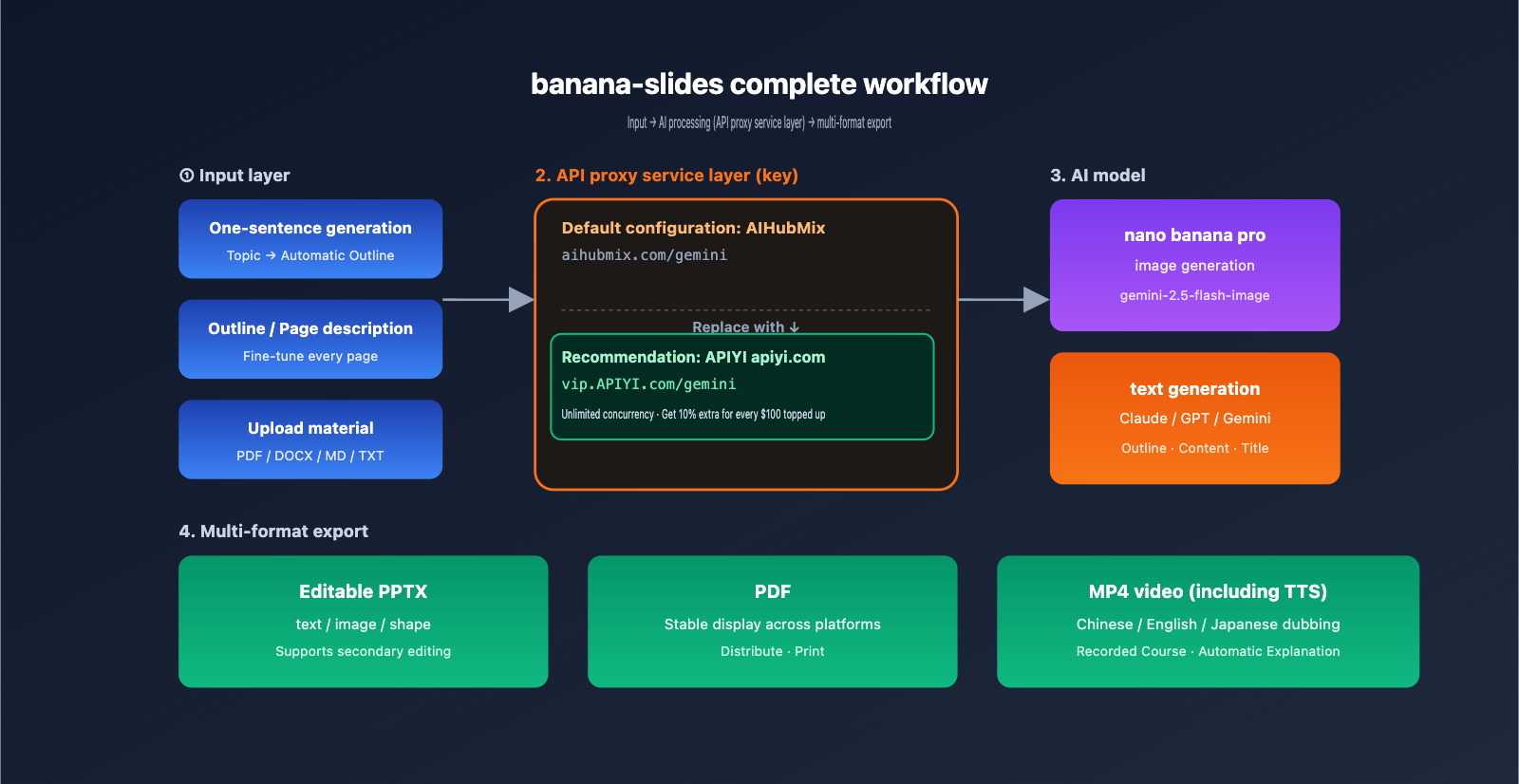
The design of banana-slides is centered around the goal of "lowering the barrier to PPT creation," and it offers capabilities across four main dimensions.
2.1 Multi-Path Content Generation
banana-slides supports three content input methods to adapt to different scenarios:
| Input Method | Use Case | Output Granularity |
|---|---|---|
| One-Sentence Generation | Impromptu speeches, initial drafts | AI automatically generates outline + all slides |
| Outline Mode | For established structures | Automatically expands content for each page based on the outline |
| Page Description Mode | Precise control | Specify text + images for each page individually |
2.2 Intelligent Material Parsing
banana-slides can accept various formats of source files and automatically extract key information:
- PDF: Automatically extracts text, images, and chart data.
- DOCX: Parses chapter structures and embedded images.
- Markdown: Preserves H1/H2 hierarchical relationships.
- TXT: Intelligently extracts key points.
This means you can drag a technical document directly into banana-slides and let the AI convert it into a complete presentation.
2.3 Natural Language "Vibe Editing"
This is arguably the most innovative feature of banana-slides. After generating a PPT, you can modify any page using natural language:
- "Change page 3 to a case study style."
- "Add an orange background to the title."
- "The image on this page is too complex; replace it with a minimalist line-art style."
The AI will precisely locate the area to modify and regenerate it. This interaction feels just like "talking to a designer."
🎯 Pro Tip: Vibe editing triggers multiple model invocations (each modification involves a full prompt + image generation). If you're working on a long PPT (over 20 slides), we recommend using the API proxy service from APIYI (apiyi.com) to avoid rate limits on official APIs.
2.4 Multi-Format Export
| Export Format | Features | Best For |
|---|---|---|
| Editable PPTX | Text, images, and shapes are all editable | Further fine-tuning |
| Image-based PPTX | Each page is a high-definition image | Preventing formatting issues |
| Stable display across platforms | Distribution and printing | |
| MP4 Video | Includes TTS voiceover + subtitles | Recorded lectures, automated presentations |
MP4 export supports Chinese, English, and Japanese TTS voiceovers with a variety of voices, making it especially friendly for educational scenarios.
III. Forking and Local Deployment of banana-slides: A 3-Step Quick Start
3.1 System Requirements
Before deploying banana-slides, please ensure your local environment meets these requirements:
| Dependency | Version Requirement | Notes |
|---|---|---|
| Docker | 20.x+ | Docker Compose deployment recommended |
| Python | 3.10+ | Required for source code deployment |
| Node.js | 16+ | Required for frontend development |
| LibreOffice | Optional | Used for PPTX upload parsing |
| Git | Any | Used for forking and cloning |
3.2 Step 1: Fork the Repository to Your Account
Open the GitHub project page at github.com/Anionex/banana-slides in your browser and click the Fork button in the top right corner to fork the repository to your own account. The benefits of forking include:
- Ability to commit your own changes (especially API configurations)
- Easier conflict resolution when pulling upstream updates
- Better support for team collaborative deployment
Once forked, clone it to your local machine:
# Replace YOUR_USERNAME with your GitHub username
git clone https://github.com/YOUR_USERNAME/banana-slides.git
cd banana-slides
3.3 Step 2: Create the Configuration File
Copy the example configuration file to create your active configuration:
cp .env.example .env
The .env file contains all API key, Base URL, and model selection settings. The next chapter will detail how to replace these with the APIYI API proxy service.
3.4 Step 3: Launch with Docker Compose
The simplest way to start is using Docker Compose:
docker compose -f docker-compose.prod.yml up -d
After starting, access the services here:
- Frontend interface:
http://localhost:3000 - Backend API:
http://localhost:5000
If you prefer to run from source (for secondary development), you can start the backend and frontend separately:
# Backend
uv sync
uv run alembic upgrade head
uv run python app.py

# Frontend (in a new terminal)
cd frontend
npm install
npm run dev
3.5 Verify Deployment
Open http://localhost:3000. You should see:
- ✅ The banana-slides homepage (yellow banana theme)
- ✅ A clickable "New PPT" button
- ✅ Successful generation after entering a topic
If you encounter an "API connection failed" error during generation, it's usually due to an incorrect API key or Base URL in your .env file. Refer to the next chapter to switch to the APIYI API proxy service to resolve this.
IV. Replacing AIHubMix with APIYI: A Complete Guide to Configuring banana-slides
The official banana-slides documentation recommends AIHubMix as the API proxy (refer to docs.bananaslides.online/configuration#aihubmix-recommended-proxy). However, you can easily replace it with APIYI (apiyi.com) to enjoy better pricing, unlimited concurrency, and more stable domestic transit routes.
4.1 Why Choose APIYI?
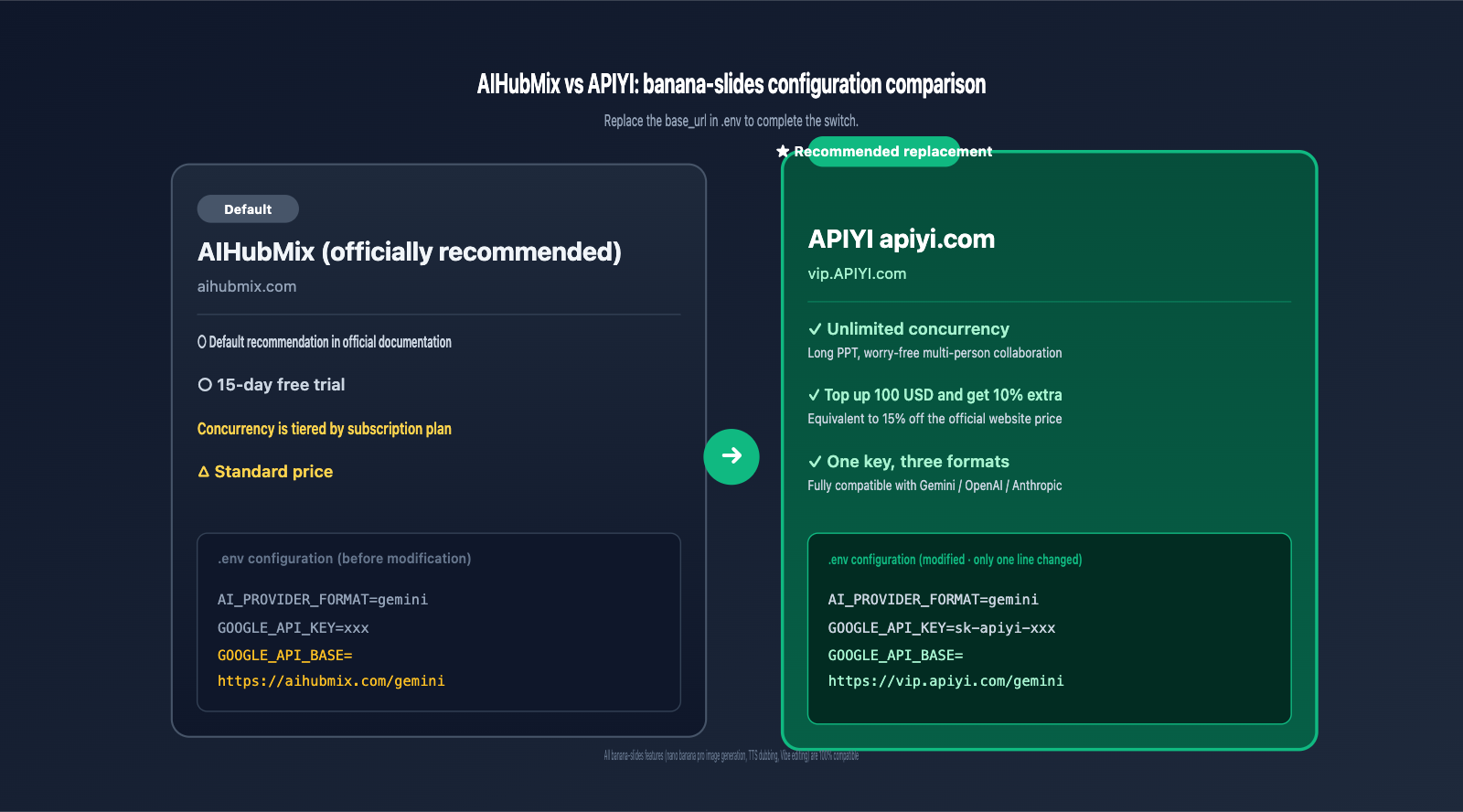
While AIHubMix is the default recommendation for banana-slides, APIYI (apiyi.com) offers several distinct advantages for long-term users:
| Comparison | AIHubMix (Default) | APIYI (Recommended) |
|---|---|---|
| Payment | USD / Domestic RMB | Domestic RMB (WeChat/Alipay) |
| Pricing | Standard | 10% bonus on $100+ top-ups (≈ 15% off) |
| Concurrency | Tiered by plan | Unlimited concurrency |
| API Format | OpenAI/Gemini compatible | Fully compatible with native OpenAI/Gemini/Anthropic |
| Ease of Use | Change base_url |
Change base_url (equally simple) |
| Failover | Single channel | Multi-datacenter load balancing |
| Support | Ticket system | Chinese customer service + WeChat group |
4.2 Modifying the .env File: Gemini Format (Recommended for nano banana pro)
banana-slides defaults to the Gemini format for calling nano banana pro. Open your .env file and locate these settings:
Before (AIHubMix default):
AI_PROVIDER_FORMAT=gemini
GOOGLE_API_KEY=your-aihubmix-key
GOOGLE_API_BASE=https://aihubmix.com/gemini
After (Replacing with APIYI):
AI_PROVIDER_FORMAT=gemini
GOOGLE_API_KEY=sk-your-apiyi-key-here
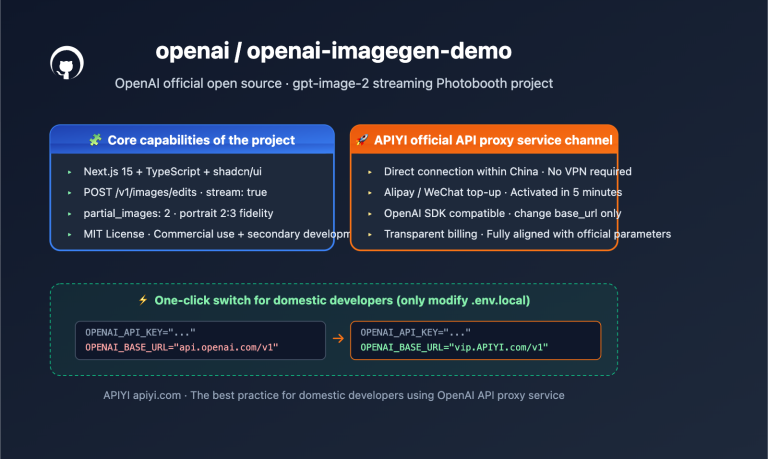
GOOGLE_API_BASE=https://vip.apiyi.com/gemini
🎯 Key Note: APIYI (apiyi.com) is fully compatible with the native Gemini
base_urlpath structure. You only need to replace the domainaihubmix.comwithvip.apiyi.com, keeping the/geminipath intact.
4.3 Modifying the .env File: OpenAI Format
If you want to use GPT series models to generate PPT text, you can switch to the OpenAI format:
Before:
AI_PROVIDER_FORMAT=openai
OPENAI_API_KEY=your-aihubmix-key
OPENAI_API_BASE=https://aihubmix.com/v1
After (Replacing with APIYI):
AI_PROVIDER_FORMAT=openai
OPENAI_API_KEY=sk-your-apiyi-key-here
OPENAI_API_BASE=https://vip.apiyi.com/v1
4.4 Modifying the .env File: Anthropic Format
If you prefer using Claude models for higher-quality PPT text, banana-slides also supports the Anthropic format:
After (Replacing with APIYI):
AI_PROVIDER_FORMAT=anthropic
ANTHROPIC_API_KEY=sk-your-apiyi-key-here
ANTHROPIC_API_BASE=https://vip.apiyi.com
4.5 Hybrid Configuration: Different Models for Text and Images
banana-slides supports using different model sources for text and image generation. For example, use Claude Sonnet 4.5 for text and nano banana pro for images:
# Text generation - use Anthropic format for Claude
TEXT_MODEL_PROVIDER=anthropic
TEXT_MODEL_NAME=claude-sonnet-4-5
ANTHROPIC_API_KEY=sk-your-apiyi-key-here
ANTHROPIC_API_BASE=https://vip.apiyi.com

# Image generation - use Gemini format for nano banana pro
IMAGE_MODEL_PROVIDER=gemini
IMAGE_MODEL_NAME=gemini-2.5-flash-image
GOOGLE_API_KEY=sk-your-apiyi-key-here
GOOGLE_API_BASE=https://vip.apiyi.com/gemini
💡 Major Advantage: A single API key from APIYI (apiyi.com) can call models in Gemini, OpenAI, and Anthropic formats simultaneously. You don't need to apply for separate accounts for each provider—a significant convenience compared to direct official connections.
4.6 Restart and Verify
After modifying .env, restart banana-slides to apply the changes:
# Docker Compose mode
docker compose -f docker-compose.prod.yml down
docker compose -f docker-compose.prod.yml up -d

# Source code mode
# Restart the uv run python app.py process
Create a test PPT in the frontend, enter "Create a 5-page PPT about AI Agents," and check the terminal logs:
- ✅ Seeing
Connecting to https://vip.apiyi.com/...confirms the APIYI proxy is in use. - ✅ Response time < 30 seconds (for initial generation).
- ✅ No 429 / 503 errors.
4.7 Committing Changes to Your Fork (Team Deployment)
For team deployments, you can commit the modified .env.example to your fork (ensure you do not commit the actual .env file):
# Create an .env.example.apiyi configuration template
cp .env .env.example.apiyi
# Edit the file to replace the real API Key with a placeholder
# Then commit
git add .env.example.apiyi
git commit -m "feat: add APIYI (apiyi.com) configuration template"
git push origin main
This way, team members who clone your fork can directly copy this template, saving time on reconfiguring settings.
V. banana-slides Practical Scenarios: 5 Typical Use Cases
5.1 Scenario 1: Students Creating Quick Classroom Presentation PPTs
Goal: Complete a 10-page course presentation within 30 minutes.
Workflow:
- Open banana-slides and select "One-sentence Generation" mode.
- Enter a topic, for example: "An introductory guide to the principles of quantum computing."
- The AI automatically generates an outline (approx. 30 seconds).
- Click to generate all pages (approx. 5-8 minutes, depending on image generation speed).
- Use Vibe to edit and fine-tune individual pages.
- Export as PPTX.
API Usage Estimate: A 10-page PPT consumes about 50-80K tokens (text) + 10-15 image generation calls. We recommend using the APIYI (apiyi.com) API proxy service to avoid rate limits.
5.2 Scenario 2: Teachers Converting Lesson Plans into Teaching Slides
Goal: Convert existing Word lesson plans into visually rich teaching PPTs.
Workflow:
- Upload the DOCX lesson plan file.
- banana-slides automatically parses the chapter structure.
- Select "Generate pages by chapter."
- The AI generates corresponding illustrations for each knowledge point.
- Export as MP4 (including TTS Chinese voiceover), ready to be used as a recorded lecture.
5.3 Scenario 3: Professionals Creating Business Proposals
Goal: Generate a professional business proposal PPT based on a set of requirements.
Workflow:
- Select "Page Description Mode" for precise control over each page's content.
- Upload company logo and brand colors as template references.
- Use Vibe to edit and adjust the style of illustrations on each page.
- Export as an editable PPTX for final fine-tuning.
5.4 Scenario 4: Tech Bloggers Creating Launch Event Presentations
Goal: Create a 30-page product launch PPT within 3 hours.
Workflow:
- Prepare a Markdown document detailing product features.
- Upload to banana-slides and select "Split pages by H2/H3."
- The AI automatically generates corresponding visual illustrations.
- Use template images to ensure a consistent visual style.
- Export in both PDF and PPTX formats.
5.5 Scenario 5: Private Deployment for Team Use
Goal: Deploy banana-slides on the company intranet for the entire team.
Workflow:
- Fork the repository to your company's GitHub organization.
- Update the
.envconfiguration to use the APIYI (apiyi.com) API proxy service. - Deploy to an internal server (Docker Compose).
- Configure an internal domain using Nginx.
- Team members access it via the intranet.
💡 Common Advice for All Scenarios: All 5 scenarios involve a large number of API calls (each PPT includes multiple text generation + multiple image generation tasks). We suggest connecting banana-slides to the APIYI (apiyi.com) API proxy service to enjoy unlimited concurrency, ensuring that PPT generation speed isn't throttled by official interface rate limits.
VI. banana-slides FAQ
Q1: How does banana-slides differ from AI PPT tools on the market (like Gamma or MindStudio)?
The core difference lies in open-source nature and customizability. Commercial tools like Gamma are cloud-based SaaS, requiring per-page or monthly subscriptions. banana-slides is an open-source project (AGPL-3.0 license) that you can deploy locally, modify freely, and connect to any AI model.
If you only make PPTs occasionally, Gamma might be more convenient. However, if you need:
- Private team deployment
- API cost control
- Custom generation logic
- Access to APIs from within China
Then banana-slides is the better choice. Combined with the APIYI (apiyi.com) API proxy service, you can achieve complete autonomy and control.
Q2: I don't have a Google API Key. Must I apply for Gemini to use banana-slides?
Not necessarily. banana-slides supports three API formats (Gemini / OpenAI / Anthropic); you only need a key from any one of them to get started.
The easiest way is to register an account at APIYI (apiyi.com). A single key allows you to call Gemini (including nano banana pro image generation), GPT, and Claude, saving you the trouble of applying for each separately. It supports RMB top-ups via WeChat/Alipay.
Q3: Will existing features be affected if I switch from AIHubMix to APIYI?
Not at all. banana-slides determines the API call address via the GOOGLE_API_BASE and OPENAI_API_BASE environment variables. As long as the provider is compatible with the corresponding API protocol (APIYI (apiyi.com) is fully compatible with native Gemini, OpenAI, and Anthropic formats), all features will work normally, including nano banana pro image generation, TTS voiceover, and Vibe editing.
Q4: What is the model name for nano banana pro on APIYI?
The official model ID for nano banana pro on APIYI (apiyi.com) is gemini-2.5-flash-image (Google's official naming). You can configure it in your banana-slides .env file like this:
IMAGE_MODEL_NAME=gemini-2.5-flash-image
GOOGLE_API_BASE=https://vip.apiyi.com/gemini
Q5: How much does it cost to generate a 30-page PPT?
Estimates are as follows:
- Text generation (outline + content): approx. 100-200K tokens
- Image generation (1-2 per page): approx. 30-60 calls
- Total cost: After using the 10% bonus from APIYI (apiyi.com) top-ups (≈ 15% off), it's about $1-3 USD.
Q6: Will it lag if multiple people use it simultaneously after deployment to a company server?
The main bottleneck is API concurrency. banana-slides itself uses a Flask + SQLite architecture, which can support 10-20 people simultaneously on a single machine. The bottleneck usually occurs at the API call layer—if you use official API interfaces, you will hit rate limits. Using the APIYI (apiyi.com) API proxy service allows you to enjoy unlimited concurrency, so multiple people generating PPTs simultaneously won't be throttled.
Q7: Is there a fee for commercial use of banana-slides?
Yes. banana-slides is licensed under AGPL-3.0, which is free for personal and non-commercial use. For commercial deployment, you need to contact the author to purchase a commercial license (contact email: [email protected]). Even with a commercial license, you can still use APIYI (apiyi.com) for the API proxy portion; the two are not in conflict.
Q8: How can I stay up-to-date with banana-slides updates?
Since you have forked the repository, you can periodically sync upstream updates like this:
# Add the upstream repository
git remote add upstream https://github.com/Anionex/banana-slides.git

# Fetch upstream updates
git fetch upstream
git checkout main
git merge upstream/main

# Push to your own fork
git push origin main
Be careful to preserve your modified .env configuration to avoid it being overwritten.
VII. banana-slides Key Takeaways
- ✅ banana-slides is an open-source AI PPT generator based on the nano banana pro image generation model, boasting 14K+ GitHub stars.
- ✅ Supports multiple input methods: Single sentences, outlines, page descriptions, or uploaded materials (PDF/DOCX/MD/TXT).
- ✅ Three export formats: Editable PPTX, PDF, and MP4 video (including TTS voiceover).
- ✅ 3-step Fork & Deploy: Fork →
cp .env.example .env→docker compose up. - ✅ Supports 3 API formats: Gemini (default), OpenAI, and Anthropic.
- ✅ Switching from AIHubMix to APIYI is simple: Just change the
base_urlfromaihubmix.comtovip.apiyi.com. - ✅ Advantages of APIYI (apiyi.com): Native format compatibility, unlimited concurrency, 10% bonus on $100+ top-ups (approx. 15% off), and support for RMB payments.
- ✅ One API key for all three formats: Fully compatible with Gemini, OpenAI, and Anthropic.
VIII. Conclusion
banana-slides is an open-source AI PPT generator worth keeping an eye on for the long term. It combines the image generation capabilities of nano banana pro with a "Vibe editing" interaction paradigm, allowing anyone to create professional-grade presentations in under 30 minutes.
For developers deciding to fork and deploy, configuring the API provider is the most critical step. While the officially recommended AIHubMix works fine, switching to APIYI (apiyi.com) offers several clear benefits: full compatibility with Gemini/OpenAI/Anthropic native formats (no business code changes required), unlimited concurrency (no rate limiting for teams or large PPTs), cost savings (10% bonus on $100 top-ups, effectively 15% off), and convenient RMB payments (via WeChat/Alipay).
The replacement process is incredibly simple—just update the GOOGLE_API_BASE (or OPENAI_API_BASE / ANTHROPIC_API_BASE) in your .env file from https://aihubmix.com/... to https://vip.apiyi.com/..., then enter your APIYI API key.
If you're considering building a team-level AI PPT generation system, or want to provide a zero-cost entry-level PPT tool for yourself or your students, the combination of banana-slides and APIYI (apiyi.com) is currently the most developer-friendly solution in China. Fork the project today, and you can have your first AI-generated PPT up and running in under an hour.
🎯 Next Steps: Visit APIYI (apiyi.com) to register and get your API key, then fork
github.com/Anionex/banana-slidesto your GitHub. Follow the configuration instructions in Chapter 4 to update your.envfile, start the service, and use a single-sentence prompt to generate your first PPT and verify the workflow.
References
-
banana-slides GitHub Repository: The main project repository
- Link:
github.com/Anionex/banana-slides - Description: Contains the complete source code, Docker Compose configuration, and an English README.
- Link:
-
banana-slides Official Documentation: Configuration and deployment guide
- Link:
docs.bananaslides.online/configuration - Description: Includes a section on AIHubMix recommended proxies; this article teaches you how to replace it with APIYI.
- Link:
-
nano banana pro Model Documentation: Google's official image generation model
- Link:
ai.google.dev/gemini-api/docs/image-generation - Description: The model ID is
gemini-2.5-flash-image.
- Link:
-
APIYI Official Website: API proxy service platform for Claude, Gemini, and OpenAI
- Link:
apiyi.com - Description: Native format compatibility, unlimited concurrency, supports RMB top-ups, and get a 10% bonus when you top up $100.
- Link:
Author: Technical Team
Last Updated: 2026-05-01
About APIYI: APIYI (apiyi.com) is a professional AI Large Language Model API proxy service provider. We offer stable access to a full range of models, including Gemini (featuring nano banana pro), Claude Sonnet 4.5, Claude Opus 4.7, and the GPT series. Our service is fully compatible with native Gemini, OpenAI, and Anthropic formats. We offer a 10% bonus on $100 top-ups (equivalent to a 15% discount off official pricing), unlimited concurrency, and fast technical support.