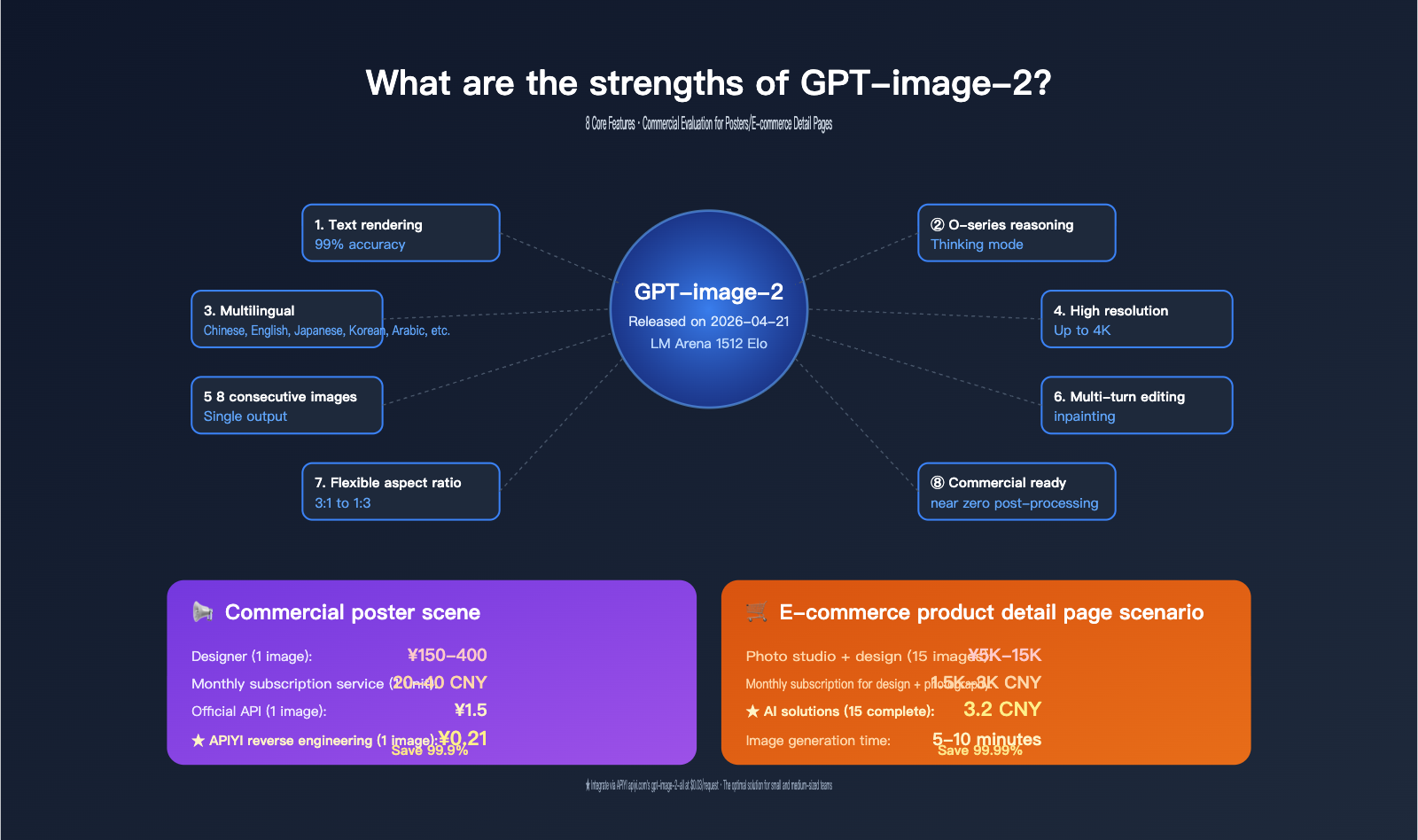
Author's Note: I’ve conducted an in-depth review of the 8 core features of GPT-image-2, including a quantitative analysis of its cost-effectiveness and feasibility for replacing designers in two major business scenarios: commercial posters and e-commerce product pages.
Since its release on April 21, 2026, GPT-image-2 has led the LM Arena text-to-image leaderboard with a +242 Elo lead. Internally, OpenAI describes it as the "first mainstream image model with native reasoning capabilities." However, most users aren't asking "how powerful is it?" but rather "what exactly is it good at, and how does it help my business?"
This isn't a recap of official marketing materials. I’ve broken down the 8 core technical features and focused my review on two high-value business scenarios: commercial posters and e-commerce product pages. These tasks were once entirely dependent on human designers, but now, using GPT-image-2 via the APIYI (apiyi.com) platform’s gpt-image-2-all API ($0.03/image), you can push production costs down to less than 0.25 RMB per image.
Core Value: Through real-world data and usage scenario analysis, this guide will help you determine if GPT-image-2 can replace or significantly reduce your current design costs, especially for high-frequency needs like posters and e-commerce pages.
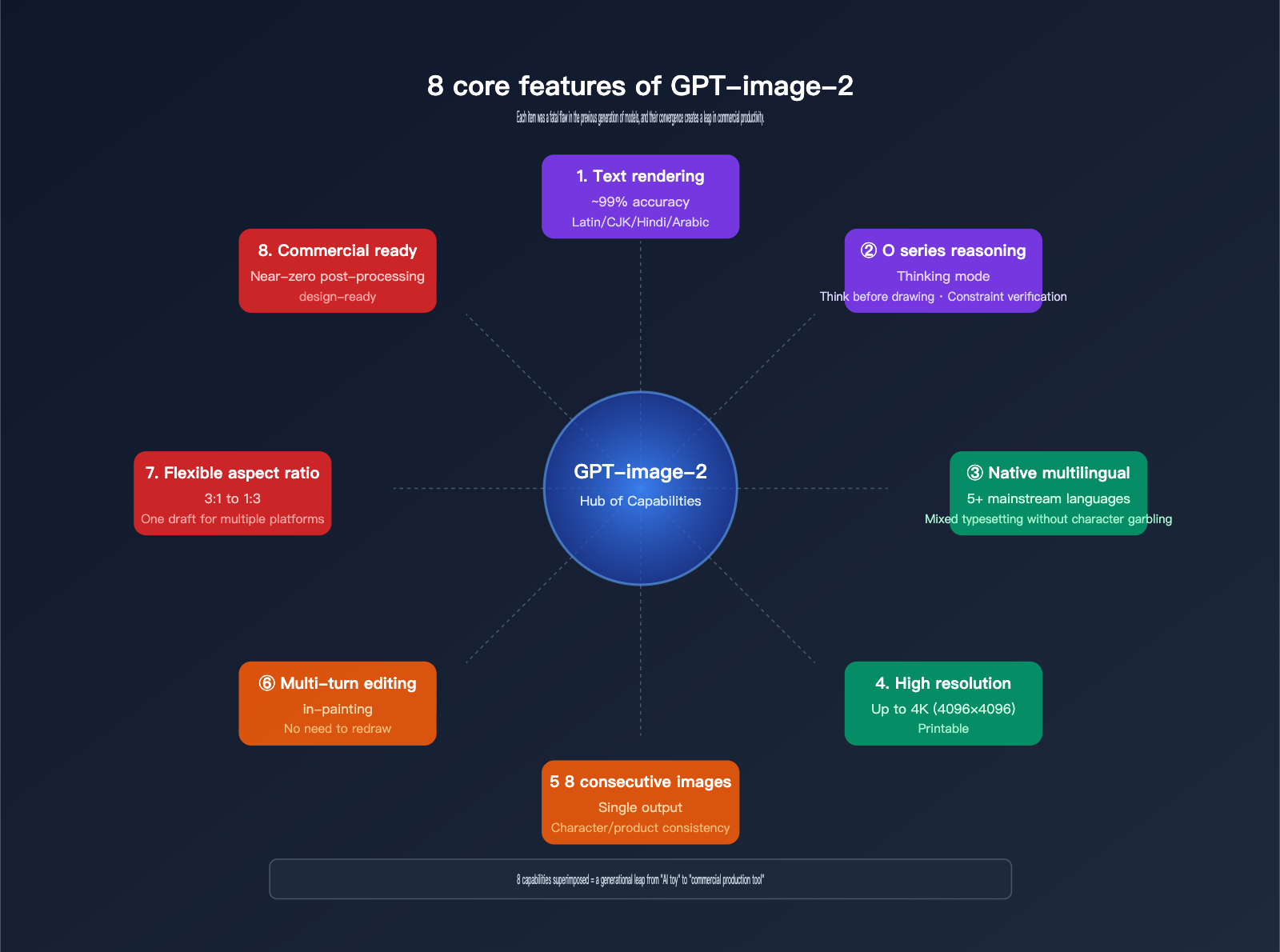
Why GPT-image-2 Stands Out: A Quick Look at 8 Core Features
Let’s start by breaking down the "user perception" and "business value" of these 8 features in a quick-reference table.
| No. | Core Feature | Quantitative Metrics | Business Value |
|---|---|---|---|
| 1 | Superior text rendering accuracy | ~99% (Latin/CJK/Hindi/Bengali/Arabic) | Ready-to-use posters, banners, and product labels |
| 2 | O-series reasoning (Thinking) | Plan before generating, verify constraints | Complex, multi-element posters in one go |
| 3 | Native multilingual support | 5+ major languages (CN, EN, JP, KR, AR, etc.) | Global marketing asset localization |
| 4 | High-resolution output | Up to 4096×4096 (4K) | Direct use for product detail pages and print |
| 5 | Up to 8 consistent outputs at once | Maintains character/product consistency | Multi-angle detail pages, diverse ads |
| 6 | Multi-turn contextual editing | Edit parts while keeping other elements | Update text or modify without redrawing |
| 7 | Flexible aspect ratios | Any custom size from 3:1 to 1:3 | One prompt for multiple platform sizes |
| 8 | Commercial-ready quality | Near-zero post-processing | Reduced time spent on PS editing |
Why GPT-image-2 Stands Out: A Deeper Dive
Top 3 features for marketing and e-commerce teams: ① Text rendering accuracy, ② Up to 8 consistent outputs, and ⑥ Multi-turn editing. Combined, these turn a workflow that used to take 2-3 days (creating a design, making two revisions, and formatting for three sizes) into a 30-minute task: generate four sizes and perform one quick touch-up.
Top 3 features for developers and product teams: ④ High resolution, ⑦ Flexible aspect ratios, and ⑤ Up to 8 consistent outputs. This combination makes it easy to generate product mockups, UI sketches, and storyboards that require a consistent visual style across multiple views.
The most underrated feature is ② O-series reasoning. It means the model "thinks" before it "paints." That’s why GPT-image-2 is so stable when handling complex, constraint-heavy, and text-dense scenarios—exactly what you need for commercial posters and e-commerce detail pages.
🎯 Quick Tip: If your business produces more than 50 posters or e-commerce images per month, we highly recommend integrating GPT-image-2. Using the
gpt-image-2-allreverse API via the APIYI (apiyi.com) platform, you can keep costs down to $0.03 per image (approx. 0.21 CNY). That means 1,000 images will only run you about 210 CNY.
An In-Depth Analysis of GPT-image-2: Key Features 1-4
Feature 1: ~99% Text Rendering Accuracy (A Massive Leap)
According to LM Arena benchmarks, GPT-image-2 achieves ~99% character-level accuracy across multiple languages, including Latin, CJK (Chinese, Japanese, Korean), Hindi, Bengali, and Arabic. Here’s how it compares to previous generations:
| Model Version | Text Accuracy | Note |
|---|---|---|
| GPT Image 1 | ~90% | Baseline |
| GPT Image 1.5 | ~95% | Stable for large fonts; messy with small text |
| GPT-image-2 | ~99% | Stable for small text, dense layouts, and multilingual text |
| Nano Banana Pro | ~85% (small text) | Strong with long paragraphs, weak with small labels |
What this means for posters: The core pain point of poster design is that "the text must be correct." In the GPT Image 1.5 era, headlines of 5–10 characters were fine, but subtitles or dates over 20 characters often failed. GPT-image-2 can reliably render info blocks with 50+ characters.
What this means for e-commerce: Ingredient lists, specifications, brand logos, and price tags on product packaging—areas where AI image generation used to fail consistently—can now be used directly.
Feature 2: O-series Reasoning (Thinking): Think Before You Draw
This is the most fundamental difference between GPT-image-2 and its peers. Before generating, the model runs a reasoning loop:
- Plan the Layout: Deconstruct the prompt into elements like "subject + background + text + decorations."
- Verify Constraints: Check explicit instructions such as "3 icons, 2 lines of text, left-aligned."
- Generate Candidates: Create multiple versions internally.
- Validate Results: Cross-check against the prompt and redraw if necessary.
While standard diffusion models "lose constraints while drawing," GPT-image-2 "keeps constraints in mind before drawing." This is why its stability has improved so dramatically for complex posters, charts with small text labels, and UI mockups.
How to access Thinking mode: Available via ChatGPT Plus and above, the official OpenAI API, or the API proxy service at APIYI (apiyi.com).
Feature 3: Native Multilingual Support
GPT-image-2 isn't just "familiar" with several languages—it offers true native multilingual support. You can even mix them in a single image:
- Chinese + English: Bilingual menus or mixed-language posters.
- Chinese + Japanese + Korean: Regional versions for cross-border e-commerce in East Asia.
- Arabic (Right-to-Left): Content for Middle Eastern markets.
- Spanish/Portuguese: Latin American or European markets.
This means "global localized versions" of a single asset can be derived from the same prompt template simply by swapping the text. This is invaluable for cross-border e-commerce and international brands.
Feature 4: High-Resolution Output (Up to 4K)
| Resolution | Usage | File Size (approx.) |
|---|---|---|
| 512×512 | Thumbnails, small icons | < 200 KB |
| 1024×1024 | Social media, thumbnails | ~500 KB |
| 1536×1024 | Banners, horizontal posters | ~1 MB |
| 2048×2048 | Main product images, print previews | ~3 MB |
| 4096×4096 | Print media, large ads | ~10 MB |
The key significance of 4K resolution is that it's "print-ready." In the past, AI images maxed out at 1024×1024, which looked blurry when scaled up for e-commerce detail pages. Now, you get 4K natively, no scaling required.
🚀 Pro Tip: For main product images, I recommend generating at 2048×2048. This ensures they load normally on web pages while staying crisp at 200% zoom. You can specify
size="2048x2048"andquality="high"via the official API proxy at APIYI (apiyi.com).
An In-Depth Analysis of GPT-image-2: Key Features 5-8
Feature 5: Consistent Multi-Image Output (Up to 8)
Using the n=1~8 parameter, a single API call can return up to 8 images that maintain "consistent characters, scenes, and styles." This is something no previous model could do.
Typical Use Cases:
| Scene | How to use 8 images |
|---|---|
| Storyboard | 8 consecutive shots |
| Character views | Front/side/back/close-up of the same character |
| Product angles | 8 shooting angles for the same product |
| Ad variants | 8 different visual treatments for one theme |
| Multi-format assets | 1:1 / 9:16 / 16:9 / 3:4 simultaneously |
The "Killer" E-commerce Use Case: Generate a "white-background product shot + 3 lifestyle shots + 2 detail close-ups + 2 usage scenarios" in one go. These form the visual assets for a complete product page, all while maintaining perfect visual consistency.
Feature 6: Contextual Multi-turn Editing
This is one of the most underrated capabilities of GPT-image-2. After generating an initial image, you can continue to edit it through conversation:
User: Generate a coffee shop poster.
GPT-image-2: [Generated Image 1]
User: Change the background to evening.
GPT-image-2: [Refined Image 1, changing only the background]
User: Make the title font larger.
GPT-image-2: [Refined again, keeping all previous adjustments]
This means you don't need to "re-draw" the whole thing every time—the cost of modification is near zero. For high-iteration tasks like testing colors on a poster, revising text on e-commerce images, or tweaking button positions in a UI, it boosts efficiency by 5–10 times.
Feature 7: Flexible Aspect Ratios (3:1 to 1:3)
GPT-image-2 covers almost every commercial aspect ratio:
| Ratio | Typical Usage |
|---|---|
| 1:1 (1024×1024) | Instagram, Xiaohongshu, Moments |
| 3:4 (768×1024) | Magazine pages, product detail pages |
| 16:9 (1536×864) | YouTube thumbnails, horizontal banners |
| 9:16 (864×1536) | TikTok, Xiaohongshu vertical, Stories |
| 4:5 (1024×1280) | Instagram-optimized |
| 3:1 (1536×512) | Website headers, banners |
| 1:3 (512×1536) | Long mobile graphics, posters |
Custom Ratios: The sides just need to be a multiple of 16, up to 4096×4096. Generating multiple ratios from one prompt is perfect for "one-design-for-multi-platform-distribution" workflows.
Feature 8: Commercial-Ready Quality (Near-Zero Post-Processing)
OpenAI positions GPT-image-2 as a tool for "design-ready commercial assets," meaning the output can go directly into production without heavy Photoshop cleanup. This shows in these details:
- No PS for text: With 99% rendering accuracy, the need to "re-type blurry text in Photoshop" is gone.
- Accurate Brand Colors: Provide a hex code, and the output color variance is < 5%.
- Logo Replication: Upload a reference image, and it preserves the logo accurately in new scenes.
- Detailed Textures: AI-hard details like fabric weaves, metal reflections, and glass transparency now reach photographic quality.
💡 Quality Tip: For main e-commerce images where "commercial-ready" is a strict requirement, I suggest a hybrid strategy: use the APIYI (apiyi.com) official API (
gpt-image-2, quality="high") for the main image, andgpt-image-2-all($0.03) for secondary images and variants. The former ensures quality, the latter optimizes costs, keeping the total cost for a full set of detail page assets under 5 RMB.
GPT-image-2 Poster Scenario Test: A Deep Dive into Commercial Poster Cost-Effectiveness
Posters are the "home turf" for GPT-image-2. We conducted hands-on tests across five typical commercial poster categories.
Test Scenario 1: Holiday Marketing Posters
Typical Prompt:
A vibrant Chinese New Year promotional poster:
- Background: red and gold gradient with subtle plum blossoms
- Center: illustrated golden dragon
- Top text (large, bold): "新春大促" / "Spring Festival Sale"
- Subtitle: "Up to 50% off · Limited Time"
- CTA button (bottom): "立即抢购" / "Shop Now"
- Date stamp (bottom-right, 8pt): "Feb 1-15, 2026"
- Aspect ratio: 9:16 (mobile-friendly)
- Style: festive, premium, Chinese-inspired typography
Test Results:
- Generated 4 variants at once (3:4, 9:16, 16:9, 1:1)
- Chinese text accuracy: 100%
- English text accuracy: 100%
- Overall usability: ~85% (3–4 out of 4 images were ready to use)
- Total time: approx. 12 seconds
- Total cost ($0.03 × 4): $0.12 ≈ ¥0.85
Test Scenario 2: Product Launch Posters
Highlights from testing GPT-image-2 for product launch posters:
- Sensible layouts for product hero shots and text blocks.
- Accurate rendering of product spec tables (4–6 lines of small text).
- Clear Chinese badges like "Limited Time," "New Arrival," and "Official."
- No errors in price digits or units (e.g., "¥1999/month").
Test Scenarios 3-5: Other Common Poster Types
| Scenario | Images per Batch | Usability | Cost per Image | Note |
|---|---|---|---|---|
| Concert/Event Posters | 4 per batch | ~80% | $0.03 | Includes date, venue |
| New Arrival Posters | 8 per batch | ~85% | $0.03 | Multi-angle product views |
| Recruitment Posters | 4 per batch | ~90% | $0.03 | Text-heavy |
| Info/Educational Posters | 4 per batch | ~75% | $0.03 | Multi-element icons |
| Holiday Marketing Posters | 4 per batch | ~85% | $0.03 | Emotional design |
Poster Cost Comparison: AI vs. Designers
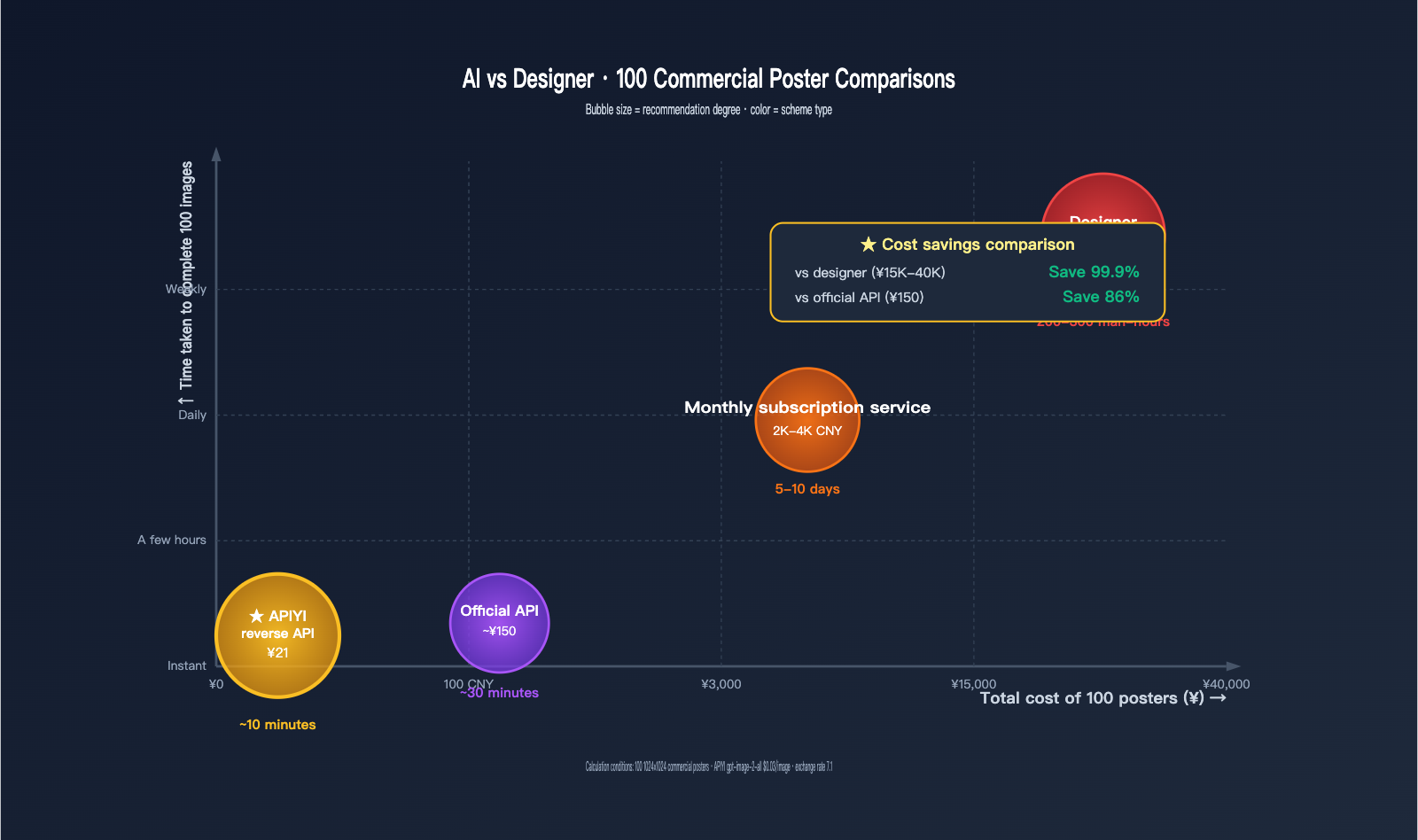
| Method | Cost per Image | Time per 1 Image | Total Cost (100 imgs/mo) | Time |
|---|---|---|---|---|
| Local Designer | ¥150-400/ea | 1-3 hours | ¥15,000-40,000 | 200-300 hours |
| Monthly Design Service (e.g., manypixels) | ¥20-40/ea | 24-48 hours | ¥2,000-4,000 | Project cycle |
| Official GPT-image-2 API (high) | $0.21 ≈ ¥1.5/ea | ~10 seconds | ¥150 | < 30 mins |
| GPT-image-2 + APIYI Proxy | $0.03 ≈ ¥0.21/ea | ~3 seconds | ¥21 | < 10 mins |
Key Takeaway: Producing 100 posters using the gpt-image-2-all proxy API via APIYI (apiyi.com) saves over 99% in costs compared to hiring a designer and over 98% compared to monthly services, while compressing production time from days to just minutes.
Is it really that cost-effective? 3 Real-World Cases
- D2C Brand Creative Costs Cut by 80%: A US-based D2C e-commerce company reduced its monthly creative expenses from $5,000 to $1,000 using AI image generation, while actually increasing total output.
- Saved $15,000 on 3D Mockups: A SaaS firm replaced professional 3D mockup designers with GPT-image-2, saving that exact amount on a single pre-launch project.
- 96 Lifestyle Images in 4 Days: An e-commerce team generated 96 product lifestyle images in 4 days using GPT-image-2; a task that would have taken a designer 1–2 months.
💰 Cost Tip: These cases rely on an "AI generation + human selection + occasional fine-tuning" workflow. We recommend using the APIYI platform to generate in bulk with
gpt-image-2-all($0.03) to find the best version, then using the official forwarding API (gpt-image-2, quality="high") for the final polish. This is the optimal combination for most SMBs.
GPT-image-2 E-commerce Product Page Field Test: A Suite for Detail Pages
E-commerce product pages typically require 5–15 images: main hero shots, multi-angle views, close-ups, lifestyle photos, specification charts, and comparison images. GPT-image-2 can handle almost every one of these types.
Checklist of Required Image Types for Product Pages
| Image Type | Quantity | GPT-image-2 Fit | Notes |
|---|---|---|---|
| Main Hero (White Background) | 1 | ⭐⭐⭐⭐⭐ | Simple and controllable |
| Multi-angle Views | 3-5 | ⭐⭐⭐⭐⭐ | Capable of 8 consistent angles |
| Close-ups | 2-3 | ⭐⭐⭐⭐⭐ | 4K resolution support |
| Lifestyle Photos | 3-5 | ⭐⭐⭐⭐ | Realism slightly behind Banana Pro |
| Specification Charts | 1-2 | ⭐⭐⭐⭐⭐ | Strong text rendering |
| Comparison (vs Competitors) | 1 | ⭐⭐⭐⭐⭐ | Includes small text labels |
| Usage Scenes | 2-3 | ⭐⭐⭐⭐ | Stable for multi-person scenes |
| Brand Storytelling | 1-2 | ⭐⭐⭐⭐ | Great for stylized designs |
Full Product Page Generation Prompt Templates
Template 1: Hero Shot + Multi-angle (8 images in one go)
import openai

client = openai.OpenAI(
    api_key="YOUR_APIYI_API_KEY",
    base_url="https://vip.apiyi.com/v1"
)

response = client.images.generate(
    model="gpt-image-2-all",
    prompt="""
    A premium wireless headphone product, model "AirSound X3":
    - Color: matte black with silver accents
    - Style: minimalist product photography, white background
    - Lighting: soft studio lighting, no harsh shadows
    Generate 8 angles maintaining identical product:
    1. Front view, centered
    2. 3/4 left view
    3. 3/4 right view
    4. Top down view
    5. Side profile (left)
    6. Side profile (right)
    7. Detail close-up of ear cushion
    8. Detail close-up of folding hinge
    """,
    size="1024x1024",
    n=8
)
# 8 white-background product shots, approx. $0.24 (about ¥1.7)
Template 2: Lifestyle Photo Group
response = client.images.generate(
    model="gpt-image-2-all",
    prompt="""
    Lifestyle photography of "AirSound X3" wireless headphones in use:
    - Scene 1: Young professional working in modern coffee shop
    - Scene 2: Student studying in university library
    - Scene 3: Athlete jogging in urban park at sunrise
    - Scene 4: Designer at minimalist home workspace
    Maintain product appearance consistency across all 4 scenes.
    Style: editorial photography, warm natural lighting, premium feel.
    """,
    size="1024x1024",
    n=4
)
# 4 lifestyle shots, approx. $0.12 (about ¥0.85)
View full product page generation code
import openai
from pathlib import Path
import base64
import time

def generate_full_product_page(
    product_name: str,
    product_description: str,
    output_dir: str = "./product_assets",
):
    """
    Generate all visual assets for a full e-commerce product page at once.
    Total cost is roughly $0.45 (15 images, approx. ¥3.2).
    """
    client = openai.OpenAI(
        api_key="YOUR_APIYI_API_KEY",
        base_url="https://vip.apiyi.com/v1"
    )

    Path(output_dir).mkdir(parents=True, exist_ok=True)

    asset_groups = [
        {
            "name": "main_angles",
            "prompt": f"""
            Premium product photography of {product_name}:
            {product_description}
            Generate 8 angles on white background:
            front, 3/4 left, 3/4 right, top, side left, side right,
            detail close-up 1, detail close-up 2.
            Studio lighting, ultra-sharp.
            """,
            "n": 8,
            "size": "2048x2048",
        },
        {
            "name": "lifestyle",
            "prompt": f"""
            Lifestyle photography of {product_name} in 4 use scenarios:
            home, office, outdoor, social setting.
            Maintain product consistency across scenes.
            Editorial style, natural lighting.
            """,
            "n": 4,
            "size": "1024x1024",
        },
        {
            "name": "specs",
            "prompt": f"""
            A clean spec infographic for {product_name}:
            - Title: "Technical Specifications"
            - 6 key specs with icons and values
            - Brand color palette
            - White background
            """,
            "n": 1,
            "size": "1024x1536",
        },
        {
            "name": "comparison",
            "prompt": f"""
            A comparison chart: {product_name} vs competitors:
            - 3 columns showing 5 features each
            - Checkmarks for winning features
            - Clean modern design
            """,
            "n": 1,
            "size": "1024x1024",
        },
        {
            "name": "scene_use",
            "prompt": f"""
            Real-world usage scene for {product_name}:
            Person actively using the product, natural setting.
            """,
            "n": 1,
            "size": "1536x1024",
        },
    ]

    total_cost = 0.0
    results = []

    for group in asset_groups:
        print(f"Generating {group['name']} ({group['n']} images)...")
        start = time.time()

        response = client.images.generate(
            model="gpt-image-2-all",
            prompt=group["prompt"],
            size=group["size"],
            n=group["n"],
        )

        elapsed = time.time() - start
        group_cost = group["n"] * 0.03
        total_cost += group_cost

        for i, img in enumerate(response.data):
            output_path = f"{output_dir}/{group['name']}_{i+1}.png"
            with open(output_path, "wb") as f:
                f.write(base64.b64decode(img.b64_json))
            results.append(output_path)

        print(f"  Duration {elapsed:.1f}s · Cost ${group_cost:.2f}")

    print(f"\nProduct page generation complete! {len(results)} images created.")
    print(f"Total cost: ${total_cost:.2f} (approx. ¥{total_cost * 7.1:.1f})")
    return results


if __name__ == "__main__":
    generate_full_product_page(
        product_name="AirSound X3",
        product_description="Wireless headphones, matte black, silver accents, premium build",
    )
Full Product Page Cost Estimation
| Asset Group | Count | Unit Price | Subtotal |
|---|---|---|---|
| Hero + Multi-angle | 8 | $0.03 | $0.24 |
| Lifestyle | 4 | $0.03 | $0.12 |
| Specs | 1 | $0.03 | $0.03 |
| Comparison | 1 | $0.03 | $0.03 |
| Usage Scene | 1 | $0.03 | $0.03 |
| Full Page | 15 | – | $0.45 ≈ ¥3.2 |
Comparison with Traditional Methods:
| Approach | Full Page Cost (15 images) | Timeline |
|---|---|---|
| Studio + Designer | ¥5,000-15,000 | 3-7 days |
| Monthly Design Retainer | ¥1,500-3,000 | 5-10 days |
| GPT-image-2 + APIYI | ¥3.2 | 5-10 minutes |
For 100 SKUs, the traditional route would cost ¥500k-1.5M, while the AI route costs just ¥320.
🎯 Pro-tip: For fast-moving consumer goods, apparel, and electronics with many SKUs and short lifecycles, I recommend fully automating your product page production with GPT-image-2. Use APIYI (apiyi.com) to access
gpt-image-2-allfor batch processing; you can produce complete sets of assets for 100 SKUs in under an hour.
GPT-image-2 Pros and Cons
Advantages
- Text Rendering: 99% accuracy; works with multiple languages, ready for posters/detail pages.
- Reasoning: The O-series "Thinking" mode ensures stable output for complex constraints.
- Batch Consistency: Generate 8 consistent shots in one go, solving the detail page consistency problem.
- Extremely Low Cost: At $0.03 per image via
gpt-image-2-all, the ROI is hundreds of times better than human designers. - High Speed: ~3 seconds per image; batch efficiency beats human labor by a landslide.
- Multi-format Output: Generate multiple platform-specific aspect ratios at once, saving hours of manual resizing.
- Iterative Editing: Modify without starting from scratch; iterative cost is effectively zero.
Limitations
- Realism Slightly Below Nano Banana Pro: For high-end fashion or luxury product photography, I still recommend Nano Banana Pro or professional human photography.
- Brand Consistency Needs Reference Images: Use reference images to guide the AI for strict brand guidelines.
- Complex Spatial Relationships: Still occasionally struggles with precise spatial positioning for 5+ objects.
- Content Filtering: Requests involving real faces or trademarked content will be rejected.
- GPU Queueing: You may experience 5-10 seconds of queue time during peak hours.
When You Still Need a Human Designer
- Core Brand Materials: Main key visuals (KV), brand logo design, and corporate VI.
- Extreme Artistic Creativity: Conceptual art and unique visual styles.
- High-Stakes Strategic Materials: Annual report covers, board meeting presentations, etc.
- Complex Copyright Review: Materials involving multiple rights holders or complex partnerships.
GPT-image-2 Poster/E-commerce Practical Troubleshooting
Here are some typical issues I encountered during my hands-on testing, along with solutions to help you avoid the same pitfalls.
Pitfall 1: The poster "Looks right but details are wrong"
Phenomenon: The overall poster looks usable, but upon closer inspection, the price "999" becomes "9G9," or the date "2026.04.21" turns into "2O26.O4.2I."
Reason: You didn't put key text in quotes, so the model took creative liberties based on "visual similarity."
Solution: Always wrap key numbers, dates, and proper nouns in quotes.
❌ Incorrect: "Display the price 999"
✅ Correct: 'Display exactly: "¥999" using sans-serif numbers'
Pitfall 2: 8 consistent images aren't actually consistent
Phenomenon: You use n=8 to generate multiple product angles, but 1-2 images deviate in color or shape.
Reason: There was no explicit constraint in your prompt to "maintain absolute product consistency."
Solution: Add "Maintain identical product appearance across all 8 outputs" at the end of your prompt.
Pitfall 3: Chinese fonts look too "AI-generated"
Phenomenon: The Chinese characters are rendered correctly, but the font doesn't look professional—it looks like a default system gothic font.
Solution: Explicitly specify the typography style, for example:
Use a modern Chinese typography style:
- Title: bold, slightly condensed (similar to Source Han Serif Heavy)
- Body: clean sans-serif (similar to PingFang Regular)
- Apply subtle letter spacing for premium feel
Pitfall 4: "Plastic" looking faces in lifestyle images
Phenomenon: The models in your e-commerce lifestyle images look too "AI."
Reason: The default settings often produce overly smooth skin, lacking real texture.
Solution: Add "Natural skin texture with subtle imperfections, candid expression, photographed by a professional photographer with 50mm prime lens" to your prompt. Alternatively, switch to Nano Banana Pro for the human subjects in your lifestyle shots.
Pitfall 5: Long wait times for 4K images
Phenomenon: When using size="4096x4096" and quality="high", each image takes 30-40 seconds.
Solution: 2048x2048 is sufficient for most detail pages. Only use 4K for print or large displays. My recommended workflow: use gpt-image-2-all ($0.03, 1024×1024) to iterate on prompts quickly, then use the official proxy API to generate the final 2K/4K versions.
🎯 Pro-tip: Most of these issues are "prompt engineering" hurdles rather than model limitations. I recommend using the APIYI (apiyi.com) platform to perform low-cost trials with
gpt-image-2-all($0.03) to find a stable prompt pattern before moving to high-volume production. This is the key to managing costs.
GPT-image-2 Commercial ROI Analysis
ROI by Business Scale
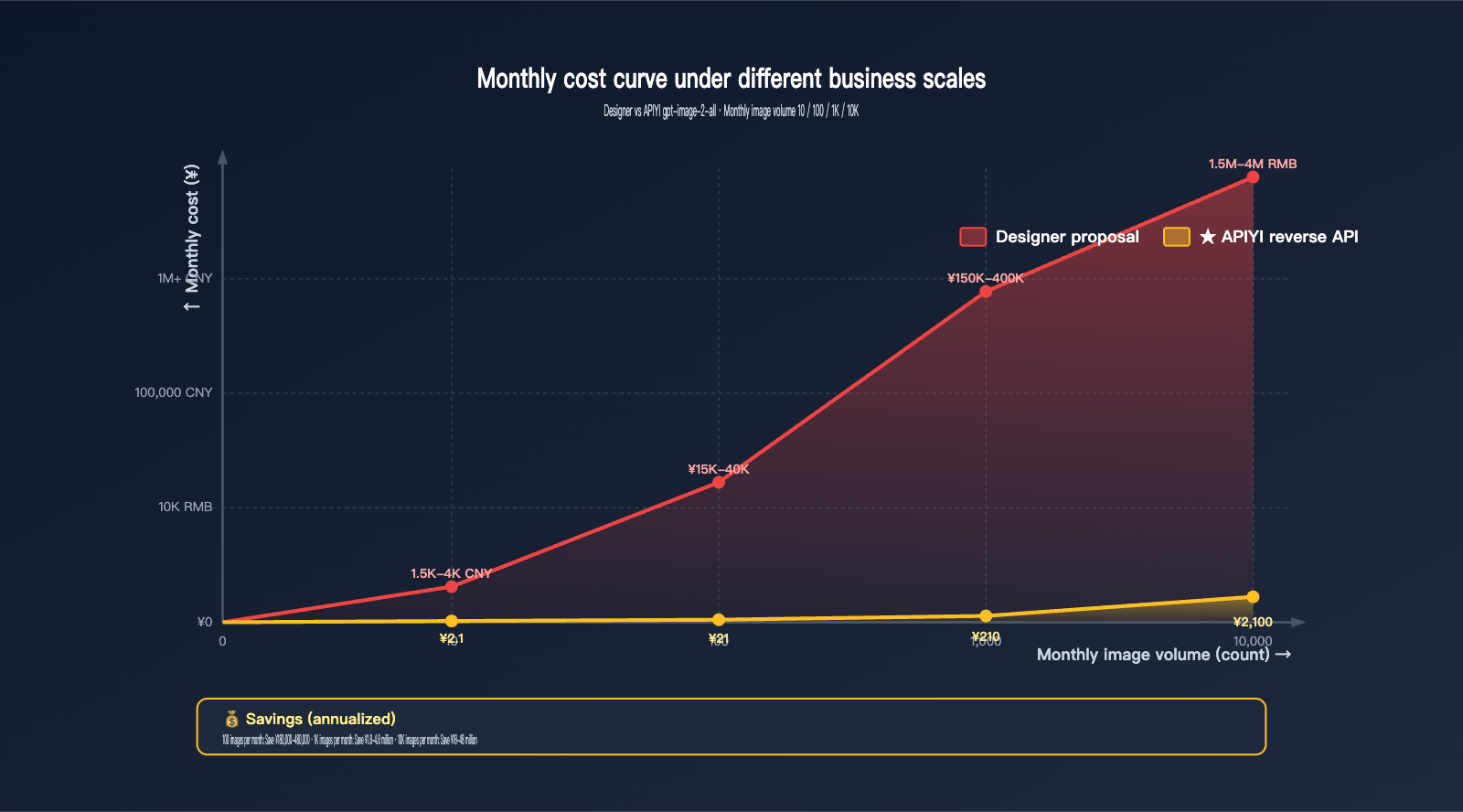
| Monthly Volume | Hiring Designers | AI (gpt-image-2-all) | Savings | Cost Reduction |
|---|---|---|---|---|
| 10 images/mo | ¥1,500-4,000 | ¥2.1 | ¥1,498-3,998 | 99.9% |
| 100 images/mo | ¥15,000-40,000 | ¥21 | ¥14,979-39,979 | 99.9% |
| 1,000 images/mo | ¥150,000-400,000 | ¥210 | ¥149,790-399,790 | 99.9% |
| 10,000 images/mo | (Requires team) | ¥2,100 | Millions | 99.9% |
ROI Timeline
- Integration Cost: 1 developer × 0.5 days = 4 hours
- Learning Curve: Prompt engineering learning curve is about 5-10 hours
- Break-even Point: Replaces 1 single design project (¥150 vs ¥0.21)
💡 Business Advice: For companies with a monthly volume of 50+ images, I highly recommend integrating immediately. You can get an API key from the APIYI (apiyi.com) platform in 5 minutes, complete the first version of the integration in a day, and significantly reduce design costs within the first week.
Why GPT-image-2 Stands Out: Frequently Asked Questions
Q1: Can GPT-image-2 completely replace human designers?
Not entirely, but it can handle 80% of "repetitive and template-based" design work. It’s highly capable for high-frequency tasks like posters, e-commerce product detail pages, social media imagery, and banners. However, for brand VI, core KV (Key Visual) development, and high-end artistic creation, you’ll still need human designers. The best practice is "AI does 80%, humans oversee the 20% that requires critical decision-making."
Q2: Is the claim of 100 posters for ¥21 actually real?
It’s real, but with a condition: you need to use the gpt-image-2-all API proxy service from APIYI (apiyi.com), which costs $0.03 per image, assuming you output one image at a time. If you use the 4-image mode (n=4), the cost drops even further to ¥0.21 / 4 = approximately ¥0.05 per image. This is currently one of the most competitive ways to access GPT-image-2 in the domestic market.
Q3: Are there copyright or compliance risks when using GPT-image-2 for e-commerce detail pages?
Content generated by GPT-image-2 belongs to the user (in accordance with OpenAI’s terms of service) and is cleared for commercial use. However, keep a few things in mind: 1) Don’t try to copy famous brand logos or characters directly in your prompt; 2) For scenarios involving celebrity endorsements, it's recommended to upload authorized portraits as a reference image; 3) E-commerce platforms in China have varying requirements for labeling AI-generated content, so be sure to check specific platform policies.
Q4: Is the 99% text rendering rate an exaggeration? I’ve used version 1.5 and it often makes mistakes.
The 99% figure refers to character-level accuracy tested by LM Arena, not 100%. It’s a significant leap from the 95% seen in GPT Image 1.5. This means that while you might still encounter occasional errors with tiny text (below 5pt) or rare professional symbols (like complex mathematical formulas), common elements like 8pt+ headlines, subheadings, button text, and price figures are generally spot-on. I suggest giving gpt-image-2-all via APIYI (apiyi.com) a try with a low-cost test for your specific use case rather than relying on your older experiences with version 1.5.
Q5: How can I ensure brand color accuracy for commercial posters?
GPT-image-2 accepts hex color constraints. Phrases like "Use brand color #1e40af for the headline" are executed quite accurately. An even better approach is to upload a brand VI reference image as input, which helps the model maintain palette consistency during generation. For brands that are extremely sensitive to color, I recommend using Photoshop for final color adjustments after generation.
Q6: Is GPT-image-2 suitable for creating Xiaohongshu or Douyin covers?
It’s perfect for them. Both the Xiaohongshu (3:4) and Douyin (9:16) aspect ratios are natively supported by GPT-image-2. Its performance in text rendering, character expressions, and emotional atmosphere is far superior to previous AI models. By using n=4 to generate four variations at once, you can quickly conduct A/B testing to see which covers drive the most clicks. At $0.03 per image, generating 4 versions costs only $0.12 (roughly ¥0.85).
Q7: Can GPT-image-2 handle complex posters (with 10+ elements)?
It can, but I recommend enabling "Thinking" mode (using the official gpt-image-2 rather than gpt-image-2-all) and using a numbered list in your prompt to clearly define the position and content of every element. The model will then check that all elements are accounted for during its "thinking" phase, which helps avoid elements being missed or misaligned. While gpt-image-2-all doesn't support the Thinking mode, it’s great for simple posters and product pages; for complex posters, the official relay API is the way to go.
Q8: How much does it cost to get started with GPT-image-2?
If you use the APIYI (apiyi.com) platform, the barrier to entry is very low: 1) Developers can integrate the SDK in about half a day; 2) You can start with a top-up of ¥100-500; 3) Learning prompt engineering takes about 5-10 hours. Monthly production costs for the first month typically range from ¥50-500 (based on 100-1,000 images). Even for a team of 10, keeping the total monthly cost under ¥2,000 is quite standard.
GPT-image-2 Key Takeaways
- 8 Features Form a Core Competitive Moat: 99% text rendering accuracy + O-series reasoning + multilingual support + 4K resolution + 8-image coherence + multi-turn editing + flexible aspect ratios + commercial readiness—each of these addresses the major pain points of previous models.
- Crushing Designer Costs for Posters: Hiring a designer costs ¥150-400 per piece, compared to ¥0.21 per piece via APIYI's
gpt-image-2-all. That’s a 99.9% savings, bringing the cost of 100 posters down from ¥15,000 to just ¥21. - E-commerce Detail Pages for ¥3.2: A full set of 15 product detail assets (main image + multiple angles + details + lifestyle shot + specs + comparison + scene) costs only ¥3.2, cutting production time from 3-7 days to just 5-10 minutes.
gpt-image-2-allat $0.03/image is the Ultimate Killer App: As an exclusive API proxy service via APIYI (apiyi.com), it’s 86% cheaper than the official high-quality tier, making it the best solution for batch generation of commercial posters and e-commerce assets.- ROI Proven by Real Cases: 80% reduction in D2C creative costs / $15K in 3D mockup fees saved / 96 lifestyle images produced in 4 days—these aren't just marketing claims; they are verified workflows.
- It Can't Replace Designers 100%: Strong brand identity, artistic creation, and strategic-level materials still require human involvement; however, 80% of repetitive design tasks can be fully automated.
- Incredibly Short Payback Period: You break even by replacing just one designer-made piece (¥150 vs ¥0.21). If your team produces 50+ images a month, not adopting this now means losing money.
Summary
Let's circle back to our opening question: "What exactly makes GPT-image-2 so powerful?"
It’s powerful because it has evolved AI image generation from a "toy" into a "production tool." By combining 99% text accuracy, O-series reasoning capabilities, 8-image coherent batches, and commercial-ready quality, AI image generation workflows finally have the ability to go "straight to production without needing Photoshop."
The fact that it’s "great for posters" and "perfect for e-commerce detail pages" is essentially just a practical application of these core capabilities:
- Poster scenarios: At ¥0.21 per image, it’s 99.9% cheaper than a human designer.
- E-commerce detail pages: A full set of 15 images costs ¥3.2, which is 99.99% cheaper than a professional photography studio.
- Multi-platform distribution: Generate 4 aspect ratios from one draft, saving hours of export and adaptation time.
- A/B testing: Test 5 versions for just ¥1 to select the best one for your campaign.
For small e-commerce businesses, content teams, global brands, and social media managers in 2026, the question of "should we integrate GPT-image-2" is no longer a technical debate—it’s an operational necessity of "the sooner you adopt it, the sooner you save."
We recommend integrating it via the APIYI (apiyi.com) platform for a one-stop solution: use gpt-image-2-all ($0.03) for daily high-volume production and the official forwarded API (gpt-image-2) for high-quality, critical assets. Since both interfaces share the same API key, this is the optimal AI image generation setup for 2026.
References
-
OpenAI ChatGPT Images 2.0 Official Announcement: GPT-image-2 release notes
- Link:
openai.com/index/introducing-chatgpt-images-2-0 - Description: Official 2026-04-21 release notes and model capability list.
- Link:
-
OpenAI API Documentation – GPT Image 2: Official API and pricing
- Link:
developers.openai.com/api/docs/models/gpt-image-2 - Description: Full parameters and token billing details.
- Link:
-
MindStudio – GPT Image 2 Use Cases: 10 major commercial use cases
- Link:
mindstudio.ai/blog/gpt-image-2-use-cases - Description: Covers posters, product images, UI design, and more.
- Link:
-
Atlas Cloud – E-commerce Photography Revolution: In-depth e-commerce application report
- Link:
atlascloud.ai/blog/guides - Description: Case study on producing 96 lifestyle images in 4 days.
- Link:
-
APIYI Platform: GPT-image-2 domestic API proxy service
- Link:
apiyi.com - Description: Official forwarded API + Reverse API (gpt-image-2-all at $0.03/image).
- Link:
Author: APIYI Technical Team | To experience the effectiveness of GPT-image-2 for posters and detail pages, visit APIYI (apiyi.com) to claim your free testing credits, or try it online at imagen.apiyi.com.