

Summary: AI video creation has split into two technical routes: native video generation and Agent code rendering. The former excels at realistic footage and natural motion; the latter excels at precise animation, data visualization, and editable, engineering-grade production. Understanding the difference is what lets you build an efficient video production workflow.
Bottom line first: Native video generation and Agent code rendering fit different jobs. Characters, live-action feel, natural motion, and cinematic language go to native video models like Seedance, Kling, and Veo; data charts, formulas, software tutorials, pricing specs, and templated batch content go to a code-rendering chain built from Remotion, Manim, and FFmpeg. Combine the two and you get natural imagery plus precise control at the same time — that’s the most practical production setup available today.
What’s ahead: This article first explains the fundamental difference in output mechanics between the two routes, then breaks down the capabilities and costs of the native video models (Seedance 2.5, Kling 4.0, Veo 3.1) and the code-rendering toolchain (Remotion, Manim, FFmpeg, Claude Motion, Codex), and uses VibeVideoBench’s independent benchmark data to show how good Agents really are at making video. Finally, it walks through a hybrid production pipeline using a product promo as the example, showing which model or tool owns which part of the work.
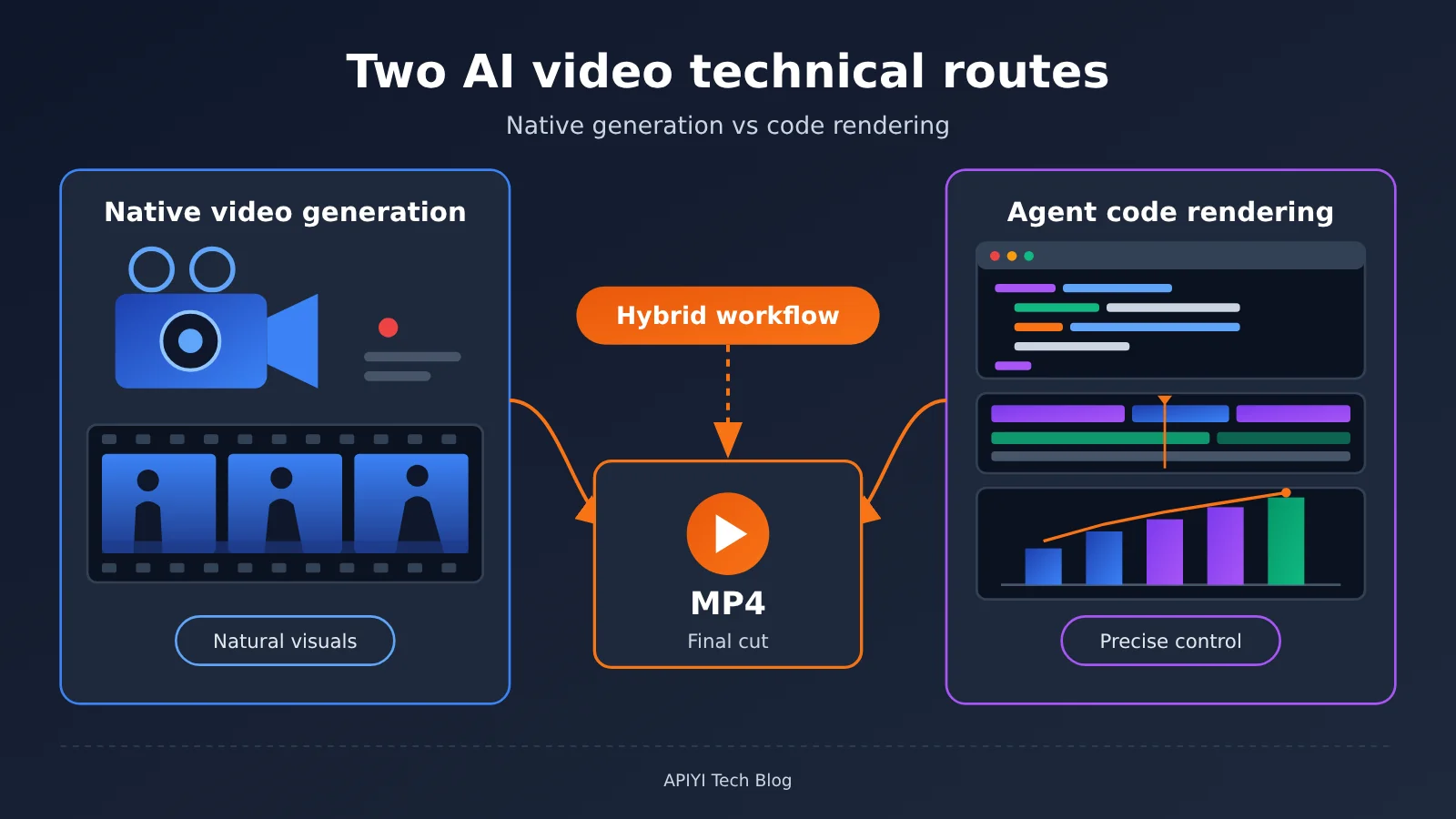
To Know: AI Video Technology Approaches Glossary
| Term | Explanation |
|---|---|
| — | — |
| Text-to-Video | Generate video directly from a text prompt |
| Image-to-Video | Generate dynamic video from a reference image |
| Multimodal Reference | Use images, video, audio, and other assets together to guide generation |
| Keyframe | A keyframe defines the visual state at a specific point in time |
| Timestamp-level Editing | Precisely edit a specific segment based on video timestamps |
| Agent | An AI system that can autonomously plan tasks, invoke tools, check results, and correct itself |
| Remotion | A tool for creating video animations with React components and code |
| Manim | A Python engine for creating math and science animations |
| FFmpeg | A command-line tool for video encoding, audio mixing, editing, and format conversion |
| ffprobe | An inspection tool bundled with FFmpeg that reads resolution, frame rate, duration, and audio tracks |
| TTS | Text-to-speech, used to automatically generate voiceover |
| Deterministic Rendering | Rendering where the same code and parameters produce the same visuals every time |
| Claude Motion | Anthropic’s product feature that packages code-driven animation, currently in Beta |
| Cache Hit | Cache hit rate; repeated context is read directly from cache, which can significantly reduce token costs |
1 Two Technical Routes for AI Video: Completely Different Output Mechanisms
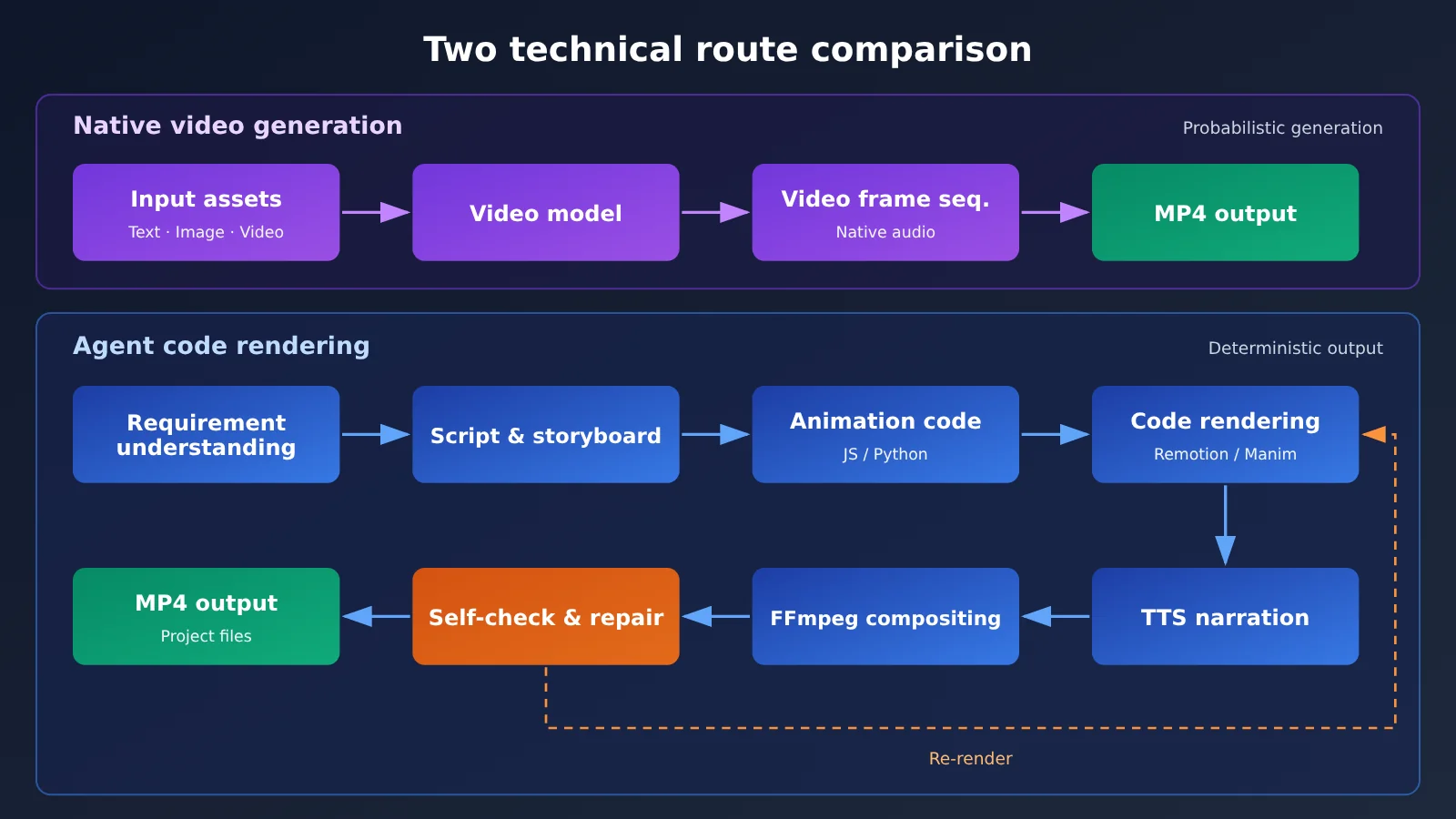
Both routes can deliver an MP4, but the way they produce frames is completely different. Native video generation has the model “draw” every frame directly; Agent code rendering has the model write a video production program, which a rendering engine then follows to output the picture. That difference drives every distinction between the two in control precision, modifiability, and cost.
1.1 Native Video Generation: the Model Creates Continuous Frames Directly
Native video generation builds on Text-to-Video and Image-to-Video. You supply a text description or a reference image, and the model directly outputs continuous video frames — the people, objects, environment, continuous motion, and physical movement in the shot are all generated by the model in one pass. Camera pushes and pulls, changes in shot size, and scene transitions can also be written into the prompt.
A new generation of models can now generate native audio in sync, and support controlling character appearance, scene, and visual style with multiple reference images and reference videos. Its strength is footage that looks natural and realistic; the trade-off is that every frame comes from probabilistic generation — the same prompt run twice yields different results, and pixel-level edits depend on regenerating or on dedicated editing features.
1.2 Agent Code Rendering: the AI Writes Its Own Video Production Program
Agent code rendering puts the Large Language Model in the roles of both director and programmer. A full workflow usually includes:
- Understand the requirements and settle on theme, audience, and visual style;
- Write the script, voiceover, storyboard, and timeline;
- Write animation code in JavaScript or Python (Remotion, Manim, Three.js, Cairo, Blender, and so on);
- Call TTS to generate the voiceover, and produce the music and sound effects;
- Call FFmpeg to combine audio and picture;
- Check the visuals, audio, and timing sync, then fix whatever turns up and re-render;
- Output the finished MP4 and a reusable project file.
The output of this route is deterministic: if the code and parameters stay the same, the render stays the same. Change a single number, one line of subtitle, or one color, and you just edit the code and re-render — every other frame stays exactly as it was. It’s well suited to data visualization, product introductions, educational explainers, and animated infographics; generating real people and live-action footage means leaning on ready-made stock material or 3D assets.
2 The Native Video Generation Route: What Tasks It Fits
By 2026, native video models have pushed single-generation duration to 30 seconds, and competition has shifted to multimodal references, keyframe control, and continuous editing after generation. The table below summarizes the published capabilities of three representative models.
| Capability | Seedance 2.5 | Kling 4.0 | Veo 3.1 |
|---|---|---|---|
| Release / availability | Released 2026-07-31 | API fully open 2026-10-28 | Listed in Gemini API docs |
| Single-generation duration | Up to 30 seconds | Up to 30 seconds | Supports video extension |
| Reference materials | 30 images, 10 videos, 10 audio clips | 10 images, 5 videos, up to 15 items mixed | Image-guided generation |
| Core control methods | Multi-round extension, timestamp editing, green-screen and camera angle editing | Up to 10 keyframes, voice reference | Last-frame control, video extension |
| Audio | Audio references supported | Voice references supported | Native audio generation |
| Pricing | By resolution and duration (Token usage included) | Per Unit/second | By generation spec |
2.1 Seedance 2.5: 30-second continuous generation and multimodal references
Seedance 2.5 was released by ByteDance’s Seed team on July 31, 2026. It generates up to 30 seconds at a time, and a single generation can contain multiple continuous shots. Its reference capabilities are the broadest among the currently published specs: up to 30 reference images, 10 reference videos, and 10 reference audio clips. You can hand the model character designs, scene photos, motion references, and a soundtrack all at once and let it organize them into a complex scene.
On the editing side, Seedance 2.5 supports multi-round extension of existing video while keeping characters, scenes, and audio as consistent as possible. It can modify character actions and plot at specified timestamps, and it also supports green-screen editing, camera angle editing, and multi-character consistency. You can even use Clay Render (clay rendering) references to control spatial structure, character blocking, and camera movement. The official examples cover Peking opera character performances, stage shows, multi-character interaction, and continuous scene transitions — and content like this, with multiple characters, long takes, and continuous narrative, is exactly the part that code-based rendering struggles with most.
2.2 Kling 4.0: Keyframe and Video Reference Control
Kling 4.0 opened its API fully on October 28, 2026. A single generation can run up to 30 seconds, with 720p and 1080p support and aspect ratios including 21:9 and adaptive. Its standout feature is up to 10 keyframes: creators can lock multiple frame states along the timeline and let the model fill in the motion between them, which makes camera movement and character poses far more controllable.
On the reference side, Kling 4.0 accepts up to 10 reference images and 5 reference videos, with up to 15 mixed inputs in a single call, and it also offers Omni multimodal references and voice references. It folds text generation, image generation, reference materials, and video editing into one tool, which suits projects that need a stable character look, a specified camera path, or a second pass on existing footage.
2.3 Veo 3.1: Native Audio and Video Extension
Google offers two video generation products inside the Gemini API. Veo 3.1 focuses on native audio generation, video extension, last-frame control, and image-guided generation—good for producing a clip with sound in one shot. Gemini Omni Flash focuses on multimodal input, character consistency, video understanding, and multi-turn conversational editing. Together they represent the two directions in the native video space: generating high-quality clips, and continuing to edit, revise, and extend them afterward.
Over at OpenAI, the Sora product was retired on April 26, 2026, and the Sora 2 model along with the Videos API shut down on September 24, 2026; the official deprecation notice states there is no one-to-one replacement API. Images 2.6, released on November 4, 2026, supports 2 to 16 frame GIF animation output—handy for animated emoji, character action loops, and storyboard previews—which is a different workflow from full MP4 video production.
2.4 Advantages and Costs of Native Video Generation
The core advantages of native video generation come down to four things: natural human motion, believable physics, cinematic camera movement, and open-ended creative expression. Implementing these capabilities in code would require a large amount of animation assets and manual tuning; with a video model, you can generate them in one pass.
In terms of cost, native video is billed by output spec and duration. Take BytePlus ModelArk’s official pricing for Seedance 2.5, updated on November 13, 2026, as an example:
| Output spec | Reference price for a 5-second video | Estimated cost per second |
|---|---|---|
| 480p | $0.514 | $0.103 |
| 720p | $1.156 | $0.231 |
| 1080p | $2.843 | $0.569 |
From 720p to 1080p, the per-second cost is about 2.5× higher. The table gives official estimates for typical specs. Input video length, resolution, frame rate, and actual token consumption all affect the final bill. Kling 4.0, on the other hand, is billed in platform Units: 720p costs 1 Unit/sec, 1080p costs 1.5 Units/sec, and Kling 4.0 Flash at 720p costs 0.6 Units/sec. When an existing video is used as input, the input duration also matters. A Unit is the platform’s billing unit, and you’ll need to convert it to actual currency according to the platform’s rules.
Keep in mind that these prices are for a single generation. Native video is stochastic, so in real production you’ll often generate multiple versions and pick the best one. The effective cost of a usable shot is usually higher than the single-run quote.
3 Agent Code Rendering Route: Turning AI into a Video Production Engineer
At the heart of the code rendering route is a set of mature open-source or commercial tools. The Large Language Model translates requirements into code that these tools can execute, and handles orchestration, checking, and fixing.
3.1 Remotion: React Animation and Automated Video Production
Remotion uses React components to describe frames, controlling element position, size, opacity, and motion through frame numbers. Developers can use React, HTML, CSS, and JavaScript directly to create animations, combining text, charts, images, video, and audio within a frame while precisely controlling every frame. It supports CLI batch rendering, server-side rendering, and cloud Lambda rendering, and can batch-generate videos with different content by passing in different parameters.
The official rendering workflow is simple:
# Install Remotion
npm install remotion @remotion/cli

# Render the specified video Composition and output an MP4
npx remotion render HelloWorld out.mp4
On licensing, Remotion is free for individuals and small companies with up to 3 people, and commercial use is allowed if you comply with the terms; the Automators plan costs $0.01 per render with a $100 minimum monthly spend; the Creators plan is $25 per seat per month; and the Enterprise plan starts at $500/month (updated November 14, 2026). Remotion’s rendering license fees and the token costs consumed by AI models writing code are two separate costs, so calculate them separately when budgeting.
3.2 Manim: Precise Math and Science Animation
Manim is a Python animation engine built for demonstrating mathematical formulas, transforming geometric shapes, animating physical motion, explaining how algorithms run, and illustrating scientific experiments. Formulas, axes, geometric structures, and the motion relationships between objects are all defined in code, so the position of every symbol and every curve is accurate and controllable. Native video models often produce formulas with character errors or structural errors — which is exactly where Manim shines.
The official quick-start example outputs an MP4 with a single command:
manim -pql main.py CreateCircle
3.3 FFmpeg: Turning Various Assets into the Final Video
FFmpeg is the “assembly line” of the entire code-rendering pipeline. It handles video encoding and transcoding, audio merging, multi-segment concatenation, subtitle burning, cropping and scaling, frame rate conversion, and format conversion. Its companion tool ffprobe can read the resolution, frame rate, duration, and audio track information of the finished video, and the Agent uses it for automated acceptance checks: if the specs don’t meet the requirements, it goes back to the previous step and fixes things.
# Concatenate segments (list.txt lists each segment file on its own line)
ffmpeg -f concat -safe 0 -i list.txt -c copy merged.mp4

# Merge narration and burn in subtitles
ffmpeg -i merged.mp4 -i voice.mp3 -vf subtitles=subs.srt \
  -map 0:v -map 1:a -c:v libx264 -c:a aac final.mp4

# Check output specs
ffprobe -v error -show_entries stream=codec_type,width,height,r_frame_rate \
  -show_entries format=duration final.mp4
3.4 Claude Motion: Code-Driven Animation Becomes a Standard Product Feature
On October 8, 2026, Anthropic launched Claude Motion Beta, bringing code-driven animation directly to enterprise users. Users describe their animation requirements in natural language, and Claude organizes text, charts, shapes, and images into a code animation saved in Artifacts. From there, users can continue refining it through conversation, open the editor to make manual adjustments, and finally export an MP4.
Typical use cases include: turning a quarterly earnings report into a 30-second explainer animation, building a dynamic comparison chart for pricing plans, creating a guided animation of product operation steps, and producing an internal promotional video from meeting materials. As for access requirements, the Beta is open to Team and Enterprise users — enabled by default on Team, while Enterprise requires an organization admin to turn it on — and usage counts against the plan’s quota. Claude Motion doesn’t call a native video generation model, so it can’t generate realistic people or continuous live-action-style footage.
The product value of Claude Motion lies in lowering the barrier to entry: operations, finance, and marketing staff within an enterprise can gain the precision and editability of code-driven animation without having to set up a Remotion project.
3.5 GPT + Codex: Agents Calling Tools to Complete Video Production
Another form is letting general-purpose models autonomously call tools within an agent development environment. VibeVideoBench, released on October 26, 2026, specifically evaluates this capability: 239 real-world video production tasks span 12 content categories, including data storytelling, educational courses, paper explainers, brand marketing, and product feature demos. Each task requires the AI to autonomously deliver, within 60 minutes in a sandbox, a playable MP4, an engineering project that can regenerate the video, plus a schedule and production notes. Nine agent systems completed a total of 2,151 runs, all in their native development environments at the highest available reasoning effort, with no mid-run human instructions allowed.
Here’s how the top two systems compare (averaged across three judge panels, scores on a 1–5 scale):
| Metric | GPT-6 Astra (Codex CLI) | Claude Opus 5.5 (Claude Code) |
|---|---|---|
| Videos successfully delivered | 238/239 (99.6%) | 239/239 (100%) |
| Spec compliance | 93.7% | 99.6% |
| Task requirement pass rate | 97.1% | 97.3% |
| Overall quality score | 4.109 | 4.074 |
| Strict task success rate | 74.5% | 76.3% |
| Human preference Elo | 1242 | 1203 |
| Average cost per task | $8.19 | $15.38 |
| Median / P90 cost per task | $7.88 / $11.88 | $10.19 / $31.22 |
| Average output tokens | 61K | 130.7K |
| Cache hit | 97% | 65% |
In this test set, GPT-6 Astra scored slightly higher on overall quality and human preference, at about 46.7% lower average cost per task; Claude Opus 5.5 delivered all 239 tasks, with higher spec compliance and strict task success rate. The cost gap mainly comes from token efficiency: Astra uses roughly 53.3% fewer output tokens and hits 97% cache, while about 76% of Opus’s per-task cost comes from cache writes. Even though Astra’s standard input/output pricing is 2.5x Opus’s, its actual spend per completed task is lower.
Reading these numbers requires keeping the evaluation setup in mind: what’s being evaluated is a complete agent system made of “model + execution environment,” and the Codex CLI and Claude Code used by GPT and Claude differ from each other; each task runs only once, with a 60-minute limit; the correlation between the three judge panels’ system rankings is 0.933–0.950, and their correlation with human Elo rankings is 0.98 — but for individual videos, human preference agrees with the panel results only 73.3% of the time. So these scores are good for gauging rough system-level performance, but shouldn’t be generalized to all video tasks, and can’t replace evaluation of native text-to-video models.
VibeVideoBench also reveals the main bottleneck for agents doing video: of 2,151 runs, 224 failed to deliver a playable video, and 169 of those were time-management problems — final rendering started too late, ran too slowly, or never started at all — accounting for about 75% of failure cases. The hard part for video agents has shifted from “can it write animation code” to render scheduling and delivery management.
Compared with Claude Motion, agent environments like Codex and Claude Code are built for developers: you can freely combine Remotion, Manim, FFmpeg, TTS, and screen recording to produce complete project files, making them suitable for plugging into automated production pipelines. Claude Motion targets enterprise end users, with simpler interaction, and its capabilities stay within text, charts, and shape animation.
4 How to Choose Between Native Video Generation and Agent Code Rendering
4.1 Tasks Suited for Native Video Generation
- Live-action people style: real people on camera, with facial expressions and body movements;
- Product usage scenarios: shots of products being used in real environments;
- Natural motion and camera language: dolly in/out, panning, tracking shots, and shot-size changes;
- Cinematic ads: brand films where lighting, mood, and texture take priority;
- Character performance and continuous plot: multi-character interaction and long-take storytelling;
- Complex natural environments: scenes that are hard to model, such as weather, water flow, and city street views.
4.2 Tasks Suited to Code-Driven Production
- Precise data charts: numbers, coordinates, and proportions must be accurate;
- Software operation tutorials: screen recording with annotations, highlights, and step-by-step instructions;
- Math and science explanations: formula derivations, geometric transformations, algorithm demonstrations;
- Dynamic infographics: presenting structured information step by step;
- Product spec comparisons and pricing explanations: every value can be verified and edited;
- Templated bulk content: swap out the data in a single template to generate hundreds of videos at scale.
The table below summarizes how well the two approaches fit common tasks:
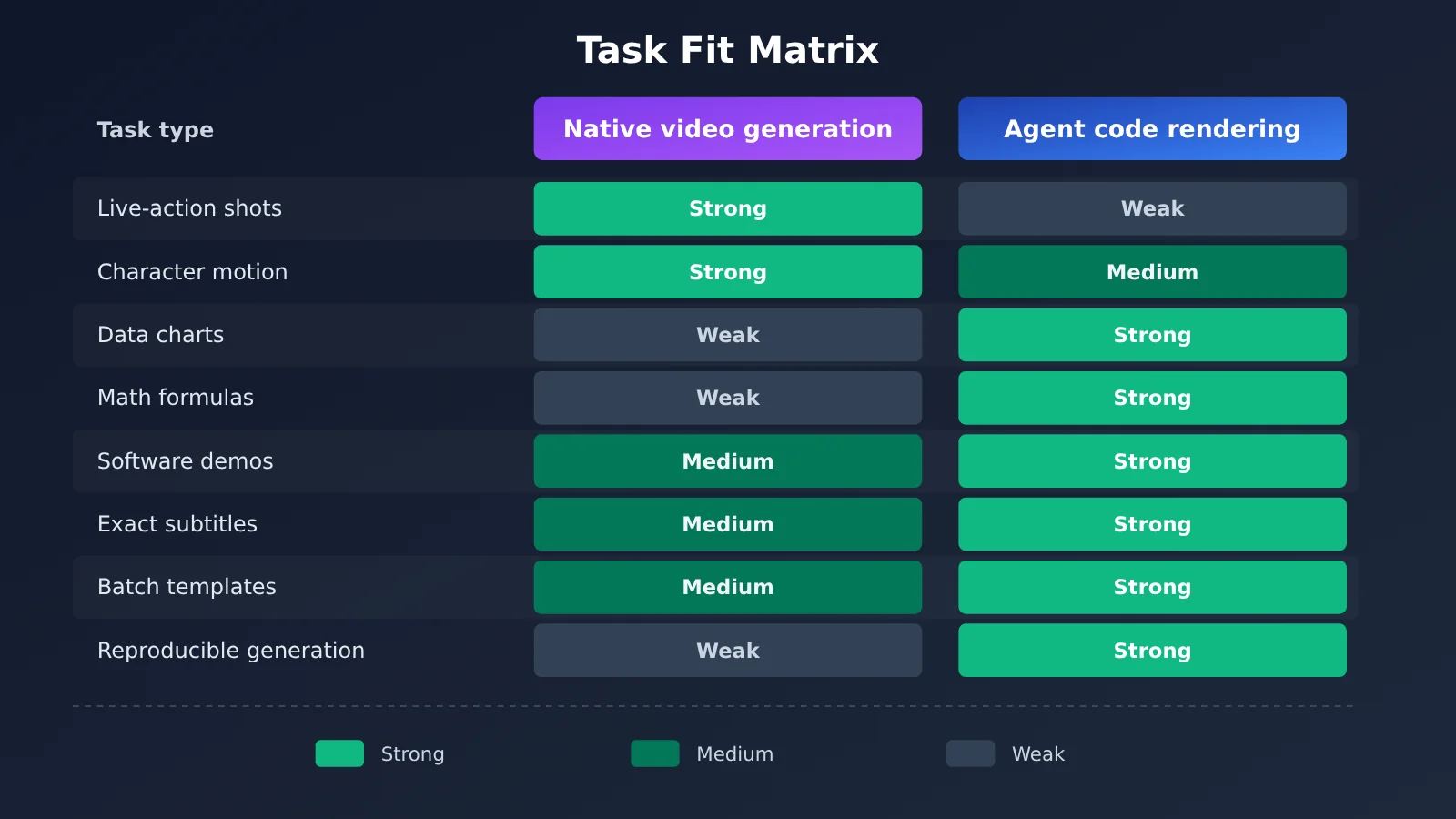
| Task | Native video generation | Agent code rendering |
|---|---|---|
| Cinematic footage shots | Strong | Needs existing footage or 3D assets |
| Natural character motion | Strong | Relies on animation assets |
| Complex camera movement | Strong | Can be programmed precisely |
| Precise data presentation | Hard to guarantee | Strong |
| Math formula animation | Prone to errors | Strong |
| Software UI demos | Needs references and post-processing | Strong |
| Precise subtitles | Needs post-production proofreading | Strong |
| Dynamic product showcases | Strong | Strong |
| Batch production from a unified template | Requires multiple generations and screening | Strong |
| Precise edits to a single detail | Relies on regeneration or editing | Strong |
| Reproducibly generating the same animation | Affected by randomness | Strong |
VibeVideoBench’s research also points out that code rendering is especially well-suited to tasks like accurate formulas, data charts, rule-consistent game visuals, and synchronized narration.
💡 Selection advice: You can boil the decision down to one sentence—if the visuals need to “look real,” use a native video model; if the information needs to be “accurate and error-free,” use code rendering. The scripts, storyboards, and animation code in the code-rendering pipeline all depend on general-purpose Large Language Models. We recommend first using APIYI apiyi.com with the same API key to test how GPT, Claude, and Gemini perform on your script and code tasks, and then decide on your primary model.
4.3 Cost Structure of the Two Approaches
The cost composition of the two approaches differs greatly, so comparing unit prices directly has limited meaning:
- Native video generation: Mainly billed by output resolution and duration, plus extra consumption from reference video input; multiple generations and screening due to randomness are hidden costs.
- Agent code rendering: Includes token costs for general models (input, output, cache read/write), code execution and rendering compute, tool licenses (such as Remotion commercial licensing), and TTS and music/sound effect asset costs.
When comparing, use “the total cost of the final deliverable video” as the benchmark: if a native video shot has to be generated five times to select one usable result, its real cost is five times the quoted price; for an Agent task, if the cache hit rate is low and re-rendering happens repeatedly, token costs will also rise rapidly. VibeVideoBench’s data shows that a model with a higher unit price can achieve a lower task cost because of fewer output tokens and a higher cache hit rate. When selecting a model, look at the measured cost per task.
💰 Cost optimization: Model costs account for a relatively high share in the code rendering pipeline, and most of them are long-context, multi-turn calls. By calling multiple mainstream models on a pay-as-you-go basis through APIYI apiyi.com, you can use the same codebase to compare the actual cost of different models completing the same video task, and then allocate models by task type.
5 The Most Effective Solution: Combine the Two AI Video Technology Routes
5.1 Hybrid Production Workflow
The most practical approach right now is to combine both routes—let native video models handle natural footage, and let code rendering handle precise expression:
- Concept & storyboard: GPT or Claude handles the concept, script, and storyboard, and tags each shot with its production method;
- Natural shots: Seedance, Kling, or Veo generate characters, scenes, and product-in-use shots;
- Precise visuals: Remotion handles data charts, subtitles, brand elements, and product spec animations;
- Voiceover: TTS generates the voiceover from the script;
- Compositing: FFmpeg stitches shots together, merges audio tracks, and burns in subtitles;
- Review & fixes: An AI agent uses ffprobe to check specs, and checks audio-video sync and subtitles, then loops back to the corresponding step to fix any issues it finds.
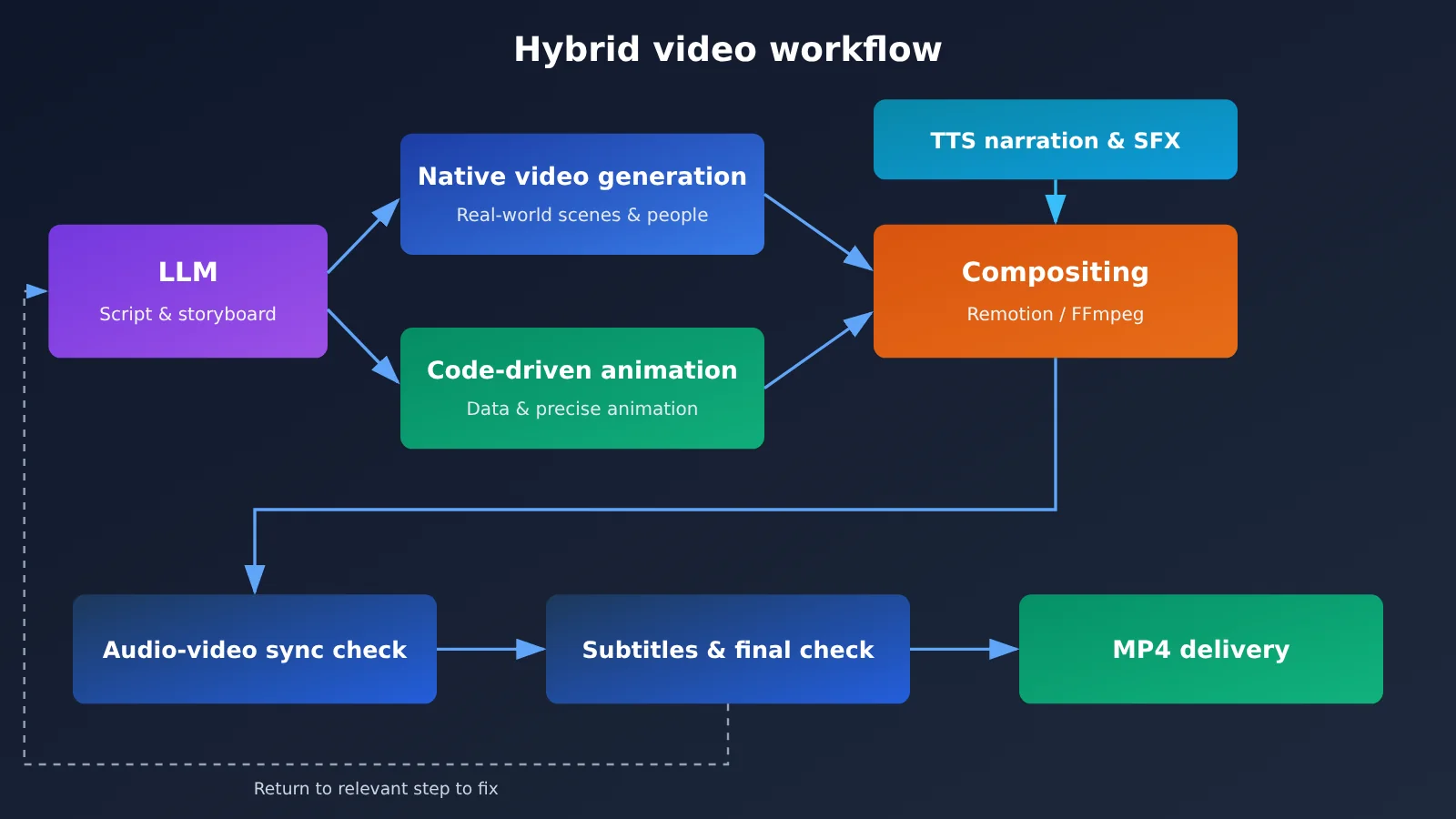
In the diagram above, both the script/storyboard step and the final cut check are handled by a general-purpose Large Language Model. These calls can all be routed through APIYI apiyi.com, so you use a single OpenAI-compatible interface to switch between GPT, Claude, and Gemini.
5.2 Running Example: How the Work Is Split for a Product Promo Video
Take a promo video for a mobile app as an example. The work can be divided like this:
- Opening atmosphere shots (people using the product while commuting or working): hand these to Seedance 2.5 or Kling 4.0. Use product photos and character design sheets as reference images to keep people and product appearance consistent; with Kling 4.0, you can use keyframes to lock the composition of the opening and closing shots. According to Seedance 2.5’s official estimate, 720p costs about $0.231 per second, so when planning the budget, leave headroom for multiple generations.
- Feature demo segment: Record the actual app interface, then use Remotion to overlay highlight boxes, step numbers, and dynamic callouts. The interface content comes from real screen recordings, so there won’t be buttons the model “made up.”
- Specs and pricing segment: Use Remotion components to render the feature comparison table and pricing cards. When prices change, you only update the data file and re-render; everything else stays the same.
- Voiceover and subtitles: The large language model writes the narration script, TTS generates the speech, and an SRT subtitle file is output at the same time.
- Final assembly and QA: FFmpeg stitches all clips together and mixes the audio track; the Agent uses ffprobe to check duration, resolution, and audio track, then checks segment by segment whether the subtitles and voiceover are in sync.
The result of this division of labor: realistic shots are guaranteed by video models, all verifiable information is guaranteed by code, and future revisions only require re-rendering the corresponding segments.
5.3 Generating Route-Annotated Storyboards with the API
The first step in the hybrid workflow is having a Large Language Model produce a structured storyboard, tagging each shot with which route it should take. The example below uses the OpenAI-compatible API to do exactly that:
import json
import openai

client = openai.OpenAI(
    api_key="YOUR_API_KEY",
    base_url="https://api.apiyi.com/v1"  # APIYI OpenAI-compatible API
)

MODEL = "your-model-name"  # Replace with the actual model name from the platform's model list

prompt = """为一款记账 App 写 30 秒宣传片分镜,输出 JSON 数组。
每个镜头包含 id、duration、description、route 字段。
route 只能是 native(真实人物与场景,交给视频模型)
或 code(数据、参数、字幕、界面标注,交给 Remotion 渲染)。"""

resp = client.chat.completions.create(
    model=MODEL,
    messages=[{"role": "user", "content": prompt}],
)
print(resp.choices[0].message.content)
View the full implementation: storyboard routing + generating Remotion render props
import json
import subprocess
import openai

client = openai.OpenAI(
    api_key="YOUR_API_KEY",
    base_url="https://api.apiyi.com/v1"
)

PLANNER_MODEL = "your-planner-model"  # Model responsible for creative direction and the storyboard
CODER_MODEL = "your-coder-model"      # Model responsible for generating render props/code


def plan_storyboard(brief: str) -> list[dict]:
    """Have the model output storyboard JSON with route annotations."""
    resp = client.chat.completions.create(
        model=PLANNER_MODEL,
        messages=[
            {"role": "system", "content": "你是视频导演,只输出合法 JSON 数组。"},
            {"role": "user", "content": brief},
        ],
    )
    return json.loads(resp.choices[0].message.content)


def build_remotion_props(shot: dict) -> dict:
    """Generate Remotion component props for a shot on the code route."""
    resp = client.chat.completions.create(
        model=CODER_MODEL,
        messages=[
            {"role": "system", "content": "把镜头描述转换为 Remotion 组件 props,只输出 JSON 对象。"},
            {"role": "user", "content": json.dumps(shot, ensure_ascii=False)},
        ],
    )
    return json.loads(resp.choices[0].message.content)


def render_code_shot(shot_id: str, props: dict) -> str:
    """Render a single shot via the Remotion CLI."""
    out = f"out/{shot_id}.mp4"
    subprocess.run(
        ["npx", "remotion", "render", "InfoCard", out,
         f"--props={json.dumps(props, ensure_ascii=False)}"],
        check=True,
    )
    return out


if __name__ == "__main__":
    shots = plan_storyboard("为一款记账 App 写 30 秒宣传片分镜,"
                            "字段:id、duration、description、route(native/code)。")
    for shot in shots:
        if shot["route"] == "code":
            path = render_code_shot(shot["id"], build_remotion_props(shot))
            print("已渲染:", path)
        else:
            # Native shots go to the video generation model — log the prompt here for later generation
            print("待原生生成:", shot["id"], shot["description"])
🚀 Quick start: The storyboard and props generation steps above only need a general-purpose Large Language Model. Try signing up at APIYI apiyi.com and using the free trial credits for new users — run the same promo brief through two or three models, compare storyboard quality and token consumption, then lock the winner into your production workflow.
6 Summary: The Focus of AI Video Competition Is the Full Production Workflow
The task fit between the two technical routes is now clear. Native video generation handles realistic footage, character performance, and cinematic language — Seedance 2.5, Kling 4.0, and Veo 3.1 each lean into different strengths across 30-second continuous generation, multimodal references, keyframes, and ongoing edits. Agent code rendering handles precise information, repeatable rendering, and batch production — Remotion, Manim, and FFmpeg form the tool foundation, Claude Motion productizes it for enterprise users, and Codex and Claude Code let developers build full automation pipelines.
VibeVideoBench results show that top Agent systems can already deliver complete videos reliably, and that failures cluster around render scheduling and time management. Per-task cost, meanwhile, hinges on token efficiency and cache hit rates rather than on model unit price. What this means is that competition in video production is shifting away from the picture quality of any single model and toward the organizational capability of the whole workflow — generate, edit, render, deliver.
Key Takeaways:
- Route difference: native generation has the model produce the footage directly; code rendering has the model write a program, which then renders it;
- Where native generation fits: people, live-action feel, natural motion, cinematic ads, and continuous narrative;
- Where code rendering fits: data charts, formulas, software tutorials, specs and pricing, and templated batch content;
- Cost comparison basis: measure the total cost of the final deliverable video, including retries, tokens, rendering, and licensing fees;
- Best practice: a hybrid workflow — let video models handle natural footage and let code handle precise expression;
- Multi-model invocation: scripts, storyboards, animation code, and final-video checks each suit different models, and a unified interface cuts switching costs.
In real production, a single video often needs several Large Language Models to handle ideation, coding, and checking separately. We recommend using APIYI apiyi.com to call GPT, Claude, Gemini, and other models through one API key — assign models by task, pay by usage, and keep your energy on the workflow itself.
References
- VibeVideoBench Official Leaderboard: Agent evaluation for code-driven video generation
- Links:
vibevideobench.github.io -
Description: 239-task leaderboard, quality scores, cost and failure reason analysis
-
Seedance 2.5 Official Announcement: 30-second generation and multimodal referencing
- Links:
seed.bytedance.com/en/blog/one-take-creation-flexible-referencing-introducing-seedance-2-5 -
Description: Reference material limits, extension, and timestamp editing capabilities
-
BytePlus ModelArk Pricing: Seedance 2.5 API pricing
- Links:
docs.byteplus.com/en/docs/modelark/model-pricing -
Description: Reference pricing for video generation at different resolutions
-
Kling API Documentation: Kling 4.0 update announcement and billing
- Links:
kling.ai/document-api/apiReference/updateNotice -
Description: Keyframes, multi-material referencing, and Unit billing rules
-
Gemini API Video Generation Docs: Veo 3.1 and Gemini Omni Flash
- Links:
ai.google.dev/gemini-api/docs/video -
Description: Native audio, video extension, and multi-turn editing capabilities
-
Remotion Documentation and Licensing Pricing
- Links:
remotion.dev/docs/render,remotion.dev/docs/license/pricing -
Description: Rendering commands and commercial licensing options
-
Manim Community Documentation
- Links:
docs.manim.community/en/stable -
Description: Usage of the math and science animation engine
-
FFmpeg Official Documentation
- Links:
ffmpeg.org/documentation.html -
Description: Encoding, compositing, subtitles, and ffprobe inspection
-
Claude Motion User Guide
- Links:
support.claude.com/en/articles/17454997-get-started-with-claude-motion -
Description: Beta feature workflow and access conditions
-
OpenAI API Deprecations
- Links:
developers.openai.com/api/docs/deprecations - Description: Sora 2 and Videos API shutdown information
- Links:
Author: APIYI Technical Team
Technical Discussion: Feel free to reach us through the APIYI homepage; more integration materials are available in the docs.apiyi.com documentation center


