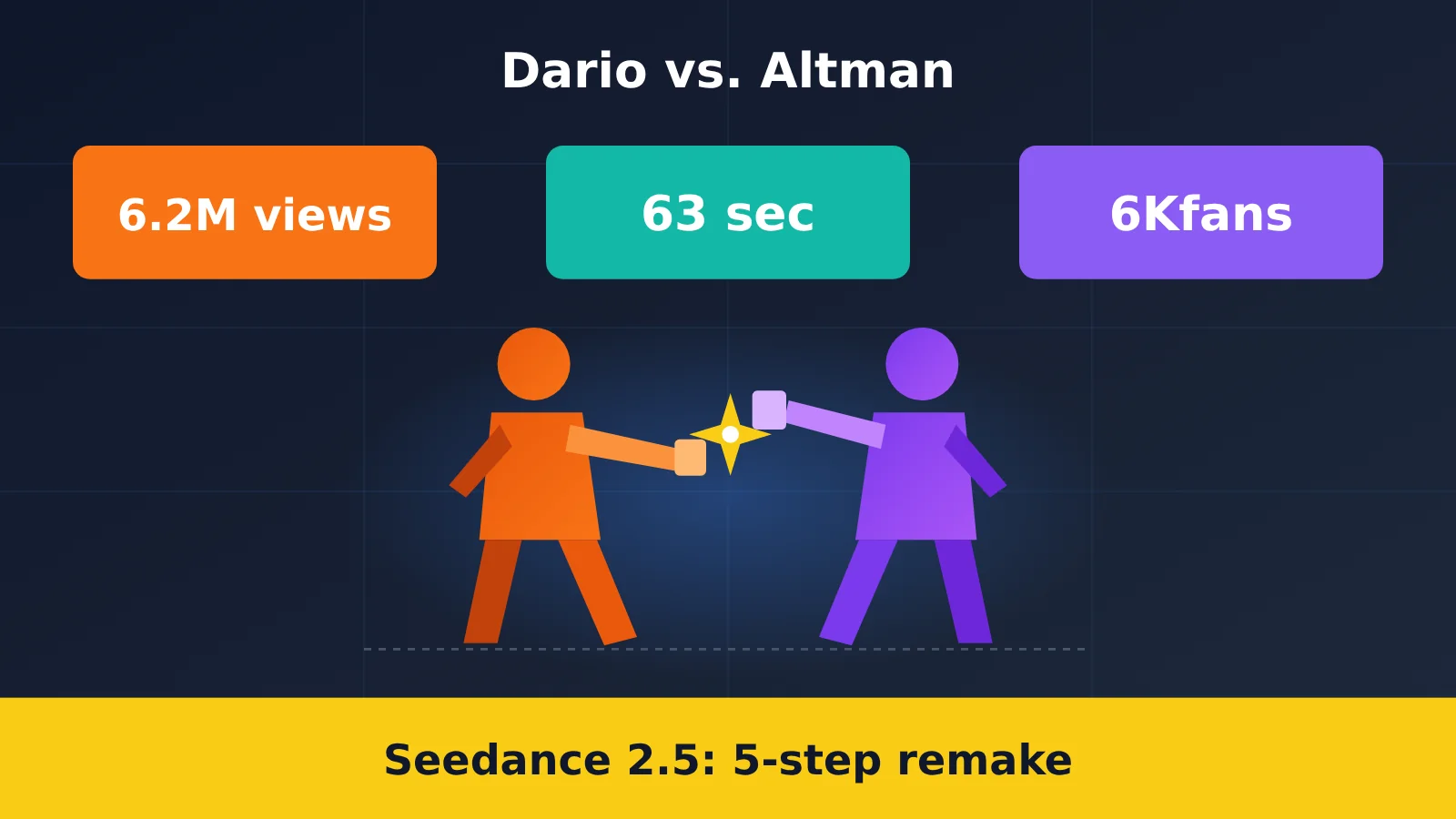
An account with just over 6,000 followers—6,375 as of October 31—posted a 63-second AI short film that racked up 6.2 million views.
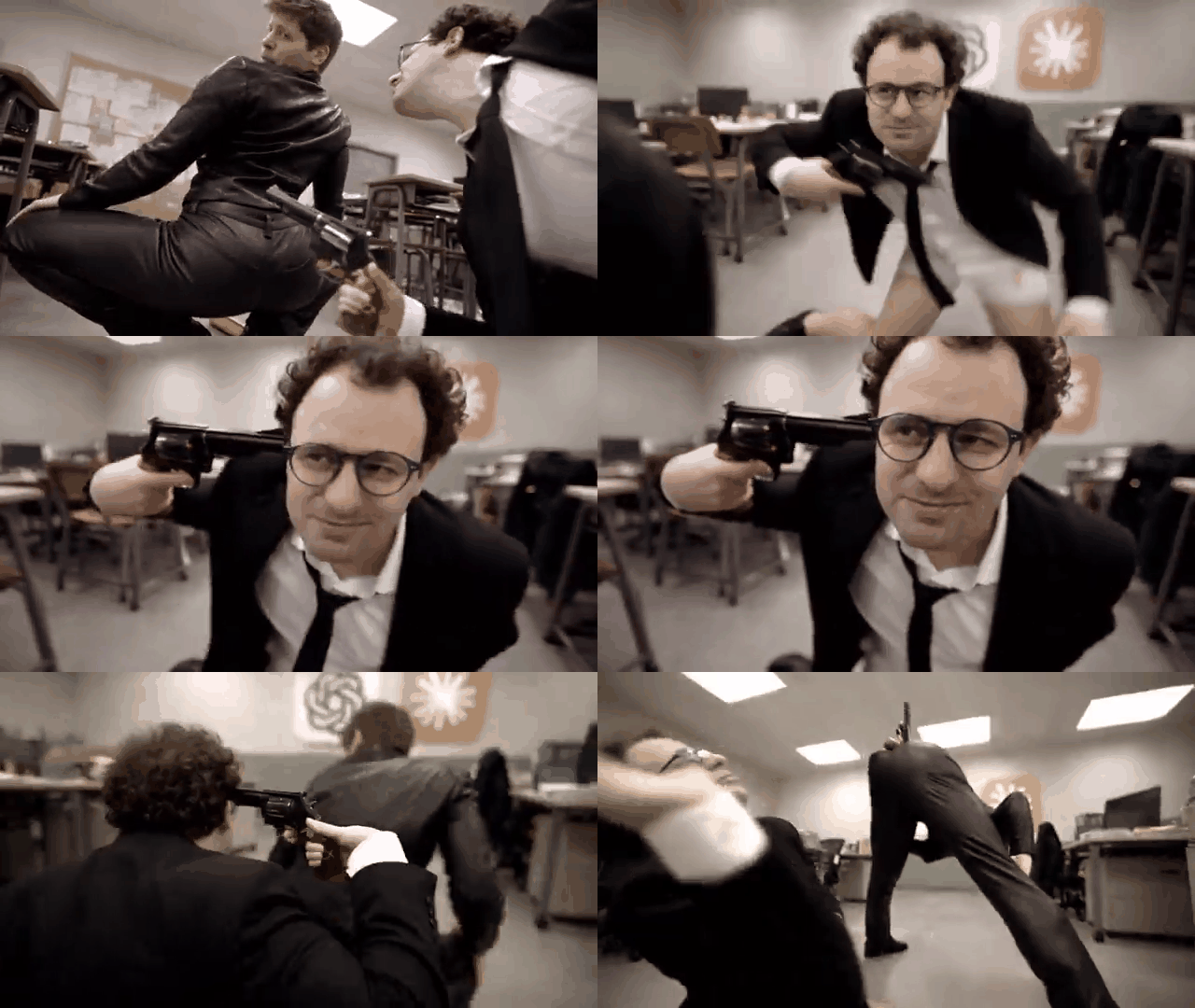
The creator summed up the production process in four Chinese characters: “pulled an all-nighter.” On September 21, 2026, @Xanderwow_A wrote on X: “Pulled an all-nighter! Dario vs. Altman! I couldn’t remove the sound effects from the Seedance 2.5 reference video, so there are a few flaws.” The creator says the video was made with Seedance 2.5, at 1920×1080 resolution and roughly 63 seconds long.
6,000 followers, 6.2 million views, 63 seconds, and one all-nighter: put those numbers together, and the contrast is striking. A lot of people want to know: How do you make a video like this? Can an everyday creator recreate it? We’ll first break down why it went viral, then walk through a reproducible five-step workflow using APIYI’s (apiyi.com) Seedance 2.5 channel. We’ll also cover the costs and pitfalls along the way.
This isn’t another explainer about how powerful the model is. We’re focusing on what you can actually put into practice: how to prepare your assets, submit jobs, calculate costs, and avoid unexpected charges.

Why Dario vs. Altman Took Off: 3 Reasons
Bottom line: It went viral because of the concept and the quality of the action, not the model’s specs.
The following three points are our analysis based on publicly available information, not the creator’s own words.
| Reason | Publicly verifiable facts | Takeaway for creators |
|---|---|---|
| The subjects come with built-in conflict | The title names Dario and Altman, the heads of two AI companies | Pick a rivalry that people in the field will recognize instantly |
| The action and camera work have a reference | The creator explained in the comments that the action and camera work were inspired by @KotteAnimation | Use a reference video to guide the camera work instead of trying to describe it all in a text-to-video prompt |
| The length and visual quality make it feel complete | At 1080p and roughly 63 seconds, it’s far longer than a single generation allows | Stitch multiple clips together and polish them in post-production so the result feels like a film, not just a clip |
The Contrast Behind the Dario vs. Altman Concept
The first contrast is the subject itself. Put two of the AI world’s best-known leaders in a fight, and people in the comments will naturally pick sides. The creator joined in, too, writing in the caption: “I’m betting on Altman to win.”
The second contrast is the account’s size. An account that isn’t a major influencer pulling in 6.2 million views as of October 31 is a story in itself. The creator’s bio reads “Master of Management | Loves playing with AI and sharing AI experience”—a classic independent creator.
Where Did the Action in Dario vs. Altman Come From?
This wasn’t a purely text-to-video production. The creator wrote on X: “The actions and camera work in this video are referenced from @KotteAnimation. I really love their animation~”. In other words, the action design and camera rhythm came from an existing animation.
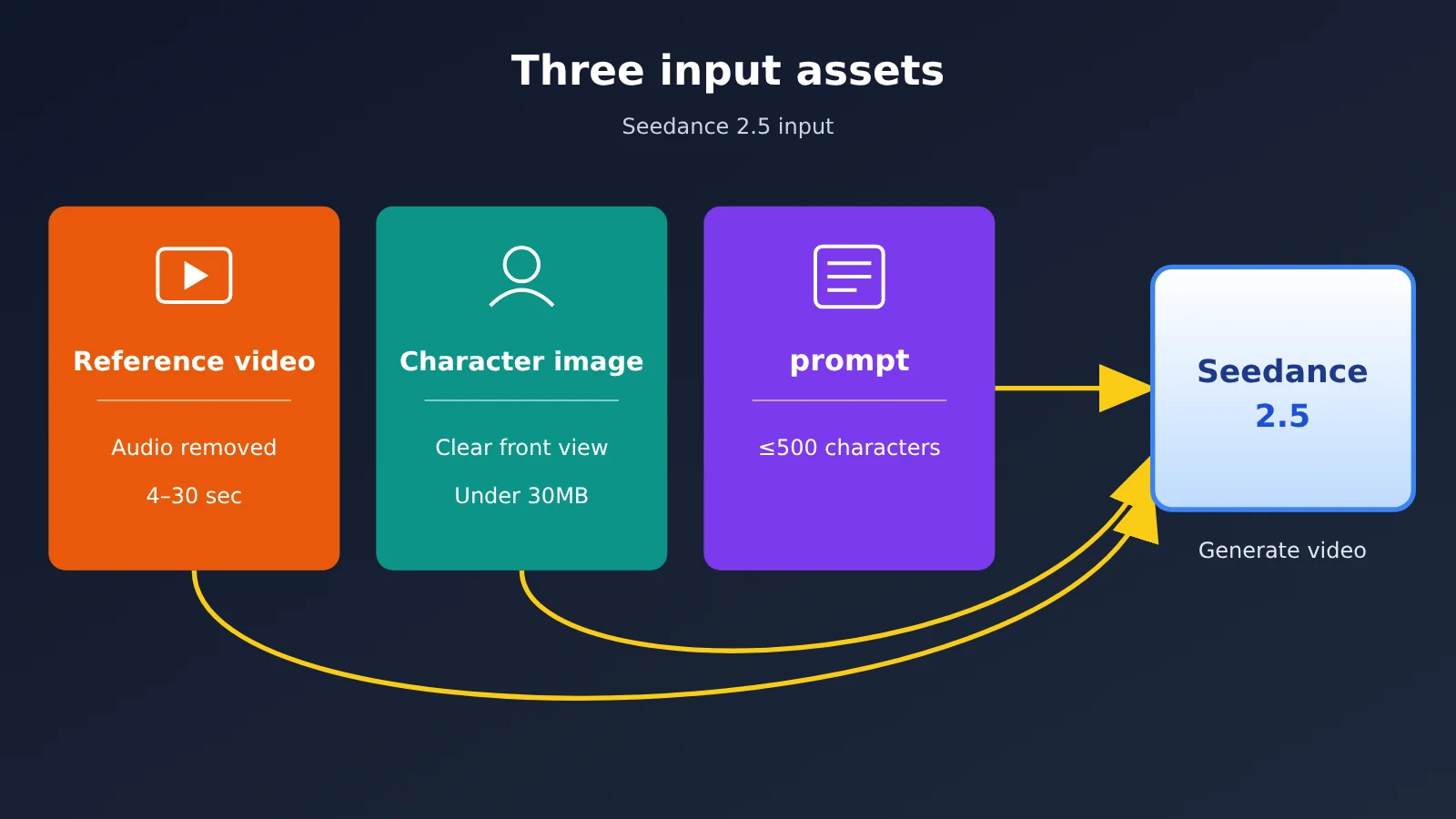
That’s the key to recreating it. The reference video supplies the action and camera work, the character images determine who’s performing, and the prompt ties them together. It’s hard to reliably describe complex fight choreography and camera work in a text-to-video prompt, but a reference video gives the model a ready-made framework.

What Makes Seedance 2.5 Stand Out: 3 Core Capabilities
Bottom line: 30-second clips, multimodal references, and timestamp-based editing cover exactly what you need for this kind of short film.
ByteDance’s Seed team announced Seedance 2.5 as a new-generation video creation model on its official blog on July 31, 2026. Here’s how the official documentation describes its capabilities.
| Capability | Seedance 2.5 | Seedance 2.0 Standard | Available platforms |
|---|---|---|---|
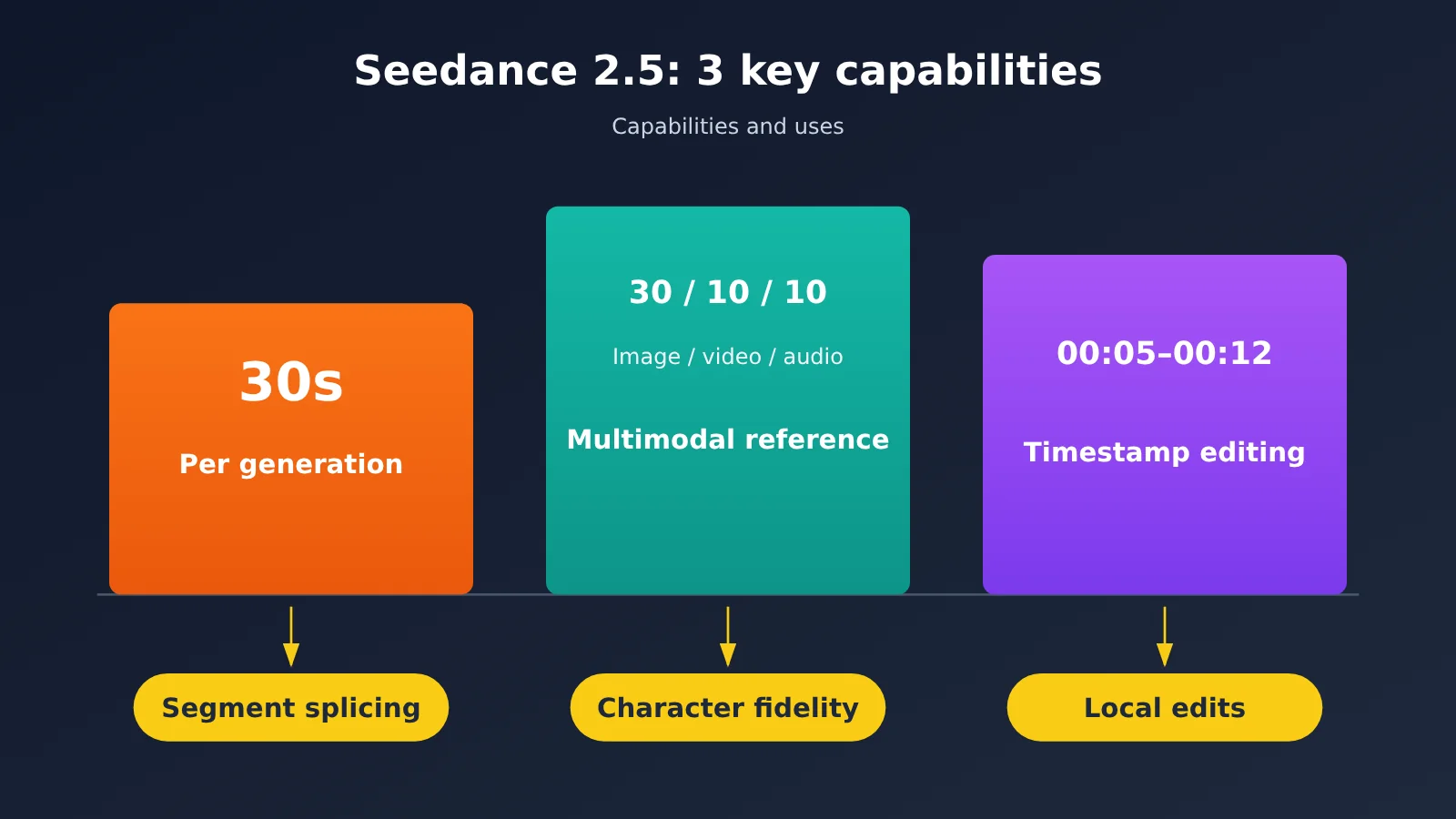
| Clip duration | 4–30 seconds, with multi-round extension | Up to 15 seconds | APIYI apiyi.com, Volcengine Ark |
| Reference assets | Up to 30 images, 10 videos, and 10 audio clips | Fewer than 2.5 | Same as above |
| Editing | Precise timestamp control; green-screen, viewpoint, and reference-based editing | Basic editing | Same as above |
| Maximum resolution | 1080p | 1080p (standard version only) | Same as above |
Seedance 2.5’s 30-Second Clips and Multimodal References
With 30 seconds per generation, a 63-second film only needs to be split into two or three clips. Seed also improved shot continuity and scene transitions, while toning down the overly slick look people often complained about.
The limit of 30 reference images, 10 videos, and 10 audio clips is especially useful for character-driven films. Note that reference videos have their own limits: each must be 4–30 seconds long, with a maximum of 10 clips and a combined duration of no more than 30 seconds.
Seedance 2.5’s Timestamp-Based Editing
Timestamp-based editing lets you specify what to change between particular seconds. For example, you can replace the background in just one section or change a camera angle. For editing tasks, ratio must be adaptive, and duration must be -1.
APIYI launched doubao-seedance-2-5-260628 on August 28, 2026. It uses official resources from Volcengine’s mainland China service, with parameters, responses, and billing terms aligned with the official service.
Recreating Dario vs. Altman with Seedance 2.5: A 5-Step Workflow
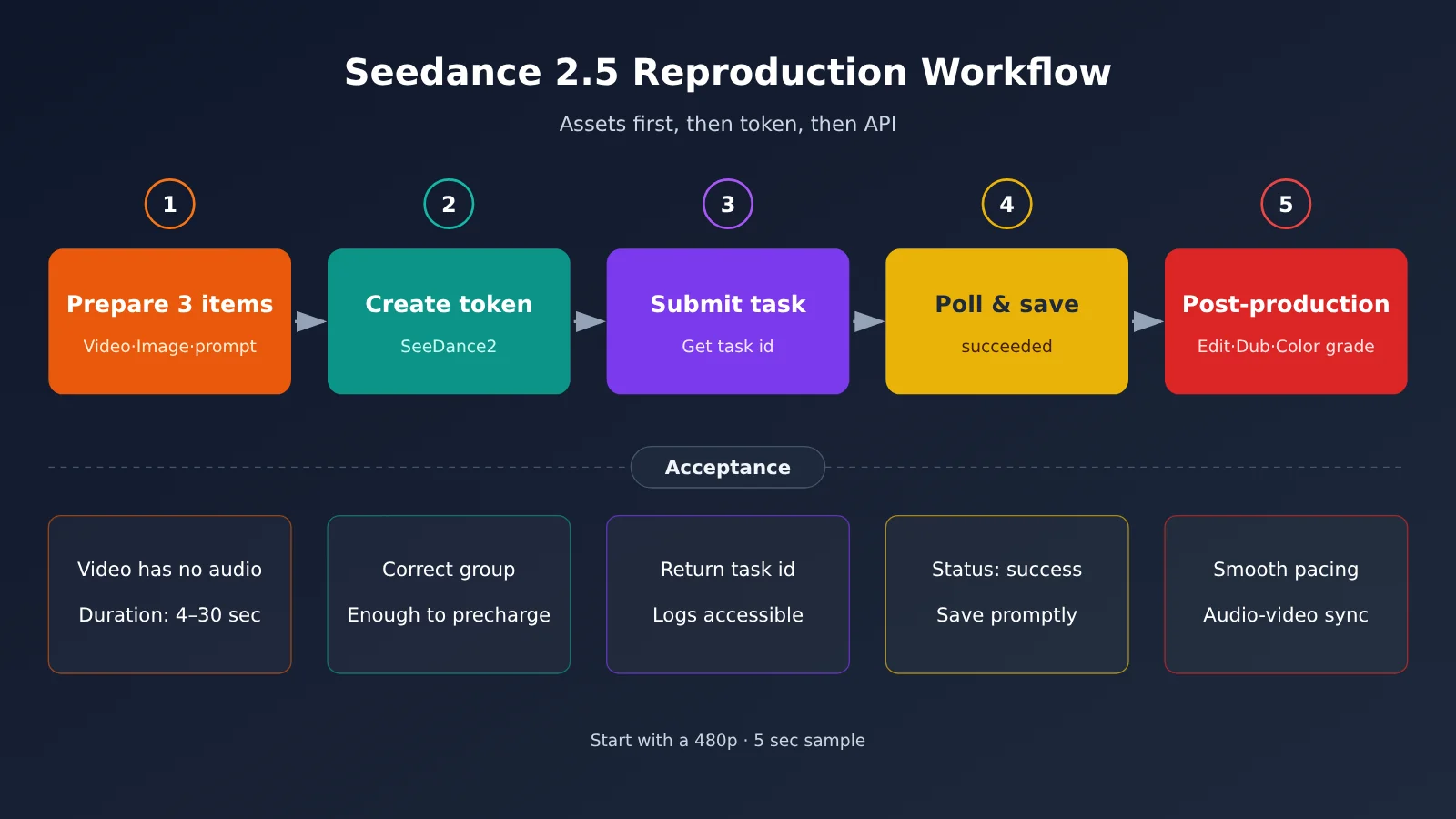
Bottom line: Prepare your assets first, create a token in the console, and only then call the API. Do it in the wrong order, and you could end up wasting money.
Step 1: Prepare the three Seedance 2.5 assets
You’ll need a reference video, a character image, and a prompt. Remove the audio track from the reference video first. The creator put it plainly on X: “The reference video shouldn’t have audio.”
The character image should be a clear, front-facing shot, and each image must be under 30 MB. You can’t upload real human faces directly; the upstream provider will block them. For celebrity-themed content, use stylized or virtual characters instead. Keep Chinese prompts under 500 characters, and write them in this order: “subject + action + camera movement + lighting/style.”
In the prompt, use @视频1 and @图像1 to refer to assets in the order they’re passed in. On October 5, the creator shared a prompt excerpt from another piece: “Replace the three original actors in @视频1 one by one … keep each character’s identity and left-right position fixed throughout.” Following that approach, here’s a general template—not the creator’s original wording: Replace the main character in @视频1 with the character in @图像1. Keep the character’s identity and left-right position fixed throughout. Preserve the original video’s camera movement, shot changes, and action timing, and use a cinematic, photorealistic style.
- What you’ll have: A silent reference video, one or two character images, and a clearly structured prompt.
- Acceptance criteria: All assets preview correctly, and the reference video has no audio track and is 4–30 seconds long.
Step 2: Create a Token in APIYI and Select the SeeDance2 Group
The token is the key to the whole workflow. Log in to the apiyi.com console, open token management, and create a new token.
Make sure you select the right options:
- Billing mode: Choose “Pay-as-you-go preferred” or “Pay-as-you-go.”
- Group: Select the SeeDance2 group. If you don’t, you’ll get a “No available channel for this model” error.
This single token can call all four models: 2.5, 2.0 Standard, fast, and mini. To switch between them later, just change the model field. APIYI doesn’t require identity verification, a Volcano Engine account, or a 200-yuan activation fee. You can connect directly from data centers in China, residential broadband connections, or overseas nodes, making it easy for individual creators to get started.
- What you’ll see: A new entry in the token list, with SeeDance2 in the group column.
- Success criteria: The group is correct, and your account balance is enough to cover at least one precharge (2.5 is precharged at $0.135 per second).
🚀 Getting started tip: For your first run, make a 5-second sample at 480p. It costs about $0.6103 per video (verified on 2026-10-31). Once you’ve confirmed the action and characters look right, increase the resolution.
Step 3: Submit a Seedance 2.5 task and get its ID
Video generation is asynchronous, so submitting a request initially gives you a task ID. You can check the status and charges for each request on the console’s tasks and logs page—start there if you need to troubleshoot.
Here’s what you need for the request:
- Submit the task:
POST https://api.apiyi.com/seedance/api/v3/contents/generations/tasks. The path prefix is/seedance/api/v3—don’t leave out/api. - Headers:
Authorization: Bearer YOUR_TOKEN. We recommend addingAccept-Encoding: identityto avoid gzip decoding errors. contentarray: Add assets in order. Text usestype=text; images usetype=image_urlandrole=reference_image; videos usetype=video_urlandrole=reference_video; audio usestype=audio_urlandrole=reference_audio.
| Parameter | Recommended value | Notes |
|---|---|---|
model |
doubao-seedance-2-5-260628 |
Switch to doubao-seedance-2-0-260128 to save money |
resolution |
480p for previews, 720p/1080p for final output |
Resolution directly determines the price |
ratio |
16:9 |
Must be adaptive for editing and extension tasks |
duration |
Specify an integer, such as 20 |
Don’t leave it blank; the default is -1 |
generate_audio |
false |
Adding voiceover in post-production gives you more control |
output_format |
mov |
Use this for color grading; mp4 is suitable for direct publishing |
return_last_frame |
true |
Use the last frame as the next segment’s first frame to stitch together longer videos |
- What you’ll see: The returned JSON contains an
id, with a status ofqueuedorrunning. - Success criteria: HTTP 200 and a task ID. In testing, all 15 tasks submitted simultaneously entered
runningimmediately, without queuing—handy for trying out shots in batches.
Step 4: Poll Until succeeded and Save Within 24 Hours
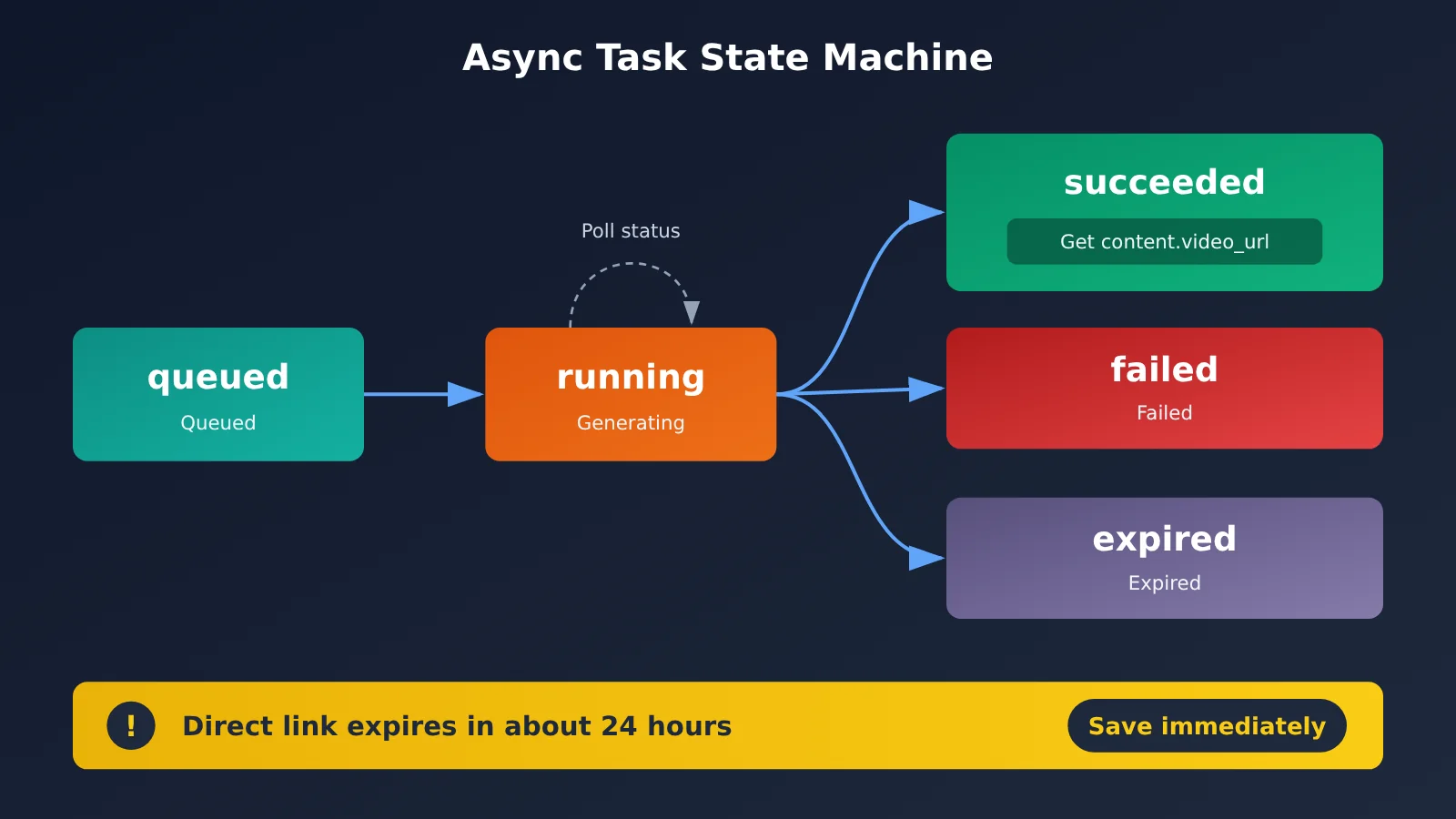
The state machine has only five states: queued → running → succeeded / failed / expired. Note that the success state is succeeded, not completed. If you use the wrong condition, polling will continue indefinitely.
- Check the task: Call
GET /seedance/api/v3/contents/generations/tasks/{id}every 10–20 seconds. - Get the video: Once the task succeeds, read
content.video_url. It’s insidecontent, not at the top level. -
Save a copy: The signed direct link expires after about 24 hours, while the task ID is retained for 7 days. Download the video to your own storage as soon as you get the URL.
-
What you’ll see: The status changes from
runningtosucceeded, and the response includes a video URL andusage.completion_tokens. - Success criteria: The video downloads and plays, and you’ve saved a copy locally or in cloud storage.
Step 5: Stitch Clips Together, Add Sound, and Color Grade
You can’t generate 63 seconds in one go: version 2.5 has a 30-second limit per generation. A common approach is to split the video into 2–3 clips and use return_last_frame to connect the last frame of one clip to the first frame of the next. You can also use omni_reference_task_type=extend to extend a clip, with wording like “extend forward” or “continue” in the prompt.
Once the clips are stitched together, add sound effects, voiceover, color grading, and subtitles. Another tip from the creator: “Make sure the audio length matches the video.” The creator mentioned using GPT-6-Astra for post-production in the credits of other works. The model is also available through APIYI via an OpenAI-compatible interface. Set base_url to https://api.apiyi.com/v1 and use it to write storyboard scripts or refine prompts.
- What you’ll see: A complete video with natural transitions between clips.
- Success criteria: Check the total duration, audio-video sync, and subtitle placement. The 1080p output uses H.265; if older editing software can’t open it, switch to MOV.
How to Calculate the Cost of Recreating a Video with Seedance 2.5
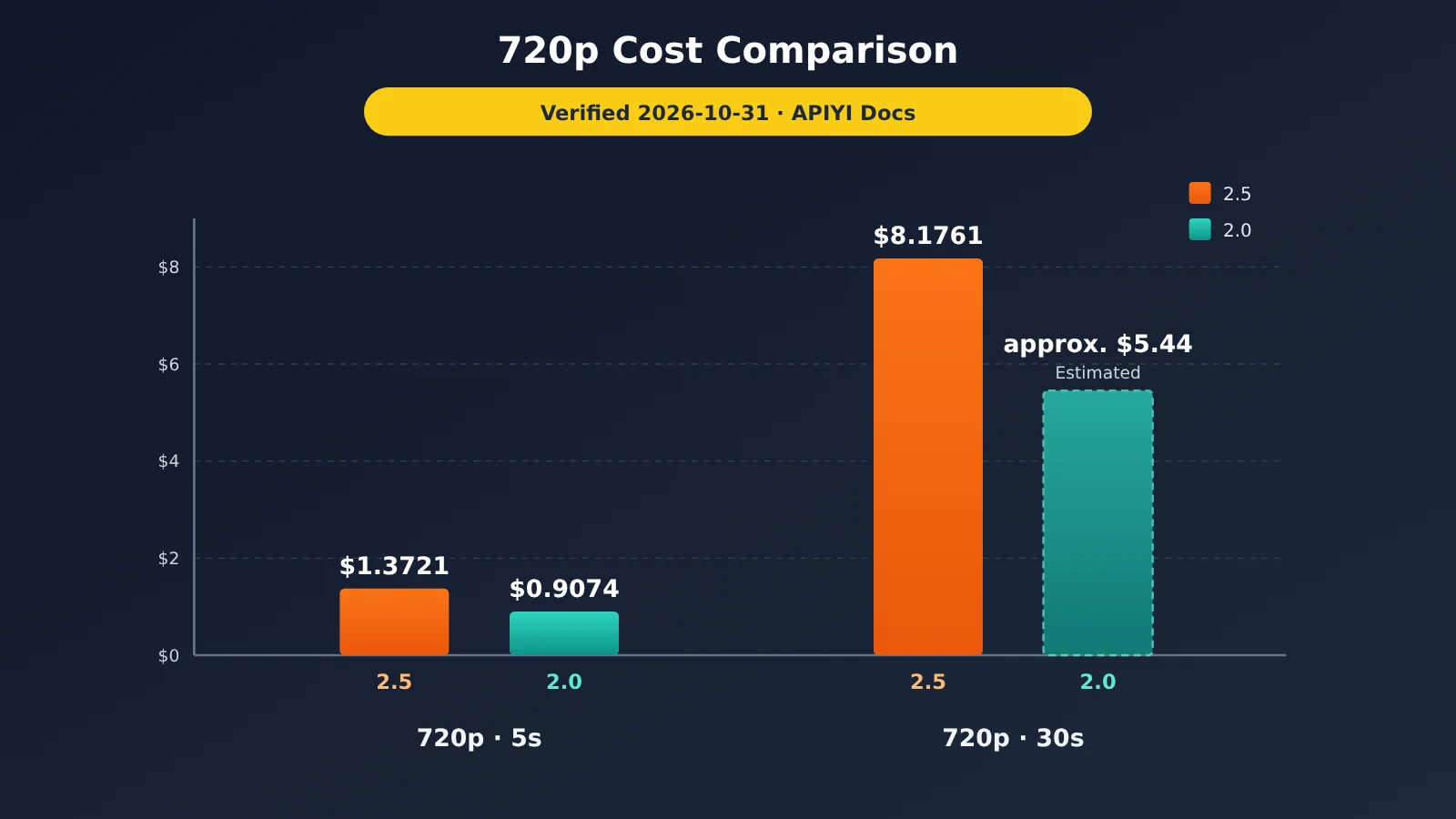
The bottom line: Resolution and duration determine the cost. A 30-second video costs six times as much as a 5-second one.
Seedance 2.5 is billed by token, with two rates: $12.60 per million tokens for inputs without video, and $7.56 per million tokens for inputs containing video (verified October 31, 2026). When you use a reference video, you’re also charged for each second of that video. The billed duration is the input video duration plus the output duration.
| Option | Cost per video (verified October 31, 2026) | Notes |
|---|---|---|
| 2.5 · 480p · 5 seconds | $0.6103 | Best for previews |
| 2.5 · 720p · 5 seconds | $1.3721 (approx. ¥9.60) | Common choice |
| 2.5 · 720p · 30 seconds | $8.1761 (approx. ¥57.23) | Maximum duration per generation |
| 2.5 · 1080p · 5 seconds | $3.0873 | For final videos |
| 2.0 Standard · 720p · 5 seconds | $0.9074 | Budget option |
If you don’t need complex motion, switching to 2.0 Standard for a 30-second video at 720p costs an estimated $5.44 based on linear scaling—about a third less than 2.5. To recreate a 63-second video, three 20-second segments at 720p would cost around $16.40 for the footage alone, excluding retries and unusable clips. These are all linear estimates based on the listed rates. Actual costs depend on usage.completion_tokens and your bill, and a ±5% difference is normal.
Cost is a real pain point for creators. The author wrote on X: “Seedance didn’t get a National Day discount—it’s still so expensive.” With APIYI at apiyi.com, you can use one token to switch between the different 2.5 and 2.0 tiers. The most straightforward way to save is to use 480p for previews, then switch to 720p or 1080p for the final video.
The 3 Most Common Seedance 2.5 Pitfalls
Bottom line: All three pitfalls can lead to higher costs or flaws in your final video. You can avoid them by setting the right parameters upfront.
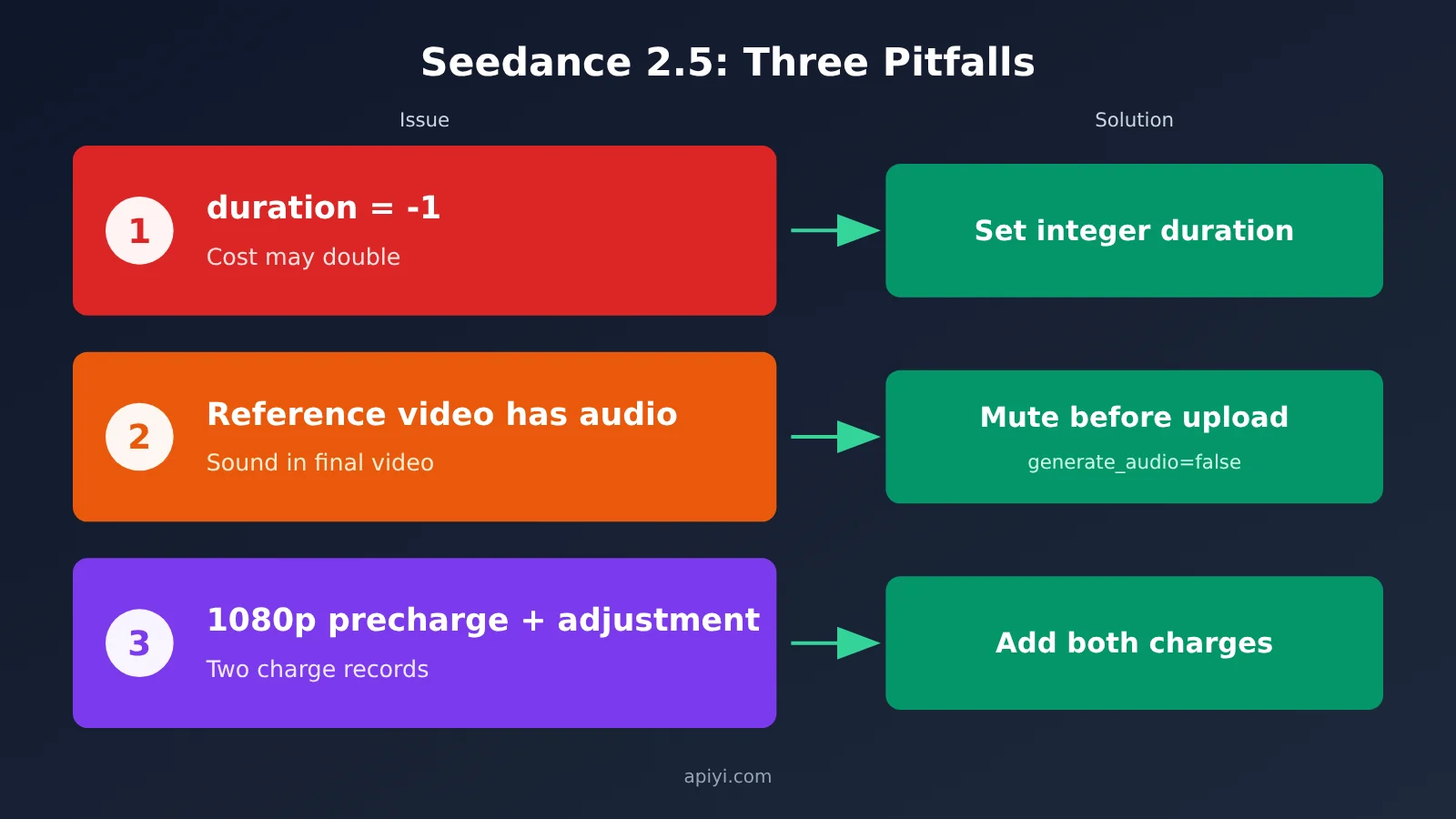
| Pitfall | What happens | Solution |
|---|---|---|
duration defaults to -1 |
The model picks the duration. In one test, it generated 10 seconds, costing exactly twice as much as 5 seconds | Pass an explicit integer duration every time |
| Reference video contains audio | The original sound effects carry over to the final video | Mute it before uploading, or set generate_audio=false and add audio in post-production |
| Additional charge for 1080p | One video has two billing entries | Add both entries to get the total cost |
Pitfall 1: Don’t Leave Seedance 2.5’s duration Unspecified
In 2.5, duration defaults to -1, which means “let the model decide.” In one test, a request that omitted it produced a 10-second video, doubling the bill. Except for editing tasks, which require -1, always specify a number.
Pitfall 2: Audio from the Reference Video Carries Over
That’s what caused the minor flaw in the original clip. The creator wrote on X: “There’s no way to remove the sound effects from the Seedance 2.5 reference video, so it’s a little flawed.” There are two ways to handle this: remove the audio track with editing software before uploading, or set generate_audio to false and add audio in post-production.
Pitfall 3: The Initial and Additional Charges for 1080p
The initial charge for 2.5 is calculated at $0.135/second, based only on duration, not resolution. The rate for 1080p is higher, so if the initial charge isn’t enough, an additional amount is charged after the video is completed. Based on this, a 5-second 1080p video would have an initial charge of about $0.675, followed by an additional charge of about $2.41. When checking your bill, don’t assume you’ve been charged twice—the two entries together are the actual cost of the video.
Frequently Asked Questions
Q1: Can I recreate Dario vs. Altman using only text-to-video?
You can generate a video, but it’ll be hard to reproduce the original’s camera movements and action timing. The creator said the movements and shots came from a reference animation, so a multimodal approach using a reference video, character image, and prompt is recommended.
Q2: Can I upload real people’s photos directly to Seedance 2.5?
No. Real human faces are blocked by the upstream provider. The channel includes a virtual face allowlist, and APIYI offers a free private asset library for adding virtual portraits and verifying real people. This makes maintaining character consistency much easier.
Q3: How do I generate a 63-second video?
Seedance 2.5 supports up to 30 seconds per generation, so you’ll need to split it into 2–3 segments. Use `return_last_frame` to carry the final frame into the next segment, or use extend mode to lengthen the video. Then stitch the segments together and add audio in editing software.
Q4: How do I choose between Seedance 2.5 and 2.0 Standard?
Choose 2.5 for 30-second continuous shots, multiple references, and timestamp-based editing. If you’re on a tight budget and need shorter clips, 2.0 Standard is cheaper: a 5-second 720p clip costs $0.9074 (checked October 31, 2026). You can invoke both models with the same token.
Q5: How can I quickly invoke Seedance 2.5 through the API?
1. Visit apiyi.com, create an account, and claim the free testing credit for new users;
2. Create a token, select pay-as-you-go billing, and check the SeeDance2 group;
3. Follow steps 3 and 4 in this article to submit a task and poll for the result.
Q6: What if I get “No available channel for this model” when submitting a task?
This usually means the SeeDance2 group isn’t selected for your token, or the billing mode is incorrect. Go back to the APIYI console, edit the token, select the group, and change the billing mode to “Pay-as-you-go first.”
Q7: Why does my Python request return a decoding error or truncated JSON?
This happens when the gateway’s content-encoding header doesn’t match the actual encoding. Add `Accept-Encoding: identity` to your request headers to fix it.
Q8: Why won’t my 1080p video open in my editing software?
Seedance 2.5’s 1080p output uses H.265 (hvc1), which some older software doesn’t fully support. If you need to color grade the video, set `output_format` to `mov`. It uses H.264 video and PCM audio, making it better suited for post-production.
Summary: Key Takeaways for Recreating Dario vs. Altman with Seedance 2.5
The video took off thanks to its unexpected premise and the quality of the action from the reference video. Seedance 2.5 made it possible to reproduce that action consistently.
- Start with the assets: Remove audio from the reference video, use clear front-facing character images, and keep the prompt under 500 characters.
- Choose the right token: Select pay-as-you-go billing and the SeeDance2 group to switch between four models with one token.
- Know the API flow: Submit a request to get an id, poll until the status is
succeeded, then retrieve the video fromcontent.video_urland save it elsewhere within 24 hours. - Set the parameters:
durationis required and must be an integer. Turn offgenerate_audiowhen appropriate. - Keep costs under control: A 480p sample starts at $0.6103, a 30-second 720p video costs $8.1761, and the 2.0 standard version is the budget option (verified October 31, 2026).
Want to try it yourself? Register at apiyi.com, create a token with the SeeDance2 group selected, and use your free new-user credits to generate a five-second 480p sample. Once the action and characters look right, stitch the clips together, one at a time, to reach 63 seconds.
📚 References
- APIYI Seedance 2 Series Integration Documentation: Model names, endpoints, parameters, and billing details
- Link:
docs.apiyi.com/api-capabilities/seedance2/overview -
Notes: The prices, state machine, and three pitfalls in this article are based on this documentation (verified October 31, 2026).
-
ByteDance Seed Official Blog: Seedance 2.5 release notes
- Link:
seed.bytedance.com -
Notes: Official descriptions of capabilities including 30-second duration, multimodal references, and timestamp editing.
-
Volcengine Ark Documentation: Official Seedance technical limits
- Link:
volcengine.com/docs -
Notes: Constraints on output duration and the number and maximum duration of reference videos.
-
Creator’s Original Post: X account @Xanderwow_A
- Link:
x.com/Xanderwow_A - Notes: View counts, likes, and other figures are as of October 31, 2026, and will continue to change.
Author: APIYI Technical Team
Technical support: Contact us through the APIYI homepage, or visit the documentation center for Seedance integration questions.