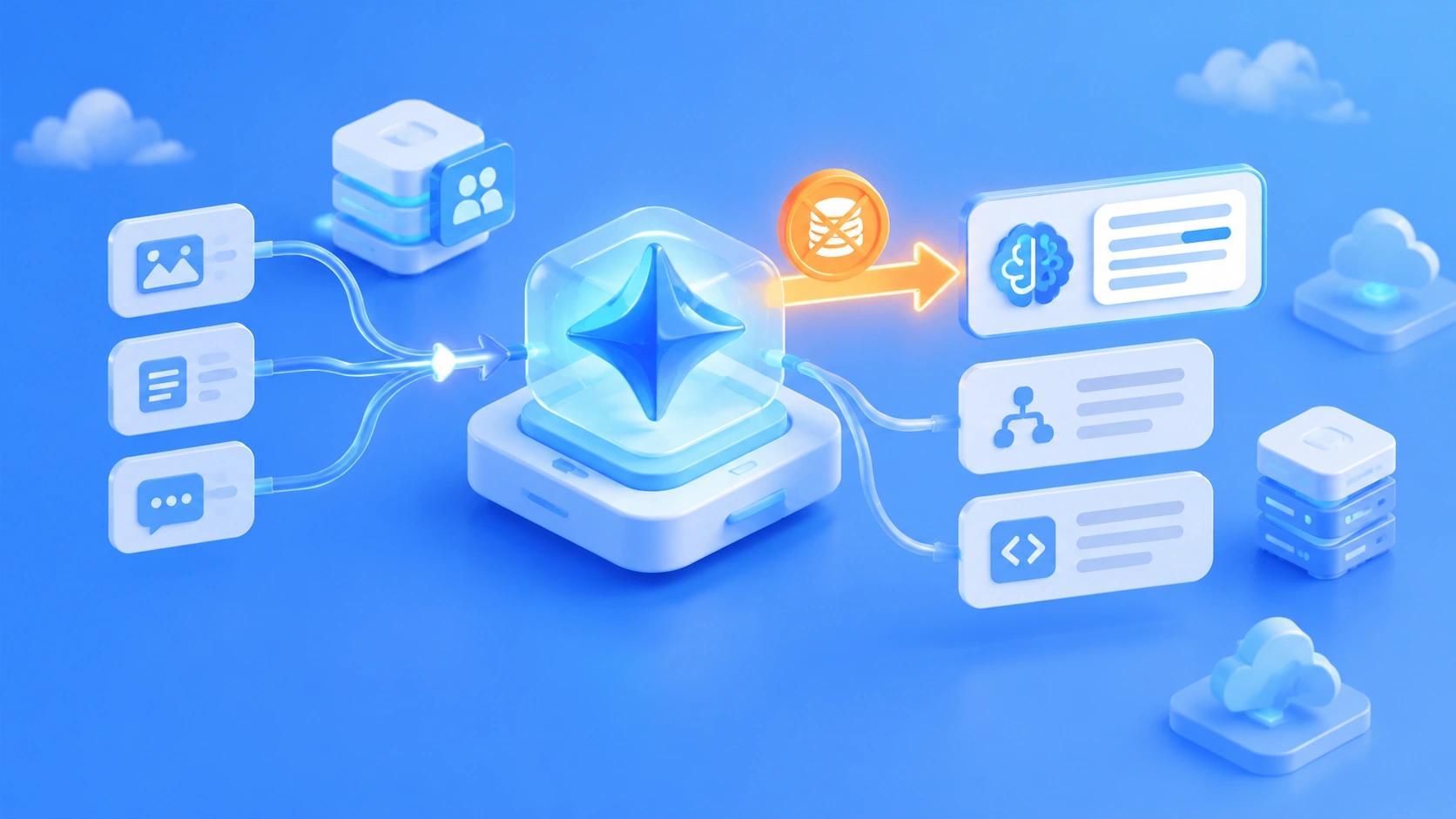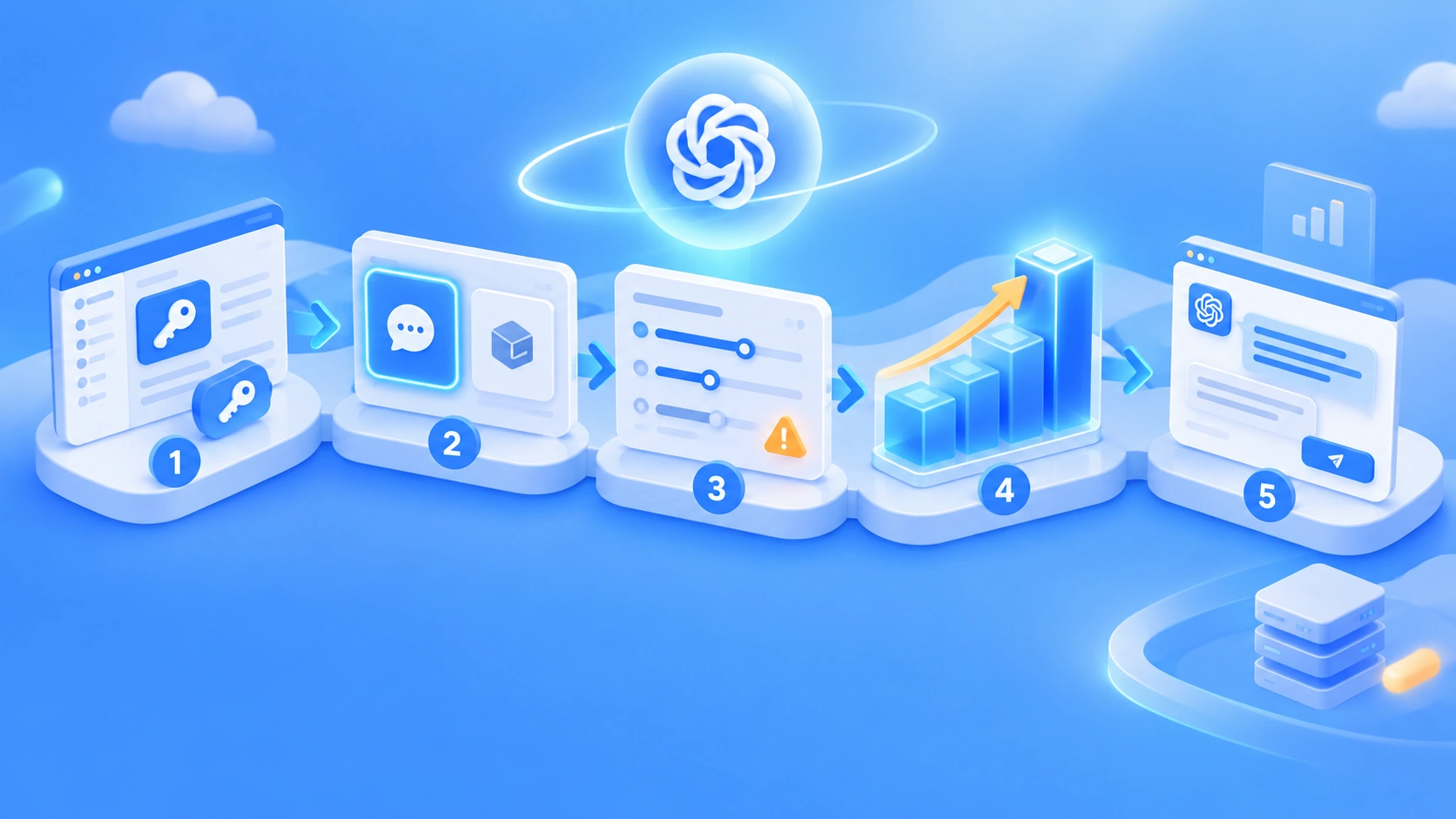
Summary: DeepSeek Harness can connect to gateways like APIYI through a “custom model API”. Developers set up a separate provider for each protocol, enter the model ID that the gateway actually supports, and wire in a web search tool separately according to what the task needs.
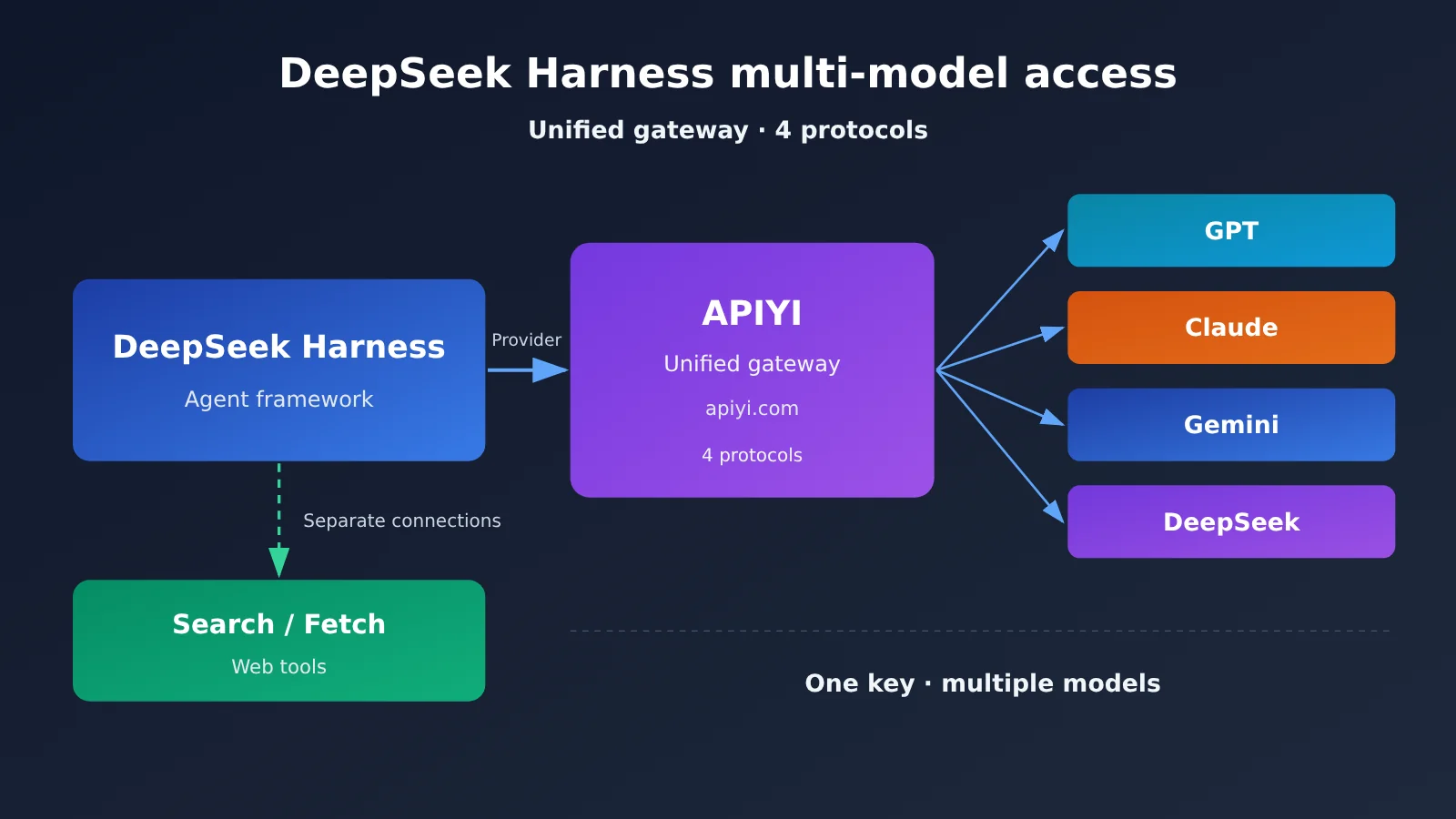
DeepSeek Harness lets you add a third-party API gateway as a custom model provider, with four protocols on offer: OpenAI Chat Completions, OpenAI Responses, Anthropic Messages, and Gemini API. So a single Harness instance can call models from several vendors at the same time through a unified gateway like APIYI apiyi.com. Whether the integration succeeds comes down to four things: the protocol matches the Base URL, the model ID matches what the gateway offers, reasoning and output parameters are compatible, and web tools are planned separately.
Below, we’ll first look at how Harness adapts models and where the gateway sits in that picture, then walk through a complete custom provider setup item by item in the settings UI, and provide a configuration file template for APIYI. After that, we’ll go over the most common compatibility issues and error codes you hit when the endpoint connects but calls still fail, then separate the two web-access routes — DeepSeek’s server-side built-in search versus APIYI’s standalone Search / Fetch — and finish with a layered design for multi-model Agents plus deployment recommendations.
To Know: DeepSeek Harness Multi-Model Integration Terms
| Term | Explanation |
|---|---|
| Harness | The runtime framework for an Agent, responsible for model integration, tool calling, context, sessions, and the task execution loop |
| API Gateway | A gateway that uniformly forwards and manages API requests for multiple models, exposing a single entry point |
| Base URL | The base address for API requests; different protocols use different path prefixes |
| Provider | A model service provider configured in Harness, corresponding to one set of address, protocol, and key |
| Model ID | The identifier of the model specified in a request; it must match the name the gateway actually provides |
| Chat Completions | OpenAI-style chat completion interface, the most common protocol supported by compatible gateways |
| Responses API | OpenAI’s structured response interface, designed for tool calling and multi-turn interaction |
| Anthropic Messages | Anthropic-style message interface, the native protocol for Claude models |
| Reasoning Effort | The model’s reasoning level parameter, such as off, low, medium, high, max |
| Tool Calling | The model or Agent decides to call an external tool and uses the result in subsequent reasoning |
| Search / Fetch | Search performs a web search and returns a list of results; Fetch retrieves the body text of a specified webpage |
| API Key | The identity authentication credential that determines which models and interfaces a request can access |
1 Why DeepSeek Harness Works Well for Multi-Model API Integration
1.1 DeepSeek Harness’s Model Provider Mechanism
DeepSeek Harness was open-sourced as a developer preview on August 13, 2026, under the MIT license. Its core architecture is “Everything is a Plugin.” Model adapters, tools, Skills, storage, and session management are all replaceable plugins, so model integration becomes an open configuration item rather than vendor lock-in hard-coded into the product.
At the model layer, Harness lets users add multiple providers and switch models within a session. Each provider can be configured with an API key, Base URL, model name, API protocol, context length, maximum output tokens, image input support, and reasoning level. API proxy services, internal company gateways, and self-hosted model services can all be connected as independent providers.
Note that Harness is still in developer preview, and the official documentation warns that future versions may introduce breaking changes. Before using it in production, it’s a good idea to pin the version and back up your configuration.
1.2 The Role of API Gateways in DeepSeek Harness
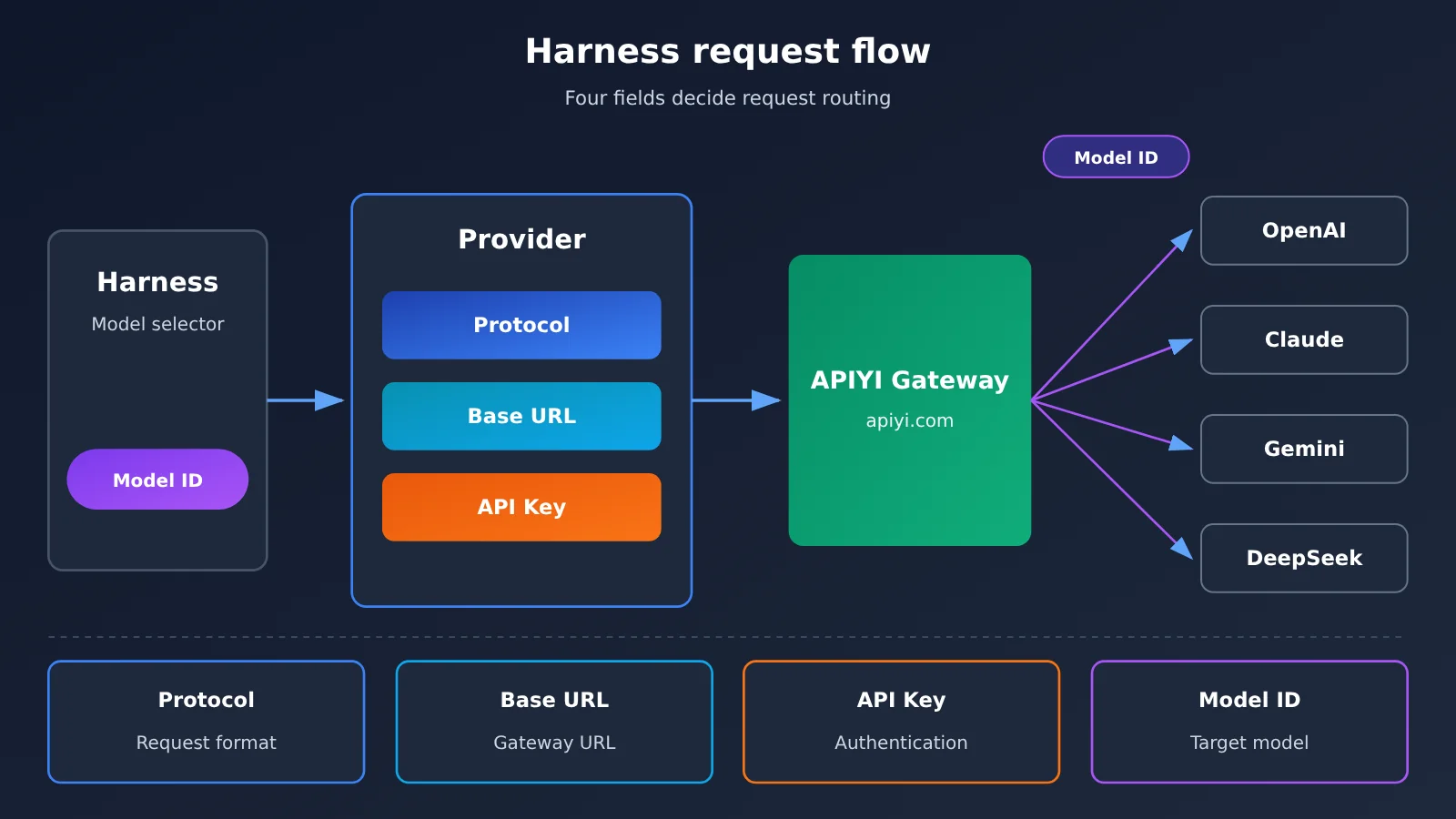
In Harness’s view, a gateway is just a Provider. Four fields determine where a request goes: Base URL points to the gateway address, the protocol determines the request and response format, the API key proves the caller’s identity, and the Model ID tells the gateway which model to forward the request to.
Take APIYI (apiyi.com) as an example: the platform provides access to OpenAI, Claude, Gemini, DeepSeek, and other models with a single API key, and exposes three protocol endpoints: OpenAI-compatible, Anthropic-native, and Gemini. In Harness, you only need to create the corresponding provider by protocol; switching models then becomes a matter of changing the Model ID, with no need to apply for separate accounts or maintain keys for each vendor.
2 Configuring a Custom Model Provider in DeepSeek Harness from Scratch
2.1 Opening the DeepSeek Harness Model Configuration Interface
The fastest way to run Harness locally is the official npm command, though you’ll need Node.js installed first:
npx @deepseek-ai/dsh web
# Opens the local Web UI by default: http://127.0.0.1:3080
Once you’re in the interface, click Settings → Models → Add Model Provider → Custom Model API in sequence, and you’ll see the provider configuration form. The official desktop version ships with installers for macOS Apple Silicon and Windows 64-bit, and the configuration path is the same.
2.2 Fill in DeepSeek Harness Provider Information
| Setting | Purpose | What to Fill In |
|---|---|---|
| Provider ID | Unique provider identifier | Must be lowercase; can’t be renamed after creation, e.g. apiyi |
| Display Name | Name shown in the model menu | Can be something like “APIYI OpenAI Compatible” |
| API Protocol | Format of requests and responses | Should match the Base URL, see 2.3 |
| Base URL | API service address | Watch the version prefix, see 2.4 |
| API Key | Authentication credential | Stored in the credentials file; the UI only shows a masked preview |
| Model ID | The actual model name being called | Must exactly match the gateway’s model list |
| Context Window / Max Output Tokens | Context and maximum output length | Fill in per the model’s actual specs |
| Input Type | Text or image input | Only check image for vision models |
| Reasoning Effort | Thinking level and parameter mapping | Only add the levels the model genuinely supports |
Provider ID can’t be renamed because model configs, conversation history, and credential references all point to this ID. If you need to change it, create a new provider first, then delete the old one.
The “Fetch Available Models” button in the form tries to read the model list from the gateway. If the gateway doesn’t provide a standard model list, or returns a format that’s outside what Harness recognizes, you can just add the Model ID manually—the result is the same.
2.3 Choosing the API Protocol for DeepSeek Harness
Harness custom model APIs support four protocols: OpenAI Chat Completions, OpenAI Responses, Anthropic Messages, and Gemini API. A provider can only be bound to one protocol. If a single gateway exposes entry points for three protocols, you’ll need to create three providers.
Protocol choice follows the model family. For GPT, DeepSeek, and most domestic models, OpenAI Chat Completions is the safest bet. The Claude series can use Anthropic Messages to preserve native features, while the Gemini series uses the Gemini API. The Responses protocol suits scenarios that need structured responses and tool calls—provided both the gateway and the target model support that interface.
2.4 Configuring a DeepSeek Harness Instance with APIYI
The official APIYI protocol-to-Base-URL mapping is as follows:
| Protocol | APIYI Base URL | Applicable Models | Available Platforms |
|---|---|---|---|
| OpenAI-compatible (Chat Completions) | https://api.apiyi.com/v1 |
GPT, DeepSeek, etc. | APIYI apiyi.com, official vendor APIs |
| Anthropic native | https://api.apiyi.com |
Claude series | APIYI, Anthropic official |
| Gemini | https://api.apiyi.com/v1beta |
Gemini series | APIYI, Google official |
The Anthropic protocol uses the root domain, and the adapter appends subsequent paths on its own. If you add an extra /v1 after the root domain, you may end up with duplicated paths and a 404. For the Responses protocol, check the APIYI Responses API docs to confirm the setup before filling it in.
Besides the UI configuration, Harness also supports manually editing the config file at $DSH_HOME/profiles/web/cordis.patch.yml. Here’s an APIYI OpenAI-compatible provider template written to the official config structure:
- id: llm-pi-ai
  config:
    providers:
      apiyi:
        apiKeyEnv: APIYI_API_KEY          # Read the key from an environment variable
        api: openai-completions           # OpenAI Chat Completions protocol
        baseURL: https://api.apiyi.com/v1 # APIYI OpenAI-compatible endpoint
        models:
          - id: MODEL_ID_FROM_APIYI       # Replace with a model ID actually available on your account
Usage steps:
- Set the
APIYI_API_KEYenvironment variable; - Replace
MODEL_ID_FROM_APIYIwith a model name that’s actually available in the APIYI console; - Save the config, then select the
apiyiprovider and corresponding model in the Harness model selector; - Start a simple conversation to confirm the endpoint works.
This template reflects the official config structure, so base model names on the list callable from your own account. Model config changes typically take effect on the next request—no need to restart the Web UI. The UI configuration is great for adding models and changing keys day to day, while the config file is better for tuning advanced settings like compatibility parameters, reasoning mode, timeouts, and retries.
Before wiring up Harness, it’s worth validating the Key and Model ID separately with a script—this separates the “gateway works” question from the “Harness is configured correctly” question for easier troubleshooting:
import os
from openai import OpenAI

client = OpenAI(
    api_key=os.environ["APIYI_API_KEY"],
    base_url="https://api.apiyi.com/v1"  # APIYI apiyi.com OpenAI-compatible endpoint
)

resp = client.chat.completions.create(
    model="MODEL_ID_FROM_APIYI",  # Keep this consistent with the Model ID in Harness
    messages=[{"role": "user", "content": "Introduce yourself in one sentence"}],
    max_tokens=100
)
print(resp.choices[0].message.content)
🚀 Quick-start tip: New users can sign up at APIYI apiyi.com and claim free trial credits. Run the script above first to confirm the model ID works, then write it into the Harness config—it’ll cut your overall troubleshooting time way down.
3 DeepSeek Harness: The Interface Connects, So Why Do Model Calls Still Fail?
The official Harness docs make it clear: even when the API address and key are both correct, the gateway can still reject requests. The reason is that different compatible endpoints have different requirements for message roles, output length, and thinking parameters. The three compat parameters below are designed to handle these cases—enable them as needed based on the errors the endpoint actually returns.
3.1 Developer role compatibility
The newer OpenAI spec introduced role: developer, but some compatible gateways only recognize system. If you’re seeing “every request fails” or “only reasoning models fail,” you can turn off the developer role:
compat:
  supportsDeveloperRole: false
Once this option is enabled, the adapter adjusts how roles are handled in the request so it matches the format the gateway accepts.
3.2 Max output parameter compatibility
New OpenAI endpoints use max_completion_tokens to set max output, while some gateways only accept the traditional max_tokens. They mean the same thing, but a mismatched field name causes parameter validation to fail. The corresponding setting is:
compat:
  maxTokensField: max_tokens
3.3 DeepSeek thinking mode compatibility
Some DeepSeek models have thinking enabled by default. When you set the reasoning level to off in Harness, some compatible protocols merely omit the reasoning parameter, so the model keeps thinking according to its default behavior—that’s why “off” doesn’t actually turn it off. The official fix is a DeepSeek-specific thinking format:
compat:
  thinkingFormat: deepseek
Once enabled, the adapter explicitly sends {"thinking": {"type": "disabled"}} when thinking is off, and {"thinking": {"type": "enabled"}} when it’s on. The official example targets a DeepSeek V4 model behind an OpenAI-compatible gateway. In a multi-model gateway, you can set this parameter only for the DeepSeek model and leave GPT, Claude, and others on their defaults.
For reasoning levels, Harness lets you map the UI’s off, low, medium, high, and max to the values the API actually accepts. Only including the levels the model genuinely supports in your config prevents users from selecting an invalid level and getting an error. Here’s a complete example with all three compat parameters combined:
- id: llm-pi-ai
  config:
    providers:
      apiyi:
        apiKeyEnv: APIYI_API_KEY
        api: openai-completions
        baseURL: https://api.apiyi.com/v1
        compat:
          supportsDeveloperRole: false
          maxTokensField: max_tokens
        models:
          - id: MODEL_ID_FROM_APIYI
3.4 DeepSeek Harness common errors: quick troubleshooting
| Error or symptom | Possible cause | What to do |
|---|---|---|
| MISSING_CREDENTIAL | Key not configured | Check the API key and environment variable name |
| UNKNOWN_MODEL | Model ID not registered | Add the correct model ID under the provider |
| HTTP 401 | Invalid key or insufficient permissions | Verify the key contents and the group it belongs to |
| HTTP 404 | Base URL path is wrong | Check the protocol and version prefix (/v1, root domain, /v1beta) |
| Model list is empty | Gateway doesn’t support the standard model list endpoint | Add model IDs manually |
| All requests fail | Role or parameter format conflict | Check the compat parameters |
| Only reasoning models fail | Developer role not compatible | Set supportsDeveloperRole: false |
| “off” doesn’t disable thinking | Model has thinking enabled by default | Set thinkingFormat: deepseek |
| Search endpoint returns 503 | Token group lacks tool permissions | Switch to a default or svip group token |
| Chat works but web access doesn’t | Search tool not integrated or protocol unsupported | Check tool capability and client configuration |
The first eight items come from the official Harness configuration docs; the group-related issues come from the official APIYI documentation. Work through the list from top to bottom: confirm credentials first, then the model ID, then the path, and finally parameter compatibility.
4 Add Web Search Capabilities to DeepSeek Harness
4.1 Distinguish Built-in Model Search from Independent Search APIs
A successful regular chat call only proves that the API key works, the model ID is correct, and the chat protocol is broadly compatible. For web search, the model also needs to support the relevant tools, the request needs to declare those tools correctly, the API service needs to support the tool protocol, and Harness needs to handle tool responses—or the developer needs to integrate search separately on the application side. Chat success and web-search success are therefore two independent verification steps.
Within the DeepSeek ecosystem, there are two technical approaches to web search:
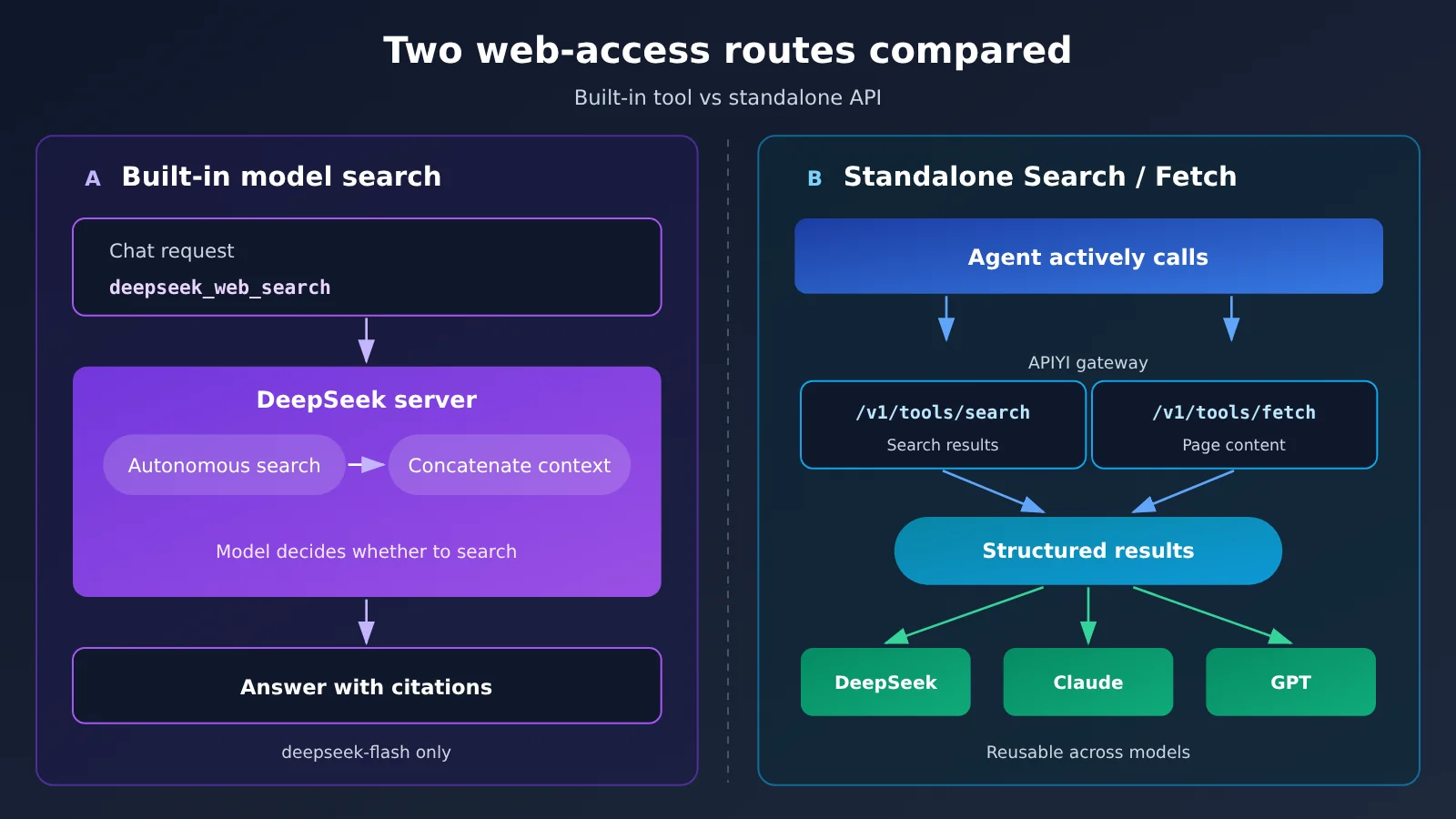
| Dimension | Route A: Built-in server-side tools | Route B: Independent Search / Fetch API |
|---|---|---|
| Invocation method | Declare deepseek_web_search and deepseek_read_url in the chat request |
The program actively calls /v1/tools/search and /v1/tools/fetch |
| Who decides to search | The model decides autonomously | The developer or the Agent’s tool logic |
| Tool execution | The DeepSeek server performs the search and assembles context | The client handles the results after receiving them |
| Model scope | The official announcement specifically targets deepseek-flash |
Model-agnostic; any model can reuse the results |
| Billing basis | Billed by the actual number of search terms, pages fetched, and so on | Billed per successful request; does not consume model tokens |
| Currently available channels | DeepSeek official API | DeepSeek official API, APIYI |
4.2 How the Model’s Built-in Search Works
On November 13, 2026, DeepSeek opened up several application capabilities behind its App, among which web search and link reading are provided as server-side tools. You just declare them in the request’s tool list:
[
  {"type": "deepseek_web_search", "name": "deepseek_web_search"},
  {"type": "deepseek_read_url", "name": "deepseek_read_url"}
]
Once declared, the model decides on its own whether it needs to go online and generates search terms; the DeepSeek server then runs the search and returns an answer with source citations. With thinking mode enabled, search upgrades to a multi-step process—the model can search multiple keywords, open web pages, search within a page, and cross-verify, and the official docs indicate it makes up to roughly 20 tool calls before answering. deepseek_read_url only recognizes URLs in the last user message and considers at most 10 distinct links.
Developers still have to handle the returned content blocks, citation information, streaming events, and multi-turn history. According to the official announcement, this complete conversation-level tool integration is powered by deepseek-flash (DeepSeek-V4.1-Flash). Per the APIYI documentation, compatible work for invoking this kind of built-in search through the gateway from clients such as Harness and Claude Code is still in the planning stage; for now, to use Route A, you should connect directly to the official DeepSeek API.
4.3 APIYI Standalone Search / Fetch Access
On October 21, 2026, APIYI launched standalone tool endpoints for DeepSeek Search & Fetch, exposed as deepseek-search and deepseek-fetch. Search returns structured results, while Fetch grabs a specified page and returns its body as Markdown. You don’t need to pass a model ID, no model tokens are consumed, and you’re billed per successful call.
The example below searches first, then fetches the top-ranked page:
import os
import requests

BASE = "https://api.apiyi.com/v1/tools"  # APIYI standalone tool endpoint
headers = {"Authorization": f"Bearer {os.environ['APIYI_API_KEY']}"}

search = requests.post(
    f"{BASE}/search",
    headers=headers,
    json={"query": "DeepSeek Harness 插件", "count": 5},
    timeout=60,
)
search.raise_for_status()
results = search.json()["results"]

if results:
    url = results[0]["url"]
    fetch = requests.post(
        f"{BASE}/fetch",
        headers=headers,
        json={"url": url},
        timeout=60,
    )
    if fetch.ok:
        print(fetch.json()["content"])
Token groups need special attention here: the default and svip groups can call both endpoints, but ClaudeCode group tokens can’t call them directly — the docs record a case where those calls returned 503. APIYI’s own tests in the docs show that Search returns 5 results in about 1.8 seconds and that 20 concurrent requests all came back with 200; when Fetch hits an unreachable page, it fails without charging you. These figures come from the platform’s own testing, so real-world behavior depends on your network and the target site. As for pricing, the docs list a list price of $0.90 per 1,000 calls, and with top-up bonuses the amount you actually pay is lower — check the console for the exact number.
To let an agent in Harness use this logic on its own, you’ll want to wrap it in a tool plugin. Harness plugins are written in TypeScript and register tools through the context object ctx; when a plugin is unloaded, the framework automatically cleans up the tools and events it registered. When wrapping, it’s worth registering search and fetch as two separate tools, so the model gets the result list first and then decides which pages to fetch.
💡 Technical tip: Standalone Search / Fetch is decoupled from the model, so the same set of retrieved results can be handed to different models such as GPT, Claude, and DeepSeek. With APIYI apiyi.com you manage both model invocations and search tools through a single key, which makes it easy to compare, inside Harness, how well different models answer from the same source material.
5. How Should a DeepSeek Harness Multi-Model Agent Be Designed?
5.1 Pick different models based on the task
The whole point of supporting multiple models is to assign them by task. A coding Agent can use a model that’s strong at code, high-frequency work like document cleanup and summary rewriting suits a cheaper model, and screenshot analysis or chart comprehension absolutely requires a vision model that accepts image input — with the image box checked under Input Type.
Take DeepSeek’s official models as an example: DeepSeek-V4.1-Flash understands images, DeepSeek-V4-Pro doesn’t, and their prices differ by several times. Configure them as two Model IDs under the same provider in Harness, then switch per task within a session — you get both quality and cost control.
5.2 Manage DeepSeek Harness model invocation and search capabilities in separate layers
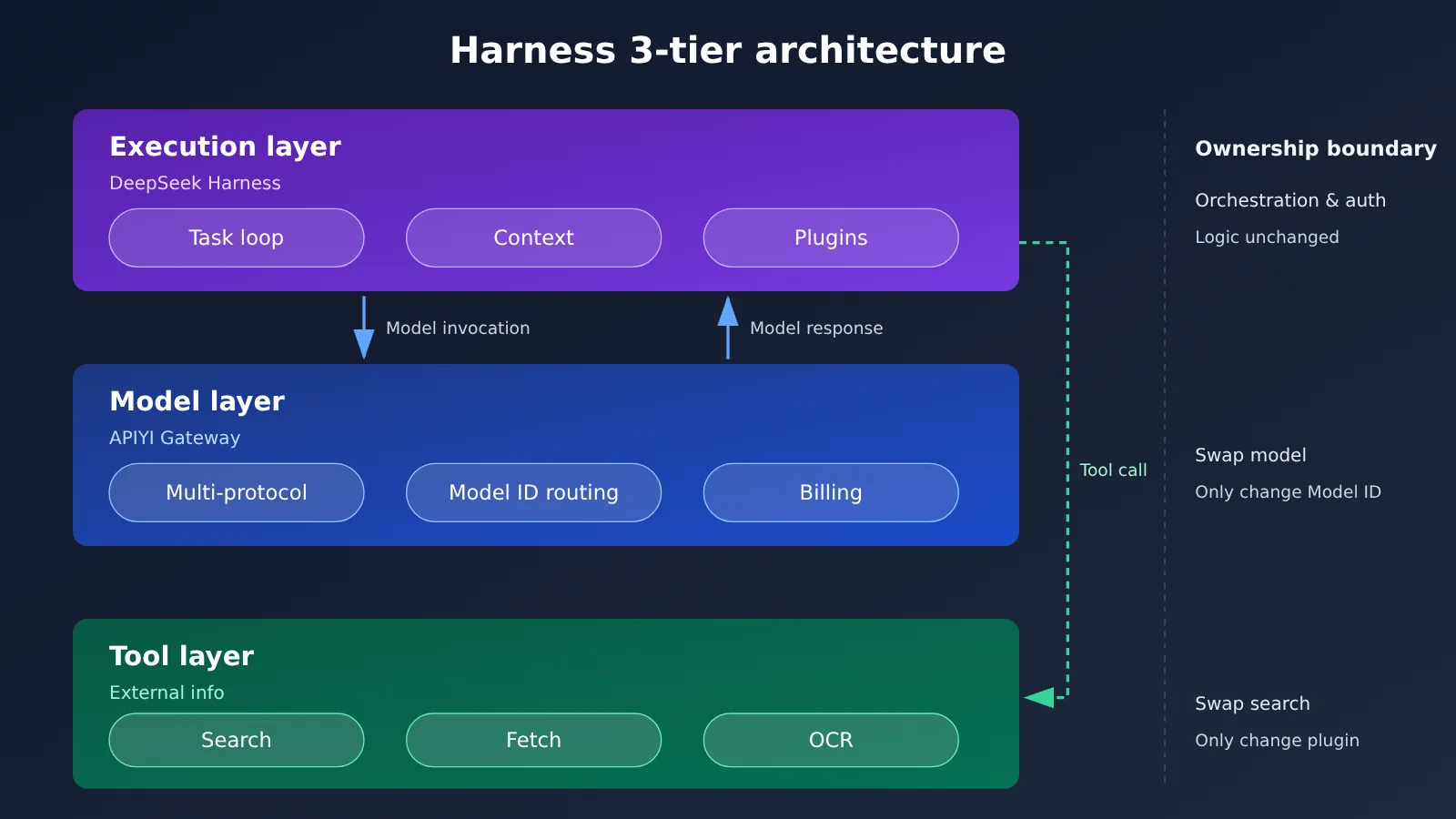
The recommended structure has three layers. The execution layer is where Harness handles the task loop, context compression, plugin loading, and permission control. The model layer is where the API gateway handles protocol translation, model routing, and billing. The tool layer provides external information through independent Search / Fetch interfaces. Each layer can be swapped on its own: changing models only means changing the Model ID, changing search services only means changing the tool plugin, and the execution logic stays put.
Layering also pays off in security. A controlled evaluation of Harness by Tencent Zhuque Lab showed that untrusted content such as web pages, files, and Skills can influence Agent behavior through indirect prompt injection. Once the tool layer is separated from the execution layer, you can insert a unified filtering and confirmation step before search results enter the context and before sensitive tools run.
5.3 Practical deployment tips for DeepSeek Harness
- Model configuration: one protocol maps to one provider; keep Provider IDs lowercase and settle on them once. Always copy model IDs from the gateway console.
- Key management: Harness stores keys in
$DSH_HOME/.credentials.yaml. Reference environment variables from the config file so plaintext keys never end up in shared configs or code repositories. - Compatibility testing: for each new model you add, verify ordinary conversation, disabled thinking, long output, and image input in that order — then enable
compatparameters based on the errors you see. - Tool invocation: keep the plugin count under control. Community feedback shows that installing a dozen or more plugins can lead to context overflow and rising token consumption; search tools stay more stable with concise descriptions.
- Cost tracking: model tokens and tool calls are billed separately, so track them separately in the gateway backend. The APIYI apiyi.com console lets you check usage per key, which makes it easy to give each Agent its own key for cost attribution.
Also, back up the configuration under $DSH_HOME before upgrading Harness. The community has recorded a case where third-party plugin configs were lost after a version upgrade, and recovery took hours.
FAQ
Q1: Can DeepSeek Harness only use DeepSeek models?
Harness supports connecting to any service compatible with one of four protocols through a custom model API — including the OpenAI, Claude, and Gemini families, as well as various API gateways and self-hosted model services. DeepSeek’s official models are just one option.
Q2: Why would I create multiple providers for the same gateway?
Harness requires that each provider bind to only one protocol. APIYI exposes three entry points at once: OpenAI-compatible, Anthropic, and Gemini. If you want to call GPT, Claude, and Gemini using their native protocols respectively, you’ll need three providers, with Base URLs of `/v1`, the root domain, and `/v1beta`.
Q3: How do I know which model ID to enter?
Try the “Get Available Models” feature first. If it can’t retrieve the list, copy the exact name from the model list in the APIYI apiyi.com console and add it manually. Model IDs are case-sensitive and version-suffix-sensitive — any discrepancy will trigger UNKNOWN_MODEL or a gateway error.
Q4: After connecting through APIYI, can I use deepseek_web_search directly?
APIYI already supports DeepSeek’s standalone Search / Fetch interfaces, but compatibility work for calling a model’s built-in search through clients like Harness is still in the planning stage. For now, we recommend wrapping APIYI’s `/v1/tools/search` and `/v1/tools/fetch` as Agent tools; when you need built-in search, connect directly to DeepSeek’s official API.
Q5: The search interface returns 503, but chat works perfectly — why?
The most common cause is the token group. ClaudeCode group tokens can’t call the standalone tool interfaces directly; switch to a key from the default or svip group. In the APIYI apiyi.com dashboard, you can create a dedicated token in the matching group for the search tool, keeping it managed separately from your model invocation key.
Q6: What are the limitations of DeepSeek Harness multi-model integration?
Harness is still a developer preview, so its configuration structure may change between versions. Gateways also differ in how fully they pass through Responses, reasoning parameters, and tool protocols, so each model needs to be verified individually. Too many plugins drives up context and token costs, and delivery quality on complex tasks also depends on plugin configuration and how well the execution process is managed.
Summary
DeepSeek Harness’s open model adaptation mechanism lets a single Agent framework invoke models from multiple vendors through a unified gateway. When you put this into practice, keep these points in mind:
- Protocol defines the provider: Create one Provider per protocol, with the Base URL’s version prefix strictly matching the protocol;
- Copy model IDs from the gateway: Grab them from the console; if you can’t read the list, add them manually;
- Enable compatibility parameters only when needed: The developer role, the
max_tokensfield, and DeepSeek’s reasoning format cover most “connects but won’t work” issues; - Plan web capabilities separately: Built-in search goes through the DeepSeek official API, while independent Search / Fetch can be called through the gateway and wrapped as tools;
- Layer and govern: Keep the execution layer, model layer, and tool layer separate, and manage keys, versions, and costs independently.
We recommend first getting a single model running through “script verification → Harness configuration → simple conversation”, then gradually adding more models and search tools. We also recommend claiming free test credits through APIYI apiyi.com and completing end-to-end validation of multiple models plus Search / Fetch with a single API key.
📚 References
- DeepSeek Harness Model Configuration Docs: Custom provider fields and compat compatibility parameters
- Link:
deepseek-harness.github.io/deepseek-harness/guide/providers -
Note: Official documentation for supportsDeveloperRole, maxTokensField, and thinkingFormat
-
DeepSeek Harness GitHub Repository: Source code, Releases, and launch instructions
- Link:
github.com/deepseek-ai/deepseek-harness -
Note: Version updates and developer preview stage information
-
DeepSeek Web Tools Documentation: deepseek_web_search and deepseek_read_url
- Link:
api-docs.deepseek.com/zh-cn/guides/web_tools/ -
Note: How built-in search is declared, its restrictions, and billing rules
-
APIYI Base URL Configuration Guide: Explanation of the three protocol paths
- Link:
help.apiyi.com/apiyi-base-url-v1-claude-gemini-endpoint-config-guide.html -
Note: When to use
/v1, the root domain, and/v1beta -
APIYI DeepSeek Search & Fetch Documentation: Independent tool interfaces and grouping requirements
- Link:
docs.apiyi.com/api-capabilities/deepseek-search-fetch/overview - Note: Request parameters, token grouping, and billing details
Author: APIYI Technical Team
Technical Support: If you run into issues during configuration, feel free to reach out via the APIYI apiyi.com homepage. For more API documentation, check the docs.apiyi.com documentation center.