
Author’s note: The 2026-11-09 leaderboard from the Artificial Analysis Search Index shows that if you hold one answer model fixed and change only the search configuration, the overall score can range from 33 points all the way to 83 points. That said, when choosing a setup you also need to look at task cost, end-to-end latency, and evaluation scope.
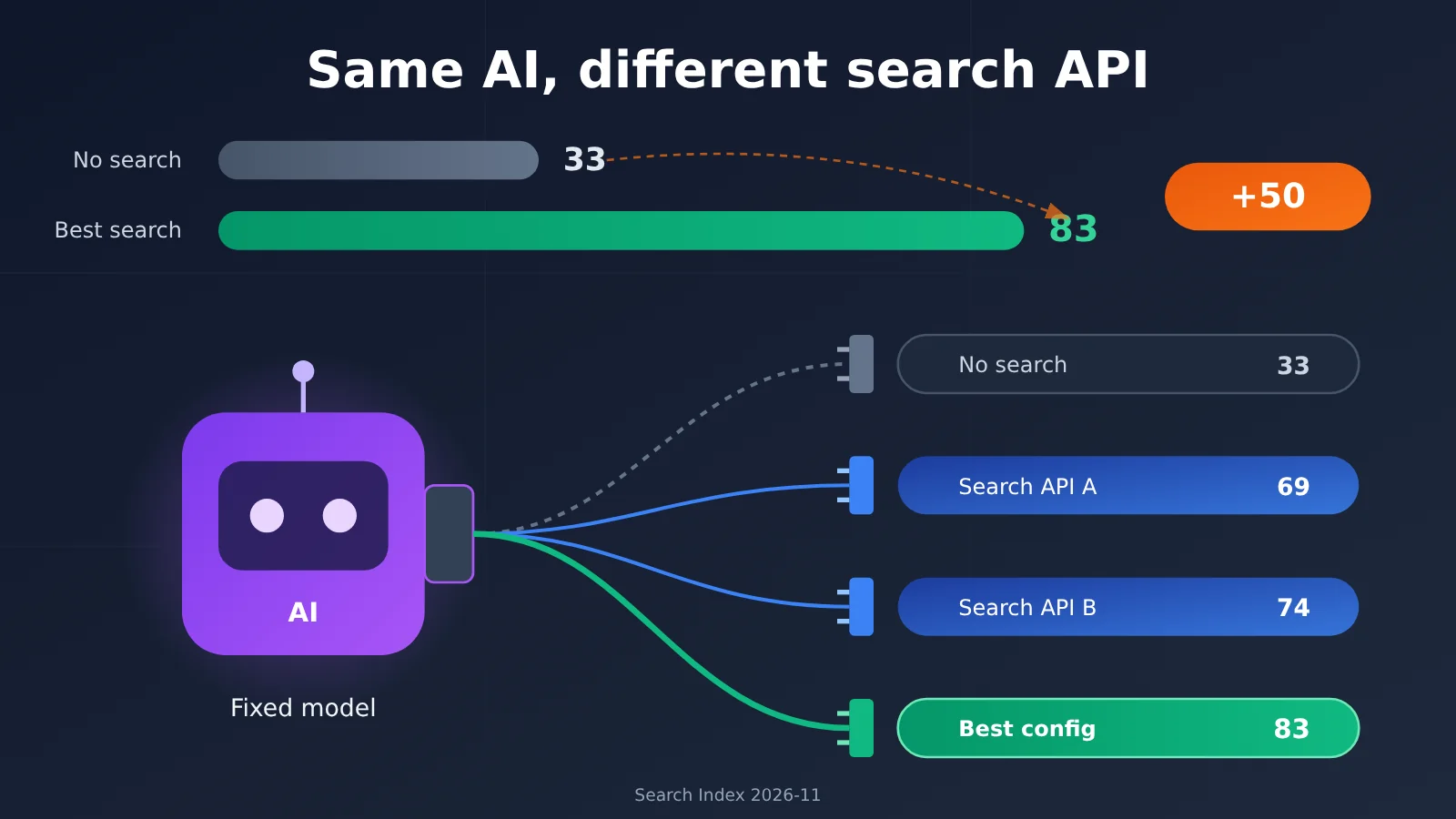
A lot of people building Agents start by picking a model, then casually wire up a search tool. For many teams, search is just an accessory—”as long as it can get online, it’s fine.” The Search Index update published by Artificial Analysis on November 9, 2026 tells a different story: with the same model, you get 33 points without search, and up to 83 points with the best search API configuration.
This isn’t just another leaderboard repost saying every vendor is good at something. This article breaks down how the 83-point result is calculated and what the test conditions are, then compares quality, end-to-end task time, search cost, and model cost side by side. Finally, it walks through which decisions this leaderboard can support by scenario—and where you can’t apply it directly.
Core value: After reading this, you’ll be able to use a public leaderboard to shortlist search API candidates, then run your own follow-up comparison against your tasks, instead of making decisions based only on the top score.
Terms to know before reading the search API leaderboard
One-sentence summary: The Search Index compares how the same model performs under different search configurations, and the gap is as large as 50 points. But a higher score doesn’t mean “best for you”—you also need to look at cost, latency, and evaluation coverage.
Before reading the leaderboard, let’s align on a few terms:
- Search Index: A composite score aggregated from a given retrieval benchmark according to a set of rules. In this article, it specifically refers to Artificial Analysis’s search API evaluation index, with a maximum score of 100.
- F1: The harmonic mean of precision and recall. When the answer is “a set of entities,” it measures whether the answer is accurate and complete.
- Harness: A testing framework that organizes model input, tool execution, and task scoring. The agent loop used by Artificial Analysis is called Stirrup.
- Search API: An interface that returns retrieval results such as web links, titles, and relevant snippets based on a query—for example, Exa, Brave, and Perplexity Search API.
- Token: The unit of text that a model processes. The more verbose the search results, the more tokens are fed into the model, and the higher the model cost.
Can search APIs really make the same AI differ by 50 points?
Artificial Analysis launched its search API benchmark on August 18, 2026. The latest public data was updated on November 9, 2026, covering 14 providers and 26 Search API products or configurations. It doesn’t evaluate models—it evaluates how search services actually perform once they’re plugged into an agent.
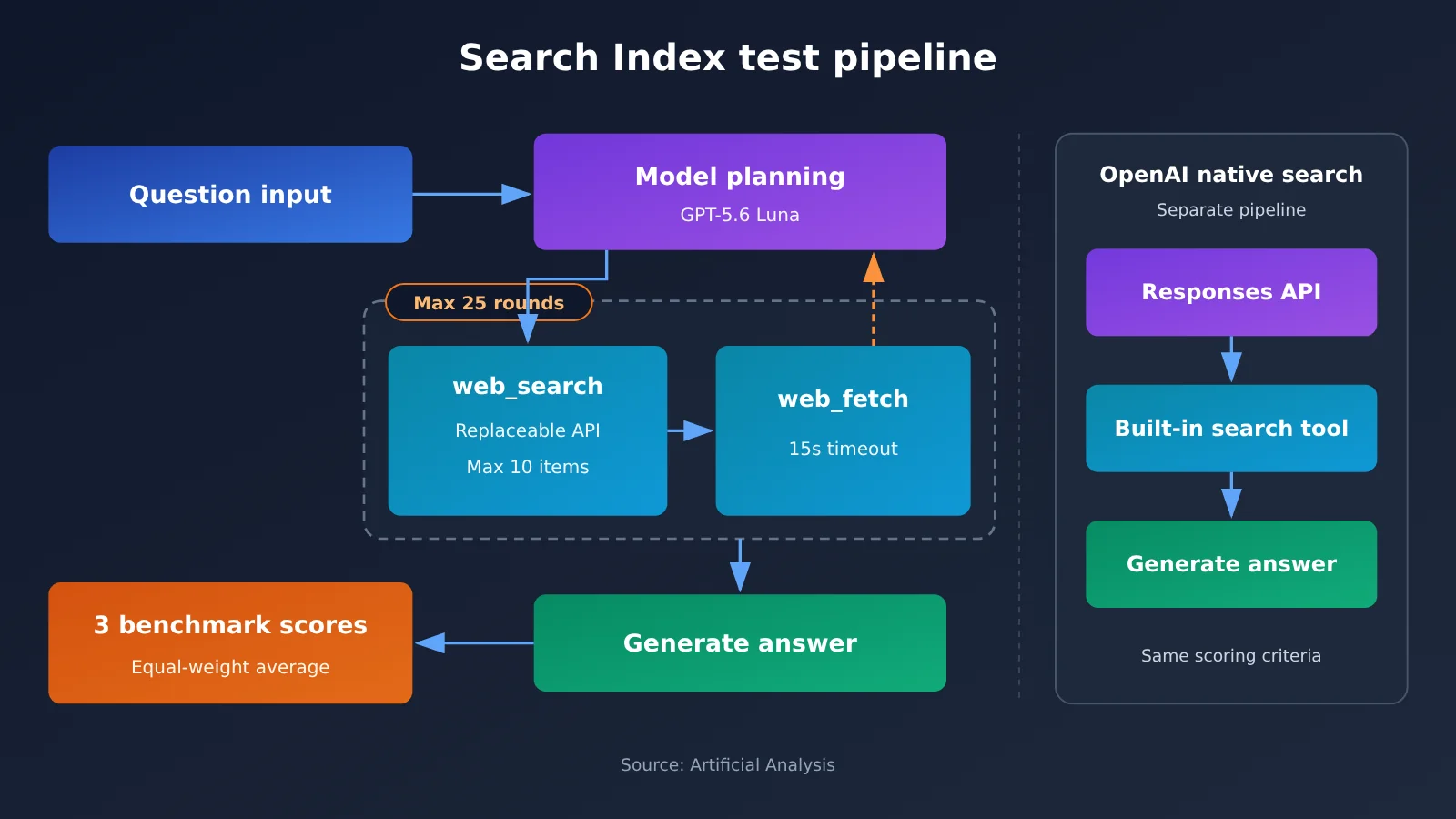
The key to the experiment design is “controlling variables.” The candidate answer model is fixed as GPT-5.6 Luna (medium), and the agent framework is also fixed—only the search service is swapped out. Under these conditions, the baseline without a search tool scores only 33, while the top-ranked Keenable Pro reaches 83—a difference of 50 index points. Even among configurations that do use search, the gap from DeepSeek Search Summary at 69 to Keenable Pro at 83 is still 14 points.
One exception needs to be called out separately: OpenAI’s native Web Search runs differently. Other standalone Search APIs all run inside Artificial Analysis’s external agent loop. OpenAI Web Search uses the built-in tool flow of the Responses API, and OpenAI itself decides how many searches happen and how they’re executed. So its score of 74 can serve as a reference, but it shouldn’t be viewed as an “API swap” experiment under exactly identical conditions.
Also note that this 50-point gap reflects the search enhancement effect within the same evaluation system. It doesn’t mean that anyone using any model with search can improve by 50 percentage points.
How is the 83 score for Search Index actually measured?
The three benchmarks behind Search Index and how scoring works
The overall score is the equal-weight average of three benchmarks, each worth one third:
| Benchmark | Task count | Task type | Scoring metric |
|---|---|---|---|
| DeepSearchQA | 900 | Complex factual research, answers are often sets | Answer-set F1 |
| BrowseComp | 200 | Harder web retrieval Q&A | Exact-answer accuracy |
| AA-Omniscience | 600 | Factual Q&A | Factual Q&A accuracy |
That’s 1,700 tasks in total, but the overall score isn’t the accuracy you’d get from lumping all 1,700 questions together. Take Keenable Pro as an example: its three scores are 88, 87, and 73, which average out to about 82.67 and display as 83 after rounding. So 83 does not mean “83% of answers were correct”.
The test conditions behind Search Index
The key configuration disclosed in the methodology is as follows:
| Experiment item | Actual setting |
|---|---|
| Candidate answering model / grading model | GPT-5.6 Luna (medium) |
| Max agent turns | 25 turns, with no limit on tool calls within a turn |
| Available tools | web_search, web_fetch (independent page fetching) |
| Results per search | Up to 10 |
| Page fetch timeout | 15 seconds per page |
| Content returned to the model | The provider’s native response content |
| No-search baseline | Same model, search tools disabled |
Two things stand out from this table. First, what’s returned to the model is the “provider’s native response.” Snippet length, summarization approach, and how highlights are organized all end up in the model’s context, so the score reflects not just the quality of the underlying web index but also how the information is organized. Second, fatal errors such as 429s, 5xxs, or timeouts are retried continuously until they succeed, and those errors don’t count toward the final result. That means the leaderboard measures quality “when it works” — it can’t be used to prove how usable or reliable each provider is in production, or what its failure rate looks like.
Latest Search Index Rankings: Whose Search API Performs Best?
In the table below, the quality score and BrowseComp come from the 2026-11-09 leaderboard. The timing values are from the leaderboard as read on 2026-11-13, representing the average end-to-end time for a standard test task — not the network latency of a single search API request.
| Search configuration | Overall score (11-09) | BrowseComp | Avg. task time (11-13) |
|---|---|---|---|
| Keenable Pro | 83 | 87% | 16.6 s |
| Keenable Realtime | 82 | 86% | 16.0 s |
| Exa Auto + Dynamic Highlights | 80 | 83% | 36.7 s |
| Perplexity Search Medium | 80 | 87% | 31.1 s |
| Exa Lite + Dynamic Highlights | 79 | 81% | 19.4 s |
| Parallel Advanced | 75 | 77% | Not listed in this timing update |
| Brave LLM Context | 75 | 77% | Not listed in this timing update |
| OpenAI Web Search Medium (built-in Responses workflow) | 74 | 74% | 33.1 s |
| DeepSeek Search Summary | 69 | 63% | 22.4 s |
| No-search baseline | 33 | 17% | — |
Three typical gaps in the search API rankings
Same score, very different speed. Exa Auto and Perplexity Medium both score 80, but their full task times are 36.7 s and 31.1 s respectively. Keenable Pro scores higher yet takes only about 16.6 s. For an agent that needs real-time responses, users will feel that difference directly.
BrowseComp doesn’t fully track the overall score. Perplexity Medium hits 87% on BrowseComp, matching Keenable Pro, yet its overall score is 3 points lower. The gap comes mainly from the other two benchmarks. If your use case is closer to “hard web retrieval problems,” you can look at the BrowseComp column on its own.
Different modes from the same vendor differ a lot. Exa Lite and Exa Auto are only 1 point apart, but their times differ by nearly 2x. So read results at the level of specific product modes — don’t collapse Exa Lite and Exa Auto into a single “Exa score.”
💡 Data note: The scores above are third-party evaluation results from Artificial Analysis, and the timings are standard task durations. If you want to reproduce a similar comparison on your own business problems, you can fix a single answer model through APIYI apiyi.com and then plug in different search tools one at a time for A/B testing.
Is the Highest-Scoring Search API Really the Best Value?
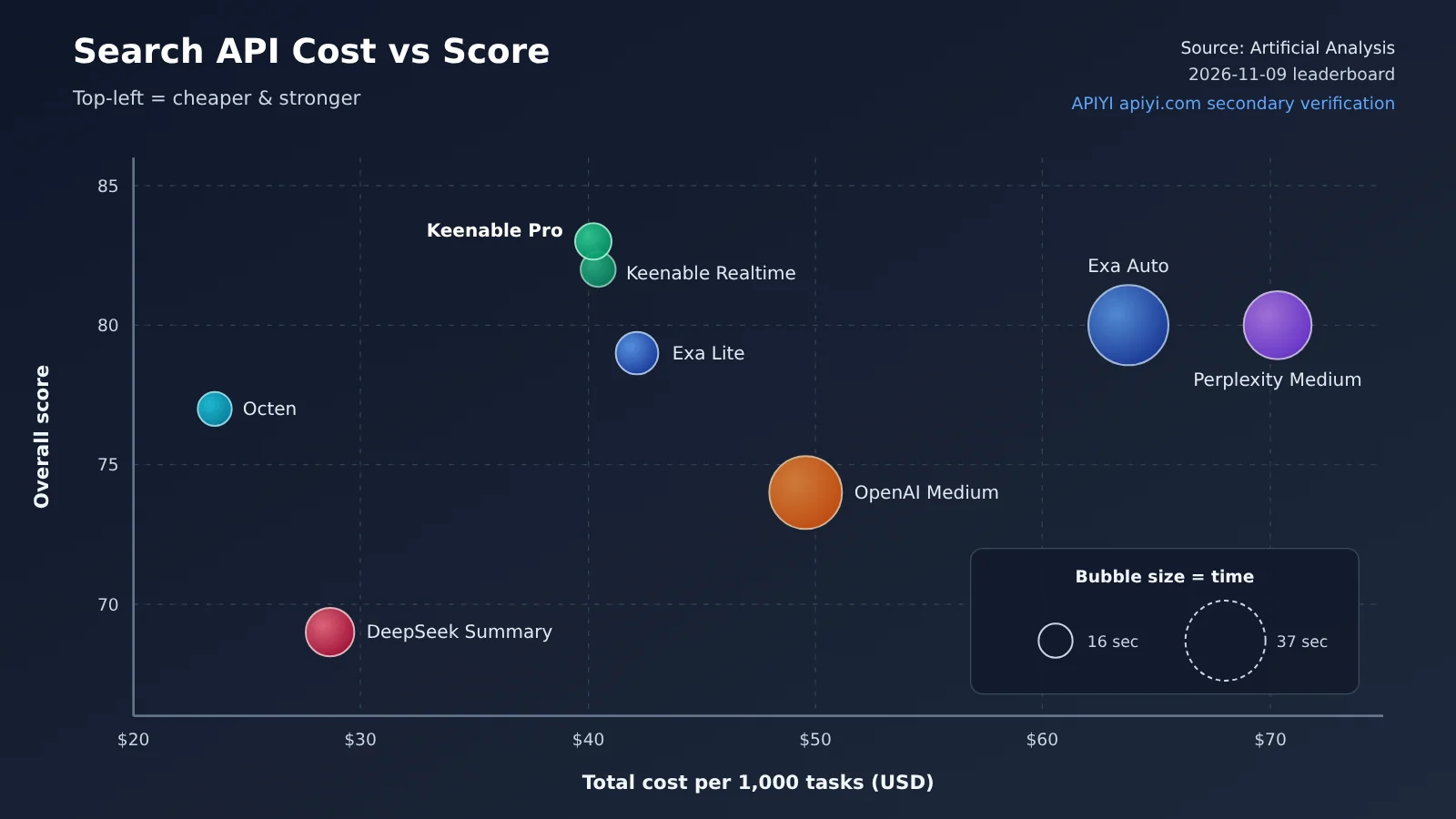
Artificial Analysis also publishes estimated costs per 1,000 benchmark tasks, broken down into search cost and model cost (2026-11-09 leaderboard, USD). The “Cost per Point” column is a rough figure our editors derived as “total cost ÷ composite score” — it’s for side-by-side reference only, not an official metric.
| Search Configuration | Quality Score | Search Cost + Model Cost | Total Cost per 1,000 Tasks | Cost per Point (editor-derived) | Task Latency (11-13) |
|---|---|---|---|---|---|
| Keenable Pro | 83 | 31.87 + 8.35 | $40.22 | ~$0.48 | 16.6 s |
| Keenable Realtime | 82 | 31.94 + 8.52 | $40.46 | ~$0.49 | 16.0 s |
| Exa Auto + Highlights | 80 | 53.17 + 10.60 | $63.77 | ~$0.80 | 36.7 s |
| Perplexity Medium | 80 | 62.30 + 8.04 | $70.34 | ~$0.88 | 31.1 s |
| Exa Lite + Highlights | 79 | 31.20 + 10.95 | $42.15 | ~$0.53 | 19.4 s |
| Octen Highlights | 77 | 9.07 + 14.50 | $23.57 | ~$0.31 | 15.6 s |
| OpenAI Web Search Medium | 74 | 40.19 + 9.40 | $49.59 | ~$0.67 | 33.1 s |
| DeepSeek Search Summary | 69 | 8.47 + 20.19 | $28.66 | ~$0.42 | 22.4 s |
Three Takeaways from the Search API Cost Table
The highest score doesn’t necessarily mean the highest price. Keenable Pro tops the list at 83 points, at about $40.22 per 1,000 tasks — roughly $0.04 per task, which puts it in the middle of the pack. Perplexity Medium scores 3 points lower, yet its total cost is about 75% higher.
A one-point gap can mean a cost difference of more than 30%. Exa Lite + Highlights scores 79 at $42.15 per 1,000 tasks, while Exa Auto + Highlights scores 80 at $63.77 per 1,000 tasks — the former is about 34% cheaper and faster to boot. According to Exa’s official pricing page (as of 2026-11-13), the Lite tier is $4 per 1,000 requests and the Auto tier is $7 per 1,000 requests. The search-cost differences in the leaderboard line up with that pricing structure.
A low search cost can come with a higher model cost. DeepSeek Search Summary’s search cost is only $8.47, but its model cost reaches $20.19 — the highest in the table. Octen has the lowest total cost, yet its model cost is also higher than Keenable, Exa, and Perplexity. When search results aren’t effective enough, the agent runs more search rounds and reads more pages, and token consumption climbs accordingly. So when you calculate cost, use “total cost to complete one task” as your unit, rather than looking only at the per-call list price of the search API.
What practical decisions can this Search Index leaderboard guide?
Search Index is an English-dominant general-purpose factual retrieval benchmark, not a dedicated benchmark for the Chinese-language internet. Below I’ve mapped it against common Agent scenarios and marked which ones you can reference directly and which ones need supplementary testing.
| Agent scenario | Most critical metric | Reference value of the leaderboard | Suggested candidates |
|---|---|---|---|
| Factual Q&A | Accuracy, citation accuracy | High, can reference AA-Omniscience directly | Keenable, Exa Lite, Perplexity |
| Complex multi-source research | Multi-hop retrieval, set recall | High, focus on DeepSearchQA and BrowseComp | Keenable Pro, Exa Auto, Perplexity Medium |
| Low-latency Agent | End-to-end task latency, P95 latency | Medium, task latency is only indicative | Keenable Realtime, Octen, Exa Lite |
| Chinese news retrieval | Chinese source coverage, reachability of domestic sites | Low, need to build your own Chinese test set | Add Baidu Qianfan, Bocha, Alibaba Cloud Bailian for comparison |
| Programming documentation retrieval | Official docs coverage, version information | Low to medium, retest with real technical questions | Exa, Perplexity, Parallel |
How to use the Search Index for a second round of search API comparison
A more sensible approach is to treat the public leaderboard as a “first-pass screening tool,” then run a second round of comparison using your own tasks:
- Pick 3–4 candidate configurations from the leaderboard based on the three dimensions of quality, latency, and total cost;
- Prepare 50–100 of your own business questions, covering simple facts, recent news, multi-hop questions, Chinese queries, and cross-language queries;
- Fix the same answer model, the same maximum number of turns, and the same number of results, and swap only the search tool;
- Record accuracy, citation accuracy, total cost per task, P50/P95 latency, and the number of empty results and timeouts;
- Stress-test production stability separately, since the leaderboard already excludes fatal errors after retries.
Search API Selection: Decision Guidance and Quick Start
🎯 Selection recommendation: If you’re optimizing for overall quality and speed, test Keenable Pro/Realtime first. If you’re cost-sensitive but want quality close to 80, Exa Lite + Highlights and Octen are worth prioritizing. Teams already deep in the OpenAI ecosystem can use built-in Web Search directly, but they’ll have to accept that its execution flow is not controllable. In production, we recommend using APIYI apiyi.com to invoke the answer model through a unified interface and making the search tool a pluggable module. That way, switching search APIs doesn’t require changing model-side code.
Minimal Example: A Unified Interface on the Model Side
The code below fixes the answer model and declares the search tool as a function. Which Search API actually implements it can be swapped out in your local code:
import openai

client = openai.OpenAI(
    api_key="YOUR_API_KEY",
    base_url="https://api.apiyi.com/v1"  # APIYI unified interface; model can be swapped
)

tools = [{"type": "function", "function": {
    "name": "web_search",
    "description": "联网搜索,返回最多10条结果",
    "parameters": {"type": "object",
                   "properties": {"query": {"type": "string"}},
                   "required": ["query"]}}}]

resp = client.chat.completions.create(
    model="gpt-4o-mini",  # Change to the model you want to evaluate
    messages=[{"role": "user", "content": "Exa 3.0 是哪天发布的?"}],
    tools=tools,
)
print(resp.choices[0].message)
View full code: A/B compare multiple search APIs with the same model
import json
import time
import openai

client = openai.OpenAI(
    api_key="YOUR_API_KEY",
    base_url="https://api.apiyi.com/v1"
)

MODEL = "gpt-4o-mini"   # Pin the answer model to keep the controlled variable fixed
MAX_TURNS = 25          # Turn limit consistent with the Search Index

# Adapter functions for each search API; implement them yourself according to the official docs
def search_provider_a(query: str) -> list:
    return []  # Return [{"title":..., "url":..., "snippet":...}]

def search_provider_b(query: str) -> list:
    return []

TOOLS = [{"type": "function", "function": {
    "name": "web_search",
    "description": "联网搜索,返回最多10条结果",
    "parameters": {"type": "object",
                   "properties": {"query": {"type": "string"}},
                   "required": ["query"]}}}]

def run_task(question: str, search_fn) -> dict:
    messages = [{"role": "user", "content": question}]
    start, searches = time.time(), 0
    for _ in range(MAX_TURNS):
        resp = client.chat.completions.create(
            model=MODEL, messages=messages, tools=TOOLS)
        msg = resp.choices[0].message
        if not msg.tool_calls:
            return {"answer": msg.content, "searches": searches,
                    "seconds": round(time.time() - start, 1)}
        messages.append(msg)
        for call in msg.tool_calls:
            query = json.loads(call.function.arguments)["query"]
            results = search_fn(query)[:10]
            searches += 1
            messages.append({"role": "tool", "tool_call_id": call.id,
                             "content": json.dumps(results, ensure_ascii=False)})
    return {"answer": None, "searches": searches,
            "seconds": round(time.time() - start, 1)}

for name, fn in [("A", search_provider_a), ("B", search_provider_b)]:
    print(name, run_task("Perplexity 何时推出独立 Search API?", fn))
🚀 Quick start: New users can claim free trial credits at APIYI apiyi.com. Start by running the A/B script above end-to-end with a small set of business questions, then decide which search API to include in your production plan.
Frequently Asked Questions
Q1: What is Search Index?
Search Index is a search API evaluation index from Artificial Analysis. It holds the answer model and agent framework fixed, swapping only the search service, and measures search performance as the equally weighted average of three benchmarks — DeepSearchQA, BrowseComp, and AA-Omniscience — on a 100-point scale.
Q2: Does a score of 83 mean an 83% correct-answer rate?
No. 83 is the average of the three benchmark scores, and those three don’t even use the same metric: DeepSearchQA uses F1, while the other two use accuracy. Keenable Pro scored 88, 87, and 73, which averages out to about 82.67 and displays as 83.
Q3: When is the leaderboard data from?
The quality scores and cost data come from the leaderboard update on 2026-11-09, while the full task latency figures were read on 2026-11-13. The leaderboard keeps updating, so cite the date whenever you reference it.
Q4: Can the latency in the leaderboard be treated as the search API’s response speed?
No. The latency in the table is the end-to-end time for one standard task, including multiple search rounds, web page reads, and model inference. Single HTTP latency has to be measured separately — ideally recording both P50 and P95.
Q5: How do I quickly compare different search APIs for my own use case?
Fix one answer model and swap only the search tool. You can call models through APIYI apiyi.com using the OpenAI-compatible interface, set base_url to `https://api.apiyi.com/v1`, and reuse the A/B script from this article. If you also want to see how search performance shifts when you change models, the same API key works for OpenAI, Claude, Gemini, and others.
Q6: What are the limitations of Search Index?
There are four main ones: it isn’t a benchmark built specifically for the Chinese-language internet; OpenAI’s native search runs a different execution flow than other setups; errors like 429, 5xx, and timeouts get retried and excluded from results, so it doesn’t reflect production stability; and costs are estimated from evaluation tasks, so they may not match your actual bill. For Chinese news and domestic technical documentation retrieval, we recommend building a separate test set and validating it together with domestic models via APIYI apiyi.com.
Search Index: Choosing a Search API — Key Takeaways
- Search is an independent variable: The same model jumped from 33 points to 83 — the choice of search API directly affects agent quality.
- 83 points isn’t an accuracy rate: It’s an equal-weighted average of three benchmarks, each with a different scoring method.
- Latency is measured for the full task: Keenable takes about 16 seconds, Exa Auto about 37 seconds — these aren’t single API call latencies.
- Break costs down: A low search fee may come with a high model fee, so compare total cost per task.
- 1 point can mean 34%: Exa Lite and Auto are only 1 point apart, but Lite is roughly a third cheaper.
- Use leaderboards for initial screening only: For Chinese, coding documentation, and similar scenarios, run your own A/B tests using your own tasks.
Summary
The most valuable thing about this Search Index leaderboard is its “same model, different search tools” design, which isolates the impact of search quality on agents:
- Quality: 33 points without search, 83 at the top. Even when all configurations use search, there’s still about a 14-point gap between them;
- Speed: At the same 80 points, full-task latency can differ by more than 5 seconds; high-scoring configurations can be fast too;
- Cost: Keenable Pro has the highest quality at a mid-range cost; Exa Lite and Octen stand out for cost efficiency; the DeepSeek Summary example shows that a low search fee doesn’t mean a low total cost.
A good approach: use the leaderboard to shortlist 3–4 candidates, then fix the model and run A/B tests on your own question set. We recommend routing all answer-model calls through APIYI at apiyi.com as a unified gateway, making the search tool a swappable module, and deciding the final setup based on quality, speed, and cost data.
References
- Artificial Analysis Search API Leaderboard: quality scores, cost, and latency data
- Link:
artificialanalysis.ai/agents/search-api -
Notes: the primary source for the scores, cost, and latency figures in this article
-
Artificial Analysis Search API Evaluation Methodology: test configuration and scoring rules
- Link:
artificialanalysis.ai/methodology/search-api -
Notes: covers the models, number of rounds, result counts, retry rules, and more
-
Exa Pricing: pricing for Lite, Auto, and other tiers
- Link:
exa.ai/pricing -
Notes: helps explain the differences in search fees across Exa modes in the leaderboard
-
Exa 3.0 Announcement: Lite mode and Dynamic Highlights
- Link:
exa.ai/blog/exa-3 -
Notes: published on 2026-10-19, includes vendor self-reported benchmark data
-
OpenAI Web Search Docs: the built-in search tool in the Responses API
- Link:
developers.openai.com/api/docs/guides/tools-web-search -
Notes: explains how OpenAI’s native search runs and its parameters
-
Perplexity Search API Pricing: standard and Fast tiers
- Link:
docs.perplexity.ai/docs/getting-started/pricing - Notes: explains the per-request billing rules
Author: APIYI technical team
Technical inquiries: reach us via the APIYI website homepage — more integration resources are available at the docs.apiyi.com documentation center